


Summary: in this tutorial, you will learn how to use the SQLite AVG function to calculate the average value of a set of values.
Introduction to SQLite AVG function
The AVG function is an aggregate function that calculates the average value of all non-NULL values within a group.
The following illustrates the syntax of the AVG function:
AVG([ALL | DISTINCT] expression);Code language: SQL (Structured Query Language) (sql)By default, the AVG function uses ALL clause whether you specify it or not. It means the AVG function will take all non-NULL values when it calculates the average value.
In case you want to calculate the average value of distinct (or unique) values, you need to specify the DISTINCT clause explicitly in expression.
If a column stores mixed data types such as integer, real, BLOB, and text, SQLite AVG function interprets the BLOB that does not look like a number as zero (0).
The value of the AVG function is always a floating point value or a NULL value. The AVG function only returns a NULL value if and only if all values in the group are NULL values.
You can take a quick test to see how the SQLite function works with various data types.
First, create a new table named avg_tests using the following statement:
CREATE TABLE avg_tests (val);Code language: SQL (Structured Query Language) (sql)Next, insert some mixed values into the avg_tests table.
INSERT INTO avg_tests (val)
VALUES
 (1),
 (2),
 (10.1),
 (20.5),
 ('8'),
 ('B'),
 (NULL),
 (x'0010'),
(x'0011');Code language: SQL (Structured Query Language) (sql)Then, query data from the avg_tests table.
SELECT rowid,
       val
  FROM avg_tests;Code language: SQL (Structured Query Language) (sql)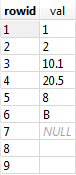
After that, you can use the AVG function to calculate the average of the first four rows that contain only numeric values.
SELECT
	avg(val)
FROM
	avg_tests
WHERE
	rowid < 5;Code language: SQL (Structured Query Language) (sql)
Finally, apply the AVG function to all the values in the val column of the avg_tests table.
SELECT
	avg(val)
FROM
	avg_tests;Code language: SQL (Structured Query Language) (sql)
You have 9 rows in the avg_tests table. The row 7 is NULL. Therefore, when calculating the average, the AVG function ignores it and takes 8 rows into the calculation.
The first four rows are the integer and real values: 1,2, 10.1, and 20.5. The SQLite AVG function uses those values in the calculation.
The 5th and 6th row are text type because we inserted the as ‘B’ and ‘8’. Because 8 looks like a number, therefore SQLite interprets B as 0 and ‘8’ as 8.
The 8th and 9th rows are BLOB types that do not look like numbers, therefore, SQLite interprets these values as 0.
The AVG(cal) expression uses the following formula:
AVG(val) = (1 + 2 + 10.1 + 20.5 + 8 + 0 + 0 + 0 )/ 8 = 5.2Code language: SQL (Structured Query Language) (sql)Let’s see how the DISTINCT clause works.
First, insert a new row into the avg_tests table with a value already exists.
INSERT INTO avg_tests (val)
VALUES (10.1);Code language: SQL (Structured Query Language) (sql)Second, apply the AVG function without DISTINCT clause:
SELECT
	avg(val)
FROM
	avg_tests;Code language: SQL (Structured Query Language) (sql)
Third, add the DISTINCT clause to the AVG function:
SELECT
	avg(DISTINCT val)
FROM
	avg_tests;Code language: SQL (Structured Query Language) (sql)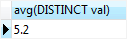
Because the avg_tests table has two rows with the same value 10.1, the AVG(DISTINCT) takes only the one row for calculation. Therefore, you got a different result.
SQLite AVG function practical examples
We will use the tracks table in the sample database for the demonstration.
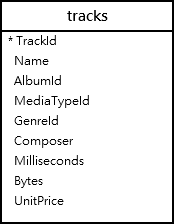
To calculate the average length of all tracks in milliseconds, you use the following statement:
SELECT
	avg(milliseconds)
FROM
	tracks;Code language: SQL (Structured Query Language) (sql)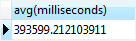
SQLite AVG function with GROUP BY clause
To calculate the average length of tracks for every album, you use the AVG function with the GROUP BY clause.
First, the GROUP BY clause groups a set of tracks by albums. Then, the AVG function calculates the average length of tracks for each album.
See the following statement.
SELECT
	albumid,
	avg(milliseconds)
FROM
	tracks
GROUP BY
albumid;Code language: SQL (Structured Query Language) (sql)SQLite AVG function with INNER JOIN clause example
To get the album title together with the albumid column, you use the INNER JOIN clause in the above statement like the following query:
SELECT
	tracks.AlbumId,
	Title,
	round(avg(Milliseconds), 2) avg_length
FROM
	tracks
INNER JOIN albums ON albums.AlbumId = tracks.albumid
GROUP BY
	tracks.albumid;Code language: SQL (Structured Query Language) (sql)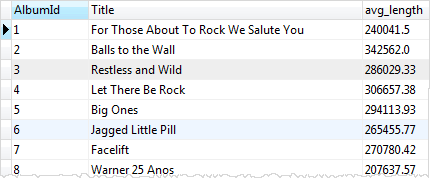
Notice that we used the ROUND function to round the floating value to 2 digits to the right of the decimal point.
SQLite AVG function with HAVING clause example
You can use either the AVG function or its column’s alias in the HAVING clause to filter groups. The following statement only gets the albums whose average length are between 100000 and 200000.
SELECT
	tracks.albumid,
	title,
	round(avg(milliseconds),2)  avg_leng
FROM
	tracks
INNER JOIN albums ON albums.AlbumId = tracks.albumid
GROUP BY
	tracks.albumid
HAVING
	avg_leng BETWEEN 100000 AND 200000;Code language: SQL (Structured Query Language) (sql)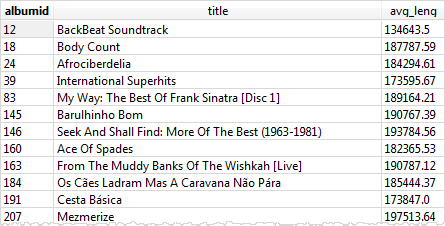
In this tutorial, we have shown you how to use the SQLite AVG function to calculate the average values of non-NULL values in a group.

