


| CARVIEW |


Planet Python
Last update: January 22, 2026 04:44 PM UTC
January 22, 2026
Reuven Lerner
Learn to code with AI — not just write prompts

The AI revolution is here. Engineers at major companies are now using AI instead of writing code directly.
But there’s a gap: Most developers know how to write code OR how to prompt AI, but not both. When working with real data, vague AI prompts produce code that might work on sample datasets but creates silent errors, performance issues, or incorrect analyses with messy, real-world data that requires careful handling.
I’ve spent 30 years teaching Python at companies like Apple, Intel, and Cisco, plus at conferences worldwide. I’m adapting my teaching for the AI era.
Specifically: I’m launching AI-Powered Python Practice Workshops. These are hands-on sessions where you’ll solve real problems using Claude Code, then learn to critically evaluate and improve the results.
Here’s how it works:
- I present a problem
- You solve it using Claude Code
- We compare prompts, discuss what worked (and what didn’t)
- I provide deep-dives on both the Python concepts AND the AI collaboration techniques
In 3 hours, we’ll cover 3-4 exercises. That’ll give you a chance to learn two skills: Python/Pandas AND effective AI collaboration. That’ll make you more effective at coding, and at the data analysis techniques that actually work with messy, real-world datasets.
Each workshop costs $200 for LernerPython members. Not a member? Total cost is $700 ($500 annual membership + $200 workshop fee). Want both workshops? $900 total ($500 membership + $400 for both workshops). Plus you get 40+ courses, 500+ exercises, office hours, Discord, and personal mentorship.
AI-Powered Python Practice Workshop
- Focus is on the Python language, standard library, and common packages
- Monday, February 2nd
- 10 a.m. – 1 p.m. Eastern / 3 p.m. – 6 p.m. London / 5 p.m. – 8 p.m. Israel
- Sign up here: https://lernerpython.com/product/ai-python-workshop-1/
AI-Powered Pandas Practice Workshop
- Focus is on data analysis with Pandas
- Monday, February 9th
- 10 a.m. – 1 p.m. Eastern / 3 p.m. – 6 p.m. London / 5 p.m. – 8 p.m. Israel
- Sign up here: https://lernerpython.com/product/ai-pandas-workshop-1/
I want to encourage lots of discussion and interactions, so I’m limiting the class to 20 total participants. Both sessions will be recorded, and will be available to all participants.
Questions? Just e-mail me at reuven@lernerpython.com.
The post Learn to code with AI — not just write prompts appeared first on Reuven Lerner.
Python Software Foundation
Announcing Python Software Foundation Fellow Members for Q4 2025! 🎉
The PSF is pleased to announce its fourth batch of PSF Fellows for 2025! Let us welcome the new PSF Fellows for Q4! The following people continue to do amazing things for the Python community:
Chris Brousseau
Website, LinkedIn, GitHub, Mastodon, X, PyBay, PyBay GitHub
Dave Forgac
Website, Mastodon, GitHub, LinkedIn
Inessa Pawson
James Abel
Website, LinkedIn, GitHub, Bluesky
Karen Dalton
Mia Bajić
Tatiana Andrea Delgadillo Garzofino
Website, GitHub, LinkedIn, Instagram
Thank you for your continued contributions. We have added you to our Fellows Roster.
The above members help support the Python ecosystem by being phenomenal leaders, sustaining the growth of the Python scientific community, maintaining virtual Python communities, maintaining Python libraries, creating educational material, organizing Python events and conferences, starting Python communities in local regions, and overall being great mentors in our community. Each of them continues to help make Python more accessible around the world. To learn more about the new Fellow members, check out their links above.
Let's continue recognizing Pythonistas all over the world for their impact on our community. The criteria for Fellow members is available on our PSF Fellow Membership page. If you would like to nominate someone to be a PSF Fellow, please send a description of their Python accomplishments and their email address to psf-fellow at python.org. We are accepting nominations for Quarter 1 of 2026 through February 20th, 2026.
Are you a PSF Fellow and want to help the Work Group review nominations? Contact us at psf-fellow at python.org.
January 21, 2026
Django Weblog
Djangonaut Space - Session 6 Accepting Applications
We are thrilled to announce that Djangonaut Space, a mentorship program for contributing to Django, is open for applicants for our next cohort! 🚀
Djangonaut Space is holding a sixth session! This session will start on March 2nd, 2026. We are currently accepting applications until February 2nd, 2026 Anywhere on Earth. More details can be found in the website.
Djangonaut Space is a free, 8-week group mentoring program where individuals will work self-paced in a semi-structured learning environment. It seeks to help members of the community who wish to level up their current Django code contributions and potentially take on leadership roles in Django in the future.
“I'm so grateful to have been a part of the Djangonaut Space program. It's a wonderfully warm, diverse, and welcoming space, and the perfect place to get started with Django contributions. The community is full of bright, talented individuals who are making time to help and guide others, which is truly a joy to experience. Before Djangonaut Space, I felt as though I wasn't the kind of person who could become a Django contributor; now I feel like I found a place where I belong.” - Eliana, Djangonaut Session 1
Enthusiastic about contributing to Django but wondering what we have in store for you? No worries, we have got you covered! 🤝
Python Software Foundation
Departing the Python Software Foundation (Staff)
This week will be my last as the Director of Infrastructure at the Python Software Foundation and my last week as a staff member. Supporting the mission of this organization with my labor has been unbelievable in retrospect and I am filled with gratitude to every member of this community, volunteer, sponsor, board member, and staff member of this organization who have worked alongside me and entrusted me with root@python.org for all this time.
But, it is time for me to do something new. I don’t believe there would ever be a perfect time for this transition, but I do believe that now is one of the best. The PSF has built out a team that shares the responsibilities I carried across our technical infrastructure, the maintenance and support of PyPI, relationships with our in-kind sponsors, and the facilitation of PyCon US. I’m also not “burnt-out” or worse, I knew that one day I would move on “dead or alive” and it is so good to feel alive in this decision, literally and figuratively.
“The PSF and the Python community are very lucky to have had Ee at the helm for so many years. Ee’s approach to our technical needs has been responsive and resilient as Python, PyPI, PSF staff and the community have all grown, and their dedication to the community has been unmatched and unwavering. Ee is leaving the PSF in fantastic shape, and I know I join the rest of the staff in wishing them all the best as they move on to their next endeavor.”
- Deb Nicholson, Executive Director
The health and wellbeing of the PSF and the Python community is of utmost importance to me, and was paramount as I made decisions around this transition. Given that, I am grateful to be able to commit 20% of my time over the next six months to the PSF to provide support and continuity. Over the past few weeks we’ve been working internally to set things up for success, and I look forward to meeting the new staff and what they accomplish with the team at the PSF!
My participation in the Python community and contributions to the infrastructure began long before my role as a staff member. As I transition out of participating as PSF staff I look forward to continuing to participate in and contribute to this community as a volunteer, as long as I am lucky enough to have the chance.
Reuven Lerner
We’re all VCs now: The skills developers need in the AI era
Many years ago, a friend of mine described how software engineers solve problems:
- When you’re starting off, you solve problems with code.
- When you get more experienced, you solve problems with people.
- When you get even more experienced, you solve problems with money.
In other words: You can be the person writing the code, and solving the problem directly. Or you can manage people, specifying what they should do. Or you can invest in teams, telling them about the problems you want to solve, but letting them set specific goals and managing the day-to-day work.
Up until recently, I was one of those people who said, “Generative AI is great, but it’s not nearly ready to write code on our behalf.” I spoke and wrote about how AI presents an amazing learning opportunity, and how I’ve integrated AI-based learning into my courses.
Things have changed… and are still changing
I’ve recently realized that my perspective is oh-so-last year. Because in 2026, many companies and individuals are using AI to write code on their behalf. In just the last two weeks, I’ve spoken with developers who barely touch code, having AI to develop it for them. And in case you’re wondering whether this only applies to freelancers, I’ve spoken with people from several large, well-known companies, who have said something similar.
And it’s not just me: Gergely Orosz, who writes the Pragmatic Engineer newsletter, recently wrote that AI-written code is “mega-trend set to hit the tech industry,” and that a growing number of companies are already relying on AI to specify, write, and test code (https://newsletter.pragmaticengineer.com/p/when-ai-writes-almost-all-code-what).
And Simon Willison, who has been discussing and evaluating AI models in great depth for several years, has seen a sea change in model-generated code quality in just the last few months. He predicts that within six years, it’ll be as quaint for a human to type code as it is to use punch cards (https://simonwillison.net/2026/Jan/8/llm-predictions-for-2026/#6-years-typing-code-by-hand-will-go-the-way-of-punch-cards).
An inflection point in the tech industry
This is mind blowing. I still remember taking an AI course during my undergraduate years at MIT, learning about cutting-edge AI research… and finding it quite lacking. I did a bit of research at MIT’s AI Lab, and saw firsthand how hard language recognition was. To think that we can now type or talk to an AI model, and get coherent, useful results, continues to astound me, in part because I’ve seen just how far this industry has gone.
When ChatGPT first came out, it was breathtaking to see that it could code. It didn’t code that well, and often made mistakes, but that wasn’t the point. It was far better than nothing at all. In some ways, it was like the old saw about dancing bears, amazing that it could dance at all, never mind dancing well.
Over the last few years, GenAI companies have been upping their game, slowly but surely. They still get things wrong, and still give me bad coding advice and feedback. But for the most part, they’re doing an increasingly impressive job. And from everything I’m seeing, hearing, and reading, this is just the beginning.
Whether the current crop of AI companies survives their cash burn is another question entirely. But the technology itself is here to stay, much like how the dot-com crash of 2000 didn’t stop the Internet.
We’re at an inflection point in the computer industry, one that is increasingly allowing one person to create a large, complex software system without writing it directly. In other words: Over the coming years, programmers will spend less and less time writing code. They’ll spend more and more time partnering with AI systems — specifying what the code should do, what is considered success, what errors will be tolerated, and how scalable the system will be.
This is both exciting and a bit nerve-wracking.
Engineering >> Coding
The shift from “coder” to “engineer” has been going on for years. We abstracted away machine code, then assembly, then manual memory management. AI represents the biggest abstraction leap yet. Instead of abstracting away implementation details, we’re abstracting away implementation itself.
But software engineering has long been more than just knowing how to code. It’s about problem solving, about critical thinking, and about considering not just how to build something, but how to maintain it. It’s true that coding might go away as an individual discipline, much as there’s no longer much of a need for professional scribes in a world where everyone knows how to write.
However, it does mean that to succeed in the software world, it’ll no longer be enough to understand how computers work, and how to effectively instruct them with code. You’ll have to have many more skills, skills which are almost never taught to coders, because there were already so many fundamentals you needed to learn.
In this new age, creating software will be increasingly similar to being an investor. You’ll need to have a sense of the market, and what consumers want. You’ll need to know what sorts of products will potentially succeed in the market. You’ll need to set up a team that can come up with a plan, and execute on it. And then you’ll need to be able to evaluate the results. If things succeed, then great! And if not, that’s OK — you’ll invest in a number of other ventures, hoping that one or more will get the 10x you need to claim success.
If that seems like science fiction, it isn’t. I’ve seen and heard about amazing success with Claude Code from other people, and I’ve started to experience it myself, as well. You can have it set up specifications. You can have it set up tests. You can have it set up a list of tasks. You can have it work through those tasks. You can have it consult with other GenAI systems, to bring in third-party advice. And this is just the beginning.
Programming in English?
When ChatGPT was first released, many people quipped that the hottest programming language is now English. I laughed at that then, less because of the quality of AI coding, and more because most people, even given a long time, don’t have the experience and training to specify a programming project. I’ve been to too many meetings in which developers and project managers exchange harsh words because they interpreted vaguely specified features differently. And that’s with humans, who presumably understand the specifications better!
As someone said to me many years ago, computers do what you tell them to do, not what you want them to do. Engineers still make plenty of mistakes, even with their training and experience. But non-technical people, attempting to specify a software system to a GenAI model, will almost certainly fail much of the time.
So yes, technical chops will still be needed! But just as modern software engineers don’t think too much about the object code emitted by a compiler, assuming that it’ll be accurate and useful, future software engineers won’t need to check the code emitted by AI systems. (We still have some time before that happens, I expect.) The ability to break a problem into small parts, think precisely, and communicate clearly, will be more valuable than ever.
Even when AI is writing code for us, we’ll still need developers. But the best, most successful developers won’t be the ones who have mastered Python syntax. Rather, they’ll be the best architects, the clearest communicators, and the most critical thinkers.
Preparing yourself: We’re all VCs now
So, how do you prepare for this new world? How can you acquire this VC mindset toward creating software?
Learn to code: You can only use these new AI systems if you have a strong understanding of the underlying technology. AI is like a chainsaw, in that it does wonders for people with experience, but is super dangerous for the untrained. So don’t believe the hype, that you don’t need to learn to program, because we’re now in an age of AI. You still need to learn it. The language doesn’t matter nearly as much as the underlying concepts. For the time being, you will also need to inspect the code that GenAI produces, and that requires coding knowledge and experience.
Communication is key: You need to learn to communicate clearly. AI uses text, which means that the better you are at articulating your plans and thoughts, the better off you’ll be. Remember “Let me Google that for you,” the snarky way that many techies responded to people who asked for help searching the Web? Well, guess what: Searching on the Internet is a skill that demands some technical understanding. People who can’t search well aren’t dumb; they just don’t have the needed skills. Similarly, working with GenAI is a skill, one that requires far more lengthy, detailed, and precise language than Google searches ever did. Improving your writing skills will make you that much more powerful as a modern developer.
High-level problem solving: An engineering education teaches you (often the hard way) how to break problems apart into small pieces, solve each piece, and then reassemble them. But how do you do that with AI agents? That’s especially where the VC mindset comes into play: Given a budget, what is the best team of AI agents you can assemble to solve a particular problem? What role will each agent play? What skills will they need? How will they communicate with one another? How do you do so efficiently, so that you don’t burn all of your tokens in one afternoon?
Push back: When I was little, people would sometimes say that something must be true, because it was in the newspaper. That mutated to: It must be true, because I read it online. Today, people believe that Gemini is AI, so it must be true. Or unbiased. Or smart. But of course, that isn’t the case; AI tools regularly make mistakes, and you need to be willing to push back, challenge them, and bring counter-examples. Sadly, people don’t do this enough. I call this “AI-mposter syndrome,” when people believe that the AI must be smarter than they are. Just today, while reading up on the Model Context Protocol, Claude gave me completely incorrect information about how it works. Only providing counter-examples got Claude to admit that actually, I was right, and it was wrong. But it would have been very easy for me to say, “Well, Claude knows better than I do.” Confidence and skepticism will go a long way in this new world.
The more checking, the better: I’ve been using Python for a long time, but I’ve spent no small amount of time with other dynamic languages, such as Ruby, Perl, and Lisp. We’ve already seen that you can only use Python in serious production environments with good testing, and even more so with type hints. When GenAI is writing your code for you, there’s zero room for compromise on these fronts. (Heck, if it’s writing the code, and the tests, then why not go all the way with test-driven development?) If you aren’t requiring a high degree of safety checks and testing, you’re asking for trouble — and potentially big trouble. Not everyone will be this serious about code safety. There will be disasters – code that seemed fine until it wasn’t, corners that seemed reasonable to cut until they weren’t. Don’t let that be you.
Learn how to learn: This has always been true in the computer industry; the faster you can learn new things and synthesize them into your existing knowledge, the better. But the pace has sped up considerably in the last few years. Things are changing at a dizzying pace. It’s hard to keep up. But you really have no choice but to learn about these new technologies, and how to use them effectively. It has long been common for me to learn about something one month, and then use it in a project the next month. Lately, though, I’ve been using newly learned ideas just days after coming across them.
What about juniors?
A big question over the last few years has been: If AI makes senior engineers 100x more productive, then why would companies hire juniors? And if juniors can’t find work, then how will they gain the experience to make them attractive, AI-powered seniors?
This is a real problem. I attended conferences in five countries in 2025, and young engineers in all of them were worried about finding a job, or keeping their current one. There aren’t any easy answers, especially for people who were looking forward to graduating, joining a company, gradually gaining experience, and finally becoming a senior engineer or hanging out their own shingle.
I can say that AI provides an excellent opportunity for learning, and the open-source world offers many opportunities for professional development, as well as interpersonal connections. Perhaps the age in which junior engineers gained their experience on the job are fading, and that participating in open-source projects will need to be part of the university curriculum or something people do in their spare time. And pairing with an AI tool can be extremely rewarding and empowering. Much as Waze doesn’t scold you for missing a turn, AI systems are extremely polite, and patient when you make a mistake, or need to debug a problem. Learning to work with such tools, alongside working with people, might be a good way for many to improve their skills.
Standards and licensing
Beyond skill development, AI-written code raises some other issues. For example: Software is one of the few aspects of our lives that has no official licensing requirements. Doctors, nurses, lawyers, and architects, among others, can’t practice without appropriate education and certification. They’re often required to take courses throughout their career, and to get re-certified along the way.
No doubt, part of the reason for this type of certification is to maintain the power (and profits) of those inside of the system. But it also does help to ensure quality and accountability. As we transition to a world of AI-generated software, part of me wonders whether we’ll eventually need to feed the AI system a set of government- mandated codes that will ensure user safety and privacy. Or that only certified software engineers will be allowed to write the specifications fed into AI to create software.
After all, during most of human history, you could just build a house. There weren’t any standards or codes you needed to follow. You used your best judgment — and if it fell down one day, then that kinda happened, and what can you do? Nowadays, of course, there are codes that restrict how you can build, and only someone who has been certified and licensed can try to implement those codes.
I can easily imagine the pushback that a government would get for trying to impose such restrictions on software people. But as AI-generated code becomes ubiquitous in safety-critical systems, we’ll need some mechanism for accountability. Whether that’s licensing, industry standards, or something entirely new remains to be seen.
Conclusions
The last few weeks have been among the most head-spinning in my 30-year career. I see that my future as a Python trainer isn’t in danger, but is going to change — and potentially quite a bit — even in the coming months and years. I’m already rolling out workshops in which people solve problems not using Python and Pandas, but using Claude Code to write Python and Pandas on their behalf. It won’t be enough to learn how to use Claude Code, but it also won’t be enough to learn Python and Pandas. Both skills will be needed, at least for the time being. But the trend seems clear and unstoppable, and I’m both excited and nervous to see what comes down the pike.
But for now? I’m doubling down on learning how to use AI systems to write code for me. I’m learning how to get them to interact, to help one another, and to critique one another. I’m thinking of myself as a VC, giving “smart money” to a bunch of AI agents that have assembled to solve a particular problem.
And who knows? In the not-too-distant future, an updated version of my friend’s statement might look like this:
- When you’re starting off, you solve problems with code.
- When you get more experienced, you solve problems with an AI agent.
- When you get even more experienced, you solve problems with teams of AI agents.
The post We’re all VCs now: The skills developers need in the AI era appeared first on Reuven Lerner.
Real Python
How to Integrate Local LLMs With Ollama and Python
Integrating local large language models (LLMs) into your Python projects using Ollama is a great strategy for improving privacy, reducing costs, and building offline-capable AI-powered apps.
Ollama is an open-source platform that makes it straightforward to run modern LLMs locally on your machine. Once you’ve set up Ollama and pulled the models you want to use, you can connect to them from Python using the ollama library.
Here’s a quick demo:
In this tutorial, you’ll integrate local LLMs into your Python projects using the Ollama platform and its Python SDK.
You’ll first set up Ollama and pull a couple of LLMs. Then, you’ll learn how to use chat, text generation, and tool calling from your Python code. These skills will enable you to build AI-powered apps that run locally, improving privacy and cost efficiency.
Get Your Code: Click here to download the free sample code that you’ll use to integrate LLMs With Ollama and Python.
Take the Quiz: Test your knowledge with our interactive “How to Integrate Local LLMs With Ollama and Python” quiz. You’ll receive a score upon completion to help you track your learning progress:
Interactive Quiz
How to Integrate Local LLMs With Ollama and PythonCheck your understanding of using Ollama with Python to run local LLMs, generate text, chat, and call tools for private, offline apps.
Prerequisites
To work through this tutorial, you’ll need the following resources and setup:
- Ollama installed and running: You’ll need Ollama to use local LLMs. You’ll get to install it and set it up in the next section.
- Python 3.8 or higher: You’ll be using Ollama’s Python software development kit (SDK), which requires Python 3.8 or higher. If you haven’t already, install Python on your system to fulfill this requirement.
- Models to use: You’ll use
llama3.2:latestandcodellama:latestin this tutorial. You’ll download them in the next section. - Capable hardware: You need relatively powerful hardware to run Ollama’s models locally, as they may require considerable resources, including memory, disk space, and CPU power. You may not need a GPU for this tutorial, but local models will run much faster if you have one.
With these prerequisites in place, you’re ready to connect local models to your Python code using Ollama.
Step 1: Set Up Ollama, Models, and the Python SDK
Before you can talk to a local model from Python, you need Ollama running and at least one model downloaded. In this step, you’ll install Ollama, start its background service, and pull the models you’ll use throughout the tutorial.
Get Ollama Running
To get started, navigate to Ollama’s download page and grab the installer for your current operating system. You’ll find installers for Windows 10 or newer and macOS 14 Sonoma or newer. Run the appropriate installer and follow the on-screen instructions. For Linux users, the installation process differs slightly, as you’ll learn soon.
On Windows, Ollama will run in the background after installation, and the CLI will be available for you. If this doesn’t happen automatically for you, then go to the Start menu, search for Ollama, and run the app.
On macOS, the app manages the CLI and setup details, so you just need to launch Ollama.app.
If you’re on Linux, install Ollama with the following command:
$ curl -fsSL https://ollama.com/install.sh | sh
Once the process is complete, you can verify the installation by running:
$ ollama -v
If this command works, then the installation was successful. Next, start Ollama’s service by running the command below:
$ ollama serve
That’s it! You’re now ready to start using Ollama on your local machine. In some Linux distributions, such as Ubuntu, this final command may not be necessary, as Ollama may start automatically when the installation is complete. In that case, running the command above will result in an error.
Read the full article at https://realpython.com/ollama-python/ »
[ Improve Your Python With 🐍 Python Tricks 💌 – Get a short & sweet Python Trick delivered to your inbox every couple of days. >> Click here to learn more and see examples ]
Quiz: How to Integrate Local LLMs With Ollama and Python
In this quiz, you’ll test your understanding of How to Integrate Local LLMs With Ollama and Python.
By working through this quiz, you’ll revisit how to set up Ollama, pull models, and use chat, text generation, and tool calling from Python.
You’ll connect to local models through the ollama Python library and practice sending prompts and handling responses. You’ll also see how local inference can improve privacy and cost efficiency while keeping your apps offline-capable.
[ Improve Your Python With 🐍 Python Tricks 💌 – Get a short & sweet Python Trick delivered to your inbox every couple of days. >> Click here to learn more and see examples ]
Reuven Lerner
Build YOUR data dashboard — join my next 8-week HOPPy studio cohort

Want to analyze data? Good news: Python is the leading language in the data world. Libraries like NumPy and Pandas make it easy to load, clean, analyze, and visualize your data.
But wait: If your colleagues aren’t coders, how can they explore your data?
The answer: A data dashboard, which uses UI elements (e.g., sliders, text fields, and checkboxes). Your colleagues get a custom, dynamic app, rather than static graphs, charts, and tables.
One of the newest and hottest ways to create a data dashboard in Python is Marimo. Among other things, Marimo offers UI widgets, real-time updating, and easy distribution. This makes it a great choice for creating a data dashboard.
In the upcoming (4th) cohort of HOPPy (Hands-On Projects in Python), you’ll learn to create a data dashboard. You’ll make all of the important decisions, from the data set to the design. But you’ll do it all under my personal mentorship, along with a small community of other learners.
The course starts on Sunday, February 1st, and will meet every Sunday for eight weeks. When you’re done, you’ll have a dashboard you can share with colleagues, or just add to your personal portfolio.
If you’ve taken Python courses, but want to sink your teeth into a real-world project, then HOPPy is for you. Among other things:
- Go beyond classroom learning: You’ll learn by doing, creating your own personal product
- Live instruction: Our cohort will meet, live, for two hours every Sunday to discuss problems you’ve had and provide feedback.
- You decide what to do: This isn’t a class in which the instructor dictates what you’ll create. You can choose whatever data set you want. But I’ll be there to support and advise you every step of the way.
- Learn about Marimo: Get experience with one of the hottest new Python technologies.
- Learn about modern distribution: Use Molab and WASM to share your dashboard with others
Want to learn more? Join me for an info session on Monday, January 26th. You can register here: https://us02web.zoom.us/webinar/register/WN_YbmUmMSgT2yuOqfg8KXF5A
Ready to join right now? Get full details, and sign up, at https://lernerpython.com/hoppy-4.
Questions? Just reply to this e-mail. It’ll go straight to my inbox, and I’ll answer you as quickly as I can.
I look forward to seeing you in HOPPy 4!
The post Build YOUR data dashboard — join my next 8-week HOPPy studio cohort appeared first on Reuven Lerner.
Seth Michael Larson
mGBA → Dolphin not working? You need a GBA BIOS
The GBA emulator “mGBA” supports emulating the Game Boy Advance Link Cable (not to be confused with the Game Boy Advance /Game/ Link Cable) and connecting to a running Dolphin emulator instance. I am interested in this functionality for Legend of Zelda: Four Swords Adventures, specifically the “Navi Trackers” game mode that was announced for all regions but was only released in Japan and Korea. In the future I want to explore the English language patches.
After reading the documentation to connect the two emulators I configured the controllers to be “GBA (TCP)” in Dolphin and ensured that Dolphin had the permissions it needed to do networking (Dolphin is installed as a Flatpak). I selected “Connect” on mGBA from the “Connect to Dolphin” popup screen and there was zero feedback... no UI changes, errors, or success messages. Hmmm...
I found out in a random Reddit comment section that a GBA BIOS was needed to connect to Dolphin, so I set off to legally obtain the BIOSes from my hardware. I opted to use the BIOS-dump ROM developed by the mGBA team to dump the BIOS from my Game Boy Advance SP and DS Lite.
Below is a guide on how to build the BIOS ROM from source on Ubuntu 24.04, and then dump GBA BIOSes. Please note you'll likely need a GBA flash cartridge for running homebrew on your Game Boy Advance. I used an EZ-Flash Omega flash cartridge, but I've heard Everdrive GBA is also popular.
Installing devKitARM on Ubuntu 24.04
To build this ROM from source you'll need devKitARM.
If you already have devKitARM installed you can skip these steps.
The devKitPro team supplies an easy script for installing
devKitPro toolsets, but unfortunately the apt.devkitpro.org domain
appears to be behind an aggressive “bot” filter right now
so their instructions to use wget are not working as written.
Instead, download their GPG key with a browser and then run the commands yourself:
apt-get install apt-transport-https
if ! [ -f /usr/local/share/keyring/devkitpro-pub.gpg ]; then
  mkdir -p /usr/local/share/keyring/
  mv devkitpro-pub.gpg /usr/local/share/keyring/
fi
if ! [ -f /etc/apt/sources.list.d/devkitpro.list ]; then
  echo "deb [signed-by=/usr/local/share/keyring/devkitpro-pub.gpg] https://apt.devkitpro.org stable main" > /etc/apt/sources.list.d/devkitpro.list
fi
apt-get update
apt-get install devkitpro-pacman
Once you've installed devKitPro pacman (for Ubuntu: dkp-pacman)
you can install the GBA development tools package group:
dkp-pacman -S gba-dev
After this you can set the DEVKITARM environment variable
within your shell profile to /opt/devkitpro/devkitARM.
Now you should be ready to build the GBA BIOS dumping ROM.
Building the bios-dump ROM
Once devKitARM toolkit is installed the next step is much easier.
You basically download the source, run make with the DEVKITARM environment variable
set properly, and if all the tools are installed you'll quickly have
your ROM:
apt-get install build-essential curl unzip
curl -L -o bios-dump.zip \
    https://github.com/mgba-emu/bios-dump/archive/refs/heads/master.zip
unzip bios-dump.zip
cd bios-dump-master
export DEVKITARM=/opt/devkitpro/devkitARM/
make
You should end up with a GBA ROM file titled bios-dump.gba.
Add this .gba file to your microSD card for the flash cartridge.
Boot up the flash cartridge using the device you are trying to dump
BIOS of and after boot-up the screen should quickly show a success message
along with checksums of the BIOS file. As noted in the mGBA bios-dump README, there are two GBA BIOSes:
sha256:fd2547: GBA, GBA SP, GBA SP “AGS-101”, GBA Micro, and Game Boy Player.sha256:782eb3: DS, DS Lite, and all 3DS variants
I own a GBA SP, a Game Boy Player, and a DS Lite, so I was able to dump three different GBA BIOSes, two of which are identical:
sha256sum *.bin
fd2547...  gba_sp_bios.bin
fd2547...  gba_gbp_bios.bin
782eb3...  gba_ds_bios.bin
From here I was able to configure mGBA with a GBA BIOS file (Tools→Settings→BIOS) and successfully connect to Dolphin running four instances of mGBA; one for each of the Links!


💚❤️💙💜
mGBA probably could have shown an error message when the “connecting” phase requires a BIOS. Looks like this behavior been known since 2021.
Thanks for keeping RSS alive! ♥
January 20, 2026
PyCoder’s Weekly
Issue #718: pandas 3.0, deque, tprof, and More (Jan. 20, 2026)
#718 – JANUARY 20, 2026
View in Browser »

What’s New in pandas 3.0
Learn what’s new in pandas 3.0: pd.col expressions for cleaner code, Copy-on-Write for predictable behavior, and PyArrow-backed strings for 5-10x faster operations.
CODECUT.AI • Shared by Khuyen Tran
Python’s deque: Implement Efficient Queues and Stacks
Use a Python deque to efficiently append and pop elements from both ends of a sequence, build queues and stacks, and set maxlen for history buffers.
REAL PYTHON
B2B Authentication for any Situation - Fully Managed or BYO

What your sales team needs to close deals: multi-tenancy, SAML, SSO, SCIM provisioning, passkeys…What you’d rather be doing: almost anything else. PropelAuth does it all for you, at every stage. →
PROPELAUTH sponsor
Introducing tprof, a Targeting Profiler
Adam has written tprof a targeting profiler for Python 3.12+. This article introduces you to the tool and why he wrote it.
ADAM JOHNSON
Articles & Tutorials
Anthropic Invests $1.5M in the PSF
Anthropic has entered a two-year partnership with the PSF, contributing $1.5 million. The investment will focus on Python ecosystem security including advances to CPython and PyPI.
PYTHON SOFTWARE FOUNDATION
The Coolest Feature in Python 3.14
Svaannah has written a debugging tool called debugwand that help access Python applications running in Kubernetes and Docker containers using Python 3.14’s sys.remote_exec() function.
SAVANNAH OSTROWSKI
AI Code Review with Comments You’ll Actually Implement

Unblocked is the AI code review that surfaces real issues and meaningful feedback instead of flooding your PRs with stylistic nitpicks and low-value comments. “Finally, a tool that surfaces context only someone with a full view of the codebase could provide.” - Senior developer, Clio →
UNBLOCKED sponsor
Avoiding Duplicate Objects in Django Querysets
When filtering Django querysets across relationships, you can easily end up with duplicate objects in your results. Learn why this happens and the best ways to avoid it.
JOHNNY METZ
diskcache: Your Secret Python Perf Weapon
Talk Python interviews Vincent Warmerdam and they discuss DiskCache, an SQLite-based caching mechanism that doesn’t require you to spin up extra services like Redis.
TALK PYTHON podcast
How to Create a Django Project
Learn how to create a Django project and app in clear, guided steps. Use it as a reference for any future Django project and tutorial you’ll work on.
REAL PYTHON
Get Job-Ready With Live Python Training
Real Python’s 2026 cohorts are open. Python for Beginners teaches fundamentals the way professional developers actually use them. Intermediate Python Deep Dive goes deeper into decorators, clean OOP, and Python’s object model. Live instruction, real projects, expert feedback. Learn more at realpython.com/live →
REAL PYTHON sponsor
Intro to Object-Oriented Programming (OOP) in Python
Learn Python OOP fundamentals fast: master classes, objects, and constructors with hands-on lessons in this beginner-friendly video course.
REAL PYTHON course
Fun With Mypy: Reifying Runtime Relations on Types
This post describes how to implement a safer version of typing.cast which guarantees a cast type is also an appropriate sub-type.
LANGSTON BARRETT
How to Type Hint a Decorator in Python
Writing a decorator itself can be a little tricky, but adding type hints makes it a little harder. This article shows you how.
MIKE DRISCOLL
How to Integrate ChatGPT’s API With Python Projects
Learn how to use the ChatGPT Python API with the openai library to build AI-powered features in your Python applications.
REAL PYTHON
Raw String Literals in Python
Exploring the pitfalls of raw string literals in Python and why backslash can still escape some things in raw mode.
SUBSTACK.COM • Shared by Vivis Dev
Need a Constant in Python? Enums Can Come in Useful
Python doesn’t have constants, but it does have enums. Learn when you might want to use them in your code.
STEPHEN GRUPPETTA
Projects & Code
Events
Weekly Real Python Office Hours Q&A (Virtual)
January 21, 2026
REALPYTHON.COM
Python Leiden User Group
January 22, 2026
PYTHONLEIDEN.NL
PyDelhi User Group Meetup
January 24, 2026
MEETUP.COM
PyLadies Amsterdam: Robotics Beginner Class With MicroPython
January 27, 2026
MEETUP.COM
Python Sheffield
January 27, 2026
GOOGLE.COM
Python Southwest Florida (PySWFL)
January 28, 2026
MEETUP.COM
Happy Pythoning!
This was PyCoder’s Weekly Issue #718.
View in Browser »
[ Subscribe to 🐍 PyCoder’s Weekly 💌 – Get the best Python news, articles, and tutorials delivered to your inbox once a week >> Click here to learn more ]
Real Python
uv vs pip: Python Packaging and Dependency Management
When it comes to Python package managers, the choice often comes down to uv vs pip. You may choose pip for out-of-the-box availability, broad compatibility, and reliable ecosystem support. In contrast, uv is worth considering if you prioritize fast installs, reproducible environments, and clean uninstall behavior, or if you want to streamline workflows for new projects.
In this video course, you’ll compare both tools. To keep this comparison meaningful, you’ll focus on the overlapping features, primarily package installation and dependency management.
[ Improve Your Python With 🐍 Python Tricks 💌 – Get a short & sweet Python Trick delivered to your inbox every couple of days. >> Click here to learn more and see examples ]
PyCharm

While other programming languages come and go, Python has stood the test of time and firmly established itself as a top choice for developers of all levels, from beginners to seasoned professionals.
Whether you’re working on intelligent systems or data-driven workflows, Python has a pivotal role to play in how your software is built, scaled, and optimized.
Many surveys, including our Developer Ecosystem Survey 2025, confirm Python’s continued popularity. The real question is why developers keep choosing it, and that’s what we’ll explore.
Whether you’re choosing your first language or building production-scale services, this post will walk you through why Python remains a top choice for developers.
How popular is Python in 2025?
In our Developer Ecosystem Survey 2025, Python ranks as the second most-used programming language in the last 12 months, with 57% of developers reporting that they use it.
More than a third (34%) said Python is their primary programming language. This places it ahead of JavaScript, Java, and TypeScript in terms of primary use. It’s also performing well despite fierce competition from newer systems and niche domain tools.
These stats tell a story of sustained relevance across diverse developer segments, from seasoned backend engineers to first-time data analysts.
This continued success is down to Python’s ability to grow with you. It doesn’t just serve as a first step; it continues adding value in advanced environments as you gain skills and experience throughout your career.
Let’s explore why Python remains a popular choice in 2025.
1. Dominance in AI and machine learning
Our recently released report, The State of Python 2025, shows that 41% of Python developers use the language specifically for machine learning.
This is because Python drives innovation in areas like natural language processing, computer vision, and recommendation systems.
Python’s strength in this area comes from the fact that it offers support at every stage of the process, from prototyping to production. It also integrates into machine learning operations (MLOps) pipelines with minimal friction and high flexibility.
One of the most significant reasons for Python’s popularity is its syntax, which is expressive, readable, and dynamic. This allows developers to write training loops, manipulate tensors, and orchestrate workflows without boilerplate friction.
However, it’s Python’s ecosystem that makes it indispensable.
Core frameworks include:
- PyTorch – for research-oriented deep learning
- TensorFlow – for production deployment and scalability
- Keras – for rapid prototyping
- scikit-learn – for classical machine learning
- Hugging Face Transformers – for natural language processing and generative models
These frameworks are mature, well-documented, and interoperable, benefitting from rapid open-source development and extensive community contributions. They support everything from GPU acceleration and distributed training to model export and quantization.
Python also integrates cleanly across the machine learning (ML) pipeline, from data preprocessing with pandas and NumPy to model serving via FastAPI or Flask to inference serving for LLMs with vLLM.
It all comes together to provide a solution that allows you to deliver a working AI solution without ever really having to work outside Python.
2. Strength in data science and analytics
From analytics dashboards to ETL scripts, Python’s flexibility drives fast, interpretable insights across industries. It’s particularly adept at handling complex data, such as time-series analyses.
The State of Python 2025 reveals that 51% of respondents are involved in data exploration and processing. This includes tasks like:
- Data extraction, transformation, and loading (ETL)
- Exploratory data analysis (EDA)
- Statistical and predictive modeling
- Visualization and reporting
- Real-time data analysis
- Communication of insights
Core libraries such as pandas, NumPy, Matplotlib, Plotly, and Jupyter Notebook form a mature ecosystem that’s supported by strong documentation and active community development.
Python offers a unique balance. It’s accessible enough for non-engineers, but powerful enough for production-grade pipelines. It also integrates with cloud platforms, supports multiple data formats, and works seamlessly with SQL and NoSQL data stores.
3. Syntax that’s simple and scalable
Python’s most visible strength remains its readability. Developers routinely cite Python’s low barrier to entry and clean syntax as reasons for initial adoption and longer-term loyalty. In Python, even model training syntax reads like plain English:
def train(model):
    for item in model.data:
        model.learn(item)
Code snippets like this require no special decoding. That clarity isn’t just beginner-friendly; it also lowers maintenance costs, shortens onboarding time, and improves communication across mixed-skill teams.
This readability brings practical advantages. Teams spend less time deciphering logic and more time improving functionality. Bugs surface faster. Reviews run more smoothly. And non-developers can often read Python scripts without assistance.
The State of Python 2025 revealed that 50% of respondents had less than two years of total coding experience. Over a third (39%) had been coding in Python for two years or less, even in hobbyist or educational settings.
This is where Python really stands out. Though its simple syntax makes it an ideal entry point for new coders, it scales with users, which means retention rates remain high. As projects grow in complexity, Python’s simplicity becomes a strength, not a limitation.
Add to this the fact that Python supports multiple programming paradigms (procedural, object-oriented, and functional), and it becomes clear why readability is important. It’s what enables developers to move between approaches without friction.
4. A mature and versatile ecosystem
Python’s power lies in its vast network of libraries that span nearly every domain of modern software development.
Our survey shows that developers rely on Python for everything from web applications and API integration to data science, automation, and testing.
Its deep, actively maintained toolset means you can use Python at all stages of production.
Here’s a snapshot of Python’s core domains and the main libraries developers reach for:
| Domain | Popular Libraries |
| Web development | Django, Flask, FastAPI |
| AI and ML | TensorFlow, PyTorch, scikit-learn, Keras |
| Testing | pytest, unittest, Hypothesis |
| Automation | Click, APScheduler, Rich |
| Data science | pandas, NumPy, Plotly, Matplotlib |
This breadth translates to real-world agility. Developers can move between back-end APIs and machine learning pipelines without changing language or tooling. They can prototype with high-level wrappers and drop to lower-level control when needed.
Critically, Python’s packaging and dependency management systems like pip, conda, and poetry support modular development and reproducible environments. Combined with frameworks like FastAPI for APIs, pytest for testing, and pandas for data handling, Python offers unrivaled scalability.
5. Community support and shared knowledge
Python’s enduring popularity owes much to its global, engaged developer community.
From individual learners to enterprise teams, Python users benefit from open forums, high-quality tutorials, and a strong culture of mentorship. The community isn’t just helpful, it’s fast-moving and inclusive, fostering a welcoming environment for developers of all levels.
Key pillars include:
- The Python Software Foundation, which supports education, events, and outreach.
- High activity on Stack Overflow, ensuring quick answers to real-world problems, and active participation in open-source projects and local user groups.
- A rich landscape of resources (Real Python, Talk Python, and PyCon), serving both beginners and professionals.
This network doesn’t just solve problems; it also shapes the language’s evolution. Python’s ecosystem is sustained by collaboration, continual refinement, and shared best practices.
When you choose Python, you tap into a knowledge base that grows with the language and with you over time.
6. Cross-domain versatility
Python’s reach is not limited to AI and ML or data science and analytics. It’s equally at home in automation, scripting, web APIs, data workflows, and systems engineering. Its ability to move seamlessly across platforms, domains, and deployment targets makes it the default language for multipurpose development.
The State of Python 2025 shows just how broadly developers rely on Python:
| Functionality | Percentage of Python users |
| Data analysis | 48% |
| Web development | 46% |
| Machine learning | 41% |
| Data engineering | 31% |
| Academic research | 27% |
| DevOps and systems administration | 26% |
That spread illustrates Python’s domain elasticity. The same language that powers model training can also automate payroll tasks, control scientific instruments, or serve REST endpoints. Developers can consolidate tools, reduce context-switching, and streamline team workflows.
Python’s platform independence (Windows, Linux, macOS, cloud, and browser) reinforces this versatility. Add in a robust packaging ecosystem and consistent cross-library standards, and the result is a language equally suited to both rapid prototyping and enterprise production.
Few languages match Python’s reach, and fewer still offer such seamless continuity. From frontend interfaces to backend logic, Python gives developers one cohesive environment to build and ship full solutions.
That completeness is part of the reason people stick with it. Once you’re in, you rarely need to reach for anything else.
Python in the age of intelligent development
As software becomes more adaptive, predictive, and intelligent, Python is strongly positioned to retain its popularity.
Its abilities in areas like AI, ML, and data handling, as well as its mature libraries, make it a strong choice for systems that evolve over time.
Python’s popularity comes from its ability to easily scale across your projects and platforms. It continues to be a great choice for developers of all experience levels and across projects of all sizes, from casual automation scripts to enterprise AI platforms.
And when working with PyCharm, Python is an intelligent, fast, and clean option.
For a deeper dive, check out The State of Python 2025 by Michael Kennedy, Python expert and host of the Talk Python to Me podcast.
Michael analyzed over 30,000 responses from our Python Developers Survey 2024, uncovering fascinating insights and identifying the latest trends.
Whether you’re a beginner or seasoned developer, The State of Python 2025 will give you the inside track on where the language is now and where it’s headed.
As tools like Astral’s uv show, Python’s evolution is far from over, despite its relative maturity. With a growing ecosystem and proven staying power, it’s well-positioned to remain a popular choice for developers for years to come.
Whether you’re building APIs, dashboards, or machine learning pipelines, choosing the right framework can make or break your project.
Every year, we survey thousands of Python developers to help you understand how the ecosystem is evolving, from tooling and languages to frameworks and libraries. Our insights from the State of Python 2025 offer a snapshot of what frameworks developers are using in 2025.
In this article, we’ll look at the most popular Python frameworks and libraries. While some long-standing favorites like Django and Flask remain strong, newer contenders like FastAPI are rapidly gaining ground in areas like AI, ML, and data science.
1. FastAPI
2024 usage: 38% (+9% from 2023)
Top of the table is FastAPI, a modern, high-performance web framework for building APIs with Python 3.8+. It was designed to combine Python’s type hinting, asynchronous programming, and OpenAPI standards into a single, developer-friendly package.
Built on top of Starlette (for the web layer) and Pydantic (for data validation), FastAPI offers automatic request validation, serialization, and interactive documentation, all with minimal boilerplate.
FastAPI is ideal for teams prioritizing speed, simplicity, and standards. It’s especially popular among both web developers and data scientists.
FastAPI advantages
- Great for AI/ML: FastAPI is widely used to deploy machine learning models in production. It integrates well with libraries like TensorFlow, PyTorch, and Hugging Face, and supports async model inference pipelines for maximum throughput.
- Asynchronous by default: Built on ASGI, FastAPI supports native async/await, making it ideal for real-time apps, streaming endpoints, and low-latency ML services.
- Type-safe and modern: FastAPI uses Python’s type hints to auto-validate requests and generate clean, editor-friendly code, reducing runtime errors and boosting team productivity.
- Auto-generated docs: FastAPI creates interactive documentation via Swagger UI and ReDoc, making it easy for teams to explore and test endpoints without writing any extra docs.
- Strong community momentum: Though it’s relatively young, FastAPI has built a large and active community and has a growing ecosystem of extensions, tutorials, and integrations.
FastAPI disadvantages
- Steeper learning curve for asynchronous work: async/await unlocks performance, but debugging, testing, and concurrency management can challenge developers new to asynchronous programming.
- Batteries not included: FastAPI lacks built-in tools for authentication, admin, and database management. You’ll need to choose and integrate these manually.
- Smaller ecosystem: FastAPI’s growing plugin landscape still trails Django’s, with fewer ready-made tools for tasks like CMS integration or role-based access control.
2. Django
2024 usage: 35% (+2% from 2023)
Django once again ranks among the most popular Python frameworks for developers.
Originally built for rapid development with built-in security and structure, Django has since evolved into a full-stack toolkit. It’s trusted for everything from content-heavy websites to data science dashboards and ML-powered services.
It follows the model-template-view (MTV) pattern and comes with built-in tools for routing, data access, and user management. This allows teams to move from idea to deployment with minimal setup.
Django advantages
- Batteries included: Django has a comprehensive set of built-in tools, including an ORM, a user authenticator, an admin panel, and a templating engine. This makes it ideal for teams that want to move quickly without assembling their own stack.
- Secure by default: It includes built-in protections against CSRF, SQL injection, XSS, and other common vulnerabilities. Django’s security-first approach is one reason it’s trusted by banks, governments, and large enterprises.
- Scalable and production-ready: Django supports horizontal scaling, caching, and asynchronous views. It’s been used to power high-traffic platforms like Instagram, Pinterest, and Disqus.
- Excellent documentation: Django’s official docs are widely praised for their clarity and completeness, making it accessible to developers at all levels.
- Mature ecosystem: Thousands of third-party packages are available for everything from CMS platforms and REST APIs to payments and search.
- Long-term support: Backed by the Django Software Foundation, Django receives regular updates, security patches, and LTS releases, making it a safe choice for long-term projects.
Django disadvantages
- Heavyweight for small apps: For simple APIs or microservices, Django’s full-stack approach can feel excessive and slow to configure.
- Tightly coupled components: Swapping out parts of the stack, such as the ORM or templating engine, often requires workarounds or deep customization.
- Steeper learning curve: Django’s conventions and depth can be intimidating for beginners or teams used to more minimal frameworks.
3. Flask
2024 usage: 34% (+1% from 2023)
Flask is one of the most popular Python frameworks for small apps, APIs, and data science dashboards.
It is a lightweight, unopinionated web framework that gives you full control over application architecture. Flask is classified as a “microframework” because it doesn’t enforce any particular project structure or include built-in tools like ORM or form validation.
Instead, it provides a simple core and lets you add only what you need. Flask is built on top of Werkzeug (a WSGI utility library) and Jinja2 (a templating engine). It’s known for its clean syntax, intuitive routing, and flexibility.
It scales well when paired with extensions like SQLAlchemy, Flask-Login, or Flask-RESTful.
Flask advantages
- Lightweight and flexible: Flask doesn’t impose structure or dependencies, making it ideal for microservices, APIs, and teams that want to build a stack from the ground up.
- Popular for data science and ML workflows: Flask is frequently used for experimentation like building dashboards, serving models, or turning notebooks into lightweight web apps.
- Beginner-friendly: With minimal setup and a gentle learning curve, Flask is often recommended as a first web framework for Python developers.
- Extensible: A rich ecosystem of extensions allows you to add features like database integration, form validation, and authentication only when needed.
- Modular architecture: Flask’s design makes it easy to break your app into blueprints or integrate with other services, which is perfect for teams working on distributed systems.
- Readable codebase: Flask’s source code is compact and approachable, making it easier to debug, customize, or fork for internal tooling.
Flask disadvantages
- Bring-your-own everything: Unlike Django, Flask doesn’t include an ORM, admin panel, or user management. You’ll need to choose and integrate these yourself.
- DIY security: Flask provides minimal built-in protections, so you implement CSRF protection, input validation, and other best practices manually.
- Potential to become messy: Without conventions or structure, large Flask apps can become difficult to maintain unless you enforce your own architecture and patterns.
4. Requests
2024 usage: 33% (+3% from 2023)
Requests isn’t a web framework, it’s a Python library for making HTTP requests, but its influence on the Python ecosystem is hard to overstate. It’s one of the most downloaded packages on PyPI and is used in everything from web scraping scripts to production-grade microservices.
Requests is often paired with frameworks like Flask or FastAPI to handle outbound HTTP calls. It abstracts away the complexity of raw sockets and urllib, offering a clean, Pythonic interface for sending and receiving data over the web.
Requests advantages
- Simple and intuitive: Requests makes HTTP feel like a native part of Python. Its syntax is clean and readable – requests.get(url) is all it takes to fetch a resource.
- Mature and stable: With over a decade of development, Requests is battle-tested and widely trusted. It’s used by millions of developers and is a default dependency in many Python projects.
- Great for REST clients: Requests is ideal for consuming APIs, integrating with SaaS platforms, or building internal tools that rely on external data sources.
- Excellent documentation and community: The official docs are clear and concise, and the library is well-supported by tutorials, Stack Overflow answers, and GitHub issues.
- Broad compatibility: Requests works seamlessly across Python versions and platforms, with built-in support for sessions, cookies, headers, and timeouts.
Requests disadvantages
- Not async: Requests is synchronous and blocking by design. For high-concurrency workloads or async-native frameworks, alternatives like HTTPX or AIOHTTP are better.
- No built-in retry logic: While it supports connection pooling and timeouts, retry behavior must be implemented manually or via third-party wrappers like urllib3.
- Limited low-level control: Requests simplifies HTTP calls but abstracts networking details, making advanced tuning (e.g. sockets, DNS, and connection reuse) difficult.
5. Asyncio
2024 usage: 23% (+3% from 2023)
Asyncio is Python’s native library for asynchronous programming. It underpins many modern async frameworks and enables developers to write non-blocking code using coroutines, event loops, and async/await syntax.
While not a web framework itself, Asyncio excels at handling I/O-bound tasks such as network requests and subprocesses. It’s often used behind the scenes, but remains a powerful tool for building custom async workflows or integrating with low-level protocols.
Asyncio advantages
- Native async support: Asyncio is part of the Python standard library and provides first-class support for asynchronous I/O using async/await syntax.
- Foundation for modern frameworks: It powers many of today’s most popular async web frameworks, including FastAPI, Starlette, and AIOHTTP.
- Fine-grained control: Developers can manage event loops, schedule coroutines, and coordinate concurrent tasks with precision, which is ideal for building custom async systems.
- Efficient for I/O-bound workloads: Asyncio excels at handling large volumes of concurrent I/O operations, such as API calls, socket connections, or file reads.
Asyncio disadvantages
- Steep learning curve: Concepts like coroutines, event loops, and task scheduling can be difficult for developers new to asynchronous programming.
- Not a full framework: Asyncio doesn’t provide routing, templating, or request handling. It’s a low-level tool that requires additional libraries for web development.
- Debugging complexity: Async code can be harder to trace and debug, especially when dealing with race conditions or nested coroutines.
6. Django REST Framework
2024 usage: 20% (+2% from 2023)
Django REST Framework (DRF) is the most widely used extension for building APIs on top of Django. It provides a powerful, flexible toolkit for serializing data, managing permissions, and exposing RESTful endpoints – all while staying tightly integrated with Django’s core components.
DRF is especially popular in enterprise and backend-heavy applications where teams are already using Django and want to expose a clean, scalable API without switching stacks. It’s also known for its browsable API interface, which makes testing and debugging endpoints much easier during development.
Django REST Framework advantages
- Deep Django integration: DRF builds directly on Django’s models, views, and authentication system, making it a natural fit for teams already using Django.
- Browsable API interface: One of DRF’s key features is its interactive web-based API explorer, which helps developers and testers inspect endpoints without needing external tools.
- Flexible serialization: DRF’s serializers can handle everything from simple fields to deeply nested relationships, and they support both ORM and non-ORM data sources.
- Robust permissions system: DRF includes built-in support for role-based access control, object-level permissions, and custom authorization logic.
- Extensive documentation: DRF is well-documented and widely taught, with a large community and plenty of tutorials, examples, and third-party packages.
Django REST Framework disadvantages
- Django-dependent with heavier setup: DRF is tightly tied to Django and requires more configuration than lightweight frameworks like FastAPI, especially when customizing behavior.
- Less flexible serialization: DRF’s serializers work well for common cases, but customizing them for complex or non-standard data often demands verbose overrides.
Best of the rest: Frameworks 7–10
While the most popular Python frameworks dominate usage across the ecosystem, several others continue to thrive in more specialized domains. These tools may not rank as high overall, but they play important roles in backend services, data pipelines, and async systems.
| Framework | Overview | Advantages | Disadvantages |
| httpx 2024 usage: 15% (+3% from 2023) | Modern HTTP client for sync and async workflows | Async support, HTTP/2, retries, and type hints | Not a web framework, no routing or server-side features |
| aiohttp 2024 usage: 13% (+1% from 2023) | Async toolkit for HTTP servers and clients | ASGI-ready, native WebSocket handling, and flexible middleware | Lower-level than FastAPI, less structured for large apps. |
| Streamlit 2024 usage: 12% (+4% from 2023) | Dashboard and data app builder for data workflows | Fast UI prototyping, with zero front-end knowledge required | Limited control over layout, less suited for complex UIs. |
| Starlette 2024 usage: 8% (+2% from 2023) | Lightweight ASGI framework used by FastAPI | Exceptional performance, composable design, fine-grained routing | Requires manual integration, fewer built-in conveniences |
Choosing the right framework and tools
Whether you’re building a blazing-fast API with FastAPI, a full-stack CMS with Django, or a lightweight dashboard with Flask, the most popular Python web frameworks offer solutions for every use case and developer style.
Insights from the State of Python 2025 show that while Django and Flask remain strong, FastAPI is leading a new wave of async-native, type-safe development. Meanwhile, tools like Requests, Asyncio, and Django REST Framework continue to shape how Python developers build and scale modern web services.
But frameworks are only part of the equation. The right development environment can make all the difference, from faster debugging to smarter code completion and seamless framework integration.
That’s where PyCharm comes in. Whether you’re working with Django, FastAPI, Flask, or all three, PyCharm offers deep support for Python web development. This includes async debugging, REST client tools, and rich integration with popular libraries and frameworks.
Ready to build something great? Try PyCharm and see how much faster and smoother Python web development can be.
Hugging Face is currently a household name for machine learning researchers and enthusiasts. One of their biggest successes is Transformers, a model-definition framework for machine learning models in text, computer vision, audio, and video. Because of the vast repository of state-of-the-art machine learning models available on the Hugging Face Hub and the compatibility of Transformers with the majority of training frameworks, it is widely used for inference and model training.
Why do we want to fine-tune an AI model?
Fine-tuning AI models is crucial for tailoring their performance to specific tasks and datasets, enabling them to achieve higher accuracy and efficiency compared to using a general-purpose model. By adapting a pre-trained model, fine-tuning reduces the need for training from scratch, saving time and resources. It also allows for better handling of specific formats, nuances, and edge cases within a particular domain, leading to more reliable and tailored outputs.
In this blog post, we will fine-tune a GPT model with mathematical reasoning so it better handles math questions.
Using models from Hugging Face
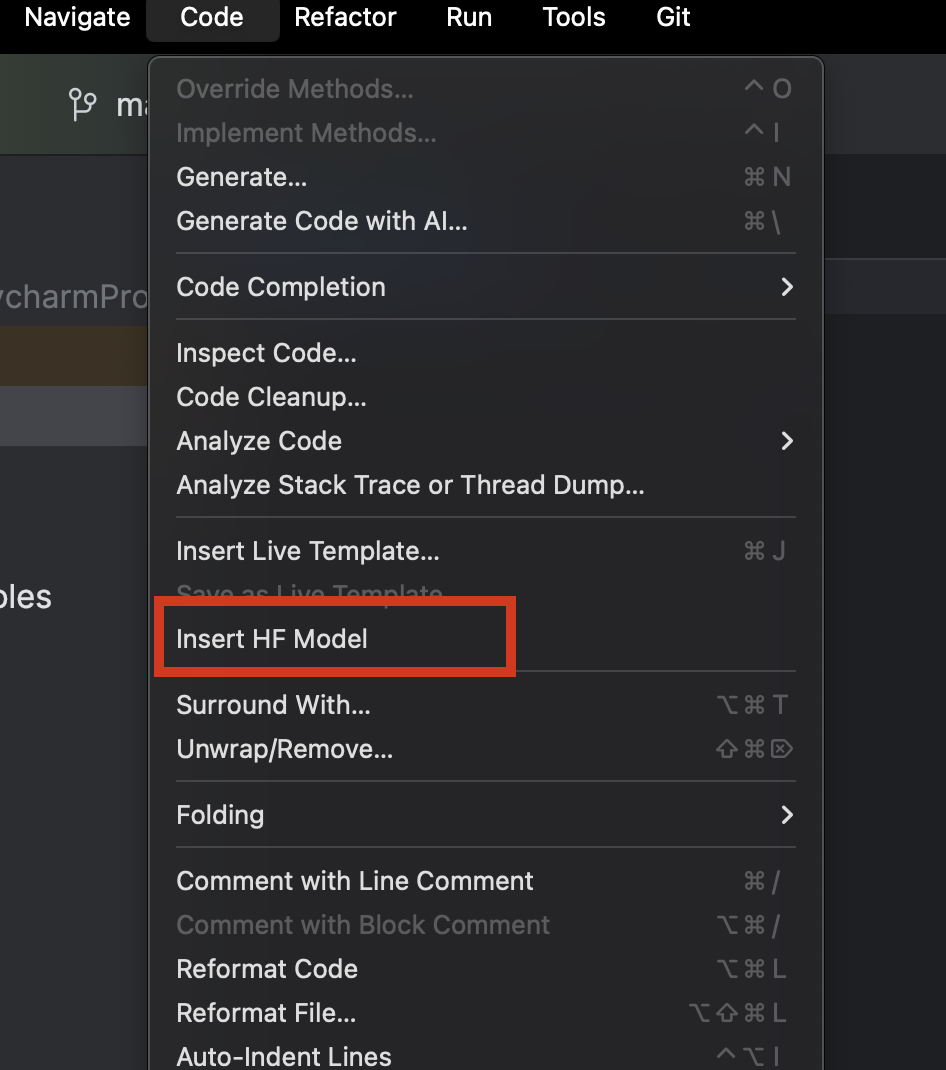
After downloading PyCharm, we can easily browse and add any models from Hugging Face. In a new Python file, from the Code menu at the top, select Insert HF Model.
In the menu that opens, you can browse models by category or start typing in the search bar at the top. When you select a model, you can see its description on the right.
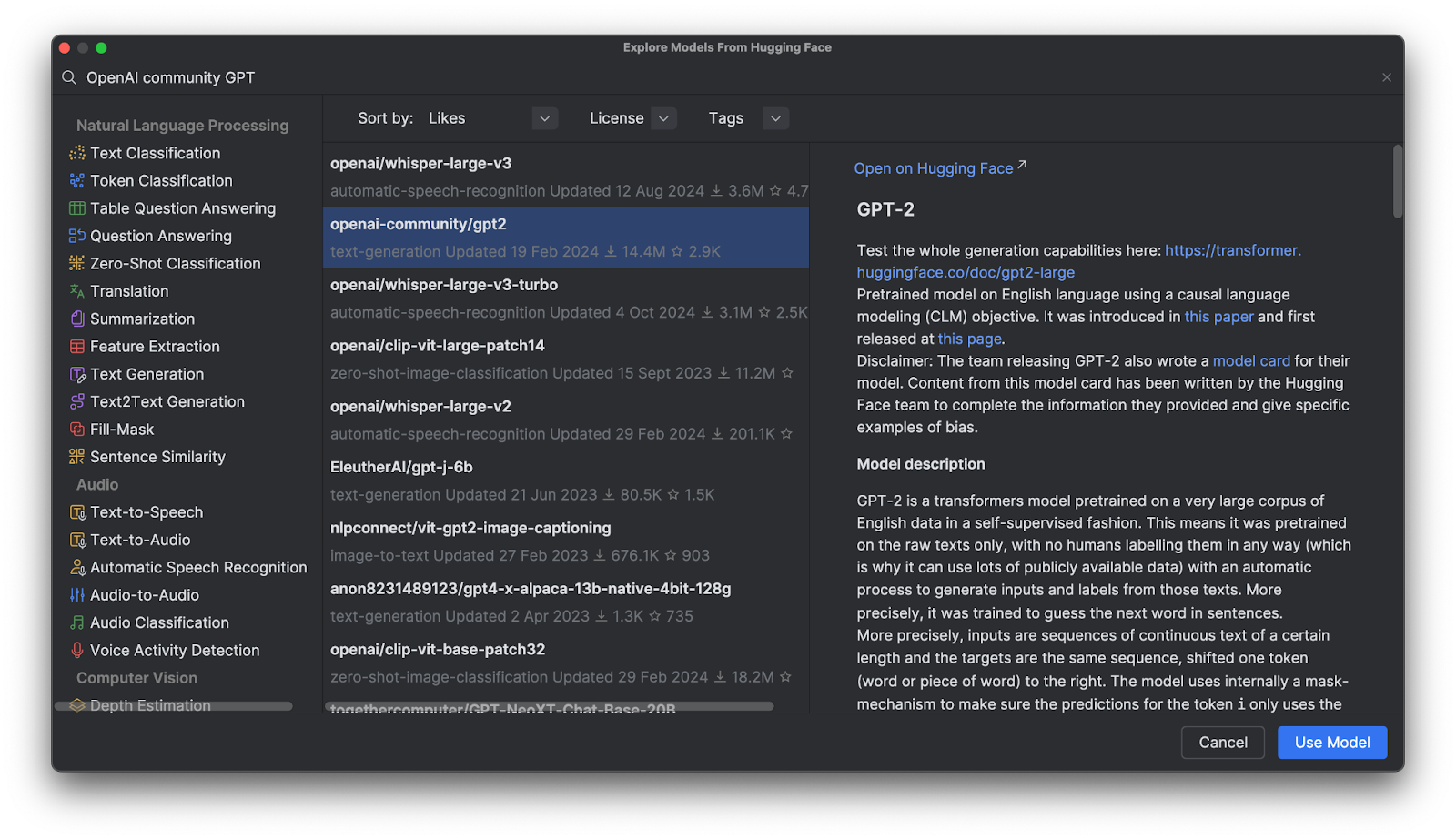
When you click Use Model, you will see a code snippet added to your file. And that’s it – You’re ready to start using your Hugging Face model.

GPT (Generative Pre-Trained Transformer) models
GPT models are very popular on the Hugging Face Hub, but what are they? GPTs are trained models that understand natural language and generate high-quality text. They are mainly used in tasks related to textual entailment, question answering, semantic similarity, and document classification. The most famous example is ChatGPT, created by OpenAI.
A lot of OpenAI GPT models are available on the Hugging Face Hub, and we will learn how to use these models with Transformers, fine-tune them with our own data, and deploy them in an application.
Benefits of using Transformers
Transformers, together with other tools provided by Hugging Face, provides high-level tools for fine-tuning any sophisticated deep learning model. Instead of requiring you to fully understand a given model’s architecture and tokenization method, these tools help make models “plug and play” with any compatible training data, while also providing a large amount of customization in tokenization and training.
Transformers in action
To get a closer look at Transformers in action, let’s see how we can use it to interact with a GPT model.
Inference using a pretrained model with a pipeline
After selecting and adding the OpenAI GPT-2 model to the code, this is what we’ve got:
from transformers import pipeline
pipe = pipeline("text-generation", model="openai-community/gpt2")
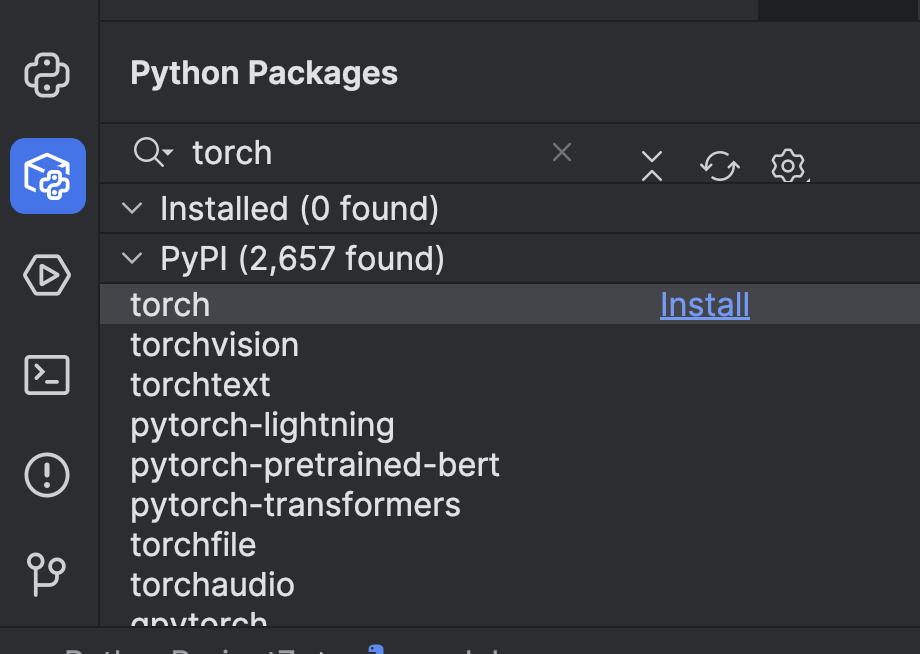
Before we can use it, we need to make a few preparations. First, we need to install a machine learning framework. In this example, we chose PyTorch. You can install it easily via the Python Packages window in PyCharm.
Then we need to install Transformers using the `torch` option. You can do that by using the terminal – open it using the button on the left or use the ⌥ F12 (macOS) or Alt + F12 (Windows) hotkey.
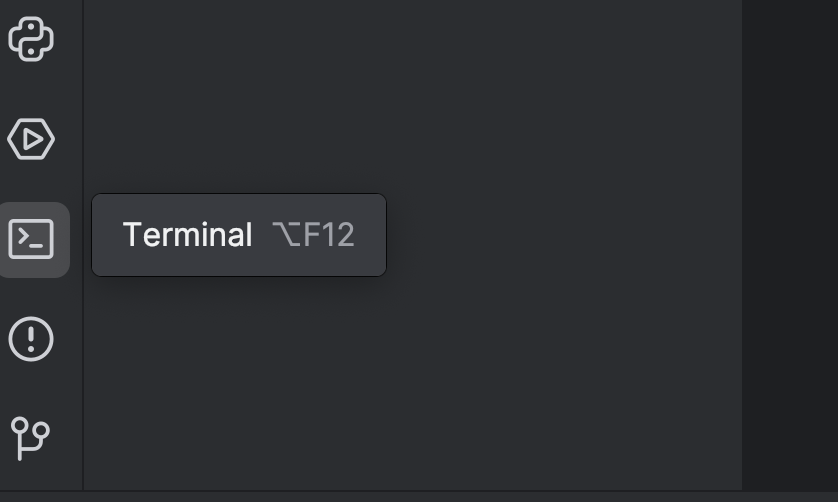
In the terminal, since we are using uv, we use the following commands to add it as a dependency and install it:
uv add “transformers[torch]”
uv sync
If you are using pip:
pip install “transformers[torch]”
We will also install a couple more libraries that we will need later, including python-dotenv, datasets, notebook, and ipywidgets. You can use either of the methods above to install them.
After that, it may be best to add a GPU device to speed up the model. Depending on what you have on your machine, you can add it by setting the device parameter in pipeline. Since I am using a Mac M2 machine, I can set device="mps" like this:
pipe = pipeline("text-generation", model="openai-community/gpt2", device="mps")
If you have CUDA GPUs you can also set device="cuda".
Now that we’ve set up our pipeline, let’s try it out with a simple prompt:
from transformers import pipeline
pipe = pipeline("text-generation", model="openai-community/gpt2", device="mps")
print(pipe("A rectangle has a perimeter of 20 cm. If the length is 6 cm, what is the width?", max_new_tokens=200))
Run the script with the Run button ( ) at the top:
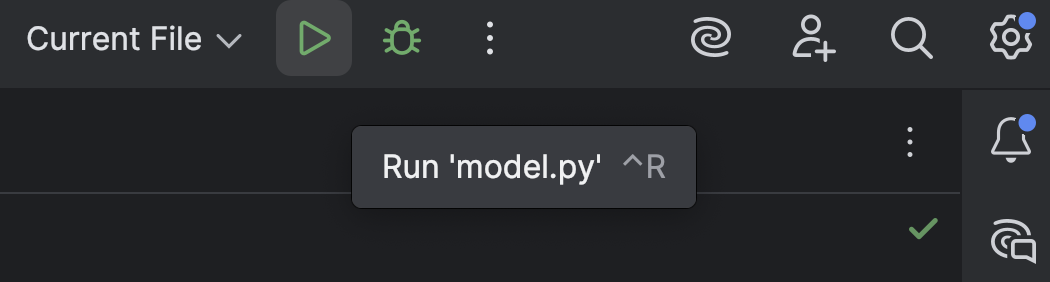
The result will look something like this:
[{'generated_text': 'A rectangle has a perimeter of 20 cm. If the length is 6 cm, what is the width?nnA rectangle has a perimeter of 20 cm. If the length is 6 cm, what is the width? A rectangle has a perimeter of 20 cm. If the width is 6 cm, what is the width? A rectangle has a perimeter of 20 cm. If the width is 6 cm, what is the width? A rectangle has a perimeter of 20 cm. If the width is 6 cm, what is the width?nnA rectangle has a perimeter of 20 cm. If the width is 6 cm, what is the width? A rectangle has a perimeter of 20 cm. If the width is 6 cm, what is the width? A rectangle has a perimeter of 20 cm. If the width is 6 cm, what is the width? A rectangle has a perimeter of 20 cm. If the width is 6 cm, what is the width?nnA rectangle has a perimeter of 20 cm. If the width is 6 cm, what is the width? A rectangle has a perimeter'}]
There isn’t much reasoning in this at all, only a bunch of nonsense.
You may also see this warning:
Setting `pad_token_id` to `eos_token_id`:50256 for open-end generation.
This is the default setting. You can also manually add it as below, so this warning disappears, but we don’t have to worry about it too much at this stage.
print(pipe("A rectangle has a perimeter of 20 cm. If the length is 6 cm, what is the width?", max_new_tokens=200, pad_token_id=pipe.tokenizer.eos_token_id))
Now that we’ve seen how GPT-2 behaves out of the box, let’s see if we can make it better at math reasoning with some fine-tuning.
Load and prepare a dataset from the Hugging Face Hub
Before we work on the GPT model, we first need training data. Let’s see how to get a dataset from the Hugging Face Hub.
If you haven’t already, sign up for a Hugging Face account and create an access token. We only need a `read` token for now. Store your token in a `.env` file, like so:
HF_TOKEN=your-hugging-face-access-token
We will use this Math Reasoning Dataset, which has text describing some math reasoning. We will fine-tune our GPT model with this dataset so it can solve math problems more effectively.
Let’s create a new Jupyter notebook, which we’ll use for fine-tuning because it lets us run different code snippets one by one and monitor the progress.
In the first cell, we use this script to load the dataset from the Hugging Face Hub:
from datasets import load_dataset
from dotenv import load_dotenv
import os
load_dotenv()
dataset = load_dataset("Cheukting/math-meta-reasoning-cleaned", token=os.getenv("HF_TOKEN"))
dataset
Run this cell (it may take a while, depending on your internet speed), which will download the dataset. When it’s done, we can have a look at the result:
DatasetDict({
    train: Dataset({
        features: ['id', 'text', 'token_count'],
        num_rows: 987485
    })
})
If you are curious and want to have a peek at the data, you can do so in PyCharm. Open the Jupyter Variables window using the button on the right:
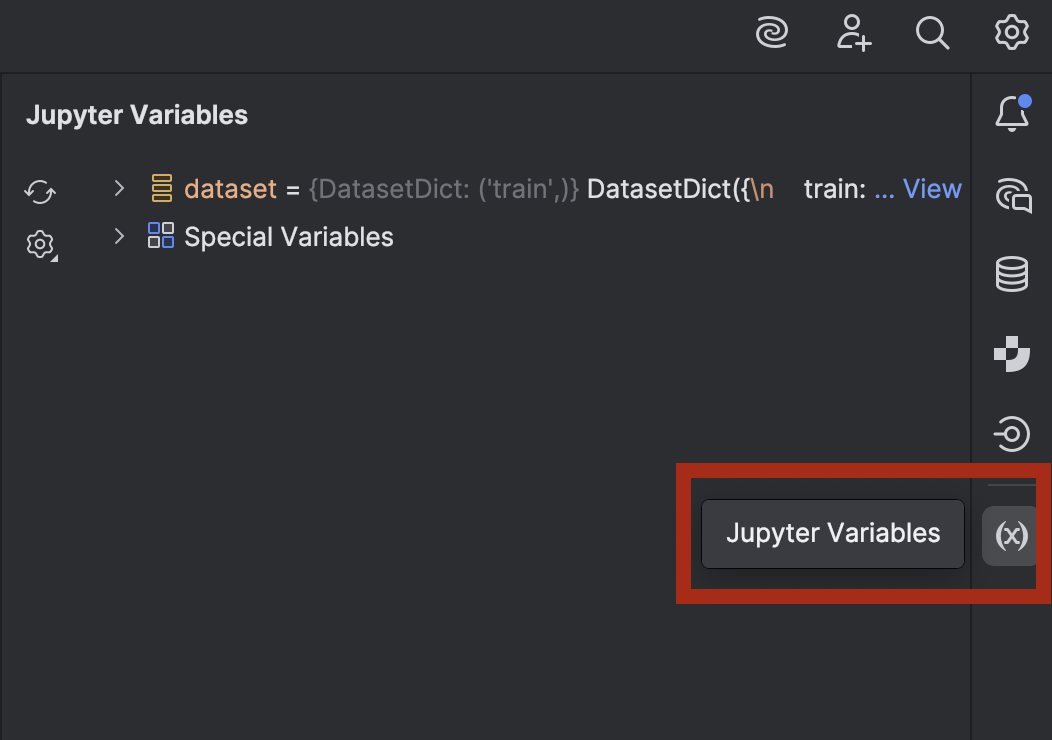
Expand dataset and you will see the View as DataFrame option next to dataset[‘train’]:
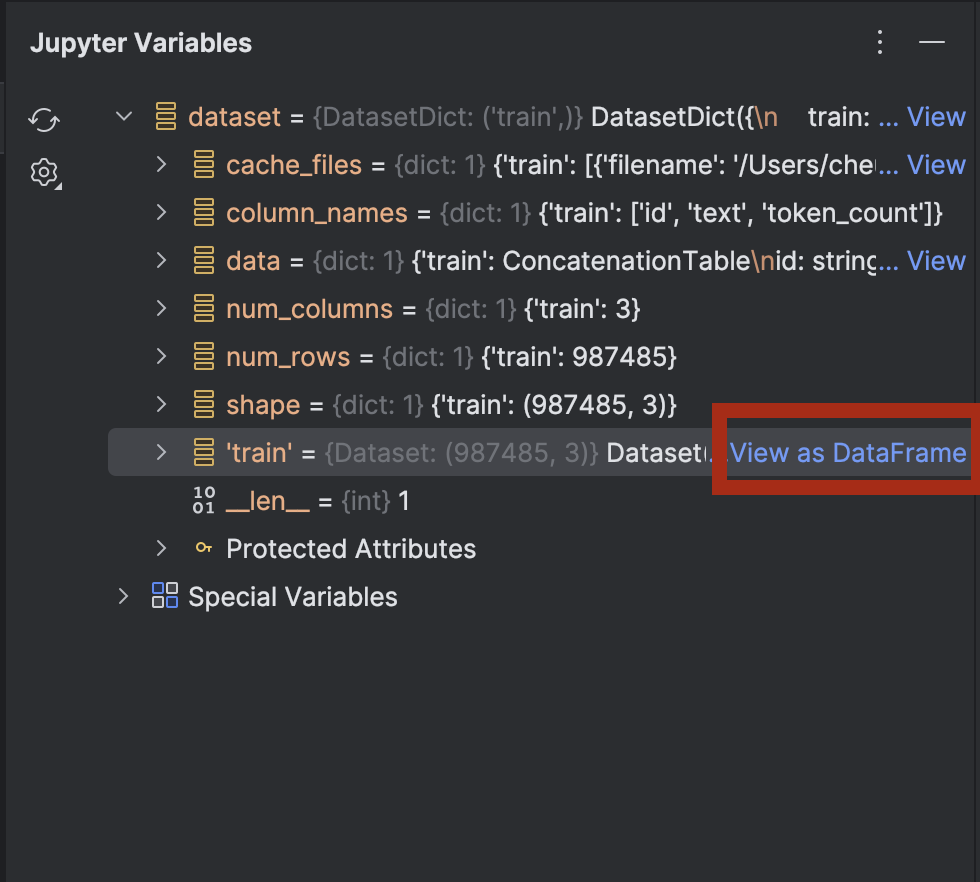
Click on it to take a look at the data in the Data View tool window:
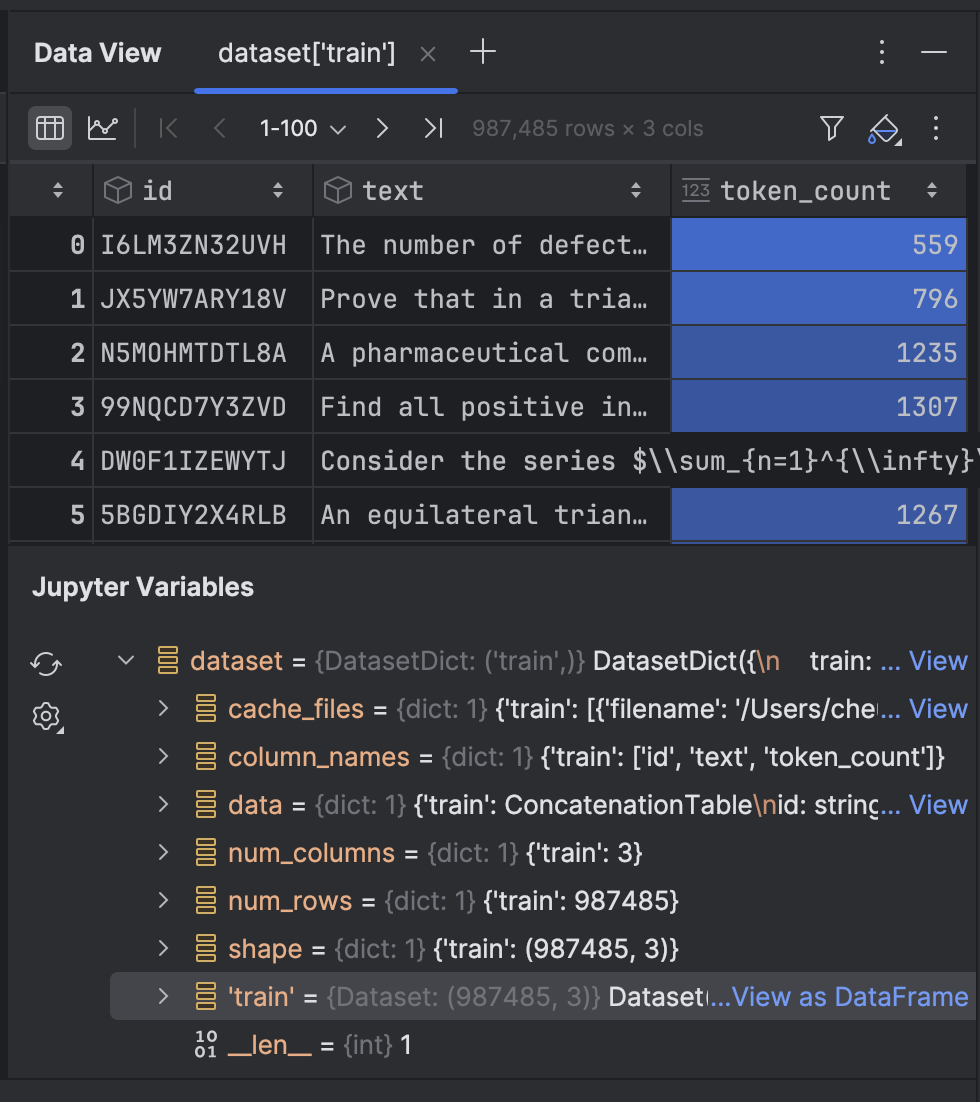
Next, we will tokenize the text in the dataset:
from transformers import GPT2Tokenizer
tokenizer = GPT2Tokenizer.from_pretrained("openai-community/gpt2")
tokenizer.pad_token = tokenizer.eos_token
def tokenize_function(examples):
   return tokenizer(examples['text'], truncation=True, padding='max_length', max_length=512)
tokenized_datasets = dataset.map(tokenize_function, batched=True)
Here we use the GPT-2 tokenizer and set the pad_token to be the eos_token, which is the token indicating the end of line. After that, we will tokenize the text with a function. It may take a while the first time you run it, but after that it will be cached and will be faster if you have to run the cell again.
The dataset has almost 1 million rows for training. If you have enough computing power to process all of them, you can use them all. However, in this demonstration we’re training locally on a laptop, so I’d better only use a small portion!
tokenized_datasets_split = tokenized_datasets["train"].shard(num_shards=100, index=0).train_test_split(test_size=0.2, shuffle=True)
tokenized_datasets_split
Here I take only 1% of the data, and then perform train_test_split to split the dataset into two:
DatasetDict({
    train: Dataset({
        features: ['id', 'text', 'token_count', 'input_ids', 'attention_mask'],
        num_rows: 7900
    })
    test: Dataset({
        features: ['id', 'text', 'token_count', 'input_ids', 'attention_mask'],
        num_rows: 1975
    })
})
Now we are ready to fine-tune the GPT-2 model.
Fine-tune a GPT model
In the next empty cell, we will set our training arguments:
from transformers import TrainingArguments
training_args = TrainingArguments(
   output_dir='./results',
   num_train_epochs=5,
   per_device_train_batch_size=8,
   per_device_eval_batch_size=8,
   warmup_steps=100,
   weight_decay=0.01,
   save_steps = 500,
   logging_steps=100,
   dataloader_pin_memory=False
)
Most of them are pretty standard for fine-tuning a model. However, depending on your computer setup, you may want to tweak a few things:
- Batch size – Finding the optimal batch size is important, since the larger the batch size is, the faster the training goes. However, there is a limit to how much memory is available for your CPU or GPU, so you may find there’s an upper threshold.
- Epochs – Having more epochs causes the training to take longer. You can decide how many epochs you need.
- Save steps – Save steps determine how often a checkpoint will be saved to disk. If the training is slow and there is a chance that it will stop unexpectedly, then you may want to save more often ( set this value lower).
After we’ve configured our settings, we will put the trainer together in the next cell:
from transformers import Trainer, DataCollatorForLanguageModeling
model = GPT2LMHeadModel.from_pretrained("openai-community/gpt2")
data_collator = DataCollatorForLanguageModeling(tokenizer=tokenizer, mlm=False)
trainer = Trainer(
   model=model,
   args=training_args,
   train_dataset=tokenized_datasets_split['train'],
   eval_dataset=tokenized_datasets_split['test'],
   data_collator=data_collator,
)
trainer.train(resume_from_checkpoint=False)
We set `resume_from_checkpoint=False`, but you can set it to `True` to continue from the last checkpoint if the training is interrupted.
After the training finishes, we will evaluate and save the model:
trainer.evaluate(tokenized_datasets_split['test'])
trainer.save_model("./trained_model")
We can now use the trained model in the pipeline. Let’s switch back to `model.py`, where we have used a pipeline with a pretrained model:
from transformers import pipeline
pipe = pipeline("text-generation", model="openai-community/gpt2", device="mps")
print(pipe("A rectangle has a perimeter of 20 cm. If the length is 6 cm, what is the width?", max_new_tokens=200, pad_token_id=pipe.tokenizer.eos_token_id))
Now let’s change `model=”openai-community/gpt2″` to `model=”./trained_model”` and see what we get:
[{'generated_text': "A rectangle has a perimeter of 20 cm. If the length is 6 cm, what is the width?nAlright, let me try to solve this problem as a student, and I'll let my thinking naturally fall into the common pitfall as described.nn---nn**Step 1: Attempting the Problem (falling into the pitfall)**nnWe have a rectangle with perimeter 20 cm. The length is 6 cm. We want the width.nnFirst, I need to find the area under the rectangle.nnLet’s set \( A = 20 - 12 \), where \( A \) is the perimeter.nn**Area under a rectangle:** n\[nA = (20-12)^2 + ((-12)^2)^2 = 20^2 + 12^2 = 24n\]nnSo, \( 24 = (20-12)^2 = 27 \).nnNow, I’ll just divide both sides by 6 to find the area under the rectangle.n"}]
Unfortunately, it still does not solve the problem. However, it did come up with some mathematical formulas and reasoning that it didn’t use before. If you want, you can try fine-tuning the model a bit more with the data we didn’t use.
In the next section, we will see how we can deploy a fine-tuned model to API endpoints using both the tools provided by Hugging Face and FastAPI.
Deploying a fine-tuned model
The easiest way to deploy a model in a server backend is to use FastAPI. Previously, I wrote a blog post about deploying a machine learning model with FastAPI. While we won’t go into the same level of detail here, we will go over how to deploy our fine-tuned model.
With the help of Junie, we’ve created some scripts which you can see here. These scripts let us deploy a server backend with FastAPI endpoints.
There are some new dependencies that we need to add:
uv add fastapi pydantic uvicorn
uv sync
Let’s have a look at some interesting points in the scripts, in `main.py`:
# Initialize FastAPI app
app = FastAPI(
   title="Text Generation API",
   description="API for generating text using a fine-tuned model",
   version="1.0.0"
)
# Initialize the model pipeline
try:
   pipe = pipeline("text-generation", model="../trained_model", device="mps")
except Exception as e:
   # Fallback to CPU if MPS is not available
   try:
       pipe = pipeline("text-generation", model="../trained_model", device="cpu")
   except Exception as e:
       print(f"Error loading model: {e}")
       pipe = None
After initializing the app, the script will try to load the model into a pipeline. If a Metal GPU is not available, it will fall back to using the CPU. If you have a CUDA GPU instead of a Metal GPU, you can change `mps` to `cuda`.
# Request model
class TextGenerationRequest(BaseModel):
   prompt: str
   max_new_tokens: int = 200

# Response model
class TextGenerationResponse(BaseModel):
   generated_text: str
Two new classes are created, inheriting from Pydantic’s `BaseModel`.
We can also inspect our endpoints with the Endpoints tool window. Click on the globe next to `app = FastAPI` on line 11 and select Show All Endpoints.
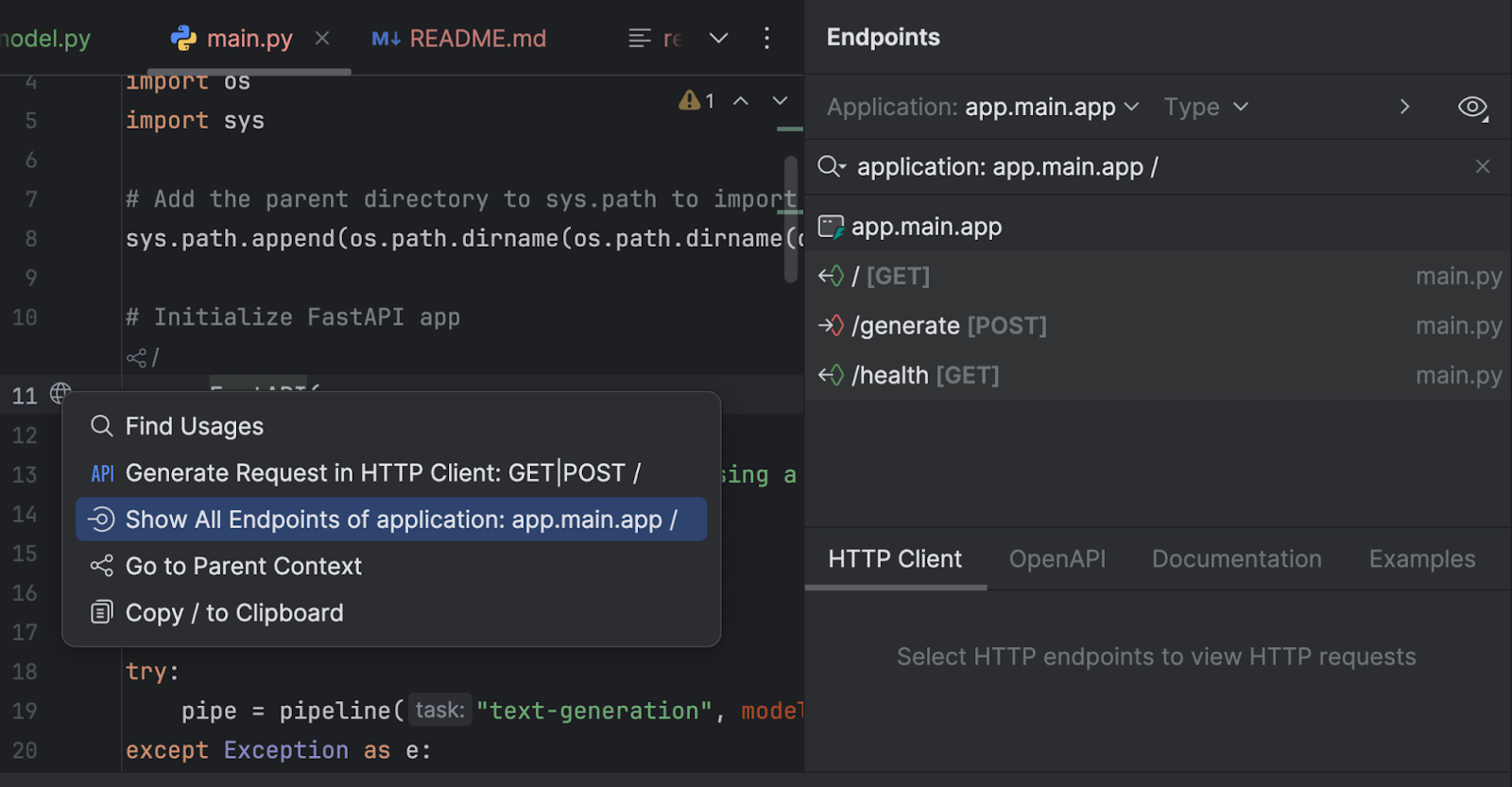
We have three endpoints. Since the root endpoint is just a welcome message, we will look at the other two.
@app.post("/generate", response_model=TextGenerationResponse)
async def generate_text(request: TextGenerationRequest):
   "carview.php?tsp="carview.php?tsp="
   Generate text based on the provided prompt.

   Args:
       request: TextGenerationRequest containing the prompt and generation parameters

   Returns:
       TextGenerationResponse with the generated text
   "carview.php?tsp="carview.php?tsp="
   if pipe is None:
       raise HTTPException(status_code=500, detail="Model not loaded properly")

   try:
       result = pipe(
           request.prompt,
           max_new_tokens=request.max_new_tokens,
           pad_token_id=pipe.tokenizer.eos_token_id
       )

       # Extract the generated text from the result
       generated_text = result[0]['generated_text']

       return TextGenerationResponse(generated_text=generated_text)
   except Exception as e:
       raise HTTPException(status_code=500, detail=f"Error generating text: {str(e)}")
The `/generate` endpoint collects the request prompt and generates the response text with the model.
@app.get("/health")
async def health_check():
   "carview.php?tsp="carview.php?tsp="Check if the API and model are working properly."carview.php?tsp="carview.php?tsp="
   if pipe is None:
       raise HTTPException(status_code=500, detail="Model not loaded")
   return {"status": "healthy", "model_loaded": True}
The `/health` endpoint checks whether the model is loaded correctly. This can be useful if the client-side application needs to check before making the other endpoint available in its UI.
In `run.py`, we use uvicorn to run the server:
import uvicorn
if __name__ == "__main__":
   uvicorn.run("main:app", host="0.0.0.0", port=8000, reload=True)
When we run this script, the server will be started at https://0.0.0.0:8000/.
After we start running the server, we can go to https://0.0.0.0:8000/docs to test out the endpoints.
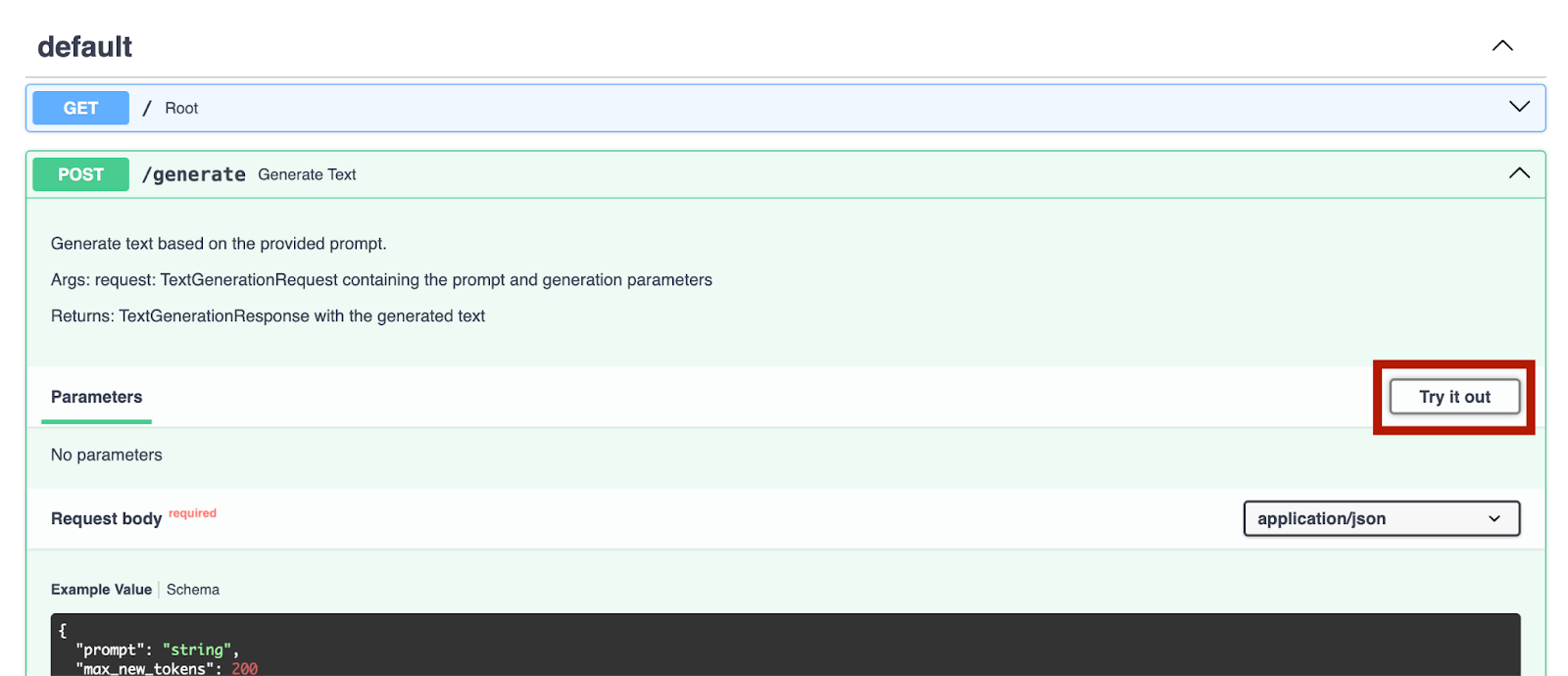
We can try this with the `/generate` endpoint:
{
  "prompt": "5 people give each other a present. How many presents are given altogether?",
  "max_new_tokens": 300
}
This is the response we get:
{
  "generated_text": "5 people give each other a present. How many presents are given altogether?nAlright, let's try to solve the problem:nn**Problem**  n1. Each person gives each other a present. How many presents are given altogether?n2. How many "gift" are given altogether?nn**Common pitfall**  nAssuming that each present is a "gift" without considering the implications of the original condition.nn---nn### Step 1: Attempting the problem (falling into the pitfall)nnOkay, so I have two people giving each other a present, and I want to know how many are present. I remember that there are three types of gifts—gifts, gins, and ginses.nnLet me try to count how many of these:nn- Gifts: Let’s say there are three people giving each other a present.n- Gins: Let’s say there are three people giving each other a present.n- Ginses: Let’s say there are three people giving each other a present.nnSo, total gins and ginses would be:nn- Gins: \( 2 \times 3 = 1 \), \( 2 \times 1 = 2 \), \( 1 \times 1 = 1 \), \( 1 \times 2 = 2 \), so \( 2 \times 3 = 4 \).n- Ginses: \( 2 \times 3 = 6 \), \("
}
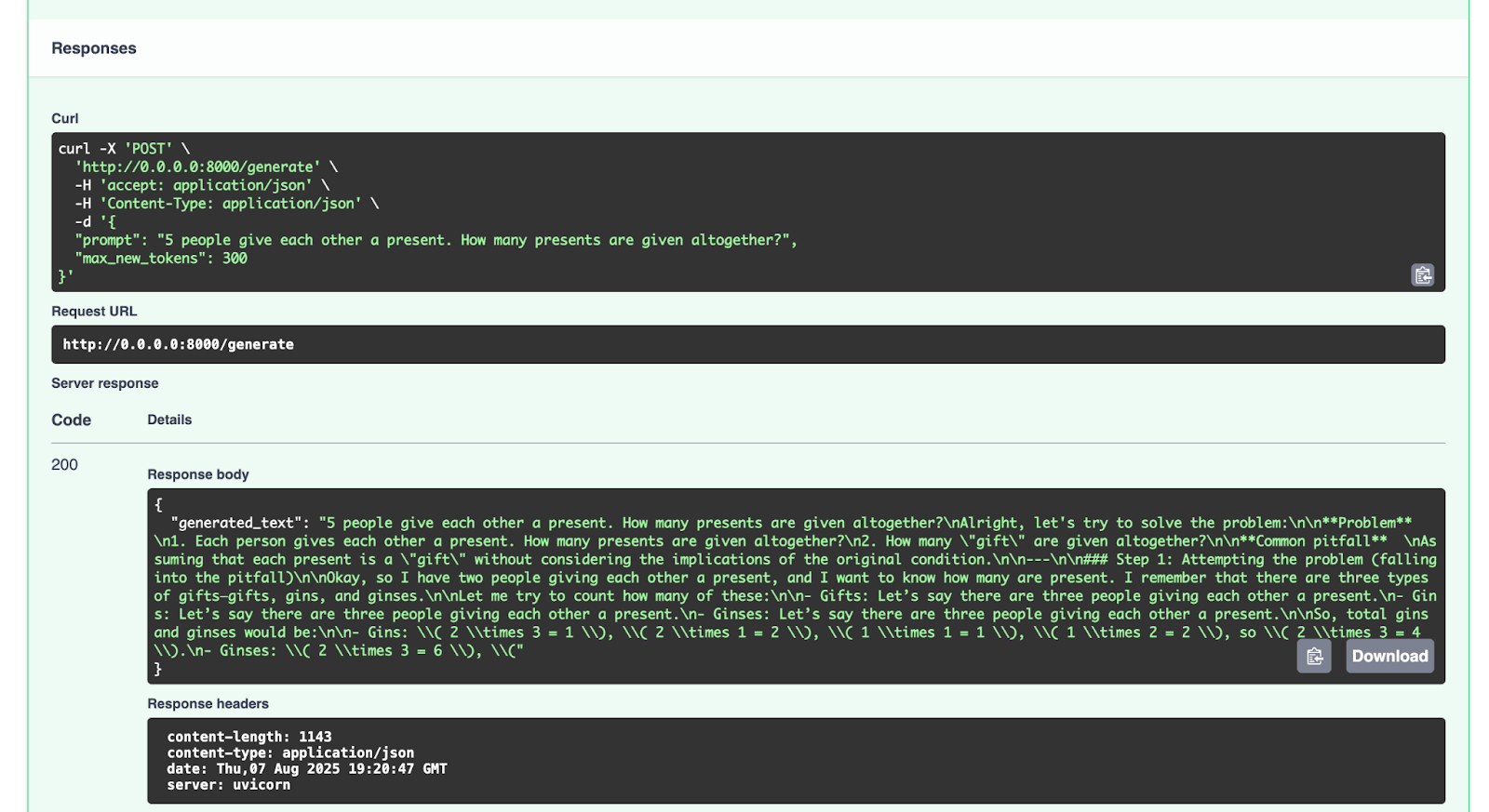
Feel free to experiment with other requests.
Conclusion and next steps
Now that you have successfully fine-tuned an LLM model like GPT-2 with a math reasoning dataset and deployed it with FastAPI, you can fine-tune a lot more of the open-source LLMs available on the Hugging Face Hub. You can experiment with fine-tuning other LLM models with either the open-source data there or your own datasets. If you want to (and the license of the original model allows), you can also upload your fine-tuned model on the Hugging Face Hub. Check out their documentation for how to do that.
One last remark regarding using or fine-tuning models with resources on the Hugging Face Hub – make sure to read the licenses of any model or dataset that you use to understand the conditions for working with those resources. Is it allowed to be used commercially? Do you need to credit the resources used?
In future blog posts, we will keep exploring more code examples involving Python, AI, machine learning, and data visualization.
In my opinion, PyCharm provides best-in-class Python support that ensures both speed and accuracy. Benefit from the smartest code completion, PEP 8 compliance checks, intelligent refactorings, and a variety of inspections to meet all your coding needs. As demonstrated in this blog post, PyCharm provides integration with the Hugging Face Hub, allowing you to browse and use models without leaving the IDE. This makes it suitable for a wide range of AI and LLM fine-tuning projects.
This is a guest post from Michael Kennedy, the founder of Talk Python and a PSF Fellow.
Welcome to the highlights, trends, and key actions from the eighth annual Python Developers Survey. This survey is conducted as a collaborative effort between the Python Software Foundation and JetBrains’ PyCharm team. The survey results provide a comprehensive look at Python usage statistics and popularity trends in 2025.
My name is Michael Kennedy, and I’ve analyzed the more than 30,000 responses to the survey and pulled out the most significant trends and predictions, and identified various actions that you can take to improve your Python career.
I am in a unique position as the host of the Talk Python to Me podcast. Every week for the past 10 years, I’ve interviewed the people behind some of the most important libraries and language trends in the Python ecosystem. In this article, my goal is to use that larger community experience to understand the results of this important yearly survey.
If your job or products and services depend on Python, or developers more broadly, you’ll want to read this article. It provides a lot of insight that is difficult to gain from other sources.
Key Python trends in 2025
Let’s dive into the most important trends based on the Python survey results.
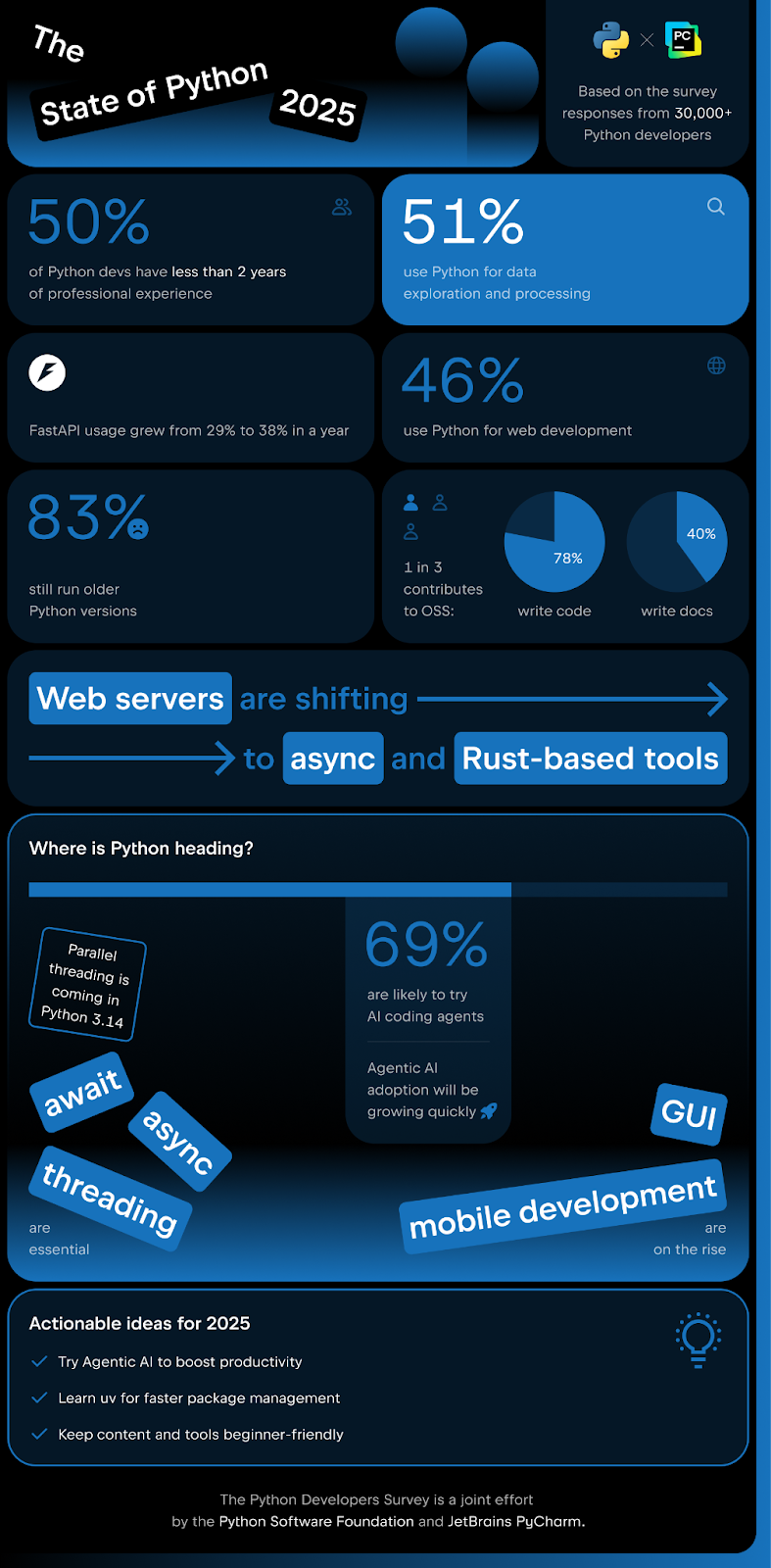
As you explore these insights, having the right tools for your projects can make all the difference. Try PyCharm for free and stay equipped with everything you need for data science, ML/AI workflows, and web development in one powerful Python IDE.
Python people use Python
Let’s begin by talking about how central Python is for people who use it. Python people use Python primarily. That might sound like an obvious tautology. However, developers use many languages that are not their primary language. For example, web developers might use Python, C#, or Java primarily, but they also use CSS, HTML, and even JavaScript.
On the other hand, developers who work primarily with Node.js or Deno also use JavaScript, but not as their primary language.
The survey shows that 86% of respondents use Python as their main language for writing computer programs, building applications, creating APIs, and more.
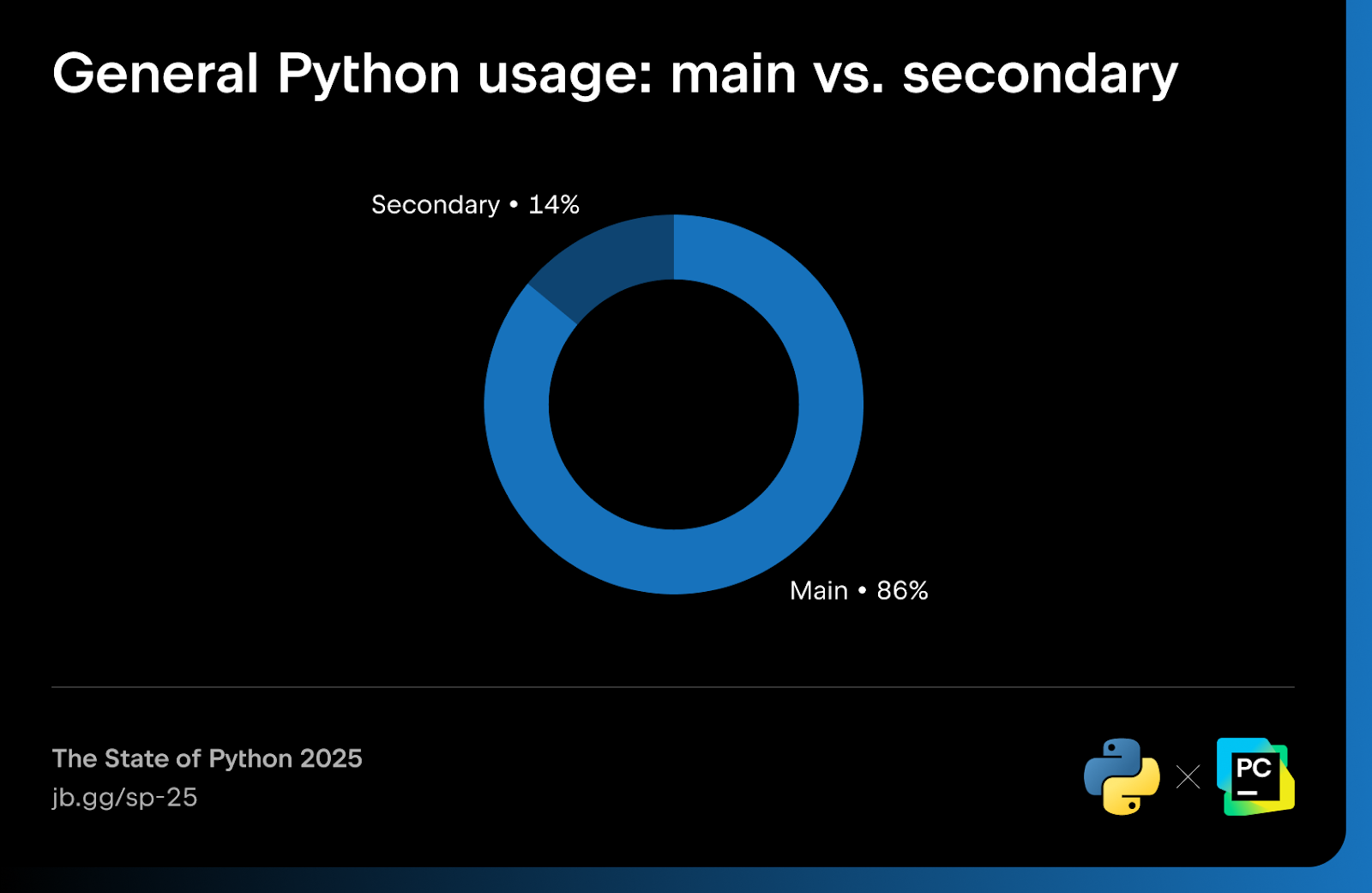
We are mostly brand-new programmers
For those of us who have been programming for a long time – I include myself in this category, having written code for almost 30 years now – it’s easy to imagine that most people in the industry have a decent amount of experience. It’s a perfectly reasonable assumption. You go to conferences and talk with folks who have been doing programming for 10 or 20 years. You look at your colleagues, and many of them have been using Python and programming for a long time.
But that is not how the broader Python ecosystem looks.
Exactly 50% of respondents have less than two years of professional coding experience! And 39% have less than two years of experience with Python (even in hobbyist or educational settings).
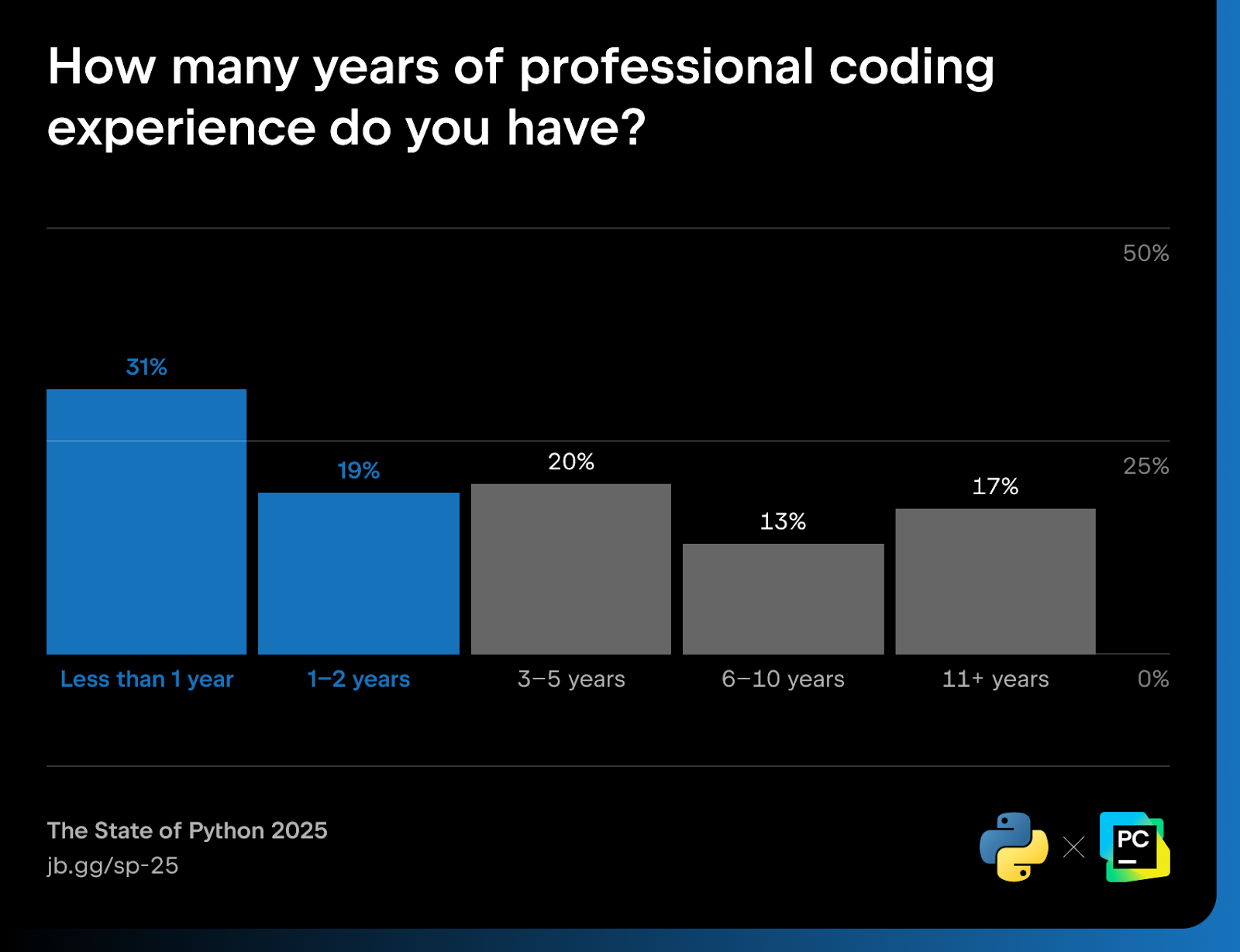
This result reaffirms that Python is a great language for those early in their career. The simple (but not simplistic) syntax and approachability really speak to newer programmers as well as seasoned ones. Many of us love programming and Python and are happy to share it with our newer community members.
However, it suggests that we consider these demographics when we create content for the community. If you create a tutorial or video demonstration, don’t skimp on the steps to help people get started. For example, don’t just tell them to install the package. Tell them that they need to create a virtual environment, and show them how to do so and how to activate it. Guide them on installing the package into that virtual environment.
If you’re a tool vendor such as JetBrains, you’ll certainly want to keep in mind that many of your users will be quite new to programming and to Python itself. That doesn’t mean you should ignore advanced features or dumb down your products, but don’t make it hard for beginners to adopt them either.
Data science is now over half of all Python
This year, 51% of all surveyed Python developers are involved in data exploration and processing, with pandas and NumPy being the tools most commonly used for this.
Many of us in the Python pundit space have talked about Python as being divided into thirds: One-third web development, one-third Python for data science and pure science, and one-third as a catch-all bin.
We need to rethink that positioning now that one of those thirds is overwhelmingly the most significant portion of Python.
This is also in the context of not only a massive boom in the interest in data and AI right now, but a corresponding explosion in the development of tools to work with in this space. There are data processing tools like Polars, new ways of working with notebooks like Marimo, and a huge number of user friendly packages for working with LLMs, vision models, and agents, such as Transformers (the Hugging Face library for LLMs), Diffusers (for diffusion models), smolagents, LangChain/LangGraph (frameworks for LLM agents) and LlamaIndex (for indexing knowledge for LLMs).
Python’s center of gravity has indeed tilted further toward data/AI.
Most still use older Python versions despite benefits of newer releases
The survey shows a distribution across the latest and older versions of the Python runtime. Many of us (15%) are running on the very latest released version of Python, but more likely than not, we’re using a version a year old or older (83%).
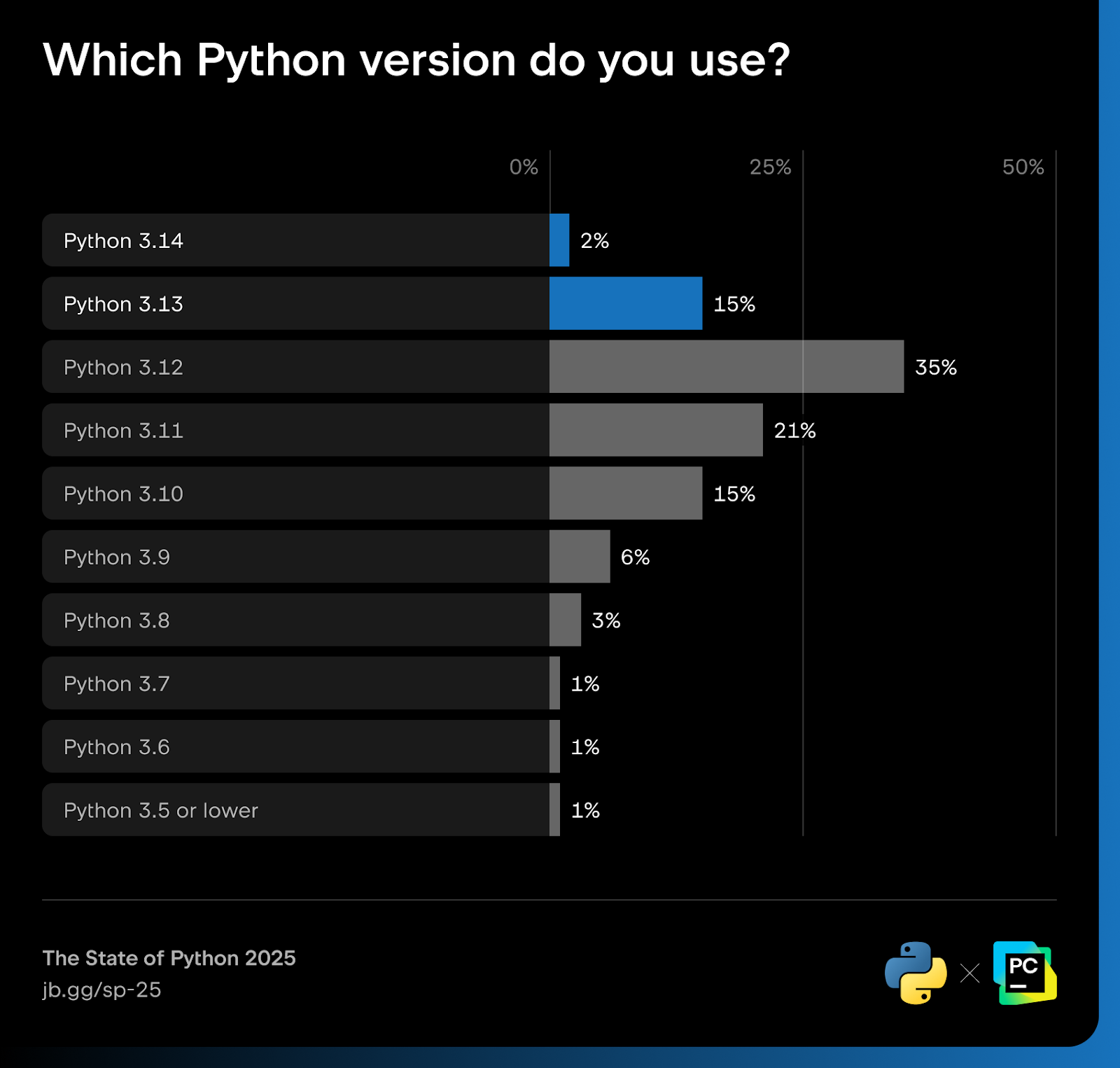
The survey also indicates that many of us are using Docker and containers to execute our code, which makes this 83% or higher number even more surprising. With containers, just pick the latest version of Python in the container. Since everything is isolated, you don’t need to worry about its interactions with the rest of the system, for example, Linux’s system Python. We should expect containerization to provide more flexibility and ease our transition towards the latest version of Python.
So why haven’t people updated to the latest version of Python? The survey results give two primary reasons.
- The version I’m using meets all my needs (53%)
- I haven’t had the time to update (25%)
The 83% of developers running on older versions of Python may be missing out on much more than they realize. It’s not just that they are missing some language features, such as the except keyword, or a minor improvement to the standard library, such as tomllib. Python 3.11, 3.12, and 3.13 all include major performance benefits, and the upcoming 3.14 will include even more.
What’s amazing is you get these benefits without changing your code. You simply choose a newer runtime, and your code runs faster. CPython has been extremely good at backward compatibility. There’s rarely significant effort involved in upgrading. Let’s look at some numbers.
48% of people are currently using Python 3.11. Upgrading to 3.13 will make their code run ~11% faster end to end while using ~10-15% less memory.
If they are one of the 27% still on 3.10 or older, their code gets a whopping ~42% speed increase (with no code changes), and memory use can drop by ~20-30%!
So maybe they’ll still come back to “Well, it’s fast enough for us. We don’t have that much traffic, etc.”. But if they are like most medium to large businesses, this is an incredible waste of cloud compute expense (which also maps to environmental harm via spent energy).
Research shows some estimates for cloud compute (specifically computationally based):
- Mid-market / “medium” business
- Total annual AWS bill (median): ~ $2.3 million per year (vendr.com)
- EC2 (compute-instance) share (~ 50–70 % of that bill): $1.15–1.6 million per year (cloudlaya.com)
- Large enterprise
- Total annual AWS bill: ~ $24–36 million per year (i.e. $2–3 million per month) (reddit.com)
- EC2 share (~ 50–70 %): $12–25 million per year (cloudlaya.com)
If we assume they’re running Python 3.10, that’s potentially $420,000 and $5.6M in savings, respectively (computed as 30% of the EC2 cost).
If your company realizes you are burning an extra $0.4M-$5M a year because you haven’t gotten around to spending the day it takes to upgrade, that’ll be a tough conversation.
Finances and environment aside, it’s really great to be able to embrace the latest language features and be in lock-step with the core devs’ significant work. Make upgrading a priority, folks.
Python web devs resurgence
For the past few years, we’ve heard that the significance of web development within the Python space is decreasing. Two powerful forces could be at play here: 1) As more data science and AI-focused people come to Python, the relatively static number of web devs represents a lower percentage, and 2) The web continues to be frontend-focused, and until Python in the browser becomes a working reality, web developers are likely to prefer JavaScript.
Looking at the numbers from 2021–2023, the trend is clearly downward 45% → 43% → 42%. But this year, the web is back! Respondents reported that 46% of them are using Python for web development in 2024. To bolster this hypothesis further, we saw web “secondary” languages jump correspondingly, with HTML/CSS usage up 15%, JavaScript usage up 14%, and SQL’s usage up 16%.
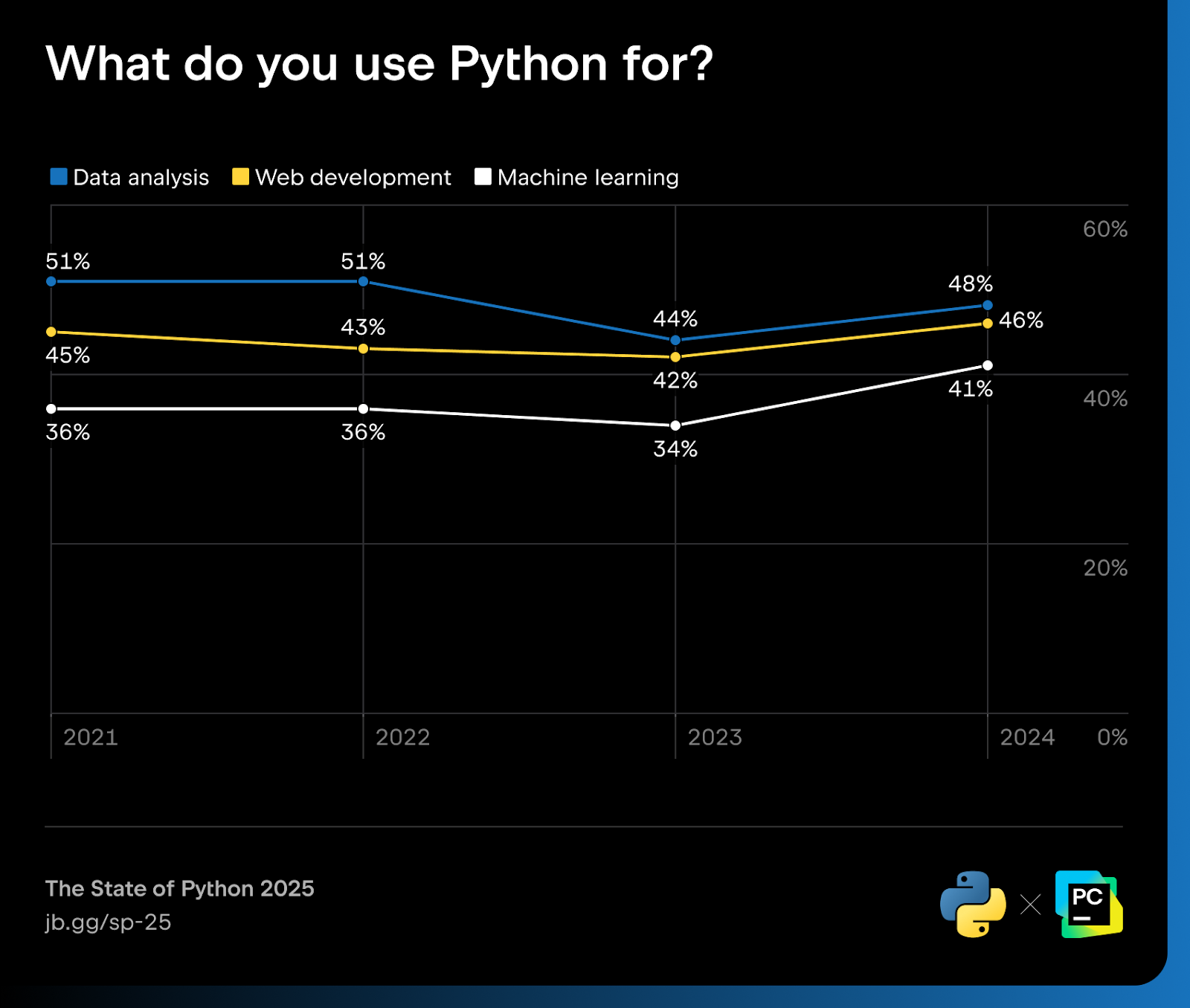
The biggest winner of the Python web frameworks was FastAPI, which jumped from 29% to 38% (a 30% increase). While all of the major frameworks grew year over year, FastAPI’s nearly 30% jump is impressive. I can only speculate why this is. To me, I think this jump in Python for web is likely partially due to a large number of newcomers to the Python space. Many of these are on the ML/AI/data science side of things, and those folks often don’t have years of baked-in experience and history with Flask or Django. They are likely choosing the hottest of the Python web frameworks, which today looks like it’s FastAPI. There are many examples of people hosting their ML models behind FastAPI APIs.
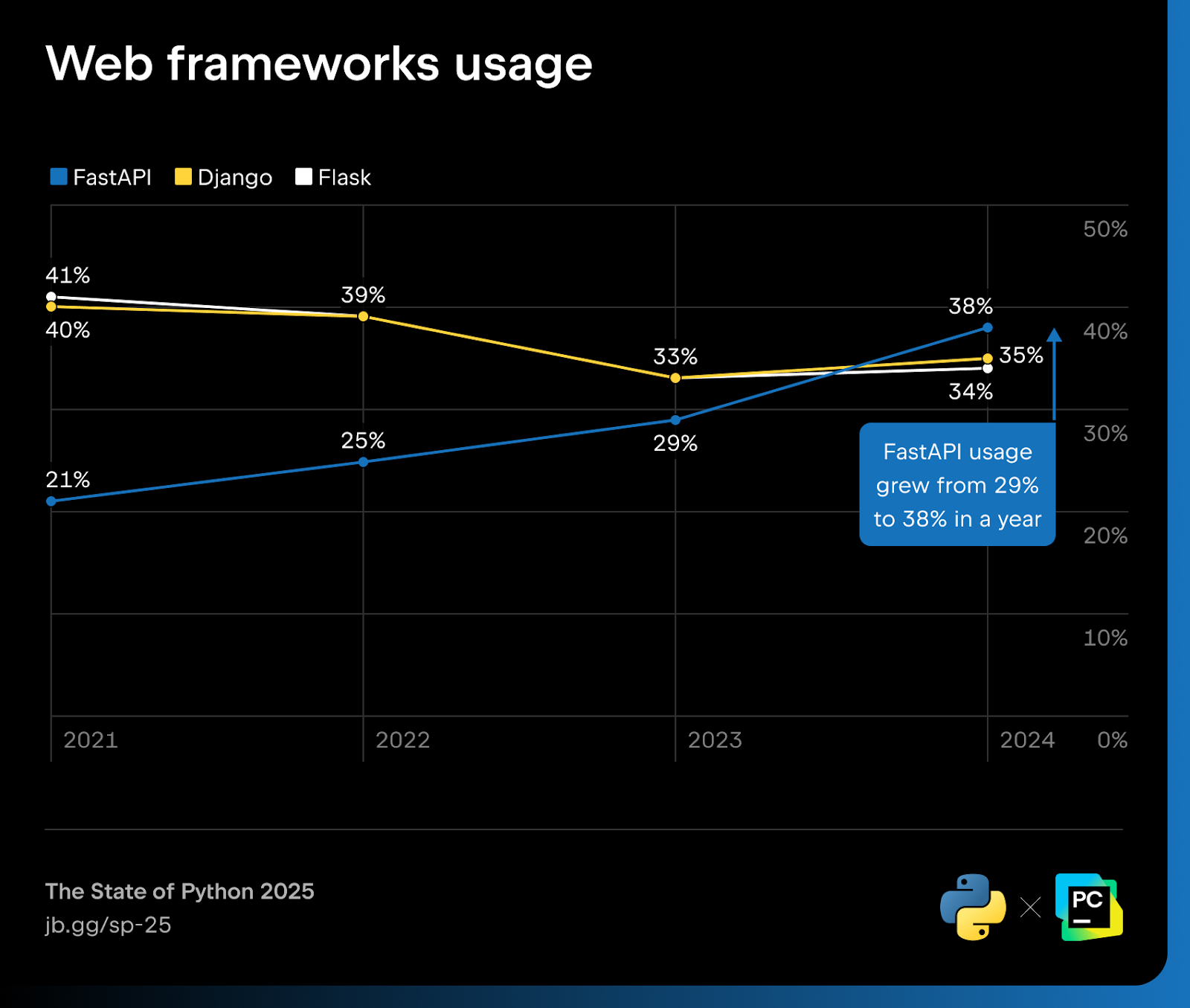
The trend towards async-friendly Python web frameworks has been continuing as well. Over at Talk Python, I rewrote our Python web app in async Flask (roughly 10,000 lines of Python). Django has been steadily adding async features, and its async support is nearly complete. Though today, at version 5.2, its DB layer needs a bit more work, as the team says: “We’re still working on async support for the ORM and other parts of Django.”
Python web servers shift toward async and Rust-based tools
It’s worth a brief mention that the production app servers hosting Python web apps and APIs are changing too. Anecdotally, I see two forces at play here: 1) The move to async frameworks necessitates app servers that support ASGI, not just WSGI and 2) Rust is becoming more and more central to the fast execution of Python code (we’ll dive into that shortly).
The biggest loss in this space last year was the complete demise of uWSGI. We even did a Python Bytes podcast entitled We Must Replace uWSGI With Something Else examining this situation in detail.
We also saw Gunicorn handling less of the async workload with async-native servers such as uvicorn and Hypercorn, which are able to operate independently. Newcomer servers, based on Rust, such as Granian, have gained a solid following as well.
Rust is how we speed up Python now
Over the past couple of years, Rust has become Python’s performance co-pilot. The Python Language Summit of 2025 revealed that “Somewhere between one-quarter and one-third of all native code being uploaded to PyPI for new projects uses Rust”, indicating that “people are choosing to start new projects using Rust”.
Looking into the survey results, we see that Rust usage grew from 27% to 33% for binary extensions to Python packages. This reflects a growing trend toward using Rust for systems-level programming and for native extensions that accelerate Python code.
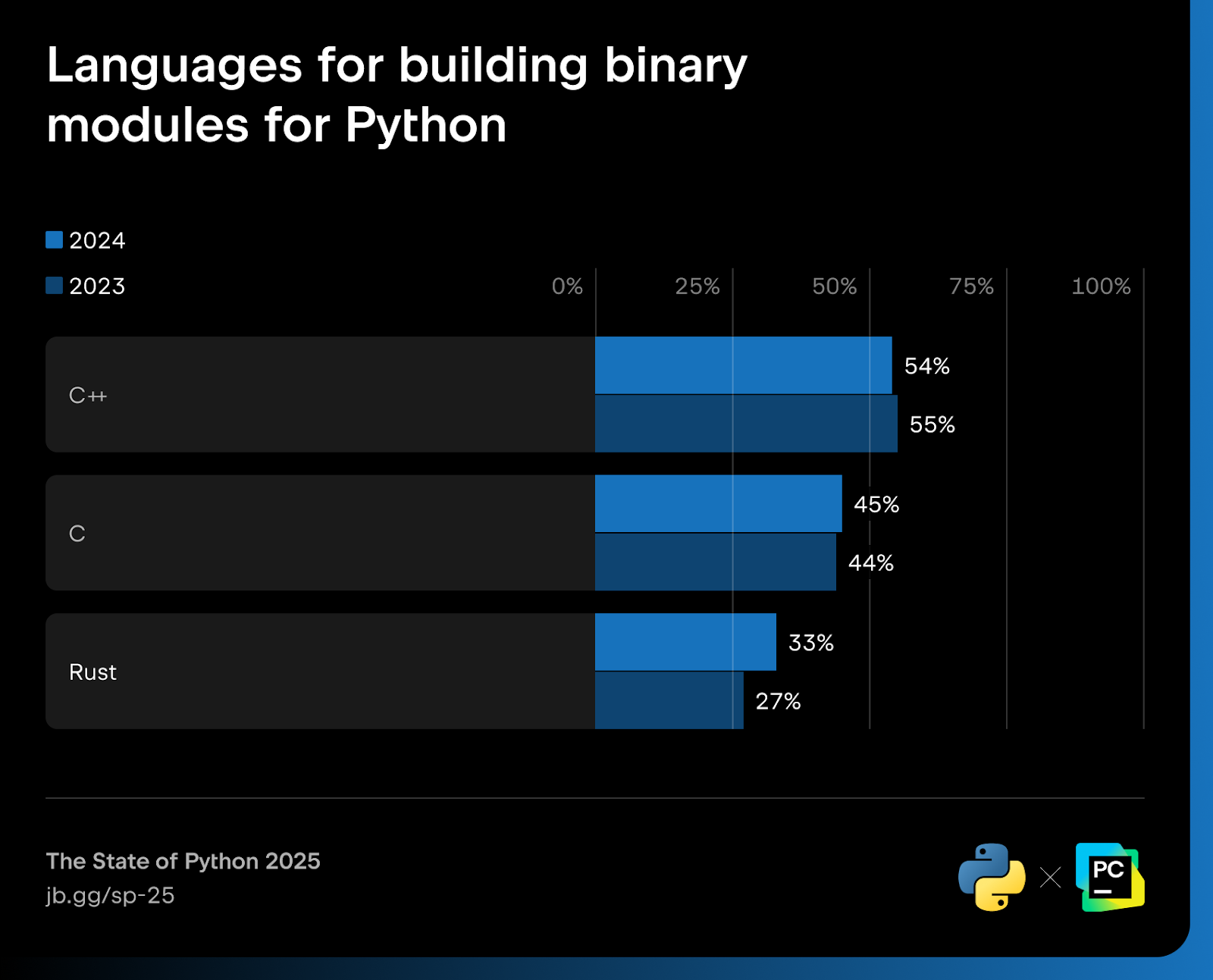
We see this in the ecosystem with the success of Polars for data science and Pydantic for pretty much all disciplines. We are even seeing that for Python app servers such as the newer Granian.
Typed Python is getting better tooling
Another key trend this year is static type checking in Python. You’ve probably seen Python type information in function definitions such as:
def add(x: int, y: int) -> int: ...
These have been in Python for a while now. Yet, there is a renewed effort to make typed Python more common and more forgiving. We’ve had tools such as mypy since typing’s early days, but the goal there was more along the lines of whole program consistency. In just the past few months, we have seen two new high-performance typing tools released:
- ty from Astral – an extremely fast Python type checker and language server written in Rust.
- Pyrefly from Meta – a faster Python type checker written in Rust.
ty and Pyrefly provide extremely fast static type checking and language server protocols (LSPs). These next‑generation type checkers make it easier for developers to adopt type hints and enforce code quality.
Notice anything similar? They are both written in Rust, backing up the previous claim that “Rust has become Python’s performance co-pilot”.
By the way, I interviewed the team behind ty when it was announced a few weeks ago if you want to dive deeper into that project.
Code and docs make up most open-source contributions
There are many different and unique ways to contribute to open source. Probably the first thing that comes to most people’s minds when they think of a contributor is someone who writes code and adds a new feature to that project. However, there are less visible but important ways to make a contribution, such as triaging issues and reviewing pull requests.
So, what portion of the community has contributed to open source, and in which ways have they done so?
The survey tells us that one-third of devs contributed to open source. This manifests primarily as code and documentation/tutorial additions.
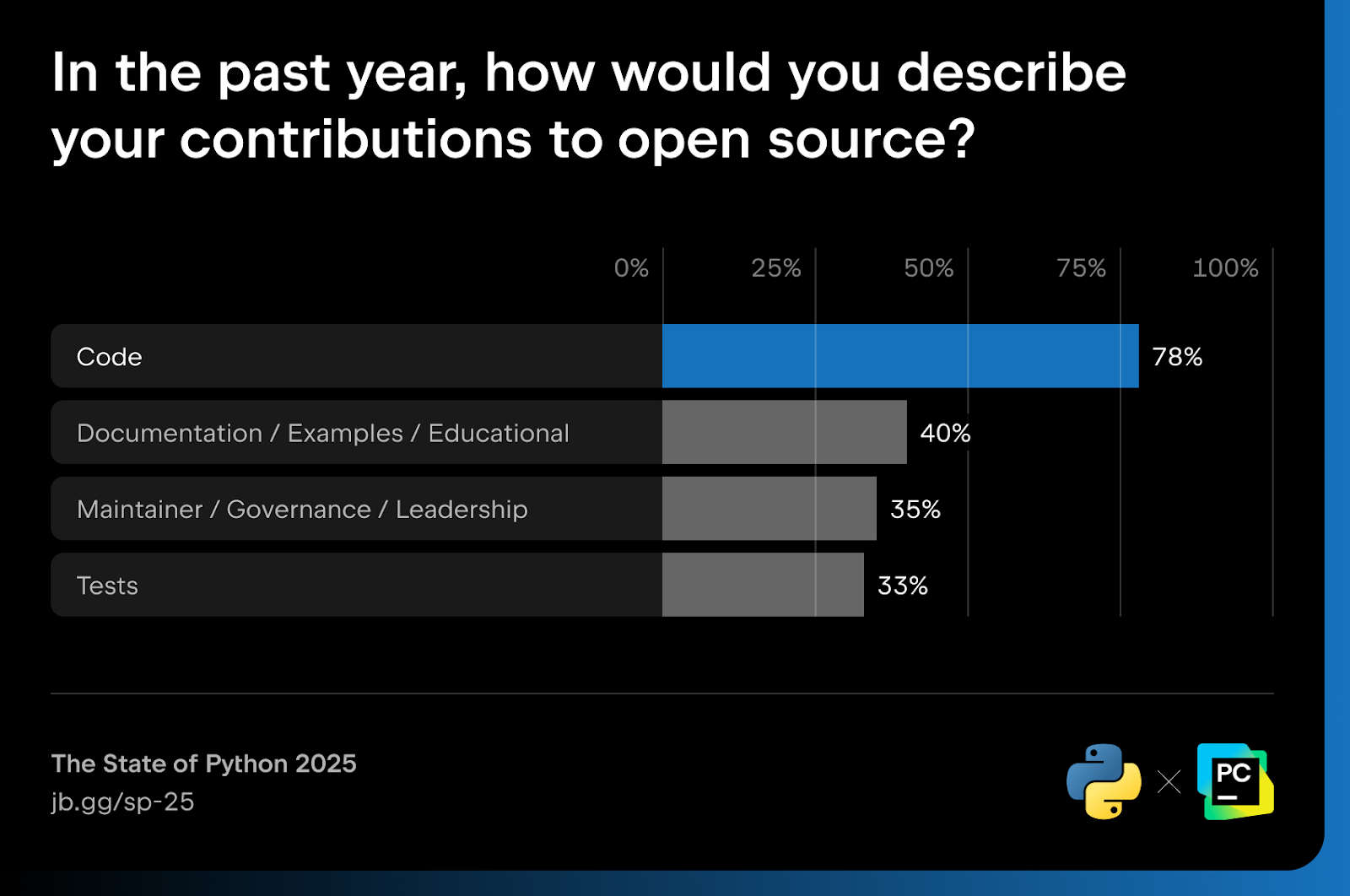
Python documentation is the top resource for developers
Where do you typically learn as a developer or data scientist? Respondents said that docs are #1. There are many ways to learn languages and libraries, but people like docs best. This is good news for open-source maintainers. This means that the effort put into documentation (and embedded tutorials) is well spent. It’s a clear and straightforward way to improve users’ experience with your project.
Moreover, this lines up with Developer Trends in 2025, a podcast panel episode I did with experienced Python developers, including JetBrains’ own Paul Everitt. The panelists all agree that docs are #1, though the survey ranked YouTube much higher than the panelists, at 51%. Remember, our community has an average of 1–2 years of experience, and 45% of them are younger than 30 years old.
Respondents said that documentation and embedded tutorials are the top learning resources. Other sources, such as YouTube tutorials, online courses, and AI-based code generation tools, are also gaining popularity. In fact, the survey shows that AI tools as a learning source increased from 19 % to 27 % (up 42% year over year)!
Postgres reigns as the database king for Pythonistas
When asked which database (if any) respondents chose, they overwhelmingly said PostgreSQL. This relational database management system (RDBMS) grew from 43 % to 49 %. That’s +14% year over year, which is remarkable for a 28-year-old open-source project.
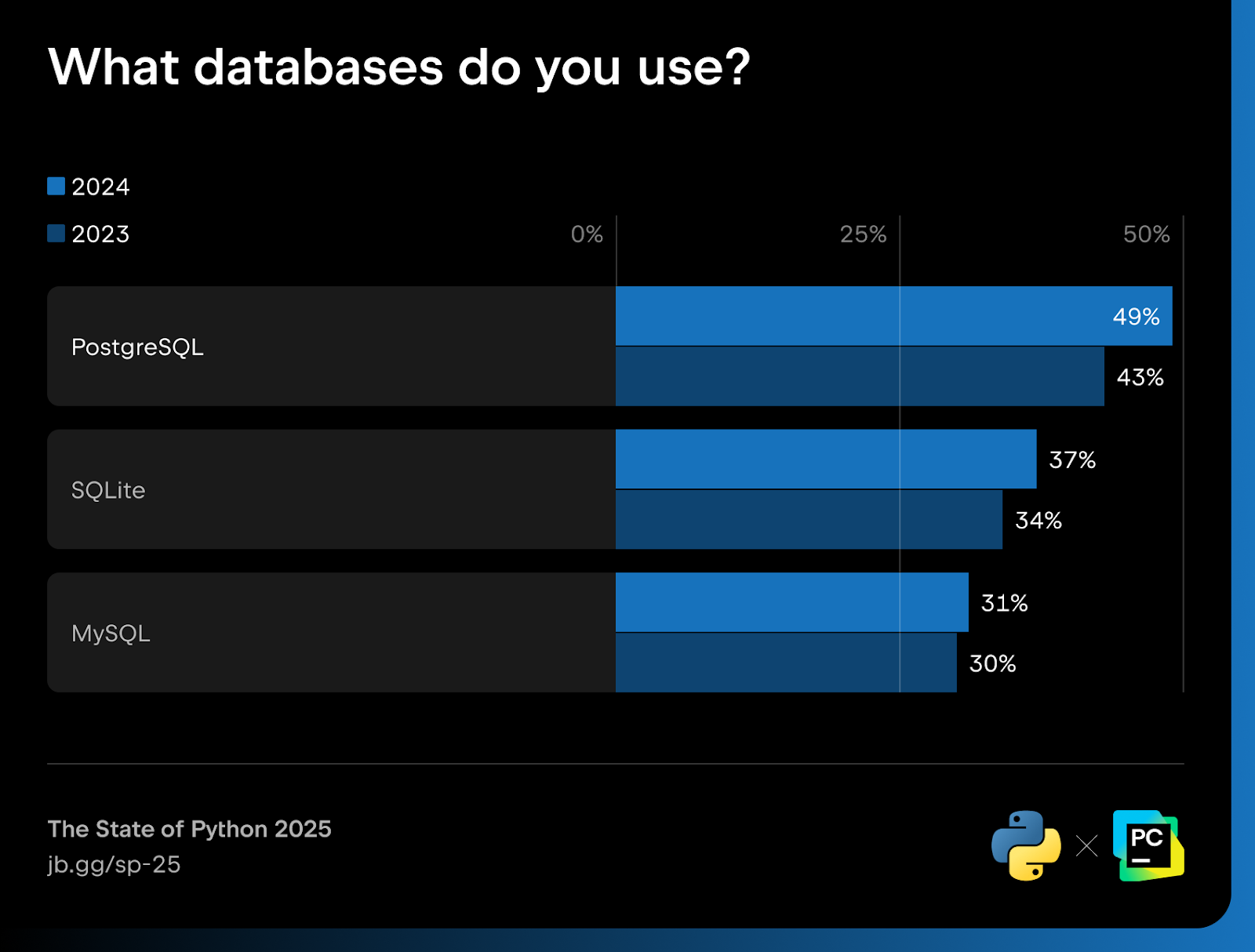
One interesting detail here, beyond Postgres being used a lot, is that every single database in the top six, including MySQL and SQLite, grew in usage year over year. This is likely another indicator that web development itself is growing again, as discussed above.
Forward-looking trends
Agentic AI will be wild
My first forward-looking trend is that agentic AI will be a game-changer for coding. Agentic AI is often cited as a tool of the much maligned and loved vibe coding. However, vibe coding obscures the fact that agentic AI tools are remarkably productive when used alongside a talented engineer or data scientist.
Surveys outside the PSF survey indicate that about 70% of developers were using or planning to use AI coding tools in 2023, and by 2024, around 44% of professional developers use them daily.
JetBrains’ State of Developer Ecosystem 2023 report noted that within a couple of years, “AI-based code generation tools went from interesting research to an important part of many developers’ toolboxes”. Jump ahead to 2025, according to the State of Developer Ecosystem 2025 survey, nearly half of the respondents (49%) plan to try AI coding agents in the coming year.
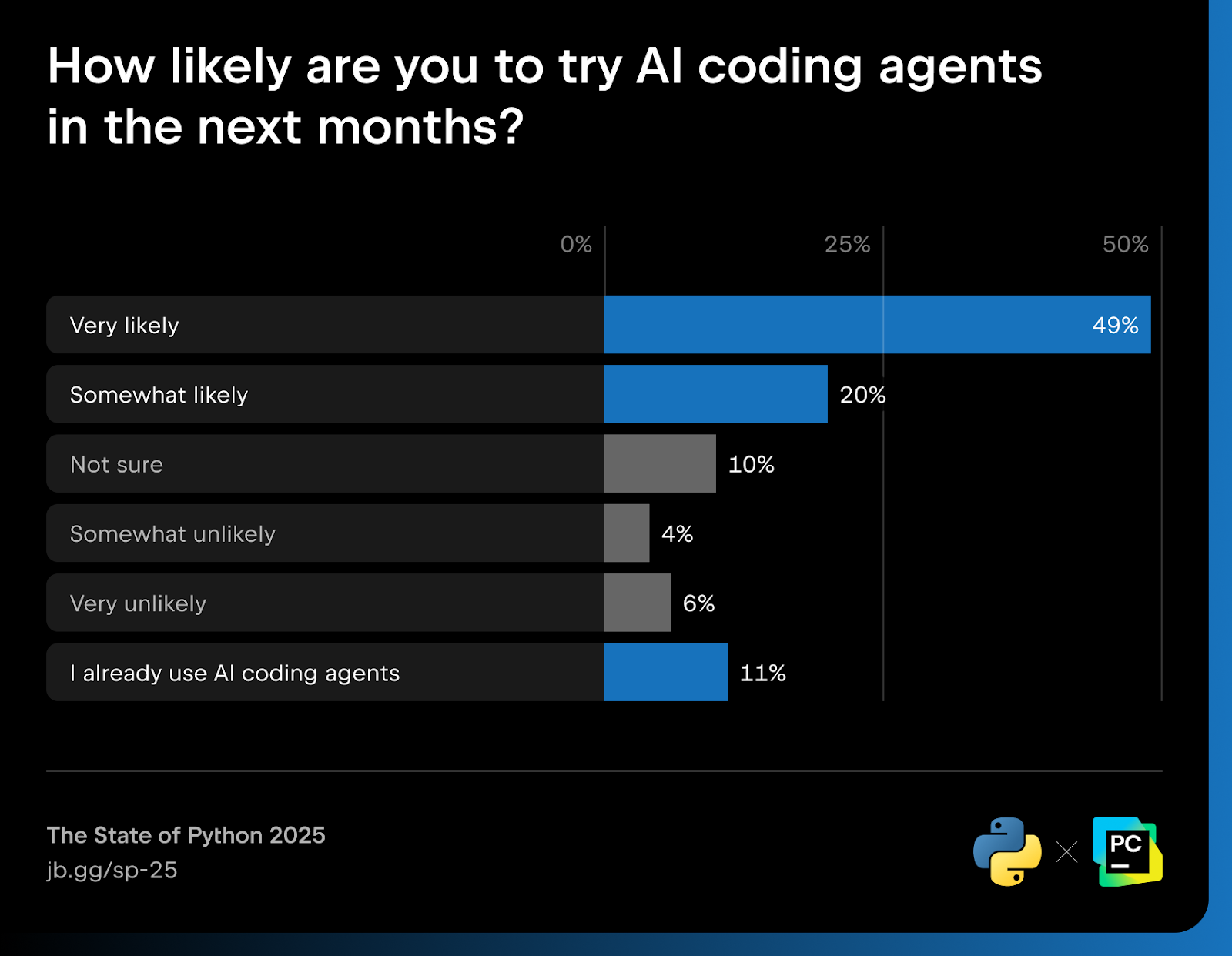
Program managers at major tech companies have stated that they almost cannot hire developers who don’t embrace agentic AI. The productive delta between those using it and those who avoid it is simply too great (estimated at about 30% greater productivity with AI).
Async, await, and threading are becoming core to Python
The future will be abuzz with concurrency and Python. We’ve already discussed how the Python web frameworks and app servers are all moving towards asynchronous execution, but this only represents one part of a powerful trend.
Python 3.14 will be the first version of Python to completely support free-threaded Python. Free-threaded Python, which is a version of the Python runtime that does not use the GIL, the global interpreter lock, was first added as an experiment to CPython 3.13.
Just last week, the steering council and core developers officially accepted this as a permanent part of the language and runtime. This will have far-reaching effects. Developers and data scientists will have to think more carefully about threaded code with locks, race conditions, and the performance benefits that come with it. Package maintainers, especially those with native code extensions, may have to rewrite some of their code to support free-threaded Python so they themselves do not enter race conditions and deadlocks.
There is a massive upside to this as well. I’m currently writing this on the cheapest Apple Mac Mini M4. This computer comes with 10 CPU cores. That means until this change manifests in Python, the maximum performance I can get out of a single Python process is 10% of what my machine is actually capable of. Once free-threaded Python is fully part of the ecosystem, I should get much closer to maximum capacity with a standard Python program using threading and the async and await keywords.
Async and await keywords are not just tools for web developers who want to write more concurrent code. It’s appearing in more and more locations. One such tool that I recently came across is Temporal. This program leverages the asyncio event loop but replaces the standard clever threading tricks with durable machine-spanning execution. You might simply await some action, and behind the scenes, you get durable execution that survives machine restarts. So understanding async and await is going to be increasingly important as more tools make interesting use of it, as Temporal did.
I see parallels here of how Pydantic made a lot of people more interested in Python typing than they otherwise would have been.
Python GUIs and mobile are rising
My last forward-looking trend is that Python GUIs and Python on mobile are rising. When we think of native apps on iOS and Android, we can only dream of using Python to build them someday soon.
At the 2025 Python Language Summit, Russell Keith-Magee presented his work on making iOS and Android Tier 3-supported platforms for CPython. This has been laid out in PEP 730 and PEP 738. This is a necessary but not sufficient condition for allowing us to write true native apps that ship to the app stores using Python.
More generally, there have been some interesting ideas and new takes on UIs for Python. We had Jeremy Howard from fast.ai introduce FastHTML, which allows us to write modern web applications in pure Python. NiceGUI has been coming on strong as an excellent way to write web apps and PWAs in pure Python.
I expect these changes, especially the mobile ones, to unlock powerful use cases that we’ll be talking about for years to come.
Actionable ideas
You’ve seen the results, my interpretations, and predictions. So what should you do about them? Of course, nothing is required of you, but I am closing out this article with some actionable ideas to help you take advantage of these technological and open-source waves.
Here are six actionable ideas you can put into practice after reading this article. Pick your favorite one that you’re not yet leveraging and see if it can help you thrive further in the Python space.
Action 1: Learn uv
uv, the incredible package and Python management tool jumped incredibly from 0% to 11% the year it was introduced (and that growth has demonstrably continued to surge in 2025). This Rust-based tool unifies capabilities from many of the most important ones you may have previously heard of and does so with performance and incredible features.
Do you need Python on the machine? Simply RUN uv venv .venv, and you have both installed the latest stable release and created a virtual environment. That’s just the beginning. If you want the full story, I did an interview with Charlie Marsh about the second generation of uv over on Talk Python.
If you decide to install uv, be sure to use their standalone installers. It allows uv to manage itself and get better over time.
Action 2: Use the latest Python
We saw that 83% of respondents are not using the latest version of Python. Don’t be one of them. Use a virtual environment or use a container and install the latest version of Python. The quickest and easiest way these days is to use uv, as it won’t affect system Python and other configurations (see action 1!).
If you deploy or develop in Docker containers, all you need to do is set up the latest version of Python 3.13 and run these two lines:
RUN curl -LsSf https://astral.sh/uv/install.sh | sh
RUN uv venv --python 3.13 /venv
If you develop locally in virtual environments (as I do), just remove the RUN keyword and use uv to create that environment. Of course, update the version number as new major versions of Python are released.
By taking this action, you will be able to take advantage of the full potential of modern Python, from the performance benefits to the language features.
Action 3: Learn agentic AI
If you’re one of the people who have not yet tried agentic AI, you owe it to yourself to give it a look. Agentic AI uses large language models (LLMs) such as GPT‑4, ChatGPT, or models available via Hugging Face to perform tasks autonomously.
I understand why people avoid using AI and LLMs. For one thing, there’s dubious legality around copyrights. The environmental harms can be real, and the threat to developers’ jobs and autonomy is not to be overlooked. But using top-tier models for agentic AI, not just chatbots, allows you to be tremendously productive.
I’m not recommending vibe coding. But have you ever wished for a library or package to exist, or maybe a CLI tool to automate some simple part of your job? Give that task to an agentic AI, and you won’t be taking on technical debt to your main application and some part of your day. Your productivity just got way better.
The other mistake people make here is to give it a try using the cheapest or free models. When they don’t work that great, people hold that up as evidence and say, “See, it’s not that helpful. It just makes up stuff and gets things wrong.” Make sure you choose the best possible model that you can, and if you want to give it a genuine look, spend $10 or $20 for a month to see what’s actually possible.
JetBrains recently released Junie, an agentic coding assistant for their IDEs. If you’re using one of them, definitely give it a look.
Action 4: Learn to read basic Rust
Python developers should consider learning the basics of Rust, not to replace Python, but to complement it. As I discussed in our analysis, Rust is becoming increasingly important in the most significant portions of the Python ecosystem. I definitely don’t recommend that you become a Rust developer instead of a Pythonista, but being able to read basic Rust so that you understand what the libraries you’re consuming are doing will be a good skill to have.
Action 5: Invest in understanding threading
Python developers have worked mainly outside the realm of threading and parallel programming. In Python 3.6, the amazing async and await keywords were added to the language. However, they only applied to I/O bound concurrency. For example, if I’m calling a web service, I might use the HTTPX library and await that call. This type of concurrency mostly avoids race conditions and that sort of thing.
Now, true parallel threading is coming for Python. With PEP 703 officially and fully accepted as part of Python in 3.14, we’ll need to understand how true threading works. This will involve understanding locks, semaphores, and mutexes.
It’s going to be a challenge, but it is also a great opportunity to dramatically increase Python’s performance.
At the 2025 Python Language Summit, almost one-third of the talks dealt with concurrency and threading in one form or another. This is certainly a forward-looking indicator of what’s to come.
Not every program you write will involve concurrency or threading, but they will be omnipresent enough that having a working understanding will be important. I have a course I wrote about async in Python if you’re interested in learning more about it. Plus, JetBrains’ own Cheuk Ting Ho wrote an excellent article entitled Faster Python: Concurrency in async/await and threading, which is worth a read.
Action 6: Remember the newbies
My final action to you is to keep things accessible for beginners – every time you build or share. Half of the Python developer base has been using Python for less than two years, and most of them have been programming in any format for less than two years. That is still remarkable to me.
So, as you go out into the world to speak, write, or create packages, libraries, and tools, remember that you should not assume years of communal knowledge about working with multiple Python files, virtual environments, pinning dependencies, and much more.
Interested in learning more? Check out the full Python Developers Survey Results here.
Start developing with PyCharm
PyCharm provides everything you need for data science, ML/AI workflows, and web development right out of the box – all in one powerful IDE.
About the author

Michael Kennedy
Michael is the founder of Talk Python and a PSF Fellow. Talk Python is a podcast and course platform that has been exploring the Python ecosystem for over 10 years. At his core, Michael is a web and API developer.
PyBites
“I’m worried about layoffs”
I’ve had some challenging conversations this week.
Lately, my calendar has been filled with calls from developers reaching out for advice because layoffs were just announced at their company.
Having been in their shoes myself, I could really empathise with their anxiety.
The thing is though, when we’d dig into why there was such anxiety, a common confession surfaced. It often boiled down to something like this:
“I got comfortable. I stopped learning. I haven’t touched a new framework or built anything serious in two years because things were okay.”
They were enjoying “Peace Time.”
I like to think of life in two modes: Crisis Mode and Calm Mode.
- Crisis Mode: Life is chaotic. The house is on fire. You just lost your job, or your project was cancelled. Stress is high, money is tight, and uncertainty is the only certainty.
- Calm Mode: Life is stable. The pay cheque hits every few weeks. The boss is happy. The weekends are free.
The deadly mistake most developers make is waiting for War Mode before they start training.
They wait until the severance package arrives to finally decide, “Okay, time to really learn Python/FastAPI/Cloud.”
It’s a recipe for disaster. Trying to learn complex engineering skills when you’re terrified about paying the mortgage is almost impossible. You’re just too stressed. You can’t focus which means you can’t dive into the deep building necessary to learn.
You absolutely have to train and skill up during Peace Time.
When things are boring and stable, that’s the exact moment you should be aggressive about your growth.
That’s when you have the mental bandwidth to struggle through a hard coding problem without the threat of redundancy hanging over your head. It’s the perfect time to sharpen the saw.
If you’re currently in a stable job, you’re in Calm Mode. Don’t waste it.
Here’s what you need to do:
- Look at your schedule this week. Identify the “comfort blocks” (the times you’re coasting because you aren’t currently threatened).
- Take 5 hours of that time this week and dedicate it to growth. This is your Crisis Mode preparation. Build something that pushes you outside of your comfort zone. Go and learn the tool that intimidates you the most!
- If crisis hits six months from now, you won’t be the one panicking. You’ll be the one who is ready.
Does this resonate with you? Are you guilty of coasting during Peace Time?
I know I’ve been there! (I often think back and wonder where I’d be now had I not spent so much time coasting through my life’s peaceful periods!)
Let’s get you back on track. Fill out this Portfolio Assessment form we’ve created to help you formulate your goals and ideas. We read every submission, Pybites Portfolio Assessment Tool.
Julian
This note was originally sent to our email list. Join here: https://pybit.es/newsletter
Edit: Softened language from “War” and “Peace” mode to “Crisis” and “Calm” mode. Special thanks to our community member, Dean, for the suggestion.
Seth Michael Larson
“urllib3 in 2025” available on Illia Volochii’s new blog
2025 was a big year for urllib3 and I want you to read about it! In case you missed it, this year I passed the baton of “lead maintainer” to Illia Volochii who has a new website and blog. Quentin Pradet and I continue to be maintainers to the project.
If you are reading my blog to keep up-to-date on the latest in urllib3 I highly recommend following both Illia and Quentin's blogs, as I will likely publish less and less about urllib3 here going forward. The leadership change was a part of my observation of Volunteer Responsibility Amnesty Day in the spring of last year.
This isn't goodbye, but I would like to take a moment to be reflective. Being a contributor to urllib3 from 2016 to now has had an incredibly positive impact on my life and livelihood. I am forever grateful for my early open source mentors: Cory Benfield and Thea "Stargirl" Flowers, who were urllib3 leads before me. I've also met so many new friends from my deep involvement with Python open source, it really is an amazing network of people! 💜
urllib3 was my first opportunity to work on open source full-time for a few weeks on a grant about improving security. urllib3 became an early partner with Tidelift, leading me to investigate and write about open source security practices and policies for Python projects. My positions at Elastic and the Python Software Foundation were likely influenced by my involvement with urllib3 and other open source Python projects.
In short: contributing to open source is an amazing and potentially life-changing opportunity.
Thanks for keeping RSS alive! ♥
January 19, 2026
Kevin Renskers
Django 6.0 Tasks: a framework without a worker
Background tasks have always existed in Django projects. They just never existed in Django itself.
For a long time, Django focused almost exclusively on the request/response cycle. Anything that happened outside that flow, such as sending emails, running cleanups, or processing uploads, was treated as an external concern. The community filled that gap with tools like Celery, RQ, and cron-based setups.
That approach worked but it was never ideal. Background tasks are not an edge case. They are a fundamental part of almost every non-trivial web application. Leaving this unavoidable slice entirely to third-party tooling meant that every serious Django project had to make its own choices, each with its own trade-offs, infrastructure requirements, and failure modes. It’s one more thing that makes Django complex to deploy.
Django 6.0 is the first release that acknowledges this problem at the framework level by introducing a built-in tasks framework. That alone makes it a significant release. But my question is whether it actually went far enough.
What Django 6.0 adds
Django 6.0 introduces a brand new tasks framework. It’s not a queue, not a worker system, and not a scheduler. It only defines background work in a first-party, Django-native way, and provides hooks for someone else to execute that work.
As an abstraction, this is clean and sensible. It gives Django a shared language for background execution and removes a long-standing blind spot in the framework. But it also stops there.
Django’s task system only supports one-off execution. There is no notion of scheduling, recurrence, retries, persistence, or guarantees. There is no worker process and no production-ready backend. That limitation would be easier to accept if one-off tasks were the primary use case for background work, but they are not. In real applications, background work is usually time-based, repeatable, and failure-prone. Tasks need to run later, run again, or keep retrying until they succeed.
A missed opportunity
What makes this particularly frustrating is that Django had a clear opportunity to do more.
DEP 14 explicitly talks about a database backend, deferring tasks to run at a specific time in the future, and a new email backend that offloads work to the background. None of that has made it into Django itself yet. Why wasn’t the database worker from django-tasks at least added to Django, or something equivalent? This would have covered a large percentage of real-world use cases with minimal operational complexity.
Instead, we got an abstraction without an implementation.
I understand that building features takes time. What I struggle to understand is why shipping such a limited framework was preferred over waiting longer and delivering a more complete story. You only get to introduce a feature once, and in its current form the tasks framework feels more confusing than helpful for newcomers. The official documentation even acknowledges this incompleteness, yet offers little guidance beyond a link to the Community Ecosystem page. Developers are left guessing whether they are missing an intended setup or whether the feature is simply unfinished.
What Django should focus on next
Currently, with Django 6.0, serious background processing still requires third-party tools for scheduling, retries, delayed execution, monitoring, and scaling workers. That was true before, and it remains true now. Even if one-off fire-and-forget tasks are all you need, you still need to install a third party package to get a database backend and worker.
DEP 14 also explicitly states that the intention is not to build a replacement for Celery or RQ, because “that is a complex and nuanced undertaking”. I think this is a mistake. The vast majority of Django applications need a robust task framework. A database-backed worker that handles delays, retries, and basic scheduling would cover most real-world needs without any of Celery’s operational complexity. Django positions itself as a batteries-included framework, and background tasks are not an advanced feature. They are basic application infrastructure.
Otherwise, what is the point of Django’s Task framework? Let’s assume that it’ll get a production-ready backend and worker soon. What then? It can still only run one-off tasks. As soon as you need to schedule tasks, you still need to reach for a third-party solution. I think it should have a first-party answer for the most common cases, even if it’s complex.
Conclusion
Django 6.0’s task system is an important acknowledgement of a long-standing gap in the framework. It introduces a clean abstraction and finally gives background work a place in Django itself. This is good! But by limiting that abstraction to one-off tasks and leaving execution entirely undefined, Django delivers the least interesting part of the solution.
If I sound disappointed, it’s because I am. I just don’t understand the point of adding such a bare-bones Task framework when the reality is that most real-world projects still need to use third-party packages. But the foundation is there now. I hope that Django builds something on top that can replace django-apscheduler, django-rq, and django-celery. I believe that it can, and that it should.
Talk Python Blog
Announcing Talk Python AI Integrations
We’ve just added two new and exciting features to the Talk Python To Me website to allow deeper and richer integration with AI and LLMs.
- A full MCP server at talkpython.fm/api/mcp/docs
- A LLMs summary to guide non-MCP use-cases: talkpython.fm/llms.txt
The MCP Server
New to the idea of an MCP server? MCP (Model Context Protocol) servers are lightweight services that expose data and functionality to AI assistants through a standardized interface, allowing models like Claude to query external systems and access real-time information beyond their training data. The Talk Python To Me MCP server acts as a bridge between AI conversations and the podcast’s extensive catalog. This enables you to search episodes, look up guest appearances, retrieve transcripts, and explore course content directly within your AI workflow, making research and content discovery seamless.
Mike Driscoll
New Book: Vibe Coding Video Games with Python
My latest book, Vibe Coding Video Games with Python, is now available as an eBook. The paperback will be coming soon, hopefully by mid-February at the latest. The book is around 183 pages in length and is 6×9” in size.

In this book, you will learn how to use artificial intelligence to create mini-games. You will attempt to recreate the look and feel of various classic video games. The intention is not to violate copyright or anything of the sort, but instead to learn the limitations and the power of AI.
Instead, you will simply be learning about whether or not you can use AI to help you know how to create video games. Can you do it with no previous knowledge, as the AI proponents say? Is it really possible to create something just by writing out questions to the ether?
You will use various large language models (LLMs), such as Google Gemini, Grok, Mistral, and CoPilot, to create these games. You will discover the differences and similarities between these tools. You may be surprised to find that some tools give much more context than others.
AI is certainly not a cure-all and is far from perfect. You will quickly discover AI’s limitations and learn some strategies for solving those kinds of issues.
What You’ll Learn
You’ll be creating “clones” of some popular games. However, these games will only be the first level and may or may not be fully functional.
- Chapter 1 – The Snake Game
- Chapter 2 – Pong Clone
- Chapter 3 – Frogger Clone
- Chapter 4 – Space Invaders Clone
- Chapter 5 – Minesweeper Clone
- Chapter 6 – Luna Lander Clone
- Chapter 7 – Asteroids Clone
- Chapter 8 – Tic-Tac-Toe
- Chapter 9 – Pole Position Clone
- Chapter 10 – Connect Four
- Chapter 11 – Adding Sprites
Where to Purchase
The post New Book: Vibe Coding Video Games with Python appeared first on Mouse Vs Python.
Real Python
How to Integrate ChatGPT's API With Python Projects
Python’s openai library provides the tools you need to integrate the ChatGPT API into your Python applications. With it, you can send text prompts to the API and receive AI-generated responses. You can also guide the AI’s behavior with developer role messages and handle both simple text generation and more complex code creation tasks. Here’s an example:
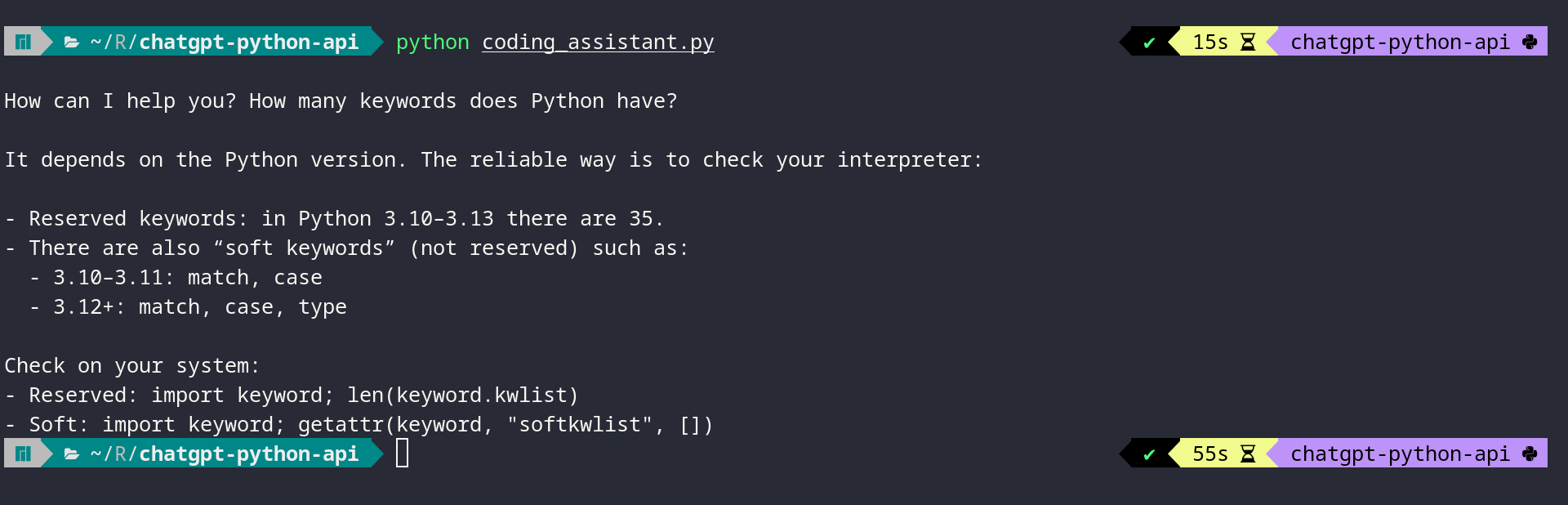 Python Script Output from a ChatGPT API Call Using openai
After reading this tutorial, you’ll understand how examples like this work under the hood. You’ll learn the fundamentals of using the ChatGPT API from Python and have code examples you can adapt for your own projects.
Get Your Code: Click here to download the free sample code that you’ll use to integrate ChatGPT’s API with Python projects.
Take the Quiz: Test your knowledge with our interactive “How to Integrate ChatGPT's API With Python Projects” quiz. You’ll receive a score upon completion to help you track your learning progress:
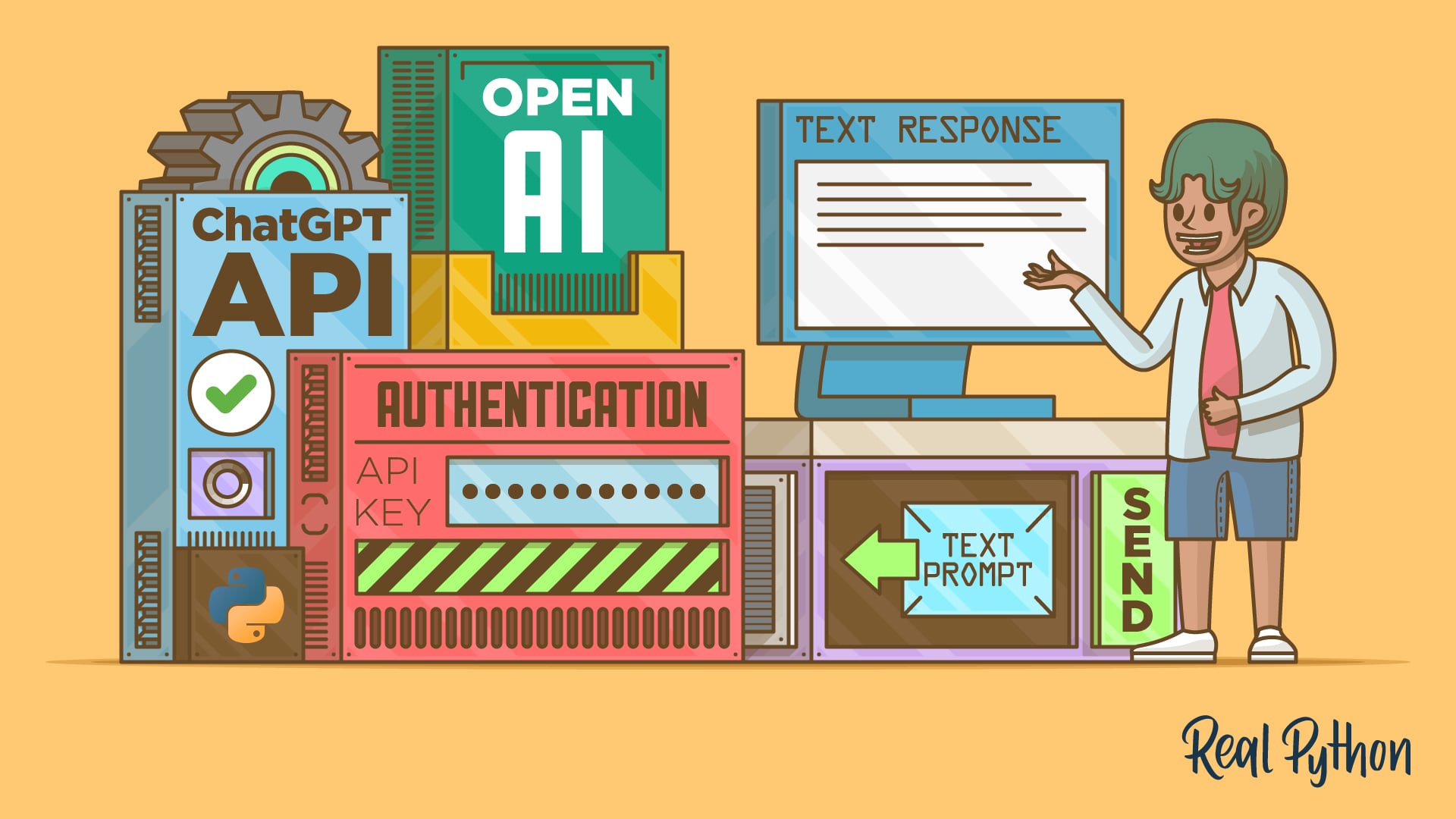
Interactive Quiz
How to Integrate ChatGPT's API With Python ProjectsTest your knowledge of the ChatGPT API in Python. Practice sending prompts with openai and handling text and code responses in this quick quiz.
Prerequisites
To follow along with this tutorial, you’ll need the following:
- Python Knowledge: You should be familiar with Python concepts like functions, executing Python scripts, and Python virtual environments.
- Python Installation: You’ll need Python installed on your system. If you haven’t already, install Python on your machine.
- OpenAI Account: An OpenAI account with API access and available credits is required to use the ChatGPT API. You’ll obtain your API key from the OpenAI platform in Step 1.
Don’t worry if you’re new to working with APIs. This tutorial will guide you through everything you need to know to get started with the ChatGPT API and implement AI features in your applications.
Step 1: Obtain Your API Key and Install the OpenAI Package
Before you can start making calls to the ChatGPT Python API, you need to obtain an API key and install the OpenAI Python library. You’ll start by getting your API key from the OpenAI platform, then install the required package and verify that everything works.
Obtain Your API Key
You can obtain an API key from the OpenAI platform by following these steps:
- Navigate to platform.openai.com and sign in to your account or create a new one if you don’t have an account yet.
- Click on the settings icon in the top-right corner and select API keys from the left-hand menu.
- Click the Create new secret key button to generate a new API key.
- In the dialog that appears, give your key a descriptive name like “Python Tutorial Key” to help you identify it later.
- For the Project field, select your preferred project.
- Under Permissions, select All to give your key full access to the API for development purposes.
- Click Create secret key to generate your API key.
- Copy the generated key immediately, as you won’t be able to see it again after closing the dialog.
Now that you have your API key, you need to store it securely.
Warning: Never hard-code your API key directly in your Python scripts or commit it to version control. Always use environment variables or secure key management services to keep your credentials safe.
The OpenAI Python library automatically looks for an environment variable named OPENAI_API_KEY when creating a client connection. By setting this variable in your terminal session, you’ll authenticate your API requests without exposing your key in your code.
Set the OPENAI_API_KEY environment variable in your terminal session:
PS> $env:OPENAI_API_KEY="your-api-key-here"
$ export OPENAI_API_KEY="your-api-key-here"
Replace your-api-key-here with the actual API key you copied from the OpenAI platform.
Install the OpenAI Package
With your API key configured, you can now install the OpenAI Python library. The openai package is available on the Python Package Index (PyPI), and you can install it with pip.
Open a terminal or command prompt, create a new virtual environment, and then install the library:
Read the full article at https://realpython.com/chatgpt-api-python/ »
[ Improve Your Python With 🐍 Python Tricks 💌 – Get a short & sweet Python Trick delivered to your inbox every couple of days. >> Click here to learn more and see examples ]
Quiz: How to Integrate ChatGPT's API With Python Projects
In this quiz, you’ll test your understanding of How to Integrate ChatGPT’s API With Python Projects.
By working through this quiz, you’ll revisit how to send prompts with the openai library, guide behavior with developer role messages, and handle text and code outputs. You’ll also see how to integrate AI responses into your Python scripts for practical tasks.
[ Improve Your Python With 🐍 Python Tricks 💌 – Get a short & sweet Python Trick delivered to your inbox every couple of days. >> Click here to learn more and see examples ]
Python Bytes
#466 PSF Lands $1.5 million
<strong>Topics covered in this episode:</strong><br> <ul> <li><strong>Better Django management commands with django-click and django-typer</strong></li> <li><strong><a href="https://pyfound.blogspot.com?featured_on=pythonbytes">PSF Lands a $1.5 million sponsorship from Anthropic</a></strong></li> <li><strong><a href="https://nesbitt.io/2025/12/26/how-uv-got-so-fast.html?featured_on=pythonbytes">How uv got so fast</a></strong></li> <li><strong><a href="https://pyview.rocks?featured_on=pythonbytes">PyView Web Framework</a></strong></li> <li><strong>Extras</strong></li> <li><strong>Joke</strong></li> </ul><a href='https://www.youtube.com/watch?v=3jaIv4VvmgY' style='font-weight: bold;'data-umami-event="Livestream-Past" data-umami-event-episode="466">Watch on YouTube</a><br> <p><strong>About the show</strong></p> <p>Sponsored by us! Support our work through:</p> <ul> <li>Our <a href="https://training.talkpython.fm/?featured_on=pythonbytes"><strong>courses at Talk Python Training</strong></a></li> <li><a href="https://courses.pythontest.com/p/the-complete-pytest-course?featured_on=pythonbytes"><strong>The Complete pytest Course</strong></a></li> <li><a href="https://www.patreon.com/pythonbytes"><strong>Patreon Supporters</strong></a></li> </ul> <p><strong>Connect with the hosts</strong></p> <ul> <li>Michael: <a href="https://fosstodon.org/@mkennedy">@mkennedy@fosstodon.org</a> / <a href="https://bsky.app/profile/mkennedy.codes?featured_on=pythonbytes">@mkennedy.codes</a> (bsky)</li> <li>Brian: <a href="https://fosstodon.org/@brianokken">@brianokken@fosstodon.org</a> / <a href="https://bsky.app/profile/brianokken.bsky.social?featured_on=pythonbytes">@brianokken.bsky.social</a></li> <li>Show: <a href="https://fosstodon.org/@pythonbytes">@pythonbytes@fosstodon.org</a> / <a href="https://bsky.app/profile/pythonbytes.fm">@pythonbytes.fm</a> (bsky)</li> </ul> <p>Join us on YouTube at <a href="https://pythonbytes.fm/stream/live"><strong>pythonbytes.fm/live</strong></a> to be part of the audience. Usually <strong>Monday</strong> at 11am PT. Older video versions available there too.</p> <p>Finally, if you want an artisanal, hand-crafted digest of every week of the show notes in email form? Add your name and email to <a href="https://pythonbytes.fm/friends-of-the-show">our friends of the show list</a>, we'll never share it.</p> <p><strong>Brian #1: Better Django management commands with django-click and django-typer</strong></p> <ul> <li>Lacy Henschel</li> <li>Extend Django <a href="https://manage.py?featured_on=pythonbytes"><code>manage.py</code></a> commands for your own project, for things like <ul> <li>data operations</li> <li>API integrations</li> <li>complex data transformations</li> <li>development and debugging</li> </ul></li> <li>Extending is built into Django, but it looks easier, less code, and more fun with either <a href="https://github.com/django-commons/django-click?featured_on=pythonbytes"><code>django-click</code></a> or <a href="https://github.com/django-commons/django-typer?featured_on=pythonbytes"><code>django-typer</code></a>, two projects supported through <a href="https://github.com/django-commons?featured_on=pythonbytes">Django Commons</a></li> </ul> <p><strong>Michael #2: <a href="https://pyfound.blogspot.com?featured_on=pythonbytes">PSF Lands a $1.5 million sponsorship from Anthropic</a></strong></p> <ul> <li>Anthropic is partnering with the Python Software Foundation in a landmark funding commitment to support both security initiatives and the PSF's core work.</li> <li>The funds will enable new automated tools for proactively reviewing all packages uploaded to PyPI, moving beyond the current reactive-only review process.</li> <li>The PSF plans to build a new dataset of known malware for capability analysis</li> <li>The investment will sustain programs like the Developer in Residence initiative, community grants, and infrastructure like PyPI.</li> </ul> <p><strong>Brian #3: <a href="https://nesbitt.io/2025/12/26/how-uv-got-so-fast.html?featured_on=pythonbytes">How uv got so fast</a></strong></p> <ul> <li>Andrew Nesbitt</li> <li>It’s not just be cause “it’s written in Rust”.</li> <li>Recent-ish standards, PEPs 518 (2016), 517 (2017), 621 (2020), and 658 (2022) made many <code>uv</code> design decisions possible</li> <li>And <code>uv</code> drops many backwards compatible decisions kept by <code>pip</code>.</li> <li>Dropping functionality speeds things up. <ul> <li>“Speed comes from elimination. Every code path you don’t have is a code path you don’t wait for.”</li> </ul></li> <li>Some of what uv does could be implemented in pip. Some cannot.</li> <li>Andrew discusses different speedups, why they could be done in Python also, or why they cannot.</li> <li>I read this article out of interest. But it gives me lots of ideas for tools that could be written faster just with Python by making design and support decisions that eliminate whole workflows.</li> </ul> <p><strong>Michael #4: <a href="https://pyview.rocks?featured_on=pythonbytes">PyView Web Framework</a></strong></p> <ul> <li>PyView brings the <a href="https://github.com/phoenixframework/phoenix_live_view?featured_on=pythonbytes">Phoenix LiveView</a> paradigm to Python</li> <li>Recently <a href="https://www.youtube.com/watch?v=g0RDxN71azs">interviewed Larry on Talk Python</a></li> <li>Build dynamic, real-time web applications using server-rendered HTML</li> <li>Check out <a href="https://examples.pyview.rocks?featured_on=pythonbytes">the examples</a>. <ul> <li>See the Maps demo for some real magic</li> </ul></li> <li>How does this possibly work? See the <a href="https://pyview.rocks/core-concepts/liveview-lifecycle/?featured_on=pythonbytes">LiveView Lifecycle</a>.</li> </ul> <p><strong>Extras</strong></p> <p>Brian:</p> <ul> <li><a href="https://upgradedjango.com?featured_on=pythonbytes">Upgrade Django</a>, has a great discussion of how to upgrade version by version and why you might want to do that instead of just jumping ahead to the latest version. And also who might want to save time by leapfrogging <ul> <li>Also has all the versions and dates of release and end of support.</li> </ul></li> <li>The <a href="https://courses.pythontest.com/lean-tdd/?featured_on=pythonbytes">Lean TDD</a> book 1st draft is done. <ul> <li>Now available through both <a href="https://courses.pythontest.com/lean-tdd/?featured_on=pythonbytes">pythontest</a> and <a href="https://leanpub.com/lean-tdd?featured_on=pythonbytes">LeanPub</a> <ul> <li>I set it as 80% done because of future drafts planned.</li> </ul></li> <li>I’m working through a few submitted suggestions. Not much feedback, so the 2nd pass might be fast and mostly my own modifications. It’s possible.</li> <li>I’m re-reading it myself and already am disappointed with page 1 of the introduction. I gotta make it pop more. I’ll work on that.</li> <li>Trying to decide how many suggestions around using AI I should include. <ul> <li>It’s not mentioned in the book yet, but I think I need to incorporate some discussion around it.</li> </ul></li> </ul></li> </ul> <p>Michael:</p> <ul> <li><a href="https://thenewstack.io/python-whats-coming-in-2026/?utm_campaign=trueanthem&utm_medium=social&utm_source=linkedin&featured_on=pythonbytes">Python: What’s Coming in 2026</a></li> <li>Python Bytes rewritten in Quart + async (very similar to <a href="https://talkpython.fm/blog/posts/talk-python-rewritten-in-quart-async-flask/?featured_on=pythonbytes">Talk Python’s journey</a>)</li> <li>Added <a href="https://talkpython.fm/api/mcp/docs?featured_on=pythonbytes">a proper MCP server</a> at Talk Python To Me (you don’t need a formal MCP framework btw) <ul> <li>Example one: <a href="https://blobs.pythonbytes.fm/latest-episodes-mcp.png?cache_id=b76dc6">latest-episodes-mcp.png</a></li> <li>Example two: <a href="https://blobs.pythonbytes.fm/which-episodes-mcp.webp?cache_id=2079d2">which-episodes-mcp.webp</a></li> </ul></li> <li><a href="https://llmstxt.org?featured_on=pythonbytes">Implmented /llms.txt</a> for Talk Python To Me (see <a href="https://talkpython.fm/llms.txt?featured_on=pythonbytes">talkpython.fm/llms.txt</a> )</li> </ul> <p><strong>Joke: <a href="https://www.linkedin.com/feed/update/urn:li:activity:7351943843409248256/?featured_on=pythonbytes">Reverse Superman</a></strong></p>
January 18, 2026
EuroPython
Humans of EuroPython: Doreen Peace Nangira Wanyama
EuroPython thrives thanks to dedicated volunteers who invest hundreds of hours into each conference. From speaker coordination and fundraising to workshop preparation, their commitment ensures every year surpasses the last.
Below is our latest interview with Doreen Peace Nangira Wanyama. Doreen wore many hats at EuroPython 2025, including being the lead organizer of the Django Girls workshop during the Beginners’ Day, helping in the Financial Aid Team, as well as volunteering on-site.
Thank you for contributing to the conference, Doreen!
 Doreen Peace Nangira Wanyama, Django Girls Organizer at EuroPython 2025
EP: What first inspired you to volunteer for EuroPython?
What inspired me was the diversity and inclusivity aspect in the EuroPython community. I had been following the EuroPython community since 2024 and what stood out for me was how inclusive it was. This was open not only to people from the EU but worldwide. I saw people from Africa getting the stage to speak and even the opportunity grants were there for everyone. I told myself wow! I should be part of this community. All I can say I will still choose EuroPython over and over.
EP: What was your primary role as a volunteer, and what did a typical day look like for you?
I had the opportunity to play two main roles. I was the Django Girls organizer and also part of the Financial Aid organizing team. In the Django Girls, I was in charge of putting out the call for coaches and Django Girls mentees. I ensured proper logistics were in place for all attendees and also worked with the communications team to ensure enough social media posts were made about the event. I also worked with coaches to set up the PCs for mentees for the workshop i.e. Django installation.In the Financial Aid Team, I worked with fellow team mates by putting out the call for finaid grants, reviewing applications and sending out acknowledgement emails. We prepared visa letters to accepted grant recipients to help with their visa application. We issued the conference tickets to both accepted online and onsite attendees. After the conference we did reimbursements for each grant recipient and followed up with emails to ensure everyone had been reimbursed.
EP: Did you make any lasting friendships or professional connections through contributing to the conference?
Yes. Contributing to this conference earned me new friends and professional connections. I got to meet and talk to people I would have hardly met out there. First of all, when I attended the conference I thought I would be the only database administrator there, well the EuroPython had a surprise for me. I met a fellow DBA from Germany and we would not stop talking about the importance of Python in our field. I got the opportunity of meeting the DSF president Thibaud Colas for the first time, someone who is down to earth and one who loves giving back to the community.I also got to meet Daria Linhart, a loving soul. Someone who is always ready to help. I remember getting stuck in Czech when I was looking for my accommodation. Daria used her Czech language skills to speak with my host and voila!
EP: How has volunteering at EuroPython impacted your own career or learning journey?
Volunteering at EuroPython made me realize that people can make you go far. Doing it all alone is possible but doing it as a team makes a big difference. Working with different people during this conference and attending talks made me realize the different areas I need to improve on.
EP: What&aposs your favorite memory from contributing at EuroPython?
My favourite memory is the daily social events after the conference. Wow! EuroPython made me explore the Czech Republic to the fullest. From the speakers&apos dinner on the first day to the Django birthday cake we cut, I really had great moments. I also can’t forget the variety of food we were offered. I enjoyed the whole cuisine and can’t wait to experience this again in the next EuroPython.
EP: If you were to invite someone else, what do you think are the top 3 reasons to join the EuroPython organizing team?
A. Freedom of expression — EuroPython is a free and open space. Everyone is allowed to express their views without bias.
B. Learning opportunities — Whether you are a first timer or a seasoned conference organizer, there is always something to learn here. You will learn new ways of doing things.
C. Loving and welcoming community — Want a place that feels like home, EuroPython community is the place.
EP: Thank you, Doreen!
Eli Bendersky
Compiling Scheme to WebAssembly
One of my oldest open-source projects - Bob - has celebrated 15 a couple of months ago. Bob is a suite of implementations of the Scheme programming language in Python, including an interpreter, a compiler and a VM. Back then I was doing some hacking on CPython internals and was very curious about how CPython-like bytecode VMs work; Bob was an experiment to find out, by implementing one from scratch for R5RS Scheme.
Several months later I added a C++ VM to Bob, as an exercise to learn how such VMs are implemented in a low-level language without all the runtime support Python provides; most importantly, without the built-in GC. The C++ VM in Bob implements its own mark-and-sweep GC.
After many quiet years (with just a sprinkling of cosmetic changes, porting to GitHub, updates to Python 3, etc), I felt the itch to work on Bob again just before the holidays. Specifically, I decided to add another compiler to the suite - this one from Scheme directly to WebAssembly.
The goals of this effort were two-fold:
- Experiment with lowering a real, high-level language like Scheme to WebAssembly. Experiments like the recent Let's Build a Compiler compile toy languages that are at the C level (no runtime). Scheme has built-in data structures, lexical closures, garbage collection, etc. It's much more challenging.
- Get some hands-on experience with the WASM GC extension [1]. I have several samples of using WASM GC in the wasm-wat-samples repository, but I really wanted to try it for something "real".
Well, it's done now; here's an updated schematic of the Bob project:
The new part is the rightmost vertical path. A WasmCompiler class lowers parsed Scheme expressions all the way down to WebAssembly text, which can then be compiled to a binary and executed using standard WASM tools [2].
Highlights
The most interesting aspect of this project was working with WASM GC to represent Scheme objects. As long as we properly box/wrap all values in refs, the underlying WASM execution environment will take care of the memory management.
For Bob, here's how some key Scheme objects are represented:
;; PAIR holds the car and cdr of a cons cell.
(type $PAIR (struct (field (mut (ref null eq))) (field (mut (ref null eq)))))
;; BOOL represents a Scheme boolean. zero -> false, nonzero -> true.
(type $BOOL (struct (field i32)))
;; SYMBOL represents a Scheme symbol. It holds an offset in linear memory
;; and the length of the symbol name.
(type $SYMBOL (struct (field i32) (field i32)))
$PAIR is of particular interest, as it may contain arbitrary objects in its fields; (ref null eq) means "a nullable reference to something that has identity". ref.test can be used to check - for a given reference - the run-time type of the value it refers to.
You may wonder - what about numeric values? Here WASM has a trick - the i31 type can be used to represent a reference to an integer, but without actually boxing it (one bit is used to distinguish such an object from a real reference). So we don't need a separate type to hold references to numbers.
Also, the $SYMBOL type looks unusual - how is it represented with two numbers? The key to the mystery is that WASM has no built-in support for strings; they should be implemented manually using offsets to linear memory. The Bob WASM compiler emits the string values of all symbols encountered into linear memory, keeping track of the offset and length of each one; these are the two numbers placed in $SYMBOL. This also allows to fairly easily implement the string interning feature of Scheme; multiple instances of the same symbol will only be allocated once.
Consider this trivial Scheme snippet:
(write '(10 20 foo bar))
The compiler emits the symbols "foo" and "bar" into linear memory as follows [3]:
(data (i32.const 2048) "foo")
(data (i32.const 2051) "bar")
And looking for one of these addresses in the rest of the emitted code, we'll find:
(struct.new $SYMBOL (i32.const 2051) (i32.const 3))
As part of the code for constructing the constant cons list representing the argument to write; address 2051 and length 3: this is the symbol bar.
Speaking of write, implementing this builtin was quite interesting. For compatibility with the other Bob implementations in my repository, write needs to be able to print recursive representations of arbitrary Scheme values, including lists, symbols, etc.
Initially I was reluctant to implement all of this functionality by hand in WASM text, but all alternatives ran into challenges:
- Deferring this to the host is difficult because the host environment has no access to WASM GC references - they are completely opaque.
- Implementing it in another language (maybe C?) and lowering to WASM is also challenging for a similar reason - the other language is unlikely to have a good representation of WASM GC objects.
So I bit the bullet and - with some AI help for the tedious parts - just wrote an implementation of write directly in WASM text; it wasn't really that bad. I import only two functions from the host:
(import "env" "write_char" (func $write_char (param i32)))
(import "env" "write_i32" (func $write_i32 (param i32)))
Though emitting integers directly from WASM isn't hard, I figured this project already has enough code and some host help here would be welcome. For all the rest, only the lowest level write_char is used. For example, here's how booleans are emitted in the canonical Scheme notation (#t and #f):
(func $emit_bool (param $b (ref $BOOL))
    (call $emit (i32.const 35)) ;; '#'
    (if (i32.eqz (struct.get $BOOL 0 (local.get $b)))
        (then (call $emit (i32.const 102))) ;; 'f'
        (else (call $emit (i32.const 116))) ;; 't'
    )
)
Conclusion
This was a really fun project, and I learned quite a bit about realistic code emission to WASM. Feel free to check out the source code of WasmCompiler - it's very well documented. While it's a bit over 1000 LOC in total [4], more than half of that is actually WASM text snippets that implement the builtin types and functions needed by a basic Scheme implementation.
| [1] | The GC proposal is documented here. It was officially added to the WASM spec in Oct 2023. |
| [2] | In Bob this is currently done with bytecodealliance/wasm-tools for the text-to-binary conversion and Node.js for the execution environment, but this can change in the future. I actually wanted to use Python bindings to wasmtime, but these don't appear to support WASM GC yet. |
| [3] | 2048 is just an arbitrary offset the compiler uses as the beginning of the section for symbols in memory. We could also use the multiple memories feature of WASM and dedicate a separate linear memory just for symbols. |
| [4] | To be clear, this is just the WASM compiler class; it uses the Expr representation of Scheme that is created by Bob's parser (and lexer); the code of these other components is shared among all Bob implementations and isn't counted here. |
- Other Python Planets
- Python Libraries
- Python/Web Planets
- Other Languages
- Databases
- Subscriptions
- [OPML feed]
- "Menno's Musings"
- "Michael J.T. O'Kelly"
- "Michael Kennedy's Thoughts on Technology"
- "Morphex's Blogologue"
- "Speno's Pythonic Avocado"
- "William's Journal"
- 2degrees
- A. Jesse Jiryu Davis
- ABlog for Sphinx
- Aahz
- Abhijeet Pal
- Abu Ashraf Masnun
- Adam Pletcher
- Adrarsh Divakaran
- Agendaless Consulting
- Ahmed Bouchefra
- Al-Ahmadgaid Asaad
- Alec Munro
- Alex Grönholm
- Alex Morozov
- Alexander Limi
- Alexandre Conrad
- Alexandre Vassalotti
- Alexey Evseev
- Allison Kaptur
- Amjith Ramanujam
- AmvTek
- Anarcat
- Anatoly Techtonik
- Andre Roberge
- Andrea Grandi
- Andrew Dalke
- Andriy Kornatskyy
- Andy Dustman
- Andy R. Terrel
- Anna Martelli Ravenscroft
- Anthony Baxter
- Anton Belyaev
- Anton Bobrov
- Antonio Cuni
- Anwesha Das
- Ari Lamstein
- Armin Ronacher
- Artem Golubin
- Artem Rys
- Ashish Vidyarthi
- Astro Code School
- Automating OSINT
- Awesome Python Applications
- Baiju Muthukadan
- Bajusz Tamás
- BeDjango
- Ben Bass
- Ben Cook
- Ben Rousch
- Benjamin Peterson
- Benji York
- Bertrand Mathieu
- Bhavin Gandhi
- Bhishan Bhandari
- BioPython News
- Bit of Cheese
- Bojan Mihelac
- Brandon Rhodes
- BreadcrumbsCollector
- Brendan Scott
- Brett Cannon
- Brian Okken
- Bruno Oliveira
- Bruno Ponne / Coding The Past
- Bruno Rocha
- Caktus Consulting Group
- Calvin Cheng
- Calvin Spealman
- Carl Chenet
- Carl Düvel
- Carl Trachte
- Carlos Eduardo de Paula
- Casey Duncan
- Catherine Devlin
- Ching-Hwa Yu
- Chris Hager
- Chris Miles
- Chris Mitchell
- Chris Moffitt
- Chris Rose
- Chris Warrick
- Christian Heimes
- Christian Ledermann
- Christian Scholz
- Christoph Schiessl
- Christoph Zwerschke
- CodeGrades
- CodeSnipers
- CodersLegacy
- Coding Diet
- Corey Gallon
- Corey Goldberg
- Cormoran Project
- Cross-Platform Command Line Tools
- CubicWeb
- Curtis Miller
- DSPIllustrations.com
- DaPythonista
- Daily Tech Video (Python)
- Dallas Fort Worth Pythoneers
- Dan Crosta
- Dan Stromberg
- Dan Yeaw
- Daniel Bader
- Daniel Nouri
- Daniel Roy Greenfeld
- Data Community DC
- Data School
- DataWars.io
- Dave Beazley
- David Amos
- David Caron
- David Goodger
- David Lindelof
- David MacIver
- David Malcolm
- David Szotten
- Davide Moro
- Davy Mitchell
- Davy Wybiral
- Declassed Art
- Denis Kurov
- Django Weblog
- Djangostars
- Doing Math with Python
- Doug Hellmann
- Dougal Matthews
- Duncan McGreggor
- Ed Crewe
- Edward K. Ream
- Eli Bendersky
- Eniram Ltd.
- Eray Özkural (examachine)
- Erik Marsja
- Etienne Desautels
- EuroPython
- EuroPython Society
- Evennia
- Everyday Superpowers
- Fabio Zadrozny
- Filip Wasilewski
- Filipe Saraiva
- First Institute of Reliable Software
- Flavio Coelho
- Flavio Percoco
- Floris Bruynooghe
- Frank Wierzbicki
- François Dion
- François Marier
- Frederik Rietdijk
- From Python Import Podcast
- Full Stack Python
- Gaël Varoquaux
- Georges Dubus
- Ghaandee on IT
- Giampaolo Rodola
- Giulio Fidente
- Glenn Franxman
- Glyph Lefkowitz
- Go Deh
- Gocept Weblog
- Godson Gera
- Graeme Cross
- Graham Dumpleton
- Graham Wheeler
- Grant Baillie
- Grant Rettke
- Greg Taylor
- Grig Gheorghiu
- Grzegorz Śliwiński
- Guido van Rossum
- Gustavo Narea
- Gustavo Niemeyer
- Gökhan Sever
- Hernan Grecco
- Hilary Mason
- Holger Krekel
- Holger Peters
- HoloViz
- Hugo van Kemenade
- Humberto Rocha
- Hynek Schlawack
- Ian Ozsvald
- Ilian Iliev
- Import Python
- Inspired Python
- Ionel Cristian Maries
- IronPython-URLs
- IslandT
- Israel Fruchter
- Itamar Turner Trauring
- Ivan Velichko
- J. Pablo Fernández
- Jack Diederich
- Jacob Perkins
- Jahongir Rahmonov
- Jaime Buelta
- Jamal Moir
- James Bennett
- Janusworx
- Jarrod Millman
- Jean-Paul Calderone
- Jeff Bisbee
- Jeff Bradberry
- Jeff Hinrichs
- Jeff Shell
- Jeremy Epstein
- Jeremy Hylton
- Jim Fulton
- Joe Abbate
- Joe Pitz
- Johan Dahlin
- John Burns
- John Cook
- John Jacobsen
- John Ludhi/nbshare.io
- Jon Parise
- Jonathan Ellis
- Jonathan Harrington
- Jonathan Hartley
- Jonathan Street
- Jorgen Schäfer
- Juan Manuel Contreras
- Julien Danjou
- Julien Tayon
- Juri Pakaste
- Just a little Python
- Justin Mayer
- Kai Lautaportti
- Karim Elghamrawy
- Kay Hayen
- Kay Schluehr
- Kelly Yancey
- Kevin Renskers
- Kodnito
- Kogan Dev
- Konrad Delong
- Koodaamo
- Kristján Valur Jónsson
- Kriti Godey
- Kulbir Saini
- Kumar McMillan
- Kumar Vipin Yadav
- Kushal Das
- Károly Nagy
- LAAC Technology
- Laurent Szyster
- Leigh Honeywell
- Lennart Regebro
- Leonhard Vogt
- Lintel Technologies
- Linux Stans
- ListenData
- Logilab
- Low Kian Seong
- Luca Botti
- Lucas Cimon
- Ludovic Gasc
- Ludvig Ericson
- Luke Plant
- Maciej Fijalkowsk
- Made With Mu
- Mahmoud Hashemi
- Malthe Borch
- Marc Richter
- Marc-André Lemburg
- Marcos Dione
- Mariatta
- Marius Gedminas
- Mark Dufour
- Mark McLoughlin
- Mark McMahon
- Martijn Pieters
- Martin Fitzpatrick
- Mats Kindahl
- Matt Layman
- Matthew Rocklin
- Matthew Rollings
- Matthew Wilson
- Matthew Wright
- Mattias Brändström
- Mauveweb
- Michael Becker
- Michael Droettboom
- Michael Foord
- Michael Nelson
- Michal Kwiatkowski
- Michał Bultrowicz
- Michele Simionato
- Michy Alice
- Mike C. Fletcher
- Mike Driscoll
- Mike Müller
- Mikhail Korobov
- Mikko Ohtamaa
- Mirek Długosz
- Mitchell Garnaat
- Mitya Sirenef
- Montreal Python User Group
- Moshe Zadka
- Moya Project
- Mozilla Web Development
- Muharem Hrnjadovic
- Mycli
- Nadav Samet
- Naomi Ceder
- Natan Zabkar
- Ned Batchelder
- Neil Schemenauer
- Nick Coghlan
- Nick Craig-Wood
- Nick Efford
- Nick Janetakis
- Nicola Iarocci
- Nicolas Dumazet
- Nicolas Paris
- Nigel Babu
- Nikola
- Nikolaos Diamantis
- Not Invented Here
- Nsukami Patrick
- Obey the Testing Goat
- Ofosos
- Omaha Python Users Group
- Ondřej Čertík
- Paolo Melchiorre
- Pathwright
- Patrice Neff
- Patrick Altman
- Patrick Kennedy
- Patrick Müller
- Paul Everitt
- Paul Harrison
- Paul Redman
- Paweł Fertyk
- Pedro Lima
- Peter Bengtsson
- Peter Eisentraut
- Peter Fankhänel
- Peter Harkins
- Peter Hoffmann
- Phil Hassey
- Philip Jenvey
- Philipp von Weitershausen
- Philippe Normand
- Phillip J. Eby
- Podcast.__init__
- Polyglot.Ninja()
- Possbility and Probability
- Pradeep Gowda
- Pranav Pandey
- Praveen Gollakota
- Programiz
- Programming Ideas With Jake
- Przemysław Kołodziejczyk
- PyATL Bytecode
- PyBites
- PyCharm
- PyCoder’s Weekly
- PyCon
- PyPodcats
- PyPy
- PyTennessee
- Python 4 Kids
- Python 411 Podcast
- Python Advocacy
- Python Anywhere
- Python Bytes
- Python Celery - Weekly Celery Tutorials and How-tos
- Python Circle
- Python Data
- Python Diary
- Python Docs Editorial Board
- Python Does What?!
- Python Engineering at Microsoft
- Python GUIs
- Python Insider
- Python Morsels
- Python People
- Python Piedmont Triad User Group
- Python Pool
- Python Software Foundation
- Python Sweetness
- Python User Groups
- Python for Beginners
- Python on Karan
- Python with Myo
- Python(x,y) News
- PythonClub - A Brazilian collaborative blog about Python
- PythonDebugging.com
- Pythonicity
- Pythonology
- Python⇒Speed
- Péter Szabó
- Péter Zsoldos
- Quansight Labs Blog
- R David Murray
- RMOTR
- Ralph Bean
- Ram Rachum
- Randell Benavidez
- Randle Taylor
- Randy Zwitch
- Raymond Hettinger
- Read the Docs
- Real Python
- Red Hat Developers
- Rene Dudfield
- Reuven Lerner
- Richard Tew
- Richard Wall
- Rickard Lindberg
- Rishi Maker
- Rob Galanakis
- Robert Collins
- Robert Zaremba
- Robin Parmar
- Robin Wilson
- Rodrigo Araúj
- Rodrigo Girão Serrão
- RoseHosting Blog
- Ruslan Spivak
- Ryan Cox
- S. Lott
- S. R. Krishnan
- SDJournal
- SPE Weblog
- STX Next
- Salim Fadhley
- Sandipan Dey
- Sandro Tosi
- Sean McGrath
- Sebastian Pölsterl
- Sebastian Witowski
- Selena Deckelmann
- Senthil Kumaran
- Seth Michael Larson
- Shannon -jj Behrens
- ShiningPanda
- Simeon Franklin
- Simeon Visser
- Simon
- Simon Brunning
- Simon Wittber
- Simple is Better Than Complex
- SoftFormance
- Speed Matters
- Spike ekipS
- Spyder IDE
- Stack Abuse
- Stanislas Morbieu
- Starzel.de
- Stefan Behnel
- Stefan Scherfke
- Stefanie Molin
- Stein Magnus Jodal
- Stephen Ferg
- Steve Holden
- Steven Klass
- Stuart Gordon Reid
- Stéphane Wirtel
- Sumana Harihareswara - Cogito, Ergo Sumana
- Suresh Dasari/Tutlane.com
- Swisscom ICT
- Talk Python Blog
- Talk Python to Me
- Taylor Edmiston
- TechBeamers Python
- Techiediaries - Django
- Terri Oda
- Terry Jones
- Test and Code
- TestDriven.io
- The Data Scientist
- The Digital Cat
- The Lunar Cowboy
- The No Title® Tech Blog
- The Occasional Occurrence
- The Open Sourcerer
- The Parcon Blog
- The Python Coding Blog
- The Python Coding Stack
- The Python Papers
- The Python Show
- The Three of Wands
- Thibauld Nion
- ThisHosting.Rocks
- Thomas Guest
- Thomas Vander Stichele
- Tibo Beijen
- Tim Arnold / reachtim
- Tim Gilbert
- Tim Knapp
- Tim Lesher
- Tobias Ivarsson
- Tom Christie
- Tomasz Ducin
- Tomaž Muraus
- Tomer Filiba
- Tony Breyal
- Toshio Kuratomi
- Travis Oliphant
- Trey Hunner
- Tryton News
- Turnkey Linux
- Twisted Matrix Labs
- TypeThePipe
- V.S. Babu
- Varun Nischal
- Vasudev Ram
- Vinay Sajip
- Vinay Sajip (Logging)
- Vinayak Mehta
- Virgil Dupras
- Vladimir Perić
- Wayne Witzel
- Weekly Python Chat
- Weekly Python StackOverflow Report
- Wes Mason
- Wesley Chun
- Will Kahn-Greene
- Will McGugan
- Will Pierce
- William Minchin
- William Reade
- Wing Tips
- Wingware
- Wyatt Baldwin
- Yaniv Aknin
- Yann Larrivée
- Yuval Greenfield
- Zaki Akhmad
- Zato Blog
- Zero to Mastery
- Zero-with-Dot (Oleg Żero)
- ZeroDB
- bottlepy-dev
- codeboje
- death and gravity
- eGenix.com
- hypothesis.works articles
- kdev-python
- meejah.ca
- nl-project
- pgcli
- py.CheckIO
- pygame
- pythonwise
- qutebrowser development blog
- saaj/recollection
- scikit-learn
- testmon
- tryexceptpass
- Éric Araujo
- Łukasz Langa
- To request addition or removal, open a PR or issue