Concurrency Problems in Java
Last Updated :
11 Oct, 2025
In Java, concurrency enables multiple threads to execute simultaneously, thereby enhancing performance and efficiency. However, improper handling of shared resources can cause serious issues in program behavior.
 Concurrency-Problem
Common Concurrency Problems
1. Race Condition
A race condition occurs when two or more threads access shared data simultaneously, and the outcome depends on the order in which the threads execute.
Java
class Counter {
    int count = 0;
    void increment() {
        count++; // Not atomic: multiple threads may interfere
    }
}
public class GFG {
    public static void main(String[] args) throws InterruptedException {
        Counter c = new Counter();
        // Thread 1 increments count 1000 times
        Thread t1 = new Thread(() ->{
            for (int i = 0; i < 1000; i++) c.increment();
        });
        // Thread 2 increments count 1000 times
        Thread t2 = new Thread(() ->{
            for (int i = 0; i < 1000; i++) c.increment();
        });

        // Start thread 1
        t1.start();

        // Start thread 2
        t2.start();

        // Wait for thread 1 to finish
        t1.join();

        // Wait for thread 2 to finish
        t2.join();

        // May be < 2000 due to race condition
        System.out.println("Final Count: " + c.count);
    }
}
Explanation:
- Both threads increment the shared count variable concurrently.
- Since count++ is not atomic, intermediate updates can be lost, resulting in an incorrect final value.
Solution: Use synchronized blocks or AtomicInteger to ensure thread-safe updates.
Java
// Using AtomicInteger
import java.util.concurrent.atomic.AtomicInteger;
class Counter{

    AtomicInteger count = new AtomicInteger(0);
    void increment(){
        count.getAndIncrement();
    }
}
2. Deadlock
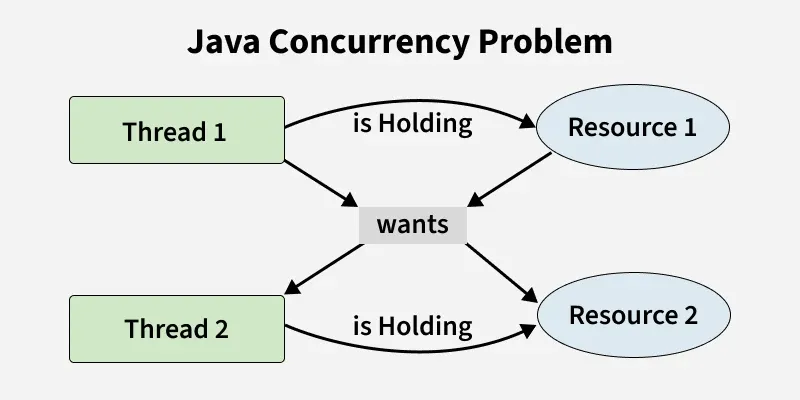
A deadlock occurs when two or more threads are waiting for each other to release resources, causing all of them to be stuck forever.
Java
class GFG {
    private final Object lock1 = new Object();
    private final Object lock2 = new Object();
    public void methodA(){

        // Acquire lock1
        synchronized (lock1) {
            System.out.println("Thread 1: Holding lock 1");

            // Waits for lock2
            synchronized (lock2) {
                System.out.println("Thread 1: Holding lock 2");
            }
        }
    }
    public void methodB(){

        // Acquire lock2
        synchronized (lock2){
            System.out.println("Thread 2: Holding lock 2");
            // Waits for lock1
            synchronized (lock1){
                System.out.println("Thread 2: Holding lock 1");
            }
        }
    }
    public static void main(String[] args) {
        GFG example = new GFG();
        new Thread(example::methodA).start();
        new Thread(example::methodB).start();
    }
}
OutputThread 1: Holding lock 1
Thread 1: Holding lock 2
Thread 2: Holding lock 2
Thread 2: Holding lock 1
Explanation:
- Thread 1 acquires lock1 and waits for lock2.
- Thread 2 acquires lock2 and waits for lock1.
- Both threads are stuck, creating a deadlock.
Solution: Always get the locks in the same order in every thread. This way, threads won’t block each other.
Visibility Problem
This occurs when one thread modifies a variable, but other threads do not see the updated value due to caching or lack of synchronization.
Java
class GFG {

    // Thread-unsafe
    private boolean running = true;
    void start() {
        new Thread(() -> {
            while (running) {}
            System.out.println("Stopped!");
        }).start();
    }
    // Change may not be visible to other thread
    void stop() {
        running = false;
    }
    public static void main(String[] args) throws InterruptedException {
        GFG t = new GFG();
        t.start();

        // Short pause before stopping
        Thread.sleep(100);

        // Thread may not see this without volatile
        t.stop();
    }
}
Output: Time limit exceeded.
Explanation:
- Thread may cache the running variable, so changes made by stop() may not be immediately visible.
- This can cause the loop to never terminate.
Solution: Use volatile keyword to ensure visibility:
private volatile boolean running = true;
This ensures that changes to running are immediately visible to all threads.
Starvation
Starvation occurs when a thread never gets CPU time or access to a resource because other high-priority threads keep executing.
Java
class GFG{
    public static void main(String[] args){

        Runnable lowPriorityTask = () -> {
            while (true) {
                System.out.println("Low priority thread running...");
            }
        };
        Runnable highPriorityTask = () -> {
            while (true) {
                System.out.println("High priority thread running...");
            }
        };
        Thread low = new Thread(lowPriorityTask);
        Thread high = new Thread(highPriorityTask);
        low.setPriority(Thread.MIN_PRIORITY);
        high.setPriority(Thread.MAX_PRIORITY);
        low.start();
        high.start();
    }
}
Explanation:
- High-priority thread consumes CPU aggressively.
- Low-priority thread may get little or no execution time, leading to starvation.
Solution: Use fair locks or proper thread scheduling mechanisms to prevent starvation.


