


| CARVIEW |

The Essential C/C++ Tool to Boost Quality and Strengthen Safety.
Validate your code against trusted industry standards like MISRA, CERT, and AUTOSAR. Catch bugs, prevent vulnerabilities, and enforce best practices.


- NEW!Almost all MISRA 2023 rules are now supported!. Check out CppDepend 2025.1
- Compatibility with C++23, C++20, C++17, C++14, C++11, C++98, C, Embedded C, and CUDA.
- Seamless integration with Visual Studio 2022, 2019, 2017, 2015, 2013, 2012 and 2010
- Supports prevalent coding standards including MISRA C++, MISRA C, AUTOSAR, CERT C++, CERT C, CWE.
- Offers DevOps integration with leading DevOps platforms.
What can you expect when you choose CppDepend?
Code Quality Insights
CppDepend's static analysis engine identifies potential issues, security risks, and areas for improvement. Enhance code efficiency and prevent unexpected bugs.
Unparalleled Visualizations
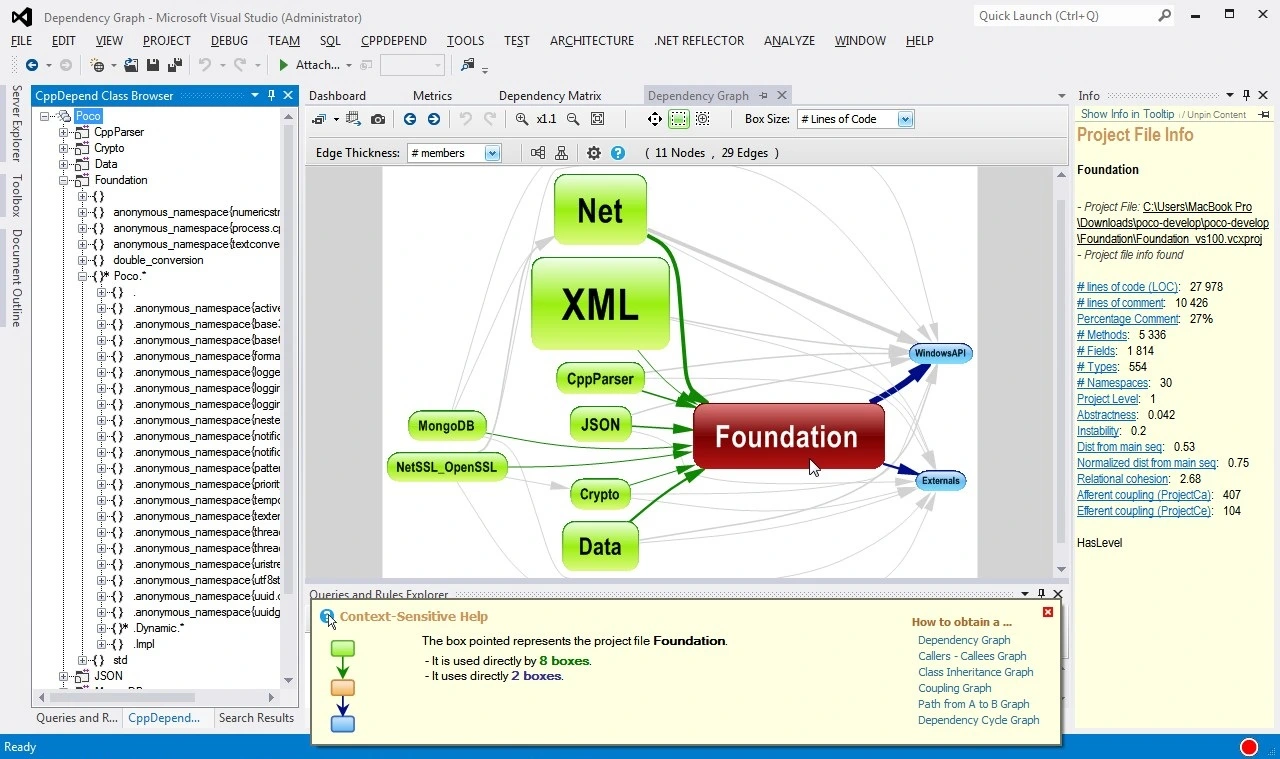
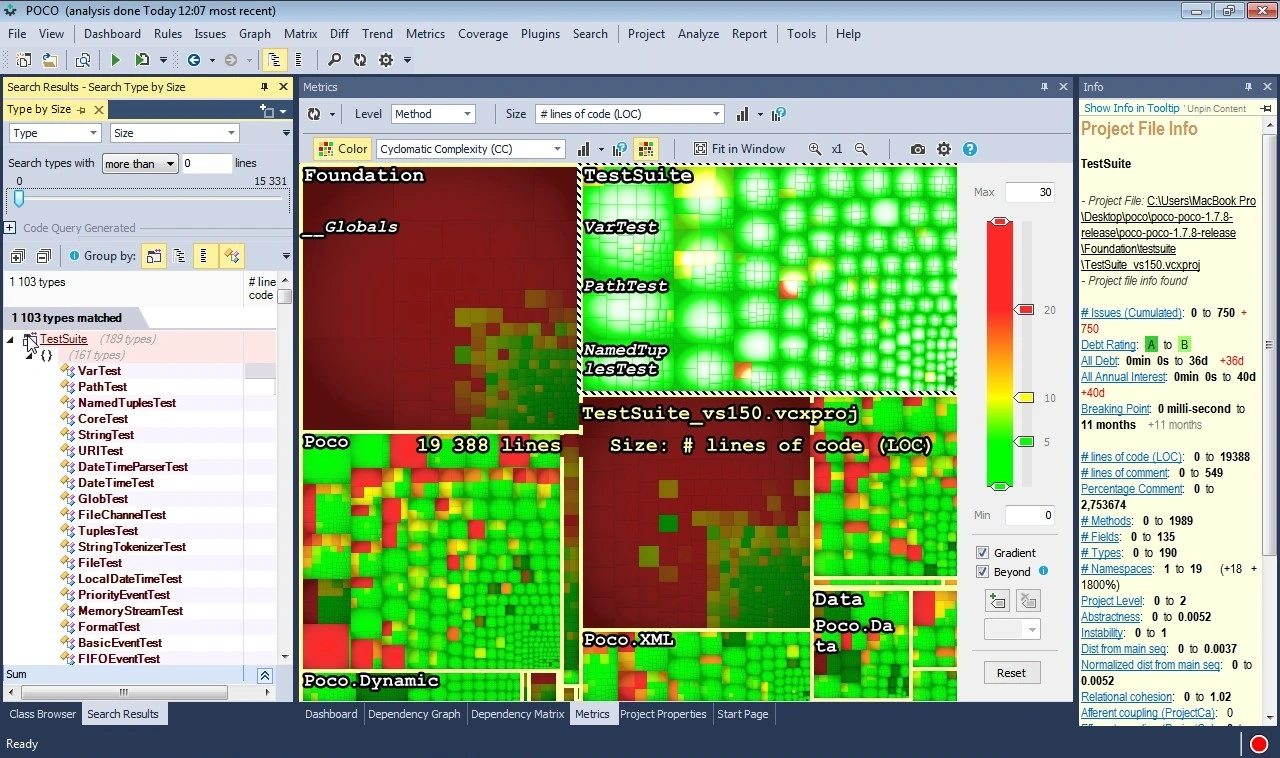
CppDepend's innovative visual representations simplify code navigation and provide insights into dependencies and component relationships. Improve your project's architecture with ease.
Customizable Metrics
With over 60 built-in metrics and custom queries using CQLinq, CppDepend allows tailored code evaluation. Achieve complete control over code analysis for maximum efficiency.
Refactoring Assistance
CppDepend's intelligent suggestions guide you through refactoring for increased maintainability and performance. Improve your codebase with expert guidance.
Seamless Integration
CppDepend effortlessly integrates with popular build systems, continuous integration tools, and IDEs. Ensure a smooth transition and maintain your existing development workflow.
Expert Support
Receive top-notch assistance from dedicated professionals for technical queries and best practices. Your success is prioritized with CppDepend's support team.
They love CppDepend
CppDepend is a great tool which helps to improve code quality. With better code, product is more stable and easier to maintain. New version improved quite a bit and it shows impact of code changes on quality. Which means that CppDepend is guiding programmer to code better.New feature of calculating code debt is also very interesting because it points out how much resources are wasted while maintaining product due breaking different rules.It is also great to see that use of CppDepend is not visually affecting performance of development environment, like some other tools do. CppDepend should be must have tool for every developer.
Zlatko Waiss
The analysis of my concurrency source files impressed me. I will, therefore, invest in the future more time to better understand the various metrics of CppDepend and apply them to my other source files. My gut feeling is that I can draw many benefits from CppDepend.
Rainer Grimm
We use the CppDepend to analyze the source every day. and Publish the results to the Local Web. It is also linked to Sonarqube using an additional Sonarqube plugin. CppDepend is used as the final verification of the source code. And it has helped a lot.
SungBum Shin
The ability to write own queries in CQLinq and get immediately the result presented is outstanding and make it for me the best tool for analyzing static C++ code. In general I like the continuous way of improving the product over the years by adding support for test coverage and CI stuff like sonar or jenkins. Additionally I would thank your support team, which is always very helpful and responsive.
Martin Blatt
It was a great opportunity for our young students to quickly revise best practices, learn about common mistakes and improve their codebase. It also allowed them to argue for certain aspects of quality assurance in their code for the course.
Francisco Lopez Luro
In general we are happy with the functionality of CppDepend. I like especially the possibility to use the product on Windows and Linux.
Alex Darby
Using CppDepend is like climbing an observation tower and look at the work you have done in the excavation of your project and you will find astonishing details you never thought about just by changing your point of view.
Martin Richter
See how professionals use CppDepend
 Hexagon Case Study
Hexagon uses CppDepend to identify the relationships that could be improved as well as understand the scope of modularization. CppDepend does a fantastic job showing where they can use more modern code patterns and solutions.
See Case Study ETAS GmbH Case Study
ETAS GmbH uses CppDepend to track mainly the dependencies between their modules to be aware if there are forbidden dependencies introduced by code changes.
See Case StudyCppDepend at a Glance

Your ultimate tool for superior C and C++ code quality. Dive into a realm where code quality and efficiency converge.

Enhanced dashboards in the CppDepend UI, Visual Studio and generated reports now offer technical debt estimates, quality gates, rules, and issue data. Progression indicators since the baseline are displayed using red and green colors to highlight improvements or regressions. Clicking on any value generates a query, providing a detailed view of corresponding data such as code elements, debt estimations, quality gates, rules, or issues, allowing for a comprehensive understanding of your C and C++ codebases.
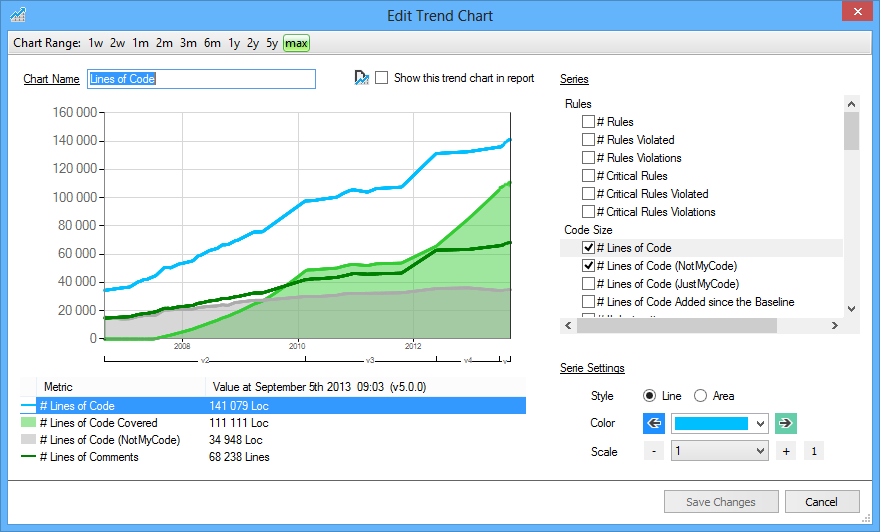
CppDepend's dashboard showcases trend charts that offer valuable insights into your C and C++ codebases. By default, these charts display:
- Lines of Code growth
- Number of Code Rules Violated and count of Code Rules Violations
- Test-driven Code Coverage
- Maximum and Average values for key Code Quality Metrics
- Third-Party Usage trends
These visualizations enable a deeper understanding of your code's evolution and quality over time.
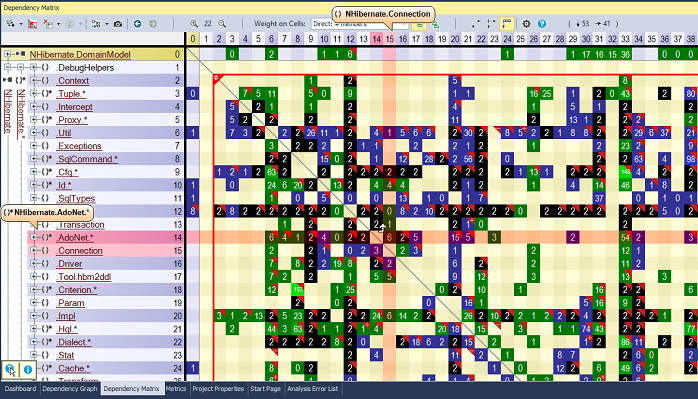
CppDepend's Dependency Structure Matrix (DSM) offers a plethora of exploration options, including the ability to:
- Drill down into dependencies by opening parent columns/rows and expanding cells,
- Handle both squared symmetric DSM and rectangular non-symmetric DSM,
- Bind rows and columns for a constantly squared symmetric matrix,
- Utilize the Indirect Usage option, where cells display both direct and indirect usage,
- Include third-party code elements in rows.
These robust features enable efficient and insightful analysis of dependencies in C and C++ codebases.
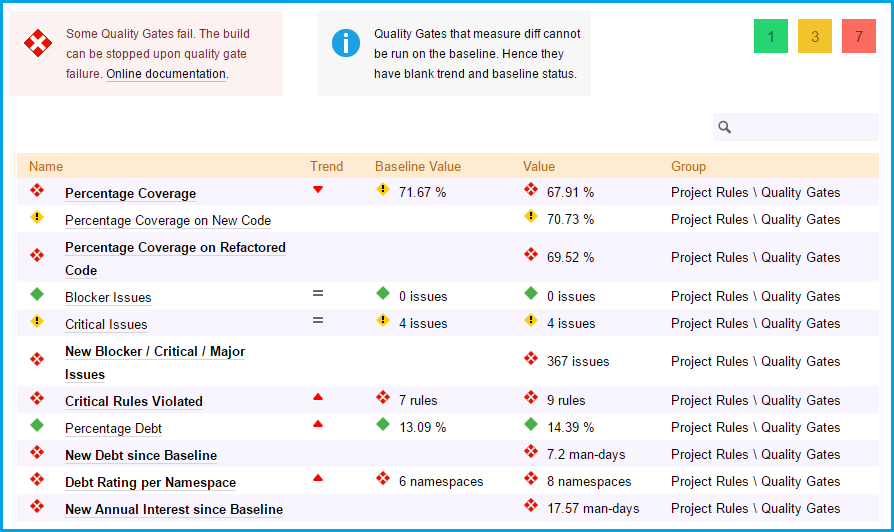
In software development, a Quality Gate serves as a checkpoint that ensures critical code quality standards are met before releasing or committing to source control. It acts as a PASS/FAIL criterion for software quality.
CppDepend provides over a dozen default Quality Gates that evaluate factors such as technical debt, code coverage, and issue severity. Quality Gate status is indicated using distinct red/yellow/green lozenge icons, denoting fail, warning, or pass, respectively.
Using these Quality Gates, developers can ensure that their C and C++ codebases adhere to high standards and maintain optimal quality.
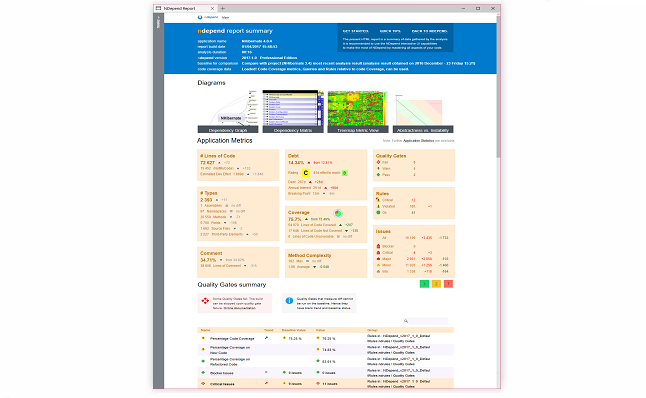
With CppDepend's powerful command-line tool, CppDependConsole, you can analyze your C and C++ projects' source code and generate detailed reports on their development status. Reports can be customized to display specific sections, and users can provide their own XSL sheet for complete customization.
Moreover, developers can build their own set of CQLinq constraints that are checked during each analysis. The report will issue a warning each time a constraint is violated, enabling automatic design and quality regression testing.
This feature empowers developers to maintain high standards of quality and design for their C and C++ codebases while automating the regression testing process.
- Code maintainability improves. This positively impacts the productivity of development teams.
- Over time, developers get educated about rules to follow and their skills improve.
- Architects can anticipate the impact of code changes. The right decisions are taken early.
- Since quality is checked automatically and continuously with a strong focus on recent changes, both in Visual Studio and in the DevOps, the team builds better code.
- Executives gain control over costs and risks thanks to light being shed on development facts and trends that matter most.
CppDepend is the only Visual Studio extension that is able to tell the developer that over the past hour, the code just written has introduced debt that would cost for example about 30 minutes should it have to be repaid later. Knowing this, the developer can fix the code before even committing it to the source control.
With CppDepend code rules are C# LINQ queries that can be created and customized in a matter of seconds. These queries contain C# formulas to compute accurate technical debt estimations.
The default rule-set offers over a hundred code rules that detect a wide range of code smells including entangled code, dead-code, API breaking changes and bad OOP usage.
As a static analyzer, CppDepend will likely find hundreds or even thousands of issues affecting a real-world code base. Stopping work to attempt to fix all issues for weeks would be quite unproductive.
This is why CppDepend is the only tool that offers a baseline in Visual Studio. The tool estimates the Technical Debt progress since the baseline.
Recent code smells that should be fixed before committing any code to source control are highlighted in Visual Studio. They can then be fixed even before reaching the source server.
As a consequence the Code Quality remains under control with no major upfront investment.
Master your C and C++ code quality Today!

CppDepend offers a wide range of features. It is often described as a Swiss Army Knife for C and C++ developers.
2009 - 2024 © All Rights Reserved. CoderGears / CppDepend