


| CARVIEW |
WriteFreely for iOS has been updated with a couple of fixes:
Fixed
- Fixed a bug that would close the active post when you’d leave and come back to the app.
- Improved compatibility with the upcoming iOS 18 launch.
Download it on the App Store now, and leave a review if you’re enjoying the app!
WriteFreely for iOS is open-source. Want to contribute? Check it out on GitHub!
Enter your email to subscribe to updates:
You can also subscribe via RSS or follow @angelo@write.as on Mastodon.
WriteFreely for iOS has been updated with a couple of fixes:
Fixed
- Improved the offline experience to let you know when you're not connected to a network (no more inscrutable
WFError -2messages)! - Fixed the navigation experience with iOS 17.
Download it on the App Store now, and leave a review if you’re enjoying the app!
Enter your email to subscribe to updates:
You can also subscribe via RSS or follow @angelo@write.as on Mastodon.
During the month of October this year, the WriteFreely Swift repositories will be accepting pull requests that count towards your contributions for the month-long event.
What's WriteFreely?
WriteFreely is the open source platform for building a writing space on the web. It powers over 500,000 blogs on Write.as, requires few resources to run, and publishes to the Fediverse.
What Are The WriteFreely Swift Repositories?
There are two repositories that make up the WriteFreely iOS and macOS app:
- The writefreely-swift repository is the source for the Swift package that wraps the WriteFreely API for fetching and publishing posts to your WriteFreely instance (including Write.as).
- The writefreely-swiftui-multiplatform repository is the source for the iOS/iPadOS, and macOS client app. It's a SwiftUI multiplatform app, and so there's a lot of code shared between the various platforms, but we dip into UIKit and AppKit where necessary.
How to Participate
- Register between September 26 and October 31 on the Hacktoberfest website.
- Check out the writefreely-swift and writefreely-swiftui-multiplatform repositories and review their Code of Conduct and Contributing docs in the root folder.
- Look for issues tagged
#hacktoberfestand claim one by assigning it to yourself. - Open a PR and request a review from
@writefreely/swift-maintainers.
If your PR meets the criteria set out by the organizers, it'll be merged in to the repo.
We've set up pen.writefree.ly as a demo site for testing. Happy coding!
Enter your email to subscribe to updates:
You can also subscribe via RSS or follow @angelo@write.as on Mastodon.
WriteFreely for iOS has been updated with a couple of new features and a bugfix:
Added
- Added a way to search for text across all posts.
- Added a way to refresh an edited post from the server copy.
Changed
- The app now reverts a post from edited to published status if you undo your changes.
Fixed
- Fixed a bug where posts moved from one blog to another on a different client didn't update in the app.
Download it on the App Store now, and leave a review if you’re enjoying the app!
Enter your email to subscribe to updates:
You can also subscribe via RSS or follow @angelo@write.as on Mastodon.
Enter your email to subscribe to updates:
You can also subscribe via RSS or follow @angelo@write.as on Mastodon.
We pushed an emergency update to the App Store to work around this, while I work on the fix.
Enter your email to subscribe to updates:
You can also subscribe via RSS or follow @angelo@write.as on Mastodon.
Turns out, things were… mostly fine! One bug involved a missing new-post button, which has been resolved. With that, WriteFreely v1.0.11 is ready for iOS 16!
Download the update now on the App Store.
Enter your email to subscribe to updates:
You can also subscribe via RSS or follow @angelo@write.as on Mastodon.
One thing I love to do with the app is write up quick little notes on my iPhone as “titleless” micro-blog posts. These get posted to one of my Write.as blogs, and are then syndicated to various social networks. Posts like this are great for sharing a quick thought, or a snippet from a web page.
Doing the latter, though, is a bit annoying — it involves several round trips between WriteFreely and Safari, copying and pasting bits of information (the URL, the page title, and any selection of text) between the two apps, one at a time. Like an animal.
With version 1.0.8 —now available on the App Store— we've added an action extension for Safari that makes this task much easier.
How It Works
Essentially, iOS exposes an extension system that developers can use to extend their apps: this includes things like home-screen widgets, Siri shortcuts, and action extensions.
The action extension is a bit special, in that it lets users interact with one app from another app (typically via the Share button). In the case of the WriteFreely for iOS extension, Safari's Share menu gets a new entry:
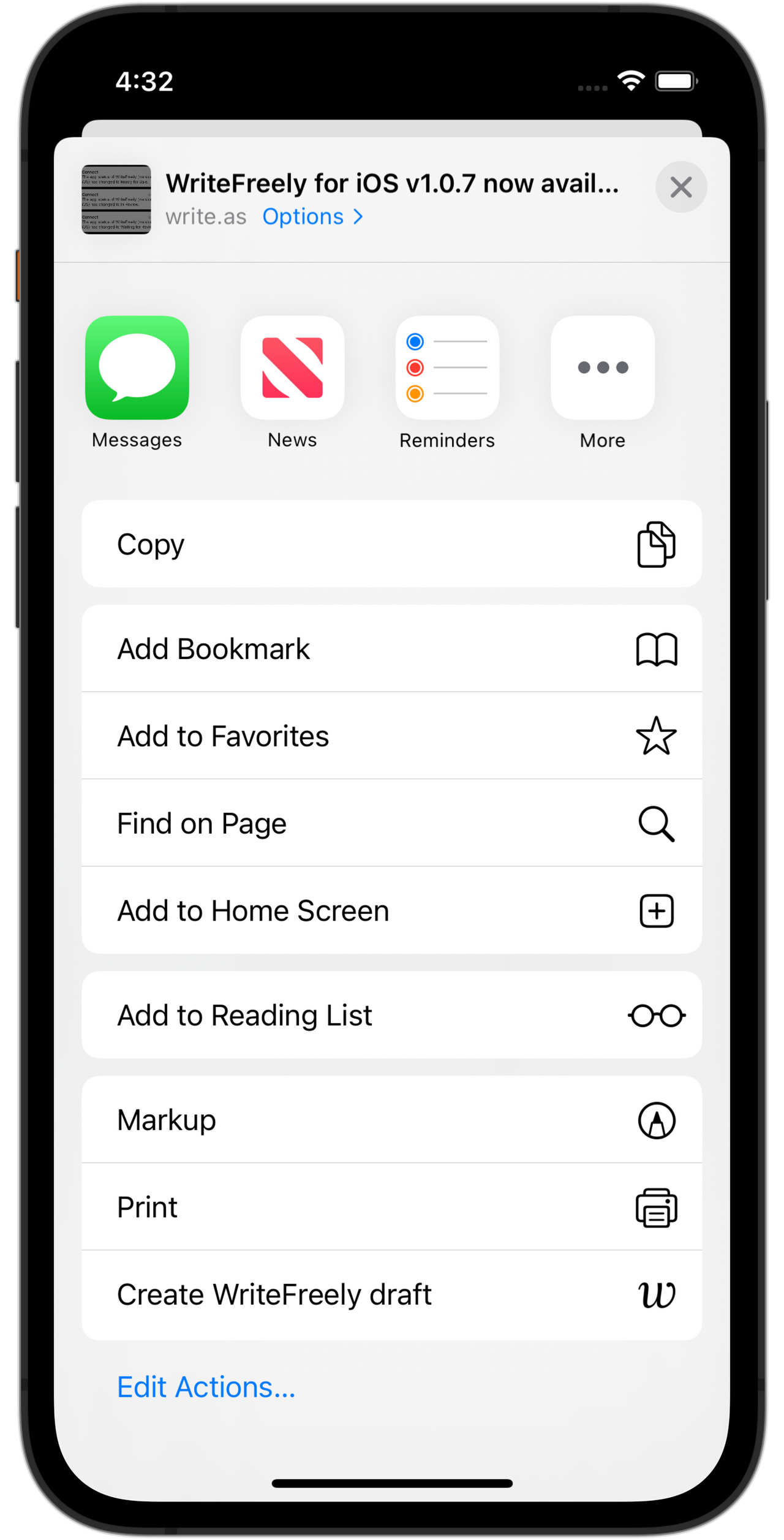
Tapping the “Create WriteFreely draft” option in the menu brings up the extension's user interface, which lets you create a note and save it as a local draft for a particular blog in your WriteFreely/Write.as account:

The Title field is optional; if you want to create a new draft with a title, enter it here. If not, leave it blank.
The Content field gets pre-populated with a Markdown link using the title and URL of the current webpage. If you've selected any text on the page, that's included too.
The formatting of the content is a little bit different, depending on whether there's selected text.
Without selected text, you just get the link. Add anything else you want to the Content field, before or after the link:
[Page Title](https://link-to-page)
If you have selected text on the webpage, then it's included as a blockquote before the link:
> This text was selected on the webpage.
Via: [Page Title](https://link-to-page)
Below that, the Save To menu lets you choose the blog to which you'd like to save the post. This is only saved to your iOS device, so you can always go back to the app and continue editing it before publishing.
How It Was Built
Building this functionality was done in a couple of steps (see the related GitHub issue). First, some data and preferences needed to be moved to an App Group so they can be accessed both by the WriteFreely and by its action extension. Then —as you might well expect— the action extension itself needed to be built.
Moving the Persistent Stores
WriteFreely for iOS stores information in one of three places on your device:
- Sensitive data like your access token, used send data back and forth between device and the WriteFreely server, is securely encrypted and stored in the system's Keychain.
- Various preferences and settings like the default font for new posts, your preferred colour scheme, and the last draft you were working on are kept in User Defaults, a simple key-value store.
- Your posts and blogs are stored in Core Data, backed by SQLite. Core Data isn't a database, but rather an object graph, and is great for storing data like this.
Extensions have limitations on what data they can access, so if we wanted to be able to save your new draft to that same Core Data store, or read User Defaults to render the text in your preferred font, those stores first had to be moved to an App Group.
Once that was done, the extension could be built.
Building the Action Extension
One of the goals of the WriteFreely app was to build as much of it as possible with SwiftUI, Apple's declarative framework for building an app's user interface. And since almost all of the app is built this way, why not try to do the same with the action extension?
As it turns out, there really isn't very much information on how to build one in SwiftUI. Sure, there are great tutorials on building an action extension —this one on Hacking With Swift in particular was helpful in getting the initial functionality working— but they all assume you'll be working in UIKit.
* * *
First, an aside.
If your iOS app was originally built in UIKit, and you want to start converting it over to SwiftUI, there's an API for that: UIHostingController. And it's relatively simple to use:
let swiftUIView = MySwiftUIView()
let hostingController = UIHostingController(rootView: swiftUIView)
I'm simplifying things a little bit, but this effectively embeds the SwiftUI view in the hosting controller, and you then use the hosting controller the way you would any other UIViewController.
So, in this case, we're working in reverse to what you'll usually come across in a SwiftUI-lifecycle app like WriteFreely: the need to add a UIKit-based view via UIViewRepresentable. I wrote more about that here.
* * *
Now, when you create a new action-extension target in your Xcode project, it spits out a template full of boilerplate code that you can use as a jumping-off point. And the key file you'd start off with is… a view controller.
(You see where this is going, right?)
By pulling out the placeholder code and using that class as a hosting controller, you can write the user interface for your action extension in SwiftUI, in all its declarative glory.
And that's what's going on in our action-extension target: we have the ActionViewController class, which sets up the environment and embeds the (SwiftUI) ContentView struct. The latter handles all of the layout and interaction, in just under 200 lines.
(Looking a bit more closely, you'll see that instead of a UIHostingController, the ActionViewController is instead using a UIHostingView. This isn't an Apple API, but rather something I found while searching for a way to write this extension in SwiftUI, in Blear — Sindre Sorhus' open-source iOS utility for turning photos into blurred background images.)
And that's how the action extension was built. Let me know how you like it!
Enter your email to subscribe to updates:
You can also subscribe via RSS or follow @angelo@write.as on Mastodon.

You should be seeing it on the App Store shortly.
(Also, less than an hour from submission to approval. Nice.)
As a reminder, I hold office hours, if you’d like to talk about contributing to the (completely open-source) project!
Enter your email to subscribe to updates:
You can also subscribe via RSS or follow @angelo@write.as on Mastodon.
Enter your email to subscribe to updates:
You can also subscribe via RSS or follow @angelo@write.as on Mastodon.