



Description
Advanced Database Cleaner is a complete WordPress optimization plugin that helps you clean up database clutter and optimize database performance by removing unused data such as old revisions, auto drafts, spam comments, expired transients, unused post meta, duplicated post meta, unused user meta, etc.
It is designed to help you improve website speed by reducing database bloat and ensuring a lean, efficient WordPress installation. It also provides detailed previews, powerful filters, and automation tools to safely control what gets cleaned.
With the ✨Premium version✨, you can unlock even more advanced features, such as detecting and cleaning orphaned options, orphaned tables, orphaned post meta, orphaned user meta, orphaned transients, and orphaned cron jobs. It also gives you clear insights into how your database evolves over time through built-in analytics, lets you monitor plugin and theme activity to better understand when new data is created or when leftovers appear, and much more.
Why use Advanced Database Cleaner❓
👉 Get a clear overview: see how many tables, options, transients, cron jobs, metadata… records you have, and identify which are unused or orphaned.
👉 Save time: configure what to clean, how far back to keep data, and how often to run automations. The plugin will then handle recurring cleanups for you.
👉 Save space and improve performance: removing unnecessary data reduces database size, makes backups faster, and can improve query performance, especially on busy or older sites.
✅ Main Features
- Delete old revisions of posts and pages
- Delete old auto-drafts
- Delete trashed posts
- Delete pending comments
- Delete spam comments
- Delete trashed comments
- Delete pingbacks
- Delete trackbacks
- Delete unused post meta
- Delete unused comment meta
- Delete unused user meta
- Delete unused term meta
- Delete unused relationships
- Delete expired transients
- Delete duplicated post meta
- Delete duplicated user meta
- Delete duplicated comment meta
- Delete duplicated term meta
- Delete oEmbed caches
- Display the database size that will be freed before cleaning for each item type, and the total size to be freed
- Display and preview items to clean before performing a database cleanup to ensure safety
- Sorting capability in cleanup preview tables (by name, date, size, site id, etc.)
- View options value content in original or formatted mode for serialized or JSON structures (and other items types as well).
- Keep last X days of data: clean only data older than the number of days you specify
✅ Automation
- Schedule database cleanup to run automatically
- Create scheduled cleanup tasks and specify which items each task should clean
- Schedule database optimization and/or repair to run automatically
- Execute scheduled tasks based on several frequencies: once, hourly, twice a day, daily, weekly, or monthly
- Specify the “keep last X days” rule for each item type in a scheduled task
- Pause/Resume scheduled tasks whenever needed
- Create as many scheduled cleanup tasks as needed and specify what each task should clean
✅ Tables
- Display the list of database tables with information such as number of rows, table size, engine, etc.
- Sort tables by any column such as table name or table size
- Detect and filter tables with invalid prefixes (tables that do not belong to the current WordPress installation), this can be enabled or disabled from the settings page
- Optimize database tables (the plugin notifies you when tables require optimization)
- Repair corrupted or damaged database tables (the plugin notifies you when tables are corrupted)
- Empty rows of database tables
- Clean and delete database tables
✅ Options
- Display the options list with information such as option name, option value, option size, and autoload status
- Sort options by any column such as option name or option size
- View option value content in original or formatted mode for serialized or JSON structures.
- Notify you if autoloaded options are large and help reduce autoload size for better performance
- Detect large options that may slow down your website
- Set option autoload to yes/no
- Clean and delete options
✅ Cron Jobs
- Display the list of active cron jobs (scheduled tasks) with information such as arguments, action, next run, schedule, etc.
- Sort cron jobs by any column such as action name or next run time
- Detect cron jobs with no valid actions
- Clean and delete scheduled tasks
✅ Post Meta
- Display the post meta list with information such as meta key, value, size, associated post ID, etc.
- Sort post meta by any column such as meta key, meta size, or post ID
- View post meta value content in original or formatted mode for serialized or JSON structures.
- Detect unused post meta (meta not associated with any existing posts)
- Detect duplicated post meta (same meta key/value for the same post ID)
- Clean and delete post meta
✅ User Meta
- Display the user meta list with information such as meta key, value, size, associated user ID, etc.
- Sort user meta by any column such as meta key, meta size, or user ID
- View user meta value content in original or formatted mode for serialized or JSON structures.
- Detect unused user meta (meta not associated with any existing users)
- Detect duplicated user meta (same meta key/value for the same user ID)
- Clean and delete user meta
✅ Transients
- Display the list of transients with information such as name, value, size, and expiration time
- Sort transients by any column such as transient name, size, or expiration time
- View transient value content in original or formatted mode for serialized or JSON structures.
- Clean expired transients
- Detect large transients that may slow down your website
- Clean and delete transients
- Set transient autoload to yes/no
✅ Other Tools
- Display current database size
- Logging system for easy troubleshooting
- Access the WordPress debug log directly from the plugin interface
- Multisite support (network-wide database cleanup and optimization from the main site)
- Modern, responsive interface powered by React for a smooth experience without page reloads
- Show/hide plugin tabs for better usability
⚡ Premium Features ⚡ Official website
Unlock the full power of database cleanup and optimization with Advanced Database Cleaner Premium – packed with smart features that take accuracy, speed, and cleanup control to the next level.
✅ Remote SmartScan
- Local scan + Remote SmartScan technology to accurately detect the true owners of tables, options, post meta, user meta, transients, and cron jobs
- Cloud-enhanced ownership detection using a large and continuously improving remote database
- Improved accuracy for identifying orphaned items left by deleted plugins and themes
- Ability to edit ownership of any item and correct misidentified owners
- Ability to send ownership corrections to improve the global detection database
- Enhanced “Belongs to” ownership column everywhere using cloud data + local data
- Display multiple possible owners for each item when applicable
- Display owner status (active, inactive, not installed) to simplify cleanup decisions
- Check your remote scan credits to monitor usage
✅ Action Scheduler Cleanup
- Clean Action Scheduler Completed actions
- Clean Action Scheduler Failed actions
- Clean Action Scheduler Canceled actions
- Clean Action Scheduler Completed logs
- Clean Action Scheduler Failed logs
- Clean Action Scheduler Canceled logs
- Clean Action Scheduler Orphan logs
✅ General Cleanup Enhancements
- Keep last X items feature in General Cleanup
- Keep last X items per parent (e.g., per post)
- Keep last X items globally (e.g., keep the last 10 pingbacks)
- Combine Keep Last X Days with Keep Last X Items for advanced cleanup safety
✅ Advanced Filters
- Advanced filters in all modules (Tables, Options, Post Meta, User Meta, Transients, Cron Jobs)
- Filter by size, value content, autoload, expiration, metadata type, and more
- Filter by plugin owner, theme owner, WordPress core, orphan, or unknown
- Filter by multisite site ID with full per-site visibility
- Filter by action frequency and interval in cron jobs
- Filter by duplicated, unused, large, not-yet-scanned, or expired items
✅ Advanced Automation
- Unlimited automation tasks (Free version is limited to 5 tasks)
- Create any number of scheduled cleanup tasks with different configurations
- Create scheduled optimization and repair tasks
- Use Keep Last X Items and Keep Last X Days inside scheduled tasks
- Run automation tasks hourly, twice daily, daily, weekly, monthly, or at any supported frequency
- Pause/resume/delete automation tasks without losing settings
- Per-task automation event logging showing executed actions, number of items cleaned, execution timestamps, and detailed logs
✅ Database Analytics
- Daily tracking of total database size and number of tables
- Daily and monthly charts showing database growth trends
- Raw data tab with all recorded measurements
- Table-level analytics showing size growth, rows growth, and daily changes
- Ability to detect abnormal table growth caused by logs, caches, or runaway actions
- Multi-table selection and search for analyzing multiple tables at once
✅ Addons Activity
- Automatically track plugin activations, deactivations, and uninstalls
- Automatically track theme switches and uninstalls
- Display activity in a color-coded timeline for better readability
- All timestamps shown in your local timezone
- Multisite support (activity recorded on the main site)
✅ Full Multisite Support
- Clean any site or all sites
- Filter items by site ID in every module (Tables, Options, Post Meta, User Meta, Transients, Cron Jobs)
- Display which site each item belongs to
- Run automation tasks across the entire network
Screenshots
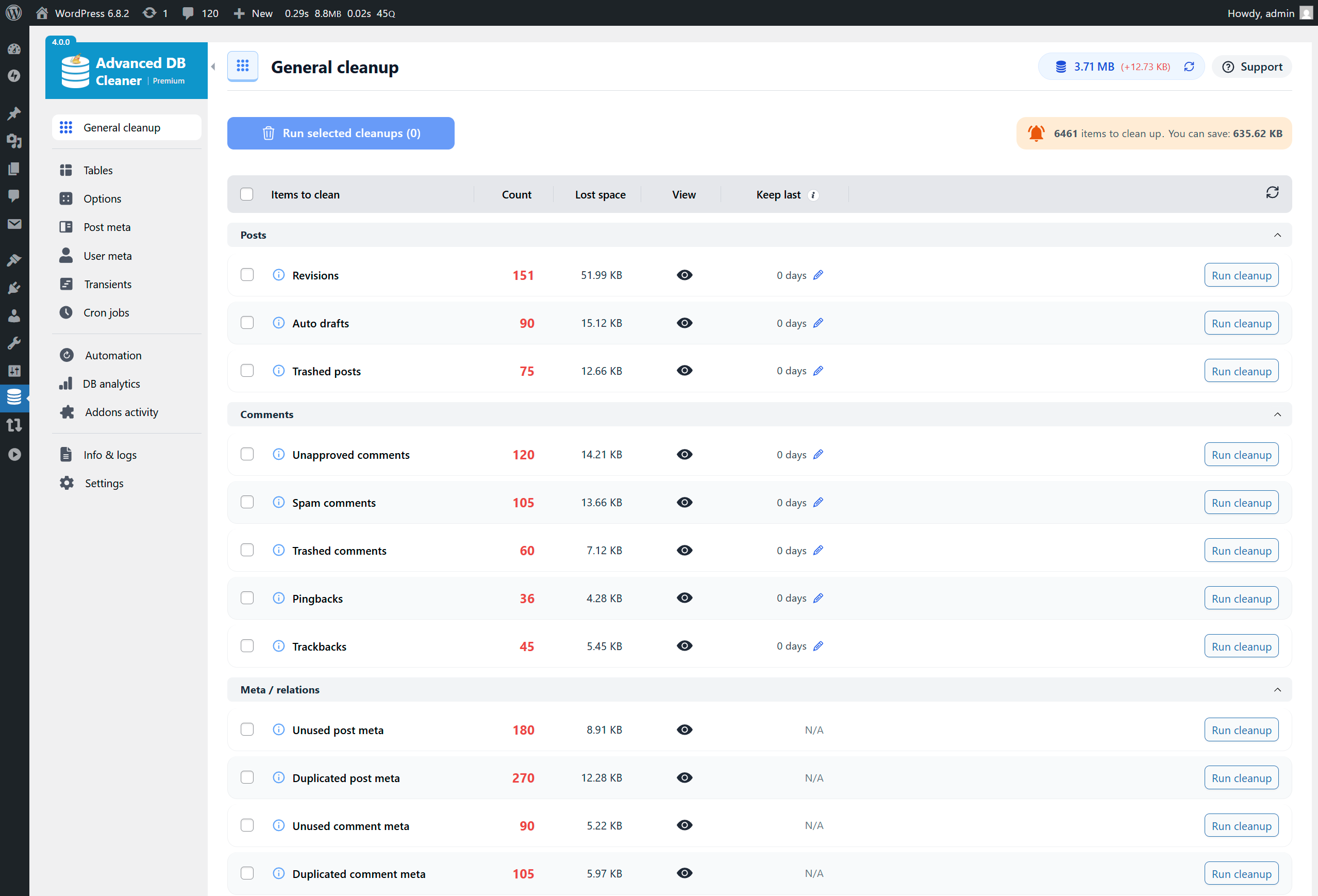
General Cleanup overview (list of database items to clean, total count & size) 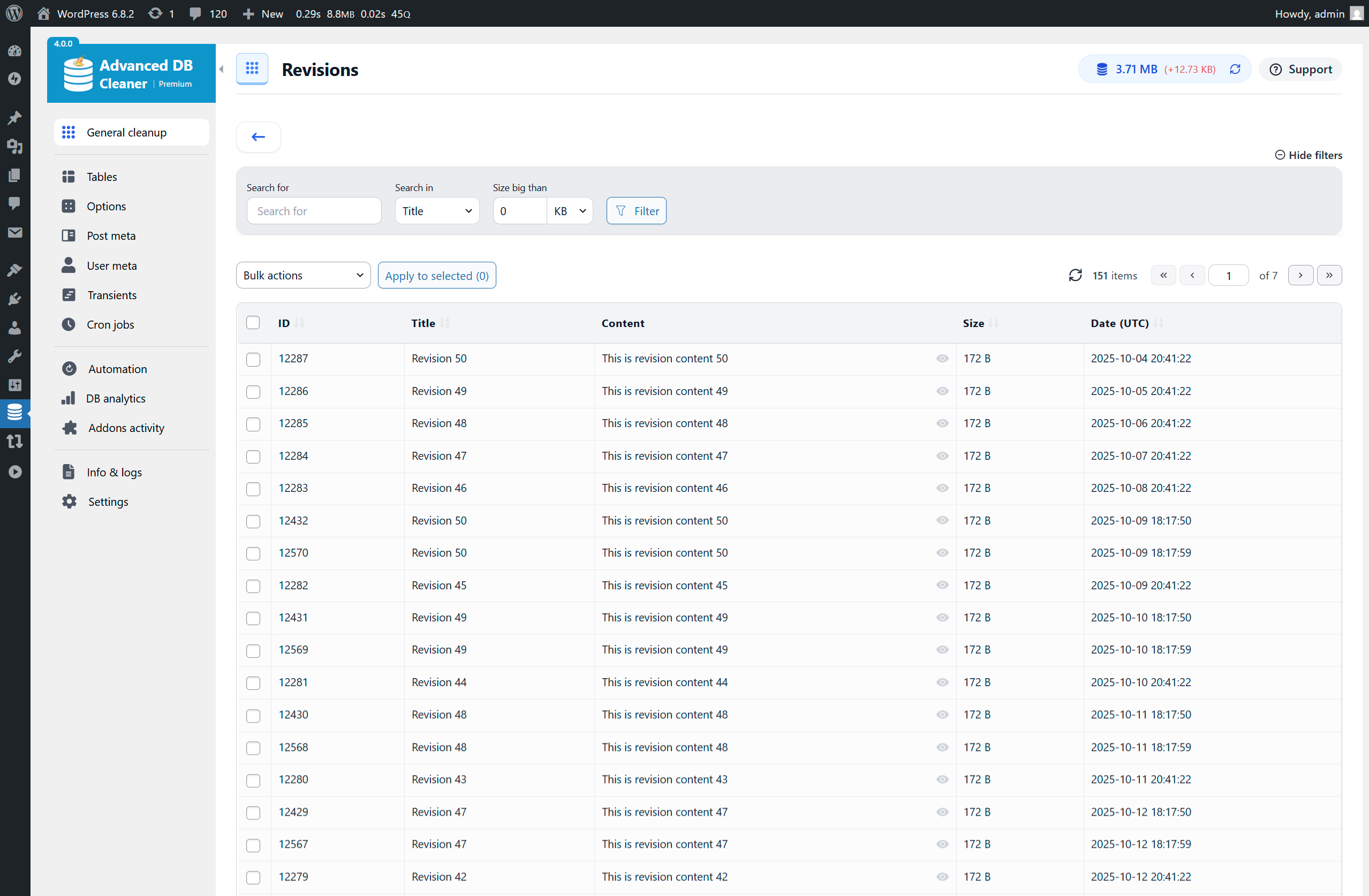
Preview items before cleaning – Revisions example (filters in Premium) 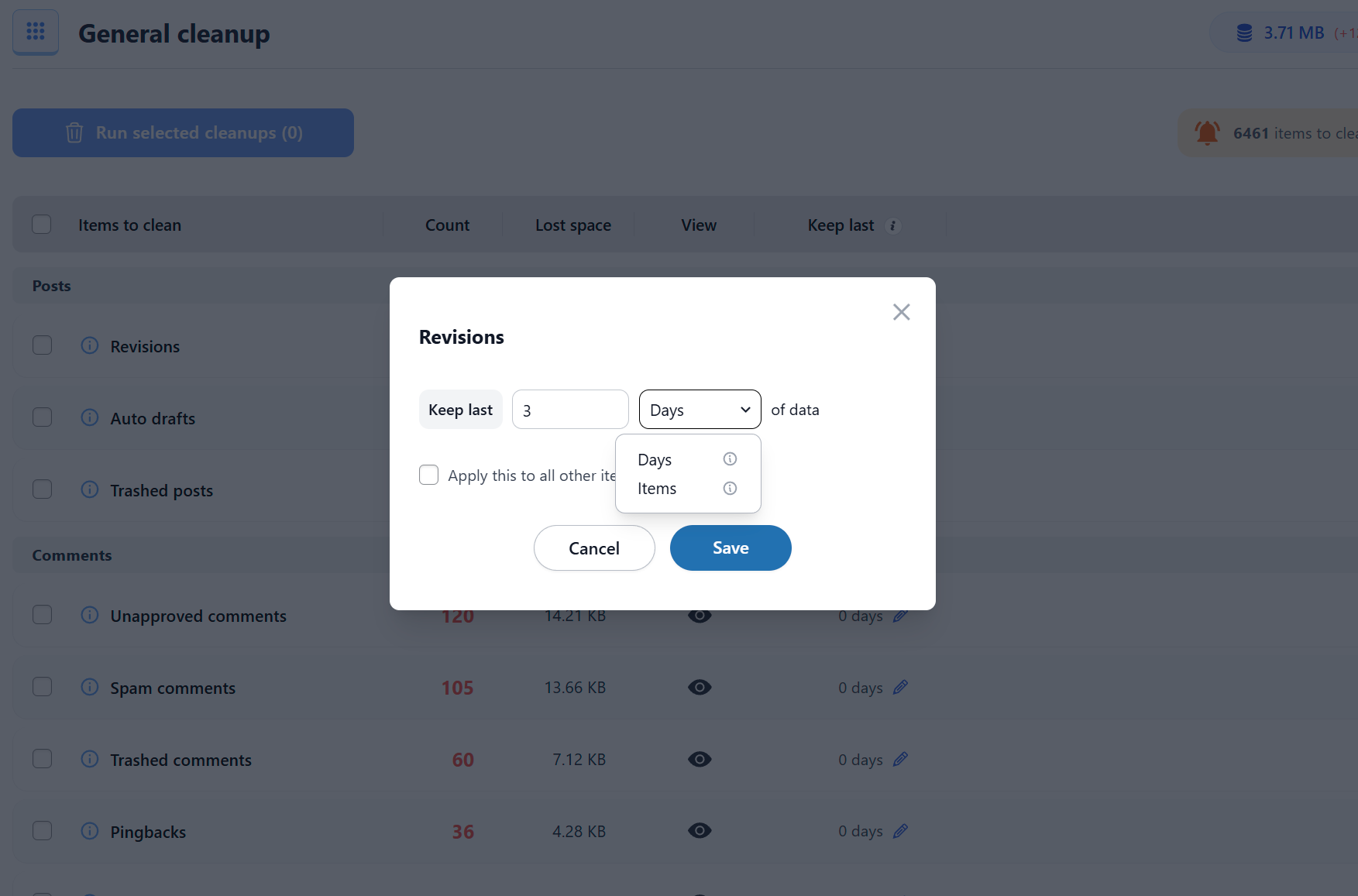
Keep Last rules – Revisions example (keep last X items in Premium) 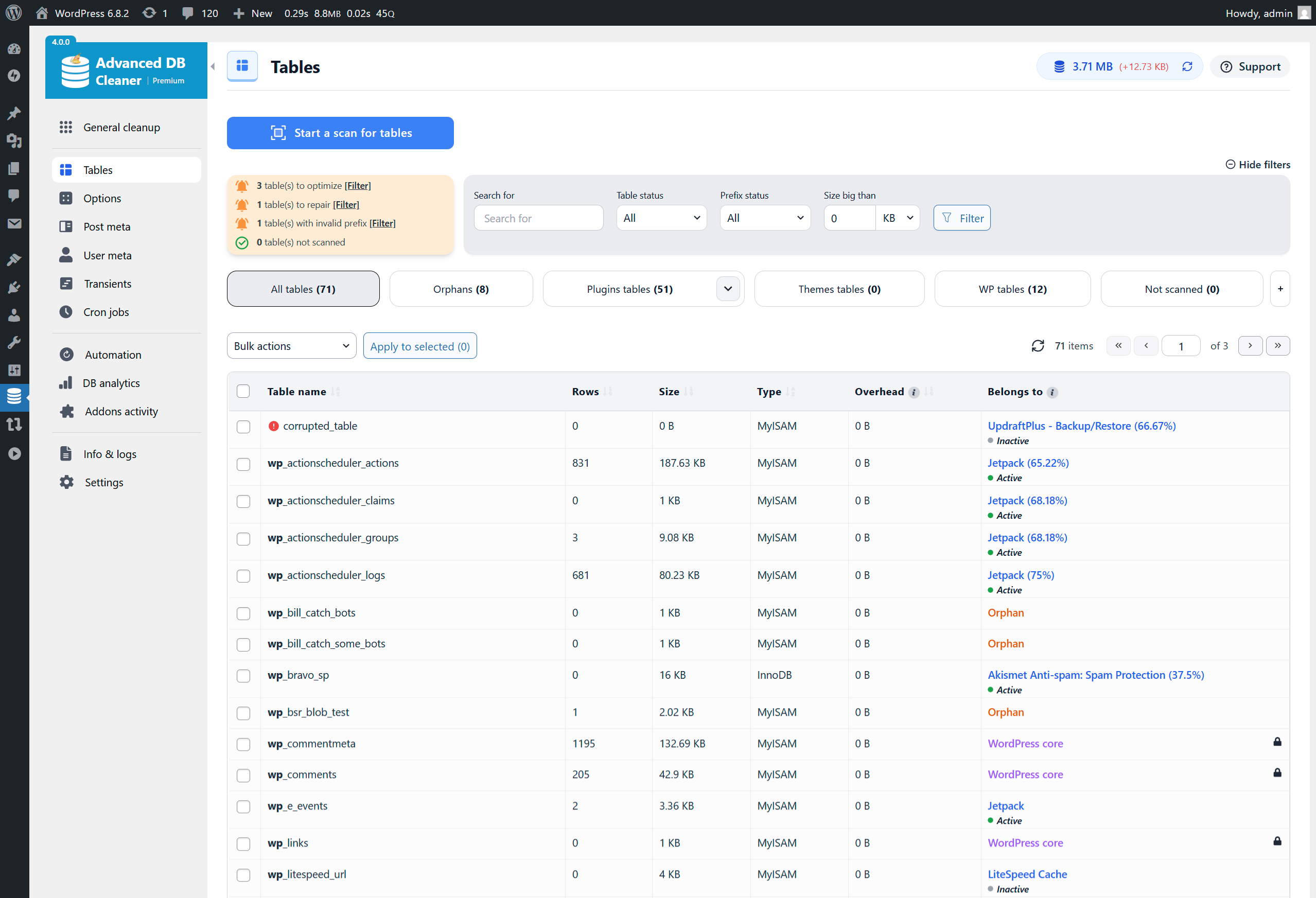
Tables overview (filters & scan in Premium) 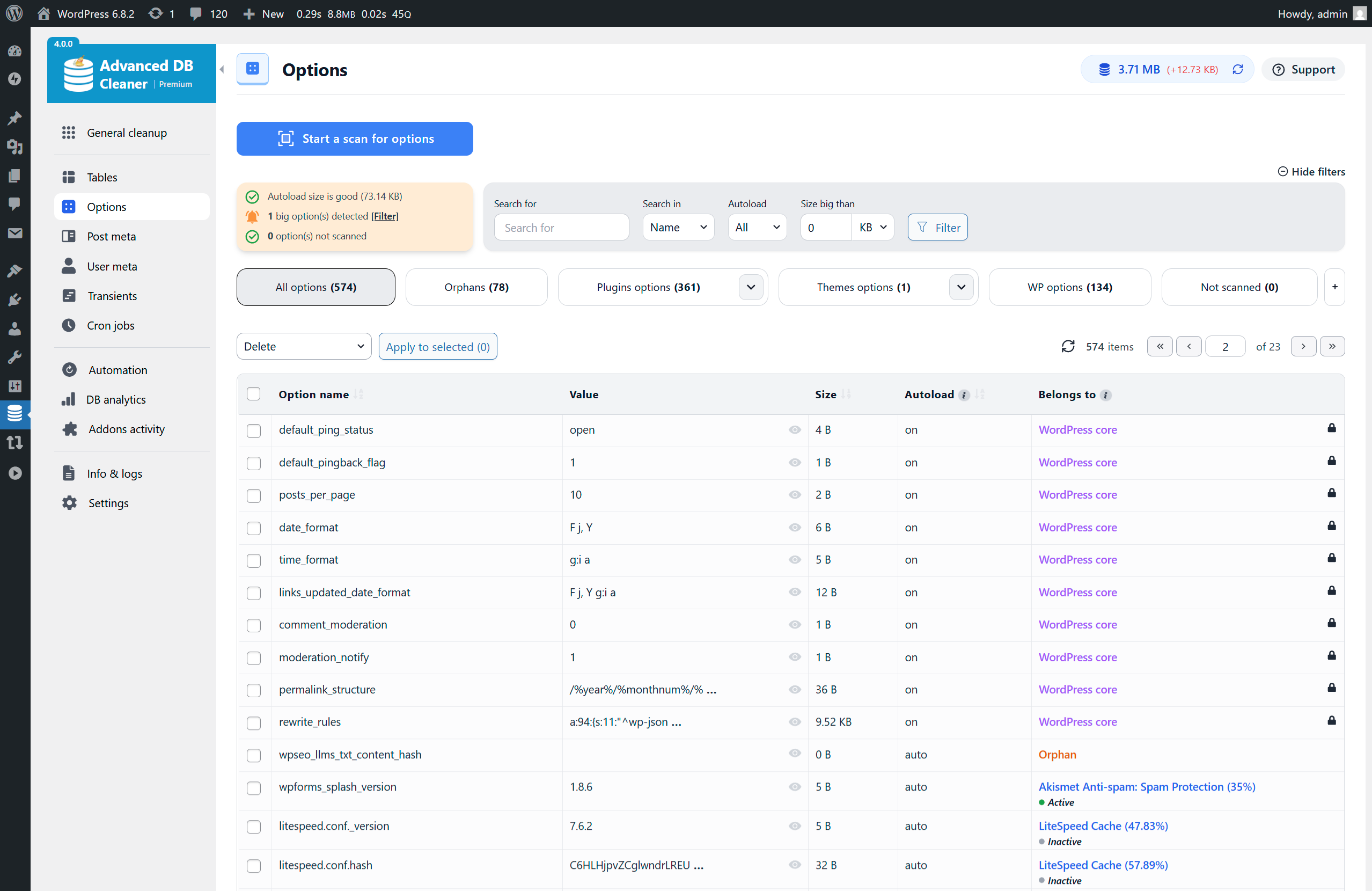
Options overview (filters & scan in Premium) 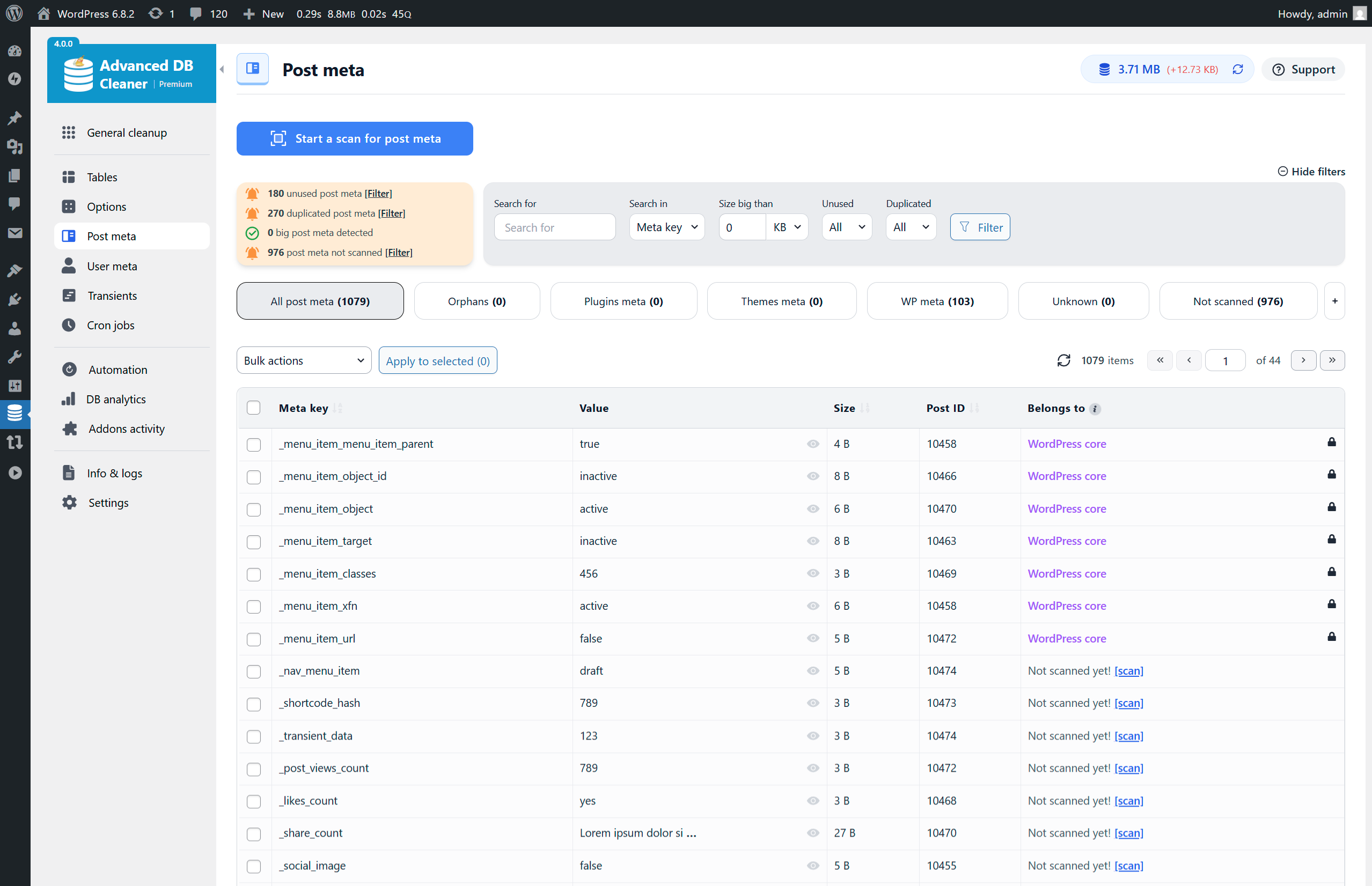
Post Meta overview (filters & scan in Premium) 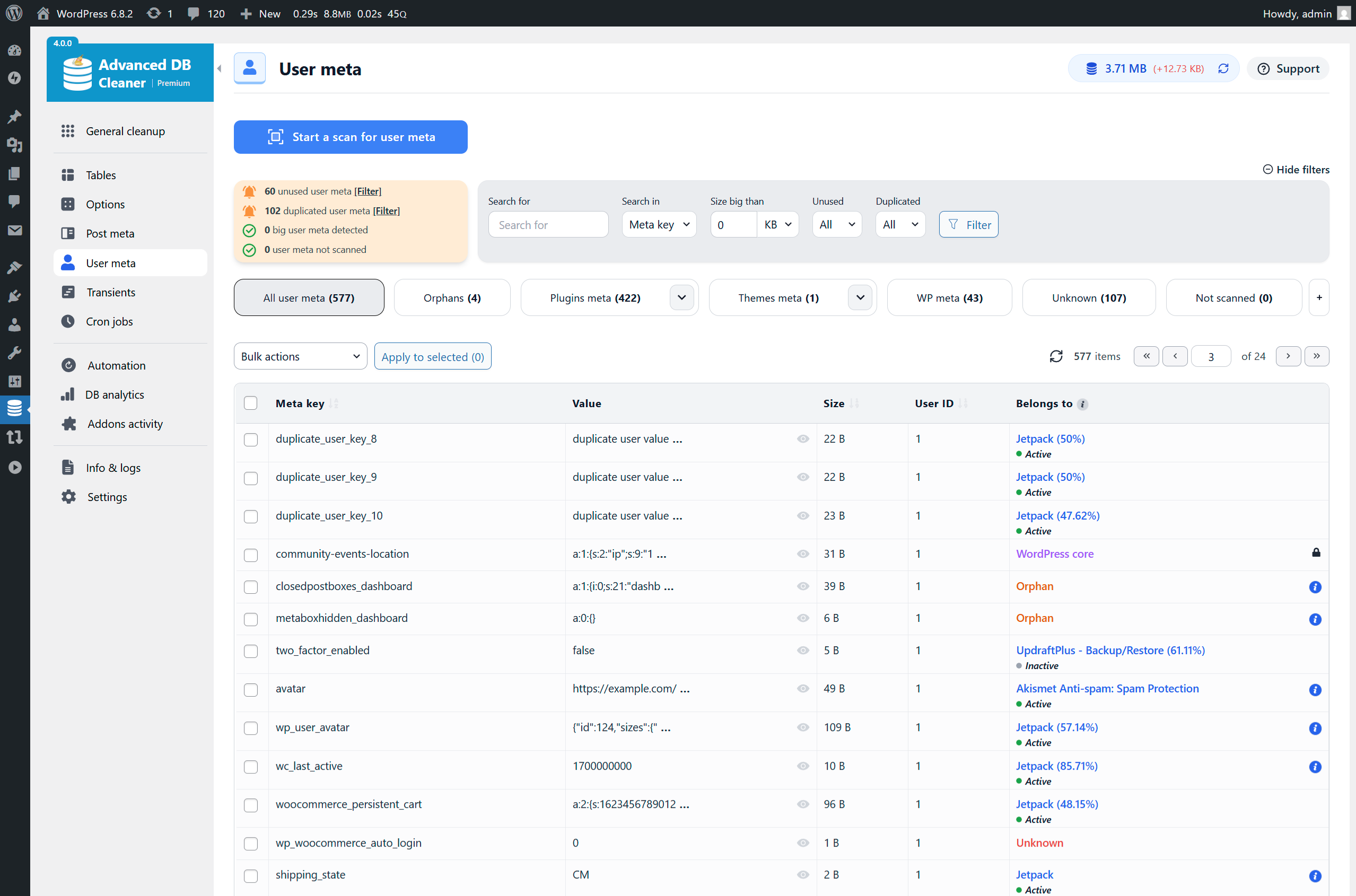
User Meta overview (filters & scan in Premium) 
Transients overview (filters & scan in Premium) 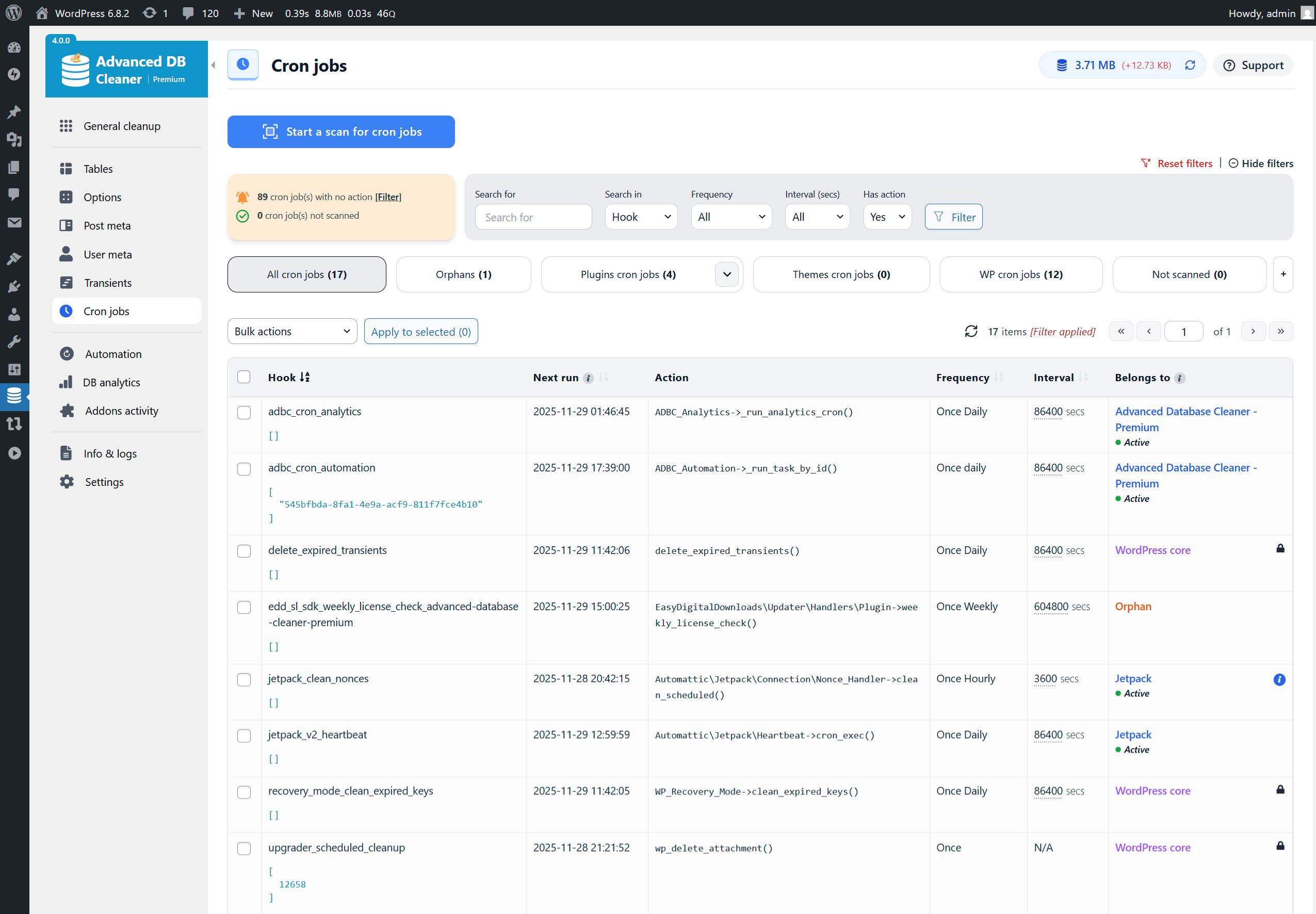
Cron Jobs overview (filters & scan in Premium) 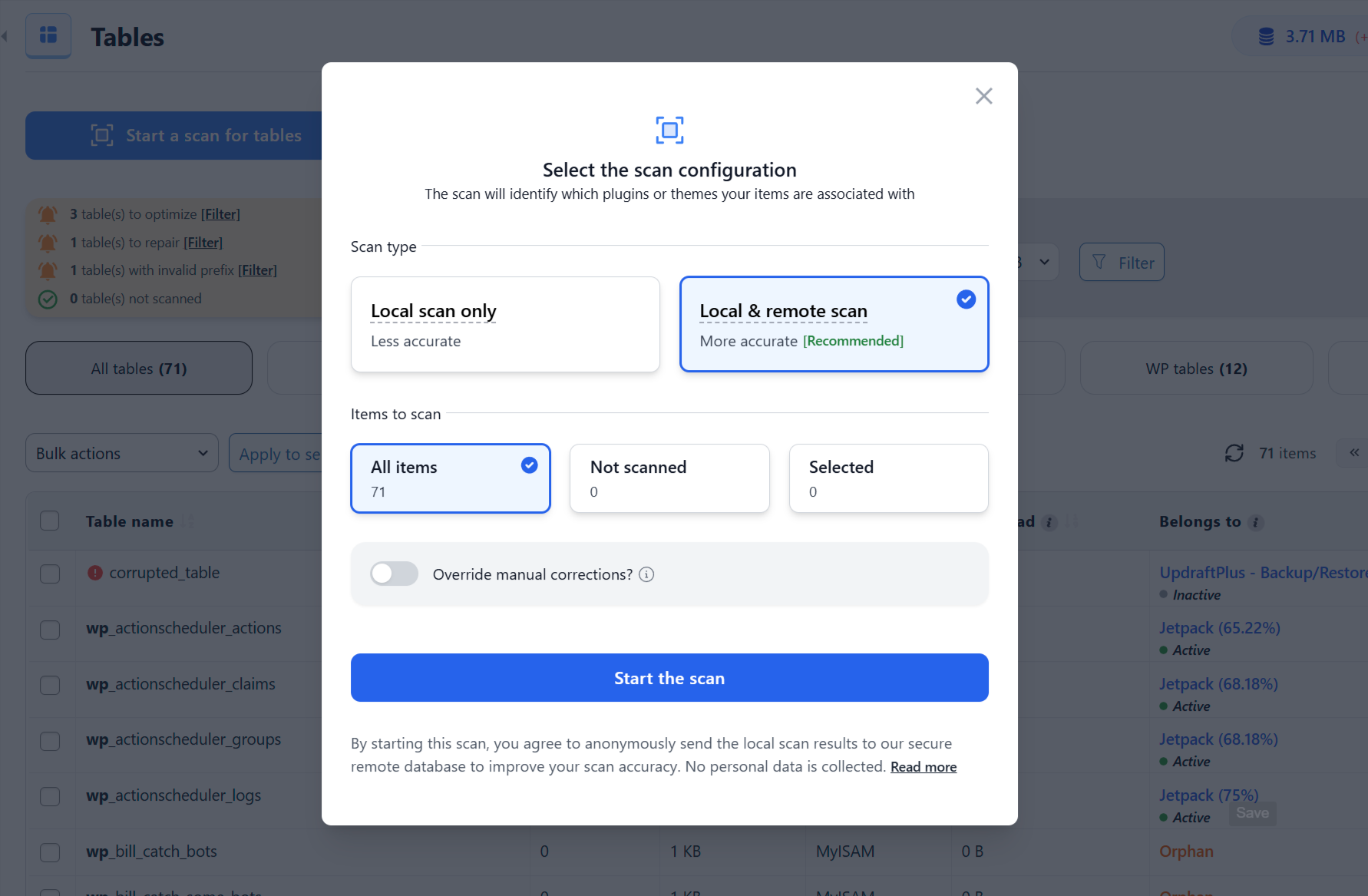
Start Scan modal – Full scan selected (in Premium) 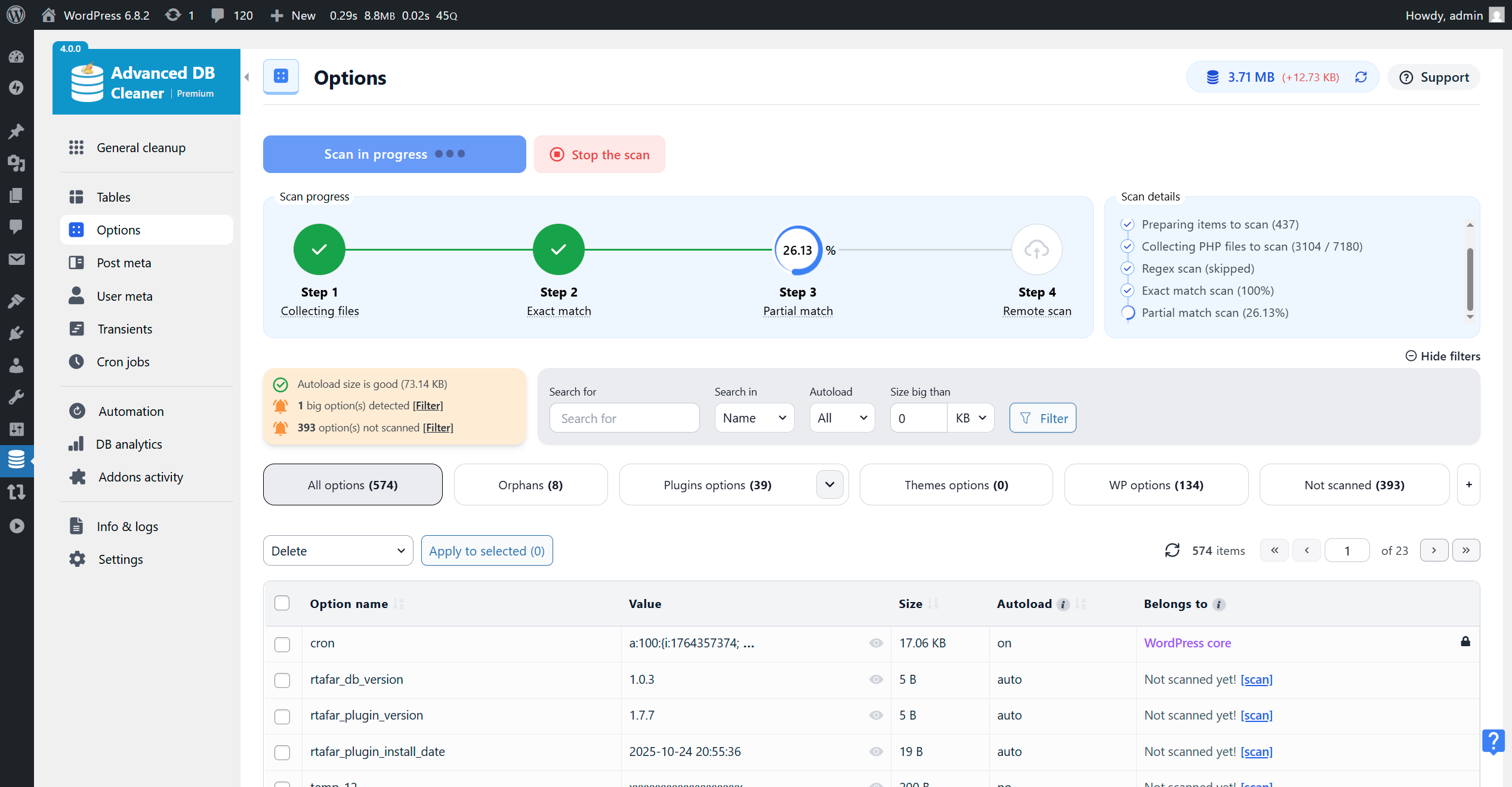
Scan running for Options – Exact Match step (in Premium) 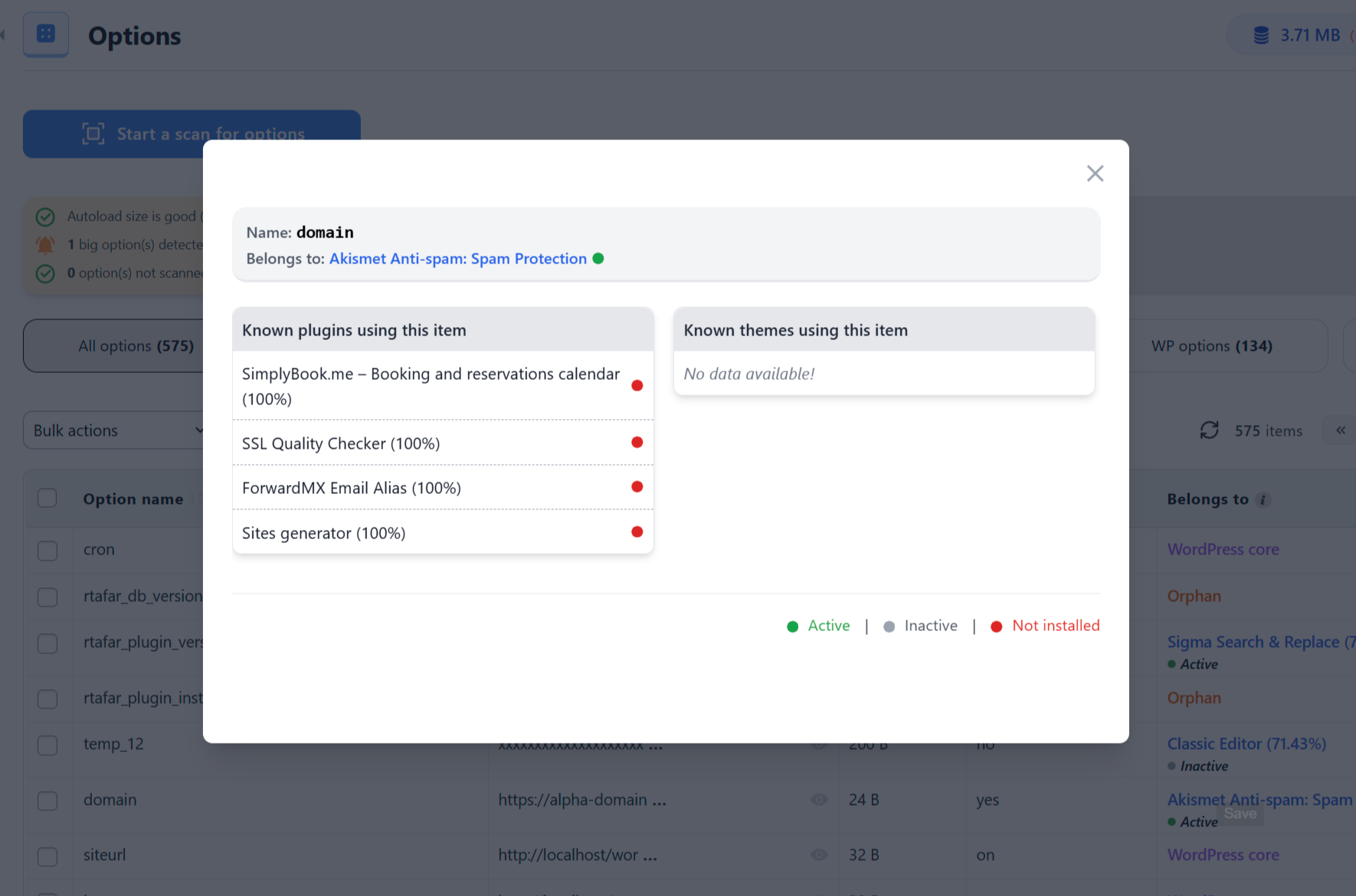
More info about an Option ownership (in Premium) 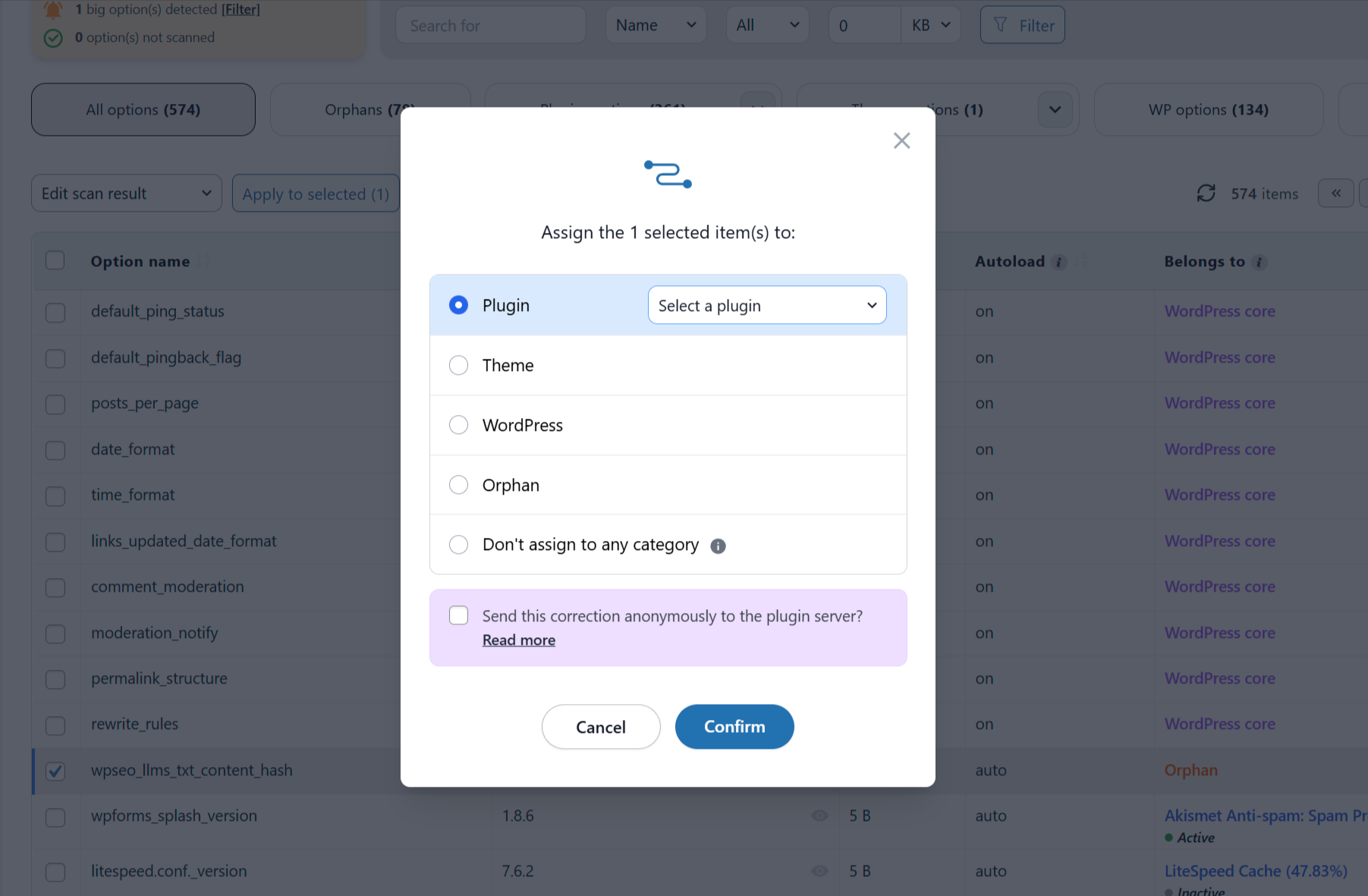
Edit an Option ownership (in Premium) 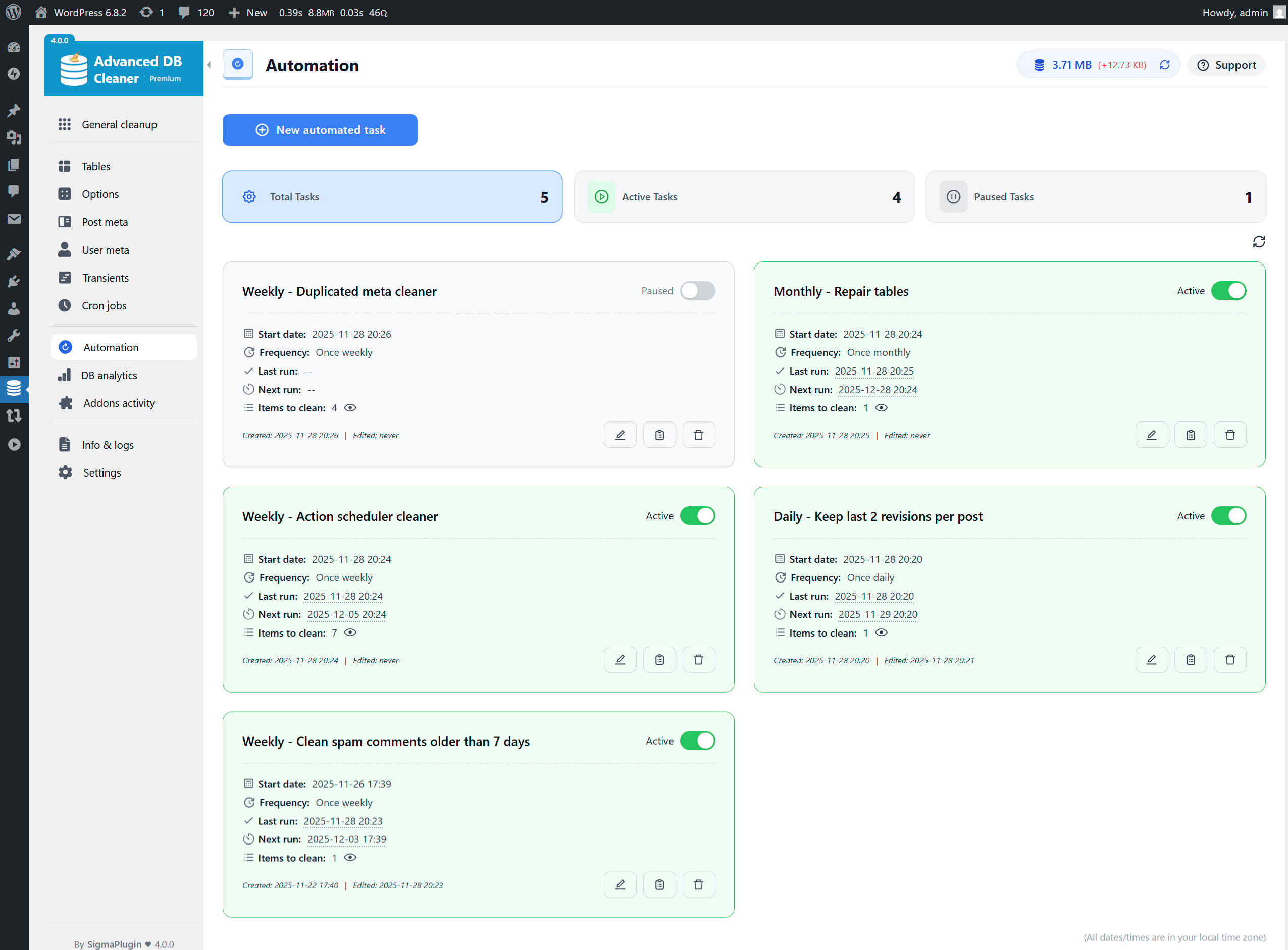
Automation cleanup tasks overview 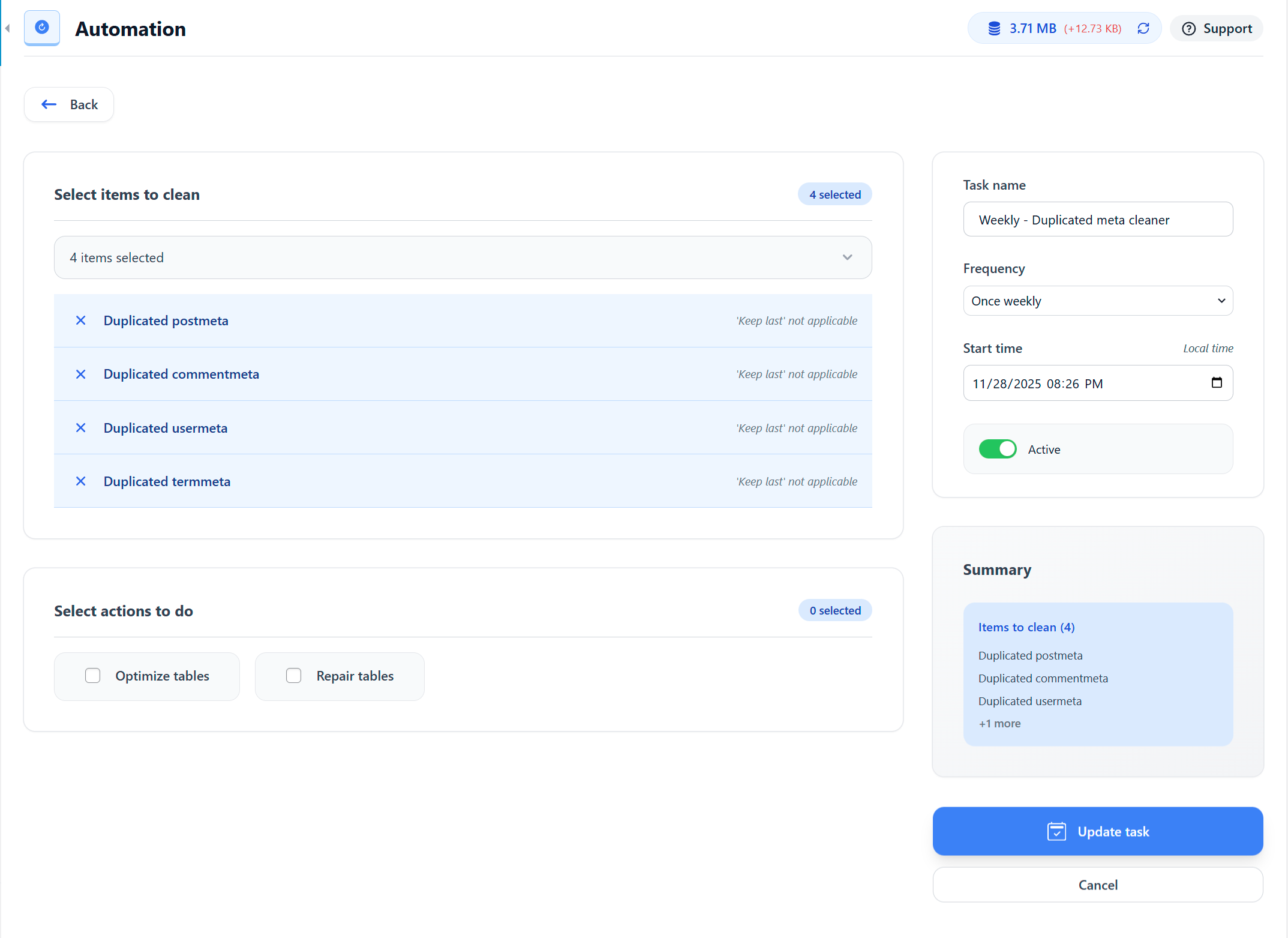
Create an Automation Revisions cleanup task (keep last 2 revisions per post) 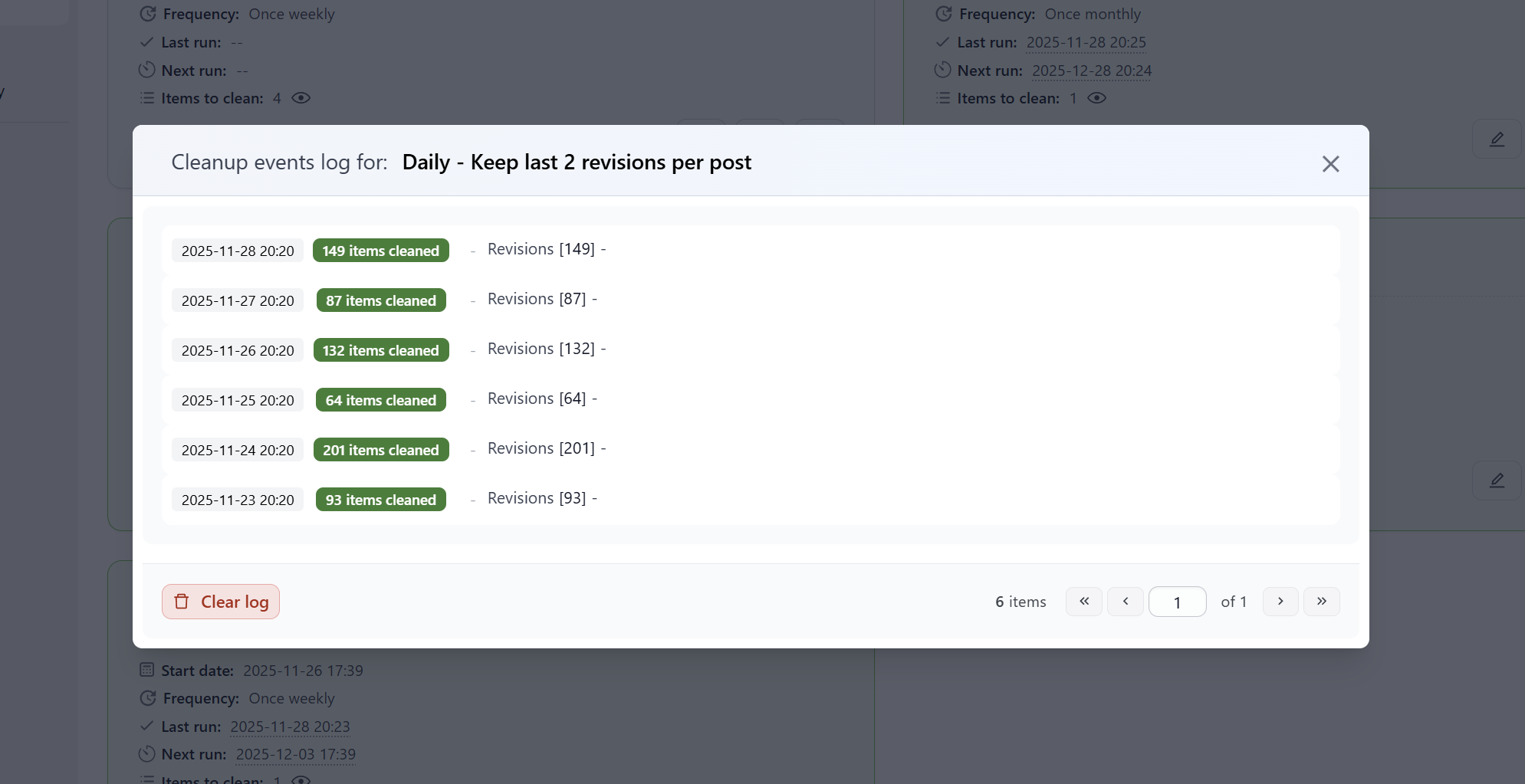
Revisions cleanup Automation task events log (in Premium) 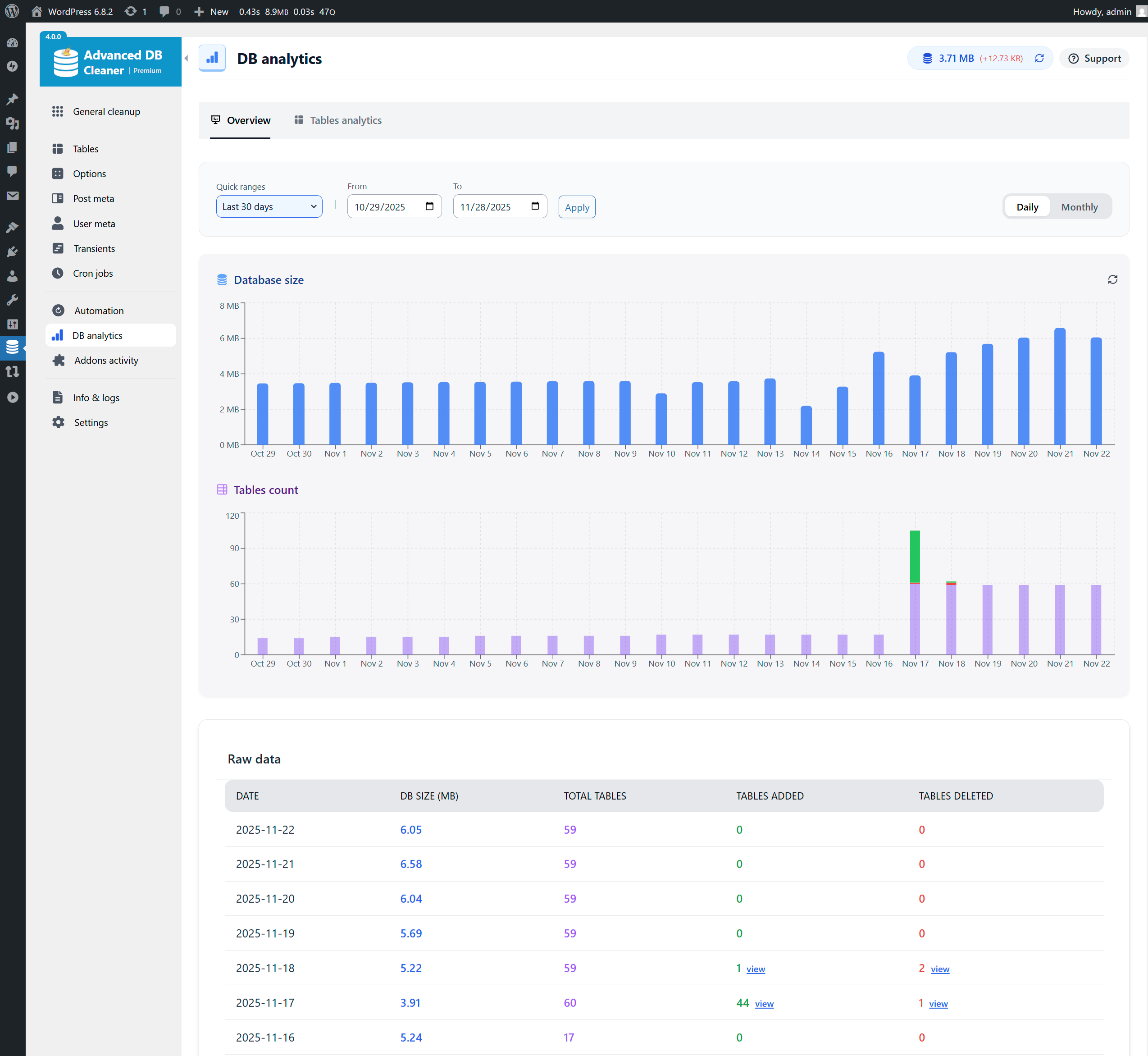
Database analytics – Last 30 days daily charts (in Premium) 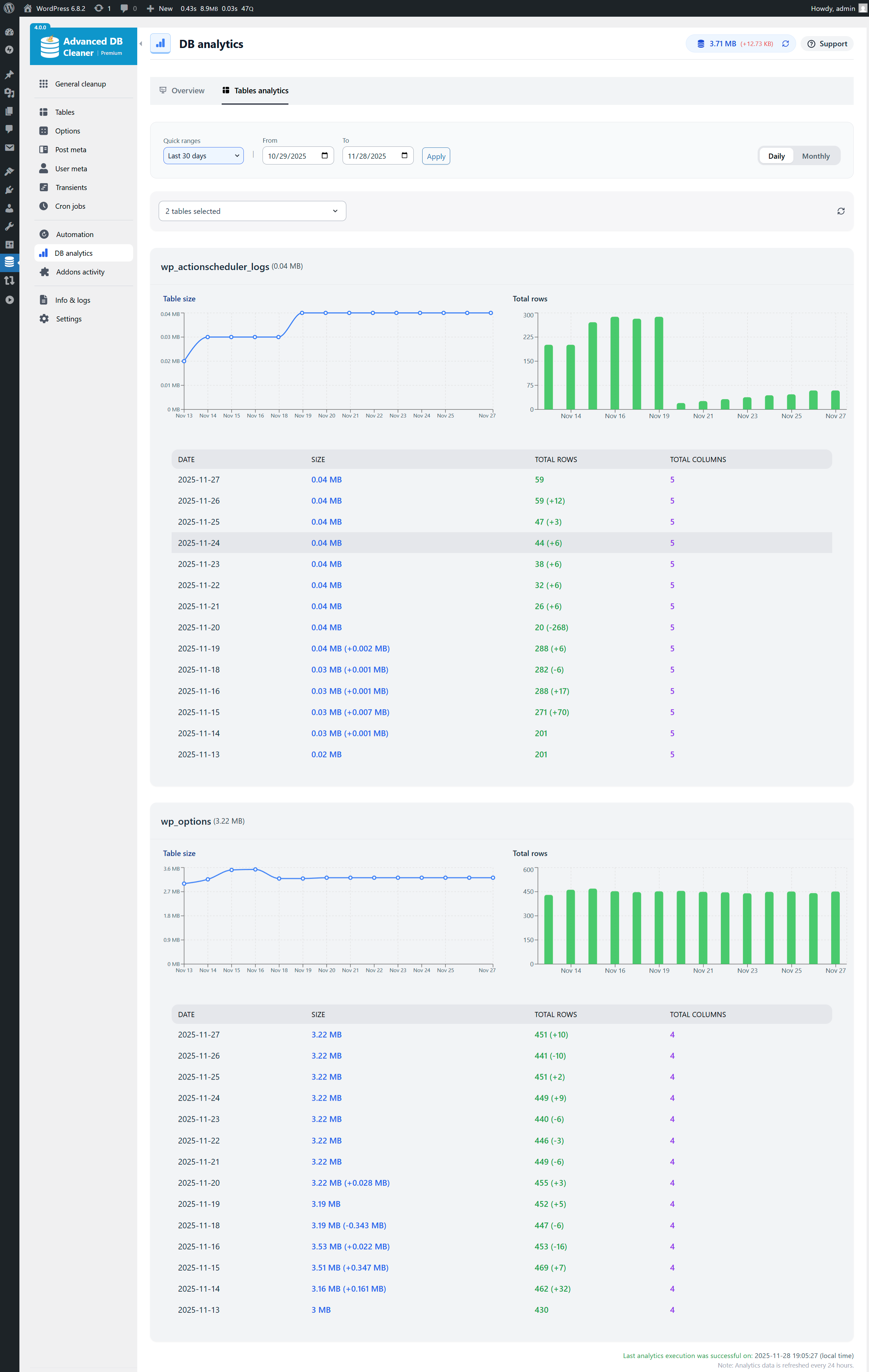
Tables analytics – Last 30 days, actionscheduler_logs & wp_options selected (in Premium) 
Addons Activity – Timeline of activation, deactivation & uninstall (in Premium) 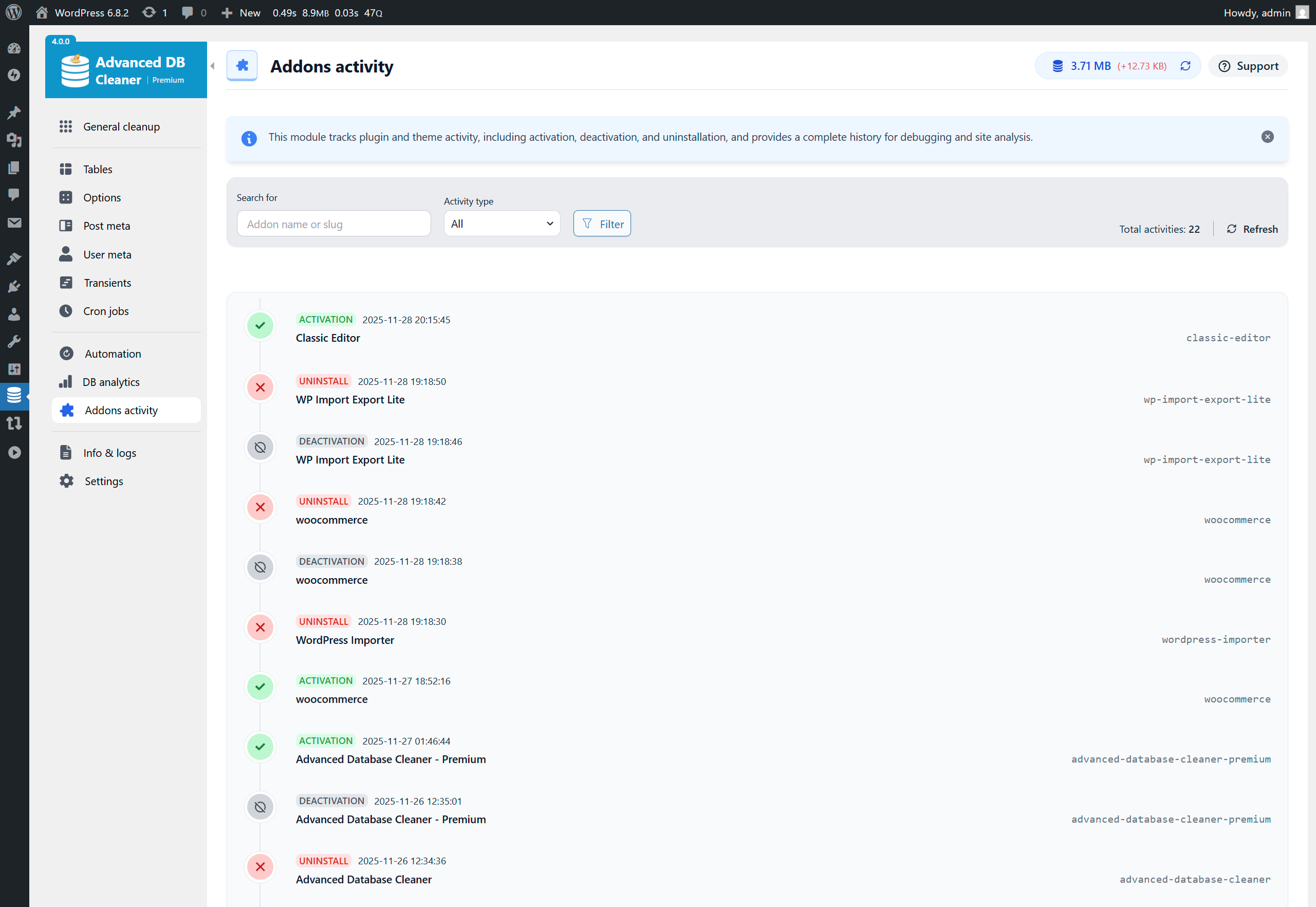
Info & Logs – System Info tab selected 
Settings page
Installation
This section describes how to install the plugin. In general, there are 3 ways to install this plugin like any other WordPress plugin.
1. Via WordPress dashboard
- Click on “Add New” in the Plugins dashboard.
- Search for “advanced-database-cleaner”.
- Click the “Install Now” button.
- Activate the plugin from the same page or from the Plugins dashboard.
2. Via uploading the plugin to WordPress dashboard
- Download the plugin to your computer from: https://wordpress.org/plugins/advanced-database-cleaner/
- Click on “Add New” in the Plugins dashboard.
- Click on the “Upload Plugin” button.
- Select the zip file of the plugin that you downloaded.
- Click “Install Now”.
- Activate the plugin from the Plugins dashboard.
3. Via FTP
- Download the plugin to your computer from: https://wordpress.org/plugins/advanced-database-cleaner/
- Unzip the zip file, which will extract the “advanced-database-cleaner” directory.
- Upload the “advanced-database-cleaner” directory (included inside the extracted folder) to the /wp-content/plugins/ directory in your web space.
- Activate the plugin from the Plugins dashboard.
For Multisite installation
- Log in to your primary site and go to “My Sites” » “Network Admin” » “Plugins”.
- Install the plugin following one of the above ways.
- Network-activate the plugin. (Only the main site can access the full network-wide cleanup tools.)
Where is the plugin menu?
- The plugin can be accessed via “Dashboard” » “WP DB Cleaner” or “Dashboard” » “Tools” » “WP DB Cleaner” (depending on your settings).
FAQ
-
Why should I “clean my database”?
-
As you use WordPress, your database accumulates a large amount of unnecessary data such as revisions, spam comments, trashed comments, and more. This clutter slowly increases the size of your database, which can make your site slower and make backups take longer. Cleaning this data keeps your site lighter, faster, and easier to maintain.
-
Is it safe to clean my database?
-
Yes, it is safe. The plugin does not run any code that can break your site or delete posts, pages, or approved comments. It only removes items that WordPress considers unnecessary. However, you should always back up your database before performing any cleanup. This is required, not optional! Backups ensure you can always restore your site if something unexpected happens.
-
Why should I “optimize my database”?
-
Optimizing your database reclaims unused space and reorganizes the way data is stored inside your tables. Over time, tables become fragmented, especially on active websites. Optimization reduces storage usage and improves the speed at which your database responds. This process is safe and can significantly improve performance on large or busy websites.
-
Is it safe to clean the cron (scheduled tasks)?
-
Cron jobs allow WordPress and plugins to run tasks automatically (like checking for updates or sending emails). When a plugin is removed, some of its cron jobs may remain behind. These leftover tasks serve no purpose and can slow down wp-cron events. Cleaning unnecessary cron jobs is safe as long as you know which ones should be removed. If you are unsure, it is safer not to delete any cron jobs manually.
-
What are “revisions”? What SQL code is used to clean them?
-
WordPress stores revisions for each saved draft or update so you can review older versions. Over time, these accumulate and take up space.
SQL used by the plugin to delete revisions:
DELETE FROM posts WHERE post_type = ‘revision’ -
What are “auto drafts”? What SQL code is used to clean them?
-
WordPress automatically creates auto-drafts while you are editing posts/pages. If those drafts are never published, they remain in the database.
SQL used by the plugin to delete auto-drafts:
DELETE FROM posts WHERE post_status = ‘auto-draft’ -
What are “pending comments”? What SQL code is used to clean them?
-
Pending comments are comments waiting for your approval. If you have many bots submitting comments, this list can grow quickly.
SQL used by the plugin to delete pending comments:
DELETE FROM comments WHERE comment_approved = ‘0’ -
What are “spam comments”? What SQL code is used to clean them?
-
Spam comments are comments flagged as spam by you or by an anti-spam plugin. They can safely be deleted.
SQL used by the plugin to delete spam comments:
DELETE FROM comments WHERE comment_approved = ‘spam’ -
What are “trash comments”? What SQL code is used to clean them?
-
Trash comments are deleted comments moved to the trash. They are no longer visible and can be permanently removed.
SQL used by the plugin to delete trash comments:
DELETE FROM comments WHERE comment_approved = ‘trash’ -
What are “trackbacks”? What SQL code is used to clean them?
-
Trackbacks are a legacy system used by WordPress to allow one website to notify another that it has linked to its content. When a site receives a trackback, it appears as a type of comment on the post. Because trackbacks can be sent manually, they became heavily abused by spammers who use them to post unwanted links on websites.
SQL used by the plugin to delete trackbacks:
DELETE FROM comments WHERE comment_type = ‘trackback’ -
What are “pingbacks”? What SQL code is used to clean them?
-
Pingbacks are an automated notification system used by WordPress. When one website publishes a link to another site’s post, WordPress sends a pingback request to the linked site. If accepted, the pingback appears as a type of comment, confirming that another site has referenced your content. Because pingbacks are automated, they are often exploited by bots to generate spam requests.
SQL used by the plugin to delete pingbacks:
DELETE FROM comments WHERE comment_type = ‘pingback’ -
What is “unused post meta”? What SQL code is used to clean it?
-
Post meta stores additional information for posts. When a post is deleted, some metadata may be left behind. This leftover “unused” data can grow over time.
SQL used by the plugin to delete unused post meta:
DELETE pm FROM postmeta pm LEFT JOIN posts wp ON wp.ID = pm.post_id WHERE wp.ID IS NULL -
What is “unused comment meta”? What SQL code is used to clean it?
-
Comment meta stores extra information for comments. When a comment is removed, some metadata may remain in the database.
SQL used by the plugin to delete unused comment meta:
DELETE FROM commentmeta WHERE comment_id NOT IN (SELECT comment_ID FROM comments) -
What is “unused user meta”? What SQL code is used to clean it?
-
User meta stores additional data for users. If a user is deleted, their metadata may not be removed automatically.
SQL used by the plugin to delete unused user meta:
DELETE FROM usermeta WHERE user_id NOT IN (SELECT ID FROM users) -
What is “unused term meta”? What SQL code is used to clean it?
-
Term meta stores extra information for taxonomy terms (categories, tags, etc.). If a term is removed, its metadata may remain behind.
SQL used by the plugin to delete unused term meta:
DELETE FROM termmeta WHERE term_id NOT IN (SELECT term_id FROM terms) -
What are “unused relationships”? What SQL code is used to clean them?
-
The wp_term_relationships table links posts to categories/tags. When posts are deleted, related entries may remain in this table, taking unnecessary space.
SQL used by the plugin to delete unused relationships:
DELETE FROM term_relationships WHERE term_taxonomy_id=1 AND object_id NOT IN (SELECT id FROM posts) -
What are “expired transients”?
-
Transients are temporary cached data stored by plugins or themes. When they expire, they should be removed automatically. However, some expired transients may remain in the database. These can be safely cleaned to free space.
-
Is this plugin compatible with multisite?
-
Yes, the plugin is compatible with multisite. For safety, only the main site can clean the database for the entire network. Sub-sites cannot perform cleanup operations to avoid accidental damage.
-
Is this plugin compatible with SharDB, HyperDB, or Multi-DB?
-
Not yet. The plugin is not currently compatible with SharDB, HyperDB, or Multi-DB setups. Support may be added in future versions.
-
Does this plugin clean itself after uninstall?
-
Yes. The plugin removes all of its data and settings when uninstalled. A cleanup plugin that leaves clutter would not make sense!
Reviews


Contributors & Developers
“Advanced Database Cleaner – Optimize & Clean Database to Speed Up Site Performance” is open source software. The following people have contributed to this plugin.
Contributors
“Advanced Database Cleaner – Optimize & Clean Database to Speed Up Site Performance” has been translated into 12 locales. Thank you to the translators for their contributions.
Interested in development?
Browse the code, check out the SVN repository, or subscribe to the development log by RSS.
Changelog
4.0.4 – 25/12/2025
- Fix: [Premium] Prevented license activation from being unintentionally removed after one week.
- Fix: Resolved style conflicts with other plugins.
- Fix: Corrected an issue where sorting usermeta by meta key returned empty results when the “duplicated” filter was applied.
- Tweak: [Premium] Removed the weekly license check cron job when uninstalling the plugin.
- Tweak: Refactored code to improve loading performance by caching data.
- Tweak: Added translatable strings and corrected some date-format inconsistencies.
- Tweak: Improved UI consistency across all tables.
- Tweak: Increased Database Rows Batch limit to 50,000 by default for better performance on large sites.
- Tweak: Added a refresh icon to the highlighted orange sections for easier counts refresh.
4.0.3 – 14/12/2025
- Fix: Improved compatibility with PHP 7.
- Tweak: Optimized the loading of the Post Meta module for large websites.
- Tweak: Highlighted preset filter section counters are now fetched via separate endpoints for better performance.
- Tweak: Optimized the duplicated meta module to improve performance.
- Tweak: Optimized the General Cleanup module for faster loading.
- Tweak: Overall performance improvements and internal code optimizations.
4.0.2 – 05/12/2025
- Fix: Conflict with another plugin injecting links into our plugin settings.
- Fix: Syntax error: unexpected ‘…’ (T_ELLIPSIS), expecting ‘]’.
- Fix: Deletion of transients and expired_transients in multisite within the sitemeta table when the transient’s site_id is invalid.
- Fix: Duplicate “squared” transients and expired transients being displayed.
- Tweak: Synchronize Axios timeout (React) with PHP max execution time to avoid early request timeouts.
- Tweak: In trashed comments, count only trashed comments and ignore comments belonging to trashed posts.
- Tweak: Use crc32 hashing to speed up detection of duplicate values.
- Tweak: General code cleanup and optimization.
- Tweak: [Premium] Added new WordPress-related items for improved identification.
- New: [Free] new setting allowing to control the number of items retrieved from the database per request for better performance.
- New: Choose between native WordPress functions or direct SQL queries for deleting items (new setting added).
- New: Items in the General Cleanup page are now loaded individually, so content appears immediately without waiting for all items.
- New: Items can now be deleted one by one in General Cleanup without reloading the entire list after each action.
- Compatibility: Tested with WordPress 6.9.
4.0.1 – 01/12/2025
- Fix: handling FS_METHOD ftpext in the file system class.
- Fix: sub-sites in Multisites were not loaded correctly.
- Fix: options and other items cannot be deleted in free version.
4.0.0 – 28/11/2025
Version 4.0.0 marks the biggest upgrade ever released for Advanced Database Cleaner. This major update introduces a completely redesigned interface for a smoother, faster, and more intuitive experience. It also brings powerful new features, an enhanced two-step scan engine for unmatched accuracy, and advanced security improvements that make database maintenance safer than ever. With better performance, more flexibility, and a modern UI, version 4.0.0 sets a new standard for professional WordPress database optimization.
- New: Duplicated post meta cleanup type.
- New: Duplicated user meta cleanup type.
- New: Duplicated comment meta cleanup type.
- New: Duplicated term meta cleanup type.
- New: oEmbed caches cleanup type.
- New: Estimated size to clean displayed for each cleanup type, plus a total freed-space summary before running a cleanup.
- New: Sorting capability added to cleanup preview tables (e.g. by name, date, size, site ID).
- New: Value viewer added to several cleanup types, displaying serialized or JSON data in raw or formatted views.
- New: Dedicated Post Meta Management module to list, sort, inspect, and clean post meta, including detection of unused and duplicated metadata.
- New: Dedicated User Meta Management module to list, sort, inspect, and clean user meta, including detection of unused and duplicated metadata.
- New: Dedicated Transients Management module to inspect, sort, and clean transients, with expiration tracking, detection of large transients, and control over their autoload status.
- New: Tables Management can now detect tables with invalid prefixes that do not belong to the current WordPress installation, with their visibility controlled from the Settings page.
- New: Options Management now includes a formatted value viewer, detection of large options, and warnings for heavy autoloaded options to help reduce autoload size.
- New: Cron Jobs Management now includes detection of cron jobs with no valid action/callback to help you clean them safely.
- New: All six management modules now detect items owned by WordPress core and Advanced Database Cleaner, making it clearer where data comes from.
- New: All six management modules now include an Attention Area that highlights priority issues, warns you about items requiring action, and helps you quickly identify and target them.
- New: Introduced a built-in error and exception logging system, allowing logs to be copied or downloaded for support or user-side investigations.
- New: Added tools to display the current database size, show or hide the plugin’s menu tabs, and access the WordPress debug log directly from the interface.
- New: Modern, fully responsive interface rebuilt with React for a smoother, faster, and more intuitive user experience.
- Enhanced: Cleaning process in the General Cleanup module now uses WordPress native deletion functions for deeper, hook-aware cleanup, with direct SQL deletion kept only as a safe fallback when required.
- Enhanced: Automation is now centralized into a unified module with a clearer creation/edit flow and consistent use of the local timezone for all schedules.
- Enhanced: Options, Tables, and Cron Jobs modules now display richer information with additional columns and more detailed data for each item.
- Enhanced: System Info is now far more detailed and can be copied or downloaded, making it easier to share environment details, diagnose issues, and assist users during support.
- Enhanced: Overall multisite support now provides clearer separation between network and site data and safer network-wide cleanup and optimization.
- Enhanced: Backend architecture migrated to a REST API–driven system for significantly faster interactions and navigation without page reloads.
- Enhanced: Numerous bugs and edge cases were resolved across all modules, resulting in more stable behavior and more reliable, effective cleaning operations.
- Premium: New – Action Scheduler completed actions cleanup type.
- Premium: New – Action Scheduler failed actions cleanup type.
- Premium: New – Action Scheduler canceled actions cleanup type.
- Premium: New – Action Scheduler completed logs cleanup type.
- Premium: New – Action Scheduler failed logs cleanup type.
- Premium: New – Action Scheduler canceled logs cleanup type.
- Premium: New – Action Scheduler orphan logs cleanup type.
- Premium: New – “Keep last X items” rule introduced, either per parent (e.g. keep 5 revisions per post) or globally (e.g. keep the last 10 pingbacks), in addition to the existing “keep last X days” rule.
- Premium: New – Introduced Remote Scan system that combines the local scan with our cloud-based detection engine and continuously curated ownership database to deliver near-perfect accuracy when identifying the true owners of tables, options, post meta, user meta, transients, and cron jobs.
- Premium: New – Added the ability to anonymously send your ownership corrections to improve our global detection database and refine ownership results for all users.
- Premium: New – “Keep last X items” rule now configurable inside scheduled tasks, in addition to the existing “keep last X days”, for more advanced and safer automated cleanups.
- Premium: New – Introduced Database Analytics module with daily and monthly charts, raw data views, and per-table analytics (size evolution, rows evolution, daily change breakdown), including multi-table selection for comparative analysis.
- Premium: New – Introduced Addons Activity module that automatically tracks plugin and theme activations, deactivations, uninstalls, and theme switches in a color-coded timeline using your local timezone.
- Premium: New – Added multisite filters to the General Cleanup preview, allowing items to be filtered by site ID or site name so you can focus on a specific site in the network.
- Premium: New – Introduced per-automation event logs showing what was cleaned, when each task ran, and how many items were processed.
- Premium: Enhanced – Scan process fully redesigned for greater robustness and accuracy, combining an improved local scan with Remote Scan results.
- Premium: Enhanced – Scan flow now offers clearer insights, guidance, and error handling throughout each step of the process.
- Premium: Enhanced – “Belongs to” ownership column enriched with cloud-backed data across all management modules for more accurate owner detection.
- Premium: Enhanced – Detailed ownership info modal added, showing all known plugins/themes related to each item.
- Premium: Enhanced – Owner status indicators added (active, inactive, or not installed) to support deeper investigations.
- Premium: Enhanced – Filtering capabilities expanded across all management modules with new filters by size, value content, autoload, expiration, owner type (plugin, theme, WordPress core, orphan, unknown), duplicates, unused, large, not-yet-scanned, and more, including filtering specifically by a chosen plugin or theme.
- Premium: Enhanced – Multisite experience improved with clearer cross-site visibility, safer network-level operations, and tighter integration of ownership and analytics across all sites.
- Premium: Enhanced – Numerous bugs and edge cases were resolved across all premium features, resulting in more stable behavior and more reliable, effective cleaning operations.
Previous changelog
- For previous changelog, please refer to the changelog on sigmaplugin.com.