



Beskrivning
”So far the best and most comprehensive logging plugin” – @herrschuessler
Simple History visar de senaste ändringarna som gjorts i WordPress, direkt på din adminpanel, på en separat sida eller i adminfältet.
Tillägget fungerar som en revisionslogg över de viktigaste händelserna som inträffar i WordPress.
Det är ett tillägg som är bra att ha på webbplatser där flera personer är involverade i redigeringen av innehållet.
Det krävs ingen kodning för att använda tillägget. Installera det bara så kommer det börja logga händelser.
🔍 How Simple History Helps in Real Situations
Track what’s happening on your site
”Has someone done anything today? Ah, Sarah uploaded the new press release and created an article for it. Great! Now I don’t have to do that.”
Identify issues and debug faster
”The site feels slow since yesterday. Has anyone done anything special? … Ah, Steven activated ’naughty-plugin-x’, that must be it.”
Keep Freelancers & Agencies Accountable
”I hired a developer to optimize my site. But did they actually do anything? A quick glance at Simple History shows me exactly what they worked on, so I know I’m getting my money’s worth!”
✨ Simple Historys funktioner
Simple History kommer direkt med stöd för:
-
Inlägg och sidor – se vem som har lagt till, uppdaterat eller tagit bort ett inlägg eller en sida
-
Bilagor – se vem som har lagt till, uppdaterat eller tagit bort en bilaga
-
Taxonomier (anpassade taxonomier, kategorier, etiketter) – se vem som har lagt till, uppdaterat eller tagit bort en taxonomi
-
Kommentarer – se vem som har redigerat, godkänt eller tagit bort en kommentar
-
Widgetar – få information när någon lägger till, uppdaterar eller tar bort en widget i ett sidofält
-
Tillägg – aktivering och inaktivering
-
Användarprofiler – information om tillagda, uppdaterade eller borttagna användare
-
Användarinloggningar – se när en användare loggar in och loggar ut. Se även när en användare misslyckas med att logga in (bra sätt att upptäcka ”brute force”-försök).
-
Användarändringar – se när en användare läggs till, uppdateras eller tas bort, och få detaljerad information om de ändringar som gjorts på användaren.
-
Misslyckade användarinloggningar – se när någon har försökt logga in, men misslyckats. Loggen kommer då att innehålla ip-adressen till den eventuella hackaren.
-
Menyändringar
-
Alternativsidor – visa detaljer om ändringar som gjorts i de olika inställningsavsnitten i WordPress. Saker som ändringar av webbplatsens rubrik och permalänkstrukturen kommer att loggas.
-
Integritets-sidan – när en integritetssida skapas eller anges till en ny sida.
-
Notes – track when notes are added, edited, or removed on posts and pages. Notes is a new collaboration feature in WordPress 6.9 that lets editors leave feedback without modifying the content.
-
Dataexport – se när en begäran om export av personuppgiftsdata läggs till och när denna begäran godkänns av användaren, hämtas av en administratör eller skickas via e-post till användaren.
-
Begäran om borttagning av användardata – se när en begäran om export av användardata läggs till och när denna begäran godkänns av användaren och när användardata tas bort.
-
admin page access denied – see when a user tries to access an admin page they don’t have permission to access.
Built-in logging for third-party plugins
Simple History har inbyggt stöd för många tillägg:
-
Jetpack – See which Jetpack modules are activated and deactivated.
-
Advanced Custom Fields (ACF) – See when field groups and fields are created and modified.
-
User Switching – See each user switch being made.
-
WP Crontrol – Se när cron-händelser läggs till, redigeras, tas bort, pausas, återupptas och körs manuellt samt när cron-scheman läggs till och tas bort.
-
Enable Media Replace – Se information om filen som ersätts och information om den nya filen.
-
Limit Login Attempts – Se inloggningsförsök, utelåsningar och konfigurationsändringar som gjorts i tillägget Limit Login Attempts.
-
Redirection – Se omdirigeringar och grupper som skapas, ändras, aktiveras eller inaktiveras och även när de globala tilläggsinställningarna har ändrats.
-
Duplicera Post – Se när ett inlägg eller en sida klonas.
-
Beaver Builder – Se när en layout eller mall från Beaver Builder sparas eller när inställningarna för tillägget sparas.
Is your plugin missing? No problem – plugin authors can add support for Simple History in their plugins using the logging API.
Tillägg som har stöd för Simple History inkluderar:
- Simple History Beaver Builder Add-On
- WP-Optimize – Cache, Clean, Compress.
- Add Customer for WooCommerce
- Better WishList API
- AJAX Login and Registration modal popup + inline form
- Loginpetze
- Authorizer
- Ad Inserter
- FV Player Pro
- Login Me Now
💬 Vad användarna säger
🌟 Fler än 300 femstjärniga recensioner talar för tillförlitligheten hos detta tillägg. 🌟
-
”The best history plugin I’ve found” – Rich Mehta
-
”Custom Logs Are Crazy Awesome!” – Ahmad Awais
-
”Amazing activity logging plugin” – digidestination
-
”Fantastic plugin I use on all sites” – Duncan Michael-MacGregor
-
”Useful Quick View of Activity” – Dan O
-
”The best Activity Plugin” – Rahim
-
”The best free history plugin ever” – abazeed
-
”It is a standard plugin for all of our sites” – Mr Tibbs
🚀 Zero-Config Activity Tracking
Simple History begins tracking your WordPress site’s activities instantly after installation – no setup required. Even better: your activity log won’t be empty on day one. Simple History automatically imports recent activity from your site’s history, giving you a useful log from the moment you activate. View your activity logs through the convenient dashboard widget or browse the full history on the dedicated ’Simple History’ page in your WordPress admin.
📧 Weekly Email Reports – Stay Informed Without Logging In
Simple History’s weekly email reports give you a quick look at your site’s activity straight in your inbox every Monday morning—know what happened on your site each week without logging in.
Each email report includes:
- Total activity summary – See at a glance how active your site was
- Daily activity breakdown – Identify the busiest days of the week
- Key metrics – Login activity, content updates, plugin changes, and WordPress updates
- Direct links – Jump straight to the full log for more details
Perfect for site owners who want to stay informed without logging in daily, agencies managing multiple client sites, and teams who need regular activity updates.
Enable email reports in the settings, add your email address, and start receiving weekly updates. You can see what the email looks like before enabling it.
📡 RSS feed with changes
Med hjälp av det lösenordskyddade RSS-flödet kan du hålla koll på de ändringar som görs på din webbplats med hjälp av din favorit RSS-läsare.
🤖 WP-CLI commands for automation
Multiple WP-CLI commands exist, to view and search the log, and to view more information about a specific event.
WP-CLI support is perfect for system administrators and agencies managing multiple WordPress sites. Using WP-CLI commands they can automate log monitoring, create reports, or integrate with existing DevOps tools.
Exempel på kommandon:
wp simple-history event list– Lista de senaste loggade händelserna.wp simple-history event get– Get more information about a specific event.wp simple-history event add– Lägg till en anpassad händelse i loggen.wp simple-history event search– Sök efter händelser.wp simple-history stealth-mode– Se status för stealth-läge.
🥷 Stealth Mode – Hide Simple History from the WordPress Admin
Stealth Mode allows Simple History to run completely in the background, hidden from the WordPress admin interface. This is ideal for agencies, developers, and administrators who want to track user activity discreetly without exposing the logs to other users.
Det finns två lägen:
- Partial Stealth Mode – Hides the plugin but allows selected users to access the logs.
- Full Stealth Mode – Completely hides Simple History from everyone.
When Stealth Mode is enabled, the activity log remains accessible via the REST API, WP-CLI, and RSS feed, ensuring administrators can still retrieve logs when needed.
Stealth Mode is built into the core/free version and is enabled using constants or filters. The Simple History Premium add-on provides a user-friendly GUI for managing Stealth Mode settings without writing code.
📝 Add your own events to the log using the API
Theme and plugin developers can log custom events in Simple History using the simple_history_log filter:
apply_filters(
  'simple_history_log',
  'This is a logged message'
);
See the documentation for examples on how to log your own events, query the log, and more.
🔆 Utöka med utökningar
Take your activity logging to the next level with add-ons that enhance tracking, security, and customization.
Simple History Premium
Unlock advanced features and customization options:
- Custom Log Entries – Add custom log entries using a UI. Document important changes by creating custom log entries for team actions, content updates, or system changes that aren’t automatically tracked.
- Stealth Mode GUI – User-friendly interface for managing Stealth Mode settings without writing code.
- Log Retention – Control how long logs are stored, from a few days to forever.
- Export Search Results – Download logs in CSV or JSON format for deeper analysis.
- Failed User Logins – Disable or limit logging of failed login attempts to reduce noise.
- IP Address Anonymization – Choose whether to store full IPs or anonymize them for privacy compliance (e.g., GDPR).
- Login Location Lookup – View the location of a specific login attempt on Google Maps to identify suspicious activity.
- Logger Control – Enable or disable specific loggers to manage what type of events are recorded.
- Ad-Free Experience – Remove promotional banners for a distraction-free workflow.
WooCommerce Logger
Track WooCommerce activity with detailed logs for:
✔️ Orders, refunds, and stock changes
✔️ Product updates and pricing adjustments
✔️ Settings modifications and coupon usage
Debug and Monitor
Gain deeper insights into your site’s background activity:
🛠️ Monitor outgoing requests and emails
🔍 Debug HTTP API calls and server communication
👨💻 Essential for developers, support teams, and anyone curious about what’s happening under the hood
💚 Sponsra detta projekt
If you like this plugin please consider sponsoring the development of the free plugin. The plugin has been free for the last 10 years and will continue to be free.
Skärmdumpar
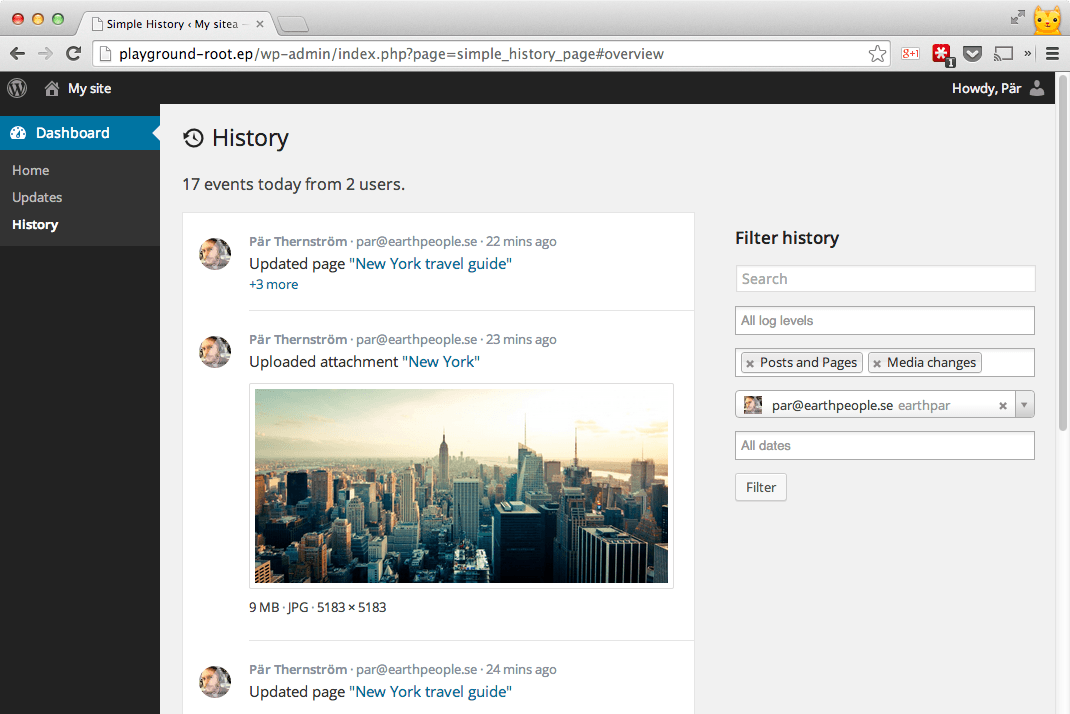
Loggvyn + den visar också filterfunktionen i bruk – loggen visar bara händelse som är av typen inlägg och sidor och media (dvs. bilder & andra uppladdningar), och endast händelser initierade av en specifik användare.
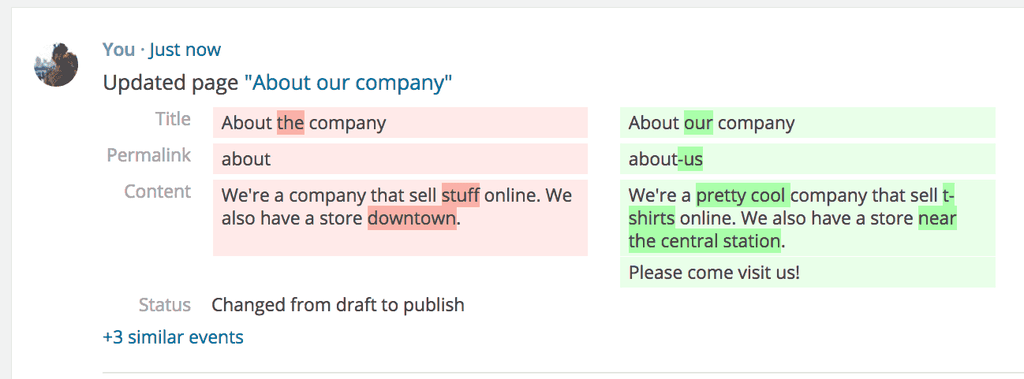
The feature will make it quick and easy for a user of a site to see what updates other users have done to posts and pages.
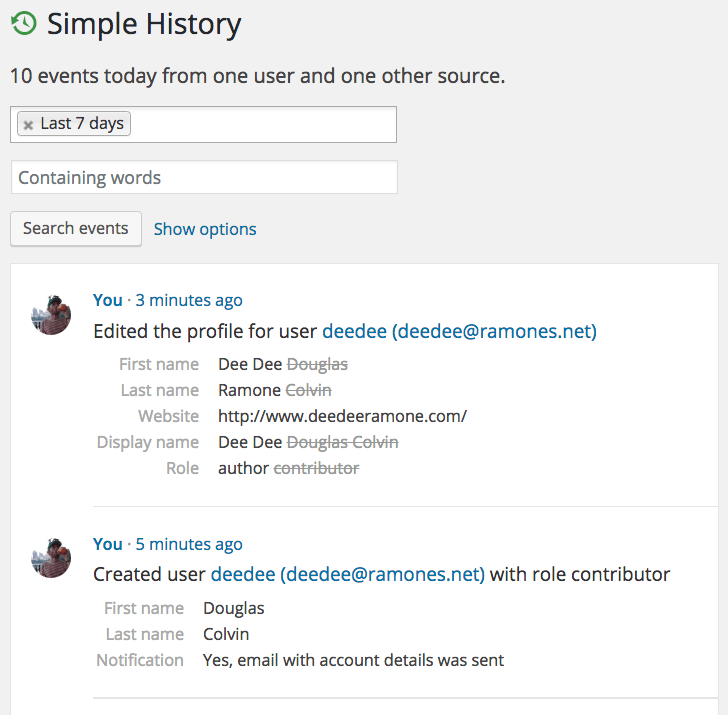
När användare skapas eller ändras kan du se detaljer om vad som har ändrats.
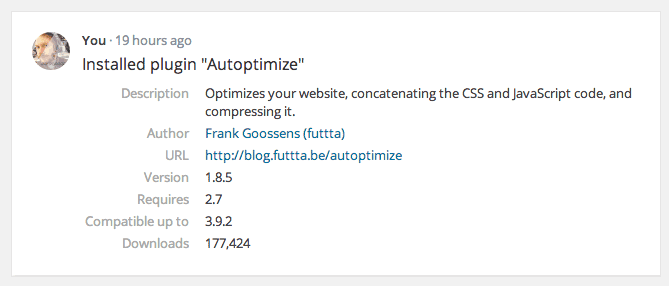
Events have context with extra details – Each logged event can include useful rich formatted extra information. For example: a plugin install can contain author info and a the url to the plugin, and an uploaded image can contain a thumbnail of the image.
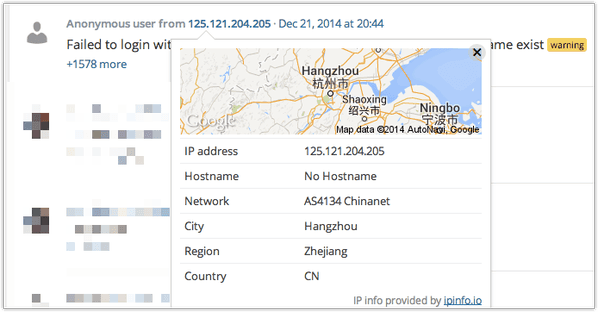
Klicka på IP-adressen för ett inlägg för att se platsen för t.ex. ett misslyckat inloggningsförsök.
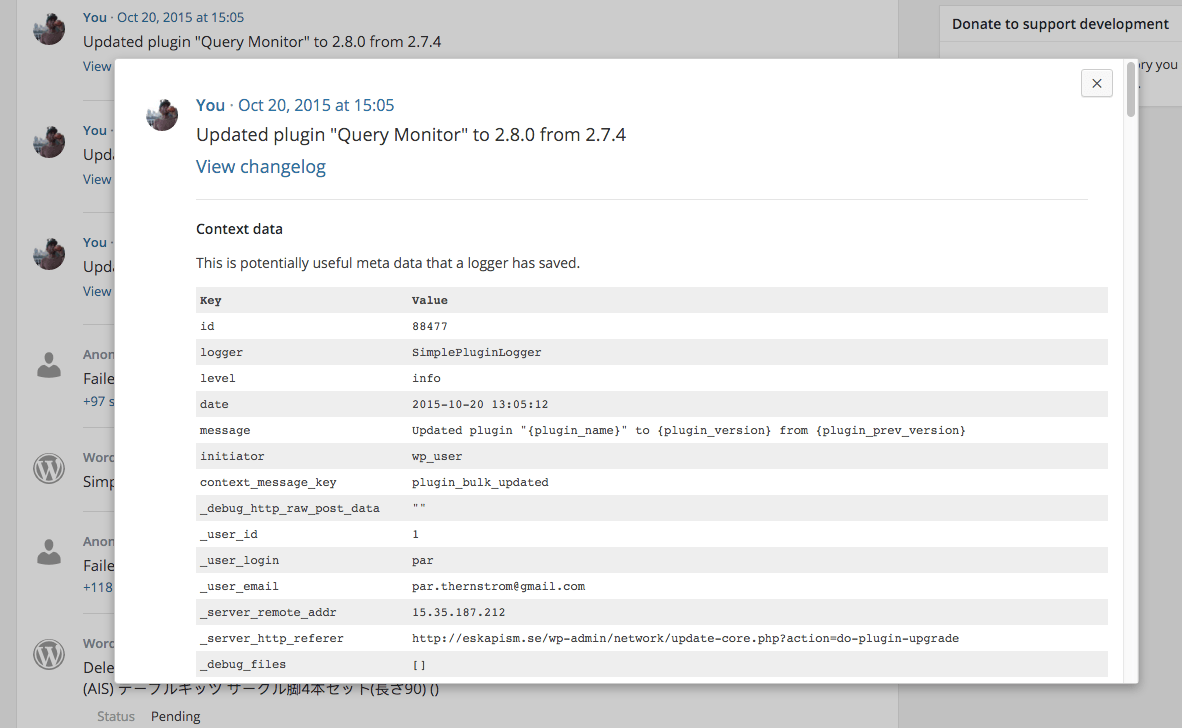
Se ännu mer information om en loggad händelse (genom att klicka på datum och tid för händelsen).
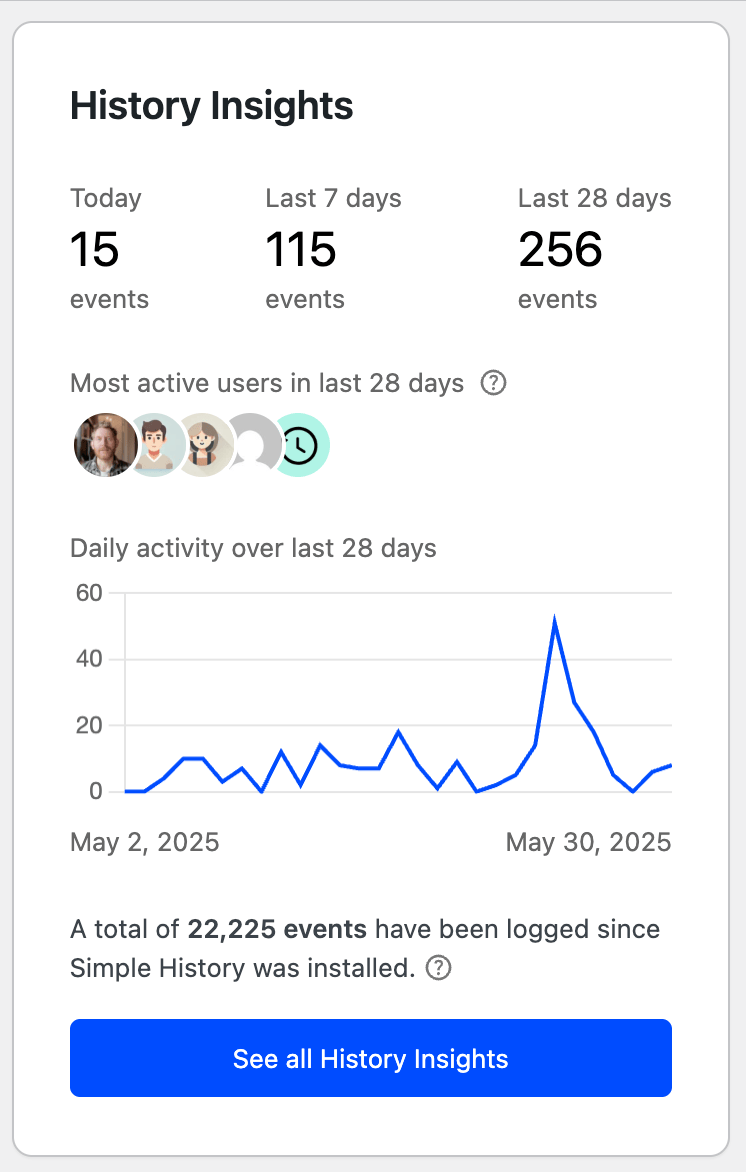
Ett diagram med lite snabbstatistik finns tillgängligt, så att du kan se antalet händelser som har loggats varje dag. Ett enkelt sätt att se eventuell ovanlig aktivitet, till exempel ett ökat antal inloggningar eller liknande.
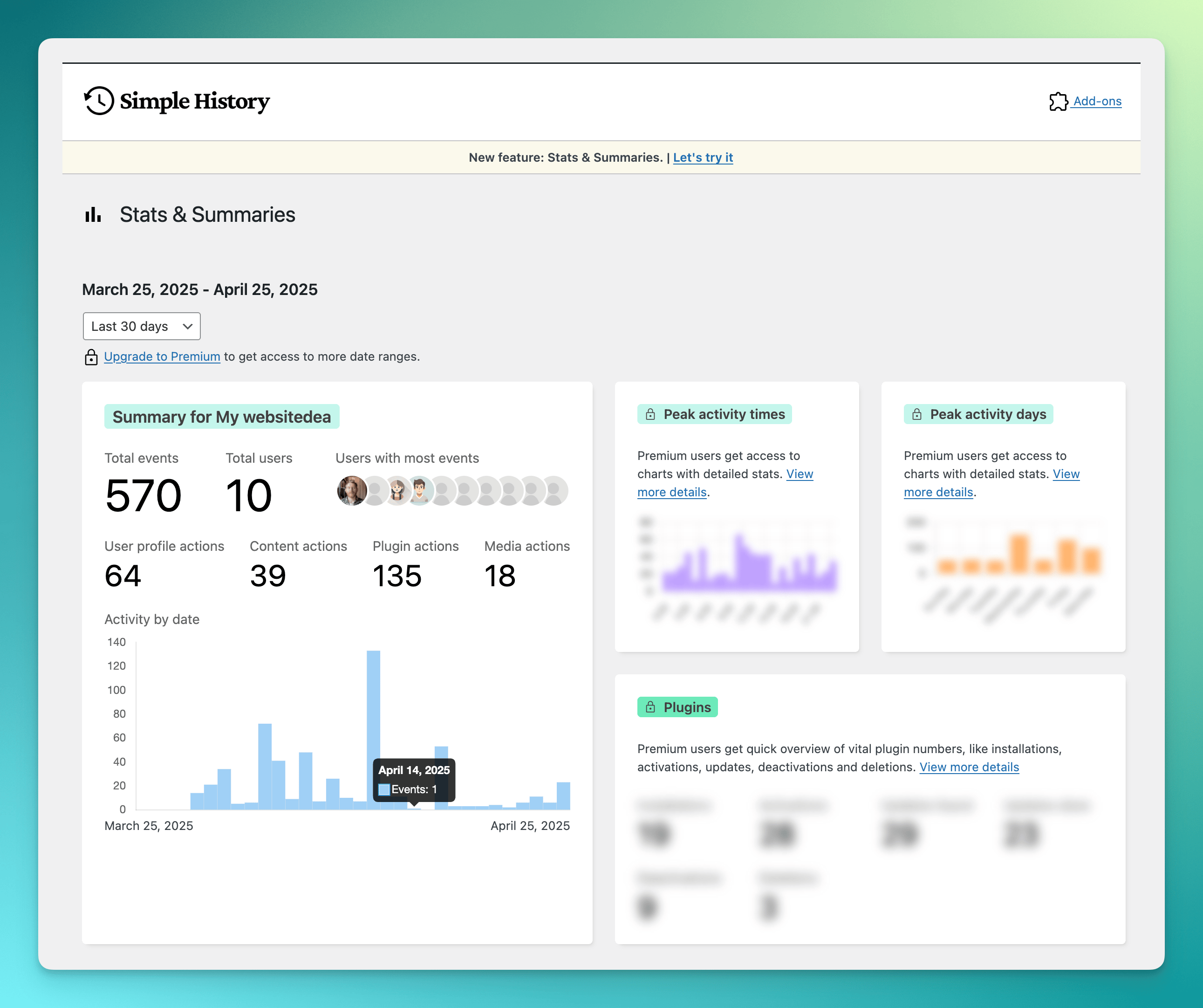
Stats and summaries page that gives you a quick overview summary of your site’s activity.
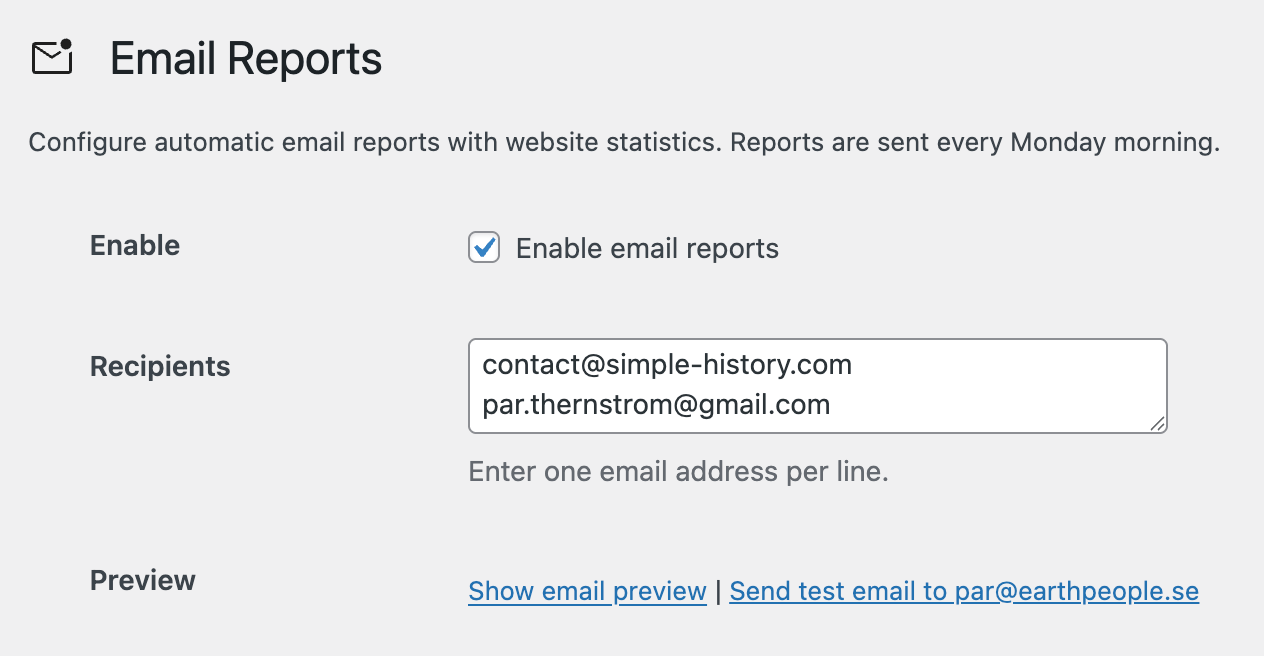
Email reports: Get a weekly summary of your site’s activity delivered straight to your inbox. Enable and configure this feature in the plugin settings.
Vanliga frågor
-
Är tillägget gratis?
-
Yes! Simple History has been free for over 10 years and will remain free. To support development and unlock extra features, you can purchase the premium add-on. View premium features.
-
Hur kan jag se loggen?
-
You can access the log in multiple ways:
- The dashboard widget
- The admin bar menu
- A dedicated log page in the WordPress admin area
-
Yes! You can customize the menu position in the plugin settings. Choose between showing Simple History at the top or bottom of the main menu, or inside the dashboard menu or tools menu.
-
Do I need coding skills to use the plugin?
-
No! Just install and activate the plugin, and it will start collecting activity logs automatically.
-
Var lagras loggen?
-
The log is stored in your WordPress database.
-
Kan jag exportera loggen?
-
Yes, you can export logs in CSV or JSON format for further analysis.
-
Is it compatible with other plugins?
-
Yes! Simple History supports many popular plugins out of the box. Additionally, developers can integrate it with any plugin using the Logging API.
-
Will this plugin slow down my website?
-
No, Simple History is lightweight and optimized for performance. Most logging occurs in the WordPress admin area when a WordPress user performs an action.
By default, nothing is logged on the front end, ensuring visitors experience no impact on performance.
-
Vem kan se loggen?
-
Access to the log depends on the user’s role:
- Administrators can view all logged events.
- Editors can see events related to posts and pages.
-
Can I exclude certain users from being logged?
-
Yes, you can exclude users based on role or email using the
simple_history/log/do_logfilter.For more details, check the hooks documentation.
-
Hur länge sparas historiken?
-
By default, logs are stored for 60 days.
Upgrade to Simple History Premium to change this using a GUI.
-
Kan jag spåra ändringar som gjorts av specifika användare?
-
Yes! You can filter logs by username, making it easy to track individual activity.
-
Is this plugin GDPR compliant?
-
GDPR compliance depends on how you use the plugin and how you handle collected data. WordPress guidelines prohibit plugins from making legal compliance claims, so you should review your site’s data policies to ensure compliance.
That said, Simple History follows privacy-friendly practices:
- ❌ Inga Google-typsnitt
- ❌ Inga cookies
- ❌ Ingen lokal lagring
- ✅ IP-adresser är anonymiserade som standard
Since the plugin logs events (which may contain personal data), it’s your responsibility to ensure GDPR compliance based on your site’s usage.
For more information, see our support page GDPR and Privacy: How Your Data is Stored in Simple History.
Recensioner


Bidragsgivare och utvecklare
”Simple History – Spåra, logga och granska WordPress-ändringar” är programvara med öppen källkod. Följande personer har bidragit till detta tillägg.
Bidragande personer

”Simple History – Spåra, logga och granska WordPress-ändringar” har översatts till 17 språk. Tack till översättarna för deras bidrag.
Översätt ”Simple History – Spåra, logga och granska WordPress-ändringar” till ditt språk.
Intresserad av programutveckling?
Läs programkoden, kika på SVN-filförvaret eller prenumerera på utvecklarloggen via RSS.
Ändringslogg
✨ If you find Simple History useful ✨
- Sponsor the plugin to keep it free.
- Add a 5-star review so other users know it’s good.
- Get the premium add-on for more features.
5.22.0 (December 2025)
Tillagt
- Added exclusion filter support to RSS and JSON feeds, allowing you to subscribe to events while excluding specific users, loggers, messages, or log levels. Useful for monitoring what others do without seeing your own actions.
Åtgärdat
- Simplified internal file structure to hopefully fix ”Class File_Channel not found” fatal error that some users experienced when updating the plugin.
- Fixed slow appearance of ”Stick event to top” and ”Unstick event” menu items in the event actions dropdown.
5.21.0 (December 2025)
🔍 Debug like a pro with the new ”Surrounding Events” feature — see what happened before and after any event. Plus: Log Forwarding (Beta) lets you send events to external log files, Syslog servers, or external databases for backup and compliance. Also improved: auto-recovery for missing database tables.
Read more about it in the release post
Tillagt
- ”Show surrounding events” feature to view events chronologically before and after a specific event, useful for debugging to see what happened around a particular event. Available via the event actions menu (administrators only), REST API, and WP-CLI. #610.
- Log Forwarding feature to send events to external destinations for backup, compliance, and security purposes. Includes File Channel for writing events to local log files with automatic rotation. Premium add-on adds Syslog and External Database channels. #573.
simple_history/purge_db_wherefilter for custom event retention rules, allowing per-logger retention periods or keeping certain events forever. See documentation.simple_history/db/purge_doneaction that fires once when purge completes, with total deleted count.Helpers::count_events()function for counting events in the database.
Åtgärdat
- Database tables not being created when using the plugin as MU plugin, after site duplication (where options are copied but custom tables are not), or during multisite network activation. The plugin now auto-recovers by recreating missing tables when needed. #606.
- IP addresses not showing when expanding grouped similar events.
- Debug page showing ”No tables found” when using SQLite (e.g., wp-playground) due to missing dbstat extension.
5.20.0 (December 2025)
🚀 Ready for WordPress 6.9 — this release logs the new Notes feature so you can track when notes are added or removed. Also new: automatic backfilling on first install so your log isn’t empty, a ”Hide my own events” checkbox, and a ”Yesterday” date filter.
Read more about it in the release post
Förändrat
- Improved code quality by resolving phpcs warnings for WordPress VIP Go compatibility.
Åtgärdat
- Fixed Notes Logger causing error in some cases when deleting comments.
- Fixed event context being silently dropped when post content contained emojis, causing incomplete log entries. (This is a long standing issue that has been around for a while, but now it’s finally fixed 🤞.) #607.
5.19.0 (November 2025)
🚀 Ready for WordPress 6.9 — this release logs the new Notes feature so you can track when notes are added or removed. Also new: automatic backfilling on first install so your log isn’t empty, a ”Hide my own events” checkbox, and a ”Yesterday” date filter.
Read more about it in the release post
Tillagt
- Add automatic backfilling of existing events on first install, so the activity log isn’t empty when you start using the plugin for the first time.
- Add logging of new notes feature in WordPress 6.9. #599.
- Add ”Yesterday” option to the date filter dropdown for quick access to previous day’s events.
- Add ”Hide my own events” checkbox to filters, allowing users to quickly exclude their own activity from the log. #604.
- Add WordPress VIP Go coding standards for enterprise compatibility.
- Add rollback context to plugin update failed events.
- Add logging of failed theme updates.
- Add support for negative filters in the event log query API, to the REST API, and to WP-CLI. #86.
- Add error message when trying to view an event that does not exist.
- Add filter
simple_history/show_promo_boxesto determine if promo boxes should be shown. - Add developer mode badge to the page header.
- Add new Tools tab with manual backfill option for importing historical events on demand.
Förändrat
- Rename ”Export” menu to ”Export & Tools” and add tabbed interface to support additional tools.
- Post creation events now capture initial post content, excerpt, and status transitions to provide complete audit trail without information gaps.
- Stop polling for new events after 10+ new events are detected to reduce server resource consumption from inactive browser tabs.
- Improved auto-backfill completion message to be more user-friendly and include the number of days imported.
- Improved welcome message text for clarity and better Premium feature promotion.
- Admin Bar Quick View: Display count of similar events (occasions) on a new line below the main event message and style it.
- Insights sidebar: Clicking on users now also filters the log by the last 30 days.
- Insights sidebar: Update text to show current events in database and total events logged with links to settings page for retention period.
- Insights sidebar: Improve messages for message count.
- Decrease font size on stats sidebar stats box to fit more events.
- Reduce number of HTTP requests by consolidating the small sidebar CSS file (just 4 rules) into the main stylesheet that’s already being loaded on the page.
- Hide sidebar donation box, support box, and review box when promo boxes are hidden for a cleaner interface with the premium add-on.
- Internal code and UI refinements.
- Tested up to WordPress 6.9.
Åtgärdat
- Fixed post creation via Gutenberg autosave not being logged.
- Fixed incorrect timezone handling for imported user registration dates.
- Fixed sidebar stats box styling conflict with premium add-on.
- Fixed warning about invalid HTML nesting in the log GUI filters. #548.
Removed
- Remove donation box from sidebar.
5.18.0 (November 2025)
👆 This release makes sidebar stats interactive – click on avatars, user names, or chart dates to instantly filter your event log. It also fixes email reports always showing Sunday as the busiest day, plus several bug fixes and improvements.
Read more about it in the release post
Tillagt
- Context search to the log GUI filters.
- Date support to create event REST API endpoint (allows creating events for specific dates).
- User names to list of most active users in last 30 days (previously only showed avatars).
- Clickable elements in sidebar stats box: avatars, user names, and chart dates now filter the event log when clicked.
- Dedicated Experimental Features admin page for users with experimental features enabled.
- New experimental feature: Import existing data from WordPress into Simple History (posts, pages, users, and attachments).
Åtgärdat
- Email reports always showing Sunday as the busiest day.
- PHP warning ”Trying to access array offset on value of type null” in Theme Logger when displaying widget events.
- More timezone and localization issues.
Förändrat
- Weekly email reports now sent earlier in the day (6 AM instead of 8 AM), so they are ready when the user wakes up.
- Reordered sidebar stats: Most active users now appears before Daily activity to group admin-only information together.
- Misc internal code improvements and changes.
5.17.0 (October 2025)
This version focuses on stats alignment and accuracy, timezone handling fixes, email report improvements, and performance optimizations.
Read more about it in the release post.
Tillagt
- Add icon to sticky events label.
- Add help text to sidebar stats box about refresh interval and what data is used for the statistics (for admin the stats are based on all events, for other users is based on the events they have permission to view).
- Email reports: Add tooltips to email ”Activity by day” showing full date (e.g., ”Thursday 2 October 2025”) on hover for each day.
- Email reports: Each day is now a link to the full log for that day.
Åtgärdat
- Sidebar stats was not always using the correct cached data.
- Fix timezone and date handling across all stats features (sidebar, Insights page, REST API, charts) and all filter dropdowns (Today, Last N days, custom date ranges, month filters) to use WordPress timezone instead of server/UTC timezone.
- ”Today” now correctly shows events from 00:00 until current time (previously showed events from now minus 24 hours).
- Email reports: Fix timezone and date handling issues (now consistently use WordPress timezone), improved daily stats accuracy, date range, and updated email copy.
- Occasions count in main GUI was displaying incorrect number (always one event to many!) – button now shows the actual number of similar events that will be loaded when expanded.
Förändrat
- Email preview now shows last 7 days including today (matching sidebar ”7 days” stat) so users can verify preview numbers against sidebar.
- Email sent on Mondays now shows previous complete Monday-Sunday week (excludes current Monday).
- Email ”Activity by day” now displays days in chronological order matching the date range instead of fixed calendar week order.
- Use ”Today” instead of ”Last day” in main GUI filters to make it more clear what range is being shown.
Performance
- Improved performance by loading logger messages only when needed, eliminating ~980 gettext filter calls on every page load. This reduces overhead to zero on pages that don’t use Simple History.
- Optimized context handling when logging events with many context items using batch inserts.
- Plugin Logger now only runs gettext filters and auto-update detection on the plugins.php page instead of globally.
- Simplified plugin action list hooks by only hooking into our plugin.
- Added autoloading of deprecated classes, so they are only loaded if needed.
Removed
- Removed legacy AJAX API endpoint (
action=simple_history_api). The plugin now uses the WordPress REST API exclusively.