


| CARVIEW |
relay.py:
1 2 3 4 5 | |
This seemed like a worthy problem to investigate so that, at the very least, I could write a ticket to track the issue.
The first challenge was to set up a smart host configuration with Twisted. A smart host is a mail server which accepts mail to any address and then determines the mail exchange for the address and connects to it to relay the mail. Unlike an open relay, a smart host imposes restrictions on the source of messages. While some may accept mail only from authenticated senders, Twisted’s default is to relay any mail received over a Unix socket or from localhost.
It was easy enough to run a smart host on my development machine. I just had
to invoke twistd mail with the relay option and specify a directory to hold
messages to be relayed:
1
| |
The smart host uses DNS to look up mail exchanges and
contacts them via SMTP on port 25. Because my ISP does not allow outgoing
traffic on port 25 and because I did not want to relay test messages to
real mail servers, I needed to make some changes to the Twisted source so that
the email messages would be relayed to a Twisted mail server that I ran on a
second computer. I modified relaymanager.py to relay to port 8025 and to
use a hosts file for DNS resolution.
1 2 3 4 5 6 7 8 9 10 11 12 | |
The hosts file maps example.com and example.net to the IP address of the
computer running the target mail server.
1 2 | |
I configured that server to run on the default port, 8025,
and accept mail for a few users on the domains example.com and example.net:
1 2 | |
When I used telnet on the development machine to send mail to the smart host running on the same machine and addressed it to one of the configured users on example.com or example.net, the smart host relayed it to the mail server on the second machine.
Now that I had a usable configuration, I wanted to explore the implications of
the comment that RelayerMixin opened a large number of files and never closed
them. RelayerMixin is used to introduce a set of functions for relaying mail
to another class, a relayer, through inheritance. On initialization, the
relayer calls one of the RelayerMixin functions, loadMessages, with a list
of the pathnames of messages which it is responsible for relaying.
loadMessages opens each message file and stores the file object in a list.
I hypothesized that if I sent a lot of messages to the smart host at once, its
relayers would open files for all the messages and hit the operating system
limit for open files.
I wrote a short program to send the SMTP commands for a series of messages to the smart host running on port 8025 of the same machine. The messages are randomly destined to one of two addresses on each of the two domains served by the mail server on the other machine.
1 2 3 4 5 6 7 8 9 10 11 12 13 14 15 16 17 18 19 20 21 22 23 24 25 26 27 28 29 30 31 32 33 34 35 36 37 38 | |
As I increased the number of messages sent, I expected to eventually see an exception occur when too many files were opened but that did not occur no matter how many messages were sent. From the server log, I observed that instead of opening one connection to the mail server for each domain and sending all the queued messages for that domain, the smart host was repeatedly connecting to the mail server and sending no more than a few messages at a time. That explained why the limit on open files was not being reached. The relayers were being handed only a few messages at a time so there was no need to open a lot of files at once.
This strategy for allocating work to relayers did not seem very efficient so I
started exploring further. SmartHostSMTPRelayingManager, which implements
the smart host functionality, has a function, checkState, which is called
periodically to see if there are messages waiting to be relayed and if there is
capacity to create new relayers. If so, it calls _checkStateMX to create
relayers and allocate messages to them. It turns out that _checkStateMX
contains a subtle bug which is the cause of the allocation behavior.
1 2 3 4 5 6 7 8 9 10 11 12 13 14 15 16 17 18 | |
_checkStateMX asks the relay queue for a list of waiting messages. Then it
loops through the messages, grouping them by target domain. Eventually, each
group will be handed off to a relayer. The problem is that _checkStateMX
breaks out of the loop as soon as it has at least one message for the maximum
number of domains it can concurrently contact. That value, maxConnections,
is an optional parameter to SmartHostSMTPRelayingManager.__init__. Its
default value is 2.
As _checkStateMX loops through the waiting messages, it creates a list of
messages for the first domain it sees and keeps adding messages for that domain
to the list. When it sees a second domain, it creates another list for that
domain but since it has hit the limit on connections, it breaks out of the
loop. So, any other messages in the queue for either domain must wait to be
sent even though they could be handled by the same relayers. Instead of
breaking out of the loop when it reaches the connection limit, _checkStateMX
should continue to add messages to the lists for the domains it has already
seen and ignore messages for other domains.
With the understanding of how messages are allocated to relayers, I was now easily able to trigger an exception for too many open files by sending a large number of messages to one domain instead of splitting them between two.
As a result of this exploration, I filed and submitted fixes for two issue
tickets, a defect ticket for the handling of open files
by RelayerMixin, and an enhancement ticket to improve
how messages are allocated to relayers.
startMessage and exists functions
of both the AbstractMaildirDomain and DomainQueuer classes.
AbstractMaildirDomain is a base class which is meant to be subclassed to
create mail domains where the emails are stored in the Maildir format. Most of
the functions it provides are placeholders that need to be overridden in
subclasses. However, it does provide implementations for two functions,
exists and startMessage. exists checks whether a user exists in the
domain or an alias of it and, if so, returns a callable which returns a
MaildirMessage to store a message for the user. Otherwise, it raises an
SMTPBadRcpt exception. startMessage returns a MaildirMessage
which stores a message for the user.
The existing unit tests for AbstractMaildirDomain were minimal, checking just
that it fully implemented the IAliasableDomain interface.
Additional test cases were needed to verify that:
startMessagereturns aMaildirMessage- for a valid user,
existsreturns a callable which returns aMaildirMessageand that the callable returns distinct messages when called multiple times - for an invalid user,
existsraisesSMTPBadRcpt
AbstractMaildirDomain could not be used directly in testing exists and
startMessage because both call a function which has only a placeholder in the
base class. So for testing purposes, I created a subclass of
AbstractMaildirDomain, TestMaildirDomain, which overrides the placeholder
functions.
Since each test would need a TestMaildirDomain to exercise, I wrote a setUp
function which runs prior to the test and creates a TestMaildirDomain as well
as a temporary Maildir directory for it to use. I also added a tearDown
function which runs after each test to remove the temporary directory.
1 2 3 4 5 6 7 8 9 10 | |
The tests for startMessage and exists turned out to be pretty
straightforward:
1 2 3 4 5 6 7 8 9 10 11 12 13 14 15 16 | |
Like AbstractMaildirDomain, DomainQueuer acts as a domain, but instead of
saving emails for users, it puts messages in a queue for relaying. Its
exists and startMessage functions are meant to be used in
the same way as those of AbstractMaildirDomain. It seemed like it would be
an easy matter to adapt the unit tests for AbstractMaildirDomain to work for
DomainQueuer.
It turned out, however, that the test for exists on DomainQueuer failed
because a function was being called on a variable set to None. Something
clearly hadn’t been properly configured for the test.
Here’s the DomainQueuer code being exercised in the test:
1 2 3 4 5 6 7 8 9 10 11 | |
exists calls willRelay with the protocol which was passed into it as part
of the user argument. willRelay tries to call getPeer on the
transport instance variable of the protocol. But, the minimal User
object passed to exists, which worked for the AbstractMaildirDomain test,
is not sufficient for the DomainQueuer test. willRelay needs the protocol
to determine whether it should relay the message.
I had two thoughts about how to get around this problem, but I wasn’t sure
either of them was satisfactory. One option would be to provide the User
object with a fake protocol and fake transport so that willRelay could be
configured to return the desired value. That seemed to be a very roundabout
way to solve the problem of getting willRelay to return a specific boolean
value.
A more direct way to get willRelay to return the desired value would be to
monkeypatch it. That is, as part of the unit test, to replace the
DomainQueuer.willRelay function with one that returns the desired value. The
problem with monkeypatching is that, even though willRelay is part of the
public interface of DomainQueuer, it could change in the future. For
example, it could received additional optional arguments. Then, the unit
test which used the monkeypatched version might not reflect the behavior of
the real version of willRelay.
I got some great advice about how to approach this problem and unit testing in
general on the Twisted developers IRC channel. The idea behind unit testing is
to test each unit of code independently. Here we can consider exists and
willRelay to be two different units. But the way willRelay is implemented
means that it is difficult to test exists independent of it. I was advised
that sometimes the best thing to do when adding unit tests is to refactor the
code itself. So, I attempted to do that without changing the public interface
of DomainQueuer.
I introduced a base class, AbstractRelayRules, whose purpose is to
encapsulate the rules for determining whether a message should be relayed.
Then, I defined a subclass, DomainQueuerRelayRules, which contains the
default rules for the DomainQueuer class.
1 2 3 4 5 6 7 8 9 10 11 12 13 14 15 16 17 18 19 20 21 22 23 24 25 26 27 28 | |
In DomainQueuer, I changed the __init__ function to take a new optional
parameter specifying the rules to be used to determine whether to relay. When
relayRules is not provided, the default DomainQueuerRelayRules is used. I
also changed the willRelay function to ask the relayRules whether to relay
instead of determining that itself. Existing code which creates a
DomainQueuer without providing the extra argument works in the exact same way
as the old code.
1 2 3 4 5 6 7 8 9 10 11 12 13 14 15 | |
Finally, I created another subclass of AbstractRelayRules to be used for
test purposes. TestRelayRules can be configured with a boolean value which
determines whether relaying is allowed or not.
1 2 3 4 5 6 7 | |
Now, the unit tests for DomainQueuer.exists using TestRelayRules are quite
simple.
1 2 3 4 5 6 7 8 9 10 11 12 13 14 15 16 | |
Refactoring to decouple the rules for relaying messages from the
DomainQueuer certainly made the unit testing code much cleaner. As a general
matter, difficulty in writing unit tests may highlight dependencies in the code
which should be refactored.
I was documenting the alias module, which contains classes for redirecting
mail from one user to another user, to a file, to a process, and to a group of
aliases. Four different classes inherit from the base class AliasBase
and implement the interface IAlias, which contains the function
createMessageReceiver.
The class hierarchy looks like this:
twisted.mail.alias.AliasBase
    twisted.mail.alias.AddressAlias
    twisted.mail.alias.AliasGroup
    twisted.mail.alias.FileAlias
    twisted.mail.alias.ProcessAlias
I was trying to determine the return value of IAlias.createMessageReceiver.
The return value was clear for three of the four classes that implement
IAlias because the object to be returned was created in the return statement.
FileAlias -> FileWrapper
ProcessAlias -> MessageWrapper
AliasGroup -> MultiWrapper
The objects returned are all message receivers which implement the
smtp.IMessage interface. They deliver a message to the appropriate place:
a file, a process or a group of message receivers.
It seemed pretty clear that the return value of the createMessageReceiver
function in the IAlias interface should be smtp.IMessage.
However, there was one more class that implemented the interface,
AddressAlias, and the return value from that wasn’t so clear.
1 2 3 4 5 6 7 8 9 | |
AddressAlias.createMessageReceiver returns the result of a call to exists
on the result of a call to domain.
domain is a base class function which returns an object which implements the
IDomain interface.
Fortunately, the IDomain interface was documented.
It returns a callable which takes no arguments and returns an object
implementing IMessage.
Unfortunately, this return value didn’t match the pattern of the other three
classes implementing IAlias.createMessageReceiver, all of which return an
object implementing IMessage.
Although messy, it was possible that the return value of
IAlias.createMessageReceiver
was either an smtp.IMessage provider or a callable which takes no arguments
and returns an smtp.IMessage provider.
Or, it might have been a mistake.
At this point, I fortuitously happened to be looking at this code in an old
branch and noticed a difference. There, the
AddressAlias.createMessageReceiver function appeared as follows:
1 2 | |
After some investigation, I found a
ticket that had been fixed
earlier this year to remove calls to the deprecated IDomain.startMessage
function.
In the old code, startMessage also returns an IMessage provider.
So, it seemed that a bug had been introduced in the switch from startMessage
to exists.
The result of the call to exists must be invoked to get the proper message
receiver to return. The code should read:
1 2 | |
I filed a ticket in the
issue tracking system and subsequently submitted a fix.
While reworking the unit tests, I relied heavily on the API documentation I had
written for the alias module.
I think it’s safe to say that had the API been fully documented when the
original change was made, this error would have been easy to spot during code
review or to avoid in the first place.
The Twisted API documentation is automatically generated from comments embedded in the source code. The Twisted Coding Standards dictate that all methods, functions, classes, and modules have docstrings which describe their purpose and detail all parameters and attributes. The docstrings are written in Epytext Markup Language and are processed by pydoctor, an API documentation generator, to produce the API documentation. Epytext provides a way to specify formatting information, to annotate parameters, return values, and their types, and to create cross-reference links. Here’s an example of a docstring written in Epytext:
1 2 3 4 5 6 7 8 9 10 11 12 13 14 | |
And here’s the API documentation that would be generated from that docstring:
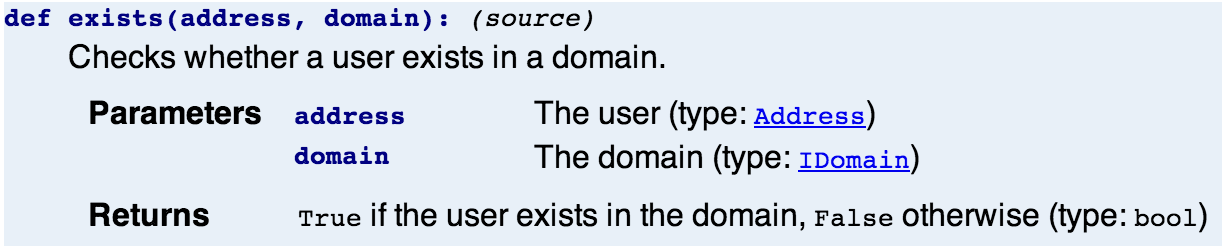
Currently, a good deal of Twisted Mail’s methods, functions, and classes are missing docstrings. Even those methods and functions that have docstrings often lack a full description of parameters, return values and their types. My task is to provide that missing information. It’s a great opportunity to dive deeply into the code. And, once the code is fully documented, I’ll find it much easier to fix bugs and introduce new features.
]]>I found immediate success in running the examples of clients that use the IMAP4 protocol to access email from a remote server. I was also able to run a simple email server that uses SMTP to receive messages, although I had to read the source code to figure out from which address it would accept messages. When it came to the examples of clients which use SMTP to send messages, nothing worked.
SMTP is a text-based protocol in which a client issues a series of commands and receives replies from a server in order to send mail. To investigate the problem with the SMTP client examples, I thought to use telnet to connect directly to the email server and issue the commands manually. Not only couldn’t I connect with telnet to the servers used in the examples, I couldn’t even connect to a Google server. In all of these cases, I was attempting to connect on port 25, which is the well-known port for SMTP. My OPW mentor, Jessica McKellar, theorized that the problem was caused by my ISP blocking outbound traffic for port 25. Verizon’s website confirms that they do this to prevent virus-infected computers from sending spam.
With this problem in mind, I moved on to the tutorial on how to build SMTP clients. I ran into the same problem that had earlier prompted a trouble ticket. The tutorial requires a server running on port 25 of localhost but it does not explicitly mention this requirement nor does it give directions for running such a server. A patch had been submitted to explicitly mention the requirement and suggest that the user could change the example to use an external SMTP server. A review of that patch had found no problem with the change in wording. The review, however, raised an ancillary issue, noting that the output listed in the tutorial did not match what was actually generated by running the examples. This same complaint was documented in another open ticket.
I wasn’t satisfied with the proposed solution, since the user might well be blocked from contacting an external server on port 25. I thought the best solution might be to include directions on running a server locally, to be used with the tutorial. With my limited knowledge of Twisted mail, I modified the example SMTP server to run on port 25 and accept mail from any user. There were some quirky requirements involved in running this server, but I was able to get through the tutorial with it.
Although I had gotten the tutorial working with a local server, I suspected that my solution might not be the most elegant. Rather than submit a patch and upon review learn of a better way to solve the problem, I thought it prudent to consult with the Twisted developer community on the twisted-dev IRC channel. I learned that I could use the twistd utility to start up a mail server with its configuration, including the port, specified through command-line flags.
When I mentioned that I planned to update the output listing in the tutorial in response to both tickets, one developer suggested that was futile since the output would vary based on release and platform and that it would be better just to mention in the tutorial that the listing was representative. He then closed the second ticket, explaining why it wouldn’t be fixed.
In the discussion, one of the developers asked me to amend the first ticket to summarize the problem and specify the completion condition. I specified that the solution was to make the tutorial self-contained so that a user would need no external knowledge to work through it. Then I revised the tutorial to make it so. At the same time, I fixed some issues of formatting, punctuation, grammar, clarity, and accuracy.
Before I could submit a patch, I needed to build the documentation. Similar to the process of building code, tools must be run on the raw form of the tutorial to produce nicely formatted output. Twisted includes a documentation generator tool called lore which translates XHTML input with annotations to indicate, among other things, links to API documentation and code listings into HTML output.
My patch received a quick review. In addition to some requests for minor changes and clarifications, the review included some comments which seemed to suggest that the examples used in the the tutorial might not best represent how to write an SMTP client. I was concerned because the ticket was currently limited in scope to making the tutorial self-contained. Changing the examples, while possibly an improvement, would require significantly reworking the tutorial. In the IRC channel, I asked for confirmation that this was what was being suggested and if so, should it be done as part of the same ticket. The consensus was that the suggestion constituted scope creep and should be addressed in a separate ticket. Now, I am left to submit a few minor revisions to hopefully close out the ticket.
If that weren’t enough in the way of tutorials, I also tackled a new tutorial
on building SMTP servers. Comments had been sitting in the
ticket for nine
months. In addition to incorporating the comments, I edited the document and
modified the presentation of some examples to hopefully make them more clear. I
found the final example, which is meant to explain how to use the
IMessageDeliveryFactory interface, to be lacking and wrote a new example to
better showcase it. The changes are nearly ready to be submitted.
Work on these tutorials will continue but my focus is now turning to another area of documentation – the API. More on that to come.
]]>