


| CARVIEW |
“Teaching Technology Addiction in a Highschool Classroom”
By: Sinead Swan, Colton Van Camp, and Harleen Parmar.
In today’s technology driven era, a learning resource that helps teenagers monitor their use of technology and understand technology addiction seems more than appropriate. The resource is well organized, with ample references to backup the study, even offering students the tools to reach out anonymously if they suspect that they may have a problem with addiction following the lessons.
The rationales on Learning Design and Theory are clear and concise. I found it easy to follow along with why they chose the methods of teaching that they did. I especially appreciated the way they would define each chosen theory prior to explaining how it correlates to their resource.
It seems to me that the Learning Context could be broadened, in the resource my peers define the learner but not the environment. Through deduction in other paragraphs, such as the Overview, I can tell that the lesson takes place primarily in a classroom setting for Highschool students, but this is not stated directly on the context. I would suggest adding in a section about the environment and target age group as a part of the context description for further clarity. Why are you specifically targeting the lessons to highschool students? I believe this should be included in the context summary.
The Assessment was also easy to understand, I liked that it used tables to help condense and organize requirements into an easy-to-read format. The expectations as to what is required by the students to pass is very clear.
I notice there does not seem to be a technology rational paragraph, at first I wondered if this was because the resource was about limiting exposure to technology, but it uses the internet and video sources to complete the lessons, so I believe the following from the learning resource criteria should still be added: “A rationale for your technology choices.” (Heidi James).
The section on the resource’s design for inclusion was well thought out, the group chose “English Language Learners” (ELL) and “No Computer access at Home” inclusions. I think the solutions this group came up with will be effective at helping these students. I would also add that in regards to ELL video inclusion, that many videos offer subtitles not only in English but through auto-generation into any language through the video settings. Auto-generation is far from perfect, but it may serve to assist ELL students. Furthermore there are tools like google translate which can take an audio sample and translate it for free. For a Ted-talk video this may be an ideal solution to improve ELL inclusion.
In regards to the actual activities and lessons of the course, I thought the ideas were solid and the activities were easy to follow along with. They had good correlation to the subject of the resource and the reasons for doing the activity was clear.
Be careful about marking students on creativity. Creativity is an abstract and highly subjective topic, fueled mostly by each individual person’s biases and life experiences. Someone is ‘creative’ when the viewers expectations are subverted. Asking a student to subvert a teacher’s expectations may be an unfair request. However, I see that its elaborated about being unique to the person, so perhaps play more on making the journals more about individual self-reflection and removing the term creativity, which may otherwise put a lot of pressure on the student and give them the wrong idea about what the teachers are expecting from them.
Regarding their learning goal: “To provide students with knowledge on technology addiction and the effects it can have on young people in a non judgmental, inclusive classroom.” I do have some concerns about privacy on some of these activities. Specifically activities were students are required to share personal data about their time and app usage to their peers. Choosing someone you trust is not always a viable option in a classroom setting, and in my own experience high school students are known for being particularly competitive or abrasive with their peers. The data shared may be considered embarrassing to some students or worthy of gossip to a bad-natured student. This could potentially damage the student’s confidence or social circle and result in opportunities for peer-shaming. My suggestion is to give the student full control over how honest they would like to be about their data, or even give them the option to complete this task without a partner, so that they are able to protect/control their privacy if they feel this is needed. Currently, I feel this activity may go against achieving their learning goal.
The activities seem all about bringing awareness to students, and I believe the activities suggested like group work, self-reflection, and personal evaluation will be effective at achieving the learning outcomes. I like that the pod tries to keep the lessons personal rather than hitting students with large walls of information. By targeting the lessons at the students directly I believe they will be more likely to relate to, and retain the information.
I am a little curious how a lesson like this may be taken by high school students, if it would make them defensive because its another “adult telling them what’s bad for them” or help open them up to helpful life tools. I think the lessons are framed in a way that will help students a lot more than a simple self-help lecture, and the tools learned could aid them for the rest of their lives. After all, the necessity of technology use is consistently on the rise.
Overall, I find this learning resource to be very well written and organized, there is room for student expansion and deep learning which could have a very positive impact on a student’s life. Unlike theoretical learning, this resource offers to teach students skills that could be applied to their lives directly and consistently. Well done!
]]>I really liked Caprim’s described activity for an interaction. Ted Talks are a great resource for students and the take on “Ceci ne pas une pipe.” is a great way to help students open up a dialogue about what it means to make art. I am a little concerned about the length of the video and the sophisticated language that’s generally used in Ted Talks. For the most part the video uses a lot of complicated dialogue which may be hard for Grade’s 6-8 to understand or pay attention to for a prolonged period (10 minutes is a long time for a child to watch someone talk, especially if the subject is complicated or abstract). For example, in my education, art teachers did not start bringing in abstract concepts about art like this until Advanced Placement courses in High School and then throughout University. I do believe the deconstruction of preconceived notions of art can start to be broken down earlier like at Grades 6-8, but I would be cautious about potentially overwhelming the students.
The exercise Caprim is describing is actually a common and extremely helpful exercise that exists in classrooms today called a Blind Contour. The activity is known to improve student’s understanding of abstract space, coordination, and ability to let go of the demand for “perfect replication”. Traditionally Blind Contours allow the student to see the object, but they are not allowed to look at the paper for the full duration of the exercise. I really like how Caprim took this one step further by removing the aspect of sight entirely, so that students are only able to envision what is happening with their minds eye. I think an exercise like this can really help lessen how ‘seriously’ art is often taken by the artists in their desire for perfect representation.
“Interaction Prompt” by Zihan Bai
I think this video would work well for kids in grades 6-8, its basically a crash course in how to compose art, but its done through animated characters, bright colors and slides, which may help keep their attention. Note-taking by writing on paper is a great and classic way to help students remember what they are hearing, its a strategy I use almost daily myself. In addition to note-taking Amy suggests a drawing activity, I really like this applied method where students need to try and replicate the strategies they see in the video. I also like the idea of sharing the drawings with each other afterwards, however I don’t know how I feel bout having peers select the “best” drawing. By having a peer reviewed best, you are including competition in the assignment. Art is a very sensitive topic for a lot of students, and “losing” is usually not taken well. There’s also some flaws where the most popular students work may be picked over the best applied work, and this could come as a hit to other student’s confidence.
Instead I believe it would be better if choosing the best work was taken out of the activity all-together, and instead was replaced either with interaction from the teacher addressing the works or through independent self reflection.
]]>The following video: “Easy Cloud Acrylic Painting Tutorial for Beginners” in JK Paint’s series: “Learn How to Paint” is a prime example of a concise speed-painting tutorial that introduces important techniques and effects that most new painters may not assume is possible just by picking up a brush. It uses techniques such as sectioning out colors by applying paint directly to the canvas for mixing, sponge texturing, and finally paint flicking. The tutorial is short and simple enough that the target age group (Grades 6-8) can easily follow along, even in real-time with some well placed pauses. Mimicking a simple tutorial like this can help build confidence and the techniques learned can help broaden their ability to create their own original works.
As described above, the video is or has the potential to be a type of inherent interactivity, where students must respond in order to continue. This doesn’t have to be the case if you ask students to watch the video just for the techniques, however I believe the best course of action for a tutorial such as this is to make the students follow along. This could be done as homework or during class time as a short exercise graded on participation and completion of the activity, with no penalty for deviation from the end result or gaps in skill level. The medium would be acrylic and the activity could take place on a small canvas or mixed media paper. When the assignment is finished, we can hang the finished products on the classroom wall and have a session of reflection where students can express what they think they did well/liked, and what they wish they could have improved on or learned more about. The activity has the ability to be scaled across as small or large a group of students as needed. If we cut out the reflection, and made students bring their own supplies, the assignment could even work for classrooms of up to 100+ people. Of course, the workload for the teacher is dependent on the class size, but overall the amount of labor for an assignment like this would be minimal, as all that would be required is general supervision, a check for completion/participation, and a short review. If the video creates barriers for a person, there are plenty of other online quick tutorials that could be used in this one’s place. Potentially a professor could offer a small assortment of videos and let students pick which one they wanted to do.
I think this video is pretty good, its short and concise which means a lot to younger age groups, however I wish there was described audio to help people who may have issues reading the font.
]]>2. How can you adjust your planned learning activities to meet the needs of your learners if an unexpected event occurs? (for example, a pandemic arises and many of your employees must now work from home – how will you ensure that they can still do their jobs? What training will they need, and how will you deliver it, knowing they must remain at home?)
As we enter more progressive times, inclusive learning becomes more prevalent to schools and resources. However, Visual Arts has remained relatively untouched for many years, and even in the midst of the Covid 19 crisis, remains to be one of the most unchanged topics I have ever seen. If you take a Visual Arts course at Uvic, students still have to go to school and be in classroom environments and have studio time. It seems the only real change to art classes has been no sharing of art supplies, use the same work-station, and the 6ft apart rule.
So what would happen in the event that my groups assignment had to be online, when even university courses take every possible measure to avoid this scenario?
Inclusive Education Canada indicates that inclusive design is about undoing hardships. There is no doubt that online art classes is a downgrade from an in-person experience with an instructor. I believe the higher the level of art course, the worse this loss is, as art courses become increasingly more complex and require more in-depth surveillance. For a university level painting course for example, they teach you the correct posture for painting standing up, which is required for making any large paintings. If you do not use the correct form, you could hurt yourself standing for multiple hours painting. A zoom class may not be enough to allow the teacher to see what their student is doing and correct them before they injure themselves. However, this is only true when we look at the possibilities in traditional media and not digital media.
So I believe if my groups resource had to be conducted online, it would then be required to change the medium. Since painting requires supervision, and group painting is impossible behind a screen, it stands to suggest that the next step forward would be to switch to digital painting. There are many online programs, most free, designed to replicate realistic painting in an online environment, programs such as Paint-tool Sai or Gimp which allow students to create art in a way that can be supervised and taught much like traditional painting but at a fraction of the cost. Switching to full online could still be conducted through zoom with screen sharing, with live demonstration and follow-along methods to learning that could then be transferred into real painting later, as well as introduce students to a new and often over-looked kind of art making. Furthermore, allowing the use of digital media comes with all kinds of accessibility tools, like colorblind filters, described audio, subtitles, and more. I believe that art can be transferred into the digital world, but only when the art itself is digitally harnessed.
]]>I enjoyed talking to my pod about which method of Instructional Approach would benefit our blueprint the most. In the end we settled between Open Pedagogy and Experiential Learning as the best candidates with a stronger lean towards Experiential Learning due to the nature of the tasks and sub-topics in the course. I could see how every instructional approach could be applied to an art setting, some of which surprised me in how good a fit they would be, everyone had such compelling points in their summaries.
Outside my pod, here are my thoughts on one of my peer’s entries.
Blog Post 2: Inquiry-based Learning by Leyang
While reading Leyang’s post on Inquiry-based learning I was taken by the following statement: “In a traditional educational environment, learners often focus only on memorizing correct answers. They tend not to be risk-takers who pursue their own curiosity.” I believe this statement could not be more true, even in the art world student’s become wrapped up in trying to understand what the teacher wants and how to meet the needs of their instructor rather than the needs of their learning. Unfortunately a lot of the time risk-taking is punished in schools, even in art, where if someone strays too far from what is expected from the assignment, they fail the assignment and maybe even the class, and this idea of failure keeps students from experimenting and thinking outside the box. By incorporating independence in learning, student’s can be accountable for themselves and be allowed to take risks and “fail” in private without direct punishment from the course. For this reason I think Inquiry-based learning is a great tool for building student confidence so long as they participate effectively.
]]>#1: Inclusive Design Prompt by Zihan (Amy) Bai
I really liked Amy’s idea in their inclusive design prompt about making a learning app that can tailor to people’s specific learning styles. I specifically was interested in their concept of notification silencing. As a person that uses my phone and computer to work, people seeing my online presence is enough to trigger them to reach out to me for tasks. I then get a lot of notifications while I am trying to study, or even when I’m in a zoom call. Furthermore trying to tell people not to message you during a certain time period really doesn’t work well, as people will either forget or discredit it quickly. Having an app that allows you to block out external stimulus while you are trying to study, while still allowing access to what you need to learn properly would be amazing. I feel like it would help a lot of people, as one of the biggest hurdles with online learning is the fact it is online in the first place and those who are not technologically savvy struggle just to get started. Introducing too many tools and online platforms can be stressful to students, more than introducing them to a single all-inclusive platform. There is then the added struggle that every teacher may use different platforms, so students need to constantly relearn all these platforms for every course. So I believe that while this app is a really good idea, the following would need to happen for it to be effective:
-It has access or the potential to access all the needed course information and tools within a self-contained and easily accessible unit. As non-disruptively as possible, so that the student focus is not on having to manage multiple sources of information.
-Teachers in the school all agreed unanimously to use this app, so that students do not need to learn new platforms every course. Just like student does not need to relearn how to walk into a classroom and pick a seat. The expectations on how to use and work the tool is established only once and is carried throughout the school. This way, the focus is on learning the material and not “an-app-a-class” as I notice it currently is in schools.
Overall these are only minor issues and I think with school cooperation something like this would be extremely beneficial to online learning. It’s a really good idea!
#2: (Prompt) Inclusive Design by Yirun Jin
I think Yirun’s idea to mix interactive design with inclusive design is an interesting idea. We live in an era where chats and social media are a click away and people are more accessible than ever before. Thus you would think this would mean that students would engage more with the addition of technology enabling them. In many regards I find the statements in Yirun’s post about the benefits of inclusive learning to be true, when everyone participates and communicates and gives feedback it certainly improves learning. However in my experience, I find that the inclusion of online platforms seems to enable students to hide rather than to participate. Rather than them coming in at a specific time, and being told they have to interact for an hour, and having no other choice but to do so, students in online courses seem to simply chose not to participate with their peers at all. I see this in a lot of online courses, people won’t talk or engage regularly like they would in a physical class. It seems almost as if, because interaction is so open, it is never prioritized and is taken for granted instead. I think there’s ways around this dilemma however, by mandating a specific time online where students are kept track of and held liable for participating we can bring back “class time” even online, and re-enable participation and communication through online student chat. After all, who says attendance can’t be taken online?
]]>Overview of Open Pedagogy:
What is Open Pedagogy?
Open Pedagogy is all about student participation, as well as the using/creating of Open Educational Resources (OER). Education is not treated like a constant, but an evolution that progresses over time with input and experience from student participation. Unlike many other forms of learning which are about the act of receiving knowledge, open pedagogy is all about the creation of knowledge through direct participation and experimentation so that students can leave behind something meaningful for the students that follow. With an Open Pedagogy teachers are inviting the students to be directly involved in the teaching process, therefore the success of an Open Pedagogy System is based not on what the teacher teaches, but on what their students do. I particularly enjoy how Open Pedagogy is summarized in this quote from the University of Texas Arlington Libraries:
“Open pedagogy is the practice of engaging with students as creators of information rather than simply consumers of it. It’s a form of experiential learning in which students demonstrate understanding through the act of creation. The products of open pedagogy are student created and openly licensed so that they may live outside of the classroom in a way that has an impact on the greater community. Open projects frequently result in the creation of open educational resources (OER). OER are free teaching and learning materials that are licensed to allow for revision and reuse. They can be fully self-contained textbooks, videos, quizzes, learning modules, and more.”
What I take from their definition is that the heart of an open pedagogy’s success is based around active student participation and exploration. This is an especially promising concept when studies like Constructive Alignment suggest that requiring students to learn what you want them to from a course requires removing possible shortcuts such as cram studies.
Hegarty (2015) separated different aspects of a working Open Pedagogy into a web-like formula, which I have included above for reference. These categories may overlap frequently, but they form the basis of what is required to produce student OERs. OERs from what I can find, most often come in the form of opensource textbooks or blogs.
Open Pedagogy in Visual Arts:
There are a lot of similar concepts between Open Pedagogy and Visual Arts, so much so that I almost wonder if teaching studio art classes in and of itself is a type of Open Pedagogy by default. Teachers may brief you on a concept in visual arts, but the learning falls entirely upon student participation, exploration, and contribution. Schools may also ask students to leave their works behind as examples for other students, or ask them to engage in large-scale projects that leave a lasting impact on the school when completed. Additionally, artworks from classes are often hosted in school gallery events, and so project studies can even be used to reach out to non-art students. Along with learning art, Visual arts offers students unique experiences where participation and exploration are not just suggested, but required by default in order to progress. Students may learn many community-based skills in Visual Arts, like the exchange of tips and tricks, techniques, sharing art supplies/resources, dynamic engagement with difficult topics, and of course an entirely creative-based approach to learning.
One of my favorite examples of Open Pedagogy in Visual Arts is the “Color Wheel Assignment”, which seems to be so beloved by art instructors that students usually have to relive it over and over at the start of almost every art course. It goes like this:
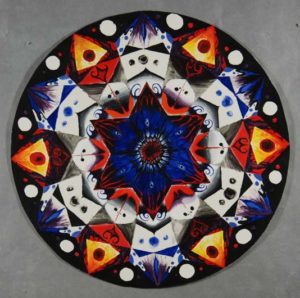
Abstracted Color-Wheel by Jessica Coleman
-First the instructor explains how a color wheel works, they show a visual example of the basic color wheel, and cover color theory such as harmony, complimentary, and monochrome palettes.
-Second comes an assignment: to make the color wheel exactly as the instructor showed. This is usually an ungraded exercise to let students discover color mixing and become familiar with the color wheel. By making students make their own accurate color wheels, they increase student understanding beyond simply giving them a picture and description of a color wheel.
-Next is the graded phase. Teachers ask students to recreate the color wheel, by engaging the wheel and color theory creatively in order to create something new, students are then forced to apply their knowledge. During this process students are asked to watch what their peers do, engage with each other to brainstorm, and draw inspiration. The wheel more often than not becomes heavily abstracted, the shape changes, the colors melt, and in the process of abstract thinking students are left with a tangible result they can share and discuss with others. The projects are then usually hung up on a wall where they can be referenced later throughout the remainder of the course, and be seen by other art classes in the same room throughout the year.
-Finally, students are required to critique and discuss their peers creations as a class. They tell the student what they did well, what they did not do well, how they could have pushed it further, and what they succeeding in accomplishing with their own color wheels in reflection.
I believe this is a good example of Open Pedagogy in Visual Arts because it taps on all the attributes in Hegarty’s web. Students are given information and as a class are tasked not just with understanding the content, but with pushing it and each other further.
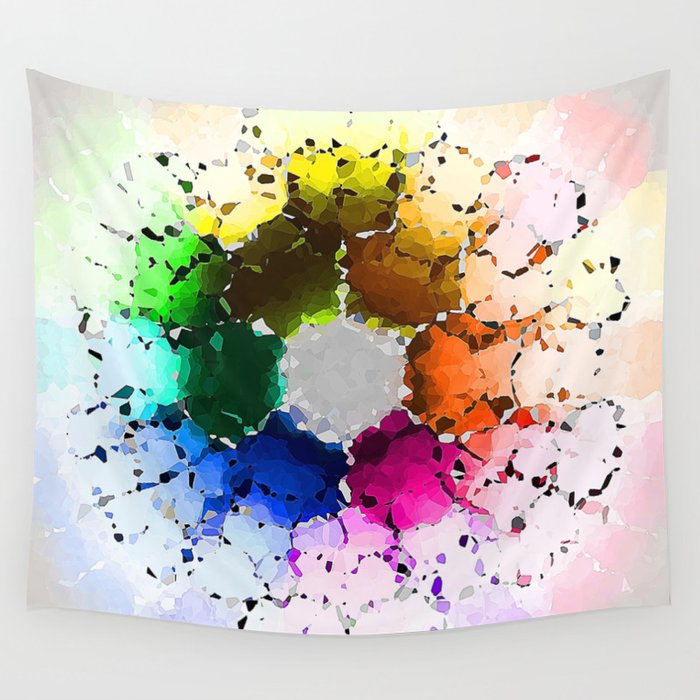
“Abstract Color Wheel Wall Tapestry” by Phil Perkins
Uses of Open Pedagogy in the Learning Resource:
I believe Open Pedagogy will be an integral part of my groups learning resource. As I previously stated a lot of art courses already operate as an Open Pedagogy. I believe it would actually be harder to make a studio-based art resource that didn’t use elements of Open Pedagogy.
My groups learning resource will be about art group projects leading up to making a school mini-mural. This mural would then be owned and displayed by the hypothetical school for generations to come. A project like this requires a lot if not all of the key defining factors of open pedagogy, especially if the mural is used to express a statement or social issue the students want to comment on. This sort of learning would heavily rely on Peer-based review, community building, trust, innovation, and participation/collaboration. The art would then be displayed in a way that it can be seen by peers and influence/build upon future student experiences, opinions and studies. Students would be responsible for their own learning of their chosen topic, and the role of the teacher would be to provide them with the tools and resources they need to achieve their desired goals, rather than providing them with very specific pre-planned information.
In conclusion, I believe Open Pedagogy systems are extremely important for visual arts courses and look forward to adding these elements to the blueprint.
References:
“What is Open Pedagogy?” by BCCampus: OpenED
“Chapter 11.4 Open Pedagogy” by TonyBates.ca &
The University of Texas Arlington Libraries
Comment 1:
Life-Changing Learning Experiences by El_Why
I really enjoyed reading this ranked list of learning experiences by El_Why. I found myself relating to their experiences and thinking about what an impact activities like art, video-making, and cooking have had on my own life. More specifically my own experience learning video-editing. I was doing a summer co-op and my employer approaches me asking for an animation, not just any animation, but a fully-animated, educational, 10 minute long video, and I had no prior animation experience! It was so hard, but so rewarding, learning a whole new software and discovering animation for the first time. Seeing a character I had created move across the screen for the first time was nothing short of magical.
I think overcoming what seems like an impossible task in the name of progress is what learning is all about! So I really relate to how El_Why was forced to learn how to cook, and how they rise to the challenge.
Comment 2:
Blog Post 1: Learning, Motivation, & Theory by Capri
I thought Capri’s blog post on tailored learning to keep up motivation was really insightful. I know it can make all the difference when you have an instructor or mentor that takes the time to evaluate how you would learn best and enables you to do so. Keeping the balance between challenge and reassurance. I’ve seen teachers in the art field be too harsh too fast with students, because the difficulty scales too quickly or the student is challenged too abruptly, they end up giving up instead of rising above the challenge. They lose their motivation to participate, and in some instances that kind of discouragement can end up being permanent. So I think its really really important to make sure you allow whoever you are teaching to adjust to new challenges, and to aid and keep up their motivation so that they do not give up.
After all if the answer to “Why were you so invested in seeing it through?” is “I don’t know anymore, it seems too hard” why would they bother to continue? I manage an online community and I see this a lot. If we make an event we have to be sure the event looks fun, and that the learning curve to participate is not too steep. It comes down to understanding who you are making the event for (common interests), what age they likely are (difficulty/accessibility), and the completion reward (primary motivator). If at any point one of these is out of balance the community event will fail, and people will choose not to participate because it’s “not worth it”.
I think learning and teaching is a lot like this. If the reward is not compelling enough, or if the requirements to unlock the reward is too difficult or uninteresting, how can a student be expected to try their best to succeed?
I am glad Capri got to have a good experience teaching the children, and that their mentor pulled through for them in the end. Thank you for sharing your experience with us!
]]>While reading and watching the provided materials for this course, I was especially stricken by the misconceptions of learning. More specifically in the video “Khan Academy and the Effectiveness of Science Videos” by Veritasium it is explained that when dealing with sciences students deemed to be “common knowledge” misconceptions often overtake the learning process. Because a student may assume they “already know this” they may not actually engage with the topic and learn anything, and instead only listen to what they expect to be said, and further inset in what is more often than not incorrect information.
In much the same way as science the Visual Arts criteria of learning often suffers from the same issues. Students will come with a pre-conceived notion of what makes for good art. School will teach them the principles of shading, color theory, techniques, and texture, all in the pursuit of understanding visual representation. More often than not if you ask a child or a beginning art student what “good art” is, they will define it by the level of realism. I believe this is because realistic art is familiar, it does not challenge what people think about art, instead it acts as a representation of the artist’s technical skill, creating an image that is overall is easier for people to understand and appreciate. I have two young cousins who will draw with me to pass the time, only to have them state they are not as “good” because they could not draw a more realistic looking cat.
In my early school days, found myself in a vicious cycle of creating and recreating the same subjects in the same way because it received the best response from my peers and teachers. It wasn’t until I joined an advanced placement program where I met a teacher that forced me to rethink what it meant to create, pushing me out of my comfort zone and challenging my misconceptions about creating “good art”. Yet still I often hear students in class refer to modern or abstracted art as “trash, effortless, and without skill” because of how it challenges their notion of what good art is.
Thus, it is my personal belief that one of the most important aspects of learning about art, is the journey through the misconception that “good art” is limited. Pushing past your biases and rediscovering yourself in many different styles and mediums. To me learning is all about exploration, getting out of your comfort zone and challenging what it means to make something.
]]>My name is Jessica but I primarily go by Soals on the web.
I am a graphic designer, editor, illustrator, animator, 3D modeler, and photographer, currently studying Visual Arts at Uvic. Art is my whole world and my passion in life. I am a laid-back and mellow individual that likes to play video-games and snuggle my two cats. I also enjoy photographing flowers and other foliage in macro, and drawing surrealism art for fun. To me the pursuit of knowledge is very important, and I am always looking to learn new things and explore new perspectives.
My profession is in asset creation for companies, but I also dabble in game design, psychology, and education. When I graduate I would like to be able to host casual art workshops either in the form of art therapy or art tutoring, as well as continuing to provide art and assets for companies. I am currently a lead developer for the Steam PC Videogame: “Beasts of Bermuda” and the lead Graphics Designer for a home office fitness company called “Ergonomyx”.
I am very friendly and always eager to meet new people!
]]>- Do you want to be online vs. offline?
- Do you want to use your name (or part thereof) vs. a pseudonym (e.g., West Coast Teacher)?
- Do you want to have your blog public vs. private? (Note, you can set individual blog posts private or password protected or have an entire blog set to private)
- Have you considered whether you are posting within or outside of Canada? This blog on opened.ca is hosted within Canada. That said, any public blog posts can have its content aggregated/curated onto social networks outside of Canada.
First tasks you might explore with your new blog:
- Go into its admin panel found by adding /wp-admin at the end of your blog’s URL
- Add new category or tags to organize your blog posts – found under “Posts” (but do not remove the pre-existing “edci335” category).
- See if your blog posts are appearing on the course website (you must have the the edci335 category assigned to a post first and have provided your instructor with your blog URL)
- Add pages, if you like.
- Include hyperlinks in your posts (select text and click on the link icon in the post toolbar)
- Embed images or set featured images and embed video in blog posts and pages (can be your own media or that found on the internet, but consider free or creative commons licensed works). To embed a YouTube video, simply paste the URL on its own line.
- Under Dashboard/Appearance,
- Select your preferred website theme and customize to your preferences (New title, new header image, etc.)
- Customize menus & navigation
- Use widgets to customize blog content and features
- Delete this starter post (or switch it to draft status if you want to keep it for reference)
Do consider creating categories for each course that you take should you wish to document your learning (or from professional learning activities outside of formal courses). Keep note, however, that you may wish to rename the label of the course category in menus (e.g., as we did where it shows “Learning Design” as the label for the “edci335” category menu. This will enable readers not familiar with university course numbers to understand what to expect in the contents.
Lastly, as always, be aware of the FIPPA as it relates to privacy and share only those names/images that you have consent to use or are otherwise public figures. When in doubt, ask us.
Please also review the resources from our course website for getting started with blogging:
- WordPress resources
- Using RSS feeds to read blog posts from your networks (e.g., Feedly)
- Privacy resources
- Copyright resources
- Finding images you can use