


| CARVIEW |
Slides for Developers
We strive to make Slides a great and flexible tool for developers. Presentations created on Slides are HTML documents under the hood, so generally anything that HTML can do, Slides can do. We make it easy to access and edit the underlying HTML and CSS through the Developer Mode.
There's also an API for creating new presentations with preset content and we're aiming to add additional APIs in the future.
Syntax Highlighted Code
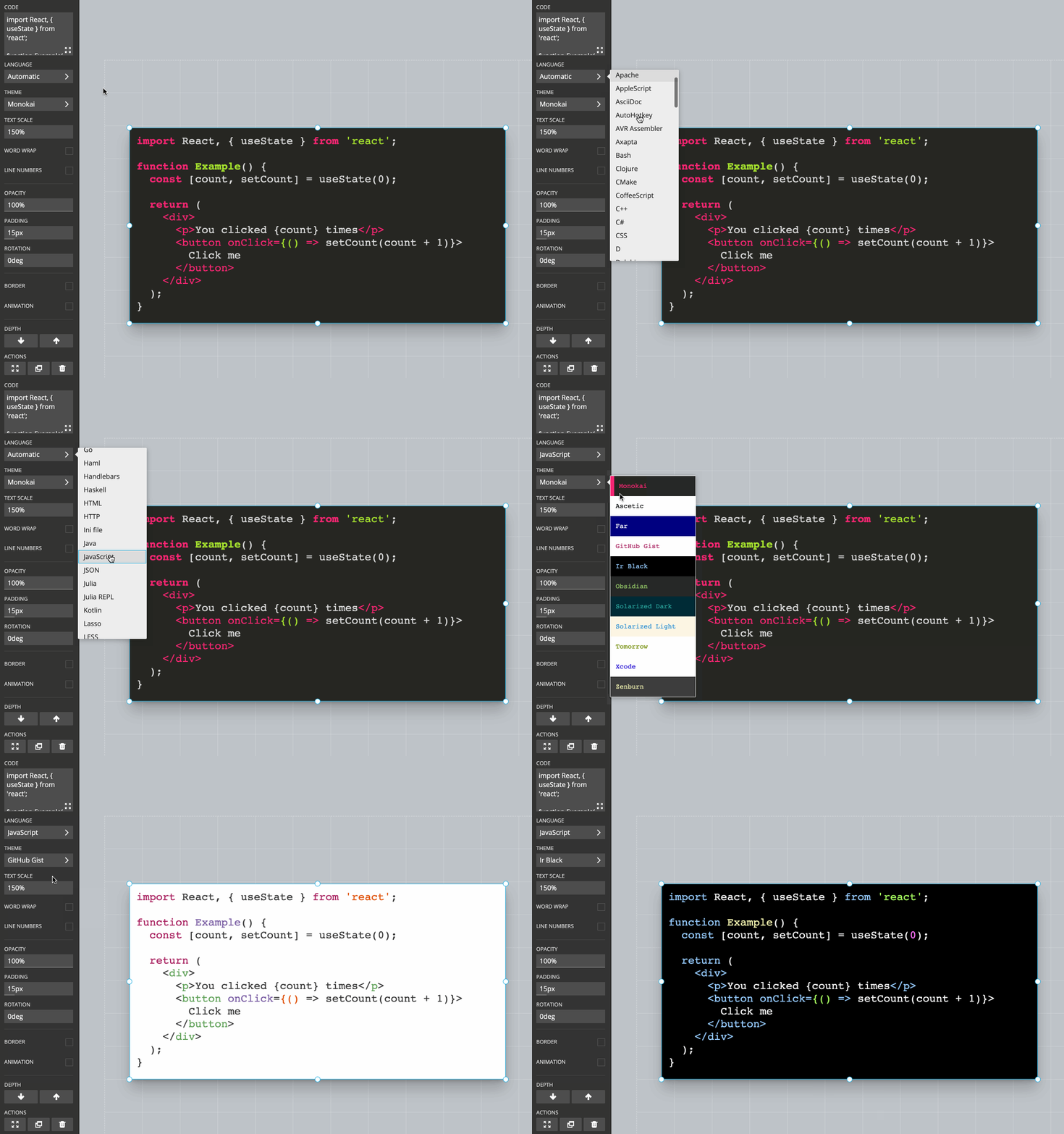
Slides is the best presentation tool out there when it comes to presenting and showing code. Highlighting is provided for all common languages and you can pick from multiple different highlight themes.
Line Highlights
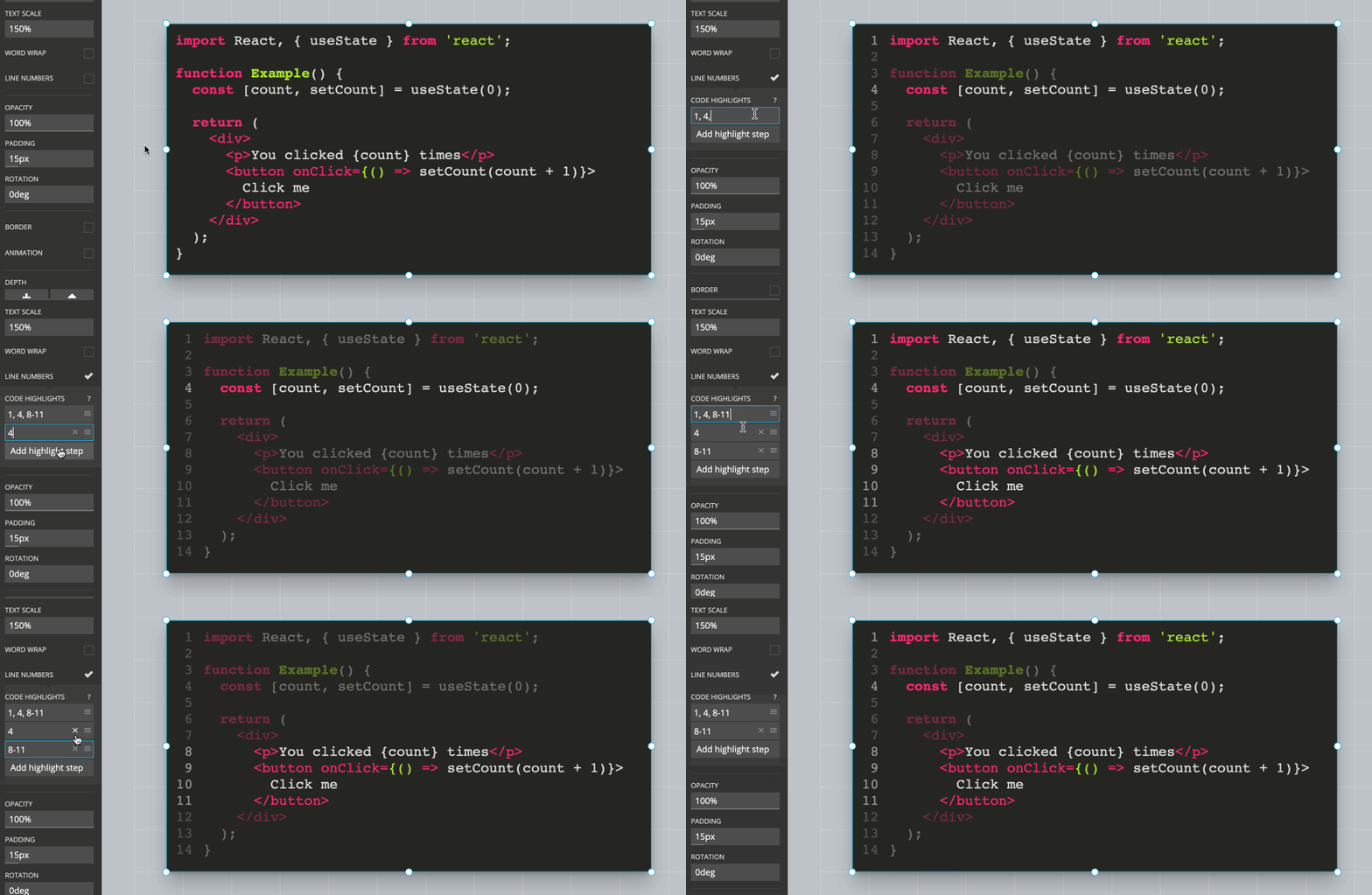
You can emphasize specific lines of code to direct the audience's attention. Multiple code highlight steps can be added and stepped through for the same code block. An empty highlight step means that no code is highlighted.
Developer Mode
The Slides editor has a developer mode which is useful if you know a bit of HTML and CSS. With this mode active you will be able to modify the underlying HTML of your deck, allowing you to make adjustments that the Slides editor does not provide interface options for.
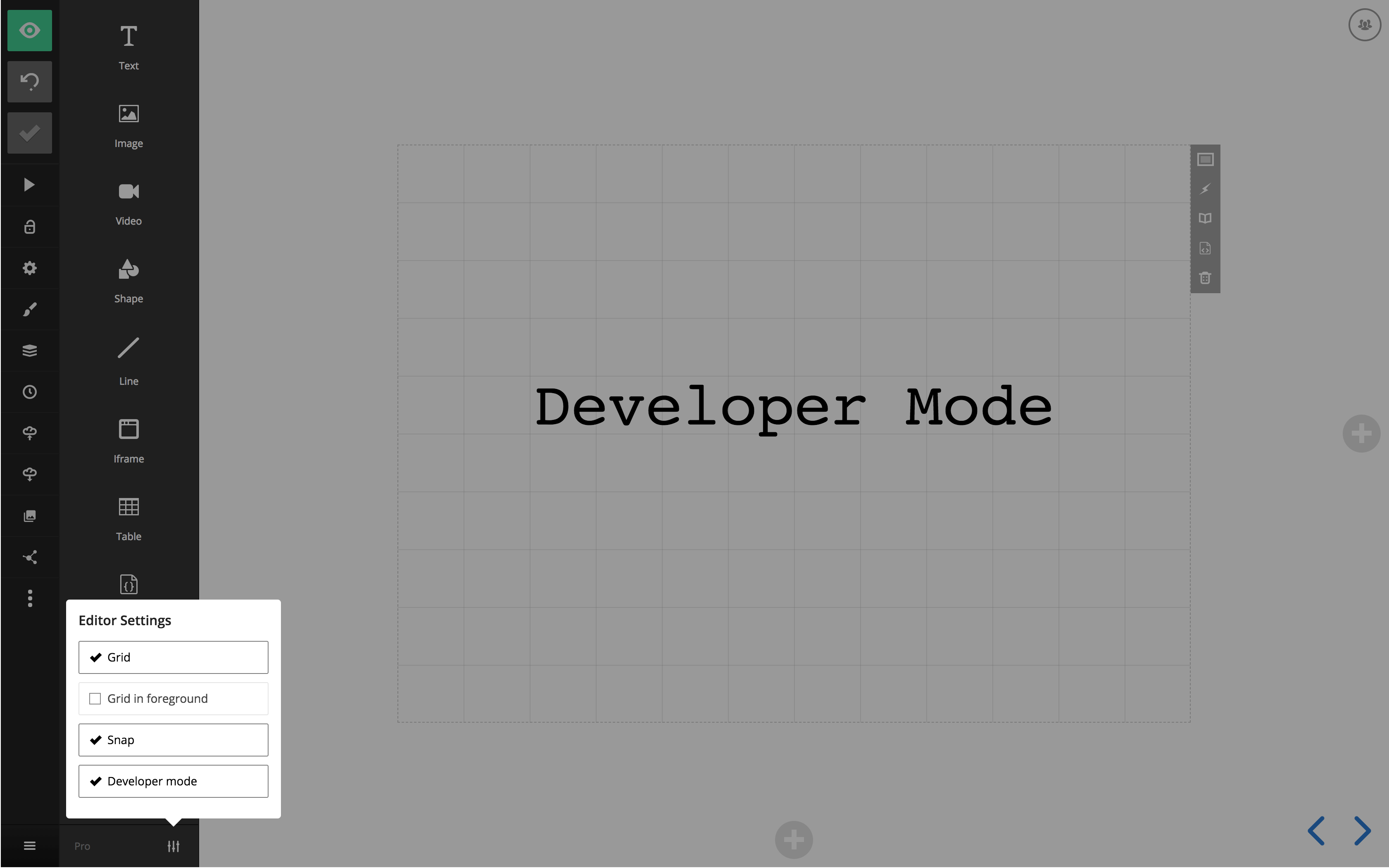
To enable the developer mode open the editor settings in the bottom left corner:
Editing HTML
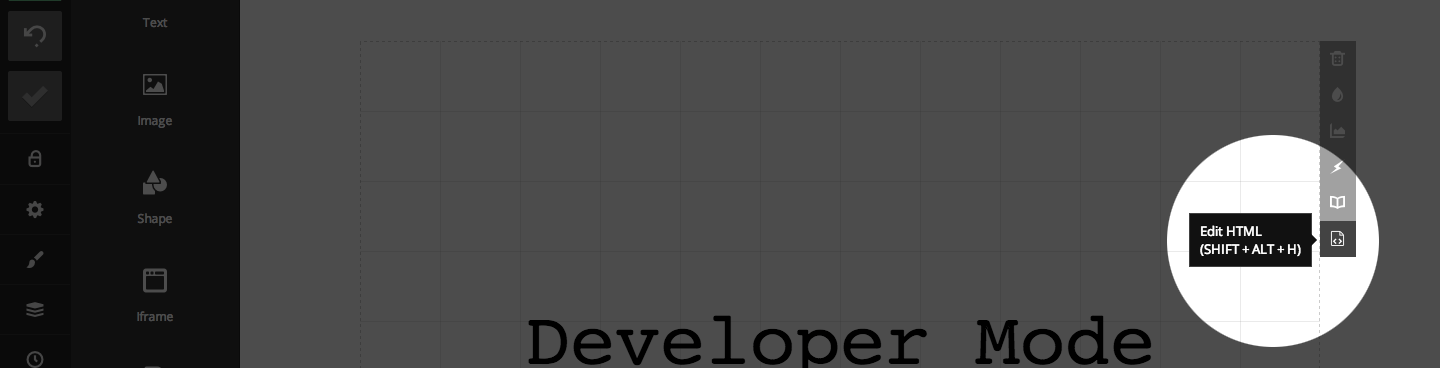
The per-slide HTML editor can be accessed from the slide options area. It gives you raw access to the current slide's HTML, allowing you to change anything you like. Note that some elements, such as <script> and <link>, are not allowed for security reasons.
Element Classes (Requires Pro)
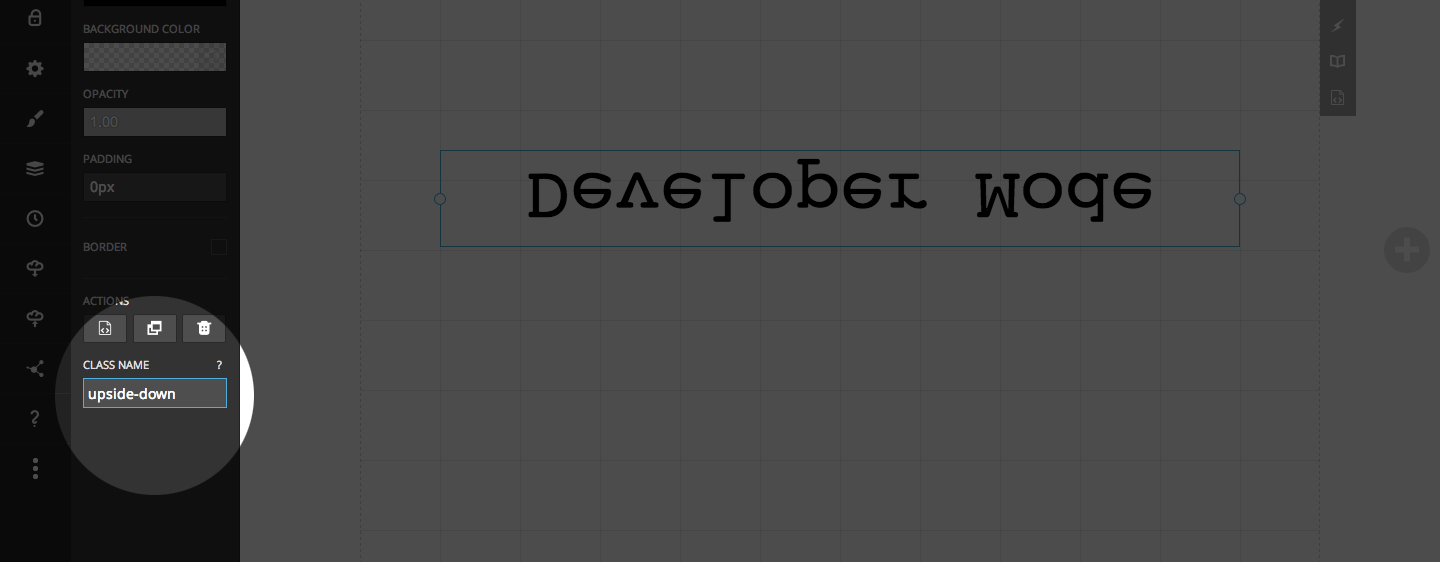
As a paying Slides customer you have access to the CSS editor which allows you to add custom styles to your deck. By turning on the developer mode a new "class name" field will appear for any block that you focus. This allows you to easily target a specific element with your CSS.
Here's an example that defines an "upside-down" class using custom CSS and applies it to a text block.
.upside-down {
    transform: scale( 1, -1 );
}
Slide Classes (Requires Pro)
Just like you can add custom classes to individual elements it's also possible to add custom classes at the slide level. This can used to apply broader changes to the whole slide like inverting text and icon colors or changing the slide transition.
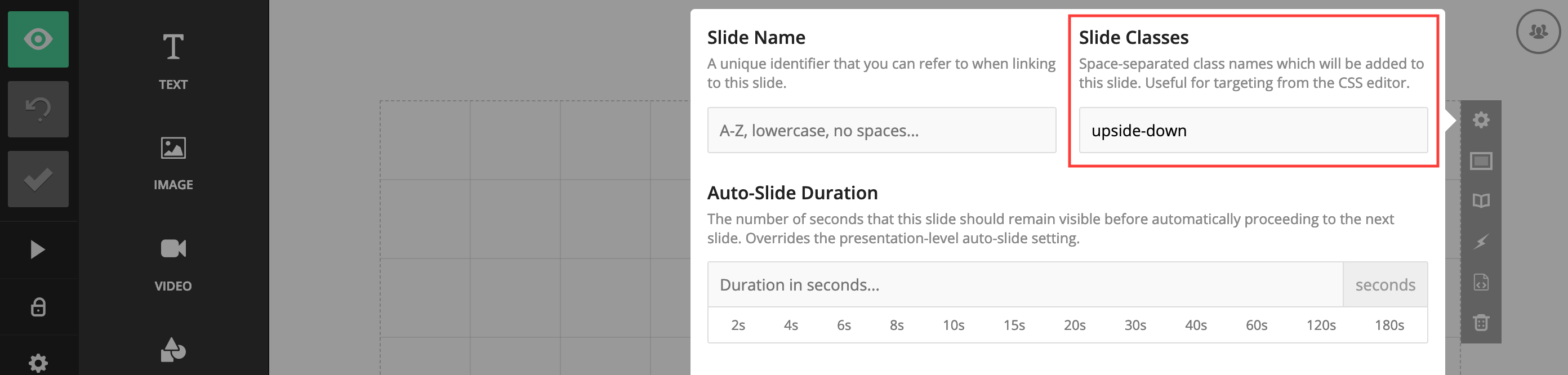
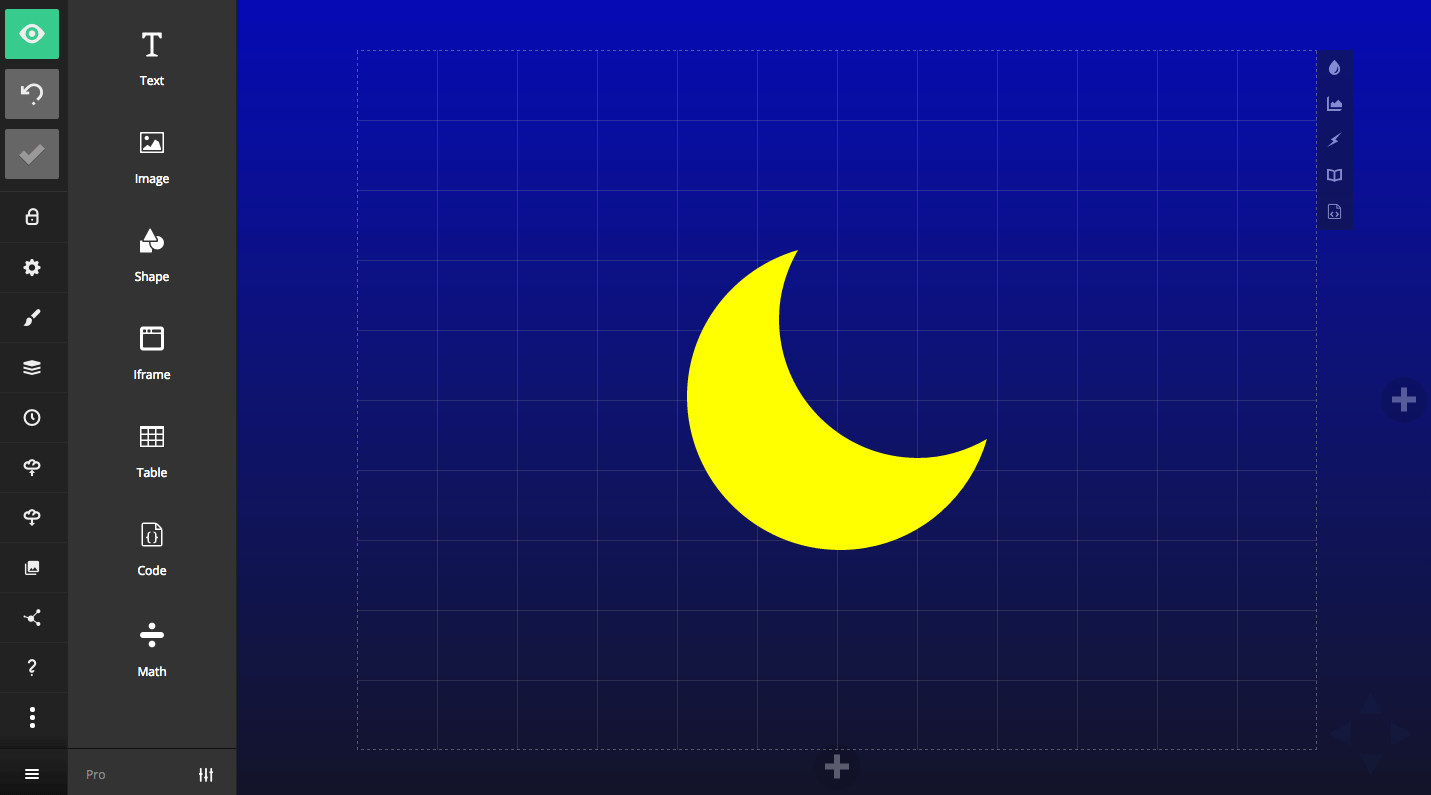
Under the hood the slide background element is separate from the slide itself. Here are two examples showing how you'd target the slide contents or slide background using a custom class called "night-sky":
// Targets the slide contents
.slides .night-sky svg path {
    fill: yellow;
}
// Target the slide background
.backgrounds .night-sky {
    background: linear-gradient(0deg, #141528, #0b1bb2);
}
Export HTML
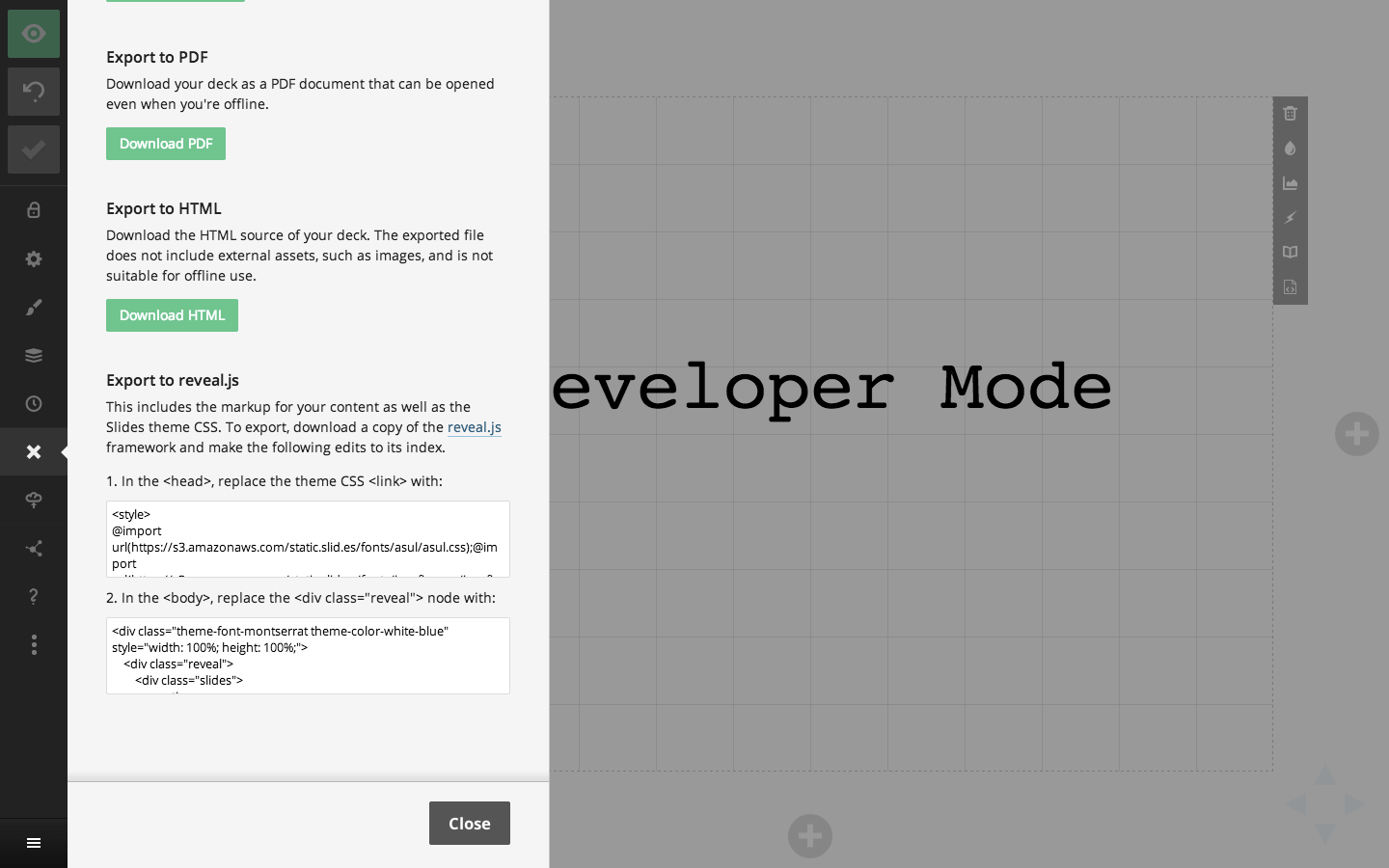
You can access the complete HTML for all slides in your deck inside of the export panel, under "Export to reveal.js". This provides a way of exporting your deck markup and the core Slides styles to reveal.js. There are a few limitations with exporting this way but it should provide a good starting point.
CSS Editor (Requires Pro)
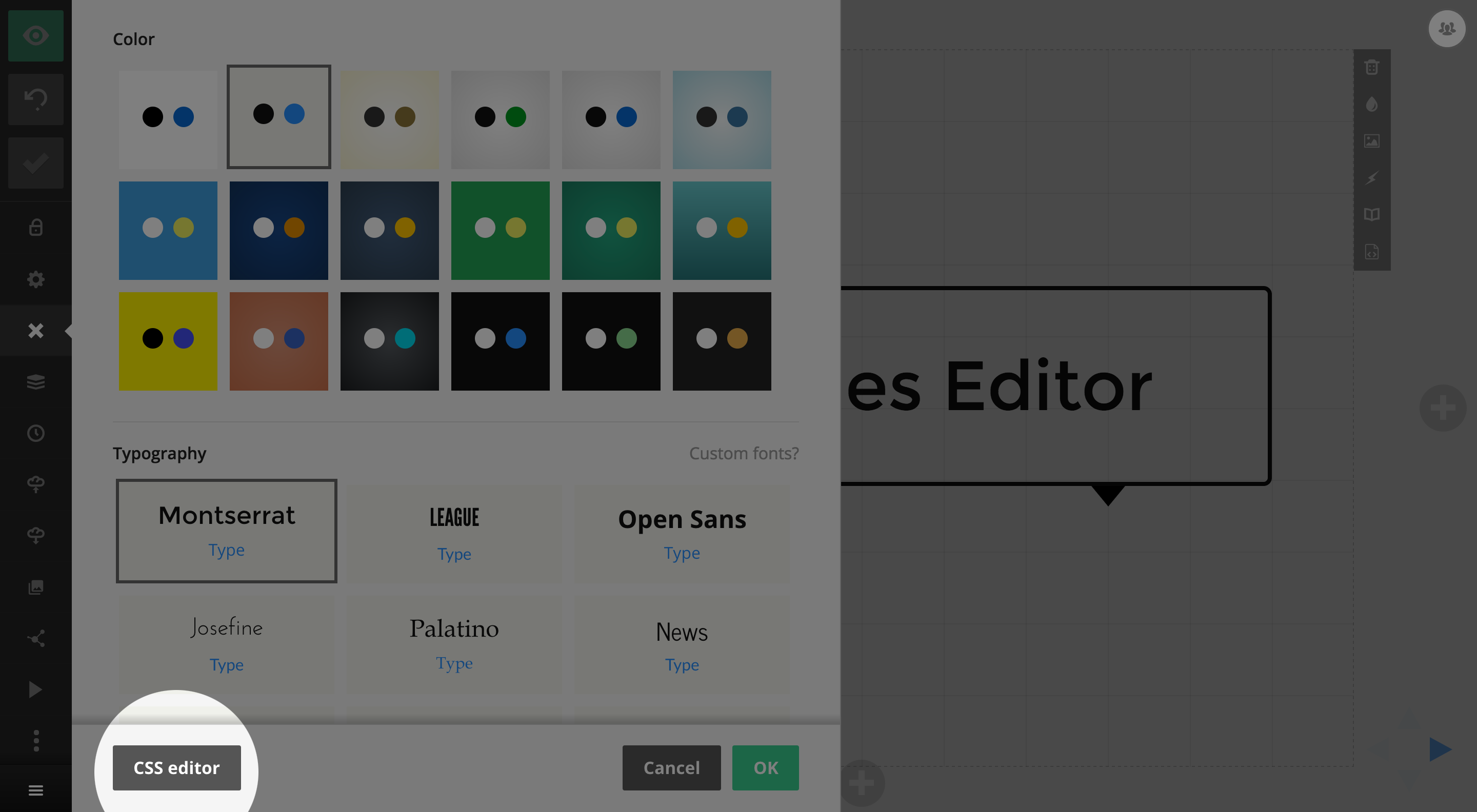
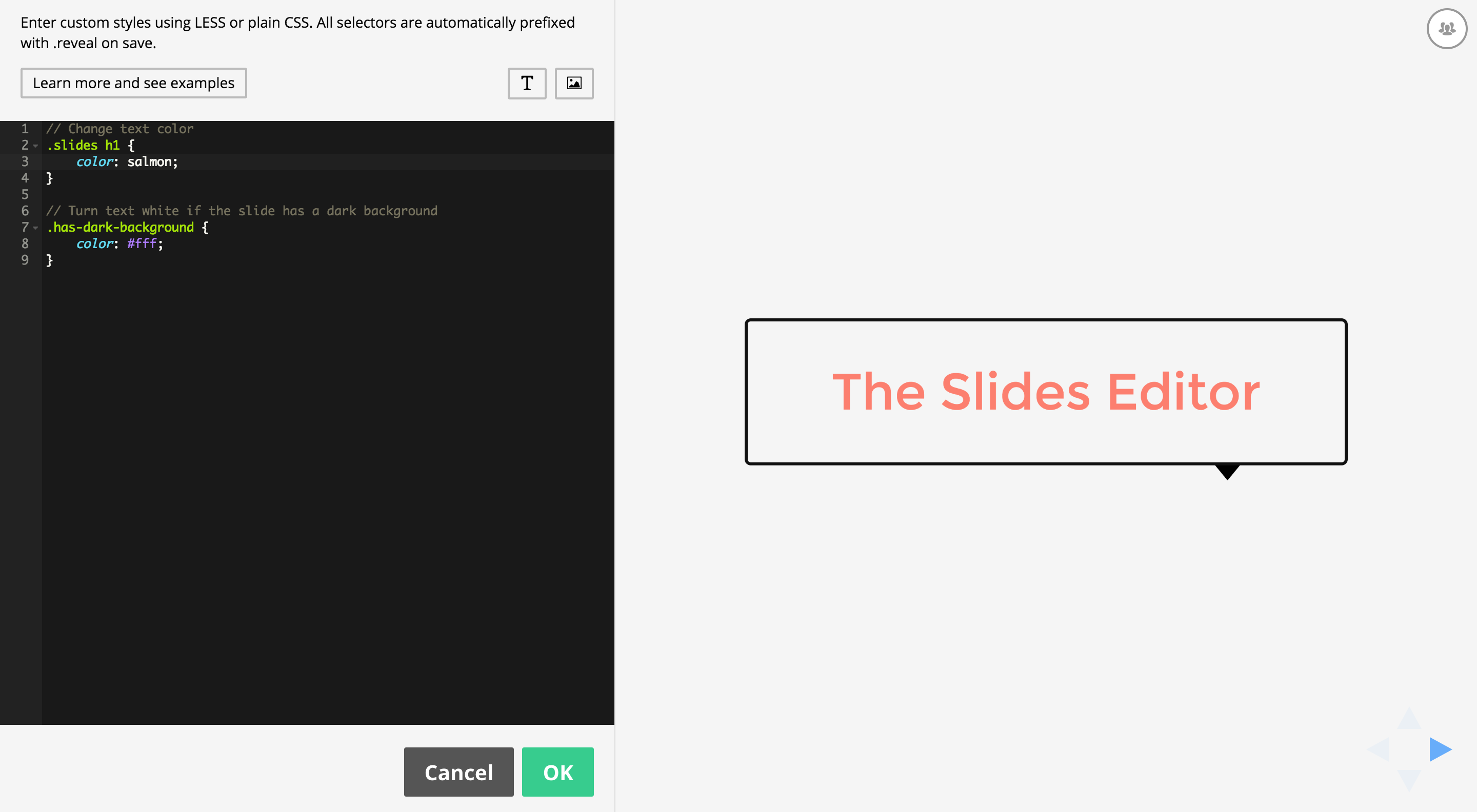
The CSS editor lets you author custom styles for your presentation with a real-time preview of the result. It's available as an option inside of the Style panel of the presentation editor.
The editor preprocesses styles using LESS, though you're free to write plain CSS as well. We apply the styles in real-time as you type so there's no need to leave the editor or even press a refresh button to see what you're getting. Note that when your styles are saved they will be automatically wrapped in a ".reveal {}" selector to avoid conflicts with other page styles.
Custom Fonts
You can load custom fonts from Typekit and Google fonts and apply them using custom CSS. Find out more.
Developer Mode
If you turn on the developer mode you can also add custom classes to any focused element. This is a convenient way to easily apply your CSS to specific elements.
Examples
// Change presentation progress bar color
.progress span {
  background: #ff0000;
}
// Change control arrow color
.controls button {
  color: #ff0000;
}
// Change presentation background
& {
  background: #a83239;
}
// Change color of body text
.slides {
  color: #009999;
}
// Turn text white if the slide has a dark background
.has-dark-background {
  color: #ffffff;
}
// Larger slide numbers (if slide numbers are enabled for the deck)
.slide-number {
  font-size: 20px;
}
// Add a blue border to all slides (each slide is a <section>)
.slides section {
  outline: 1px solid blue;
}
// Add a red border to all vertical stacks of slides
.slides section.stack {
  outline: 1px solid red;
}
// Include a custom font
@font-face {
  font-family: "Cabin Sketch";
  src: url("https://static.slid.es/fonts/cabinsketch/cabinsketch-regular.woff") format("woff")
}
.slides h1, .slides h2, .slides h3 {
  font-family: "Cabin Sketch";
}
Here's where you can access the CSS editor from inside of the Style panel:
A screenshot of the editor:
Define API: Create Prefilled Decks (beta)
The define API lets you create a presentation programatically and add it to the current user's Slides account. Presentations you create can include any of the content types that the Slides editor supports. You can even include live data from other sites via iframes.
For example, if you operate a web-based charting service, you can let your users create a presentation containing their fully interactive charts at the click of a button.
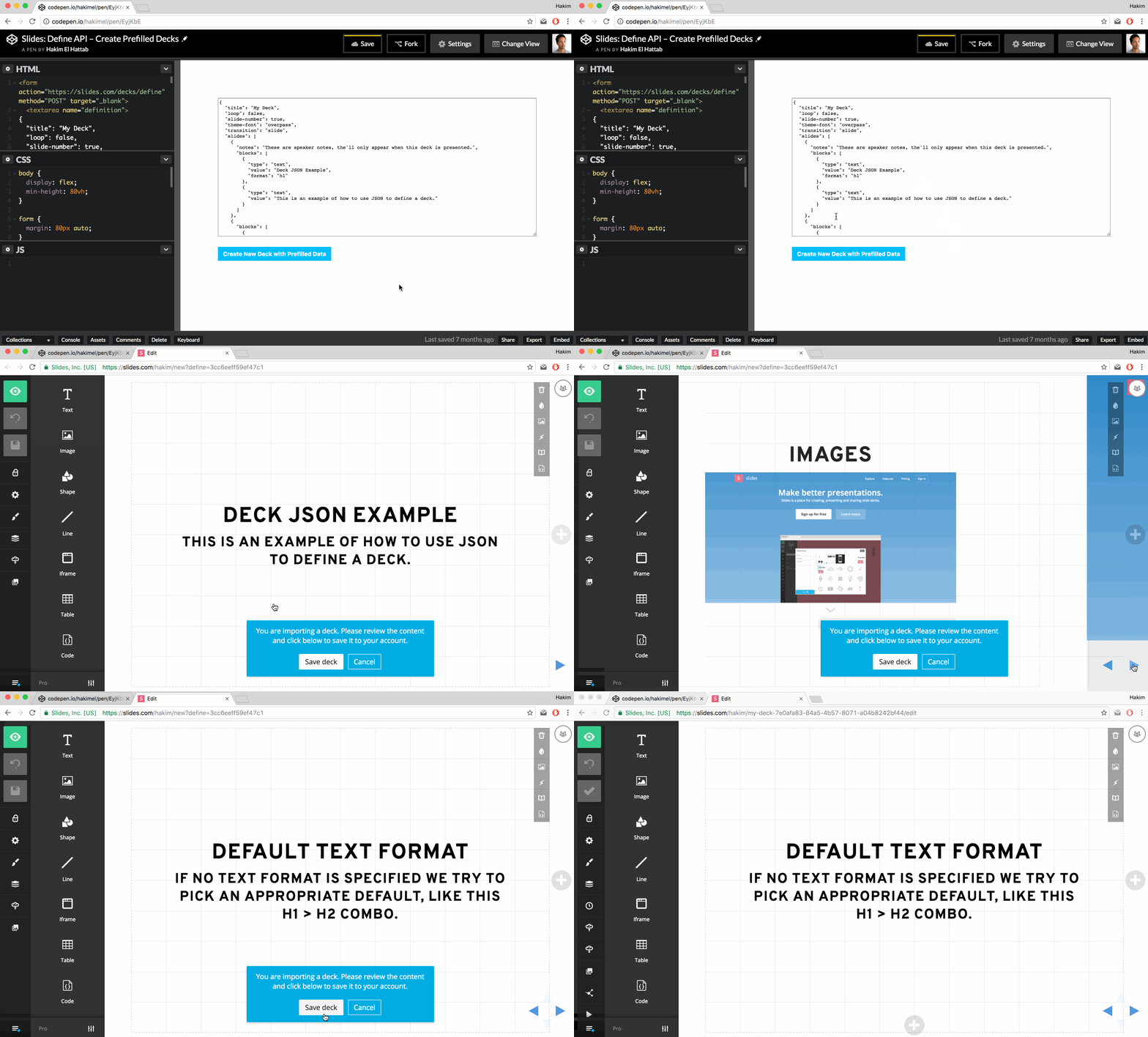
If the user isn't already signed in to Slides, they will automatically be prompted to authenticate or sign up. Once signed in, they are able to review the deck and confirm that they want to save it to their account. Here's what that process looks like:
The Request
To start the process you'll need to have the user submit an HTML form towards the https://slides.com/decks/define endpoint. The form needs to contain an input field with the name definition and the value of this input should be the JSON representation of a deck. Once the form is submitted, we'll automatically redirect the user to the appropriate page.
| Request Method | POST |
| Request URL | https://slides.com/decks/define |
| Request Payload | definition: DECK_JSON_HERE |
Here's a fully working example:
JSON Examples
Here's the bare minimum JSON you'll need to describe a deck.
{
  "title": "My Deck",
  "slides": [
    { "html": "<h1>Slide 1</h1>" },
    { "html": "<h1>Slide 2</h1>" }
  ]
}
If you want to group multiple slides into one vertical stack you can nest them in an array:
{
  "title": "My Deck",
  "slides": [
    { "markdown": "# Slide 1" },
    [
        { "markdown": "# Vertical Slide 2.1" },
        { "markdown": "# Vertical Slide 2.2" }
    ],
    { "markdown": "# Slide 3" }
  ]
}
The following JSON demonstrates most of the available options.
Note that there are three different ways to define slide content, blocks, HTML and Markdown. The benefit of using content blocks is that the elements you define are separately editable inside of the Slides editor. If you specify content as a string of HTML or Markdown, it will all be grouped into one element and edited as a text box.
{
  "title": "My Deck",
  "description": "Description of My Deck.",
  "width": 1024,
  "height": 576,
  "auto-slide-interval": 0,
  "slide-number": false,
  "loop": false,
  "theme-color": "white",
  "theme-font": "overpass",
  "transition": "slide",
  "slides": [
    {
      "id": "an-optional-slide-id",
      "background-color": "#cccccc",
      "background-image": "https://static.slid.es/images/screenshots/v1/slides-homepage-1440x900.png",
      "background-size": "cover",
      "notes": "My speaker notes",
      "blocks": [
        {
          "type": "text",
          "value": "Hello world!",
          "format": "h2"
        },
        {
          "type": "image",
          "value": "https://static.slid.es/images/screenshots/v1/slides-homepage-1440x900.png"
        },
        {
          "type": "iframe",
          "value": "https://slides.com/news/make-better-presentations/embed"
        },
        {
          "type": "table",
          "data": [
              ["A","B","C"],
              [ 1,  2,  3 ]
          ]
        }
      ]
    },
    {
      "background-image": "https://static.slid.es/images/screenshots/v1/slides-homepage-1440x900.png"
    },
    {
      "html": "<h1>HTML Slide</h1>"
    },
    {
      "markdown": "**Markdown** slide! <https://daringfireball.net/projects/markdown/syntax>"
    }
  ]
}
JSON Spec
Deck Properties
| Deck property | Description | ||||||||||||||||||||||||||
|---|---|---|---|---|---|---|---|---|---|---|---|---|---|---|---|---|---|---|---|---|---|---|---|---|---|---|---|
|
title
String
|
The title of the presentation. Appears anywhere the deck is listed on slides.com. | ||||||||||||||||||||||||||
|
description
String
Optional
|
A short description of the presentation. Appears anywhere the deck is listed on slides.com. | ||||||||||||||||||||||||||
|
width
Integer
|
The presentation width in pixels. Defaults to 960. We automatically scale content up or down to fit any display. | ||||||||||||||||||||||||||
|
height
Integer
|
The presentation height in pixels. Defaults to 700. We automatically scale content up or down to fit any display. | ||||||||||||||||||||||||||
|
visibility
String
Optional
|
Determines who this deck is visible to.
|
||||||||||||||||||||||||||
|
auto-slide-interval
Integer
Optional
|
Optionally make the presentation auto-slide. This value is defined in milliseconds and defaults to 0 (no autosliding). | ||||||||||||||||||||||||||
|
slide-number
Boolean
Optional
|
Flags if a slide number should show the current slide number when viewing the presentations. False by default. | ||||||||||||||||||||||||||
|
loop
Boolean
Optional
|
Flags if the last slide of the presentation should loop back to the first. False by default. | ||||||||||||||||||||||||||
|
css
String
Optional
|
Additional CSS to include in the presentation. Learn more about custom CSS. | ||||||||||||||||||||||||||
|
theme-id
String
Optional
|
The ID of a theme to apply to the presentation. This theme must be owned by the team the signed in user are a member of. If this value is not provided, the default theme is used. | ||||||||||||||||||||||||||
|
theme-color
String
Optional
|
Presentation color. Available options:
|
||||||||||||||||||||||||||
|
theme-font
String
Optional
|
Presentation fonts. Open the Slides editor "Style" panel for previews. Available options:
|
||||||||||||||||||||||||||
|
transition
String
Optional
|
The transition to use when moving between slides.
|
||||||||||||||||||||||||||
|
slides
Array
|
Each record in this array represents a slide. You can group multiple slides in a nested array to create vertical stacks, like this:
|
Slide Properties
| Slide property | Description | ||||||
|---|---|---|---|---|---|---|---|
|
id
String
Optional
|
A unique identifier for the slide. This id can be used used for internal links. Should only contain alphanumerics, dashes, and underscores. | ||||||
|
background-color
String
Optional
|
Slide background color. Supports all CSS color formats, like red or #ff0000.
|
||||||
|
background-image
String
Optional
|
URL to a background image. Supported formats: JPG, PNG, GIF and SVG. | ||||||
|
background-size
String
Optional
|
Controls the sizing of a background image. Options:
|
||||||
|
notes
String
Optional
|
Plain text speaker notes that will appear when presenting this deck. Maximum length is 10000 characters. | ||||||
|
html
String
Optional
|
Custom HTML that should be added to the slide. The HTML will be placed into a content block and centered on the slide. Note that we strip out all scripts, style tags and external stylesheets. | ||||||
|
markdown
String
Optional
|
Markdown content that should be added to the slide. The HTML output will be placed in a content block and centered on the slide. | ||||||
|
blocks
Array
Optional
|
An array of content blocks. Blocks are automatically placed in a column at the center of the page. | ||||||
|
auto-animate
Boolean
Optional
|
Enables automatic animations between this slide and adjacent slides with the same property set. Elements are automatically matched and animated based on their content and position. See reveal.js Auto-Animate documentation for more details. | ||||||
|
auto-animate-easing
String
Optional
|
CSS easing function for auto-animate transitions on this slide (e.g., ease, ease-in-out, cubic-bezier()).
|
||||||
|
auto-animate-duration
Float
Optional
|
Duration of auto-animate transitions in seconds. | ||||||
|
auto-animate-unmatched
Boolean
Optional
|
Determines whether elements with no matching auto-animate target should fade in. Set to false to make them appear instantly. Defaults to true.
|
||||||
|
auto-animate-restart
Boolean
Optional
|
When set to true, prevents auto-animation between the previous slide and this one, effectively starting a new auto-animate sequence.
|
Block Properties
Properties available for all content blocks.
| Block property | Description | ||||||||||||||||||||||
|---|---|---|---|---|---|---|---|---|---|---|---|---|---|---|---|---|---|---|---|---|---|---|---|
|
type
String
|
The type of content you want to insert.
|
||||||||||||||||||||||
|
x
Integer
Optional
|
The horizontal position of the block in pixels. If this value is not defined, we will automatically place it at the center of the slide. | ||||||||||||||||||||||
|
y
Integer
Optional
|
The vertical position of the block in pixels. If this value is not defined, we will automatically place it at the center of the slide. | ||||||||||||||||||||||
|
z
Integer
Optional
|
The z-index (layer depth) of the block. Higher values appear on top of lower values. | ||||||||||||||||||||||
|
width
Integer
Optional
|
The width of the content block in pixels. | ||||||||||||||||||||||
|
height
Integer
Optional
|
The height of the content block in pixels. Note that some blocks, like text, ignore this value since height is based on how tall the content is. | ||||||||||||||||||||||
|
class
String
Optional
|
A class name to apply to the underlying HTML element for targeting with custom styles. Must be a valid CSS class name. | ||||||||||||||||||||||
|
data
Object
Optional
|
An object of key-value pairs to add as data attributes to the underlying HTML element. For example:
data-foo="bar" to the underlying HTML element.
|
||||||||||||||||||||||
|
animation-type
String
Optional
|
Adds an animation to the content block.
|
||||||||||||||||||||||
|
animation-trigger
String
Optional
|
Determines which interaction that will trigger the animation. Has no effect unless animation-type is set.
|
||||||||||||||||||||||
|
animation-duration
Float
Optional
|
The number of seconds that the animation should run for. | ||||||||||||||||||||||
|
animation-delay
Float
Optional
|
The number of seconds to wait before running the animation. | ||||||||||||||||||||||
|
rotation
Integer
Optional
|
The rotation angle of the block in degrees. | ||||||||||||||||||||||
|
align-content
String
Optional
|
CSS align-content property for controlling content alignment within the block. | ||||||||||||||||||||||
|
border-color
String
Optional
|
Border color. Supports all CSS color formats, like red or #ff0000.
|
||||||||||||||||||||||
|
border-width
Integer
Optional
|
Border width in pixels. | ||||||||||||||||||||||
|
border-style
String
Optional
|
Border style: solid, dashed, dotted, etc.
|
||||||||||||||||||||||
|
border-radius
Integer
Optional
|
Border radius in pixels for rounded corners. | ||||||||||||||||||||||
|
auto-animate-delay
Float
Optional
|
Delay in seconds before auto-animate transitions for this block. | ||||||||||||||||||||||
|
auto-animate-duration
Float
Optional
|
Duration in seconds of auto-animate transitions for this block. | ||||||||||||||||||||||
|
auto-animate-easing
String
Optional
|
CSS easing function for auto-animate transitions (e.g., ease, linear, ease-in-out).
|
||||||||||||||||||||||
|
mix-blend-mode
String
Optional
|
CSS mix-blend-mode property for controlling how the block blends with content below it (e.g., multiply, screen, overlay).
|
||||||||||||||||||||||
|
locked
Boolean
Optional
|
Whether the block is locked from editing. | ||||||||||||||||||||||
|
flip-x
Boolean
Optional
|
Whether to flip the block horizontally. | ||||||||||||||||||||||
|
flip-y
Boolean
Optional
|
Whether to flip the block vertically. | ||||||||||||||||||||||
|
blur-radius
Integer
Optional
|
Blur filter radius in pixels. | ||||||||||||||||||||||
|
drop-shadow-x
Integer
Optional
|
Horizontal offset of drop shadow in pixels. | ||||||||||||||||||||||
|
drop-shadow-y
Integer
Optional
|
Vertical offset of drop shadow in pixels. | ||||||||||||||||||||||
|
drop-shadow-radius
Integer
Optional
|
Blur radius of drop shadow in pixels. | ||||||||||||||||||||||
|
drop-shadow-color
String
Optional
|
Color of drop shadow. Supports all CSS color formats, like red or #ff0000.
|
||||||||||||||||||||||
|
link
String
Optional
|
URL to link the block to. When clicked, the block will navigate to this URL. |
Text block
Properties available for the text content block.
| Text block property | Description | ||||||||||||
|---|---|---|---|---|---|---|---|---|---|---|---|---|---|
|
value
String
|
The string of text to insert. | ||||||||||||
|
format
String
Optional
|
The text format, defined as one of the following HTML tags:
If no format is specified, we pick a good default based on what other blocks there are on the slide. For example, if you have two text blocks we'll use an h1 for the first block and h2 for the second. |
||||||||||||
|
align
String
Optional
|
Left, center, right or justify. | ||||||||||||
|
padding
Integer
Optional
|
The number of pixels to leave empty around the text. | ||||||||||||
|
color
String
Optional
|
The color of table text. Supports all CSS color formats, like red or #ff0000.
|
||||||||||||
|
font-size
String
Optional
|
The size of text as a percentage of the default size. For example, 150%.
|
||||||||||||
|
text-layout
String
Optional
|
Controls text layout behavior.
|
||||||||||||
|
auto-fit-text
Boolean
Optional
|
Whether to automatically scale text to fit within the block. | ||||||||||||
|
align-content
String
Optional
|
Controls the vertical alignment of text within a text block with a fixed text layout: start (top), center, or end (bottom). |
Image block
Properties available for the image content block.
| Image block property | Description |
|---|---|
|
value
String
|
The URL of the image to insert. We support JPG, PNG, GIF and SVG. |
|
alt
String
Optional
|
Alternative text for the image for accessibility purposes. |
Iframe block
Properties available for the iframe content block.
| Iframe block property | Description |
|---|---|
|
value
String
|
The HTTPS URL of the web page to embed. |
Code block
Properties available for the code content block.
| Code block property | Description | ||||||||||||||||||||||||||||||||||||
|---|---|---|---|---|---|---|---|---|---|---|---|---|---|---|---|---|---|---|---|---|---|---|---|---|---|---|---|---|---|---|---|---|---|---|---|---|---|
|
value
String
|
Code to syntax highlight. | ||||||||||||||||||||||||||||||||||||
|
language
String
|
The language of the code. We use highlight.js for syntax highlighting, you can see which languages they support at highlightjs.org/static/demo. If no language is specified, highlight.js will automatically try to determine what language it is. |
||||||||||||||||||||||||||||||||||||
|
word-wrap
Boolean
Optional
|
Flags if a code should wrap to new lines. False by default. | ||||||||||||||||||||||||||||||||||||
|
line-numbers
Boolean|String
Optional
|
Controls line number visibility and code highlights.
|
||||||||||||||||||||||||||||||||||||
|
theme
String
|
The theme to use for syntax highlighting. We support the following themes:
|
||||||||||||||||||||||||||||||||||||
|
font-size
String
Optional
|
The size of code text in pixels. | ||||||||||||||||||||||||||||||||||||
|
frame
String
Optional
|
Frame style for the code block.
|
||||||||||||||||||||||||||||||||||||
|
autoheight
Boolean
Optional
|
Whether the code block should automatically adjust its height to fit the content. |
Table block
Properties available for the table content block.
| Table block property | Description |
|---|---|
|
data
Array
Optional
|
Table data in a multidimensional array. Here's an example data set:
|
|
padding
Integer
Optional
|
Controls the empty spacing around each table cell. |
|
text-color
String
Optional
|
The text color. Supports all CSS color formats, like red or #ff0000.
|
|
border-width
Integer
Optional
|
The size of the table border in pixels. |
|
border-color
String
Optional
|
Color of the table border. Supports all CSS color formats, like red or #ff0000.
|
Video block
Properties available for the video content block.
| Video block property | Description |
|---|---|
|
value
String
|
The URL of the video file to embed. |
|
controls
Boolean
Optional
|
Whether to display video playback controls. Default is true. |
|
autoplay
Boolean
Optional
|
Whether the video should automatically start playing. |
|
muted
Boolean
Optional
|
Whether the video should be muted by default. |
|
loop
Boolean
Optional
|
Whether the video should loop when it reaches the end. |
Math block
Properties available for the math content block.
| Math block property | Description |
|---|---|
|
value
String
|
Mathematical equation to render in LaTeX format. |
|
font-size
String
Optional
|
The scale of the equation text as a percentage. |
Chart block
Properties available for the chart content block.
| Chart block property | Description |
|---|---|
|
value
String
|
Chart data in CSV format. |
|
chart-type
String
Optional
|
The type of chart: column, bar, line, pie, doughnut, polarArea, or radar. |
|
chart-scales
Boolean
Optional
|
Whether to show chart axis scales. |
|
chart-legend
Boolean
Optional
|
Whether to show the chart legend. |
|
chart-legend-position
String
Optional
|
Position of the legend: top, bottom, left, or right. |
|
chart-begin-at-zero
Boolean
Optional
|
Specifies whether the the chart scale should always start from 0. |
|
chart-theme
String
Optional
|
Color theme for the chart: vibrant, mono-dark, mono-light, warm, cool, pastel, contrast, earth, neon, or neutral. |
|
chart-text-color
String
Optional
|
Color of chart text labels. Supports all CSS color formats. |
|
chart-grid-color
String
Optional
|
Color of chart grid lines. Supports all CSS color formats. |
Shape block
Properties available for the shape content block.
| Shape block property | Description |
|---|---|
|
shape-type
String
Optional
|
Type of shape: rect, circle, diamond, octagon, triangle-up, triangle-down, triangle-left, triangle-right, arrow-up, arrow-down, arrow-left, or arrow-right. Defaults to rect. |
|
fill
String
Optional
|
Fill color of the shape. Supports all CSS color formats. |
|
stroke-color
String
Optional
|
Stroke color of the shape. Supports all CSS color formats. |
|
stroke-width
String
Optional
|
Width of the shape's stroke in pixels. |
|
corner-radius
Integer
Optional
|
Corner radius for rounded rectangles in pixels. |
Line block
Properties available for the line content block.
| Line block property | Description |
|---|---|
|
line-color
String
Optional
|
Color of the line. Supports all CSS color formats. |
|
line-width
String
Optional
|
Width of the line in pixels. |
|
line-start-type
String
Optional
|
Type of line ending at the start point: none, line-arrow, arrow, circle, square, or cross. |
|
line-end-type
String
Optional
|
Type of line ending at the end point: none, line-arrow, arrow, circle, square, or cross. |
|
line-x1
String
Optional
|
X coordinate of the line's start point. |
|
line-y1
String
Optional
|
Y coordinate of the line's start point. |
|
line-x2
String
Optional
|
X coordinate of the line's end point. |
|
line-y2
String
Optional
|
Y coordinate of the line's end point. |
|
line-c
String
Optional
|
Controls the curvature of the line. This is an offset from the middle of the line to the outer edge of the arc along the line's perpendicular. |