


Table of contents
Logo
Progress Planner’s logo is also our mascot; his name is Ravi.
Note: to download the .eps files, please right-click and ‘save link as’.
To download all files at once, please download this .zip file.
Default


If the default (colored) version doesn’t work for your application, you can find a few alternatives below.
Indigo


White


Inverted


Wide
If you’re using our logo with a limitation on height, please use the appropriate wide version.


Colors
Colors of our logo
#38296DCMYK: 90,90,10,25#FAA310CMYK: 0,40,100,0Color palette amber
We have a palette of ambers we use for different
#FAA310CMYK: 0,79,83,10#FAB33CCMYK: 100,0,100,50#FBC468CMYK: 0,0,0,100#FCD493CMYK: 0,16,42,1#FEE7C2CMYK: 0,9,24,0#FFF4E4CMYK: 0,4,11,0#FFF9F0CMYK: 0,2,6,0Color palette indigo
#38296DCMYK: 90,90,10,25#534786CMYK: 0,40,100,0#F6F5FBCMYK: 2,2,0,2Color palette gray
When we need grays, we use the following grays based on Tailwind:
#374151CMYK: 90,90,10,25#4B5563CMYK: 0,40,100,0#6B7280CMYK: 16,11,0,50#9CA3AFCMYK: 11,7,0,31#D1D5DBCMYK: 5,3,0,14#E1E3E7CMYK: 3,2,0,9Color palette charts
For charts, we need colors that are easy to distinguish from each other.
#FAA310CMYK: 0,40,100,0#534786CMYK: 38,47,0,47#14B8A6CMYK: 89,0,10,28#F43F5ECMYK: 0,74,61,4#FCD493CMYK: 0,16,42,1The colors should be used in the following sequence:
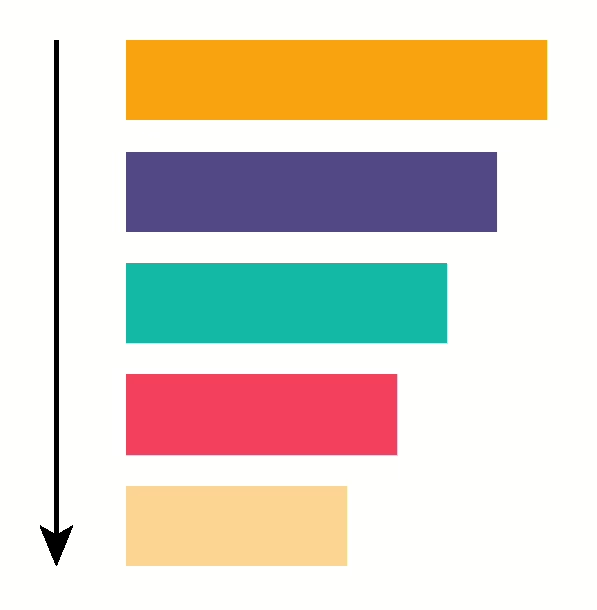
Examples of these colors in action in graphs:

Fonts
On this site, we use Readex Pro for headings and a system sans-serif font for the body copy. We use Inter for copy in designs. In the logo, we use the AZO Sans font.
Within the Progress Planner plugin, we use the system fonts used by WordPress and Roboto in our designs.
Style
Progress Planner in writing
We always write Progress Planner with a space.
Sentence and title case
We always use sentence case unless we write a badge or product name. For example:
- Progress Planner plugin
- Awesome Author badge
- Jack January badge