




Opis
Nie jest to typowa wtyczka do tworzenia formularzy. Forminator to łatwa w użyciu wtyczka do tworzenia formularzy WordPress dla każdej witryny i każdej sytuacji. To najprostszy sposób na stworzenie dowolnego formularza – formularza kontaktowego, formularza zamówienia, formularza płatności, formularza e-mail, widżetów do przesyłania opinii, interaktywnych sondaży z wynikami w czasie rzeczywistym, quizów typu „każda odpowiedź jest błędna” w stylu Buzzfeed, kalkulatorów kosztów usług oraz formularzy rejestracyjnych z opcjami płatności, takimi jak PayPal i Stripe.
To magiczny kreator formularzy WordPress dla każdego!
Wizualny kreator Forminator z funkcją „przeciągnij i upuść” ułatwia konfigurację i dodawanie formularzy do witryny WordPress. Zbieraj informacje, twórz interaktywne treści i generuj więcej konwersji dzięki Forminatorowi.
Odblokuj wszystkie pola formularzy i dodatki Premium od samego początku dzięki Forminator Pro.
Uzyskaj natychmiastowy dostęp do ekskluzywnych funkcji Pro, takich jak formularze subskrypcji Stripe, dynamiczne generowanie plików PDF oraz łatwa geolokalizacja i autouzupełnianie. Dowiedz się więcej o wersji Pro.
Formularze Forminator, ankiety, quizy, sondaże, obliczenia i wiele więcej…
- Formularze – Własne formularze dostosowane do Twoich potrzeb, zawierające dowolną liczbę pól.
- Sondaże – Interaktywne sondaże służące zbieraniu opinii użytkowników, z wieloma dynamicznymi opcjami i ustawieniami.
- Quizy – Zabawne lub wymagające quizy, które odwiedzający mogą wypełniać i udostępniać w mediach społecznościowych.
- Obliczenia – Zbieraj informacje, pozyskuj potencjalnych klientów, przyjmuj zamówienia i angażuj odwiedzających.
- Płatności – Przyjmuj płatności, darowizny, zaliczki, sprzedawaj towary dzięki integracji ze Stripe i PayPal.
Poznaj podstawy obsługi Forminatora dzięki praktycznym poradnikom
- Tworzenie idealnego formularza kontaktowego za pomocą programu Forminator
- Utwórz łatwy formularz płatności (za darmo!) z Forminatorem
- Jak najlepiej wykorzystać program Forminator
- Jak przechwytywać podpisy elektroniczne za pomocą programu Forminator
- Jak zbierać wiadomości e-mail i generować kontakty do potencjalnych klientów za pomocą quizu Forminator
Akceptuj płatności za pomocą Stripe i PayPal
Zacznij przyjmować płatności z Forminator. Nie jest wymagana aktualizacja do wersji Pro! W zestawie znajdują się usługi Stripe i PayPal zgodne ze standardem SCA. Wystarczy wprowadzić klucze publikacji, aby aktywować moduł płatności Forminator dla płatności stałych i zmiennych.
Zweryfikowany partner Stripe
Forminator jest również dumnym Zweryfikowanym Partnerem Stripe. To partnerstwo pozwala nam pomóc Ci w pełni wykorzystać integrację ze Stripe dzięki dodatkowym zasobom, np. możliwości eskalacji pytań do pomocy technicznej lub wnioskowania o spersonalizowane wyceny.
Dynamiczne płatności Stripe
Oferuj ponad 40 metod płatności dzięki Dynamiczny element płatności Stripe, w tym Apple Pay, Google Pay, Klarna i inne. Z łatwością zarządzaj opcjami płatności dostępnymi dla Twoich użytkowników.
Obliczenia są magnesem przyciągającym klientów
Istnieją dosłownie tysiące kombinacji, które można wykorzystać do zwiększenia wartości swojej witryny za pomocą obliczeń:
- Formularze rejestracyjne z pakietami aktualizacji
- Sprzedaj koszulkę z różnymi rozmiarami, kolorami, cenami i podatkami
- Dodaj kalkulator BMI i/lub spożycia kalorii do swojego bloga o zdrowiu i sprawności fizycznej
- Umieść kalkulator kredytowy na swojej stronie internetowej poświęconej finansom
- Podaj położnej kalkulator terminu porodu
- Natychmiastowa wycena lub szacowanie kosztów usług
- Umieść kalkulator zwrotu z inwestycji na witrynie swojej agencji
- I tak dalej, i tak dalej, i tak dalej…
Przeciągnij i upuść bloki formularzy
Forminator oferuje szereg bloków typu „przeciągnij i upuść”, które ułatwiają tworzenie formularzy – imię i nazwisko, adres e-mail, numer telefonu, tekst, przesyłanie plików, strona internetowa, data, godzina, liczba, kod HTML, paginacja, pola wyboru, zgody zgodne z RODO, płatności, obliczenia i pola ukryte.
Twoje ulubione integracje, w tym ponad 1000 już dodanych aplikacji
Forminator oferuje liczne integracje z uwielbianymi przez użytkowników rozwiązaniami zewnętrznymi, takimi jak usługi poczty e-mail, CRM, magazynowanie i zarządzanie projektami.
- HubSpot
- Campaign Monitor
- ActiveCampaign
- Arkusze Google
- Webhooki (Zapier, Make, Tray itd.)
- Trello
- MailChimp
- AWeber
- Slack
Twórz i sprzedawaj własne rozszerzenia
Forminator jest darmowy i dostępny dla milionów użytkowników WordPressa! Skorzystaj z API dla programistów oraz dołączonych haków i filtrów, aby tworzyć własne integracje lub aplikacje niestandardowe, a następnie sprzedawać je lub rozdawać za darmo tutaj, na WordPress.org.
Sondaż dla odwiedzających
Sondaże to doskonały sposób na zaangażowanie odwiedzających. Forminator zapewnia informacje zwrotne w czasie rzeczywistym, prezentując statystyki na żywo w formie pięknych wykresów kołowych i grafów.
Twoje własne quizy w stylu Facebooka
Kto nie dał się nabrać na „testy inteligencji” i quizy „zgadnij, którą postacią z Gwiezdnych Wojen jesteś” na Facebooku? Teraz możesz skierować cały ten ruch na swoją stronę. Twórz quizy wiedzy i quizy z odpowiedziami bezbłędnymi za pomocą Forminatora.
Zbieraj potencjalnych klientów za pomocą quizów
Chcesz wykorzystać swoje quizy nie tylko do rozrywki, ale i jako sposób na zaangażowanie odbiorców? Forminator pozwala również zbierać dane uczestników (np. imię i nazwisko, adres e-mail itp.) poprzez integrację formularza pozyskiwania potencjalnych klientów z quizem.
Blok Gutenberga
Forminator jest dla Ciebie, niezależnie od tego, czy jesteś klasycznym edytorem, czy też wczesnym użytkownikiem Gutenberga. Pożegnaj się z krótkimi kodami i szybko dodawaj formularze do wpisów dzięki blokowi Forminator dla Gutenberga.
Trasowanie poczty e-mail i wstępne wypełnianie
Zwiększ wydajność swojej witryny, od wprowadzania danych przez odwiedzających po czas odpowiedzi na e-maile. Używaj ciągów zapytań, aby wstępnie wypełnić dane odwiedzających i dostarczać formularze bezpośrednio do konkretnych zespołów z routingiem e-maili, automatycznymi odpowiedziami i warunkami.
Przesyłanie wpisów przez użytkownika
Chcesz umożliwić odwiedzającym udostępnianie postów bez konieczności dostępu do panelu WordPress? Dzięki Forminatorowi odwiedzający mogą przesyłać pomysły na wpisy z poziomu front-endu Twojej witryny, dzięki czemu możesz łatwo selekcjonować i publikować ich przemyślenia. Przypisz wpis domyślnemu autorowi, zapisz jako szkic, opublikuj natychmiast itd.
Google reCAPTCHA
Nie chcesz, żeby Twoja skrzynka odbiorcza była zalewana spamem z formularzy. Google ReCAPTCHA jest darmowa z Forminatorem. Teraz możesz zatrzymać te szalone boty, nie utrudniając życia odwiedzającym. Koniec z trudnymi do odczytania, losowymi frazami.
Funkcje antyspamowe
Chroń swoje formularze za pomocą wbudowanych narzędzi antyspamowych, takich jak reCAPTCHA, hCaptcha i Cloudflare Turnstile. Możesz również zezwalać na określone adresy e-mail, domeny lub domeny najwyższego poziomu (TLD) lub je blokować, korzystając z konfigurowalnych filtrów poczty e-mail.
Szablony w chmurze i wstępne ustawienia
Jumpstart form creation with Preset Templates, or save time by reusing your own custom forms across sites using Cloud Templates synced through the HUB.
Zbieraj, śledź i bądź gotowy na RODO
Forminator przechowuje i porządkuje przesłane treści, dzięki czemu możesz sortować, analizować i zarządzać odpowiedziami – oczywiście, a jednocześnie bardzo łatwo jest zachować zgodność z RODO i innymi prawnymi zasadami ochrony prywatności.
Importuj istniejące dane Contact Form 7
Chcesz przenieść istniejące formularze z CF7? Kreator importu Forminatora pozwala przenieść wszystkie lub wybrane formularze w zaledwie kilka kliknięć. Możesz również przenieść dane z szeregu dodatków i ustawień Contact Form 7.
Własne formularze logowania i rejestracji
Twórz i osadzaj niestandardowe formularze logowania i rejestracji dla swoich witryn (lub wielowitrynowego!). Przenieś formularze L&R na wyższy poziom: wybieraj spośród szerokiej gamy pól formularza i dostosuj ustawienia, styl i zachowanie.
Pole przesyłania wielu plików
Oprócz możliwości przesyłania pojedynczych plików, Forminator idzie o krok dalej, umożliwiając użytkownikom przesyłanie wielu plików. Można również ustawić konkretne rodzaj plików, ograniczyć liczbę przesyłanych plików, a także rozmiar każdego pliku. Interfejs „przeciągnij i upuść” w polu przesyłania również ułatwia użytkownikom przesyłanie plików.
Pola formularza grupowania i powtarzania
Funkcja grupowania pól pozwala na grupowanie dowolnej liczby pól w jednym formularzu. Możesz również umożliwić użytkownikom dodawanie dowolnej liczby dodatkowych grup pól podczas wypełniania formularza. Jest to idealne rozwiązanie do powtarzalnego wprowadzania danych, takich jak historia zatrudnienia, uczestnicy wydarzeń, listy itp.
Zaawansowane ograniczenia pól daty
Idealne do rezerwacji spotkań i hoteli – funkcja Limity wyboru dat w Forminatorze pozwala ograniczyć dostępne daty wyświetlane w kalendarzu. Na przykład, możesz wyświetlić tylko daty przyszłe, wybraną liczbę dat od dzisiaj, daty z określonego przedziału dat, konkretne dni tygodnia i wiele więcej!
Dodaj pole formularza podpisu elektronicznego (tylko Pro)*
Masz aplikację online wymagającą podpisu lub umowę, którą chcesz, aby podpisali Twoi klienci? Funkcja podpisu elektronicznego Forminatora pozwala odwiedzającym na użycie myszy, gładzika lub palca (na urządzeniach dotykowych) do pozostawienia podpisu po przesłaniu formularza. Wystarczy wstawić pole „Podpis elektroniczny” i voilà!
Odbieraj subskrypcje i płatności cykliczne w Stripe (tylko Pro)*
Twórz w pełni spersonalizowane formularze subskrypcji dzięki dodatkowi Stripe Subscription do Forminator Pro. Pozwól swoim klientom wybrać plany/ceny, cykl rozliczeniowy, spersonalizowane oferty dodatkowe, bezpłatny okres próbny i oczywiście bezpieczne płatności kartą. Forminator oszczędza również Twój czas, natychmiastowo i automatycznie synchronizując wszystkie dane z formularza subskrypcji bezpośrednio z Twoim kontem Stripe.
*Uwaga: Te funkcje są dostępne tylko w ramach Forminator Pro. Uzyskaj natychmiastowy dostęp do Forminator Pro, a także do wszystkich naszych innych wtyczek Premium, zarządzanego hostingu WP, naszej platformy do zarządzania witryną: The Hub oraz całodobowego wsparcia ekspertów – wszystko w ramach członkostwa WPMU DEV.
Co ludzie mówią o Forminatorze?
★★★★★
Niesamowita wtyczka, naprawdę wydaje się, że tylko wyobraźnia może ograniczyć jej zastosowanie. Mnóstwo funkcji, takich jak przyjmowanie płatności, kalendarz, za darmo. Nie mogę uwierzyć, że jest tam wszystko, czego potrzebuję. Pobudza kreatywność i sprawia, że praca nad witryną internetową to czysta przyjemność. – araca
★★★★★
Ta wtyczka ma doskonały, przemyślany i dobrze zaprojektowany interfejs użytkownika i oferuje wszystko, czego szukałem (a myślę, że wypróbowałem już każdą poważną konkurencję). – tvsmvp
★★★★★
Ta wtyczka to zdecydowanie najlepszy darmowy kreator formularzy! Przetestowałem wiele, ale ta jest tak prosta w obsłudze… Wypróbuj ją. Jestem pewien, że ją pokochasz. – johncarteroz
★★★★★
Świetny projekt interfejsu, superłatwy w obsłudze i świetna funkcjonalność. Zwykle nie piszę recenzji, ale tym razem tak mi się spodobało, że po prostu musiałem! – istavridi
Wtyczki Shameless
Uwielbiam Forminatora! WPMU DEV ma inne świetne darmowe wtyczki, które warto sprawdzić.
- Smush – Kompresja i optymalizacja obrazków
- Hummingbird – Optymalizacja szybkości strony
- Hustle – Wyskakujące okienka, wysuwane okienka i zgody na otrzymywanie wiadomości e-mail
- SmartCrawl – Optymalizator SEO
- Defender – Bezpieczeństwo, monitorowanie i ochrona przed hakowaniem
O nas
WPMU DEV to wiodący dostawca wysokiej jakości wtyczek, usług i wsparcia WordPress. Dołącz tutaj:
https://wpmudev.com/
Nie zapomnij być na bieżąco ze wszystkim, co dotyczy WordPressa, z najlepszego źródła informacji w Internecie:
Blog WPMU DEV
Hej, jeszcze jedno… mamy nadzieję, że cieszą się Państwo naszymi darmowymi ofertami tak samo, jak my cieszyliśmy się, gdy mogliśmy je dla Państwa tworzyć!
Kontakt i autorzy
Zrzuty ekranu
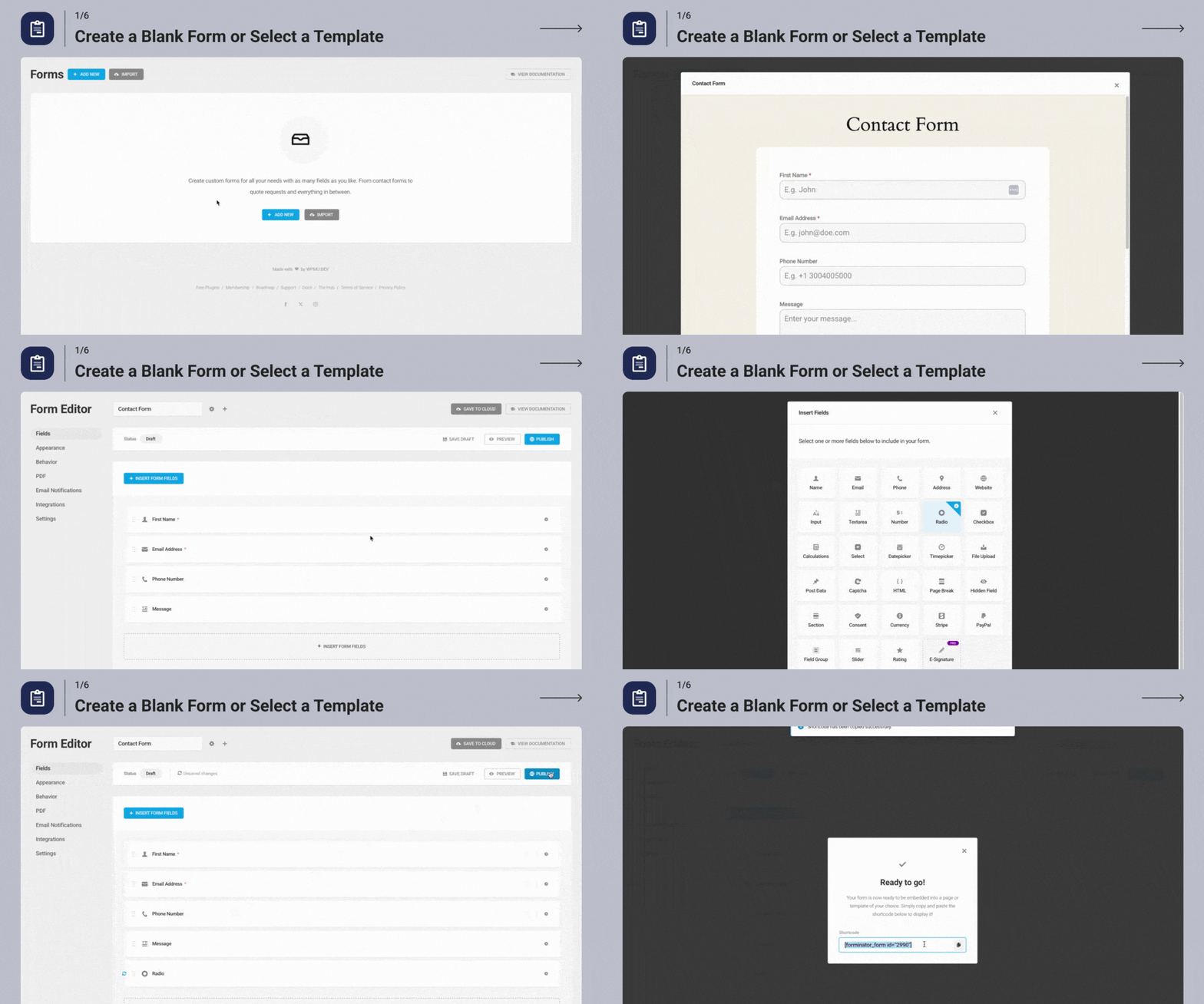
Utwórz pusty formularz lub wybierz szablon 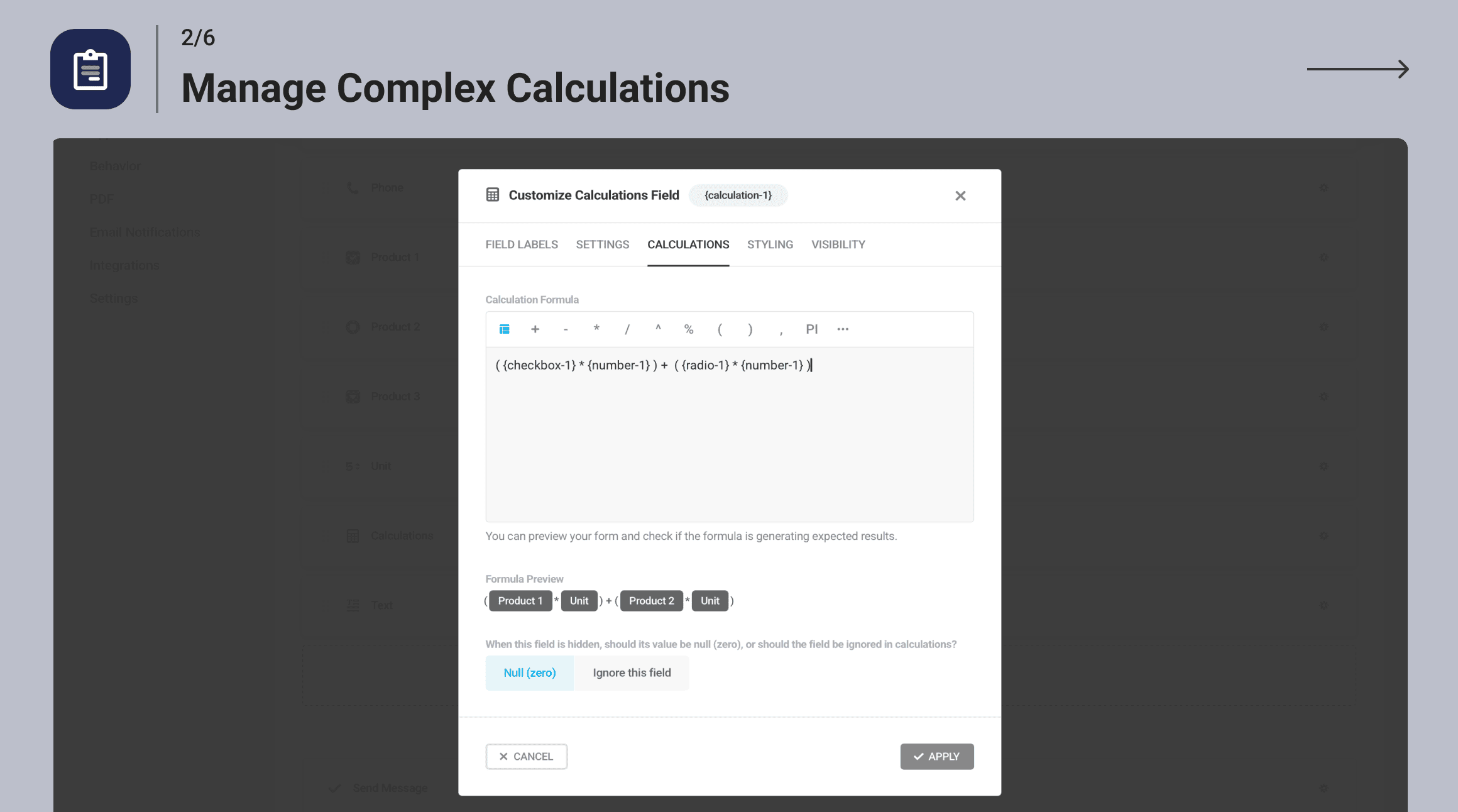
Zarządzaj złożonymi obliczeniami 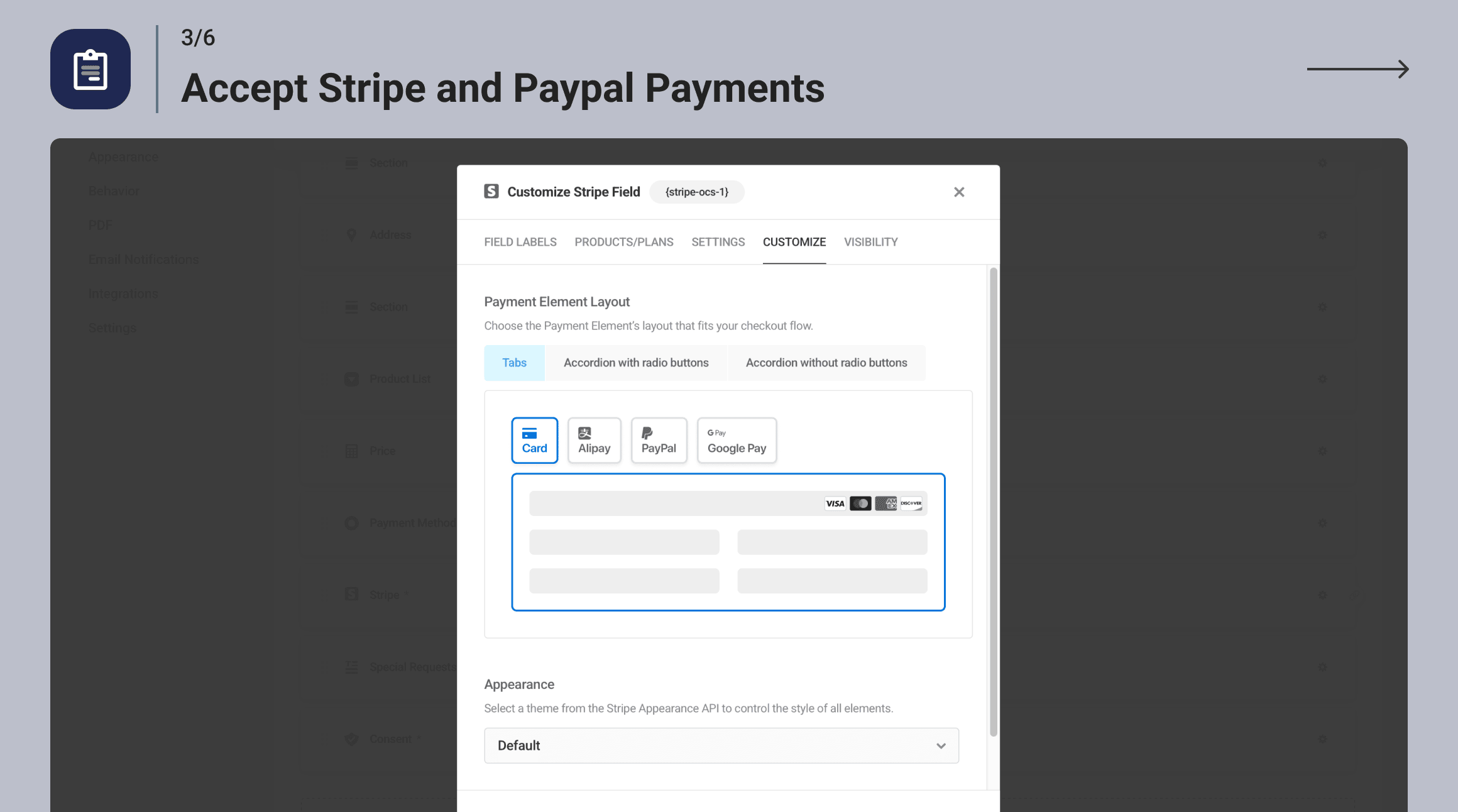
Akceptujemy płatności Stripe i PayPal 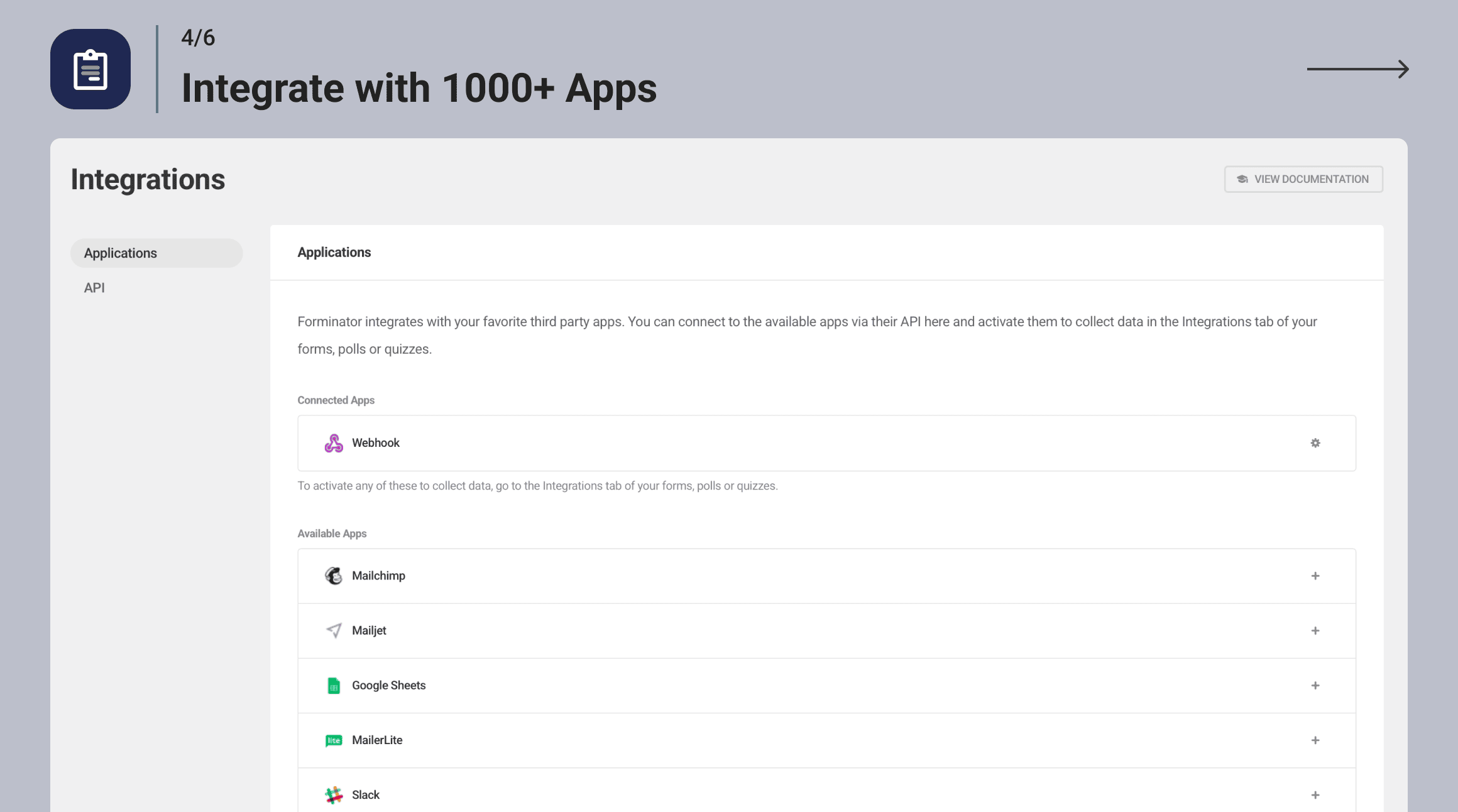
Zintegruj się z ponad 1000 aplikacji 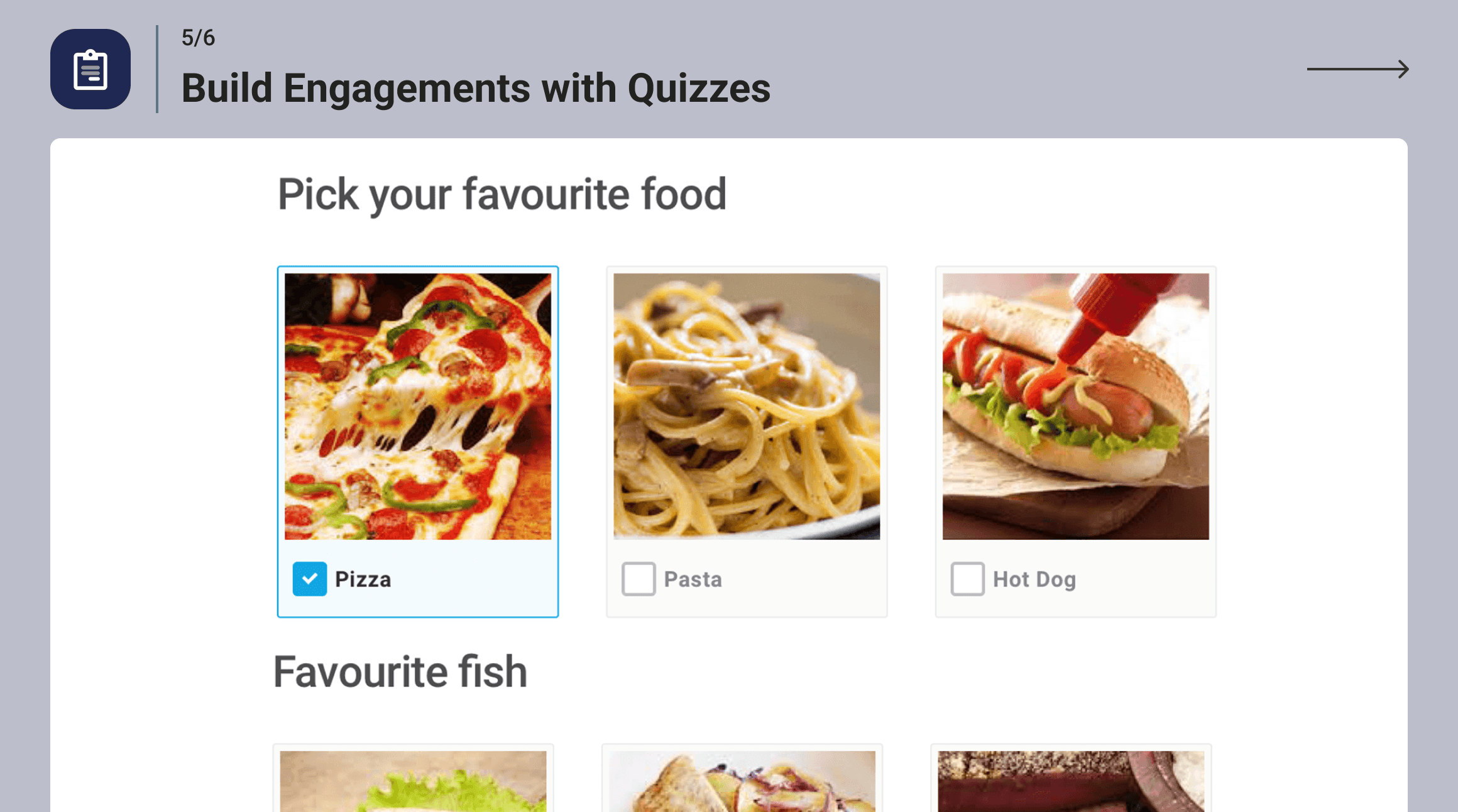
Buduj zaangażowanie za pomocą quizów 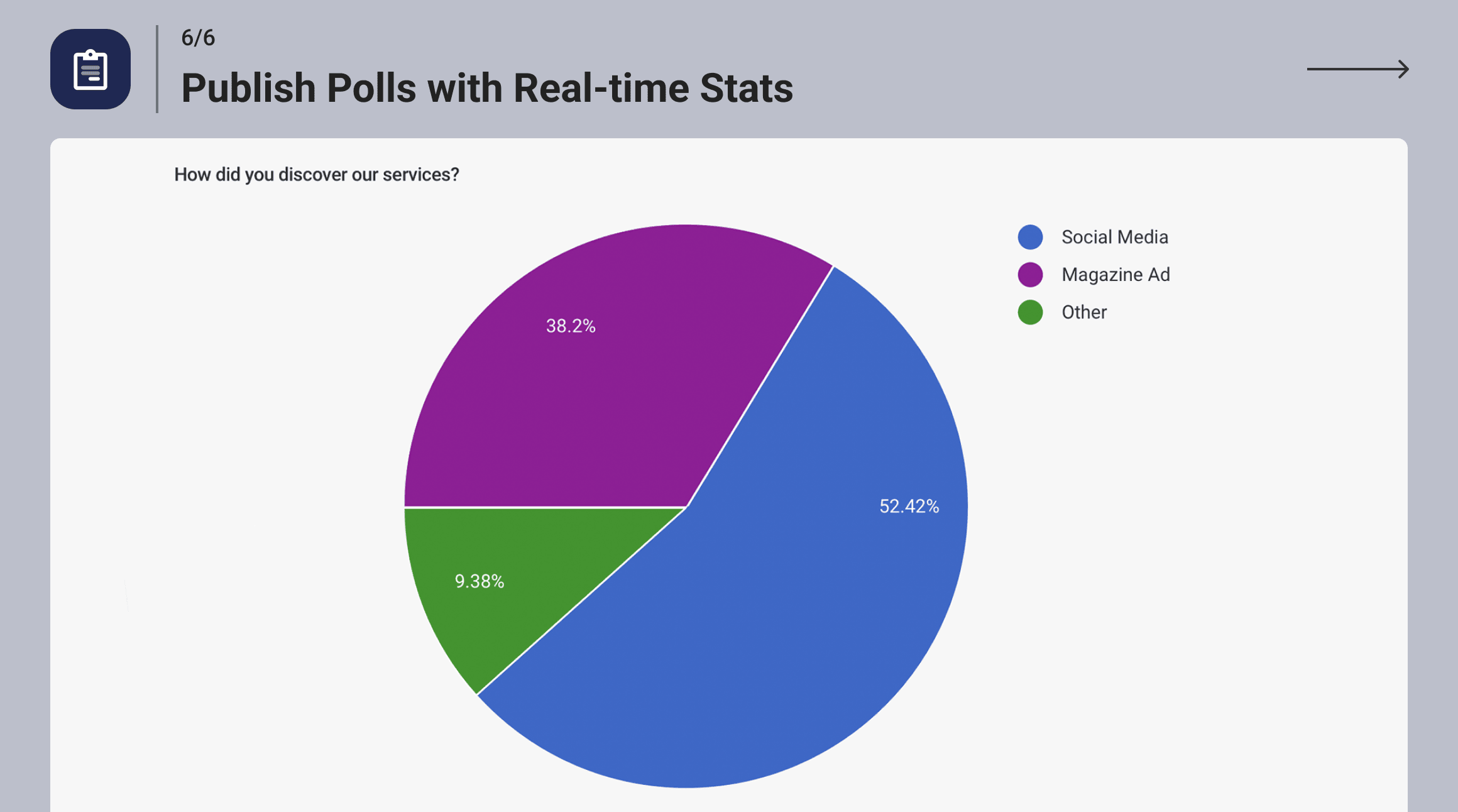
Publikuj sondaże ze statystykami w czasie rzeczywistym
Najczęściej zadawane pytania
-
Dlaczego warto wybrać Forminator zamiast WPForms?
-
Forminator oferuje więcej funkcji i możliwości w porównaniu z WPForms, zwłaszcza w wersji darmowej. Podczas gdy WPForms Lite ma ograniczony dostęp do podstawowych narzędzi, Forminator oferuje ponad 20 pól formularza, logikę warunkową i kompleksową ochronę przed spamem.
Dodatkowo, Forminator oferuje integrację płatności zarówno ze Stripe, jak i PayPal, podczas gdy WPForms Lite integruje się tylko ze Stripe. Forminator obsługuje również szerszy zakres integracji, a także narzędzia do quizów i sondaży, zaawansowane opcje personalizacji i stylizacji oraz rozbudowany system zarządzania zgłoszeniami. Funkcje te są dostępne tylko w wersji pro WPForms.
-
Czy Forminator zawiera blok Gutenberga?
-
Oczywiście. Forminator został stworzony do pracy zarówno w edytorach Gutenberg, jak i ClassicPress.
-
Czy Forminator jest gotowy na RODO?
-
Forminator ułatwia Ci przestrzeganie RODO i innych lokalnych przepisów dotyczących prywatności… wszystkie narzędzia są dostępne, ale ostatecznie to Ty decydujesz o wdrożeniu zasad ochrony prywatności i danych w swojej witrynie. Postępuj właściwie, wszyscy.
-
Czy mogę przyjmować płatności za pomocą Forminator?
-
Tak! Forminator oferuje bezpłatne integracje ze Stripe i PayPal. Dynamiczny Element Płatności Stripe obsługuje ponad 40 opcji, w tym Apple Pay, Google Pay, Amazon Pay i Klarna.
-
Czy opcje płatności Forminator są zgodne ze standardem SCA?
-
Tak! Forminator nie zarządza przetwarzaniem płatności. Współpracowaliśmy ze Stripe i PayPal, aby zapewnić zgodność wbudowanych integracji z unijnymi przepisami dotyczącymi silnego uwierzytelniania klienta (PSD2).
-
Czy Forminator może pomóc w zapobieganiu wysyłaniu spamu?
-
Forminator zawiera wbudowane narzędzia antyspamowe, takie jak integracje Captcha od wielu dostawców, pola honeypot, filtry wiadomości e-mail i obsługę usług stron trzecich, takich jak Akismet.
-
Jak utworzyć formularz kontaktowy w WordPressie za pomocą Forminatora?
-
Przygotowaliśmy prosty przewodnik po formularzach kontaktowych Forminator na naszym blogu. Artykuł znajdziesz tutaj.
-
Chcę tworzyć dla Forminatora! Gdzie znajdę dokumentację API?
-
Dowiedz się wszystkiego, co musisz wiedzieć, zapoznając się z naszą dokumentacją API tutaj
-
Gdzie mogę otrzymać dokumentację Forminatora?
-
Jak mogę zgłosić problemy lub błędy bezpieczeństwa?
-
Bezpieczeństwo wtyczek traktujemy niezwykle poważnie. Jeśli masz błąd lub lukę w zabezpieczeniach do zgłoszenia, możesz to zrobić za pośrednictwem Programu Ujawniania Luk w Oprogramowaniu Patchstack. To szybkie i proste rozwiązanie, a otrzymasz powiadomienie o rozwiązaniu problemu. Zgłoś lukę w zabezpieczeniach.
Recenzje


Kontrybutorzy i deweloperzy
„Forminator Forms – Formularz kontaktowy, formularz płatności i kreator formularzy własnych” jest oprogramowaniem open source. Poniższe osoby miały wkład w rozwój wtyczki.
Zaangażowani
Wtyczka „Forminator Forms – Formularz kontaktowy, formularz płatności i kreator formularzy własnych” została przetłumaczona na 19 języków. Podziękuj tłumaczom za ich wkład.
Interesuje cię rozwój wtyczki?
Przeglądaj kod, sprawdź repozytorium SVN lub czytaj dziennik rozwoju przez RSS.
Rejestr zmian
1.49.2 ( 2025-12-18 )
- Fix: Security improvements
1.49.1 ( 2025-12-12 )
- Miscellaneous improvements
1.49.0 ( 2025-01-12 )
- Enhancement: Add Instant Preview
- Enhancement: Add the ability to insert new fields at any location in the Form Editor
- Enhancement: Update the Status Bar in the Editor
- Enhancement: Update the Editor sidebar
- Enhancement: Update Appearance settings
- Enhancement: Remove other admin notices in the Editor
- Enhancement: Show a success notification after creating an Appearance Preset
- Enhancement: Show free templates without errors when the Hub has issues
- Enhancement: Include information about using Cloud Templates in the Import and Export modals
- Enhancement: Remove the file name format from the PDF title
- Enhancement: Add a survey to collect user feedback
- Fix: Stripe notice appears in logs when a subscription payment requiring additional steps is submitted
- Fix: PayPal field throws an error when the amount is greater than 1000 in Japanese Yen
- Fix: Visibility Conditions missing on the Email Notification tab for Quizzes
- Fix: Some hidden fields trigger accessibility issues
- Fix: Export adds a
tag when multiple checkbox values are selected - Fix: Active submissions count in form stats shows all submission types when clicked
- Fix: Incomplete submissions appear in the stats graph on the forms listing page
- Fix: Removing an image in the Upload field doesn’t toggle visibility conditions
- Fix: Notices appear when using Number and Calculation fields in a form
- Fix: Issue with required Radio fields that have no options
- Fix: Fatal error when using the {signature-1} placeholder in PDFs
- Fix: Calculations not showing the slider value when it’s not a whole number
- Fix: Sending multiple options from Checkbox and Select fields to HubSpot
- Fix: Fatal error on the Add-ons page when the Add-ons list from the Dashboard plugin is not synced due to a network issue
- Fix: Retention description for the '0′ case
- Fix: Highlighting the parent block when selecting the child element in Appearance settings
1.48.3 ( 2025-11-20 )
- Miscellaneous improvements
1.48.2 ( 2025-10-15 )
- Fix: Issue with some submission data not properly rendering when object cache is enabled
- Fix: Error message for required Select fields is not cleared after submission
1.48.1 ( 2025-10-10 )
- Fix: Google Sheets token refresh issue
1.48.0 ( 2025-10-06 )
- Enhancement: Respect WordPress network settings that disable site creation and display a notice on the Form Editor screen for registration forms on the main site of multisite networks
- Enhancement: Respect WordPress settings that disable user registration and display a notice on the Form Editor screen for registration forms
- Enhancement: Add a new „Map ID” field to Geolocation settings
- Enhancement: Improve browser autofill
- Enhancement: Add option to enable or disable browser autofill for input fields (Name, Address, and Phone)
- Enhancement: Display Signature, Radio, Checkbox, and Upload fields in the email body as images instead of text or URLs
- Enhancement: Add „status” column to „frmt_form_entry” table in the database for submissions
- Enhancement: Improve WP caching for submissions based on their status
- Enhancement: Improve compatibility with Photonic Gallery plugin
- Enhancement: Hide integration API keys
- Enhancement: Add add-on page notices when there is no connection to the Hub
- Enhancement: Hide HTML field from Payment custom metadata
- Enhancement: Enable the Slider step values toggle by default
- Fix: Registration is still allowed even when the network option is deactivated
- Fix: Can’t set conditions that include the Date Picker field if the site language differs from English
- Fix: Stripe payment method does not change on the front end if the user visited the form before and did not submit it
- Fix: Select placeholder is duplicated when using an Elementor popup triggered by an On Click event
- Fix: Single Upload field not working in the media library with the Stripe field
- Fix: Sudden layout changes move the Submit button after filling out a required field
- Fix: Calculation field removes the modulo operator without brackets
- Fix: The min/max validation message is reversed for Number and Currency fields
- Fix: Fields with conditional visibility inside repeater groups do not record all data
- Fix: PayPal field breaks the selected values when the variable amount is not properly configured
- Fix: Word „array” for the Upload field appears in the PDF if no files are uploaded
- Fix: Show correct navigation links when some features are disabled
- Fix: Categories and Tags (Multiple) in the Post Data field remain selected when the form is submitted
- Fix: Incorrect classes on Submit button for paginated forms
- Fix: Number field value does not display in HTML fields if it is on the same row as a hidden Calculation field
- Fix: Default Radio/Checkbox image background color isn’t working
- Fix: Issue with Group field, HTML widget, and visibility conditionals
1.47.0 ( 2025-09-09 )
- Enhancement: Add page visibility conditions for paginated forms
- Enhancement: Improve Page Break field design
- Fix: Prevent placing the Page Break field in the same row with other fields
1.46.2 ( 2025-08-19 )
- Fix: Redirect URLs breaking due to double-encoding
1.46.1 ( 2025-08-13 )
- Fix: Resolved a fatal error that occurred when using certain dynamic Stripe payment methods.
1.46.0 ( 2025-08-12 )
- Enhancement: Adjust color shades for better contrast to meet WCAG 2.1 AA standards in forms with Forminator styles. You may notice minor visual changes.
- Enhancement: Add focus outline colors to fields to meet WCAG 2.1 AA standards in forms with Forminator styles. You may notice minor visual changes.
- Enhancement: Allow keyboard-only form completion
- Enhancement: Update Stripe library
- Enhancement: Improve progress bar calculation for paginated forms
- Enhancement: Compatibility with Elementor template editor
- Enhancement: Properly encode placeholder values used in URLs
- Enhancement: Prevent downgrading PRO to free version on servers that ignore the 'Update URI’ plugin tag
- Enhancement: Update Onboarding Dashboard
- Enhancement: Compatibility with PHP 8.2
- Enhancement: Small UI improvements
- Enhancement: Improve Group field appearance on Submissions page
- Enhancement: Improve Group field single macro in Email Notifications and HTML fields
- Enhancement: Add filter to disable Add-ons
- Fix: Security improvements
- Fix: Prevent user creation in Network and Main Site when site registration is disabled
- Fix: Macro not working in Email Notification body for Group field
- Fix: Visibility rules based on AM/PM and Minutes in Time field not working correctly
- Fix: 'Is’ visibility condition not working for Upload field
- Fix: 'Is Not’ visibility condition not working with Number fields when value is 0
- Fix: Date field validation issue with visibility rules
- Fix: Hidden Address field shifts columns in CSV exports
- Fix: Incorrect calculation of Repeated fields with visibility conditions
- Fix: Incorrect calculation when a hidden field is used in a formula
- Fix: Visibility conditions not working correctly inside Group fields
- Fix: 'Hide’ visibility conditions not working when based on Hidden fields
- Fix: Issue filling Stripe Billing Details
- Fix: Min/Max validation issue in Number field
- Fix: Textarea field styling broken on Material Design Style
- Fix: Slider field colors not saved in Appearance Presets
- Fix: Password field validation message broken when using quotes
- Fix: RTL mode issues with Select field
- Fix: Submission ID in Hidden field not working in Email Notification subject
- Fix: HTML field displays only the first item of Repeated field
- Fix: Repeater field not working in Elementor popup
- Fix: Issue with success message after submitting Polls
- Fix: Quiz result and Lead form data missing in Email Notifications when 'Store Submissions in Database’ is disabled
- Fix: Scrolling issue on Add-ons page
- Fix: Fatal error when using Multiple Upload field
- Fix: Expiry Date field not allowing manual input
- Fix: Default hint missing for Skip Form button
- Fix: Visibility tab not showing reactivated Multiple Name fields
- Fix: Confirm Email field validation message not editable
- Fix: Close button not translatable in some modals
- Fix: Error message not shown on Timepicker when a description is present
- Fix: 'Approve’ button missing for Registration form in some cases
- Fix: JavaScript error when adding Conditional Visibility to Submit button
- Fix: Textarea field overlaps with error message
- Fix: Number field limits not working when inline validation is disabled in paginated forms
- Fix: Screen reader does not read label for Slider field
1.45.1 ( 2025-07-15 )
- Fix: Security improvements
1.45.0 ( 2025-07-08 )
- Enhancement: Add Autosave option to prevent data loss during editing
- Enhancement: Allow custom Markdown in field labels and descriptions
- Enhancement: Include custom input option for Select, Checkbox, and Radio fields
- Enhancement: Add Min and Max labels to Slider field
- Enhancement: Make Preset Templates available via Hub Connector
- Enhancement: Show default field error messages as placeholders
- Enhancement: Show notification after creating a new form
- Enhancement: Improve UI in various areas
- Fix: Number and Currency field formatting is lost when using specific merge tags in PDFs
1.44.3 ( 2025-06-30 )
- Fix: Security improvements
1.44.2 ( 2025-06-04 )
- Fix: Security improvements
1.44.1 ( 2025-05-20 )
- Fix: Remove unused files
1.44.0 ( 2025-05-13 )
- Enhancement: Disable validation on Preview
- Enhancement: Adjustments to Dashboard page
- Enhancement: Adjustments to Form Editor
- Enhancement: Adjustments to Preset Template flow
- Enhancement: Update Cloud Templates page behavior
- Enhancement: Allow closing modals with Escape key
- Enhancement: Improve process for deleting fields
- Enhancement: Improve text readability of gray text
- Fix: Email field visibility rules do not work correctly with other fields in the same row
- Fix: Form submit success JS event not triggered when using Stripe field
- Fix: Currency formatting missing in emails when using single placeholder
- Fix: Poll submit button colors not applied correctly
- Fix: Submission ID placeholder not passed to HubSpot integration
1.43.1 ( 2025-05-12 )
- Fix: Incorrect 1.43.0-free version label causing update loop
1.43.0 ( 2025-04-30 )
- Enhancement: Numerous accessibility improvements
- Enhancement: Add label for AM/PM selectbox
- Enhancement: Update Toggle colors in High Contrast Mode to make them more visible
- Enhancement: Prevent modal from closing when clicking outside it while adding forms
- Enhancement: Add placeholder for date and time in Email Notification subject
- Enhancement: CC and BCC fields are now also replaced when importing forms
- Fix: “Invalid user role” error on multisite Registration form
- Fix: Condition is not working properly for decimal numbers
- Fix: Currency field formatting issue in email notifications
- Fix: File was not uploaded if the form was submitted before the upload completed
- Fix: Post Data Field labels are not translatable
- Fix: PayPal Field is not rendering in Gutenberg editor
- Fix: Visibility rules based on Email field don’t work when Confirm Email field is enabled
- Fix: Prevent creating duplicate Stripe payment intents on form load for subscriptions
- Fix: Validation issue caused by Signature Field
- Fix: Captcha field compatibility issue with Elementor popup
- Fix: Submission error caused by „is not” condition in PayPal field
- Fix: Email notifications fail if routing is based on field values containing spaces or special characters
- Fix: Consent Field placeholder is not working inside HTML field
- Fix: „Go back” behaves incorrectly after previewing form templates
- Fix: PHP deprecated error on PHP 8.2 during import forms
- Fix: PHP deprecated errors while connecting Slack integration with any form
- Fix: Quiz submit button custom text doesn’t update when Leads option is enabled
- Fix: Missing text format in PDF Payment field
- Fix: Paginated form reloads to first page before redirecting in the same tab
- Fix: Additional CSS classes on PDF page header and footer not working properly
- Fix: PDF CSS selectors do not work in Custom CSS option
- Fix: Select field was displaying HTML entity ' instead of the correct character (’) in placeholder
1.42.2 ( 2025-04-21 )
- Enhancement: Add a new menu item to help you discover other free plugins by WPMU DEV and more
1.42.1 ( 2025-04-16 )
- Fix: Security improvements
1.42.0 ( 2025-04-08 )
- Enhancement: Add Cloudflare Turnstile Integration
- Enhancement: Add the ability to allow or block specific emails or domains in the Email field
- Enhancement: Add Email Confirmation Field
- Enhancement: Add PDF template based on DIV tags
- Enhancement: Add ability to hide empty fields in the generated PDF
- Enhancement: Twitter rebranding
- Fix: Apple Pay amount defaults to $1 when using Stripe dynamic payment methods
- Fix: Stripe field displays a note about future charges even for one-time payments
- Fix: Form fails to submit when using Indian Stripe accounts with restricted keys using dynamic payment methods
- Fix: Incorrect Google address in Autocomplete for certain countries
- Fix: Visibility Conditions in Field Groups cause calculation errors
- Fix: Draft does not load if the Select field mode was changed
- Fix: Images added to quiz answers don’t have alt attributes
- Fix: Fatal error when submitting expired Draft forms
- Fix: Fatal error on free version when Signature field is added to the form
- Fix: Label is added twice for the Name field with Multiple options
- Fix: Textarea field does not preserve formatting for the default value
- Fix: Slider field handle overlaps the calendar when the Date Picker field is clicked
- Fix: Issue with replacing spaces with dashes in PDF names
- Fix: Slider custom colors revert to default after closing form preview
- Fix: Hidden field with Submission Date as default returns empty value
1.41.2 ( 2025-03-24 )
- Fix: Visual editor scrolling issue
1.41.1 ( 2025-03-11 )
- Fix: Appearance Presets get reset to default values after update
1.41.0 ( 2025-03-10 )
- Enhancement: Slider Field update
- Enhancement: Caching DB query results to improve efficiency
- Enhancement: Improve compatibility with PHP 8.4
- Enhancement: Improve compatibility with WordPress 6.8
- Enhancement: Remove unused code
- Enhancement: Highlighting forms with uncompleted configuration
- Fix: Calculation field with Prefix is not triggered on initial form load
- Fix: PayPal payment fails due to expired reCAPTCHA
- Fix: Google Sheets integration works only initially if Page Reload submission is enabled
- Fix: HubSpot integration issue with their consent field
- Fix: Submission fails when Checkbox option with value of 0 is selected
- Fix: Error message is not visible in some cases
- Fix: PDF filename issues when using Cyrillic characters
- Fix: Translations don’t work on Appearance Presets section under Settings page
- Fix: Number field gets out of focus when hovering away from the field
- Fix: Ampersand (&) is not supported in form names
- Fix: Issue with Select field validation
1.40.0 ( 2025-02-24 )
- New: Ability to place field description text above or below field inputs
- Enhancement: Cloud templates feature is now available for WPMU DEV Free Plan members
- Enhancement: Stop creating the same Stripe payment intents each time when a form loads
- Enhancement: Improve performance by caching DB query results for getting entries
- Enhancement: Compatibility with OceanWP Theme
- Enhancement: Only load Mixpanel classes if Usage Tracking is enabled
- Fix: Stripe not assigning the customer when new Stripe field is used
- Fix: Indian clients unable to receive Stripe payments due to missing Customer Name and Address
- Fix: Avoiding conflicts with intl-tel-input library in 3rd-party plugins
- Fix: Form disappears after PayPal payment for AJAX Submission Method
- Fix: Incorrect order of Personalities when there is a tie in Personality Quiz results
- Fix: Hidden field Values „HTTP Refer URL” and „Embed URL” are working in reverse
- Fix: Submitted form data shows incomplete information in some cases
- Fix: Remove .rar files from supported upload file types
- Fix: Empty form with Post field can be submitted
- Fix: Hide Select field options without values
- Fix: Upload fields not working properly
- Fix: Upload field with conditional visibility remains visible after form submission
- Fix: Form Submission fails with PHP Fatal Error when Visibility Condition set to Contains for Upload field
- Fix: Fatal Error when Google Sheet API token is invalid
- Fix: Fatal Error when publishing or unpublishing a form with Stripe Field and invalid Stripe Key
- Fix: Empty screen appears after entering name for existing Google sheet file and then clicking on „Enter” button
1.39.3 ( 2025-02-24 )
- Fix: Security improvements
1.39.2 ( 2025-02-21 )
- Fix: Security improvements
1.39.1 ( 2025-01-28 )
- Update readme information
1.39.0 ( 2025-01-28 )
- Enhancement: Phone field validation
- Enhancement: Optimize DB queries and their execution frequency
- Enhancement: Add block previews and update Forminator icon in Gutenberg editor
- Enhancement: Migrate packages and build to support @wordpress/element and native React from WordPress
- Enhancement: Remove deprecated classes from integrations
- Enhancement: Improve method to fetch upload directory
- New: Add submission date placeholder
- New: Add filter to disable Cloud Template features
- New: Add Filter to disable all payment-related features
- Fix: Stripe Field doesn’t load when Visibility Condition is set for Stripe Field with Live Mode
- Fix: Link to Stripe Payment Methods goes to test dashboard
- Fix: No error is displayed when Stripe Tax ID is invalid
- Fix: Stripe field error in Course Enrollment Form
- Fix: Incorrect country ordering if translation is applied
- Fix: Certain long numbers are messed up when pushed to Google Sheet integration
- Fix: When you input the form’s name and hit the „Enter” button multiple times, it creates multiple forms
- Fix: Phone field with international validation appears broken inside Group field
- Fix: Form redirect behavior is not working properly
- Fix: Modern multi-select style breaks other field Visibility Conditions
- Fix: „Is before” and „Is after” conditions are not working as expected
- Fix: Disable removal of dial code for International Validation
- Fix: Double country flag when there is an error after form submission
- Fix: Draft Submitted/Expired warning is not shown if form is loaded via Ajax
- Fix: Import certain forms fails
- Fix: iFrame is removed from HTML field
- Fix: Country names don’t appear properly in international phone field when using Colibri WP Theme
- Fix: Signature field is not shown as full width when it is inserted after page break
- Fix: Creating new form with Stripe field and without connecting it causes an error
- Fix: Error Message for Password strength setting contains an HTML entity code
- Fix: Select field options without value issue
- Fix: Address label is not translated when {all_fields} is used in Email Notification
- Fix: PHP notice on Submissions page
- Fix: Fatal error when ActionScheduler tables are missing
1.38.3 ( 2025-01-22 )
- Fix: Security improvements
1.38.2 ( 2025-01-13 )
- Fix: Stripe field shows subscription terms on One Time plans
- Fix: Phone field in Material Design has unnecessary space for the country flag
1.38.1 ( 2024-12-24 )
- Fix: Resolved an issue with the Forminator Elementor widget disappearing
- Fix: Resolved a bug affecting country selection in the phone field on mobile devices
1.38.0 ( 2024-12-18 )
- Enhancement: Add support for Stripe Dynamic Payment Methods
- Enhancement: Pass subscription ID in webhooks
- Enhancement: Improve Paypal Venmo integration
- Enhancement: Support for Stripe Subscriptions individual field tags
- Enhancement: Update get_entries() API method
- Fix: „Ready to go!” popup modal disappears after publishing the form
- Fix: Compatibility with Extra theme
- Fix: Wrong country flag on phone field
- Fix: Forms do not accept some file types even if they are allowed
- Fix: Deprecated notice when you connect Google Sheets
- Fix: The payment Receipt option does not work with subscriptions
- Fix: Empty screen appears when entering the name for Google sheet integration and then clicking on the „Enter” buttons
- Fix: Form Lifespan -> Expiry Date option does not work
- Fix: No warning message shows on imported form with subscription plan when stripe addon is disabled
- Fix: PHP error when a different WordPress language is selected
- Fix: Moving to the appearance tab in Poll throws console warnings
- Fix: PHP warning when submitting the registration form
1.37.1 ( 2024-11-25 )
- Fix: Conflict with Divi child themes
- Fix: Calculation field does not work due to Number Formatting
- Fix: Notice for _load_textdomain_just_in_time called incorrectly since WordPress v6.7
1.37.0 ( 2024-11-19 )
- Enhancement: New Basic Style mode for Forms
- Enhancement: Add Use Theme Colors option
- Fix: Low-level roles can create a Registration form
- Fix: Security improvements
- Fix: Incorrect access to Preset and Cloud templates for users on the Free plan
- Fix: Low-level roles can Approve or Delete Users when manual approval is set for the registration form
- Fix: PayPal payment cancellation fully prevents form submission with no option to re-try payment until the form is reloaded
- Fix: Calculation error in the donation template when the „other” donation option is selected
- Fix: Add missed settings for Appearance Presets
- Fix: Syntax error in CSS file causing issues with Litespeed Cache plugin UCSS
- Fix: Issue with creating the registration form
- Fix: No calendar background when the Colibri WP theme is active
- Fix: Upload file inline validation does not work for some file types
- Fix: Signature UI is broken on the Submission page in some cases
- Fix: All polls become inactive when there is more than 1 poll on a page and one of them is submitted
- Fix: Add security notice for Registration Forms for administrator roles
- Fix: Adding odd technical text on PDF files
1.36.3 ( 2024-10-25 )
- Fix: Phone fields issue
1.36.2 ( 2024-10-23 )
- Fix: Remove development dependencies from the plugin
1.36.1 ( 2024-10-21 )
- Fix: Security improvements
1.36.0 ( 2024-10-09 )
- Enhancement: Update Google Sheets integration library.
- Enhancement: Update phone number validation library.
- Fix: Improve compatibility with the Paid Memberships Pro plugin.
- Fix: Resolve issue where Forminator reCaptcha fails when both Defender 2FA and reCaptcha are enabled on login form.
- Fix: Correct CSS syntax error causing LiteSpeed Cache plugin’s UCSS to break.
- Fix: Address field preview issue when using the Full Site Editor and the Gutenberg Forminator Form block.
- Fix: Resolve signature field display issue in full-width mode.
- Fix: Prevent blank page on poll submission when „Display Results” is enabled and rendering is done via AJAX.
- Fix: Escape unescaped characters in participant email titles for quizzes with leads enabled.
- Fix: Ensure special characters are correctly counted in textarea fields when a character limit is set.
- Fix: Resolve issue where number fields with comma separators caused URL redirects to fail.
- Fix: Address conflicts between field conditions when switching between options.
- Fix: Correct template translation issues.
- Fix: Ensure redirects work properly based on date conditions.
- Fix: Resolve custom spacing issue in the „None” design style.
- Fix: Apply security improvements.
1.35.1 ( 2024-09-17 )
- Enhancement: Stripe API and PayPal secret key encryption
- Fix: Security improvements
1.35.0 ( 2024-09-02 )
- Enhancement: Code improvements
- Fix: Installatron on cPanel reverts Forminator Pro to Free
- Fix: Issues with submitting PDF files and storing submissions in the database
- Fix: Unpublished quiz does not display an error on submission
- Fix: Submission fails when the Consent field is translated
- Fix: Duplicated image when Custom Field is enabled
- Fix: PayPal payment form issues with reCaptcha
- Fix: Stripe field does not show if is hidden by CSS
- Fix: Checkbox Links are not crawlable
- Fix: If Required field validation is not checked first, the PayPal button does not work
1.34.1 ( 2024-08-14 )
- Fix: XSS vulnerabilities
1.34.0 ( 2024-07-18 )
- Enhancement: Compatibility with WordPress 6.6
- Fix: Rating field Color section inconsistent
- Fix: Multi Select field is forced to have a default option
- Fix: Lifespan submissions limit ignored for quizzes until the page is refreshed
- Fix: PDF attached in Email Notification
- Fix: On the third page of pagination, it is not possible to access the previous page of the form list
- Fix: Clicking „Submit Deposit” fails when entering a valid zip code
- Fix: „Is Not” condition is not working with zero or null value
- Fix: Form embedded in Elementor popup showing duplicate buttons
- Fix: When submitting the paginated form, fields can be hidden based on the visibility condition
1.33.0 ( 2024-07-10 )
- Enhancement: Stripe integration with new RAK Keys
- Fix: Border appears around the pagination form when clicking on any unfilled area or rating field
- Fix: Prefixes are not allowed in the Pakistani phone field
- Fix: Clicking the last dot of the pagination indicator skips required fields
- Fix: Custom required alert message does not appear in the Rating field
- Fix: Select field displays the first option instead of placeholder text
- Fix: When switching from Update Existing Template to New Template, the template name disappears from the selection.
1.32.0 ( 2024-07-02 )
- New Feature: Add Preset and Cloud Form Templates
- New Feature: Add a Rating field
- Enhancement: Ability to choose a worksheet to send data to in a Google Sheet
- Enhancement: Add a modern multi-select option to the Select field
- Enhancement: Update Phone Number validation library
- Enhancement: Compatibility with Custom Field Suite plugin
- Fix: Incorrect state in PayPal billing details
- Fix: Visibility conditional logic for the submit button based on radio doesn’t work on paged forms
- Fix: Issues with Group duplication and dragging
- Fix: Files stay on the server deleting submission files.
- Fix: Default HTML upload field is visible in Post Data featured image along with styled field
- Fix: Connected integrations are missing on the Integrations page for quizzes without leads
- Fix: Delay when dragging and dropping Forminator fields
- Fix: Issue when creating Preset
- Fix: Issues with form submission when the Name field is set to Required with prefill enabled.
- Fix: Textarea field width is not aligned with the other fields when placed on the 2nd column
- Fix: Colon removed from URL when using the Hidden field for redirect
- Fix: Submission_id in the Hidden field doesn’t work in MailChimp integration
- Fix: Forminator doesn’t show the menu selected when using Windows High Contrast Mode
- Fix: Captcha will not show on preview after the first try on Forms
- Fix: JS error when dragging and dropping fields in Forminator
- Fix: Issues with translating certain strings
1.31.0 ( 2024-06-03 )
- Enhancement: Update Stripe library to the latest version
- Enhancement: Add the ability to align ReCaptcha to the right
- Enhancement: Prevent disabling calculation option on fields that are used in Calculations field formulas
- Fix: Workato Webhook does not connect
- Fix: Password is sent as plain text in Login form when using a webhook
- Fix: Some fields do not support HTML tags in the description
- Fix: Incorrect password on Forminator Login form for a specific password
- Fix: Conflicts with the Suremember plugin
- Fix: Stripe field is not showing on PopUp plugins
- Fix: International phone validation field prevents submission even if the field is optional
- Fix: Quiz Final Count message is erased even after saving
- Fix: Open the GDPR links in a new browser tab by default
- Fix: Form expands when loaded via Ajax while having conditionally visible fields
- Fix: Number field is not working for Stripe pre-filled postal code
- Fix: Pagination custom button text is not working if you start the form with a Slider field
- Fix: Post data field shows only the first Category and first tag in email notification when Multiple option is selected for tags and categories
- Fix: Replace statement_descriptor_suffix to fit the Stripe API
- Fix: Some Custom CSS classes in the PDF add-on are no longer working
- Fix: Slider values are not getting reset when a form is submitted
- Fix: Sorting submissions does not apply to exported CSV
- Fix: Upload field issue with WebP file type
- Fix: HTML Validation for select fields
- Fix: Can’t assign Name field to username in User Login Form
- Fix: Escaping characters in redirect URL breaks form pre-population
- Fix: Contact Form 7 image file size limit is not imported
- Fix: Scheduled Exports in Submissions do not allow editing of the email on Forms
- Fix: Columns break when custom spacing value is set to 0
- Fix: Search bar on matching Hubspot fields isn’t working
- Fix: Incorrect scrolling in paginated forms with long HTML field content on mobile devices
1.30.2 ( 2024-04-30 )
- Fix: Temporarily support deprecated classes for integrations
1.30.1 ( 2024-04-09 )
- Fix: Backward compatibility with Complianz plugin
1.30.0 ( 2024-04-08 )
- New Feature: Integration with MailerLite
- Enhancement: Refactoring of all integrations
- Enhancement: Twitter rebranding
- Enhancement: UX improvements for Forminator addons
- Security Fix: Cross-Site Scripting (XSS) vulnerability
- Security Fix: SQL injection vulnerability
- Fix: Aweber integration not connecting when an identifier is added
- Fix: Replaced …