


| CARVIEW |
The release notes for Kodi v21.
]]>The release notes for Kodi v21.3 are not yet officially available but we will update this post with a link when they are published.
USA shipments restored
From 29th August, there was an executive order stating that shipments to the USA would be subject to import tarrifs and we initially advised for customers to put their orders before this date.
We're now happy to announce that since early September, we have resumed shipments to the US. They remain tariff free and the price that you see on the website is the final price. There are no extra or hidden charges. It's business as usual.
Dolby Vision support
In case you missed it, we are now happy to announce TV-led Dolby Vision support for Vero V devices. You can learn more about Dolby Vision here.
Nothing needs to be done to enable this functionality beyond updating to the latest version of OSMC.
Furthermore, we are now exploring Dolby Vision FEL support and we have started testing this internally.
Black Friday
We like to offer our customers the best possible price for our products, including our flagship Vero V. We didn't offer a Black Friday discount this year. We're already offering the best possible price and with the current insatiable demand for DRAM, we're doing our best to keep the price as it is while we can.
Technology usually operates in a deflationary environment but the AI boom is currently causing an extreme demand for memory. We are doing what we can to mitigate this, including purchasing memory in advance when we see price breaks.
On the OSMC side, we've made a number of changes to keep things running smoothly:
Bug fixes
- Vero V: fix an issue with MPEG2 based Live TV
- Vero V: avoid micro stutter when users pauses a video
- Vero V: fix a micro stutter issue when a user presses pause
- Raspberry Pi / Vero: fix Inputstream Adaptive issues
Improving the user experience
- Vero V: improved skin performance significantly in library mode and windows which expose lots of text
- Vero V: improved playback performance and display latency calculations
- Vero V: limit number of HDMI resets when starting stream for smoother playback
- Vero V: added support for Dolby Vision Profile 10
- Vero V: fixed a frame drop issue that occur after absolute seeking
- Vero V: automatically reboot five seconds after a kernel panic
- OSMC Skin: improved main menu widget sorting and item limit
Miscellaneous
- Vero V: add support for memory dumping crashes on panic
- Add version codename to
/etc/os-releaseto improve compatibility
Wrap up
To get the latest and greatest version of OSMC, simply head to My OSMC -> Updater and check for updates manually on your exising OSMC set up. Of course — if you have updates scheduled automatically you should receive an update notification shortly.
If you enjoy OSMC, please follow us on X, like us on Facebook and consider making a donation if you would like to support further development.
You may also wish to check out our Store, which offers a wide variety of high quality products which will help you get the most out of OSMC.
Vero V is our latest and greatest flagship and the best way to enjoy OSMC and with Dolby Vision now supported, it's better than ever.
]]>USA shipment warning
From 29th August, all items sent to the USA will have tariffs applied from them and the $800
]]>USA shipment warning
From 29th August, all items sent to the USA will have tariffs applied from them and the $800 USD deminimis rule will be removed for all countries. We are looking at mitigating this but given such short notice, it is likely we will not be able to ship orders to the US for a while after this date.
As such, we advise anyone wishing to order OSMC products to bring these orders forward before Monday, 25th August, 20:00 BST. We will then suspend shipping to the US until further notice after this time.
29th August - US shipments have now resumed, with some brief delays expected. Normal service is expected to resume soon. We will provide further updates in he coming days.
Dolby Vision support
In case you missed it, we are now happy to announce TV-led Dolby Vision support for Vero V devices. You can learn more about Dolby Vision here.
Nothing needs to be done to enable this functionality beyond updating to the latest version of OSMC.
End of support for Vero 4K / 4K + (one more update)
We announced end of life support with the last OSMC update. However some users reported an issue with seeking when we released Kodi v21.2. As a result, we addressed this with a final update and also updated the final OSMC installation images so that users could always install the latest version of Kodi which did not exhibit this issue.
Bug fixes
- Fixed seeking issues on Vero devices which could cause freezes
- Fixed an issue which could prevent NTP time daemon from working on new installations of OSMC
- Fixed an issue with zooming on video files when using hardware accelerated playback on Vero V
- OSMC Skin: fixed missing OSD icon for auto masking feature
- OSMC Skin: fix custom masking colour setting
- Dolby Vision: fixed an issue that could cause some TVs to show a blank screen
- Dolby Vision: fixed flashes of corrupted colours in some circumstances
- Dolby Vision: fixed playback of official Apple streams which flag as Profile 5 in RPU but are actually Profile 8
Improving the user experience
- Improved Profile 5 Dolby Vision colours on Vero V
- Improved VNC server on Vero devices
- OSMC Skin: change masking bars to allow fully transparent colour values
- Limit number of HDMI resets when starting and stopping playback on Vero V for a smoother playback experience
- Dolby Vision: improved playback with some problematic clips
- Improved switching between RGB and YUV output without reboot on Vero V
- Added support for dynamic metadata with AV-1 codec on Vero V
Wrap up
To get the latest and greatest version of OSMC, simply head to My OSMC -> Updater and check for updates manually on your exising OSMC set up. Of course — if you have updates scheduled automatically you should receive an update notification shortly.
If you enjoy OSMC, please follow us on X, like us on Facebook and consider making a donation if you would like to support further development.
You may also wish to check out our Store, which offers a wide variety of high quality products which will help you get the most out of OSMC.
Vero V is our latest and greatest flagship and the best way to enjoy OSMC and with Dolby Vision now supported, it's better than ever.
]]>Kodi v21.2
Kodi v21.2 (Omega) is now available as standard on OSMC, and release details can be found here.
Dolby Vision support
We're now happy to announce TV-led Dolby Vision support for Vero V devices.
]]>Kodi v21.2
Kodi v21.2 (Omega) is now available as standard on OSMC, and release details can be found here.
Dolby Vision support
We're now happy to announce TV-led Dolby Vision support for Vero V devices. You can learn more about Dolby Vision here. Nothing needs to be done to enable this functionality beyond updating to the latest version of OSMC.
End of support for Vero 4K / 4K +
As of 1st January 2025, we have ended support for Vero 4K / 4K + devices after several years. You can learn more about what that means here. Furthermore, we are also allowing customers to upgrade at a discounted price by using their existing order number and email address. We have back-ported a couple of critical fixes as part of this update.
On the OSMC side, we've made a number of changes to keep things running smoothly:
Bug fixes
- OSMC Skin: fix an issue which could prevent installation of other OSMC skin variants
- OSMC Skin: fix an issue with the subtitle information in the video information dialog
- OSMC Skin: fix text width of slider and spin settings controls
- OSMC Skin: fix video player info dialog handling of episodes and files
Improving the user experience
- Improved 24-bit audio output on Vero V
- Improved OSD when playing HDR content on Vero V
- Updated translations
- Introduced new track muxers on Vero 4K / 4K + / V
- OSMC Skin: adjust video add-on views to work with multiple content types
- OSMC Skin: add new views for images section
- OSMC Skin: add XL font to plot/description text size setting
- OSMC Skin: adjust addon settings dialog button indicator behaviour
- OSMC Skin: add new colour picker slider dialog
Miscellaneous
- Support custom EDID firmware loading from file on Vero V
- Report if a TV supports Dolby Vision in logs
- Improved logging time precision
Wrap up
To get the latest and greatest version of OSMC, simply head to My OSMC -> Updater and check for updates manually on your exising OSMC set up. Of course — if you have updates scheduled automatically you should receive an update notification shortly.
If you enjoy OSMC, please follow us on X, like us on Facebook and consider making a donation if you would like to support further development.
You may also wish to check out our Store, which offers a wide variety of high quality products which will help you get the most out of OSMC.
Vero V is our latest and greatest flagship and the best way to enjoy OSMC and with Dolby Vision now supported, it's better than ever.
]]>We guaranteed five years of software updates at a minimum but extended this to eight years as the OSMC flagship remained popular. It's important that OSMC keeps moving forward and supporting
]]>We guaranteed five years of software updates at a minimum but extended this to eight years as the OSMC flagship remained popular. It's important that OSMC keeps moving forward and supporting new video formats and technologies. From a technical perspective we are now quite limited with what we can achieve with the Vero 4K / 4K+ family.
At the end of 2023, we announced the successor: Vero V, but continued to release updates for both device families. With significant improvements planned for Vero V and its predecessor's SoC being end of life, we'd like to move forward and continue to bring our users a modern and improved experience.
In short: this means that Vero 4K / 4K + devices will not get further OSMC updates beyond the October 2024 update. However, they will stay working just as they are now. We will continue to offer support on our forums where we can and users will be able to download all versions of OSMC released for their device from our website and installer.
For those that wish to upgrade to the Vero V, you can receive a discount code here by inputting your original order number and email address when you ordered a Vero 4K or 4K +.
We would like to thank our users for being part of the Vero experience and hope that they continue to use OSMC with our newer flagship, the Vero V.
]]>Here's what's new:
Bug fixes
- Fix for a potential crash which could occur during playback on Vero 4K/4K+/V
- Fix an issue with Full SBS output
Here's what's new:
Bug fixes
- Fix for a potential crash which could occur during playback on Vero 4K/4K+/V
- Fix an issue with Full SBS output on Vero 4K/4K+
- Fix a playback crash on Vero 4K/4K+/V caused by an unresolveable symbol.
Improving the user experience
- Improved translations
- Made translations available for the OSMC Scope skin variants
- Added 16:9 and 4:3 variants of the OSMC Skin
- Improvements to Blu-ray implementation library
- Ship Kodi Global Search add-on by default
Miscellaneous
- Vero V: update bootloader
- Use the Kodi mirror system for serving Kodi add-on updates again
Wrap up
To get the latest and greatest version of OSMC, simply head to My OSMC -> Updater and check for updates manually on your exising OSMC set up. Of course — if you have updates scheduled automatically you should receive an update notification shortly.
If you enjoy OSMC, please follow us on X, like us on Facebook and consider making a donation if you would like to support further development.
You may also wish to check out our Store, which offers a wide variety of high quality products which will help you get the most out of OSMC.
Vero V is our latest and greatest flagship and the best way to enjoy OSMC.
]]>To ensure that this was a stable release and that the user
]]>To ensure that this was a stable release and that the user experience stays at the highest level you would expect from OSMC, we waited until the first point release of Kodi v21 before making a release.
Kodi v21.1
Kodi v21.1 (Omega) is now available as standard on OSMC, and release details for Kodi v21.0 can be found here.
On the OSMC side, we've made a number of changes to keep things running smoothly:
Bug fixes
- Fixed an issue with backing up user data via My OSMC to an SMB share
- Fixed an issue with playback of some VC-1 content on Vero 4K / 4K + and V
Improving the user experience
- Improved OSMC remote keymap messages
- Add support for custom EDID on Vero 4K / 4K + and V
- Removed the unnecessary space in a log URL returned after uploading logs to My OSMC
- Added support for Full SBS / TAB support on Vero 4K / 4K + and V
- Vero V: implemented full range video output
- OSMC Skin: add support for Kodi v21 and new view type selection dialog
Miscellaneous
- Updated and improved translations
- Added support for 2560x1440p60 video mode on Vero 4K / 4K + and V
- Updated Vero V WiFi driver
Wrap up
To get the latest and greatest version of OSMC, simply head to My OSMC -> Updater and check for updates manually on your exising OSMC set up. Of course — if you have updates scheduled automatically you should receive an update notification shortly.
If you enjoy OSMC, please follow us on X, like us on Facebook and consider making a donation if you would like to support further development.
You may also wish to check out our Store, which offers a wide variety of high quality products which will help you get the most out of OSMC.
Vero V is our latest and greatest flagship and the best way to enjoy OSMC. It's also currently on sale, so grab a great device at a great price while you can!
]]>After April's OSMC release bringing Kodi v20.5, we planned to release Kodi v21 builds imminently. However we had a few final issues to fix up for users that cannot or do
]]>After April's OSMC release bringing Kodi v20.5, we planned to release Kodi v21 builds imminently. However we had a few final issues to fix up for users that cannot or do not wish to upgrade yet.
We've also finalised our support for Kodi v21 and this will be the final release of Kodi v20, with test builds for Kodi v21 now available on the forums.
The end of 2023 was also busy for us, with the announcement of Vero V, our fifth iteration of our flagship device. We're happy to announce significant playback improvements to the device in this update.
Here's what's new:
Bug fixes
- Fix an issue where you could not resume playback after pausing on Vero 4K / 4K + / V
- Fixed an issue which prevented manual configuration of WiFi and Ethernet when no DHCP server is present
- Fixed missing panels in OSMC first run walkthrough when there is no network connection
- Fixed network provisioning using the OSMC installer
Improving the user experience
- Improved system performance during standby on Vero 4K / 4K + / V
- Support official My OSMC hotfix retrieval from OSMC servers
- Improved My OSMC backup system
- Improved playback of progressive material on Vero 4K / 4K+ / v
- Set up an OSMC Skin repository for users that want to use the OSMC Skin on other Kodi systems
Miscellaneous
- Removed unused VC1 and MPEG2 codec settings on My OSMC for Raspberry Pi
Wrap up
To get the latest and greatest version of OSMC, simply head to My OSMC -> Updater and check for updates manually on your exising OSMC set up. Of course — if you have updates scheduled automatically you should receive an update notification shortly.
If you enjoy OSMC, please follow us on X, like us on Facebook and consider making a donation if you would like to support further development.
You may also wish to check out our Store, which offers a wide variety of high quality products which will help you get the best of OSMC.
Vero V is our latest and greatest flagship and the best way to enjoy OSMC.
]]>We've also finalised our support for Kodi v21 and this will be the final release of Kodi v20, with test builds for Kodi v21 being made available on
]]>We've also finalised our support for Kodi v21 and this will be the final release of Kodi v20, with test builds for Kodi v21 being made available on the forums in the coming days before an anticipated release in May.
The end of 2023 was also busy for us, with the announcement of Vero V, our fifth iteration of our flagship device. We're happy to announce significant playback improvements to the device in this update.
Vero 4K / 4K + and V users will now experience perfect AV sync playback after several months of hard work.
Vero V users can now enjoy Dolby Vision compatible Profile 5 tonemapping with output to HDR and SDR. If you've ever played content that looks magenta and green, this is because it doesn't have a fallback layer. Vero V will now tonemap this and output it in the best possible format for your display.
This is the first step in our efforts to support UHD content and Dolby Vision content provided by streaming services such as Netflix which does not have a fallback layer. Many thanks to those that tested this on our forums and reported positive feedback.
Here's what's new:
Kodi v20.5
Kodi v20.5 (Nexus) is now available as standard on OSMC, and release details can be found here.
On the OSMC side, we've made some changes to keep everything running smoothly. Here's what's new:
Bug fixes
- Fix a network issue in My OSMC
- Vero 4K / 4K +: fix an issue where using the 'toothpick' recovery method can render an existing installation unbootable
- My OSMC: fix an issue which could cause a build up of backup files in the Kodi user data directory
- Fixed CEC issues on Vero 4K / 4K +
- Fixed a number of issues with the OSMC skin
Improving the user experience
- Vero V: added Dolby Vision Profile 5 colourspace conversion support. Previously playing content that was Profile 5 (did not have a fallback layer) would result in purple and green colours
- Improved CPU governor performance on all devices
- Improved PTS handling on Vero 4K / 4K + and Vero V
- Improved playback performance and synchronisation on Vero 4K/4K+/V
- My OSMC: Changing settings for updates; backup or restore no longer requires a reboot to take effect.
- Vero V: improved Bluetooth range and performance when using A2DP audio
- Vero 4K / 4K + / V: improve support for VESA reduced blanking modes used, eg, by Dell monitors
Miscellaneous
- Vero 4K/4K+/V: add support for specific Ortek keyboard
- Updated translations
Wrap up
To get the latest and greatest version of OSMC, simply head to My OSMC -> Updater and check for updates manually on your exising OSMC set up. Of course — if you have updates scheduled automatically you should receive an update notification shortly.
If you enjoy OSMC, please follow us on X, like us on Facebook and consider making a donation if you would like to support further development.
You may also wish to check out our Store, which offers a wide variety of high quality products which will help you get the best of OSMC.
Vero V is our latest and greatest flagship and the best way to enjoy OSMC. To celebrate the significant milestones in this update, we're offering Vero V at a discount for a limited period of time. Grab yours today
]]>
Here's what's new:
]]>
Here's what's new:
Kodi v20.3
Kodi v20.3 (Nexus) is now available as standard on OSMC, and release details can be found here.
On the OSMC side, we've made some changes to keep everything running smoothly. Here's what's new:
Bug fixes
- Fixed an issue which prevented some hot fixes from being applied via My OSMC
- Fix a bug on Vero 4K / 4K + / V which could result in 4K video being displayed in only a quarter of the screen
- Fixed an issue where DLNA window may be blank using the OSMC skin
- Fixed an issue with picture quality on Vero 4K / 4K + when playing progressive material that was introduced in the December 2023 update
Improving the user experience
- Vero V: support 1360x768p output
- Vero 4K / 4K + / V: improved VNC server performance
- Vero 4K / 4K + / V: allow a user to manually configure HDR capabilities. This allows outputting HDR signals in situations where the display supports HDR but the AVR does not support it
- Vero 4K / 4K + / V: allow contrast and brightness adjustments for HLG and HDR10+.
- CEC: set OSMC as the device name
- CEC: do not suspend the device when the display is turned off
- Support the Digital Clock Screensaver font on the OSMC Skin
- Vero V: implement options to output HDR as SDR or BT2020SDR
- Reduced log spam introduced by Vero V's WiFi driver
Miscellaneous
- Updated translations
Wrap up
To get the latest and greatest version of OSMC, simply head to My OSMC -> Updater and check for updates manually on your exising OSMC set up. Of course — if you have updates scheduled automatically you should receive an update notification shortly.
If you enjoy OSMC, please follow us on X, like us on Facebook and consider making a donation if you would like to support further development.
You may also wish to check out our Store, which offers a wide variety of high quality products which will help you get the best of OSMC.
Vero V is our latest and greatest flagship and the best way to enjoy OSMC.
]]>
Merry Christmas!
The OSMC team would like to wish you a Merry Christmas. We hope you're enjoying the festive break and watching lots of TV with OSMC.
Eat well, drink well and take care and see you in the New Year!
Best wishes
Team OSMC
]]>
Merry Christmas!
The OSMC team would like to wish you a Merry Christmas. We hope you're enjoying the festive break and watching lots of TV with OSMC.
Eat well, drink well and take care and see you in the New Year!
Best wishes
Team OSMC
]]>
Doesn't look too bad, does it?
However, we've also been very busy improving OSMC and have a
]]>
Doesn't look too bad, does it?
However, we've also been very busy improving OSMC and have a lot to announce in time for Christmas.
Here's what's new:
Bug fixes
- Fix an issue on Vero 4K / 4K + and V where the kernel may not install properly during an update where there is CMA memory pressure
- Fix an HSBS issue on Vero 4K / 4K +
- Fix non-working playback of MJPEG material on Vero 4K / 4K + / V
- Fix an issue that prevented skipping 3D ISO material on Vero 4K / 4K + / V
- Fix a Samba issue where share name cannot be same as username
- Fix an issue where users could not see a picture on Vero 4K / 4K + / V when the TV reports an invalid timing mode.
- Vero 4K / 4K + / V: fixed issues with BTRFS filesystem
- OSMC Skin: Fix focus cover animation in wide views
- OSMC Skin: Fix media flags transition glitch
- OSMC Skin: Fix radio button control text width
- OSMC Skin: Fix behaviour when the correct view type or content type is not yet ready (especially related to addons loading new pages)
Improving the user experience
- Add support for improved remote dongle on OSMC Vero V
- Improve MESA packaging on Raspberry Pi so that packages depending on upstream libraries can be installed again
- Add support for true 4K UI on Vero V to allow viewing of photos in higher resolution
- Added support for Blu-Ray BD-J menus. Users need to install the Java Runtime Environment from OSMC's App Store.
- Improved 3D MVC playback on Vero 4K / 4K + / V
- Improved My OSMC logging explanations
- Support external remote dongle on Vero V
- Update and improve translations
- Improved deinterlacing on Vero 4K and Vero V
- Add support for GLESv3 on Vero V
- Add Pluto TV PVR Kodi add-on
- Improved support for DVI displays on Vero 4K / 4K + / V
- OSMC Skin: Add new setting to adjust select action of album, TV show and movie set main menu widgets
- OSMC Skin: Add consistent reminder icons for PVR reminder feature introduced in Kodi Nexus
- OSMC Skin: Add genre colours to TV and radio guide
- OSMC Skin: Improve live TV and radio related localisations
- OSMC Skin: Improve pre-playback behaviour of now playing information section in the top right corner of each window/dialog
- OSMC Skin: Improve consistency between PVR windows and dialogs (feature parity as well as cosmetic appearance)
- OSMC Skin: Improve media flags behaviour during window transitions and when encountering edge cases
- OSMC Skin: Improve progress feedback of confirm dialog as well as the extended progress notification
- Made a VNC Server available for Vero 4K / 4K + and Vero V via the My OSMC App Store.
- Install cron scheduler by default on new installations -- this can be still controlled via the App Store
Miscellaneous
- Reduce filesystem footprint by stripping system libraries in default system path
- Updated Buildroot environment to 2018.11 so Raspberry Pi 5 can be supported shortly
- Updated Blu-Ray library (libbluray) for better compatibility
- Improved kernel build process when running consecutive builds
- When building filesystems, clean the log file on build as well as clean target
- Unify ConnMan preferences file with
/etc/osmc/prefs.ddirectory convention. - Allow systemd-timesyncd to be installed in place of NTP
- Clean up old TCP kernel vulnerability mitigations
Wrap up
To get the latest and greatest version of OSMC, simply head to My OSMC -> Updater and check for updates manually on your exising OSMC set up. Of course — if you have updates scheduled automatically you should receive an update notification shortly.
If you enjoy OSMC, please follow us on X, like us on Facebook and consider making a donation if you would like to support further development.
You may also wish to check out our Store, which offers a wide variety of high quality products which will help you get the best of OSMC.
Vero V is our latest and greatest flagship and you can still order it in time for Christmas delivery worldwide.
]]>We began the work on our fifth flagship, aptly named Vero V, in 2018, with hardware starting from a
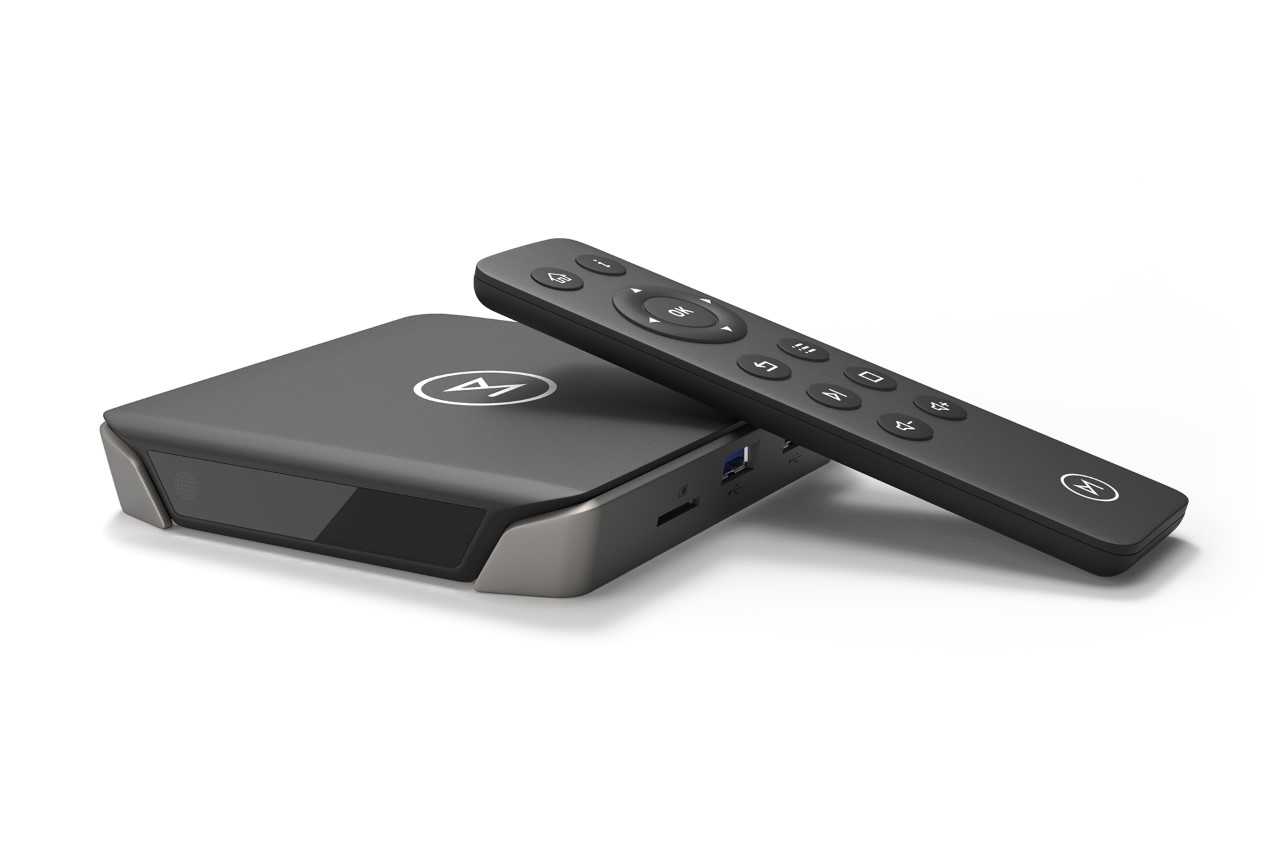
]]>We began the work on our fifth flagship, aptly named Vero V, in 2018, with hardware starting from a completely blank slate. Over these five years, we've been rapidly iterating on the device's hardware and software, keeping it in sync with the newer SoCs solutions that were released along the way.
Improvements
Vero V features a number of improvements over its predecessor, Vero 4K +. Firstly, we've gone with a completely new case design. This new design allows us to integrate better thermal dissipation, dedicated antennas for WiFi and Bluetooth for improved performance, and embed the remote controller's RF receiver inside the case.
On the hardware side, Vero V features a new and improved CPU which delivers a faster system and smoother experience. This is particularly noticeable when using some more demanding Kodi add-ons. This is also complemented by an updated GPU to provide better graphics and UI performance, which is essential when running more intense skins.
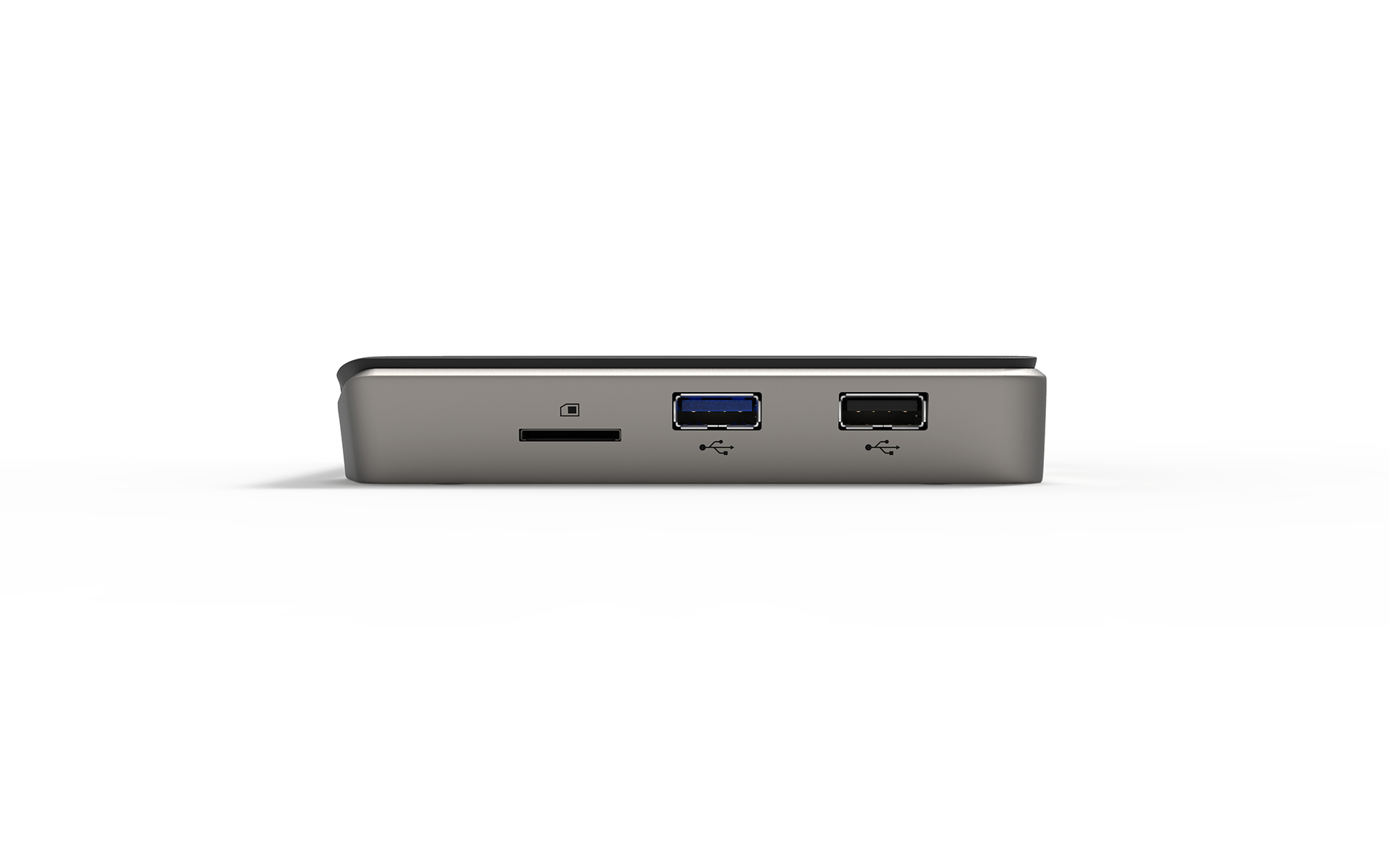
In terms of connectivity, we have now added a USB3 port which is capable of providing 0.9A output which should be sufficient for powering almost all external hard drives. We've also improved analogue audio output by changing the pinout. We've updated the WiFi implementation and due to a newer chip and SDIO bus improvements, users can enjoy speeds of up to 833Mbps over WiFi.
In terms of storage, Vero V features 4GB RAM and 32GB of eMMC storage to accomodate ever growing media libraries. The eMMC storage is significantly faster (10x) than the previous implementation on Vero 4K / 4K +.
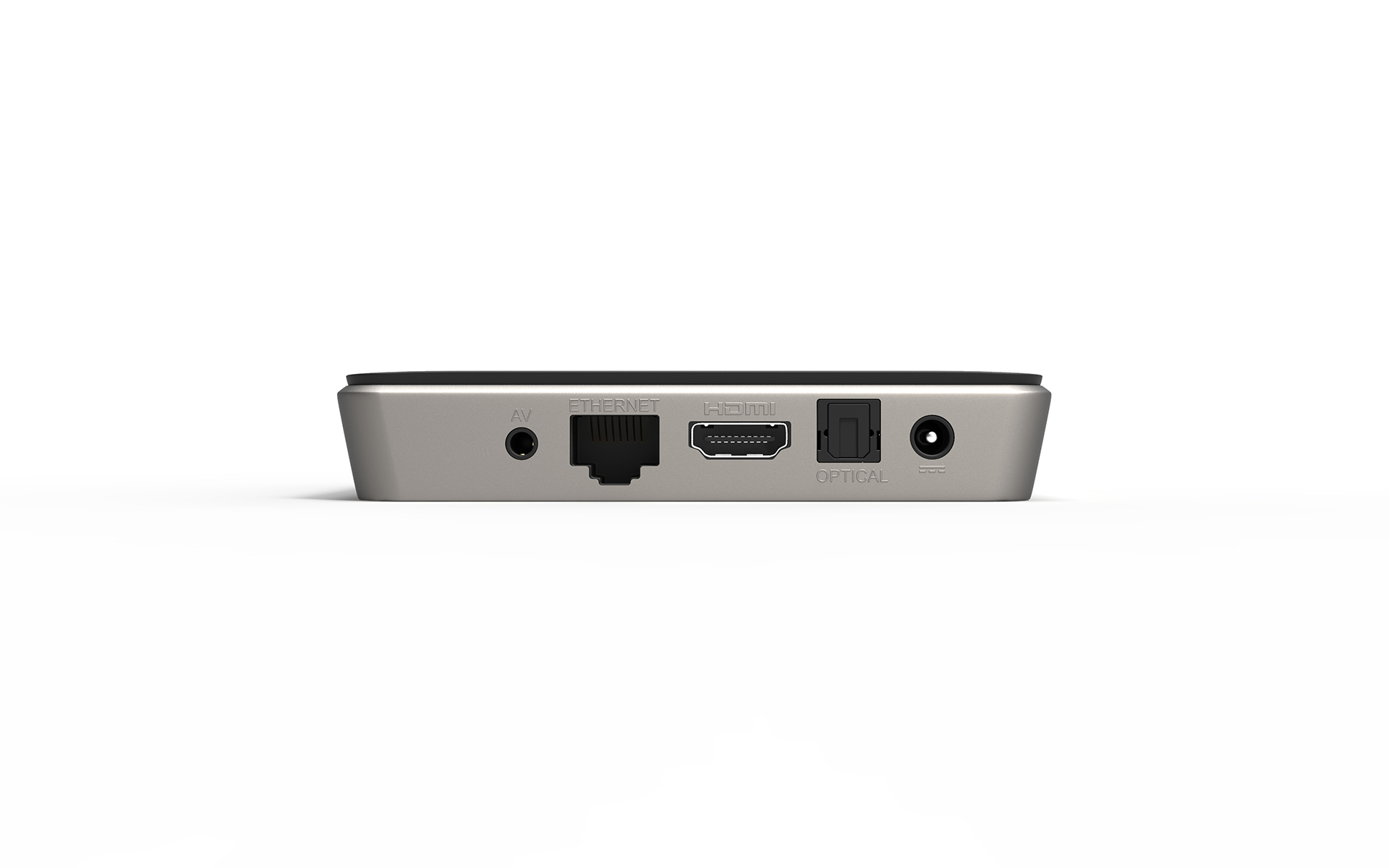
When it comes to playback, Vero V will not disappoint. Vero V features over five years of continued refinement and improvement with the intention of serving your TV needs for the next ten. The new device features an improved HDR tonemapping system for HDR to SDR conversion as well as support for next generation video codecs such as AV-1. Vero V also supports a trusted video pathway with HDCP2.2 and Widevine L1 support (initially for industrial customers).
Some things stay the same
However, new hardware from scratch doesn't mean that everything changes. Some things stay the same. Vero V features the same software stack as Vero 4K / 4K +, so migrating over should be easy with no unexpected surprises when doing so. Support for Frame Packed 3D MVC stays, as does support for other formats. If it plays on a Vero 4K / 4K +, it will play on your Vero V.
Furthermore, we remain committed to supporting Vero 4K / 4K+ and we are still supporting it seven years after release, well beyond the guaranteed period of updates.
Thank you
We are grateful to all of those in the team who tested this device in advance as well as to everyone that contributed to making the Vero V the great device that it is.
On sale today
Vero V goes on sale today for £149 with free international shipping with an estimated 3-5 day delivery. With that said, we anticipate some slight delays due to very high demand. We also have a number of resellers for those that prefer to purchase from a local reseller.
]]>The new Raspberry Pi features a faster processor, faster RAM and improved GPU as well as a number of other improvements.
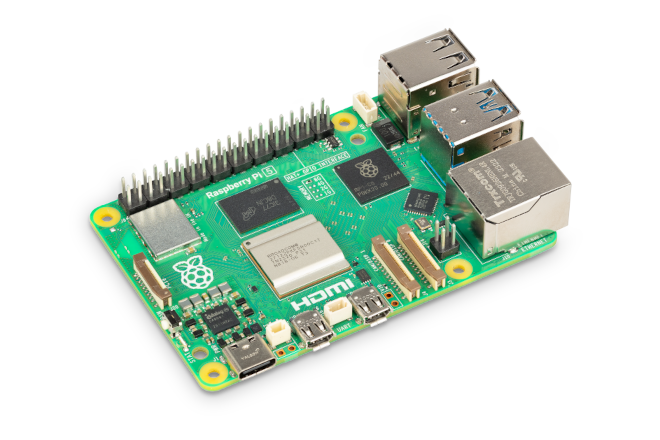
From a multimedia and OSMC perspective, not much has changed. In
]]>The new Raspberry Pi features a faster processor, faster RAM and improved GPU as well as a number of other improvements.
From a multimedia and OSMC perspective, not much has changed. In terms of playback, we don't gain anything in hardware on Raspberry Pi 5. Pi 5 can still support HEVC decode at 60fps as it does on Raspberry Pi 4, but Raspberry Pi 5 no longer offers accelerated H264 decode.
However, software decode should be possible for other formats at 1080p. This has the potential to generate a fair bit of heat however, so an active cooling solution may be needed. Raspberry Pi sell an official heatsink and fan kit that is compatible with the official case.
OSMC are grateful to have received an advance unit some time ago from Raspberry Pi. We started work on bringing up the new Raspberry Pi immediately. There is not a significant amount of work needed to bring up this device, so we anticipate having a compatible release shortly. We updated the target installer to handle newer kernels (6.1 is needed for Pi 5); have added support for Raspberry Pi 5's new GPU to our MESA packages and now only need to produce an updated kernel with Pi 5 support.
As a result, we will soon move Raspberry Pi users to the 6.1 kernel and will make a test thread available when this occurs. Raspberry Pi 4 users will be able to upgrade to a Raspberry Pi 5 by simply ensuring their OSMC installation is fully up to date and then migrating the SD card.
There will however be some significant changes to Raspberry Pi support in the near future. We have not yet updated OSMC's Debian release to Debian 12 (Bookworm) yet. When we do so, we will be changing to a complete 64-bit environment (both userland and kernel).
As a result, we'll be dropping support for Raspberry Pi 2 which does not support this. We then plan to have a single Raspberry Pi image for all remaining supported Raspberry Pi models. As a result of this architectural change, it will be necessary to reinstall OSMC when updating to the new version when we release it. Currently we do not have a firm schedule of when this will occur as we are also mindful of getting Pi 5 support out first and also tracking Kodi v21 which is starting to mature.
]]>Since then, we've been working hard on a number of bug fixes and improvements for all platforms.
Here's what's new:
Bug fixes
- Fixed issues with CEC on Vero
Since then, we've been working hard on a number of bug fixes and improvements for all platforms.
Here's what's new:
Bug fixes
- Fixed issues with CEC on Vero 4K / 4K + / V
- Fixed an issue on Vero V which prevented the full eMMC size from being available
- Fixed an A/V sync issue on Vero 4K / 4K + / V
- Fixed an issue that prevented the OSMC Scope Skin from being enabled without further configuration
- Fix an issue that caused a blurry UI when the resolution was set to 4K on Vero V.
- OSMC Skin: fix watched indicator background in wide and wall views
- OSMC Skin: episodes image to properly react to hide thumbs for unwatched episode setting
Improving the user experience
- Improve graphics performance for Raspberry Pi
- Disabled persistent journalling to reduce wear on system storage
- Updated translations
- Improved EDID logging on Raspberry Pi
- OSMC Skin: add composer info to fullscreen music playback window and music info dialog
- OSMC Skin: rework seek indicator and button behaviour
Wrap up
To get the latest and greatest version of OSMC, simply head to My OSMC -> Updater and check for updates manually on your exising OSMC set up. Of course — if you have updates scheduled automatically you should receive an update notification shortly.
If you enjoy OSMC, please follow us on Twitter, like us on Facebook and consider making a donation if you would like to support further development.
You may also wish to check out our Store, which offers a wide variety of high quality products which will help you get the best of OSMC.
]]>Since then, we've been working hard on a number of bug fixes as well as improving support for our soon to
]]>Since then, we've been working hard on a number of bug fixes as well as improving support for our soon to be released new version of our flagship device: Vero V.
Here's what's new:
Kodi v20.2
Kodi v20.2 (Nexus) is now available as standard on OSMC, and release details can be found here. The most prominent fix is a long standing E-AC3 bug, which was first reported here.
On the OSMC side, we've made a number of changes:
Bug fixes
- Fix an issue that prevented connecting to WiFi via My OSMC on new installations
- Fix some playback issues with SMB shares on Vero 4K / 4K + / V
- Fix PGS subtitle width and height calculations when playing 3D SBS / TAB clips on Vero 4K / 4K + / V
- Fix aspect ratio for rendering text subtitles when playing 3D SBS / TAB clips on Vero 4K / 4K + / V
- Fix an issue on Vero 4K / 4K + / V which resulted in the warning message when switching to a 4K resolution from not displaying properly
- Fix an intermittent blank screen when exiting Kodi on Vero 4K / 4K + and V that could result in no display being visible when updating
- Fix GPU hang on Raspberry Pi 2/3 / 3 + under certain conditions
- Fixed an issue which prevented add-ons from the official Kodi add-on repository from updating correctly
Improving the user experience
- Re-introduced pvr.sledovanitv.cz PVR add-on for all platforms which was broken before
- Respect configurable 3D subtitle depth when using PGS subtitles on Vero 4K / 4K + / V
- Respect vertical subtitle position from the video calibration dialog when playing 3D content on Vero 4K / 4K + / V
- Ensure that the complete system journal is uploaded via the My OSMC log uploader
- Removed log spam in OSMC video whitelisting logic for all platforms
- Improved OSD behaviour for Vero 4K / 4K + / V
- Add support for netfilter bridge on Raspberry Pi 4 / 400
- Added support for Hauppauge 955Q tuner on Vero 4K / 4K + / V
- Fixed missing play button from the full screen information window in the OSMC skin
Miscellaneous
- Added support for OSMC Vero V
- Build system: generate a build log when creating filesystems to make dependency tracking easier
- Updated Raspberry Pi firmware
- Updated Raspberry Pi kernel to 5.15.92
Wrap up
To get the latest and greatest version of OSMC, simply head to My OSMC -> Updater and check for updates manually on your exising OSMC set up. Of course — if you have updates scheduled automatically you should receive an update notification shortly.
If you enjoy OSMC, please follow us on Twitter, like us on Facebook and consider making a donation if you would like to support further development.
You may also wish to check out our Store, which offers a wide variety of high quality products which will help you get the best of OSMC.
]]>