Click the link below to access our Brain Breaks Interactive Learning Resource for EDCI 335, thanks!
https://docs.google.com/presentation/d/12DPkkY5v8EpEdW8iixby0AH5whE48rVKBIewVZyTVQA/edit?usp=sharing
| CARVIEW |
Click the link below to access our Brain Breaks Interactive Learning Resource for EDCI 335, thanks!
https://docs.google.com/presentation/d/12DPkkY5v8EpEdW8iixby0AH5whE48rVKBIewVZyTVQA/edit?usp=sharing
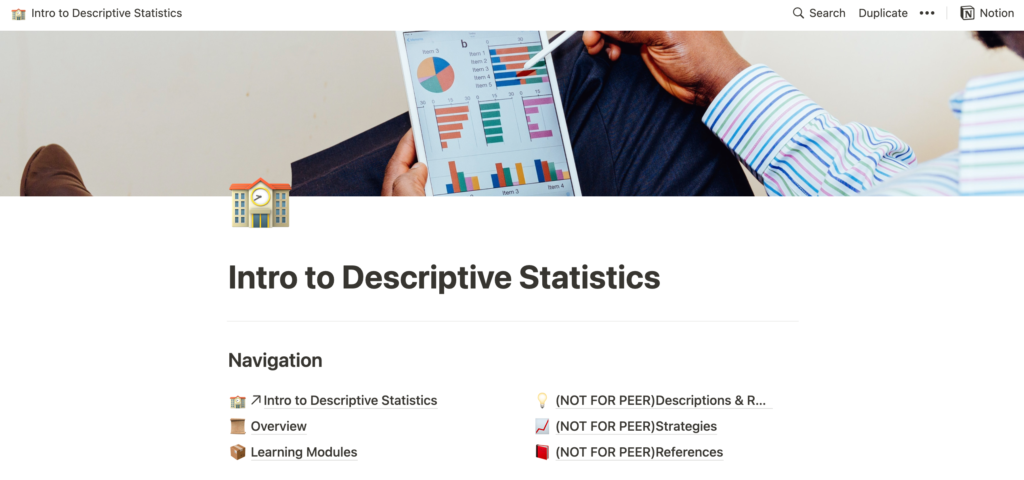
Click the link to access learning Pod 7’s Interactive Learning Resource: https://www.notion.so/Intro-to-Descriptive-Statistics-575e41bb1bb046888775e11dbea2c8a1
Hello Pod 7,
After reviewing and going through your interactive learning resource I liked how you clearly stated the learning outcomes for the resource in the introduction along with the corresponding outcomes in each of the modules. By stating the learning outcomes in the beginning of the module, it informs the learner of what is going to be covered and what they should be able to do once they complete that module. I also thought that you did a great job of including articles and opportunities for the learner to further explore the topics and content.
Design for Inclusion
I am not too familiar with the platform Notion, so I am not sure if this is possible or if I have missed it, but I am wondering how you will diversify this course to be inclusive for a wide range of learners with different abilities. For example, I noticed that your resource includes a fair amount of written text, as well as a couple accompanying videos. How might this affect those learners who struggle with reading?
Structure
I was also confused at one point by the labels of the modules: 1.1, 1.2, 1.3, 1.4. Since within each of these modules in the lesson contents you also have labels of 1.2.1, 1.3.3, 1.3.4, etc. it made it a bit confusing to remember or determine which section, module, or lesson content I was in. Maybe you would consider re-labelling the modules to start with 1 for Mean, Median, and Mode and within that 1.1, 1.2, 1.3, etc. Then 2 for Variance, and within that 2.1, 2.2, 2.3, etc. This way the learner knows what module they are in, if that makes sense.
Learning Module 1.1: Mean, Median, and Mode
I wonder if you would consider changing your reflection and discussion questions to better match the learning outcomes for that module. By asking the learner “What do you think of the quiz?” how will you know that the learner “understands when, where, and why mean, mode, and median are used in different situations, and are able to apply these measures to real world applications”? By framing the question differently, and directly asking about a certain topic, you might be able to get a response from the learner that would allow you see how much the learner understands.
*quick note: the video for Real-world Application does not work and says it is unavailable…
Perhaps it explained what central tendency is in the video (or my lack of knowledge in statistics) but I was unsure as to how that question related to the content.
I liked how the interactive quiz you included directly related to the learned content in the module, as well as how it gave immediate feedback as to whether the learner answered the question correctly or not. I also think that this helps gamify your resource in a way that could increase motivation within your learners.
Learning Module 1.2: Variance
I think that including a social space where learners can talk about the questions and work through them together is a great idea. Through discussion learners can gain new understanding, develop further meaning, and help support each other, through peer teaching.
In the learning outcome, it stated that the learner should be able to define variance, however, I did not see how you will be able to assess that at the end of this module. In the module about standard deviation the reflection question asked the learner to define it in their own words, and I think this could be a good way to see and assess if the learner can define variance.
Learning Module 1.3: Standard Deviation
I liked how you connected your outcomes to the reflection and discussion topics, by asking the learner to define standard deviation in their own words. I think this is a great way to get the learner to interact and think critically about the definition of standard deviation.
I noticed how this is the third time you asked the learner to journal about what they found difficult, is this so that the learner can go back after the resource is complete and see where they had challenges? If not, I wonder if this is too repetitive and if you would consider changing it so that the learner does not get tired of answering the same question each time as that might hinder motivation and interest.
Learning Module 1.4: Descriptive Statistics
I thought it was great that you included a brief refresher on the concepts learned in the previous modules. This can be useful if the learner was to stop and continue the learning at another time. I also liked how you included several opportunities for the learner to practice using the concepts and how you included online calculators in case they did not have the appropriate one.
In your learning outcome, you said the learner should be able to ‘learn’ the concepts, however I wonder if you would consider changing this verb as this might not be very measurable. Perhaps verbs like ‘apply’ or ‘use’ would be a better fit? As it seems that the learner is using those previously learned concepts to answer the questions.
In the unit quiz, I thought that by asking the learner to write their answers on a piece of paper to share with the instructor at the end of this module was a good idea as it will show the learners thought process when working through the questions. I am not sure if there is an option on Notion to give immediate feedback on the quiz questions, such as at the end of the quiz? As this is a supplemental course to go along with the regular math curriculum, I wonder if the learner is being graded on this quiz or if it is more to allow the learner to see areas of growth or where there are gaps in knowledge.
Assessment
I know that you are still working through your interactive learning resource, but perhaps I missed the overall assessment goal, such as is this graded to inform if they should take statistics? Or is it more of an optional workshop to further knowledge? With all of the journal prompts and group work, I wonder if these are for the instructor to be graded or just for the learners’ personal learning and knowledge. I would consider informing the learner in the beginning of the resource so that they know how much information to include in the journals, etc. As many learners stress or become anxious about the final grades or percentages, it might help ease anxiety if they know the expected assessment outcome and format. Since this resource is targeted at teens maybe by gamifying your assessment it would take some of the stress off and help improve engagement.
Overall, I thought that you are off to a great start in developing your interactive learning resource by including options for furthering knowledge, connections to real-world contexts, and creating opportunities for collaboration. I was also impressed by how you included citations and resources for all of your content.
Looking forward to seeing the final version of your interactive learning resource!
Please click on the link to see our Interactive Learning Resource on Brain Breaks. Looking forward to hearing your peer reviews and constructive criticism. Thank you!
https://docs.google.com/presentation/d/12DPkkY5v8EpEdW8iixby0AH5whE48rVKBIewVZyTVQA/edit?usp=sharing
Hi Glenn,
I agree with your thoughts that the video you shared is not inherently interactive because it does not require or push the student to respond to the content in any way. Your idea of an online discussion forum sounds like an appropriate way for students to interact with the content in the video by summarizing or even sparking a conversation about the topic. Your thoughts about assessment and whether it would be worthwhile made me think of this course and how although we are required to make several blog posts and comments we choose only one to be submitted for grading. Could this be an effective way to minimize the work for the teacher in terms of assessment? Alternatively, could you utilize your students to assess their peers’ discussion posts based on a predetermined rubric?
Hi Teeney,
I am empathetic to your views of collaboration and how frustrating it can be when poorly done. Especially when learning is online or asynchronous it can be extremely difficult to collaborate with others particularly on a group project. Besides the diversity of the members, there are so many other factors to consider such as physical limitations (access to appropriate technology, wifi, etc.), mental capabilities, time zones, and communication (such as the ability to read the tone and meaning through text) just to name a few. It is so important to help students develop an understanding of their strengths and weaknesses as it can not only give them confidence in their abilities but also allow them to see areas where they can grow or improve. I personally know how hard it is to self-reflect and think critically about what my strengths/weaknesses are, so I think that it is a great idea to include a think-pair-share as that can also give their peers an opportunity to highlight their strengths. This can help boost their confidence, spark new insights, and create social connections between classmates which in turn can increase motivation. In group work, something that I always do is a peer evaluation, which can be helpful in seeing each members’ view on their peers’ contributions, along with their process of completing the project. By informing the students prior to the group work, it also motivates them to ensure that they are contributing and taking responsibility for their learning. This can be done anonymously, shared with the group, or just for the teacher’s eyes only, but through peer evaluation, you definitely get some good insight into the inner workings of the group.
Fitness Break (4-6) Movement Video
This video features an instructor (or teacher) accompanied by a classroom of elementary-aged students. The instructor guides the entire class through a series of active movements for a fitness brain break.
In what way are they likely to respond to the video on their own, e.g. make notes, do an activity, think about the topic (learner-generated)?
The interactivity in this video I think is learner-generated as viewers/students are likely to respond to the video by following along and doing the movements synchronously (Bates, 2019). This can be due to the instructor in the video engaging with the viewer by saying things like “I see you, you look like you need some brain power!” As well, by seeing the students in the video participating, I think most viewers (assuming they are in a classroom setting) would infer that they are to participate and follow along too. However, I could argue that they are inherently interacting with the video as the instructor is speaking to the viewer directly, asking them (or giving them a gentle push) to “move those arms come on we can do it!” (Bates, 2019). In our Interactive Learning Resource, we used this video to demonstrate a type of brain break that can be used in the classroom as well as to show what a class-wide active brain break would look like.
What activity could you suggest that they do, after they have watched the video (designed)? What type of knowledge or skill would that activity help develop? What medium or technology would students use to do the activity?
An activity that I could suggest that the students do before and after they have watched and participated alongside the video is to reflect on how they feel physically and mentally. Since this video is considered a ‘brain break’ from regular instruction time, questions that could be asked are:
Before
“What does your brain/mind feel like right now?” and “What does your body feel like right now?”
After
“How does your brain/mind feel now?”, “How does your body feel right now?”, and “What differences do you feel from now and before we did the active brain break?”
By including a self-reflection before and after the activity, students can gain skills to help self-regulate their body and mind, for example when they are feeling unfocused, tired, unmotivated, burnt out, etc. It also allows students to become more aware of their own bodily sensations and feelings. Through reflection, students can also develop vocabulary associated with feelings, emotions, and sensations which can help them identify and label them.
Students could have a personal journal that they use to write down their reflections or this could be done as a pair-share with another classmate (if they are comfortable, as this is something personal).
This connects to designed interactivity in that the teacher must provide students the journal, teach students the language involved with labelling feelings, emotions, and sensations, as well as provide feedback to ensure they are meeting the requirements of the activity (Bates, 2019).
How could the video have been designed to generate more or better activity from viewers or students?
Since the video is already very active in inviting the viewer/students to participate synchronously, it could potentially be more interactive by including the self-reflection activity (as I stated above) in the video, with a pause so that students have time to self-reflect and record their thoughts. Even if students were not required to write down a written reflection, by simply thinking and self-reflecting on their feelings and sensations they are engaging more with the video in an interactive way.
How will you address any potential barriers for your learners in the use of this video to ensure an inclusive design?
When thinking about potential barriers associated with this video, I thought about those who may have challenges physically participating synchronously, as it is very active. However, lots of the movements can be adapted for just the upper body or lower body and can be done while sitting. The music that goes along with the video is very upbeat and as the purpose of the video is to get moving and take a break from instruction and work time, any movement and break are beneficial. YouTube also offers closed captioning for the video in case there are students with auditory impairments. I did also consider how loud and upbeat the music and instructor are and how that can be overwhelming for some students. By offering those students headphones (to block out the noise), they can still follow along and participate with the closed captioning and by following the movements of the instructor and students in the video. I think that it is great that the video is a demonstration of students and the instructor doing the movements as it can also be accessible for English Language Learners or those who may have difficulty with verbal communication. In terms of the activity that I suggested to go along with the video, if there are students who cannot complete the written reflection, it could be formatted or structured differently by offering images of feelings, emotions, or sensations that the student must circle or colour in before and after the video. As I also mentioned before, this could also be done verbally with a partner or with the teacher.
Reference
Bates, A. W. T. (Ed.). (2019). 9.6 Interaction [E-book]. In Teaching in a Digital Age (2nd ed., p. 9.6.1-9.6.1.3). Contact North Research Associate. https://pressbooks.bccampus.ca/teachinginadigitalagev2/chapter/pedagogical-roles-for-text-audio-and-video/
Hi Deanna,
I really enjoyed reading how your group thought critically about how to get learners involved in online learning (particularly during this difficult time) and what barriers might be involved for those with or without disabilities and impairments. By incorporating a UDL approach when designing your course, you are creating a learning experience that is accessible and inclusive for any learner. It is so true that an online environment can make it difficult to connect and engage with your peers in a course. Although there are so many platforms and technologies to aid in the delivery of your content and for communication between members, it is hard to account for the subtleties of emotion, meaning, and tone through a screen. I liked how you accounted for not only the mental and physical capabilities of the learner but also for the conditions under which they are studying, such as a global pandemic or access to the appropriate technologies. I look forward to seeing what your final interactive learning resource looks like in terms of accessibility!
Hi Emily,
After reading through your group member, Deanna’s, post on inclusive design when designing your blueprint for your interactive learning resource I was excited to read your take on how you planned for accessibility within your resource. I thought that you raised a good point in considering the point of view of a parent who may not be comfortable with their child in a learning environment that is designed for inclusion. As a new teacher, I never personally considered this point of view or what I would do in that situation. I liked how you gave examples of providing resources on the benefits of inclusive learning and by having them sit in on a lesson. My question is are you explicitly telling parents that you are incorporating a UDL inclusive approach to account for those students with disabilities? Or I guess how would they know that you are teaching to a UDL?

PROMPT: How will your interactive learning resource specifically ensure that the needs of all learners can be met?
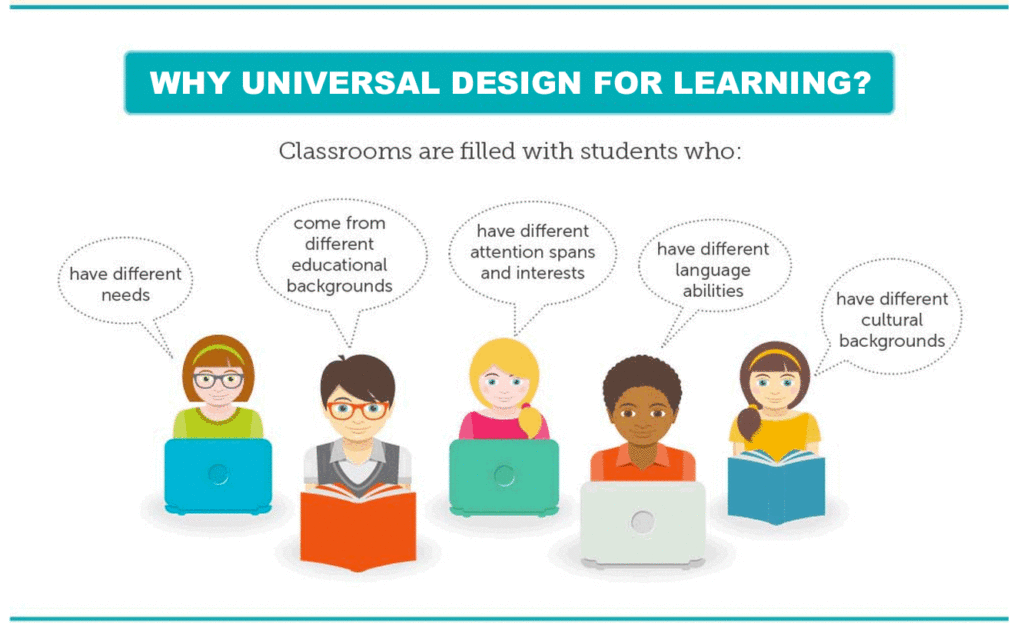
As a teacher we are constantly designing and adapting learning in order to reach and better support our learners. I think that this image above really depicts the diverse learners that are in the classroom and helped shape our mindset when designing our resource.
While designing our interactive learning resource, we accounted for two specific learning contexts, dyslexia and English language learners. The way that we adapted our learning resource to better support learners with dyslexia was by including recorded audios for all of the written content on each slide. Since there was a fair bit of written text on each of the slides, we chose to also include the audio so that if there were learners who were busy (for example parents) or if the learner was using a mobile phone where the text may be quite small. We also included graphics that corresponded to the content on each of the slides in order to help learners develop meaning. For English language learners, we included the written text in the speakers notes section underneath the slides that can be easily copied and input into a translator so that the content can be understood in the learners’ native language. Although our intention to include audio of the written text was to account for these two contexts, it can also be beneficial for all learners (UDL).
The format we used was Google Slides as it can be sent via a clickable link by any user whether or not they have a google account or not. This online platform also does not require the user to download any app, program, or sign up for an account. However, the user does need to have internet access and a device such as a laptop, tablet, or mobile phone to view the resource.
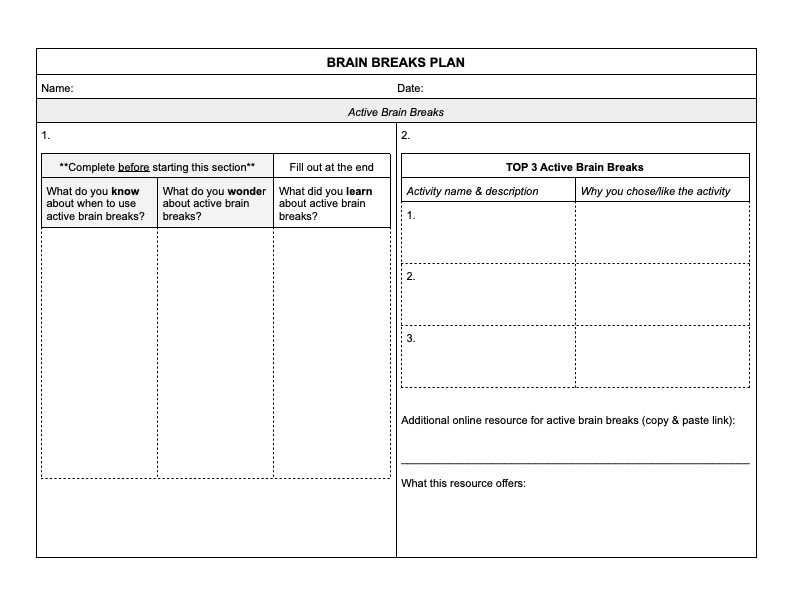
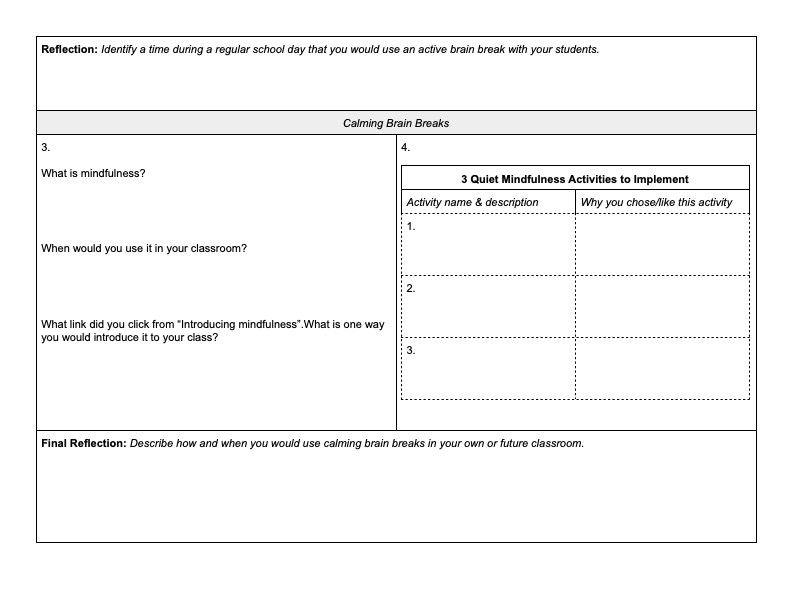
Throughout our resource, the learner is creating a ‘Brain Breaks Plan’ that they can use the implement brain breaks in their classrooms. We offered this document in two formats, Microsoft Word and PDF. We chose to offer two options as not everyone has a subscription to the Microsoft Office Suite but most devices can save and fill a PDF document, or print it and fill it out by hand. This gives the learner options on how they complete the assignment to best fit their needs.
Our course is structured into sections:
Active Movement and Body Breaks
Calming, Quiet, and Mindfulness Breaks
By sectioning off our course, it also easily allows the learner to pause and come back to the resource later in case they do not have enough time to finish the course in one go. Or if the attention span of the learner cannot last for the entire course they can always come back later. We also included a table of contents in the beginning of our resource that directly links to each section and slide of our resource which can help the learner quickly jump to the spot they were working on previously.
Although we did account for many different types of learners, there is always more that can be done to ensure you are reaching everyone. After writing this blog post, I realize that there are a few changes that could be made to our resource to make it even more accessible such as offering different options for learners to present their learning for their ‘Brain Breaks Plan’ and including audio descriptions of the photos and graphics that we used in our resource. We could also offer an alternate way to view our resource that does not require the user to have internet access or a device to use. Although this would change a bit of the content of the course it would give those individuals another option to complete the course for example on the go, or in a location that does not have adequate technology or internet access. The videos could be replaced by downloaded articles or readings, which would allow the resource to be printed hard copy for the learner.
Hi Lauren,
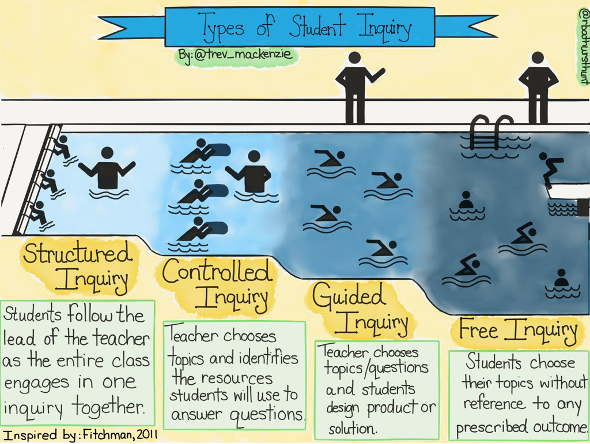
I also chose the topic of inquiry-based learning as my independent investigation. I liked how you explicitly outlined the steps involved in an inquiry project, particularly relating to school-aged children. As a fellow teacher, I liked how instead of ‘questions’ you used the word ‘wonder’ as I think that this takes a lot of pressure off of coming up with this big question to answer. As you mentioned in the research stage of inquiry, where students may need assistance, have you considered or heard of different types of inquiry? In my personal research on this topic, I found a great graphic by Trevor Mackenzie that shows the progression of types of inquiry so that you can help students develop the necessary skills in order to eventually complete the inquiry process on their own with little or no support.
Hi Jerry,
I really liked how you clearly defined the four steps to direct instruction. This type of learning is definitely super common as I have experienced this type of instruction a lot in my educational journey. The video that you attached also gives a very clear and easy-to-understand explanation of direct instruction. I do enjoy the predictability and easy-to-follow format of direct instruction as it usually follows the same format. However, as opposed to an inquiry model (where students’ interests are more so guiding the learning) do you think that motivation suffers when a lesson is very structured, sequenced, and led by a teacher?
PROMPT: Independent inquiry on inquiry-based learning.
Inquiry-based learning is an approach that asks students to become active participants in their learning journey by allowing them to follow their interests and curiosities to learn something new. Inquiry-based learning not only allows students to dive deeper into materials and topics, but also provides all students in the class an opportunity for learning about a wider range of topics. (Grade Power Learning, 2018) Through the process of inquiry, students also develop skills that they might not otherwise develop through direct instruction. Although this may seem like a very vague or aloof method of teaching, it actually requires a lot of front loading and practice in order to set the students up for success in their own inquiry.
During my education degree, inquiry-based learning was a buzzword that was circulating in the education world as it was a newer concept and style of learning. There was a lot of confusion about how it would work and look like in the classroom, whether it is an effective method, and concern about the amount of work involved for the teacher (particularly in adapting their current teaching style and planning to accommodate an inquiry framework).
Heather Wolpert-Gawron, a writer for Edutopia, talks about the 4 steps of inquiry-based learning in the classroom. These steps are:
Although these steps seem very straightforward in nature, there is actually a lot to unpack within these steps. Through these steps, students learn skills particularly related to digital literacies that can be easily translated into the real world. Due to the advancement in technology and the ability for machines to complete the work of humans on a basic level, employers are now looking to hire those individuals who have digital skills and can think analytically and communicate in the digital era. (Trilling and Fadel, 2009, as cited in, Chu et al., 2021) These digital literacy skills are comprised of three components:
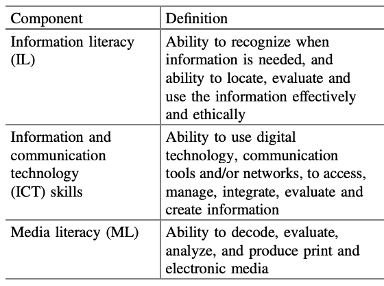
In most cases, these skills need to be modelled by the teacher, but through inquiry-based learning, students can practice and refine these skills so that they are better prepared for the future. Trevor Mackenzie and Rebecca Bathurst-Hunt are two local teachers in the Greater Victoria School District who I would consider leaders in the inquiry mindset field. They both emphasize the importance of teaching and guiding students through the inquiry process so that they can be successful. I think that Trevor Mackenzie’s illustration of a swimming pool represents how student inquiry can be structured to foster success.
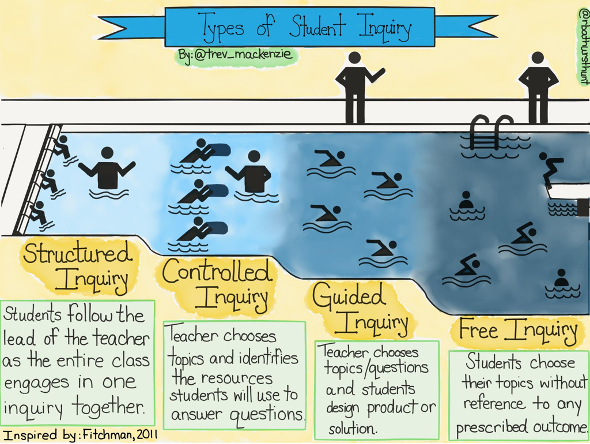
As you can see, like swimming, you start in the shallow end and usually have an instructor to teach you the basics of swimming. Then through more controlled and guided practice, can you then let students go into the deep end and take more control of their inquiry.
References
Chu, S. K. W., Reynolds, R. B., Tavares, N. J., Notari, M., & Lee, C. W. Y. (2021). 21st century skills development through inquiry-based learning from theory to practice. Springer International Publishing.
https://www.edutopia.org/blog/what-heck-inquiry-based-learning-heather-wolpert-gawron
https://www.trevormackenzie.com/