


Thanks for checking my blog! Unfortunately, I no longer update this blog. I have moved to a Wordpress blog integrated into my new Portfolio website. Please update your bookmarks and follow my only blog here:
Jay's Illustration of Life
https://jaymontgomery.com/blog/
RSS feed
https://jaymontgomery.com/?feed=rss
Also check out my BRAND NEW portfolio website at the same URL.
https://jaymontgomery.com
Thanks,
Jay Montgomery
| CARVIEW |
Select Language
HTTP/2 200
content-type: text/html; charset=UTF-8
expires: Mon, 26 Jan 2026 09:51:00 GMT
date: Mon, 26 Jan 2026 09:51:00 GMT
cache-control: private, max-age=0
last-modified: Wed, 11 Sep 2024 17:58:20 GMT
etag: W/"1110294faa47987a7bf8472126ce826d1ea3221a1cefabfae0c521c52f5e328e"
content-encoding: gzip
x-content-type-options: nosniff
x-xss-protection: 1; mode=block
content-length: 18142
server: GSE
alt-svc: h3=":443"; ma=2592000,h3-29=":443"; ma=2592000
Jay's Illustration of Life


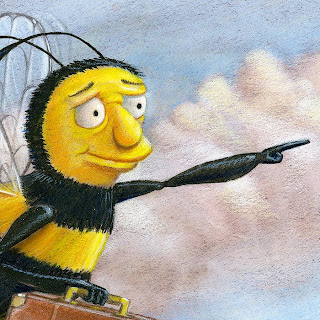
Gotta new documented process of my traditional paintings. It was a quick demo I did this Fall quarter at SCAD. The students have to do some sort of "manimal" (part human part animal) This is what you get when Yaritza Burgos (AKA "Bumblebee Man" from the Simpsons) gets a "Bee Movie" body and finds a job.
 Prismacolor Pencil transfer to Strathmore Illustration Board. 10" x 7.5" image area. Taped off with Blue Safe Release tape.
 Acrylic and Ink base colors. Watercolor was used for the clouds that I don't have a picture for.
 Oil wash made with Dioxane Purple and Permanent Green Light thinned with Gamsol.
 Dried oil wash removed with kneaded eraser revealing highlights and unifying shadows.

 Final flatbed scan color corrected with touched off with digital signature.
Before yours and her very eyes
Originally uploaded by jaymontgomery
Made this little video of one of my many painting methods. Painting was created with acrylic, watercolors, an oil wash, Prismacolor pencils, and gesso in about that order.
Video was created with iPhoto 11' slideshow. Limiting options but works OK. Real easy once you do it once right. This was my first time doing the slideshow.

Twitter Updates
Hot Spots
- My Amazon Wish List
- The Illustrators Partnership
- Illustration Growers
- Graphic Artists Guild
- AIGA
- Society of Illustrators
- My Family Blog
- Escape From Illustration Island
- Big Illustration Party Time
- Ninja Mountain Scrolls
- Drawn!
- Illustration Friday
- Photoshop TV
- Slate Magazine
- Freakonomics
- Why Do Men Have Nipples?
- The World Is Flat
- Natural Cures
- Roots of Buddhist Psychology
- 100 Ways to Motivate Yourself
- The God Delusion
- The Power of Positive Thinking
- Verbal Advantage
- 21 series by Brian Tracy
- Get Anyone To Do Anything
- Getting Things Done Fast
Blogs & Podcasts
Books
Search This Blog
Friday, March 18, 2011


Sunday, November 21, 2010
Busy Bumblebee - Process
Gotta new documented process of my traditional paintings. It was a quick demo I did this Fall quarter at SCAD. The students have to do some sort of "manimal" (part human part animal) This is what you get when Yaritza Burgos (AKA "Bumblebee Man" from the Simpsons) gets a "Bee Movie" body and finds a job.
 Prismacolor Pencil transfer to Strathmore Illustration Board. 10" x 7.5" image area. Taped off with Blue Safe Release tape.
 Acrylic and Ink base colors. Watercolor was used for the clouds that I don't have a picture for.
 Oil wash made with Dioxane Purple and Permanent Green Light thinned with Gamsol.
 Dried oil wash removed with kneaded eraser revealing highlights and unifying shadows.
Prismacolor pencil details. and color shifts in certain areas.
 Final flatbed scan color corrected with touched off with digital signature.
Details reveal lots of great texture and variations in colors.
Whole process took about 8 hours, but not all at once.
Whole process took about 8 hours, but not all at once.
Labels:
illustration,
personal work,
process,
recent work,
SCAD,
teaching
Tuesday, November 16, 2010
Before yours and her very eyes
Originally uploaded by jaymontgomery
Video was created with iPhoto 11' slideshow. Limiting options but works OK. Real easy once you do it once right. This was my first time doing the slideshow.
Sunday, May 16, 2010
Shannon Elizabeth
One of my favorite sexy actresses. Totally created and drawn by hand in Corel Painter 11 using the sponge tool in the background and a few pastels sticks for her face. Click to to see details.


Tuesday, March 23, 2010
Decathlon Poster Process
New work!
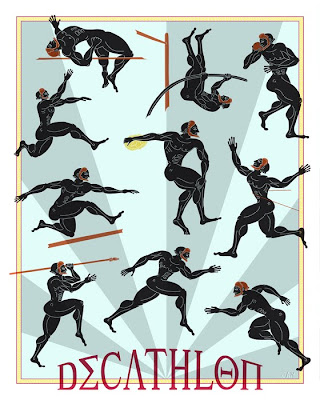
A 16" x 20" poster I did as part of a demo for my Adobe Illustrator class a Portfolio Center. I just finished it today. I thought it turn out pretty good. Whada you think?
I then copied certain grouped areas from Illustrator into a Photoshop document and created a series of Smart Object layers. Then I added various textures in the layers masks of the Smart Object layers.


A 16" x 20" poster I did as part of a demo for my Adobe Illustrator class a Portfolio Center. I just finished it today. I thought it turn out pretty good. Whada you think?
This part was done in Adobe Illustrator CS4.

I then copied certain grouped areas from Illustrator into a Photoshop document and created a series of Smart Object layers. Then I added various textures in the layers masks of the Smart Object layers.
The result is a the marriage of Illustrator and Photoshop. The best of both worlds.
I love texture!!
I love texture!!
Labels:
experiments,
illustration,
personal work,
Portfolio Center,
prints,
process,
recent work,
teaching
Subscribe to:
Comments (Atom)