


| CARVIEW |
We’re delighted to announce that the Hookmark 7 public beta has begun.
It introduces another feature that is unique to Hookmark: Clean My Links — a system-wide way to remove tracking cruft from web URLs, working across browsers without requiring a plugin or extension.
Clean My Links: why it matters
The web is full of links—but far too many of them are cluttered with tracking cruft, marketing parameters, and unnecessary complexity. These bloated URLs don’t just look ugly. They undermine privacy, fragment your links, and get in the way of meaningful connections between your information.
Clean My Links is Hookmark’s built-in solution. It automatically removes tracking cruft and unnecessary parameters from web URLs, so your links stay private, beautiful, and durable across time and contexts.
To learn more, see:
Clean My Links is still evolving. If there are additional URL patterns you’d like cleaned, Pro users can add their own custom rules (similar in spirit to ad blocking), or you can let us know in this dedicated forum topic.
If auto-updating is enabled, you’ll automatically receive improvements we make to Hookmark’s cruft-removal rules.
Brett Terpstra’s Favorites of 2025
We were also delighted to see Hookmark featured among Brett Terpstra’s Favorites of 2025 — alongside many truly excellent apps.
Brett highlighted, among others:
- Cotypist — “Predictive text anywhere you’re typing… it completes my words and sentences like it’s reading my mind.”
- DEVONthink — which Brett describes as transformative for building a deeply integrated, long-term knowledge base.
We’re honored to see Hookmark included in such company.
Reminder: Webinar — Using Hookmark for Lawyers (and Others)
 January 15, 10:00 AM – 11:00 PM Pacific Time
Please join us for Hookmark Office Hours on Zoom:  Zoom link
I’ll be showcasing how Hookmark can be used by lawyers—and by anyone working with complex documents, cases, or knowledge. Can’t make it? We’ll record the session and publish it on YouTube and on Hookmark’s forum.
Advocacy for Linking Interoperability
Many tools still aren’t link-friendly in ways that support serious knowledge work.
For example, TextExpander does not provide a Copy Link UI or API. And it does not provide a note field for annotating snippets. These limitations makes it difficult to connect contextual information to specific snips.
This week, I contacted TextExpander’s CEO @J.D. Mullin and VP of Engineering @Andrew Hoobing to request that TextExpander become link-friendly.
You can make the same request via TextExpander’s contact page using this template.
To keep things simple, you could also just link to this blog post explaining why TextExpander should become link-friendly. There’s also a forum topic dedicated to this discussion.
If you use a different text-expansion utility that you’d like to see become link-friendly, please let us know on the forum or by replying to this message.
Substack, Mastodon, BlueSky
If you’d like to follow my ongoing thinking and updates, you can find me on:
You can also subscribe to the RSS feed of the Hookmark blog.
Looking Ahead to 2026
Thank you for supporting the ideals of the Manifesto for Ubiquitous Linking.
We at CogSci Apps wish you all the very best for 2026.
Warm regards,
Luc
CogSci Apps Corp.
Brett highlighted, among others that I myself adore:
- Cotypist — “Predictive text anywhere you’re typing… it completes my words and sentences like it’s reading my mind.”
- DEVONthink — a link-friendly that Brett describes as transformative for building a deeply integrated, long-term knowledge base.
We’re honored to see Hookmark included in such company.
]]>I often write to CEOs of macOS app development companies to encourage them to make their software link-friendly.
I’ve decided to start sharing some of these emails on this blog so that the broader community—developers, power users, and productivity thinkers—can join the conversation and help move the ecosystem forward.
Below is a slightly redacted version of a recent message I sent to the team at TextExpander.
Letter to TextExpander
Hi,
I’m the CEO of CogSci Apps Corp. and the editor of the Manifesto for Ubiquitous Linking, which was published by 24 developers, CEOs, and professors. And many more have signed on since.
The goal of the Manifesto is simple:
It should be possible—primarily via automation, and also via the UI—to obtain a link to the currently selected item in an application.
In the case of TextExpander, this would mean being able to obtain a direct link to the currently selected snippet (e.g., via a textexpander:// URL). This would enable users to connect their snippets to their notes, web pages, emails, and other information that may be relevant to the snippet.
We refer to applications that implement this straightforward capability as link-friendly.
Here is a long (though still incomplete) list of macOS applications that already support this functionality:
Link-friendly Mac Apps
It would be extremely valuable if TextExpander were to become link-friendly as defined above. For reference, here is a concise technical overview of what’s required: Information for Developers to Make Their Apps Linkable (API Requirements for Compatibility with Hookmark)
I’d be happy to explain the rationale, benefits, or implementation details further—feel free to email me or even FaceTime me if that’s convenient.
Once TextExpander meets these (very modest) requirements, I would be delighted to invite TextExpander to be our Partner for the Month. This is a co-marketing initiative that has proven effective at boosting visibility of the link-friendliness of apps.
Cheers,
Luc
hook://file/ links).
Why this matters
Robust file linking isn’t just a technical nicety—it fundamentally changes how you work. When links don’t break, you stop worrying about where files live and start focusing on what they mean and how they relate to each other. That’s the difference between managing files and managing knowledge.
Hookmark’s hook://file/ links are designed for real-world workflows: evolving projects, refactored folders, shared repositories, cloud sync, collaboration, and long-lived archives. They let you confidently connect files to emails, tasks, notes, research papers, and web resources—knowing those connections will still work weeks, months, or years later.
This is why Hookmark isn’t just a bookmarking tool or a convenience utility. It’s infrastructure for ubiquitous linking on macOS: a reliable foundation for building, revisiting, and sharing meaningful context across your work.
]]>We will focus mainly on Using Hookmark for Lawyers, but we will also:
- discuss a workflow for content developers, including with the powerful
Hook to Newcommands; and - how to use Hookmark to glue together a contact management system using various apps, with or without Daylite.
Later I will provide an outline for the office hours and share some templates.
A bit of background
I am obviously not a lawyer but many people in my circle are lawyers, and I have had the privilege of talking with them about their workflows. My sister and brother are lawyers and my mother is a retired lawyer. Many Hookmark customers are lawyers. I have gotten feedback from some of them on how they use Hookmark, which I am happy to share with you — without sharing any confidential info of course.
]]>- Hookmark 6.13,
- Hookmark Pal 1.2 and 1.3,
- a sneak preview of Hookmark 7 and upcoming integrations,
- Artisanal software’s Winterfest vs. Enshittification
- Our next Office Hours (webinar)
Hookmark 6.13 now available
Hookmark 6.13 is now available as an in-app update for users with a valid Updates license.
This release improves how web bookmarks are stored in DEVONthink and fixes issues with the context window in Apple Notes, as well as with Hookmark’s badges.
For full details, please see the release notes.
Hookmark Pal 1.2 and 1.3
Hookmark Pal 1.2 has been released with further refinements to subscription logic.
Hookmark Pal 1.3 will introduce an iOS/iPadOS share-sheet action for Hook to Copied Link, making it much easier to hook links while working on your mobile devices.
We have a list of enhancements planned for Hookmark Pal, but please let us know on the Hookmark forum what changes you’d most like to see—this helps us prioritize our work.
Hookmark 7: sneak preview
We’re working on some major new features for Hookmark 7. Here are two highlights:
Clean My Links
This new setting cleans links you copy and hook. Enabled by default—even for Hookmark Lite users—it removes tracking parameters added by services such as Amazon, X, LinkedIn, and Facebook. The result is cleaner, shorter, more private, and more shareable links.
Hookmark Pro users will be able to define their own regular expressions for link cleaning.
Hook a web page to a new clean PDF
You’ll be able to hook a web page to a newly generated, clean PDF of that page. Hookmark will generate the PDF and hook it to its source, automatically bookmarking both sides of the link.
And there’s plenty more to come in the Hookmark 7 series.
Upcoming software integrations
We’re continually improving our integrations—our current script collection is now at version 400.
Coming soon:
- Support for the new Omni Link URL schemes for OmniOutliner and OmniGraffle (currently in The Omni Group’s TestFlight builds)
- Support for the Neovim hyper-extensible Vim-based text editor
- Improved support for ReadKit 3
- Better support for Scrivener, including non-English languages
If enabled, these updates are delivered silently and automatically to your Hookmark apps—no restart required.
Artisanal software’s Winterfest vs. Enshittification
I’ve been reading Cory Doctorow’s book Enshittification, and I must say I’m aghast. I was aware of some of the harmful behaviors in which big tech companies engage, but this comprehensive account really takes the cake. I’m particularly looking forward to the sections on what we can do about this troubling state of affairs.
The beauty of artisanal software is that it cannot resort to enshittification.
Hookmark takes the high road—forever, pursuing the ideals of the Manifesto for Ubiquitous Linking which I wrote and has been signed by many artisanal Mac app developers, and you can sign it too.
Winterfest is the artisanal Mac software winter festival curated by Mark Bernstein. This year’s theme is artisanal intelligence.
Andy Brice asked “Is the golden age of Indie software over?”, and Mark Bernstein responded in a manner with which I agree.
Winterfest runs until January 7. You can get 25% off a selection of great artisanal software—such as Tinderbox, DEVONthink, and even Hookmark Pro and Hookmark Updates licenses.
Webinar: Using Hookmark for lawyers (and others)
Please join us for Hookmark Office Hours on January 15, from 10:00 AM to 12:00 PM Pacific Time. Zoom link
I’ll demonstrate how Hookmark can be especially useful for lawyers—for example, when used with Daylite, DEVONthink, and PDF deep linking. I’ll also show applications for content developers and explain how Hookmark can be used alongside a contact management system. There will be plenty of time for questions.
Check the Hookmark blog a few days before the webinar for posts that will be directly relevant to the session.
Following Hookmark (and me)
Please consider following:
- Hookmark on Mastodon or X
- Me on the Fediscience Mastodon server or on Substack
You can also subscribe to the RSS feed of the Hookmark blog.
Substack is where I’ll be doing most of my long-form writing going forward—especially work that isn’t narrowly focused on Hookmark.
Valedictions
We wish you a cognitively productive and enjoyable
]]>Some developers’ reasoning goes something like this:
“I spend most of my time in Xcode. I don’t really switch apps that much.”
Ironically, that’s exactly why Hookmark is useful for developers.
Modern software development is not just writing code. It’s moving constantly between code, issues, documentation, design discussions, test cases, emails, pull requests, and web references—and keeping the context of that work intact over time.
Hookmark is designed to do one thing extremely well:
create durable, bidirectional links between the resources you already use, so you can jump straight back into context instead of re-searching, re-navigating, or re-figuring out what you were doing.
Yes—Hookmark Works with Xcode
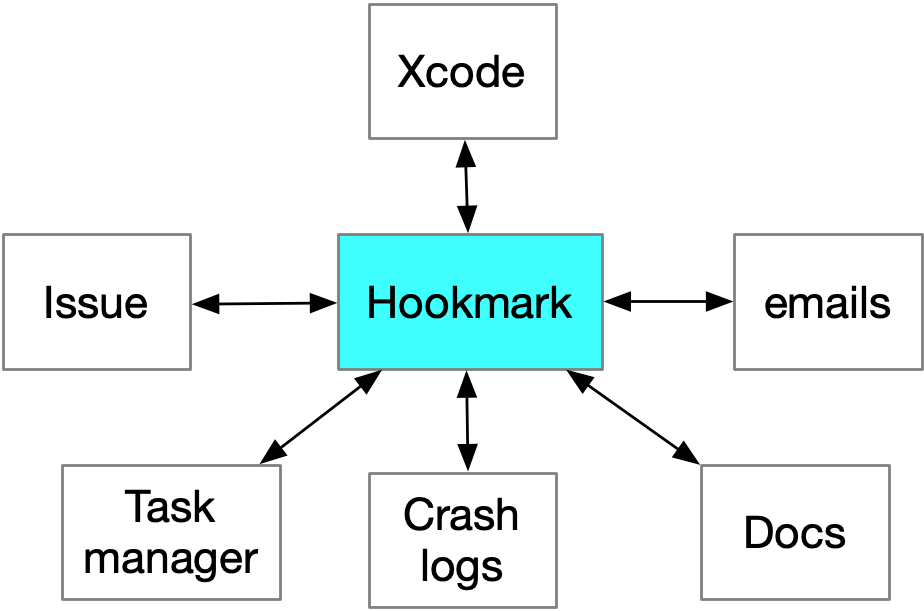
Let’s start with a misconception. Hookmark is fully compatible with Xcode. Any file, symbol, or location you can open in Xcode can be linked to—and linked from—other resources on your Mac.
Not using Xcode? Well, Hookmark is also compatible with BBEdit, SublimeText, TextMate and other editors.
A Common Developer Use Case
You’re editing a source file in Xcode to fix a bug or implement a feature. At the same time, you’re working with:
- an issue in Jira, GitHub Issues, or Bugzilla
- a pull request or code review discussion (even in email)
- a design spec or API documentation
- a Stack Overflow or Apple Developer Forums page
With Hookmark, you can link the Xcode file directly to the issue and other information you’re addressing.
Later, from either side:
- open the issue → jump straight to the relevant code
- open the code → jump back to the issue, discussion, or spec
No searching. No guessing. No “why was I touching this file again?”
Have you received an email containing code review information? You can hook the email directly to a file in Xcode (or elsewhere).
Further Developer-Focused Use Cases
1. Linking Code to Design Decisions
Every non-trivial codebase contains decisions that aren’t obvious from the code itself.
Developers often rely on:
- architecture docs (including UML or Tinderbox or other diagrams)
- design discussions in Notion, Confluence, or Markdown files
- Slack or email threads explaining “why we did it this way”
With Hookmark, you can link:
- a core class or module → the design document that explains it
- a refactored file → the email discussion that justified the change
Months later, you (or a teammate) can answer why in seconds.
2. Pull Requests and Code Reviews
Pull requests are temporary, but the decisions made in them often live on. Use Hookmark to link:
- a PR → the files it modifies
- a controversial change → the review discussion that approved it
This is especially useful when:
- onboarding new developers
- revisiting old tradeoffs
- debugging regressions tied to past decisions
3. Linking Code to Documentation (Internal and External)
Documentation is often scattered:
- README files
- internal wikis
- API references
- Apple docs and WWDC sessions
Hookmark lets you link:
- a method or class → its external API documentation
- a wrapper or workaround → the Apple doc or forum thread explaining the limitation
The result: documentation that stays connected to the code it explains.
4. Debugging and Test Context
Debugging is rarely linear. You may juggle:
- a failing test
- a log file
- a Stack Overflow answer
- a crash report
- a local repro project
Hookmark lets you create a temporary constellation of links around a problem—then dissolve it when you’re done, or keep it for future reference.
This turns debugging from “hunt and peck” into structured problem-solving.
As an example, you can hook a crashlog text file to the key file in Xcode. And/or you can hook that crash log to the bug report (e.g., in Bugzilla or email). That lets you instantly navigate between these resources.
5. Cross-Project and Cross-Repo Work
Many developers work across:
- multiple repos
- shared libraries
- client and server code
- open-source dependencies
Hookmark doesn’t care where things live. You can link:
- a function in one repo → its usage in another
- a forked dependency → the upstream issue or commit
This is especially valuable in long-lived or legacy projects.
6. Developer Notes That Aren’t Another Notes App
Many developers resist heavyweight note-taking tools. Hookmark doesn’t replace your notes—it anchors them. You can link:
- a Markdown note → the code it refers to
- a scratchpad file → the resources it summarizes
Your notes become entry points into real work, not isolated text blobs.
7. Link code to your task list
For any sizable endeavor, developers typically maintain a task list on their Mac. Their tasks might be in plain text or in a task manager like OmniFocus, Todoist, Things or TaskPaper.
With Hookmark you can link key files in Xcode to a project in your task manager. This makes it easy to address the next task — the same day or days later.
Inline Links and Hooks
There are two ways to link things with Hookmark, both of which developers can use.
The first is to copy a link and paste it directly into a code comment or elsewhere. These are inline links, which most developers are already accustomed to. A crucial difference with Hookmark, however, is that these links can point not only to web pages, but also to local files and other objects—such as a PDF stored in DEVONthink.
When those resources are shared—such as files in a shared Git repository that collaborators have cloned locally—those links can be used by anyone who has access to the same underlying resource.
Hookmark file (hook://file/) links are more robust than traditional file:// links: even if the files are moved, the links can still work.
The second way is with hooks, which are bidirectional links managed by Hookmark itself. Hooks are private to the person who creates them and do not modify code, comments, or shared documents. This makes them ideal for maintaining personal working context without adding noise to a shared codebase.
Why This Matters for Developer Productivity
Developers lose time not because they can’t write code—but because they lose context.
- Context is fragile
- Context is scattered
- Context is rarely captured explicitly
Hookmark helps by:
- making context explicit
- keeping it connected
- letting you return to it instantly
This is especially valuable for:
- deep work
- interrupted workflows
- long-term maintenance
- onboarding and handoffs
Hookmark Fits Your Existing Toolchain
You don’t have to change how you work.
Hookmark works alongside:
- Xcode
- GitHub, GitLab, Bitbucket
- Jira, Bugzilla, Linear
- Markdown editors
- browsers
- email and chat
If you already use links, Hookmark makes them stronger, bidirectional, and reusable—across apps, across time.
Final Thought
Hookmark doesn’t replace Git, comments, READMEs, or issue trackers—it complements them by preserving personal and cross-tool context that those systems aren’t designed to hold.
If you’re a developer who thinks:
“I don’t need Hookmark because I live in Xcode”
you may actually be the ideal user.
Hookmark isn’t about replacing your tools.
It’s about linking your work into a coherent whole—so you can focus on building, not re-finding.
Have comments or questions?
Join the discussion in this topic on the Hookmark forum, or send us an email.
]]>After reading it, I replied on X:
“@eastgate I’ve hooked this page to the WinterFest page using Hookmark, which also automatically bookmarks both pages in Hookmark — for ease of future reference.”
Mark then replied:
“@LucCogZest That is cool! Could you explain that in a thread, so more bystanders could follow?”
So I did.
I’m reproducing that explanation here for two reasons. First, many people no longer use X. Second, this exchange provides a compact, real-world example of how Hookmark can function as a bookmarking app—though one that works quite differently from conventional bookmark managers.
Here’s what I wrote:
My pleasure. I wanted to be able to refer to this page later, so on that page I invoked Hookmark (⌃H) and used its
Copy Link(⌘C)command.Then I went to the Winterfest page which you conveniently linked to at the end of your post. On that page I invoked Hookmark (⌃H) and did
Hook to Copied Link(⌘V). This 1) bidirectionally linked (“hooked”) both pages together (meaning in the context of one, I can see a link to the other); 2) adds bookmarks in Hookmark for this page.Why did I hook the pages together? Because I knew I’d later want to refer to this web page. Because I might not be able to remember information about the title of the page, I used the hook command. I can now access your successfulsoftware.net document from the Winterfest doc to which it applies. I.e., to get back to the linked document I just need to go to the Winterfest page, which I can easily do (our app is listed there).
But because of point (2) I can search for “bernstein x.com” in Hookmark’s bookmark window and find it in the list.
For more information on using Hookmark for bookmarking purposes see https://hookproductivity.com/help/general/features/bookmark-manager/
It takes a few minutes to wrap one’s head around Hookmark but once one does, it’s as easy to use as a launcher (Alfred, Raycast, LaunchBar)– in fact, its UI looks a bit like a launcher.
BTW, I went the extra mile and “hooked” (bidirectionally linked) this x.com thread to your successfulsoftware document. That way if I want to post about it in x.com, I can easily get from the document to the thread on X.
Why this matters
Traditional bookmarks rely on future-you remembering titles, folders, or search terms. Hookmark works differently. It lets you connect resources directly, in context, at the moment you know they belong together.
In this case, I didn’t just save a page “somewhere.” I linked it to the Winterfest page where it was relevant. Later, I can return to that context effortlessly—and from there, jump straight to the article, or even back to the X thread discussing it.
This is what we mean by contextual, bidirectional linking. Each link strengthens your ability to get back to what matters, even when memory fails or search comes up short.
Hookmark does include a bookmark window and search, and those work exactly as you’d expect. But the real payoff comes when bookmarks are reinforced by meaningful links between the things you already use.
That small exchange on X neatly captured the idea—and I’m grateful to Mark for prompting the explanation.
]]>You can now add new bookmarks to Hookmark via a dedicated dialog box, and optionally configure Hookmark to automatically create a corresponding bookmark in DEVONthink for every new web bookmark you add to Hookmark.
Hookmark is now compatible with more apps, and we’ve fine-tuned some existing integrations. You can find the full list of enhancements and bug fixes in the release notes.
Please feel free to discuss this in this topic of the Hookmark forum.
]]>Gang, I’ve talked about the idea of contextual computing and hyperlinking. Hookmark by CogSci Apps brings you just that. Lots of people in the tech community champion the concept of contextual computing.
That’s when your software workflows let you jump straight to the specific piece of information or task you need, bypassing search and navigation flows that cause distraction. The classic example is email. You should jump to a specific email, not your inbox.
But the same thing applies to all of your productivity apps. And Hookmark’s developer, CogSci Apps’ founder, is actually the originator of a manifesto called the Manifesto for Ubiquitous Linking, which you can search and learn more about. Indeed, I was one of the original signers of it because I really believe in this cause.
Editor’s note: the Manifesto for Ubiquitous Linking articulates why links — not folders, tags, or search alone — are the foundation of contextual computing.
David goes on to say:
Hookmark is designed specifically to enable contextual computing. With Hookmark, you can create links not only to the current web page, but to the current file, email, task, or other item in any link-friendly app. Just bring up Hookmark and copy links to see what’s hooked.
This gets you bidirectional linking to the current item, and to any related items. And the way they’ve developed Hookmark, all the links are robust, which means they work even if the file gets moved or renamed. It’s really smart.
The links to files can even be shared with others who have access to the same file in a locally synced cloud folder, such as Dropbox, Git, or other version control systems, which makes it great for teamwork. You can, for instance, link a draft document to an outline, emails from co-authors, figures, your task lists, and so on. Hookmark really lets you glue it all together and gives you that contextual experience that I’ve been talking about.
No longer do you get distracted through menus or other pieces of applications. When you work on a project using Hookmark, you get just the files you need — just for that project. It lets you stay in the zone and do your best work.
Hookmark keeps you in the flow of your work.
Check this app out. It’s very interesting and very powerful. And our thanks to Hookmark for their support of the Mac Power Users and all of Relay.
From Mac Power Users: The Apple Productivity Suite Field Guide, Oct 26, 2025
(Excerpted with attribution from Relay FM’s Mac Power Users podcast.)
The Manifesto itself quotes both David Sparks and Seth Godin on its motivation page. For example:
Whereas searching on a device may seem like an instantaneous and effortless process, in fact it involves multiple physical and mental steps that consume limited mental resources (such as working memory) and contribute to fatigue. Moreover, switching task modes, in itself, “breaks our rhythm”, as Seth Godin put it.
Start your Hookmark 1-month trial for free. You can continue using Hookmark indefinitely in Lite mode, which includes several free features. You might wish to check out the full list of features.
]]>