| CARVIEW |
pi-lcd: Control an Adafruit character LCD and keypad kit on a Raspberry Pi
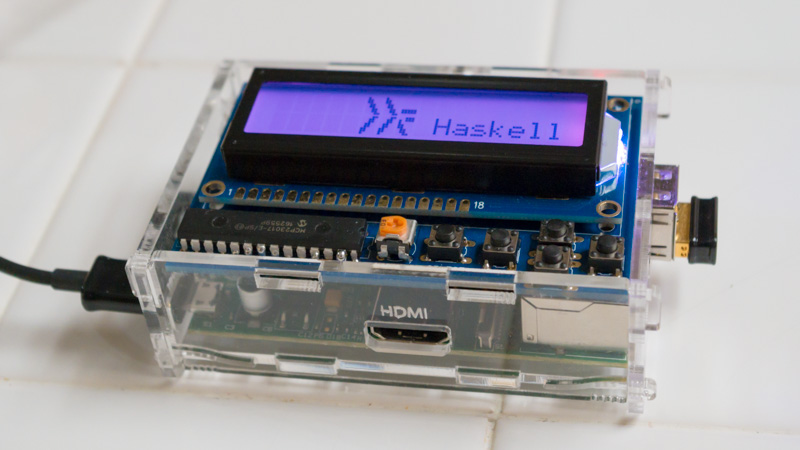
This package allows using an
Adafruit character LCD and keypad kit
on a Raspberry Pi from Haskell.
Everything you need to use one of these LCDs is exposed in the
System.Hardware.PiLcd module. The submodules are only exposed
because they might be useful to reuse for other types of hardware,
such as if you are using an MCP23017 port expander or an HD44780
display controller in some other context. But if you're using the
Adafruit character LCD and keypad kit, all you need is
System.Hardware.PiLcd.
[Skip to Readme]


Modules
[Index]
Downloads
- pi-lcd-0.1.1.0.tar.gz [browse] (Cabal source package)
- Package description (revised from the package)
Note: This package has metadata revisions in the cabal description newer than included in the tarball. To unpack the package including the revisions, use 'cabal get'.
Maintainer's Corner
For package maintainers and hackage trustees
Candidates
- No Candidates
| Versions [RSS] | 0.1.0.0, 0.1.1.0 |
|---|---|
| Change log | ChangeLog.md |
| Dependencies | base (>=4.6 && <5), bytestring (>=0.10.0.2 && <0.11), clock (>=0.7.2 && <0.9), deepseq (>=1.3 && <1.5), pi-lcd, text (>=1.1 && <1.3), unix (>=2.7 && <2.8), unordered-containers (>=0.2.4 && <0.3) [details] |
| Tested with | ghc ==7.6.3, ghc ==7.8.4, ghc ==7.10.3, ghc ==8.0.2 |
| License | BSD-3-Clause |
| Copyright | © Patrick Pelletier, 2017 |
| Author | Patrick Pelletier |
| Maintainer | code@funwithsoftware.org |
| Uploaded | by ppelleti at 2017-04-27T20:56:21Z |
| Revised | Revision 1 made by ppelleti at 2019-05-09T18:31:55Z |
| Category | Hardware, Raspberrypi |
| Home page | https://github.com/ppelleti/pi-lcd |
| Bug tracker | https://github.com/ppelleti/pi-lcd/issues |
| Source repo | head: git clone https://github.com/ppelleti/pi-lcd.git |
| Distributions | |
| Executables | pi-lcd-test-rom, pi-lcd-ui, pi-lcd-custom, pi-lcd-demo |
| Downloads | 1887 total (9 in the last 30 days) |
| Rating | (no votes yet) [estimated by Bayesian average] |
| Your Rating |
|
| Status | Docs available [build log] Last success reported on 2017-04-27 [all 1 reports] |
Readme for pi-lcd-0.1.1.0
[back to package description]

This package allows using an Adafruit character LCD and keypad kit on a Raspberry Pi from Haskell. The LCD+Keypad Kit has a 16x2 character LCD, an RGB LED backlight, and five buttons. It works on all models of Raspberry Pi, and plugs into the GPIO header. It only uses the I²C pins on the header.
This library automatically handles Unicode, using the LCD controller's built-in characters where possible, and using the "custom characters" feature, along with a 5x8 font bundled with this package, to emulate Unicode characters which are not built-in. The user of the library can also define their own custom characters.
Everything you need to use one of these LCDs is exposed in the
System.Hardware.PiLcd module. The submodules are only exposed
because they might be useful to reuse for other types of hardware,
such as if you are using an MCP23017 port expander or an HD44780
display controller in some other context. But if you're using the
Adafruit character LCD and keypad kit, all you need is
System.Hardware.PiLcd.
Before using this package, you'll need to make sure that
I²C is enabled on your Raspberry Pi, under "Advanced Options" in
raspi-config.
Using PiLcd is as easy as:
{-# LANGUAGE OverloadedStrings #-}
import System.Hardware.PiLcd
main = do
  lcd <- openPiLcd defaultLcdAddress defaultLcdOptions
  updateDisplay lcd ["Hello,", "World!"]
  setBacklightColor lcd Cyan
  closePiLcd lcd
There are additional examples in the examples directory.
This library is specifically designed to work with GHC 7.6.3 and up,
and to not use Template Haskell, so it will work with the
system-supplied version of GHC on Raspbian "Jessie." Just do
sudo apt-get install ghc cabal-install and you're good to go. (You
should also increase the swap space by editing /etc/dphys-swapfile.)
There are other ways to install more recent versions of GHC if you
want; see the wiki page for details.
This is a fairly early release, and there might be breaking changes in the future. Please contact me, by filing a GitHub issue, or by email, if you have any feedback on the library. I'd also be curious to hear how the library is being used!