


| CARVIEW |
lima: Convert between Haskell, Markdown, Literate Haskell, TeX


Downloads
- lima-0.3.0.0.tar.gz [browse] (Cabal source package)
- Package description (as included in the package)
| Versions [RSS] | 0.1.0.0, 0.1.0.1, 0.1.0.2, 0.1.0.3, 0.1.0.4, 0.1.0.5, 0.1.0.6, 0.2.0.0, 0.2.1.0, 0.2.1.1, 0.2.1.2, 0.2.1.3, 0.3.0.0 |
|---|---|
| Dependencies | base (>=4 && <5), data-default, microlens, microlens-th, string-interpolate, text [details] |
| License | MIT |
| Author | Fabian Schneider |
| Maintainer | Danila Danko |
| Uploaded | by deemp at 2023-07-21T17:55:02Z |
| Category | Productivity |
| Bug tracker | https://github.com/deemp/lima/issues |
| Source repo | head: git clone https://github.com/deemp/lima |
| Distributions | |
| Downloads | 898 total (39 in the last 30 days) |
| Rating | (no votes yet) [estimated by Bayesian average] |
| Your Rating |
|
| Status | Docs available [build log] Last success reported on 2023-07-21 [all 1 reports] |
Readme for lima-0.3.0.0
[back to package description]lima
Sync your README with your Haskell codebase.
Supported formats
Convert files between:
Haskell(.hs)Literate Haskell(.lhs)GitHub Flavored Markdown(.md)TeX(.tex)
Related works
-
LiterateMarkdown -
limais a fork of this abandoned project. -
pandoc - supports
Literate Haskelland a ton of other formats. -
IHaskell - create
Jupyternotebooks withHaskellcode cells andGitHub Flavored Markdowntext cells. -
lhs2tex - convert
Literate HaskelltoTeX. -
agda2lagda - Generate a literate Agda/Haskell script from an Agda/Haskell script. Produces LaTeX or Markdown literate scripts.
-
markdown-unlit -
markdown-unlitis a custom unlit program. It can be used to extract Haskell code from Markdown files. -
unlit - Tool to convert literate code between styles or to code.
-
design-tools - a Pandoc filter for building a book from Markdown.
Scope
lima focuses on converting documents between formats and allows to concatenate documents.
Other scenarios, e.g., inlining a document into a document, may require specialized tools.
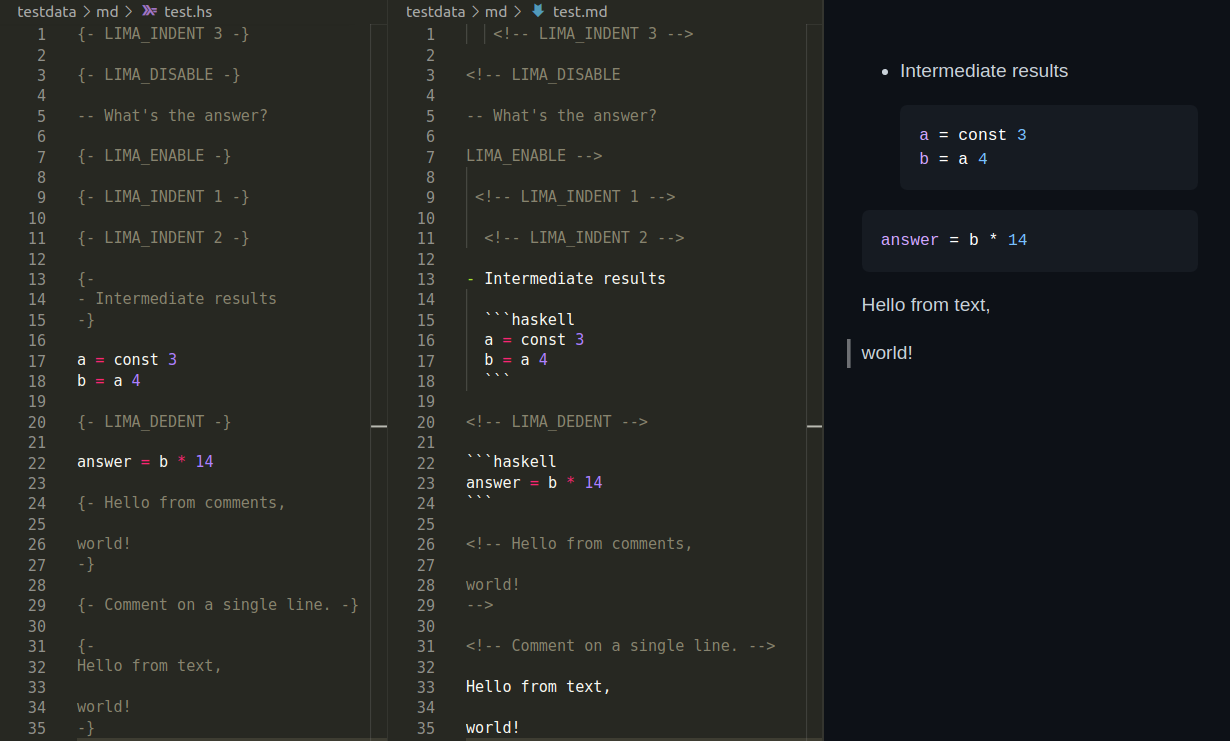
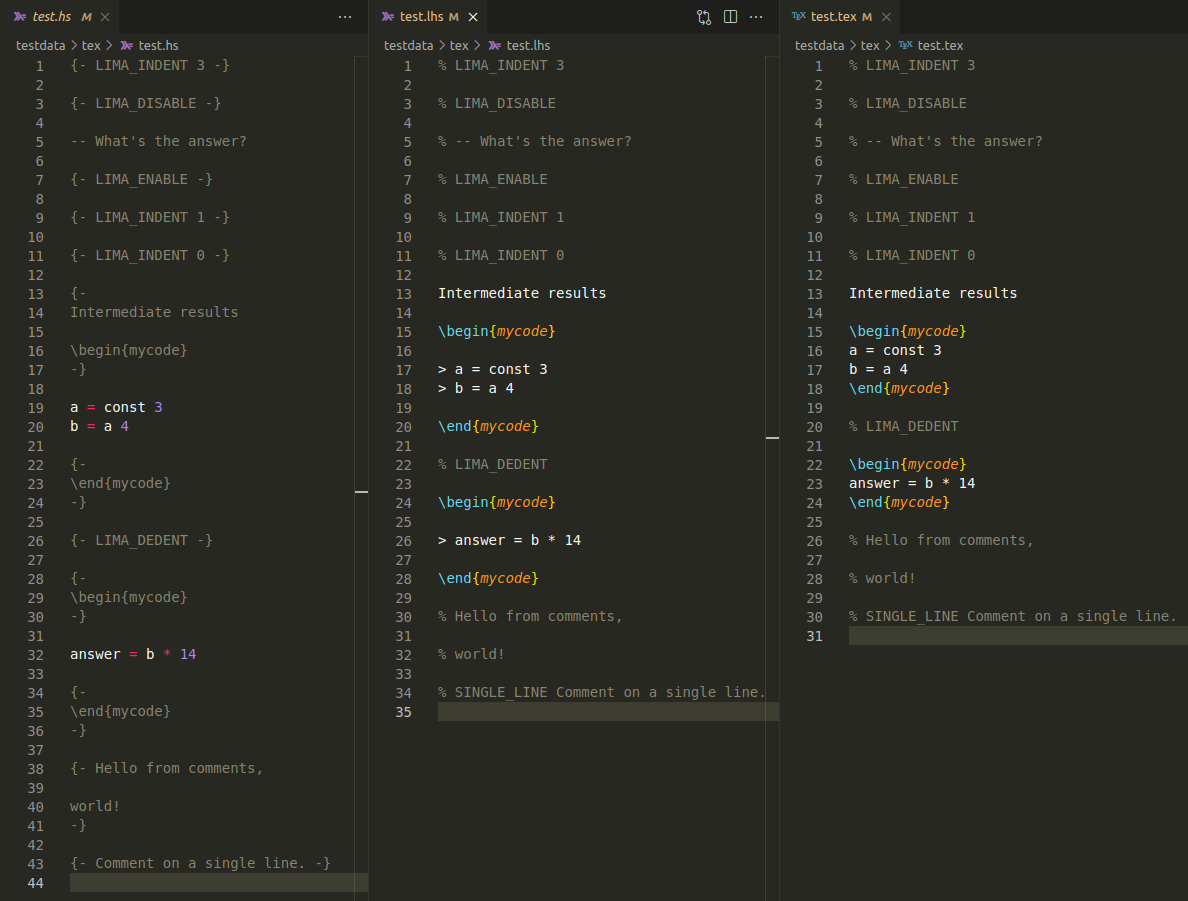
Demo
Markdown
TeX
Ideas
- A document is a text in a supported format.
- I introduced tags into supported formats.
- E.g., in
.hsdocuments, tags are multiline comments written on a single line like '{- LIMA_ENABLE -}'.
- E.g., in
- Tag names are configurable.
- A user may set '
on' instead of 'LIMA_ENABLE'.
- A user may set '
- A document can be parsed into a list of tokens.
- Tags affect document parsing.
- The tokens can be printed back to that document.
- Formatting a document is printing a parsed document back to itself.
- Formatting is idempotent. In other words, formatting the document again won't change its content.
- The
limalibrary provides a parser and a printer for each supported format. - A composition of a printer after a parser produces a converter.
- Such a converter is usually invertible for a formatted document.
- Converting a document
Ato a documentB, then convertingBtoAdoesn't change the content ofA.
- Converting a document
Suggested setup
-
Create a test suite.
README.hsmay be its main file. -
Add
limaandtextto its dependencies. -
Create a test module. It may have the following content.
import Lima.Converter (Format (..), convertTo, def)
import Data.Text.IO qualified as T
main :: IO ()
main = T.readFile "README.hs" >>= T.writeFile "README.md" . (Hs `convertTo` Md) def
This package has three such test suites:
- readme converts
README.hstoREADME.md.README.hsis its main file. - readme-hs-to-md converts
README.hstoREADME.md. - readme-md-to-hs converts
README.mdtoREADME.hs.
Suggested workflow
Here's a suggested workflow for Haskell and Markdown:
- Edit the code in a
README.hsusing Haskell Language Server. - Convert
README.hsto aREADME.md. Comments fromREADME.hsbecome text inREADME.md. - Edit the text in
README.mdusing markdownlint. - Convert
README.mdback to theREADME.hsto keep files in sync. Text fromREADME.mdbecomes comments inREADME.hs. - Repeat.
Contribute
Clone this repo and enter lima.
git clone https://github.com/deemp/lima
cd lima
cabal
Build
cabal update
cabal build
nix
-
Install
Nix. -
Run a devshell and build
limausing the project'scabal:nix develop nix-dev/ cabal build -
Optionally, start
VSCodium:nix run nix-dev/#writeSettings nix run nix-dev/#codium . -
Open a
Haskellfile there, hover over a term and wait untilHLSshows hints. -
Troubleshoot if necessary.