TV Remote Uses Floppy Disks

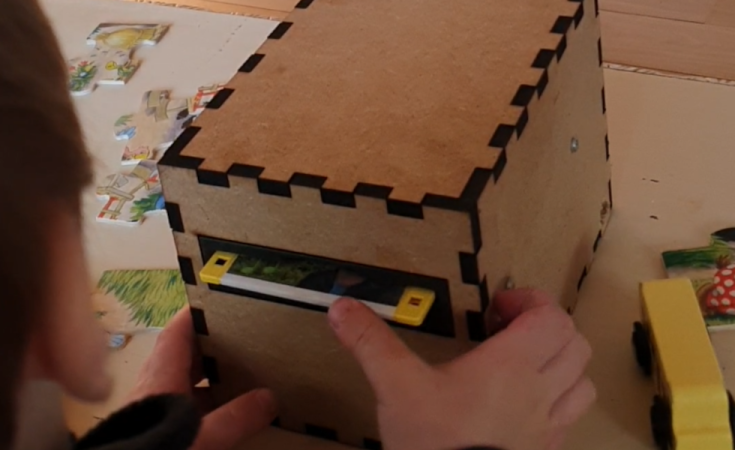
Famously, the save icon on most computer user interfaces references a fairly obsolete piece of technology: the venerable floppy disk. It’s likely that most people below the age of about 30 have never interacted with one of these once-ubiquitous storage devices, so much so that many don’t recognize the object within the save icon itself anymore. [Mads Chr. Olesen]’s kids might be an exception here, though, as he’s built a remote control for them that uses real floppy disks to select the programming on the TV.

This project partially began as a way to keep the children from turning into zombies as a result of the modern auto-play brainrot-based economies common in modern media. He wanted his kids to be able to make meaningful choices and then not get sucked into these types of systems. The floppy disk presents a perfect solution here. They’re tangible media and can actually store data, so he got to work interfacing a real floppy disk drive with a microcontroller. When a disk is inserted the microcontroller wakes up, reads the data, and then sends out a command to stream the relevant media to the Chromecast on the TV. When the disk is removed, the microcontroller stops play.

Like any remote, this one is battery powered as well, but running a microcontroller and floppy disk drive came with a few challenges. This one is powered by 18650 lithium cells to help with current peaks from the drive, and after working out a few kinks it works perfectly for [Mads] children. We’ve seen a few other floppy disk-based remote controls like this one which replaces the data stored on the magnetic disc with an RFID tag instead.

A Guide To Using Triacs For Switching AC

For switching high-powered loads from a microcontroller, or for switching AC loads in general, most of us will reach into the parts bin and pull out a generic relay of some sort. Relays are fundamental, proven technologies to safely switch all kinds of loads. They do have their downsides, though, so if you need silent operation, precise timing, or the ability to operate orders of magnitude more times you might want to look at a triac instead. These solid state devices can switch AC loads unlike other transistor-based devices and [Ray] at OpenSprinkler is here to give us an overview on how to use them.

The key to switching an AC load is bi-directional conductivity. A normal transistor or diode can only conduct in one direction, so if you try to switch an AC load with one of these you’ll end up with what essentially amounts to a bad rectifier. Triacs do have a “gate” analogous to the base of a bipolar junction transistor, but the gate will trigger the triac when current flows in either direction as well. The amount of current needed to trigger the triac does depend on the state of the switched waveform, so it can be more complex to configure than a relay or transistor in some situations.

After going through some of the theory around these devices, [Ray] demonstrates how to use them with an irrigation system, which are almost always operating on a 24VAC system thanks to various historical quirks. This involves providing the triacs with a low voltage source to provide gate current as well as a few other steps. But with that out of the way, switching AC loads with triacs can become second nature. If you prefer a DC setup for your sprinklers, though, [vinthewrench] has demonstrated how to convert these sprinkler systems instead.

A Petabyte NAS Using Consumer-Grade Parts

Self-hosting a few services on one’s own hardware is a great way to wrest some control over your online presence while learning a lot about computers, software, and networking. A common entry point is using an old computer or Raspberry Pi to get something like a small NAS, DNS-level adblocker, or home automation service online, but the hobby can quickly snowball to server-grade hardware in huge racks. [Dennis] is well beyond this point, with a rack-mounted NAS already up and running. This build expands his existing NAS to one which can host a petabyte of storage out of consumer-grade components.

The main reason for building this without relying too much on server-grade gear is that servers are generally designed to run in their own purpose-built rooms away from humans, and as a result don’t generally take much consideration for how loud that environment becomes. [Dennis] is building a lot of the components from scratch for this build including the case, the backplanes for the drives, and a backplane tester. With backplanes installed it’s time to hook up all of the data connections thanks to a few SAS expanders which provide all of the SATA connections for the 45 drives.

There are two power supplies here as well, although unlike a server solution these aren’t redundant and each only serves half the drives. This does keep it running quieter, along with a series of Noctua fans that cool the rest of the rack. The build finishes off with an LED strip which provides a quick visual status check for each of the drives in the bay. With that it’s ready for drives and to be connected to the network. It’s a ton of wiring and soldering, and great if you don’t want to use noisy server hardware. And, if you don’t need this much space or power, we’ve seen some NAS builds that are a bit on the smaller side as well.

Continue reading “A Petabyte NAS Using Consumer-Grade Parts”

DIY, Full-Stack Farm Automation

Recently, [Vinnie] aka [vinthewrench] moved from Oregon to Arkansas to start a farmstead. This is a style of farming that focuses not just on a profitable farm where produce is sold at market, but also on a homestead where much of one’s own food is grown on the farm as well. Like any farm, though, it’s extremely hard work that takes a tremendous amount of time. Automation and other technology can make a huge impact in these situations, and [Vinnie] is rolling out his own software stack to help with this on his farm.

He calls his project the Pi Internet of Things, or PioT, and as its name suggests is based around the Raspberry Pi. Since this will all be outdoors and exposed to the extremes of Arkansas weather, everything built under the auspices of this project prioritizes ruggedness, stability, and long-term support, all while avoiding any cloud service. The system also focuses on being able to ride through power outages. The server side, called piotserver, uses a REST API to give the user access to the automation systems through a web interface

[Vinnie] also goes into detail about why existing systems like Home Assistant and Open Sprinkler wouldn’t work in his situation, and why a ground-up solution like this is more appropriate for his farm. This post is largely an overview of his system, but some of his other posts go into more detail about things like integrating temperature sensors, rainfall monitoring, controlling irrigation systems, and plenty of other farm automation tasks that are useful for any farmer or gardener.

We’ve also seen some other projects of his here like this project which converts a common AC sprinkler system to an easier-to-use DC system, and a DIY weather station that operates in the 915 MHz band. He’s been a great resource for anyone looking to have technology help them out with their farm or garden, but if you’re just getting started on your green thumb be sure to take a look at this starter guide as well.

AC Motor Converted Into DC EBike Powerplant

AC induction motors are everywhere, from ceiling fans to vehicles. They’re reliable, simple, and rugged — but there are some disadvantages. It’s difficult to control the speed without complex electronics, and precisely placing the shaft at a given angle is next to impossible. But the core of these common induction machines can be modified and rewired into brushless DC (BLDC) motors, provided you have a few tools on hand as [Austin] demonstrates.

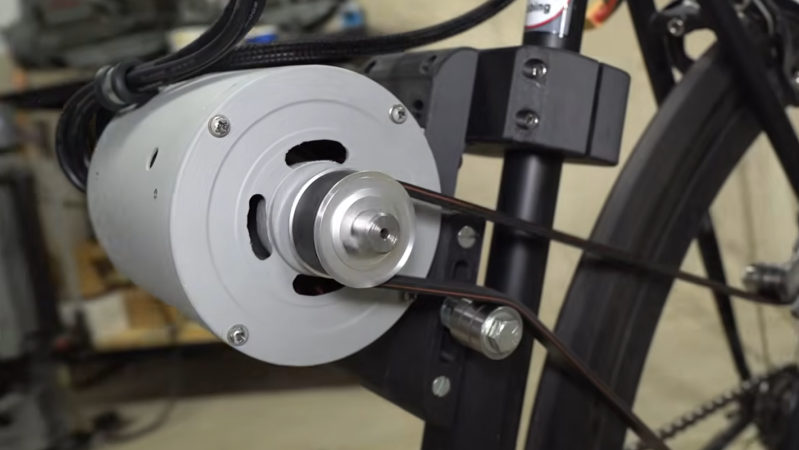
To convert an AC induction motor to a brushless DC electric motor (BLDC), the stator needs to be completely rewired. It also needs a number of poles proportional to the number of phases of the BLDC controller, and in this case the 24-pole motor could accommodate the three phases. [Austin] removed the original stator windings and hand-wound his own in a 16-pole configuration. The rotor needs modification as well, so he turned the rotor on a lathe and then added a set of permanent magnets secured to the rotor with JB Weld. From there it just needs some hall effect sensors, a motor controller and power to get spinning.

At this point the motor could be used for anything a BLDC motor would be used. For this project, [Austin] is putting it on a bicycle. A 3D printed pulley mounts to the fixed gear on the rear wheel, and a motor controller, battery, and some tensioners are all that is left to get this bike under power. His tests show it comfortably drawing around 1.3 kW so you may want to limit this if you’re in Europe but other than that it works extremely well and reminds us of one of our favorite ebike conversions based on a washing machine motor instead of a drill press.

Continue reading “AC Motor Converted Into DC EBike Powerplant”

Old Windsurfers Become New Electric Surfboards

Windsurfing has experienced a major decline in popularity in the last few decades as the sport’s culture failed to cater to beginners at the same time that experienced riders largely shifted to kiteboarding. While it’s sad to see a once-popular and enjoyable sport lose its mass market appeal, it does present a unique opportunity for others as there’s cheap windsurfing gear all over the online classifieds now. [Dane] recently found that some of these old boards are uniquely suited to be modified into electric surfboards.

The key design element of certain windsurfers that makes this possible is the centerboard, a fin mounted on the windsurfer extending down into the water that resists the lateral force of the sail, keeping the board moving forward instead of sideways. [Dane] used this strengthened area of the board to mount a submerged electric motor, with all of the control electronics and a battery on the top of the board. The motor controller did need a way to expel excess heat while being in a sealed waterproof enclosure, but with a hole cut in the case and a heat sink installed on top of it, this was a problem quickly solved.

The operator control consists of a few buttons which correspond to pre-selected speeds on the motor. There’s no separate control input for steering, though; in order to turn this contraption the operator has to lean the board. With some practice it’s possible to stand up on this like any other electric surfboard and scoot around [Dane]’s local lake. For the extreme budget version of this project be sure to check out [Ben Gravy]’s model which involves duct taping two cheap surfboards together instead.

A Linux Power User Puts SteamOS To Work

The line between a Linux user and a Linux power user is a bit gray, and a bit wide. Most people who install Linux already have more computer literacy than average, and the platform has long encouraged experimentation and construction in a way macOS and Windows generally aren’t designed for. Traditional Linux distributions often ask more of their users as well, requiring at least a passing familiarity with the terminal and the operating system’s internals especially once something inevitably breaks.

In recent years, however, a different design philosophy has been gaining ground. Immutable Linux distributions like Fedora Silverblue, openSUSE MicroOS, and NixOS dramatically reduce the chances an installation behaves erratically by making direct changes to the underlying system either impossible or irrelevant.

SteamOS fits squarely into this category as well. While it’s best known for its console-like gaming mode it also includes a fully featured Linux desktop, which is a major part of its appeal and the reason I bought a Steam Deck in the first place. For someone coming from Windows or macOS, this desktop provides a familiar, fully functional environment: web browsing, media playback, and other basic tools all work out of the box.

As a Linux power user encountering an immutable desktop for the first time, though, that desktop mode wasn’t quite what I expected. It handles these everyday tasks exceptionally well, but performing the home sysadmin chores that are second nature to me on a Debian system takes a very different mindset and a bit of effort. Continue reading “A Linux Power User Puts SteamOS To Work”