



January 14, 2015
New status menu, bandwidth control for Google Drive for Mac/PC


Google Drive for Mac/PC syncs any or all of your files to Google Drive on the web, making them available anywhere, at any time, on any device. It also provides secure cloud-based storage for your files.
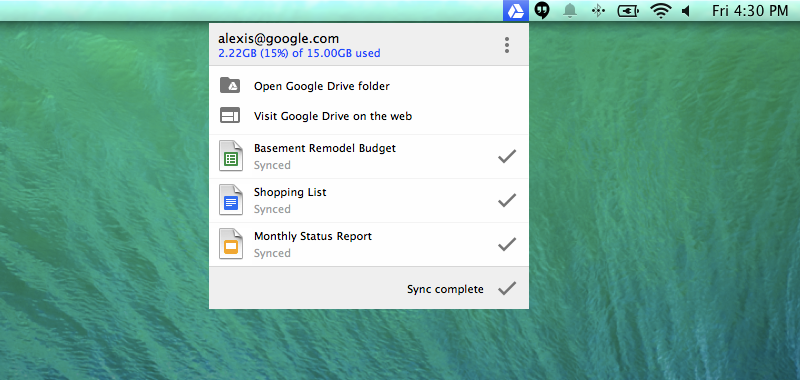
A new version of Google Drive for Mac/PC is rolling out this week, featuring a new, more visually rich status menu. The menu allows people using Google Drive for Mac/PC to more clearly follow their sync status, including guidance on already synced files, files currently syncing and files yet to be synced. When you hover over a recently synced file, you’ll see an icon that saves you steps by letting you share it right from the menu:
You can also now choose to limit how much bandwidth Drive consumes while syncing your files for those times when you need extra bandwidth for something else. You can do that in the Advanced section of the Preferences menu.
Release track:
Rapid release and Scheduled release (gradual rollout)
For more information:
Sync files and folders with Google Drive for Mac/PC
Install Google Drive for Mac/PC
Note: all launches are applicable to all Google Apps editions unless otherwise noted
whatsnew.googleapps.com
Get these product update alerts by email
Subscribe to the RSS feed of these updates
A new version of Google Drive for Mac/PC is rolling out this week, featuring a new, more visually rich status menu. The menu allows people using Google Drive for Mac/PC to more clearly follow their sync status, including guidance on already synced files, files currently syncing and files yet to be synced. When you hover over a recently synced file, you’ll see an icon that saves you steps by letting you share it right from the menu:
You can also now choose to limit how much bandwidth Drive consumes while syncing your files for those times when you need extra bandwidth for something else. You can do that in the Advanced section of the Preferences menu.
Release track:
Rapid release and Scheduled release (gradual rollout)
For more information:
Sync files and folders with Google Drive for Mac/PC
Install Google Drive for Mac/PC
Note: all launches are applicable to all Google Apps editions unless otherwise noted
whatsnew.googleapps.com
Get these product update alerts by email
Subscribe to the RSS feed of these updates