You signed in with another tab or window. Reload to refresh your session.You signed out in another tab or window. Reload to refresh your session.You switched accounts on another tab or window. Reload to refresh your session.Dismiss alert
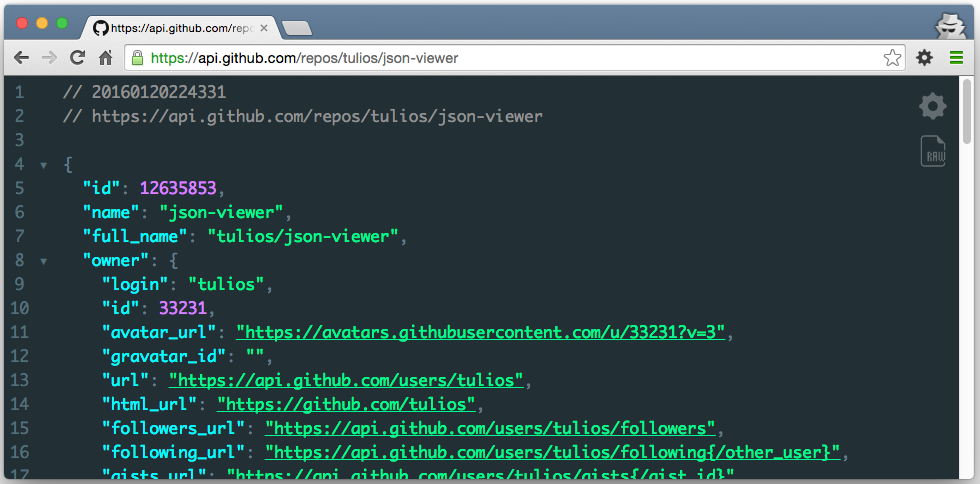
The most beautiful and customizable JSON/JSONP highlighter that your eyes have ever seen. It is a Chrome extension for printing JSON and JSONP.
Notes:
This extension might crash with other JSON highlighters/formatters, you may need to disable them
To highlight local files and incognito tabs you have to manually enable these options on the extensions page
Sometimes when the plugin updates chrome leaves the old background process running and revokes some options, like the access to local files. When this happen just recheck the option that everything will work again
Works on local files (if you enable this in chrome://extensions)
Features:
Syntax highlighting
27 built-in themes
Collapsible nodes
Clickable URLs (optional)
URL does not matter (the content is analysed to determine if its a JSON or not)
Inspect your json typing "json" in the console
Hot word json-viewer into omnibox (type json-viewer + TAB and paste your JSON into omnibox, hit ENTER and it will be highlighted)
Toggle button to view the raw/highlighted version
Works with numbers bigger than Number.MAX_VALUE
Option to show line numbers
Option to customize your theme
Option to customize the tab size
Option to configure a max JSON size to highlight
Option to collapse nodes from second level + Button to unfold all collapsed nodes
Option to include a header with timestamp + url
Option to allow the edition of the loaded JSON
Option to sort json by keys
Option to disable auto highlight
Option for C-style braces and arrays
Scratch pad, a new area which you can type/paste JSON and format indefinitely using a button or key shortcut. To access type json-viewer + TAB + scratch pad ENTER
Installation
Install through Chrome Web Store
Or compile and load by yourself
It depends on node (version in package.json engines).