


| CARVIEW |
Navigation Menu
-
Notifications
You must be signed in to change notification settings - Fork 369
Getting Started
Phan v6 is the current release and is recommended for PHP 8.1+ codebases. This guide covers setting up Phan v6.
For legacy PHP projects: If you need to analyze code written for PHP 8.0 or earlier, see Migrating-to-Phan-V6 for information about using Phan v5.
To get started, choose a method for getting Phan running on your system and then create a config file so that Phan knows where to look for code and how to analyze it.
If you're having trouble getting Phan up and running, open an issue on GitHub or join the Gitter chat. If Phan is running but you're unsure why it's emitting certain issues, see Frequently Asked Questions.

Maintainers should be able to respond fairly quickly before/after US east coast working hours.
Phan v6 requires:
- PHP 8.1 or later to run Phan itself
- php-ast 1.1.3+ for analyzing PHP 8.4+ code
- php-ast 1.0.11+ for analyzing earlier PHP versions
The Phan-Helpers-Extension (optional) can provide 2-3x performance improvements for large projects.
To compile php-ast: Something along these lines should do it (Alternate instructions):
pecl install ast-1.0.14And add extension=ast.so to your php.ini file. Check that it is there with php -m.
If it isn't, then you probably added it to the wrong php.ini file.
Check php --ini to see where it is looking.
If phpize is unavailable on your system, you may need to install the PHP developer
packages which are often available with names such as php-dev.
Windows users can grab ast.dll directly from PECL releases.
If you're managing dependencies via Composer, you can add Phan v6 to your project by running:
composer require --dev "phan/phan:^6.0"For a full list of releases, check out https://packagist.org/packages/phan/phan.
With the Phan dependency installed, you can do analysis by running the following (once you create a configuration file).
./vendor/bin/phanBefore you begin, make sure you have:
- PHP 8.1+ installed
- The php-ast module installed (1.1.3+ for PHP 8.4 support)
Then clone the Phan source and use composer to install dependencies:
git clone https://github.com/phan/phan.git
cd phan
composer install
Verify Phan is working correctly:
./phan --version
./vendor/bin/phpunit
Run Phan on itself (using its own .phan/config.php configuration):
./phanTo run Phan from a Phar package, you can download the latest Phar and run it.
curl -L https://github.com/phan/phan/releases/latest/download/phan.phar -o phan.pharYou'll now be able to run Phan via
php phan.pharThe official Phan Docker image includes all dependencies (PHP 8.1+, php-ast):
docker run -v $(pwd):/app etsy/phan:latest phanFor more information, see the official Phan Docker repository.
Other options:
- jakzal/phpqa - includes multiple PHP analysis tools
- Search for other Docker images
See Getting Started With Homebrew (useful for Mac OS)
You'll want to create a configuration file within your codebase at .phan/config.php so that Phan knows what to look at. The following config file will let Phan know that your source is in the src/ with some dependency code in the vendor/symfony/console directory and that anything under vendor/ should be parsed, but not analyzed.
<?php
/**
 * This configuration will be read and overlaid on top of the
 * default configuration. Command-line arguments will be applied
 * after this file is read.
 */
return [
    // Target PHP version(s) for analysis.
    // Supported values: '8.1', '8.2', '8.3', '8.4', '8.5', null
    //
    // If null, Phan uses the PHP version that is running Phan itself.
    // Minimum version is PHP 8.1 for target analysis.
    'target_php_version' => '8.1',
    // A list of directories that should be parsed for class and
    // method information. After excluding the directories
    // defined in exclude_analysis_directory_list, the remaining
    // files will be statically analyzed for errors.
    //
    // Thus, both first-party and third-party code being used by
    // your application should be included in this list.
    'directory_list' => [
        'src',
        'vendor/symfony/console',
    ],
    // A regex used to match every file name that you want to
    // exclude from parsing. Actual value will exclude every
    // "test", "tests", "Test" and "Tests" folders found in
    // "vendor/" directory.
    'exclude_file_regex' => '@^vendor/.*/(tests?|Tests?)/@',
    // A directory list that defines files that will be excluded
    // from static analysis, but whose class and method
    // information should be included.
    //
    // Generally, you'll want to include the directories for
    // third-party code (such as "vendor/") in this list.
    //
    // n.b.: If you'd like to parse but not analyze 3rd
    //       party code, directories containing that code
    //       should be added to both the `directory_list`
    //       and `exclude_analysis_directory_list` arrays.
    'exclude_analysis_directory_list' => [
        'vendor/'
    ],
];You can auto-generate a .phan/config.php using the --init command:
phan --init --init-level=3The --init-level parameter controls strictness:
-
--init-level=1: Very strict analysis (many config options enabled) -
--init-level=3: Recommended starting point (good balance) -
--init-level=5: Lenient analysis (minimal issues reported)
You may need to manually add some indirect third-party dependencies to directory_list.
- See Incrementally Strengthening Analysis for tips on gradually increasing analysis strictness
- Full option reference: Phan Config Settings
- Example: Phan's own
.phan/config.phpshows a strict production configuration
Assuming you have set up .phan/config.php in your project root, you can integrate Phan into your CI/CD pipeline.
Phan exits with:
-
0- No issues found -
1- Issues were detected -
2- Fatal error during analysis
Most CI tools can detect these exit codes to pass or fail the build.
name: Phan Analysis
on: [push, pull_request]
jobs:
  phan:
    runs-on: ubuntu-latest
    steps:
      - uses: actions/checkout@v3
      - uses: shivammathur/setup-php@v2
        with:
          php-version: '8.1'
          extensions: ast
      - run: composer install --dev
- run: vendor/bin/phanphan:
image: php:8.1
before_script:
- apt-get update && apt-get install -y php-dev
- pecl install ast-1.1.3
- composer install --dev
script:
- vendor/bin/phancomposer install --dev
vendor/bin/phan --output-mode=checkstyle > phan-report.xmlSee Using-Phan-From-Command-Line for more CLI options, including --output-mode=json or --output-file.
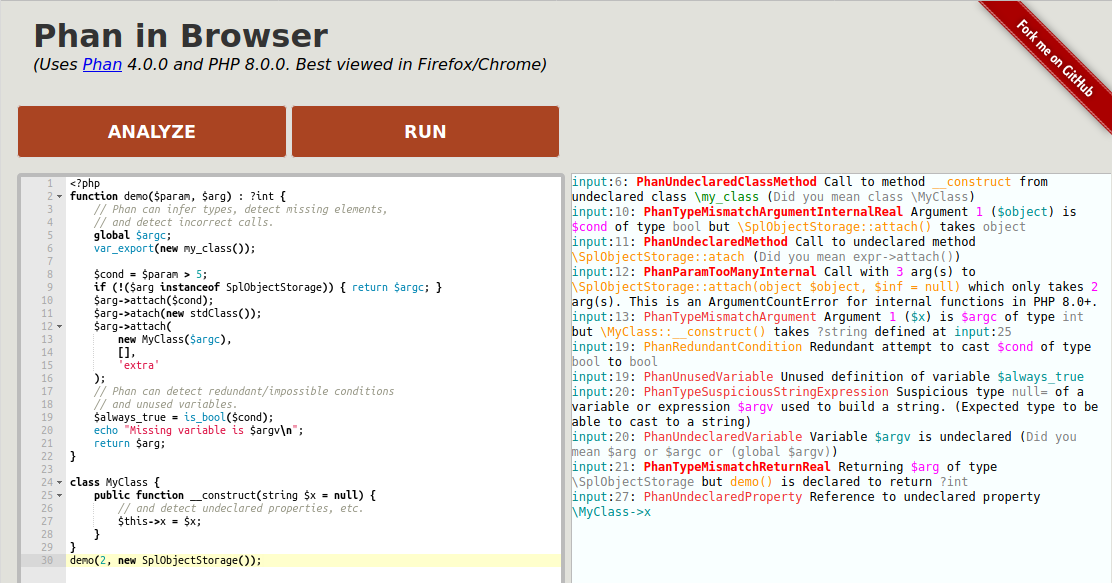
You can try Phan entirely in your browser with the WebAssembly demo - no installation needed!
This is a great way to explore Phan's features before setting it up on your project.
Works best on desktop Firefox or Chrome.
Once you have Phan installed and running:
- Learn annotation syntax: Annotating-Your-Source-Code-V6 - How to add type hints to improve analysis
- Understand issue types: Issue-Types-Reference - Reference for all issue types Phan can detect
- Improve analysis gradually: Incrementally Strengthening Analysis - Increase strictness over time
- Set up fast re-analysis: Incremental-Analysis - Speed up analysis on code changes
- Optimize for large projects: Memory-and-Performance-Optimizations and Phan-Helpers-Extension
If you're upgrading from Phan v5, see Migrating-to-Phan-V6 for:
- Breaking changes to be aware of
- Migration steps
- Configuration changes needed
-
Getting Started
-
Annotating Your Source Code V6
-
About Union Types
-
Tutorial for Analyzing a Large Sloppy Code Base
-
Incrementally Strengthening Analysis
-
Issue Types Reference
-
Phan Config Settings
-
Typing Parameters
-
How To Use Stubs
-
Migrating to Phan V6
-
PHP 8.4 and 8.5 Support
-
Using Phan From the Command Line
-
Incremental Analysis
-
Memory and Performance Optimizations
-
Phan Helpers Extension
-
Tooling and Suppression Baselines