You signed in with another tab or window. Reload to refresh your session.You signed out in another tab or window. Reload to refresh your session.You switched accounts on another tab or window. Reload to refresh your session.Dismiss alert
For Neovim users, this plugin is superseded by R.nvim.
I no longer use Vim-R and will only fix newly reported bugs if they
are serious enough to prevent its use. I will not fix minor bugs.
Vim-R improves Vim's support to edit R scripts.
Installation and use
Please, read sections Instalation and Use of the
documentation.
The communication between R and Vim
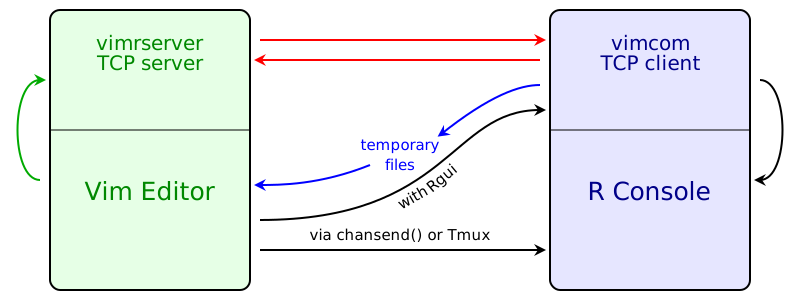
The diagram below shows how the communication between Vim and R works.
The black arrows represent all commands that you trigger in the editor and
that you can see being pasted into R Console.
There are three different ways of sending the commands to R Console:
When running R in a Vim built-in terminal, the function chansend()
is used to send code to R Console.
When running R in an external terminal emulator, Tmux is used to send
commands to R Console.
On the Windows operating system, Vim-R can send a message to R (vimcom)
which forwards the command to R Console.
The R package vimcom includes the application vimrserver which is never
used by R itself, but is run as a Vim's job. That is, the communication
between the vimrserver and Vim is through the vimrserver standard
input and output (green arrows). The vimrserver application runs a TCP
server. When vimcom is loaded, it immediately starts a TCP client that
connects to vimrserver (red arrows).
Some commands that you trigger are not pasted into R Console and do not output
anything in R Console; their results are seen in the editor itself. These are
the commands to do omnicompletion (of names of objects and function
arguments), start and manipulate the Object Browser (\ro, \r= and \r-),
call R help (\rh or :Rhelp), insert the output of an R command
(:Rinsert) and format selected text (:Rformat).
When new objects are created or new libraries are loaded, vimcom sends
messages that tell the editor to update the Object Browser, update the syntax
highlight to include newly loaded libraries and open the PDF output after
knitting an Rnoweb file and compiling the LaTeX result. Most of the
information is transmitted through the TCP connection to the vimrserver,
but temporary files are used in a few cases.