You signed in with another tab or window. Reload to refresh your session.You signed out in another tab or window. Reload to refresh your session.You switched accounts on another tab or window. Reload to refresh your session.Dismiss alert
PortableSettingsProvider is a C# implementation of SettingsProvider for portable applications.
Usage
Add src/PortableSettingsProvider.cs to your project.
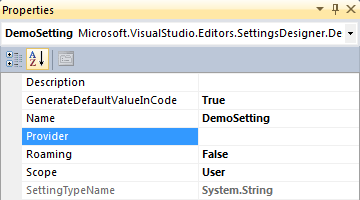
For each setting that should be portable, set the Provider property to the PortableSettingsProvider class, with a namespace qualifier if required. (By default this would be changeme.Settings.PortableSettingsProvider so make sure to substitute changeme for your namespace root.)
Optionally, set the Roaming property to True for global settings, or False for local settings. (See Types below for an explanation.)
Visual Studio currently defaults this to False.
Read and write your application settings as you normally would.
Types
Two types of settings are supported: global (roaming) and local.
Global (aka "Roaming")
Global settings are not tied to the current computer and are available to all running instances of the application, regardless of where it's running from.
Local
Local settings are tied to the computer on which the application is running. The computer name is used as the unique identifier.
File format
The application settings are stored in an XML file in the same directory as the application. The filename is the same as the application's executable, with the file extension settings.
Global settings are stored in the /settings/globalSettings node.
Local settings are stored in the /settings/localSettings/[ComputerName] node.