| CARVIEW |

 2024
2024Top Rated product Get award-winning protection

Defend your PC against cyberthreats with our award-winning, free antivirus
Download AVG AntiVirus Free for real-time protection against viruses, infected emails, scam websites, and more.

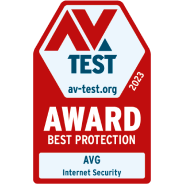
January 2024
Best Protection

January 2024
Top Rated product


Our smart AI protects you against scam websites, viruses, and more

Download our free antivirus

Easily install it on your PC

You’re now protected!


Award-winning by nature, not just by name
We’ve added 25 new accolades in the past two years to the hundreds we have won since we started in 1991. Our top score means you know you’re in good hands with our PC security software.

Best Protection
Top Rated Product

Malware Protection


Relax, you’re protected with multi-layered security
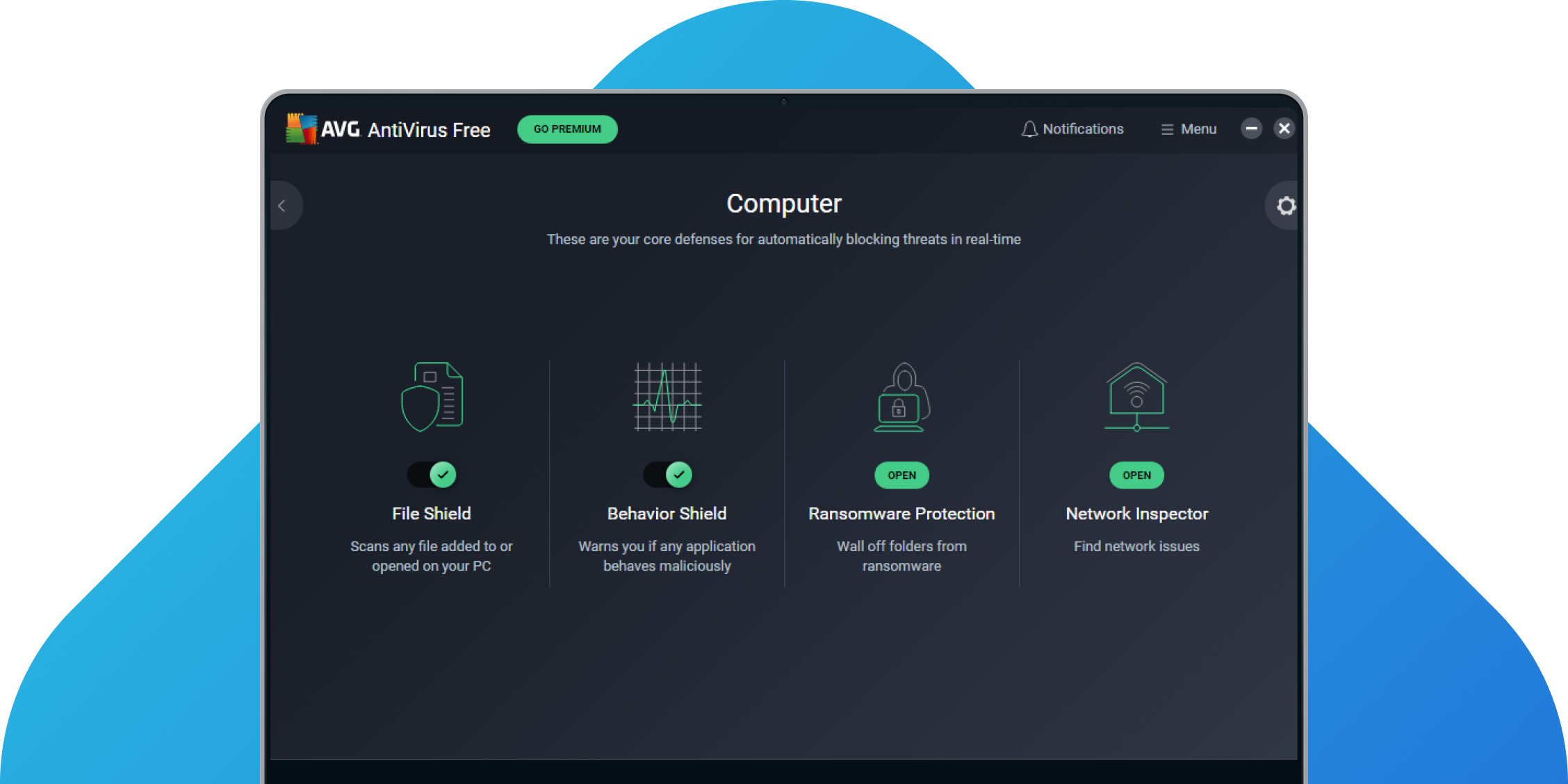
With cybersecurity, more is better. Use our antivirus software for PCs to make it simpler to detect cyberthreats and block suspicious files or activity in real time. This includes online scams. Plus, isolate digital threats from your operating system to keep it safer.
How our multi-layered security helps you:
-
Fix unsafe settings, passwords, and more.
-
Block files that could be risky or dangerous.
-
Stop unsafe or strange software activity.
-
Check opened or added files for cyberthreats.
-
Fight back against scan-resistant viruses.
-
Lock away dangerous files automatically.
How does AVG go even further to protect you?


Download AVG AntiVirus Free
Keep yourself safer against viruses, online scams, unsafe emails, and more.
Our Windows antivirus software for PCs and laptops is just a click away.
How to install
- First, download the installation wizard using the button at the top of the page.
- Once it’s downloaded, double-click the installation wizard to run it.
- Follow on-screen application instructions.
- You’re done! Run your first scan and start securing your PC today.
For more detailed instructions, please go to our installation support page.
Usage
For personal and family use only. Not for business or commercial use.
System requirements

PC with Windows 11, Windows 10, 8.1, 8 or 7 (both the 32 and 64-bit versions, excluding Starter and RT editions), 4 GB RAM and 2 GB of hard disk space. ARM chips Windows 11 only.

MacOS 10.13 (High Sierra) or later

Android 5.0 (Lollipop, API 21) or above

iOS 10.0 or above
Languages
For Windows: Chinese (simplified), Chinese (traditional), Czech, Danish, Dutch, English, French, German, Hungarian, Indonesian, Italian, Japanese, Korean, Malay, Polish, Portuguese (Brazil), Portuguese (Portugal), Russian, Serbian, Slovak, Spanish, and Turkish.
For Mac: English only.
For Android: Arabic, Chinese (simplified), Chinese (traditional), Czech, Danish, Dutch, English, Finnish, French, German, Greek, Hebrew, Hindi, Hungarian, Indonesian, Italian, Japanese, Korean, Malay, Norwegian, Polish, Portuguese (Brazil), Portuguese (Portugal), Russian, Serbian, Slovak, Spanish, Swedish, Thai, Turkish, Ukrainian, and Vietnamese.
For iOS: Arabic, Chinese (traditional), Czech, Dutch, English, French, German, Hindi, Italian, Japanese, Korean, Polish, Portuguese (Brazil), Russian, Spanish, Thai, Turkish, and Vietnamese.
FAQs
What makes AVG AntiVirus Free one of the best free antivirus software options?
There are various options open to users who want to download the best free antivirus software. AVG has been protecting users for more than 30 years and offers a free download of antivirus software for PC, Mac, Android, and iPhone/iPad. AVG also offers free protection against spyware as well as free protection against Trojan horse malware.
How does AVG AntiVirus Free protect against viruses and other threats?
New threats are always emerging, but AVG’s free virus protection keeps you safe. AVG even offers protection against spyware, webcam threats, ransomware, rootkits, hackers, and more. While built-in PC protection like Windows Defender might stop some of the threats you’ll face, it’s crucial to have antivirus software like AVG’s to make sure you don’t leave yourself vulnerable to more sophisticated threats.
Why does my PC need antivirus software?
You need antivirus software if you want to protect your PC against viruses, malware, ransomware, and the variety of other online threats out there.
Windows Defender will guard against standard types of malware, but it won’t match the comprehensive security you’ll get with a powerful, third-party antivirus solution like AVG AntiVirus Free for PC. Now known as Microsoft Defender, Windows Defender doesn’t offer enough protection against phishing attacks on all browsers, nor does it perform quite as highly as AVG AntiVirus Free in leading independent tests.
How can I do a free virus scan on my computer?
It's very simple to download and run a free virus scan to check for viruses and other malware on your computer. AVG offers a free virus scanner and malware removal tool which takes seconds to install. All you have to do is:
- Click Download to download the installer file.
- Click on the downloaded installer file.
- Follow the simple instructions to complete the installation of your free AVG virus scan tool.
What is a computer virus?
You can check out our guide for how to manually get rid of viruses from your computer, or you can download a great virus removal tool like AVG AntiVirus Free and start protecting your PC in real time today. Whether you're working on a Windows 10 desktop device or laptop, AVG AntiVirus Free automatically detects and blocks incoming viruses and other malware while scanning and removing any existing malware.
How do I get rid of a virus?
A computer virus is a type of malware that infects your computer often through malicious downloads or deceptive links. Viruses are designed to spread themselves across files and programs as well as across networks to other devices. Indications that you may have a virus on your computer include slowdowns, invasive pop-ups, crashes, and other issues.
Are virus protectors worth it?
Yes, always. Without them, malware of all kinds have the potential to cause you problems. Viruses can damage software and data. Spyware can undermine your privacy and steal data. Ransomware can encrypt your files so you can no longer access them. It’s also important to do more to secure your home Wi-Fi from cybercriminals and defend the network traffic between your PC and the internet.
Our free antivirus software for PCs, AVG AntiVirus Free, supports you with all of these things. Plus, you can monitor your in-going and outgoing email messages for potential cyberthreats — all for free. Do it all from one easy-to-use app.
What does a virus blocker do?
Typically, virus blockers automatically scan the files and apps on your PC for potential malware. When we refer to malware, we mean viruses and other digital threats. Most virus blockers help stop more than just viruses. Some also protect you as you browse the web, blocking dangerous downloads or links.
Digital threats can come from many different angles. So it’s also important for PC antivirus software to help defend you from email-based cyberthreats or to support you in defending your home Wi-Fi network from cybercrime.
AVG AntiVirus Free helps with all the things we’ve mentioned. Plus, you guessed it, it’s completely free to use.
Is there a free virus scan for laptops?
If you have Windows, then our free antivirus software for PCs will work for you. It can help you block various types of malware, including viruses. Plus, it can support you to defend yourself from phishing attacks and email-based cyberthreats while helping to protect your home Wi-Fi network from cybercriminals. You can do all of this and more for free!
Get privacy tips, straight from the VPN experts

How to Find and Clean Viruses on Android Phones or iPhones
Learn how to remove viruses from your Android phone and iPhone with our expert guide. Scan and remove mobile malware, then protect against future threats.
Read more
Fake Virus Warnings: How to Spot and Avoid Them
Concerned about fake virus alerts? Learn how to detect fake virus warning pages and pop-up malware and avoid a real attack.
Read more
Sugar Daddy & Sugar Baby Scams: How to Spot a Fake One
Learn how to spot a fake sugar daddy or sugar baby on Instagram Snapchat and what to do if you're caught in a sugar daddy/baby scam.
Read more
How to Scan and Remove Malware From Your Router
Did you know that your router may be vulnerable to malware? Learn how to scan and remove malware from your router with our expert guide.
Read more
How to Check If a Website Is Legit or Fake
Unsure if a website is legit? Read our simple guide to website safety and learn how to identify fake sites.
Read more
iPhone Calendar Virus: What Is It and How Do You Get Rid of It?
Learn how to get rid of iPhone calendar viruses and how to stop receiving spam event invitations to your iPhone calendar.
Read more
Malware And Virus Statistics 2024: The Trends You Need to Know About
Which cybersecurity threats are on the rise? Read about the latest cybersecurity threats statistics for the first half of 2024.
Read more
How to Block Spam Calls on Your iPhone, Android, or Landline
Learn how to stop spam calls with built-in tools on your mobile or network service, for your iPhone, Android, or home phone.
Read more


- Global Website: Español / Worldwide (English) / Europe (English)
- Argentina: Español
- Australia: English
- België: Nederlands
- Belgique: Français
- Brasil: Português do Brasil
- Canada: English
- Canada: Français
- Česká republika: Čeština
- Chile: Español
- Colombia: Español
- Denmark: English
- Deutschland: Deutsch
- España: Español
- France: Français
- India: English
- Indonesia: Bahasa Indonesia
- Italia: Italiano
- Malaysia: Bahasa Melayu
- México: Español
- Nederland: Nederlands
- New Zealand: English
- Norge: Norsk
- Polska: Polski
- Portugal: Português
Global Website: Español / Worldwide (English) / Europe (English)