



Description
Lorsque vous avez besoin de fonctionnalités de conception professionnelles mais que les constructeurs de pages vous semblent trop lourds, trop complexes ou trop contraignants.
DesignSetGo vous offre la puissance d’un constructeur de pages avec la simplicité des blocs WordPress. Créez des mises en page, des formulaires, des éléments interactifs et des visuels époustouflants, le tout en utilisant l’éditeur de blocs que vous connaissez déjà.
Pourquoi DesignSetGo ?
✓ Fonctionne comme WordPress – Si vous connaissez les blocs, vous connaissez DesignSetGo. Pas d’interface distincte, pas de courbe d’apprentissage.
✓ 46 blocs, une extension – Remplace plusieurs extensions : formulaires, diaporamas, onglets, accordéons, compteurs, cartes, modales, fils d’Ariane, et plus encore.
✓ 11 Extensions universelles – Ajoutez des animations, une visibilité réactive, des en-têtes épinglés, des groupes cliquables, une largeur maximale, et plus encore à N’IMPORTE QUEL bloc WordPress (y compris les blocs principaux).
✓ Performance First – Code léger, pas de jQuery, lots optimisés. Votre site reste rapide.
✓ No Lock-In – Construit avec les standards WordPress. Ce que vous construisez fonctionne avec ou sans l’extension.
✓ Editeur = Interface publique – Ce que vous voyez dans l’éditeur est exactement ce qui apparaît sur votre site. Pas de surprises.
Qu’est-ce qui est inclus ?
Mise en page & conteneurs (5 blocs)
Créez des mises en page réactives sans code : flex, grille, piles, lignes, et des sections pleine largeur avec des contrôles de largeur de contenu.
Constructeur de formulaires complet (13 blocs)
Formulaires professionnels avec soumission AJAX, protection anti-spam et notifications par e-mail. Inclut des champs texte, e-mail, téléphone, zone de texte, nombre, URL, date, heure, liste déroulante, case à cocher, téléversement de fichier et champs cachés. Aucun service externe n’est nécessaire.
Éléments interactifs (11 blocs)
Onglets, accordéons, fenêtres modales/fenêtres surgissantes, cartes à rabat, diaporamas, effets de défilement, compteurs, barres de progression et contenu révélateur. Le tout avec des animations fluides et un comportement responsive.
Navigation & Structure (2 blocs)
Fil d’Ariane avec balisage Schema.org et table des matières avec détection automatique des titres, défilement fluide et positionnement épinglé.
Composants visuels (8 blocs + blocs enfants)
Icônes (500+), boutons d’icônes, listes d’icônes, pilules/badges, séparateurs, comptes à rebours, formes de blob organiques et cartes de contenu avec plusieurs préréglages de mise en page.
Emplacement (1 bloc)
Cartes interactives avec prise en charge de Google Maps et OpenStreetMap, marqueurs personnalisés et options de protection de la vie privée.
Universal Extensions (14 extensions)
These work with ANY WordPress block—including core blocks and third-party blocks:
* Block Animations – 24+ effects with scroll/hover/click triggers
* Scroll Parallax – Elementor-style vertical/horizontal parallax effects with device controls
* Text Reveal – Scroll-triggered text color animation that simulates reading progression
* Expanding Background – Scroll-driven background that expands from a circle to fill sections
* Sticky Header – Advanced sticky controls with offset and hide on scroll
* Clickable Groups – Turn containers into accessible clickable links
* Background Video – Add YouTube or self-hosted videos to containers
* Responsive Visibility – Hide/show blocks by device (desktop, tablet, mobile)
* Max Width – Constrain content width with auto-centering
* Custom CSS – Per-block custom styling and advanced controls
* Grid Span – Column and row spanning for grid layouts
* Reveal Control – Advanced hover reveal timing and transitions
* Text Alignment Inheritance – Inherit alignment from parent blocks
Text Style Format
Apply custom inline styles to selected text, just like bold or italic:
* Text color (solid + gradient fill)
* Background highlight (solid + gradient)
* Font size presets (S/M/L/XL) + custom values
* Padding and border radius for pill/badge styles
Parfait pour
- Indépendants & Agences : Créez des sites clients plus rapidement sans avoir à apprendre un autre constructeur de pages.
- Sites web d’entreprises : Formulaires professionnels, FAQ, listes de services et sections d’appel à l’action
- Marketing & Pages d’atterrissage : Mises en page attrayantes avec des compteurs, des flip cards et des animations
- Portfolios & Vitrines : Galeries d’images, diaporama et effets de défilement pour des présentations époustouflantes
- Sites d’adhésion & sites communautaires – Formulaires d’inscription, contenu organisé, éléments de ludification
- Sites de commerce électronique : Pages de produits améliorées avec des diaporamas, des listes d’icônes et des mises en page personnalisées.
Confidentialité & Sécurité
DesignSetGo respecte votre vie privée :
* Pas de suivi ou d’analyse
* Pas de collecte de données
* Pas de connexion à un serveur externe
* Pas de cookies ou de stockage local pour le suivi
* 100% conforme au GDPR
La soumission des formulaires est traitée sur votre serveur et envoyés via votre système de messagerie WordPress. Aucun service tiers n’est nécessaire.
Captures d’écrans

Bloc conteneur avec grille de mise en page responsive et prise en charge de l’arrière-plan vidéo 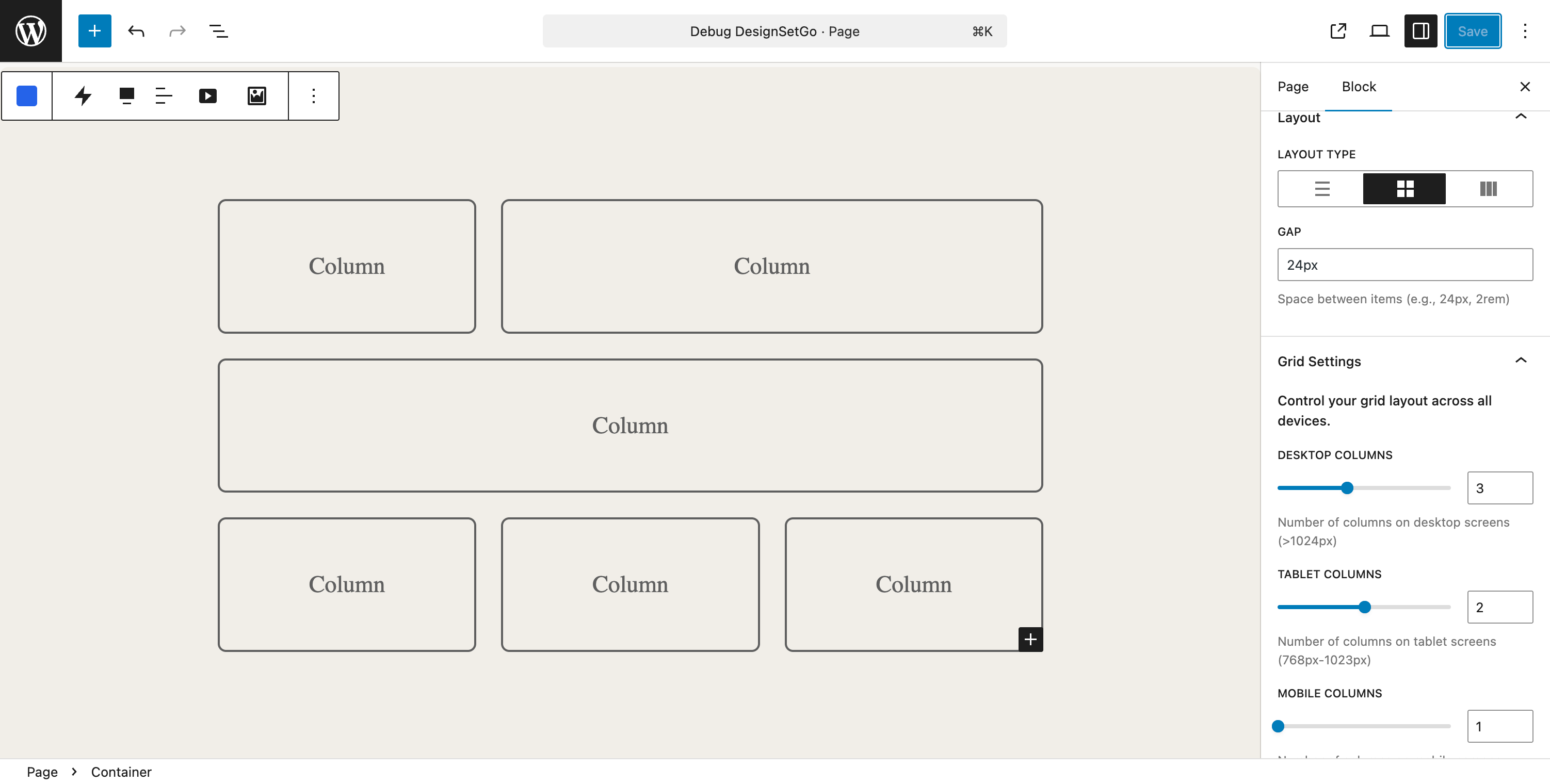
Bloc d’onglets avec orientation horizontale, icônes et plusieurs options de style 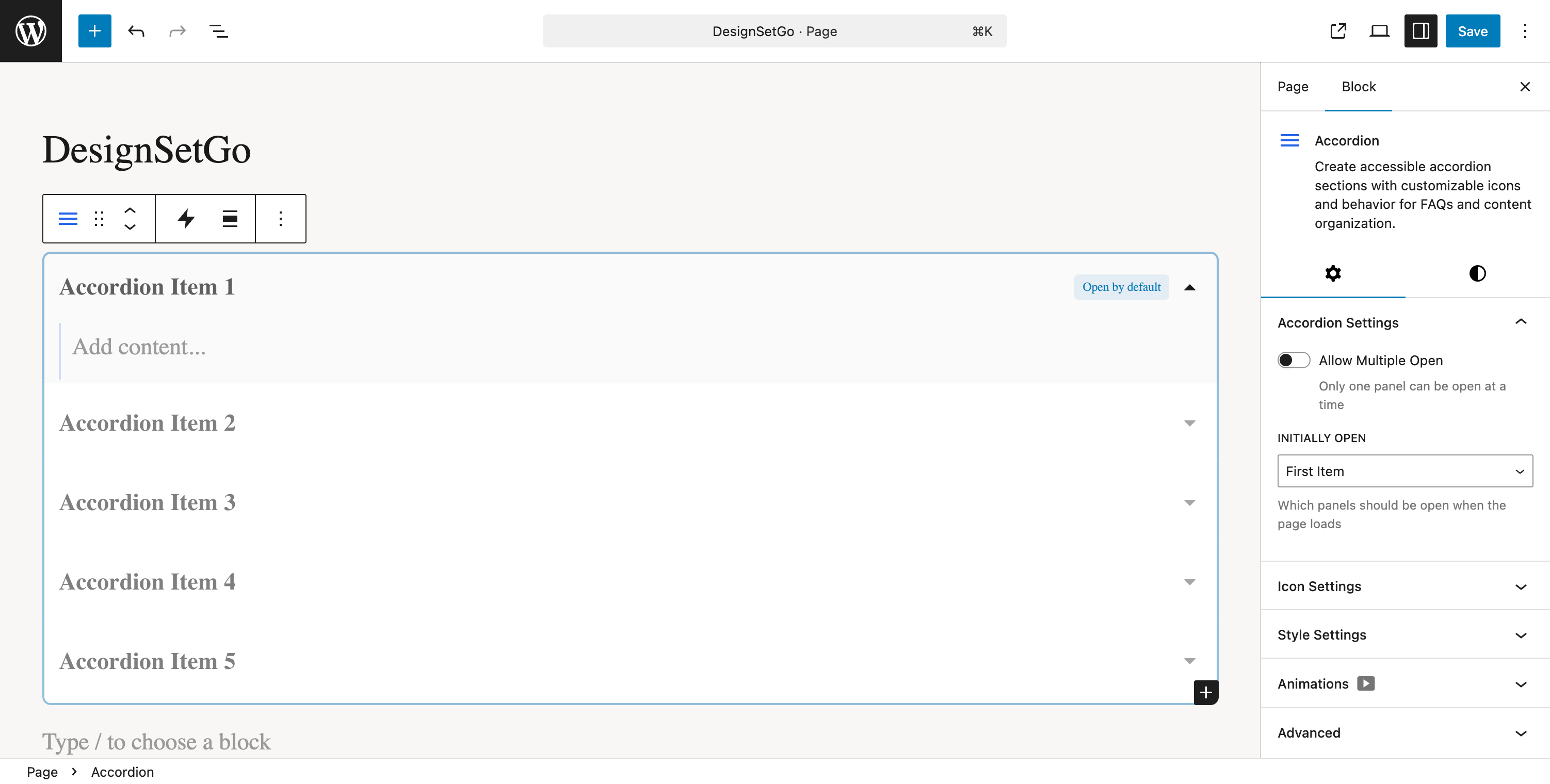
Bloc accordéon avec panneaux rabattables et animations fluides 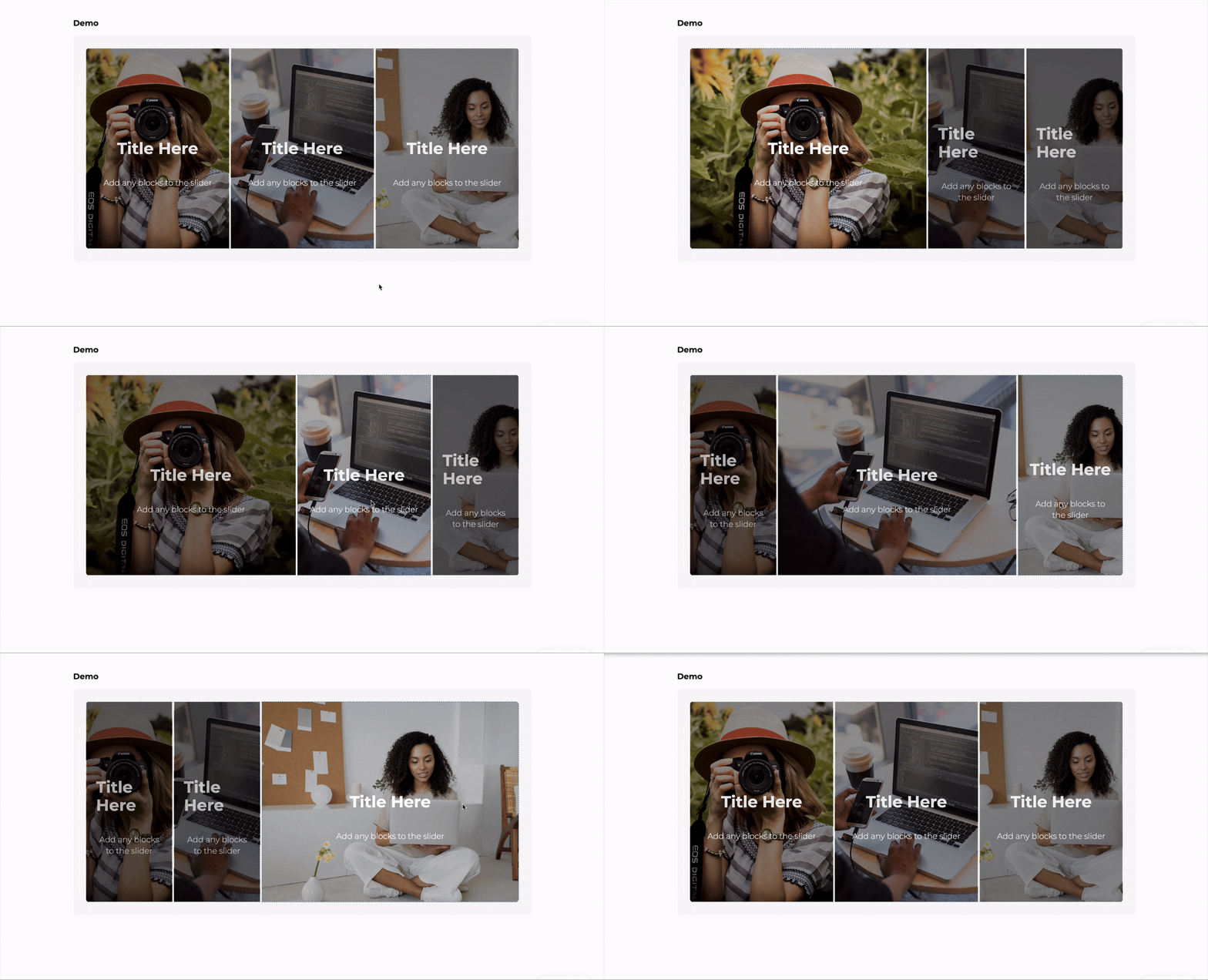
Bloc de groupes de compteurs avec statistiques animées et formatage des nombres 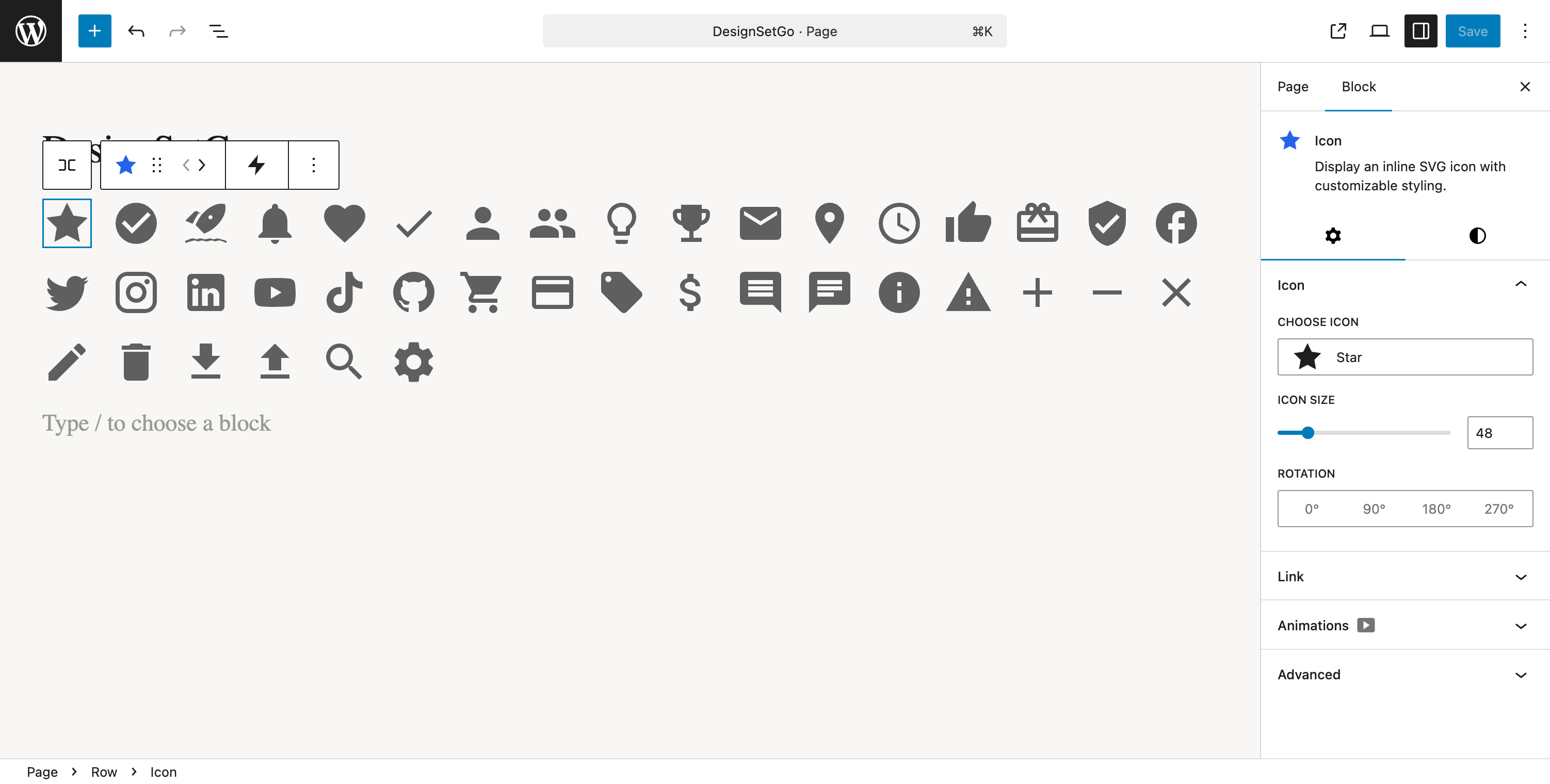
Bloc d’icônes avec plus de 500 icônes, styles de formes et options de personnalisation 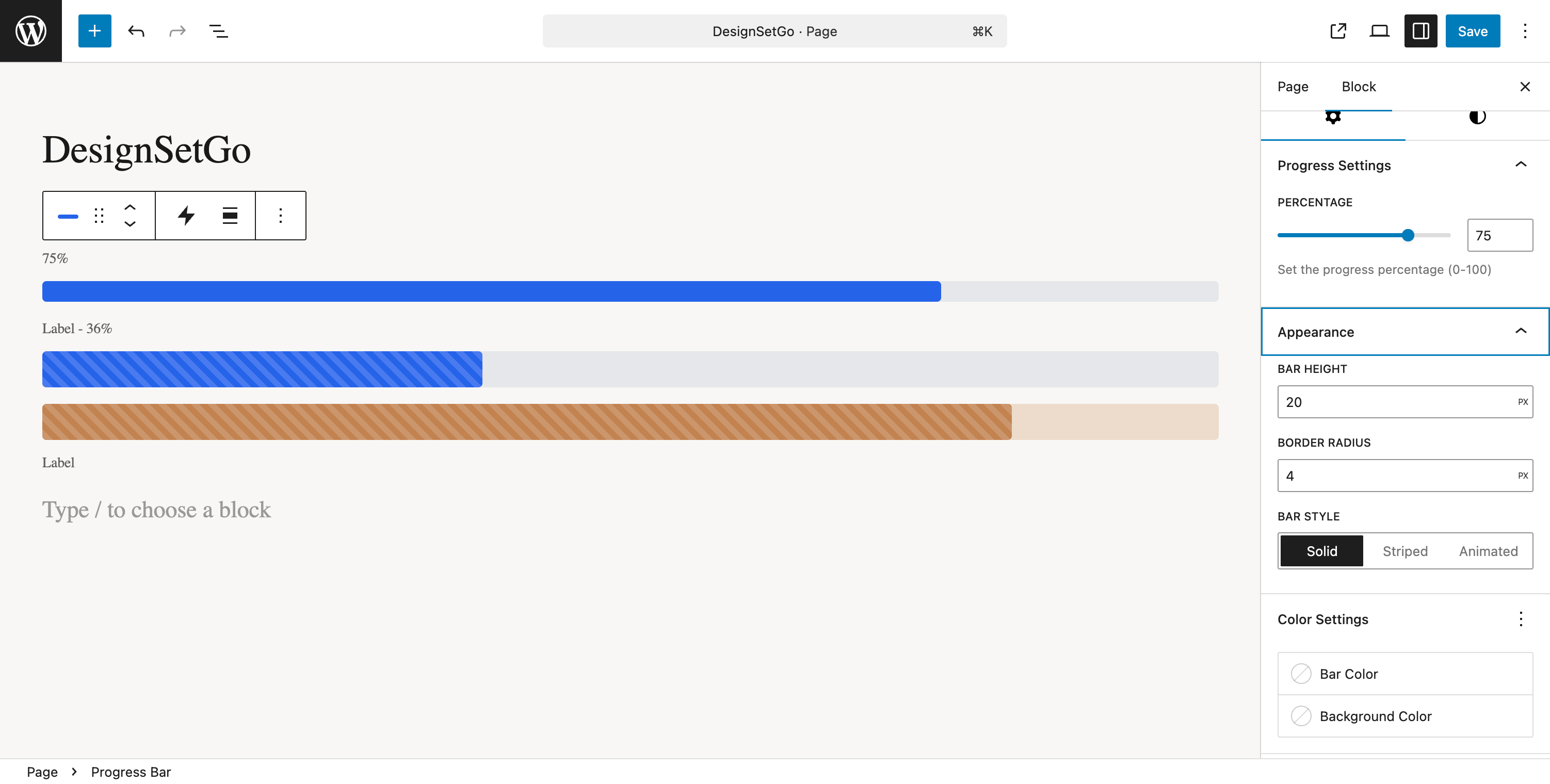
Barre de progression avec remplissages animés et plusieurs styles d’affichage 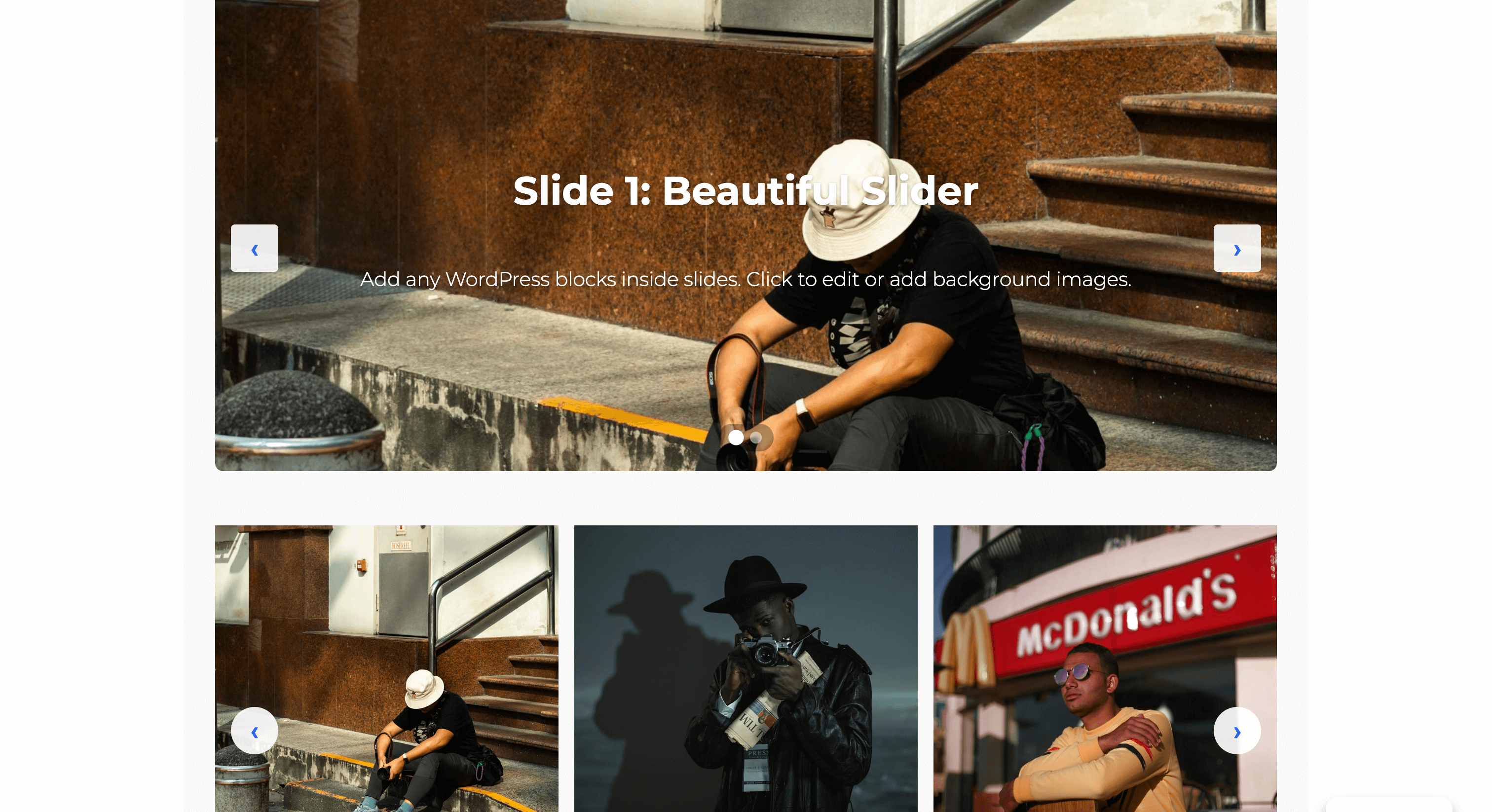
Contrôles de l’animation des blocs affichant les effets d’entrée et les options de synchronisation
Blocs
Cette extension fournit 47 blocs.
- Blobs Create random, unique, and organic-looking blob shapes. Customize with gradients, overlays, and images. Animate with smooth morphing effects.
- Row Flexible horizontal or vertical layouts with wrapping. Perfect for button groups, hero sections, and responsive card layouts.
- Scrolling Gallery Display rows of images that scroll horizontally in alternating directions based on page scroll. For best performance, use optimized images (WebP format recommended) and limit to 20 images or less.
- Section Vertical stacking container for sections and content areas. Perfect for building layouts with consistent spacing. Can be nested within other sections for complex page structures.
- Counter Group Display animated statistics and numbers that count up on scroll
- Icon Display an inline SVG icon with customizable styling.
- Countdown Timer Display a countdown timer to a specific date and time with customizable styling.
- Tabs Create tabbed content with icons, deep linking, and responsive accordion mode.
- Modal Trigger A button or link that opens a modal dialog.
- Flip Card Interactive card that flips to reveal content on the back. Perfect for team profiles, product showcases, and feature highlights.
- Image Accordion Display a series of expandable image panels that reveal content on hover or click, perfect for showcasing portfolios, galleries, or featured content.
- Pill Display text with a rounded background that wraps tightly around content.
- Form Builder Create custom forms with multiple field types, AJAX submission, and spam protection.
- Breadcrumbs Display navigation breadcrumbs with Schema.org markup for improved UX and SEO.
- Slider A modern, performant slider with multiple transition effects, auto-play, and full block support inside slides.
- Card Display content in a card layout with image, badge, title, subtitle, body text, and CTA button. Perfect for pricing, features, services, and team members.
- Icon List Create a list of items with icons, titles, and descriptions.
- Icon Button A customizable button with optional icon and hover animations.
- Divider Add a visual separator with multiple style options including solid, dashed, gradient, and decorative patterns.
- Map Display an interactive map using OpenStreetMap or Google Maps.
- Grid (DSG) Responsive multi-column grid layouts. Perfect for feature grids, product listings, team members, and card layouts.
- Scroll Accordion Accordion that reveals items progressively as you scroll down the page
- Accordion Create accessible accordion sections with customizable icons and behavior for FAQs and content organization.
- Modal Create accessible modal dialogs with customizable triggers and content.
- Table of Contents Auto-generate a table of contents from page headings with smooth scroll navigation and scroll spy.
- Progress Bar Display progress or statistics with an animated bar
- Flip Card Back Back face of the flip card.
- Email Field Email input field with built-in validation.
- Tab Individual tab panel within a Tabs block.
- Checkbox Field A single checkbox field for forms.
- Icon List Item A single item in an icon list with icon, title, and description.
- Phone Field A phone number input field for forms.
- Number Field A number input field for forms.
- Hidden Field A hidden field for passing data in forms.
- Time Field A time picker input field for forms.
- Image Accordion Item An individual expandable panel within an image accordion.
- Accordion Item An individual collapsible item within an accordion.
- Slide Individual slide within a slider with background image support and full block flexibility.
- Scroll Accordion Item Individual item within a Scroll Accordion
- Select Field A dropdown select field for forms.
- Textarea Multi-line text area for longer text input.
- Text Field Single-line text input field for forms.
- Reveal Container that reveals hidden content on hover
- Date Field A date picker input field for forms.
- Flip Card Front Front face of the flip card.
- URL Field A URL/website address input field for forms.
- Counter Individual counter item with animated number
Installation
Installation automatique
- Connectez-vous à votre tableau de bord WordPress
- Aller sur Extensions > Ajouter une extension.
- Rechercher « DesignSetGo »
- Cliquez sur Installer maintenant.
- Cliquez sur Activer.
- Commencez à utiliser les blocs dans l’éditeur de blocs !
Installation manuelle
- Téléchargez le fichier ZIP de l’extension.
- Connectez-vous à votre tableau de bord WordPress
- Allez dans Extensions > Ajouter une extension > Téléverser une extension
- Choisissez le fichier ZIP et cliquez sur Installer maintenant.
- Cliquez sur Activer.
- Les blocs sont désormais disponibles dans l’éditeur
Après l’activation
- Modifier une publication ou une page
- Cliquez sur le bouton + pour ajouter un bloc.
- Retrouvez les blocs DesignSetGo dans la catégorie DesignSetGo.
- Insérez un bloc et configurez-le à l’aide des contrôles de l’inspecteur
- Consultez la documentation pour obtenir des guides détaillés
FAQ
-
Cela fonctionnera-t-il avec mon thème ?
-
Oui ! DesignSetGo est conçu pour fonctionner avec n’importe quel thème WordPress moderne. Il respecte les couleurs, l’espacement et les réglages de typographie de votre thème dans le fichier theme.json. Testé avec les thèmes Twenty Twenty-Five et FSE.
-
Cela ralentira-t-il mon site ?
-
Non ! DesignSetGo est conçu pour la performance. L’ensemble du code CSS est inférieur à 30 Ko, aucune dépendance à jQuery (économie de 150 Ko), et les blocs chargent uniquement ce que vous utilisez réellement. Vos scores PageSpeed restent élevés.
-
Dois-je savoir coder ?
-
Pas du tout. Si vous pouvez utiliser les blocs WordPress, vous pouvez utiliser DesignSetGo. Tout est contrôlé par l’inspecteur de blocs habituel – aucun code n’est nécessaire. (Mais si vous souhaitez ajouter des feuilles de style CSS personnalisées à n’importe quel bloc, vous pouvez le faire).
-
Que se passe-t-il si je désactive l’extension ?
-
Votre contenu reste intact. Parce que DesignSetGo utilise les standards de WordPress, vos mises en page ne seront pas cassées. Elles seront simplement rendues comme des conteneurs et du contenu standard. Pas de balisage propriétaire, donc aucun enfermement.
-
L’éditeur correspond-il à l’interface publique ?
-
Oui, tout à fait. DesignSetGo utilise les mêmes compositions que les blocs natifs de WordPress pour garantir que ce que vous voyez dans l’éditeur est ce qui apparaît sur votre site réel. Pas de surprises.
-
Ai-je besoin de Contact Form 7 ou d’une autre extension de formulaire ?
-
Non ! DesignSetGo comprend un constructeur de formulaires complet avec 11 types de champs, une soumission AJAX, une protection indésirables et des notifications par e-mail. Tout est intégré et fonctionne sans services externes.
-
Cela fonctionne-t-il avec le l’Éditeur de Site (FSE) ?
-
Absolument. Tous les blocs fonctionnent de manière transparente avec FSE, l’éditeur de site, les modèles et les parties de modèles. Le module entête épinglé est spécialement conçue pour les parties de modèle d’entête de FSE.
-
Puis-je l’utiliser avec WooCommerce ?
-
Oui ! Utilisez les blocs DesignSetGo sur n’importe quelle page WooCommerce pour améliorer la mise en page des produits, créer des sections personnalisées et améliorer l’expérience d’achat.
-
Comment obtenir de l’aide ?
-
Consultez la documentation, visitez le forum d’assistance, ou signalez les bogues sur GitHub.
Avis

Contributeurs/contributrices & développeurs/développeuses
« DesignSetGo » est un logiciel libre. Les personnes suivantes ont contribué à cette extension.
Contributeurs
“DesignSetGo” a été traduit dans 1 locale. Remerciez l’équipe de traduction pour ses contributions.
Traduisez « DesignSetGo » dans votre langue.
Le développement vous intéresse ?
Parcourir le code, consulter le SVN dépôt, ou s’inscrire au journal de développement par RSS.
Journal des modifications
1.3.0 – 2025-12-06
New Features:
* New: WordPress 6.9 Abilities API support – 50 AI abilities for block insertion, configuration, and section generation
* New: Text Style inline format – apply colors, gradients, font sizes, and highlights to selected text like bold/italic
* New: Scroll Parallax extension – Elementor-style vertical and horizontal parallax effects with per-device controls
* New: Text Reveal extension – scroll-triggered text color animation that simulates natural reading progression
* New: Expanding Background extension – scroll-driven background that expands from a small circle to fill sections
* New: Cloudflare Turnstile integration for form spam protection – modern, privacy-friendly alternative to reCAPTCHA
WordPress 6.9 Compatibility:
* Enhancement: Conditionally load Abilities API polyfill only for WordPress < 6.9 (6.9+ includes it natively)
* Enhancement: 26 new abilities added including inserters, configurators, and section generators
* Enhancement: Updated « Tested up to » to WordPress 6.9
Improvements:
* Enhancement: Icon Button now respects WordPress width constraints and inherits theme.json button styles
* Enhancement: Icon Button properly integrates with FSE button settings (colors, padding, border-radius)
* Enhancement: Admin settings page now properly displays translations for all supported languages
Bug Fixes:
* Fix: Icon Button display and width issues in constrained layouts
* Fix: Admin settings page translation loading with proper JSON translation file generation
* Fix: Added missing wp_set_script_translations() call for admin JavaScript bundle
Documentation:
* Docs: Added comprehensive documentation for all new extensions and formats
* Docs: Updated Abilities API documentation with complete reference for all 50 abilities
1.2.1 – 2025-11-24
New Features:
* New: Form submissions admin now displays email delivery status (sent/failed) with visual indicators
* New: Detailed email delivery information in submission sidebar (recipient, date, status)
* New: Data retention enforcement and configurable anti-abuse settings for form submissions
* New: Missing blocks and extensions now properly display in admin Dashboard
Security Fixes:
* Security: Added CSRF protection for form submissions to prevent cross-site request forgery attacks
* Security: Restricted form submissions to admin-only access for better data protection
* Security: Implemented trusted proxy IP resolution to prevent IP spoofing in rate limiting
Performance:
* Performance: Implemented lazy loading for icon library – critical optimization reducing initial bundle size
Bug Fixes:
* Fix: Form email deliverability – changed From address default from admin email to wordpress@{sitedomain} to match WordPress core and prevent SPF/DKIM/DMARC failures
* Fix: Form validation, rate limiting, and email tracking issues resolved
* Fix: Email status display bug in admin dashboard
* Fix: Admin dashboard capability check error preventing proper access control
* Fix: Admin dashboard handling of blocks data preventing crashes
Enhancements:
* Enhancement: Added debug logging to track email notification flow and diagnose sending issues
* Enhancement: Updated From Email helper text to reflect new domain-matched email default
1.2.0 – 2025-11-21
New Features:
* New: Breadcrumbs block with Schema.org markup for improved SEO and navigation
* New: Table of Contents block with automatic heading detection, smooth scrolling, and sticky positioning
* New: Modal/Popup block with accessible triggers, animations, and gallery support
* Enhancement: Modal close triggers and improved icon-button UX with better accessibility
Bug Fixes:
* Fix: Table of Contents critical production readiness fixes for stable performance
* Fix: Table of Contents sticky positioning and scroll spy highlighting functionality
* Fix: Table of Contents error handling for better reliability
* Fix: Prevent sticky header from affecting footer template parts
Security:
* Security: Fixed 3 critical vulnerabilities in Modal block + performance optimizations
Internationalization:
* i18n: Added modal block translations to all language files
* i18n: Updated translation strings for modal close functionality
Maintenance:
* Maintenance: Optimized screenshot-1.gif (24MB 5.7MB)
* Maintenance: Updated WordPress.org assets and screenshots
1.1.4 – 2025-11-19
Bug Fixes:
* Fix: Slider initialization on uncached first load – sliders now display correctly on first page visit
* Fix: Critical race condition in image loading detection that could cause 3-second initialization delays
* Fix: Memory leak from uncleaned setTimeout timers in slider initialization
* Fix: Double-counting bug in slider image load detection that could prevent initialization
Performance:
* Performance: Eliminated redundant DOM queries in slider initialization
* Performance: Optimized Array.from conversions for better memory efficiency
1.1.3 – 2025-11-16
Performance:
* Performance: Major CSS loading strategy optimization – improved enqueue logic and selective loading
* Performance: Fixed forced reflows in JavaScript and optimized asset loading strategy
* Performance: Eliminated layout thrashing by batching DOM reads/writes and deferring non-critical operations
Bug Fixes:
* Fix: Flip card back panel now correctly displays background color and text in editor
* Fix: Added alignment options to countdown timer block for better layout control
1.1.2 – 2025-11-15
New Features:
* New: Added developer filter hooks for advanced Custom CSS customization
Bug Fixes:
* Fix: Section hover background now correctly renders behind content instead of over text
* Fix: Resolved z-index stacking issue where hover overlay appeared above section content
Enhancements:
* Enhancement: Improved Custom CSS textarea UX with better styling and increased height
1.1.1 – 2025-11-15
Security Fixes:
* Security: Fixed HIGH severity string escaping vulnerability in counter number formatting
* Security: Added escapeReplacement() function to prevent injection via replacement string special sequences
Bug Fixes:
* Fix: Escape special characters in separator strings used by Counter and Counter Group blocks
1.1.0 – 2025-11-14
New Blocks:
* New: Card block with multiple layout presets (horizontal, vertical, overlay, compact, featured)
* New: Map block with Google Maps and OpenStreetMap support, privacy mode, and customizable markers
Admin Interface Overhaul:
* New: Completely redesigned admin dashboard with stat cards showing blocks, extensions, and form submissions
* New: Enhanced dashboard displays blocks organized by category and extension status pills
* New: Tabbed settings interface organized into Features, Optimization, and Integrations tabs
* New: Google Maps API key management in Settings > Integrations with security guidance
* Enhancement: Two-column grid layouts for improved settings panel space efficiency
* Enhancement: Gradient icon stat cards with hover effects for better visual hierarchy
* Enhancement: Collapsible sections for advanced settings to reduce vertical scroll
Translations:
* Enhancement: Added translation support for 9 languages (Spanish, French, German, Italian, Portuguese, Dutch, Russian, Chinese, Japanese)
* Enhancement: Updated POT file with 100% translation coverage for all admin strings
Security & Bug Fixes:
* Security: Fixed js-yaml prototype pollution vulnerability (CVE-2023-2251)
* Fix: Added missing ToggleControl import to Card block editor component
* Fix: Google Maps API key now persists correctly after save/reload
* Fix: API key properly exposed to frontend via data attributes with secure referrer-based protection
1.0.1 – 2025-11-14
- Docs: Streamlined readme.txt with JTBD-focused messaging for better scannability
- Docs: Condensed description from 516 to 339 lines while keeping essential information
- Docs: Reordered FAQ to address user anxiety barriers first
1.0.0 – 2025-11-12
🚀 Initial Release
43 Professional Blocks:
* 5 Container blocks (Row, Section, Flex, Grid, Stack)
* 13 Form Builder blocks (complete system with AJAX, spam protection, email notifications)
* 10 Interactive blocks (Tabs, Accordion, Flip Card, Slider, Counters, Progress Bar, Scroll effects)
* 8 Visual blocks (Icons, Icon Button, Icon List, Card, Pill, Divider, Countdown Timer, Blobs)
* 9 Child blocks (Tab, Accordion Item, Slide, Flip Card Front/Back, Icon List Item, Image Accordion Item, Scroll Accordion Item, Counter)
11 Universal Extensions (work with ANY block):
* Block Animations (24+ effects with scroll triggers)
* Sticky Header (FSE-optimized with offset controls)
* Clickable Groups (accessible card/container links)
* Background Video (YouTube and self-hosted)
* Responsive Visibility (hide by device)
* Max Width (content width constraints)
* Custom CSS (per-block styling)
* Grid Span (column/row control)
* Reveal Control (advanced hover effects)
* Text Alignment Inheritance (parent-child context)
Performance & Quality:
* Built with WordPress core patterns for guaranteed editor/frontend parity
* Optimized bundles, no jQuery, code-splitting
* WCAG 2.1 AA accessible with full keyboard navigation
* FSE compatible with theme.json integration
* Comprehensive documentation and developer guides