


| CARVIEW |
Dio's Workshop Welcome to my brain. It’s messy. It’s interesting. And it’s all connected if you stick around long enough. "Believe Nothing: no matter who said, even if I have said it, except it agree with your own reason and common sense. Siddhartha Guatamo, the Buddha.

GP4U
>>>>UPDATE<<<<<<
There are other PGP like programs available. You do not have to have TAILS to use PGP or the like. One such program is Gpg4win. I use this in my windows configuration as well as the GnuGP in TAILS. I created a public/private key in each one, was able to import each to the other and have not had any communication conflicts so far. And each has similar traits in setup and use so this page is still a walk through for either setup. Use your best judgement on what works best for you.
<<<<<<<<<<<<<<<<<>>>>>>>>>>>>>>>>>>>>>>>
So, here you are, on a camouflaged page of TAILS and its time to start learning about being secretive. Remember my lesson on establishing a superstrong password and the fact that no matter how strong a password, you are the weakest link. I can’t repeat that lesson enough.
Now, if you look down on the right of the taskbar, you will see an icon that looks like a clipboard. That is your encryption program. Note, it is already up and running. The people that designed TAILS know their agenda well. (right next to it is an onion icon. TOR for those that already use it.) Anywhoos,right click that clipboard and open up your password manager.(should look as follows.)

Now, at the upper left under file, hit the new button and you should see this.
Select PGP Key.

This is pretty obvious for most. No need to elaborate too much. Do click the advanced key options though.

Choose RSA and bump up your encryption to whatever is comfortable for your computer. Oh, forgot to tell ya, slow computers can do this but they may take longer on higher encryption rates. I do run 4096 on mine and its a mini and doesn’t seem bogged by that. Just a suggestion for the highest your computer can handle. Go ahead and hit create once you have everything filled out. Have that passphrase ready. Make sure its different than your log-in Consider multiple passphrases the three lock box of yore. YargHHHH!!!!!

This screen will not allow you to screw up, too much of course. BUT, be aware that if you do make a typo, you must repeat it for ever after. IF you think you did, start over and try again. No matter what line you are typing in, it will be very forgiving up to the point you hit the generate key. After that, you get to live with whatever you just typed in.
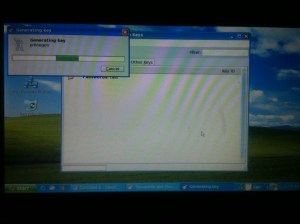
This may take a few minutes, BEER RUN!!!!!!

And there it is, Yada Yada Yada now has a private key and a public key. How to get that public key to distribute? Highlight and click the profile and hit copy. Then you have to open a text editor. 
Note, TEXT EDITOR not a word program like LibreOffice or OpenOffice or MSOffice. Just a simple text editor that won’t try to re-write the ASCII codes this thing generates.

Note the layers of gobbledigook here. this is actually just a name and contact info (about 30 letters) encrypted. The file is really not that large but it does take up more space on the drives. Keep that in mind. You don’t really want to save any encrypted messages, and not just for the storage needed. (THINK SECURITY!!!!) That piece of info is what you will pass along to trusted persons for sending messages TO YOU. Once they run the encryption, not even they can open it up, only you. Keep this is a safe place. IF you feel the need to export your private key, and you may: Guard it like it were your firstborn, your parents and your bank account all rolled up into one.
Now, how to use that key, or one of your associates on your keyring (which you will eventually have) into an encrypted message. Again, open that text editor and write out what you need to send forward; be it Auntie Allisons Sweet potatapie recipe or whatever.

Save that file to where ever. Now, go up to edit and the drop down will give you options for encryption.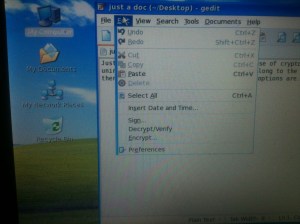
Hit encrypt and it will pop up a menu of your keyring and ask you “whom” the message is intended. Click the recipient and hit ok. (you did make sure you wrote to them politely correct? Cause if you spoke out of turn here, you won’t be able to do anything other than delete the file and start over after you hit ok.)
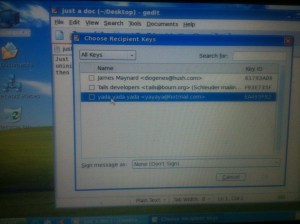
(highlight recipient and ENCRYPT like magic!) \
\
And that is what those short little words turn into when you hit that ok. NOW, is when you can cut and paste or copy/paste into an email client you are using. Doesn’t matter what one as only the recipient can open this beast now.
Receiving and reading anything encrypted TO YOU is the reverse. Copy and paste into an text editor, decrypt it and read. Enjoy. I hope this clears up any confusions you may have had .
I can’t offer any suggestions as to what client to use as they are all under the microscope now and sending encryption may pull your name to the top of the list. I can’t say that encryption will keep you safe, but it will add an envelope to your mail to keep prying eyes from seeing what is sent. Keep in mind also to write over the files you just copies and pasted. Simple enough go in and start putting a bunch of shit all over the text you just copied and save, then delete it. Yes, it could possibly be pulled back off a drive, but adding anything into that gobbledigook and saving then deleting will destroy its integrity. Again, the weakest link in security is always the human element: IE YOU. Don’t save anything without destroying it by random keystrikes in the body and then saving it and deletion. If you need to retain a message, copy it onto a drive DIFFERENT than the one you are using for storage of your keys, AND store it encrypted, not decrypted.
Remember, you are encrypting things to keep prying eyes away, you are the weakest link in your security now, and only you can determine how paranoid to be about your personal information. I would suggest being VERY paranoid about it.
Share this:
One response
Leave a comment or hit the LIKE button, OR BOTH. Thank you! Cancel reply
Help support this Blogger
SUPPORT YOUR FAITHFUL BLOGGER

It was the early part of the Tweens when the political divisions of the United States reached irreconcilable differences. Ted, a burnt out computer programmer, and Jim, a double amputee combat vet, reverse engineer the pentagons drone program and create a rebel air force. While traveling the country helping others defend what is left of the country, they run afoul a most evil woman intent on creating a serfdom within the country.



A beginner’s guide to going off grid. how to evaluate if you even want to make the attempt. written by the curmudgeonly author of this blog and his dog


Contact me
maynardDOTjDOTkDOT01ATprotonmail.com
Categories
- anarchy or liberation
- Behind the scenes of the shop
- blockchain
- CARNIVORE!
- fictional shorties
- Getting healthy
- Just talkin'
- Kittehs
- LYSSA
- Metaphysical rambles
- palm to face moment
- podcast
- preps
- random misfires
- self promotion
- story time
- Sunday histories
- techy talk
- tips for the kids
- Uncategorized
- yakking
FAIR USE NOTICE: This site may contain copyrighted material such as articles, Audio broadcasts (podcasts), video snippets and commentary from various sources, the use of which may not be authorized by the copyright owner. Such material is posted here in the cause of understanding and discussion of environmental, political, religious, economic, Constitutional, democratic, scientific, and societal issues affecting our lives and the world. This constitutes a ‘fair use’ of such copyrighted material as provided for in section 107 of the US Copyright Law. In accordance with Title 17 U.S.C. Section 107, the material on this site is available and distributed without profit for informational, research and educational purposes. For more information go to: https://www.law.cornell.edu/uscode/17/107.shtml.
The publisher of this site DOES NOT own the copyrights of the images on the site. The copyrights lie with the respective owners.
If any copyrighted material has been published, genuine rights owners may kindly email us at Jamesmaynard four zero at gmail dot com We will discuss about it's removal per 18 USC 107.
Original commentary on this site is ©copyright by the owner of Diosworkshop.com and may be reprinted and used with acknowledgment of this site.
-
Subscribe
Subscribed
Already have a WordPress.com account? Log in now.
 Dio's Workshop
Pingback: Weekend of GrRRR!!!!! | Dio's Workshop