Developer Tools
Image API
Create transformative visual experiences with image APIs.
| CARVIEW |
Developer Tools
Create transformative visual experiences with image APIs.


We’re showing a resized version of the original asset to avoid slow loading speeds. View the original.
cloudinary.image("hiking_dog_mountain.jpg", {transformation: [
  {aspect_ratio: "0.5", gravity: "auto", width: 433, crop: "fill"},
  {quality: "auto"},
  {fetch_format: "auto"}
]})new CloudinaryImage("hiking_dog_mountain.jpg")
.resize(
fill()
.width(433)
.aspectRatio(0.5)
.gravity(autoGravity())
)
.delivery(quality(auto()))
.delivery(format(auto()));new CloudinaryImage("hiking_dog_mountain.jpg")
.resize(
fill()
.width(433)
.aspectRatio(0.5)
.gravity(autoGravity())
)
.delivery(quality(auto()))
.delivery(format(auto()));new CloudinaryImage("hiking_dog_mountain.jpg")
.resize(
fill()
.width(433)
.aspectRatio(0.5)
.gravity(autoGravity())
)
.delivery(quality(auto()))
.delivery(format(auto()));new CloudinaryImage("hiking_dog_mountain.jpg")
.resize(
fill()
.width(433)
.aspectRatio(0.5)
.gravity(autoGravity())
)
.delivery(quality(auto()))
.delivery(format(auto()));CloudinaryImage("hiking_dog_mountain.jpg").image(transformation=[
{'aspect_ratio': "0.5", 'gravity': "auto", 'width': 433, 'crop': "fill"},
{'quality': "auto"},
{'fetch_format': "auto"}
])(new ImageTag('hiking_dog_mountain.jpg'))
->resize(Resize::fill()->width(433)
->aspectRatio(0.5)
->gravity(
Gravity::autoGravity())
)
->delivery(Delivery::quality(
Quality::auto()))
->delivery(Delivery::format(
Format::auto()));cloudinary.url().transformation(new Transformation()
.aspectRatio("0.5").gravity("auto").width(433).crop("fill").chain()
.quality("auto").chain()
.fetchFormat("auto")).imageTag("hiking_dog_mountain.jpg");cl_image_tag("hiking_dog_mountain.jpg", transformation: [
{aspect_ratio: "0.5", gravity: "auto", width: 433, crop: "fill"},
{quality: "auto"},
{fetch_format: "auto"}
])cloudinary.Api.UrlImgUp.Transform(new Transformation()
.AspectRatio("0.5").Gravity("auto").Width(433).Crop("fill").Chain()
.Quality("auto").Chain()
.FetchFormat("auto")).BuildImageTag("hiking_dog_mountain.jpg")cloudinary.image('hiking_dog_mountain.jpg').transformation(Transformation()
.resize(Resize.fill().width(433)
.aspectRatio(0.5)
.gravity(
Gravity.autoGravity())
)
.delivery(Delivery.quality(
Quality.auto()))
.delivery(Delivery.format(
Format.auto())));imageView.cldSetImage(cloudinary.createUrl().setTransformation(CLDTransformation()
.setAspectRatio("0.5").setGravity("auto").setWidth(433).setCrop("fill").chain()
.setQuality("auto").chain()
.setFetchFormat("auto")).generate("hiking_dog_mountain.jpg")!, cloudinary: cloudinary)MediaManager.get().url().transformation(new Transformation()
.aspectRatio("0.5").gravity("auto").width(433).crop("fill").chain()
.quality("auto").chain()
.fetchFormat("auto")).generate("hiking_dog_mountain.jpg");cloudinary.image('hiking_dog_mountain.jpg').transformation(Transformation()
.resize(Resize.fill().width(433)
.aspectRatio(0.5)
.gravity(
Gravity.autoGravity())
)
.delivery(Delivery.quality(
Quality.auto()))
.delivery(Delivery.format(
Format.auto())));cloudinary.image {
publicId("hiking_dog_mountain.jpg")
resize(Resize.fill() { width(433)
aspectRatio(0.5F)
gravity(
Gravity.autoGravity())
})
delivery(Delivery.quality(
Quality.auto()))
delivery(Delivery.format(
Format.auto()))
}.generate()new CloudinaryImage("hiking_dog_mountain.jpg")
.resize(
fill()
.width(433)
.aspectRatio(0.5)
.gravity(autoGravity())
)
.delivery(quality(auto()))
.delivery(format(auto()));Leverage generative AI outpainting with our powerful cropping APIs.
Remove unwanted elements from your image with Generative Remove as if they never existed.
Use generative AI and natural language to replace one object or color with another.
Easily rerun prompts and select from multiple outputs, without changing the delivery URL (also works for Generative Fill).
Apply zoom and pan to an image to create a video or animated GIF.
Easily create 3D animations and videos to give customers a 360-degree view of your product.
Create an interactive shopping experience with high-performant and responsive images, videos, 360-degree views, and 3D models.
Quickly make programmatic changes to images using upload presets.
Super resolution upscaling uses AI to transform images from grainy or low quality to high resolution.
Easily clean up the outputs of automated background knockouts to ensure edges are smooth and crisp.
For more, check out our documentation for images and videos.
Original
https://res.cloudinary.com/demo/image/upload/v1689803100/ai/hiker.jpg

Filled (800 pixels wider):
https://res.cloudinary.com/demo/image/upload/c_pad,w_2400,h_1600,b_gen_fill/v1689803100/ai/hiker.jpg
Before:
https://cloudinary-marketing-res.cloudinary.com/image/upload/cups_on_table.jpg

After:
https://cloudinary-marketing-res.cloudinary.com/image/upload/e_gen_remove:prompt_(remove-right-cup)/cups_on_table.jpg
Original
https://res.cloudinary.com/demo/image/upload/v1688737277/ai/model_plain_sweatshirt.jpg

Transformed (shirt to rain coat)
https://res.cloudinary.com/demo/image/upload/e_gen_replace:from_shirt;to_raincoat/v1688737277/ai/model_plain_sweatshirt.jpg

Transformed (shirt to suit jacket)
https://res.cloudinary.com/demo/image/upload/e_gen_replace:from_shirt;to_suit_jacket/v1688737277/ai/model_plain_sweatshirt.jpg
Original: https://res.cloudinary.com/cloudinary-marketing/image/upload/e_gen_background_replace:prompt_scene%20near%20a%20river/aqua-flask-campaign.jpg

Updated: No code changes necessary
https://res.cloudinary.com/demo/image/upload/e_zoompan:from_(g_persons;zoom_3);du_10/w_1300/f_mp4/v1664906306/pm/hikers_mts.jpg
https://res.cloudinary.com/demo/image/upload/dl_200,f_gif,fl_animated/c_fill,h_600,w_600/v1664984700/pm/Shoe.glb
cloudinary.galleryWidget({
    container: "#my-gallery",
    cloudName: "",
    mediaAssets: [{
            tag: "shoes_product_gallery_demo"
        },
        {
            publicId: "pm/shoes_video",
            mediaType: "video"
        }
    ],
    zoom: true
});
myGallery.render();
Grayscale:
https://res.cloudinary.com/demo/image/upload/e_grayscale/v1664903773/pm/mountains_autumn.jpg

Tint
https://res.cloudinary.com/demo/image/upload/e_tint/v1664903773/pm/mountains_autumn.jpg

Image Overlay
https://res.cloudinary.com/demo/image/upload/l_pm:cld_logo/w_230/o_80/fl_layer_apply,g_south_east,x_230,y_120/pm/mountains_autumn.jpg
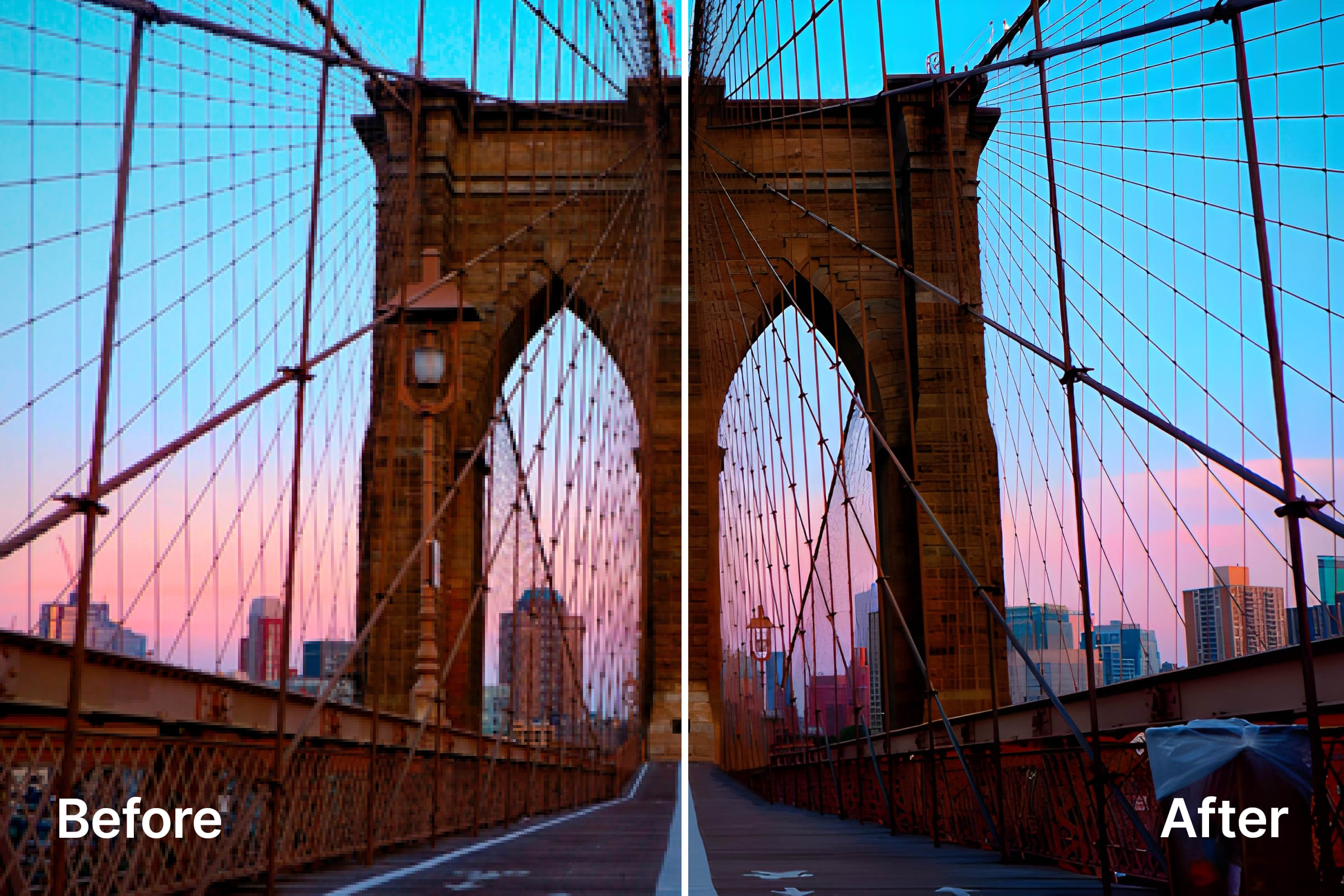
Before (larger with no upscale)
https://cloudinary-marketing-res.cloudinary.com/image/upload/w_2000/brooklyn_bridge.jpg

After (larger with upscaling applied)
https://cloudinary-marketing-res.cloudinary.com/image/upload/e_upscale/w_2000/brooklyn_bridge.jpg
Original: https://res.cloudinary.com/cloudinary-marketing/image/upload/e_background_removal/ridgeform-xil-shoe.jpg

Updated: No code changes necessary
Auto-cropping and filling that adapts to image content and your specified dimensions for precise results.
Perfect your assets with AI-powered object cropping that identifies the most important sections of your image or video. Thousands of out-of-the-box object categories make it fast and accurate.
Correct and right-size the outputs of automated cropping to ensure your preferred focal points remain in the foreground.
Ensure that the most relevant portions of your content are the main focus throughout the duration of each video.
Website and app users automatically view images and videos in the correct size and shape for their device.
Send the best quality asset every time, formatted to the user’s device, browser, and connection — including cutting-edge formats like AVIF, JPEG XL, HEIC, and WebP.
For more, check out our documentation.
Original
https://res.cloudinary.com/demo/image/upload/pm/woman_car.jpg

Auto Crop
https://res.cloudinary.com/demo/image/upload/c_auto,g_auto,w_900,ar_9:16/pm/woman_car.jpg

Auto Crop With Generative Fill
https://res.cloudinary.com/demo/image/upload/c_auto_pad,b_gen_fill,g_auto,w_900,ar_7:16/pm/woman_car.jpg

Original
https://res.cloudinary.com/demo/image/upload/v1688585331/pm/kitchen.jpg

Face Crop
https://res.cloudinary.com/demo/image/upload/c_thumb,w_500,g_auto:face/v1688585331/pm/kitchen.jpg

Hands Crop
https://res.cloudinary.com/demo/image/upload/c_thumb,w_500,g_auto:hands/v1688585331/pm/kitchen.jpg
Original: https://res.cloudinary.com/cloudinary-marketing/image/upload/g_region_dog/ugc-portrait0103.jpg

Updated: No code changes necessary
Original
https://res.cloudinary.com/demo/video/upload/pm/surfer.mp4

Cropped
https://res.cloudinary.com/demo/video/upload/w_600,c_fill,g_auto,ar_9:16/pm/surfer.mp4
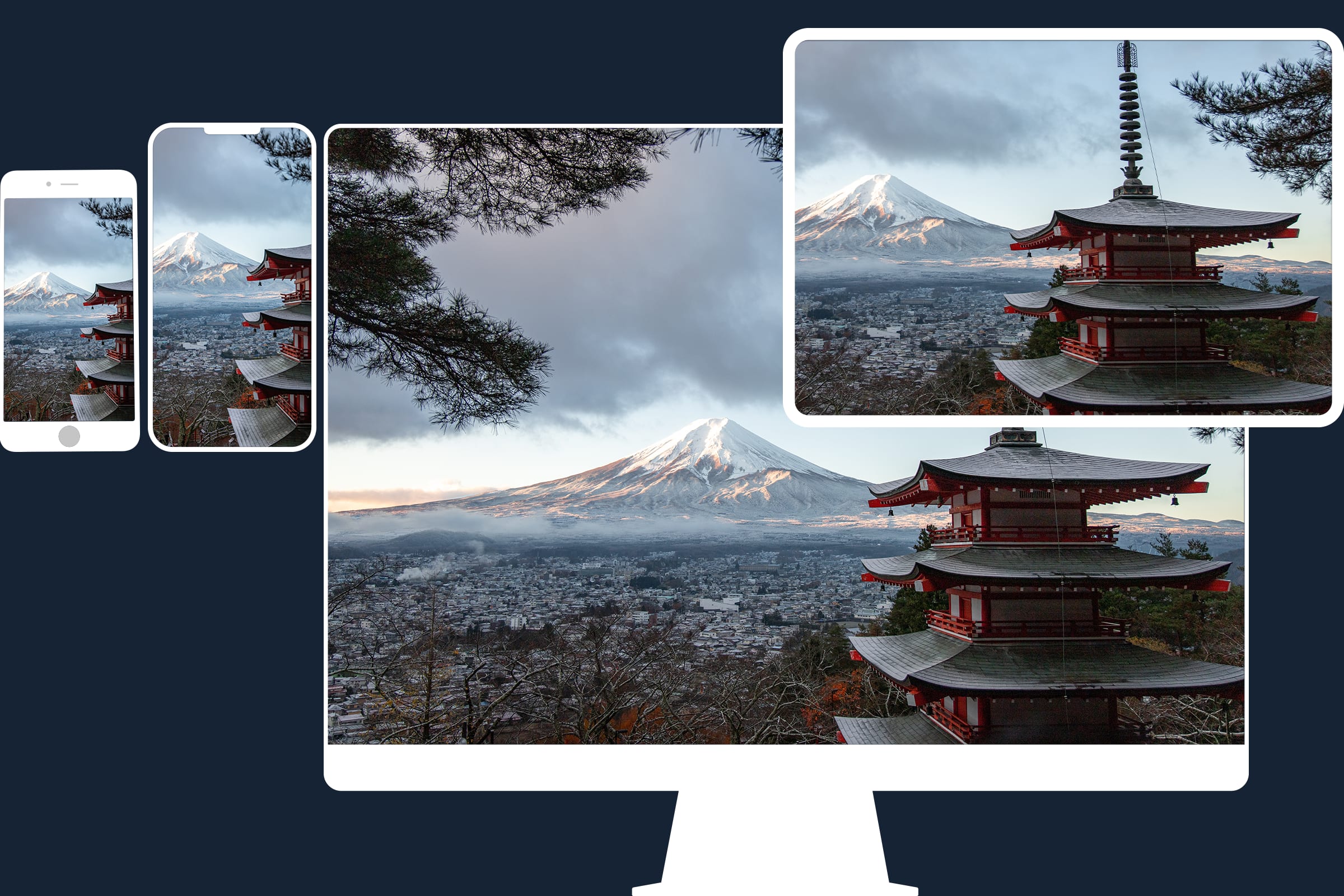
<html>
  <head>
    <title>
      Auto Responsive Images with Cloudinary
    </title>
    <script src="https://unpkg.com/cloudinary-core@latest/cloudinary-core-shrinkwrap.js" type="text/javascript">
    </script>
  </head>
  <body>
    <img data-src="https://res.cloudinary.com/demo/image/upload/c_limit,w_auto/v1689805772/pm/japan.jpg"
    class="cld-responsive">
    <script type="text/javascript">
      var cl = cloudinary.Cloudinary.new({
        cloud_name: "demo"
      });
      cl.responsive();
    </script>
  </body>
</html>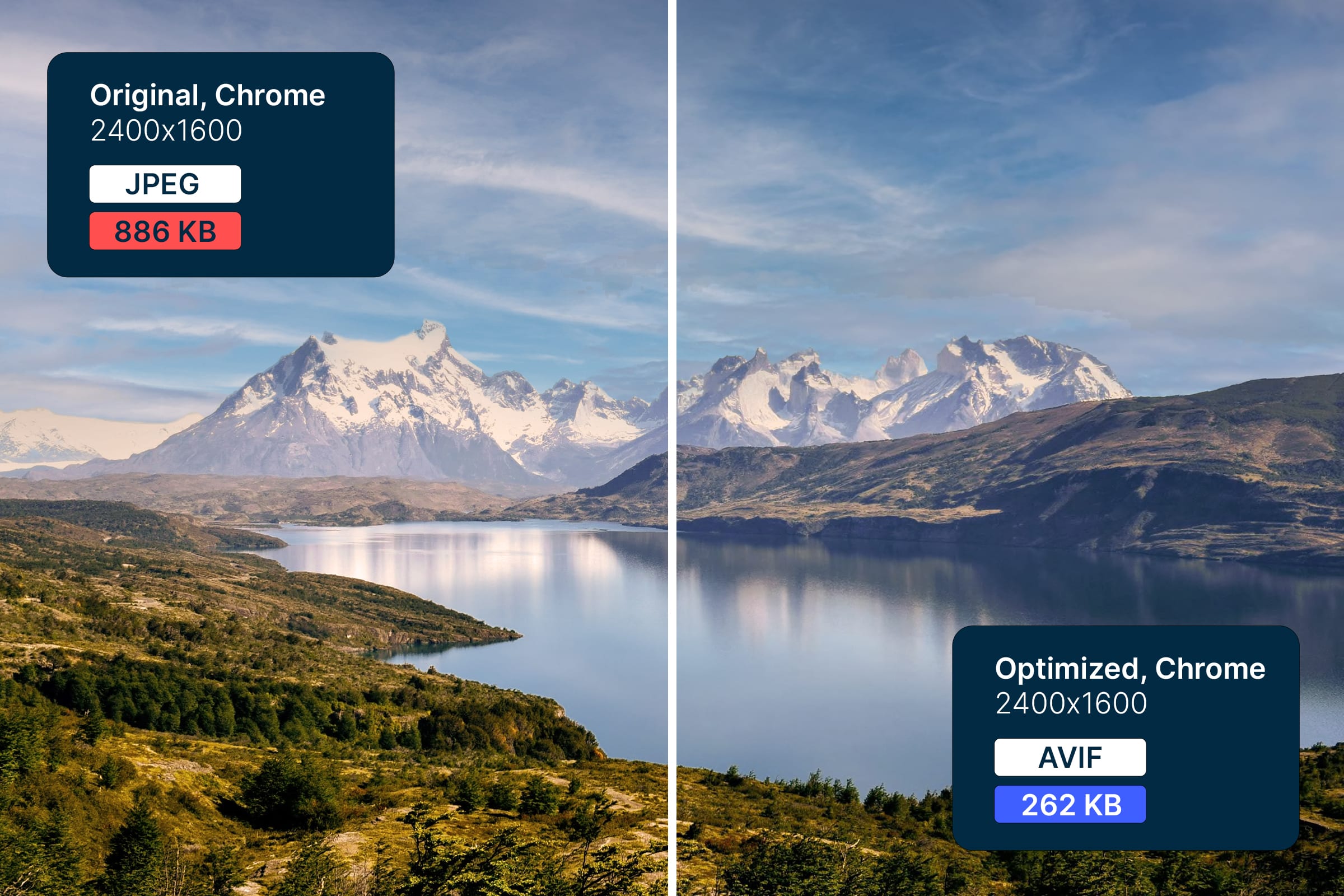
Original
https://cloudinary-marketing-res.cloudinary.com/image/upload/patagonia_mountains

Optimized
https://cloudinary-marketing-res.cloudinary.com/image/upload/f_auto/q_auto/patagonia_mountains
Industry-leading AI tools power auto-tagging of images and video during the upload process.
Improve SEO and accessibility with intelligent image captioning using large language model (LLM) technology.
The Upload widget’s interactive UI enables users to upload assets from a variety of sources and includes AI-based moderation and curation.
Generate presets to automatically transform files upon upload to save time and ensure files are delivery-ready, automatically.
Check out relevant documentation for Upload API, Admin API, and Search API.
// utilize AWS Rekognition with Node.js
cloudinary.v2.uploader
.upload("fashion.jpg",
 {categorization: "aws_rek_tagging"})
.then(result=>console.log(result));
cloudinary.v2.uploader.upload("island.jpg", {
    detection: "captioning"
}).then(result => console.log(result));
var myWidget = cloudinary.createUploadWidget({
    cloudName: 'Your Cloud Name',
    uploadPreset: 'my_preset'
}, (error, result) => {
    if (!error && result && result.event === "success") {
        console.log('Done! Here is the image info: ', result.info);
    }
})
document.getElementById("upload_widget").addEventListener("click", function() {
    myWidget.open();
}, false);
require("dotenv").config();
const cloudinary = require("cloudinary").v2;
cloudinary.api.create_upload_preset({
    name: "auto_crop_square",
    transformation: [{
        width: 200,
        height: 200,
        crop: "fill",
        gravity: "auto"
    }, ],
}).then((uploadResult) => console.log(uploadResult)).catch((error) => console.error(error));Cloudinary’s AI-powered Image API offers a plethora of transformative and customizable features that empower developers to enhance, optimize, and manage their images. From generative image manipulations to intelligent optimizations, the Cloudinary Image API caters to a wide array of use cases.
Leverage Generative Fill and Generative Object Removal to automatically enhance product images. This ensures that your e-commerce platform showcases products at their best by removing distractions and highlighting essential elements.
Utilize Generative Replace to dynamically change specific elements in images based on natural language commands. This can be particularly useful for creating personalized content on the fly, allowing you to adapt images to suit different contexts or promotional campaigns.
Implement 3D spin set and Product Gallery features to provide customers with an interactive shopping experience. Showcase products from multiple angles, allowing users to view 360-degree rotations, zoom in, and explore details, enhancing engagement and potentially boosting sales.
Employ filters and overlays to modify images on the fly programmatically. This can be handy for implementing real-time image effects, enabling users to personalize their experience on your platform.
Use super resolution upscaling to enhance image quality, making your visuals appear sharper and more professional. This is especially beneficial when dealing with user-generated content that may vary in quality.
Perfect your assets with object-aware cropping, which identifies and retains essential elements in images. This is invaluable for ensuring that key features aren’t lost during cropping, providing a polished and professional appearance to your visuals.
Benefit from auto-responsive and automatic optimization features to automatically deliver the best-quality assets tailored to users’ devices, browsers, and connections. Support for cutting-edge image formats ensures optimal performance and faster loading times.
Smart tagging and AI image captioning streamline asset management by automatically categorizing and captioning images, improving searchability, SEO, and accessibility.
Ensure a safe and curated content environment using AI-based moderation during upload. The Upload widget’s interactive UI facilitates easy asset uploads from various sources while maintaining content quality.
Generate automated workflows with preset configurations to transform files upon upload. This saves time and ensures that assets are delivery-ready without manual intervention.
Cloudinary’s API for images unlocks a world of possibilities, empowering businesses and developers to unleash the full potential of their visual assets. Here’s why Cloudinary stands out as the preferred choice for managing and optimizing images.

Cloudinary’s Image API harnesses the power of artificial intelligence to offer cutting-edge image transformations. Generative Fill, Generative Object Removal, and Generative Replace are just a few examples of how AI can enhance and customize images, providing unparalleled flexibility in content creation.

Whether it’s 3D animations, interactive product displays, or real-time image filtering, Cloudinary’s API covers a wide spectrum of image enhancement features. Developers can integrate these capabilities to create visually appealing and dynamic content.

Automatic optimization ensures that images are delivered in the best quality and format based on the user’s device, browser, and connection. This improves website performance and contributes to a better user experience by reducing loading times.

Smart tagging, AI image captioning, and object-aware cropping simplify asset management. These features enhance searchability, improve SEO, and facilitate accessibility, allowing businesses to organize and utilize their visual content efficiently.

The AI-based moderation during upload ensures that content remains safe and adheres to quality standards. This is crucial for platforms that rely on user-generated content, helping maintain a positive and curated environment.

Cloudinary’s Image API enables the creation of automated workflows with preset configurations. This saves time and ensures that files are transformed and ready for delivery automatically upon upload, streamlining the content management process.

The auto-responsive feature ensures that images are automatically displayed in the correct size and shape for each user’s device, contributing to a consistent and optimized viewing experience across various platforms.
Support for cutting-edge image formats like AVIF, JPEG XL, HEIC, and WebP ensures that visual assets are delivered in formats that offer the best combination of quality and efficiency. This adaptability future-proofs your content for evolving technological landscapes.

Cloudinary’s image API is developer-friendly, providing a seamless integration experience. The quick start UI and corresponding SDK code snippets simplify visual asset management, making it accessible for developers to incorporate powerful image transformations into their applications.

Cloudinary’s infrastructure is designed for scalability and reliability, making it suitable for businesses of all sizes. Whether you’re a small startup or a large enterprise, the API can efficiently handle image processing demands, ensuring consistent performance.

With Cloudinary, you’re not just adopting an image API; you’re embracing innovation. The platform stays at the forefront of technological advancements, regularly introducing new features and staying up to date with industry trends, ensuring your visual content remains ahead of the curve.
Sign up for our free plan and start creating stunning visual experiences in minutes.