


| CARVIEW |
Select Language
HTTP/1.1 200 OK
Date: Mon, 02 Feb 2026 02:47:14 GMT
Server: Apache/2.4.66 (Debian)
ETag: "user:anon-gzip"
Set-Cookie: session_b2evo=390262600_P0txUrKrMsFMBqGbfS0EY55h1filSxcd; expires=Thu, 31-Jan-2036 02:47:14 GMT; Max-Age=315360000; path=/; domain=b2evolution.net; HttpOnly
Expires: Mon, 02 Feb 2026 02:47:14 +0000
Last-Modified: Mon, 02 Feb 2026 02:47:14 +0000
Cache-Control: no-cache, must-revalidate
Pragma: no-cache
Vary: Accept-Encoding
Content-Encoding: gzip
Content-Length: 8240
Content-Type: text/html; charset=utf-8
Collection Admin

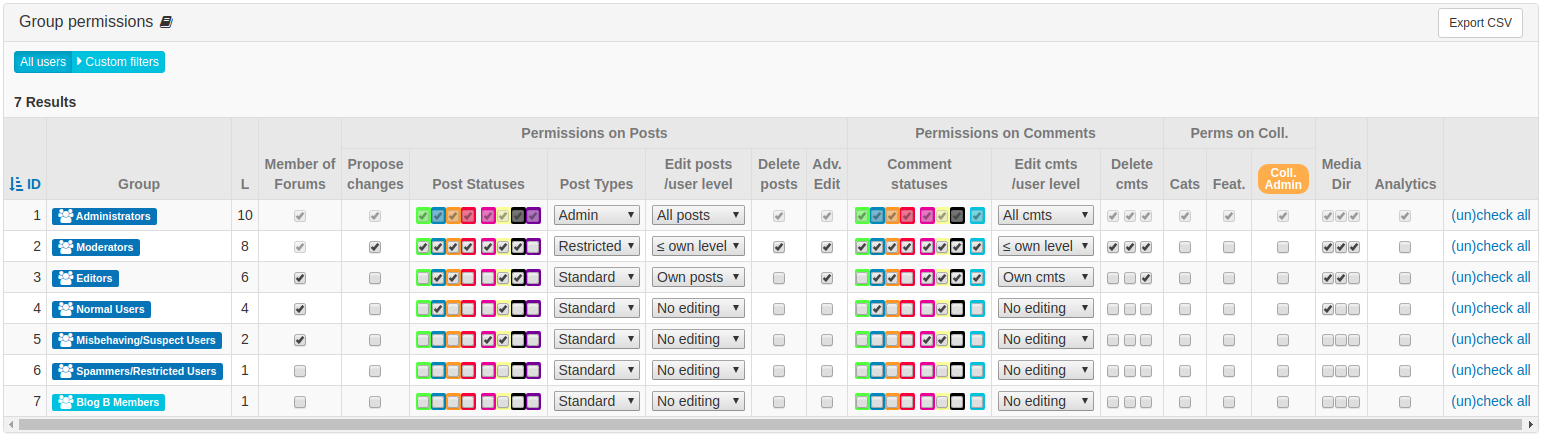
Here the Administrators group has the Coll. Admin permission


- b2evolution CMS User Manual
- Glossary
- Generic vocabulary
- Collection Admin
Collection Admin
A User who has permission to edit all settings (including admin settings) of a Collection.
The settings that can only be edited by Collection admins are identified with a "Coll. Admin" badge.
Who gets this permission
1. The Collection Owner
As defined in Collection Permissions.
2. Global Collection Admins
Member of a particular User Group may receive permission to administrate all collections at once – see the group’s Blogging Permissions Panel:

3. On a Case-to-Case Basis
The permission can also be given to specific Users or Groups on specific collections. See the collection’s Advanced Permissions:

Where this permission is used
- Advanced Collection Settings
- Feedback Options Panel
- Collection Base URL Panel
- Cookie Settings Panel
- Aggregation Panel
- Assets URLs / CDN Support Panel
- Cross Posting Panel
- To display messages of sending notifications on creating/updading of Items or Comments [CHECK]
Tech info
The underlying permission check is $current_User->check_perm( 'blog_admin', 'edit' ).