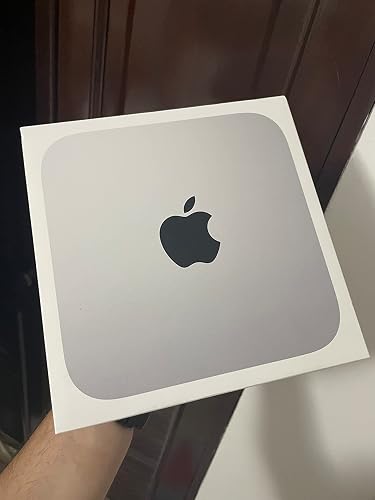
Apple 2023 Mac mini Desktop Computer with Apple M2 Pro chip with 10‑core CPU and 16‑core GPU, 16GB Unified Memory, 512GB SSD Storage, Gigabit Ethernet. Works with iPhone/iPad
EPEAT certifies electronic products based on sustainability impacts across their life cycle including requirements for energy efficiency and end-of-life management. An EPEAT registered product can also meet optional more ambitious criteria including reduction of fluorinated greenhouse gases (F-GHGs). Products meeting 50% - 74% optional criteria are 'Silver' and those meeting 75% or more are 'Gold'.
SUPERCHARGED BY M2 PRO — M2 Pro brings power to take on demanding projects. Its up to 12-core CPU makes pro workflows fly, and the up to 19-core GPU provides next-level graphics performance. It can be configured with up to 32GB of unified memory.
CONNECT WHAT YOU WANT — Mac mini with the M2 Pro chip has four Thunderbolt 4 ports, two USB-A ports, an HDMI port, Wi-Fi 6E, Bluetooth 5.3, Gigabit Ethernet, and a headphone jack. And if you want faster networking speeds, you can configure Mac mini with 10Gb Ethernet for up to 10 times the throughput.
SIMPLY COMPATIBLE — All your go-to apps run lightning fast on your Mac mini desktop, from Microsoft 365 to Adobe Creative Cloud to Zoom. And over 15,000 apps and plug-ins are optimized for M2 Pro.
EFFICIENT MEMORY — Unified memory on Mac does more than traditional RAM. A single pool of high-bandwidth, low-latency memory allows Apple silicon to move data fast — so everything you do is fluid. Choose up to 32GB memory with M2 Pro. More memory means easier multitasking and handling of large files.
FAST SSD STORAGE — Mac mini comes with all-flash storage for all your photo and video libraries, files, and apps. Choose up to a whopping 8TB SSD with M2 Pro.
KEEP IT SAFE AND SECURE — M2 Pro and macOS Ventura give Mac mini industry-leading privacy and security features, including built-in protections against malware and viruses. And the next-generation Secure Enclave helps keep your system and data protected.
MAC MINI DOES THAT — The Mac mini desktop with M2 Pro crushes compute-intensive tasks, from editing massive images and 8K ProRes video to 3D modeling.
EASY TO USE — Getting set up is simple, and Apple ID makes it easy for you to switch to Mac. So you can get going, right out of the box.
ADD A DISPLAY AND ACCESSORIES — Pair Mac mini with Apple Studio Display. Connect Apple accessories like Magic Keyboard with Touch ID or your favorite compatible accessories.
LEGAL DISCLAIMERS — This is a summary of the main product features. See legal disclaimers below.
Customer Reviews, including Product Star Ratings help customers to learn more about the product and decide whether it is the right product for them.
To calculate the overall star rating and percentage breakdown by star, we don’t use a simple average. Instead, our system considers things like how recent a review is and if the reviewer bought the item on Amazon. It also analyzed reviews to verify trustworthiness.
Customers find the Mac mini performs well and runs incredibly fast, with one mentioning that file transfers and application launches feel almost instantaneous. They appreciate its compact size with a very small footprint, and find it effortless to use, with one customer noting a smooth transition from Windows. The value for money receives mixed feedback, with some customers finding it excellent while others say it's not amazing for its price.
AI Generated from the text of customer reviews Generated from the text of customer reviews
Customers are satisfied with the computer's performance, describing it as a good basic machine that gets the job done.
"...got the mac mini m2 pro and I notice that this new one is faster and powerful, capable tu execute many task at the same time."Read more
"Great performance but nothing amazing for its price."Read more
"...Safe and secure shipping and an awesome computer. The Mac Mini M2 Pro was easy to set up and runs quickly. It has more than enough power for me."Read more
"My Mac Mini M2 Pro arrived in about 20 hours, with Prime. Excellent computer. Thank you!"Read more
Customers praise the Mac mini's speed, noting that everything runs incredibly fast, with one customer mentioning that transferring files or launching applications feels almost instantaneous.
"Exceptional little monster. I needed something compact, fast with decent power and this little beast fit the bill...."Read more
"This is one fast machine and a major improvement over the 12 year old iMac I was using -- in both the built in apps and the most recent upgrades..."Read more
"...I switched to the Mac Mini 2, and now everything is effortless and blazing fast, and fun instead of frustrating...."Read more
"...now with the 2023 Mac Mini it has the M2 Pro chip that is lightning fast and gets the job done."Read more
Customers appreciate the compact size of the Mac mini, noting its small footprint, with one customer mentioning its decent-sized hard drives.
"Small, yet powerful and fast. Capable of running mult screens and apps with out a hitch"Read more
"Exceptional little monster. I needed something compact, fast with decent power and this little beast fit the bill...."Read more
"...These machines, especially with the Pro chip and decent sized hard drives, coupled with the Mac OS, function smoothly and flawlessly...."Read more
"...But this one is a good size for getting the job done and working Davinci resolve."Read more
5 customers mention ease of use, 4 positive, 1 negative5 customers mention "Ease of use"4 positive1 negative
Customers find the Mac mini easy to use, with one mentioning a smooth transition from Windows.
"...The Mac Mini M2 Pro was easy to set up and runs quickly. It has more than enough power for me."Read more
"...They will do anything I need to do on a PC, transition from Windows went easily. Updates happen in the background...."Read more
"...So I switched to the Mac Mini 2, and now everything is effortless and blazing fast, and fun instead of frustrating...."Read more
"...The MacOS is not as simple or easy to use as I was lead to believe! It requires a major relearning effort to master thie system!..."Read more
9 customers mention value for money, 5 positive, 4 negative9 customers mention "Value for money"5 positive4 negative
Customers have mixed opinions about the computer's value for money, with some finding it excellent while others say it's not amazing for its price.
"...They are ideal machines, excellent value, and the new ones (M4's) are even better."Read more
"Great performance but nothing amazing for its price."Read more
"...wide array of ports and the superb performance make this the perfect Mac for the money! Video credits:..."Read more
"...Great little machine. Integrated storage is ridiculously priced of course so buy an external SSD and take advantage of the generous amount of USB C..."Read more
The perfect upgrade from my Macbook Pro 2015! All apps run flawlessly in this M2 Pro Mac Mini. I’m more than happy with the performance of this Mac when editing videos with CapCut & DaVinci Resolve, when comparing it to my previous Macbook Pro 2015. What I like the most of this new Mac Mini is how silent it is. You can barely hear anything when it is running, and the temperature always maintains relatively low, even on demanding tasks such as rendering. The wide array of ports and the superb performance make this the perfect Mac for the money! Video credits: Music: A Sailor's Hawaii Musician: Philip E Morris
Brief content visible, double tap to read full content.
Full content visible, double tap to read brief content.
These are the perfect answer for me now. I'm older, have always had high end machines, have built my own performance gaming pc's, and while I'm not an expert, have gotten tired of Microsoft Windows products and their constant upgrade and renewal cycles. These machines, especially with the Pro chip and decent sized hard drives, coupled with the Mac OS, function smoothly and flawlessly. They will do anything I need to do on a PC, transition from Windows went easily. Updates happen in the background. They are quiet: no, they are noiseless. They have a very small footprint. They interface with my iPhone and Apple watch, update calendars across all devices, handle my finances and stocks, my email identical to my phone, photos are a breeze, and internet is easy. Security seems top notch, and updating passwords on one device updates them all. I've had the oldest of the two since August of 2024. I had misgivings about not having the latest chip, but no problems or complaints whatsover. They are ideal machines, excellent value, and the new ones (M4's) are even better.
One person found this helpful
Helpful
Sending feedback...
Thank you for your feedback.
Sorry, we failed to record your vote. Please try again
Brief content visible, double tap to read full content.
Full content visible, double tap to read brief content.
I upgraded from a standard M1 Mac mini. I say upgraded but really the idea was just to have both Mac Minis that I use to be Apple silicon versions. The M1 replaced my Intel Mac Mini while this one replaced the M1. All in all I don't really see a difference when it comes to performance but that's not saying much because the M1 was already great for 1080p video editing and the basic internet browsing stuff.
I know there's a difference though because just out of curiosity I installed Steam and downloaded a game called Hades, which I had also tried on my M1. There was a pretty significant difference in performance with that, like going from 40ish frames per second to 80-100 frames per second. But the thing is, I don't play video games on Mac so it's pretty irrelevant overall but an interesting observation nevertheless.
Great little machine. Integrated storage is ridiculously priced of course so buy an external SSD and take advantage of the generous amount of USB C ports. I'd also recommend the magic track pad and not the Magic Mouse. I had a Magic Mouse and really liked it too but it developed some sort of issue with sporadic cursor movement that I couldn't resolve by cleaning the lens (which by the way usually worked).
From my experience any Mac mini with the M chips are great. If you're into heavy video editing, maybe consider the Mac Studio instead. I've never tried one myself but I know they're supposed to be much more capable. For the basic stuff and video editing in Final Cut Pro, any Mac mini with the Apple chips will work great.
Helpful
Sending feedback...
Thank you for your feedback.
Sorry, we failed to record your vote. Please try again
Brief content visible, double tap to read full content.
Full content visible, double tap to read brief content.
The Apple Mac Mini has always been revered for its compact form factor, but the 2023 iteration, equipped with the groundbreaking M2 Pro chip, takes it to an entirely new level.
Performance:
With a 10-core CPU and a robust 16-core GPU, the Mac Mini doesn't just compete; it outpaces many of its bulkier competitors. Whether you're editing high-resolution video, gaming, or juggling multiple productivity tasks, this machine handles it all with unparalleled finesse. It's awe-inspiring how much raw power Apple has managed to pack into such a diminutive box.
Unified Memory:
The 16GB of unified memory ensures applications run seamlessly, making multi-tasking smooth and efficient. Gone are the days of incessant loading screens or annoying lags. Everything is just snappy!
Storage:
A 512GB SSD might not sound immense, but with Apple's optimized storage algorithms and the blazing-fast speeds of this SSD, you'll realize it's more than enough for most tasks. Transferring files or launching applications feels almost instantaneous.
Connectivity:
Gigabit Ethernet ensures stable and ultra-fast internet connectivity, which is a boon for professionals relying on cloud-based services or hefty uploads/downloads. In addition, the added capability to work harmoniously with iPhone/iPad makes the Mac Mini a pivotal component in the Apple ecosystem, reinforcing its role as the nucleus of one's digital workspace.
Design:
Staying true to the legacy of the Mac Mini, the 2023 version boasts a sleek, minimalist design that makes it an elegant addition to any workspace. It's a testament to Apple's design philosophy - where form meets function without compromise.
Conclusion:
The 2023 Apple Mac Mini, backed by the M2 Pro chip, is a testament to technological evolution. It's a compact beast, melding power and aesthetics, proving once again that good things truly do come in small packages. Whether you're a seasoned professional, a creative enthusiast, or someone just looking for a potent desktop experience, the Mac Mini is a purchase you won't regret.
31 people found this helpful
Helpful
Sending feedback...
Thank you for your feedback.
Sorry, we failed to record your vote. Please try again
Brief content visible, double tap to read full content.
Full content visible, double tap to read brief content.
Exceptional little monster. I needed something compact, fast with decent power and this little beast fit the bill. I have no regrets as it’s been able to handle whatever I’ve thrown at it thus far. I’ve done remote work and it wasn’t always convenient to bring my mini-fridge sized Windows box with me, and this little beast didn’t disappoint. It is a little workhorse without sounding like a 747 leaving the runway every time I turned it on. Impressive little box.
2 people found this helpful
Helpful
Sending feedback...
Thank you for your feedback.
Sorry, we failed to record your vote. Please try again
Brief content visible, double tap to read full content.
Full content visible, double tap to read brief content.
The perfect upgrade from my Macbook Pro 2015! All apps run flawlessly in this M2 Pro Mac Mini. I’m more than happy with the performance of this Mac when editing videos with CapCut & DaVinci Resolve, when comparing it to my previous Macbook Pro 2015.
What I like the most of this new Mac Mini is how silent it is. You can barely hear anything when it is running, and the temperature always maintains relatively low, even on demanding tasks such as rendering.
The wide array of ports and the superb performance make this the perfect Mac for the money!
The perfect upgrade from my Macbook Pro 2015! All apps run flawlessly in this M2 Pro Mac Mini. I’m more than happy with the performance of this Mac when editing videos with CapCut & DaVinci Resolve, when comparing it to my previous Macbook Pro 2015.
What I like the most of this new Mac Mini is how silent it is. You can barely hear anything when it is running, and the temperature always maintains relatively low, even on demanding tasks such as rendering.
The wide array of ports and the superb performance make this the perfect Mac for the money!
Video credits:
Music: A Sailor's Hawaii
Musician: Philip E Morris
30 people found this helpful
Helpful
Sending feedback...
Thank you for your feedback.
Sorry, we failed to record your vote. Please try again
Brief content visible, double tap to read full content.
Full content visible, double tap to read brief content.
It took me a while to make the switch from PC to a Mac, but I finally got tired of wasting time when trying to record in a DAW. It was a pain when all I was doing was recording guitar or piano and vocals, but once I started pulling in instrumental effects, everything came to a grinding halt. So I switched to the Mac Mini 2, and now everything is effortless and blazing fast, and fun instead of frustrating. It was an inexpensive solution and didn't have the learning curve I anticipated. Everyone tells me it will last a lot longer than a PC, so there are no regrets or buyer's remorse here.
One person found this helpful
Helpful
Sending feedback...
Thank you for your feedback.
Sorry, we failed to record your vote. Please try again
Brief content visible, double tap to read full content.
Full content visible, double tap to read brief content.
I've been reluctant regarding the IOS infrastructure since the late 70's when I opted to partake in the x86 architecture in the form of the Radio Shack TRS-80. Simply put the available apple system retailed for over $1100 which was well beyond my purchase ability. The TRS-80 sold for less that half the cost by also came with a high learning curve. I still have my TRS-80 as a matter of fact, although it has give up the 'ghost' for over 4 decades.
Having weathered the storm of the Atari ST & multiple generational PCs for well over 50 years, in my senior years, I have decided to take the plunge into the MacOS Infrastructure. So for I have been impressed with the Mac M2 Mini. My major realization is that it is not your father's Windows PC. The operating system is both graphical & keyboard shortcut enabled to a major degree. The MacOS is not as simple or easy to use as I was lead to believe! It requires a major relearning effort to master thie system!
However, I must confess the set up & tweating of my new M2 Mac Mini has been a pleasant surprise. I have been aided by Youtube in the form of multiple Mac Training & tips videos which have been a major resourcs in adapting to my new Mac Mini! I will willlingly move deeper into the Mac as time goes by!
44 people found this helpful
Helpful
Sending feedback...
Thank you for your feedback.
Sorry, we failed to record your vote. Please try again
Brief content visible, double tap to read full content.
Full content visible, double tap to read brief content.
I've been using Macs since 1986. I have a sales award from Apple for having sold so many early Mac SEs, Mac Pluses, Laserwriters, etc. I know them inside and out. I bought the M2 mini to replace my late 2012 mini, which would not run the latest AI versions of Lightroom and Photoshop. This mini obviously runs the software, though it doesn't seem any faster to me - and I'm not using any subjective testing methods, just the seat of my pants. The biggest problem I have with this unit is that I have several different peripherals that I must unplug to make room for others. Mostly hard drives, but also USB devices, cameras and the like. Since ALL the ports are in the back, and all but one will have something plugged in when I need to plug something else in, I can't turn the unit around to see the back of it. And since it sits against the wall, I have to get a flashlight, lift the thing without pulling out all the other USB cables just to see the port I'm trying to access. If Apple could have put two or three USB ports on the front of this thing, I'd be running through the streets screaming for everyone to buy one. Why not Apple? Why not 2 or 3 USB-C ports right on the front?
12 people found this helpful
Helpful
Sending feedback...
Thank you for your feedback.
Sorry, we failed to record your vote. Please try again





 Report an issue with this product or seller