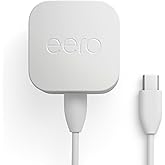
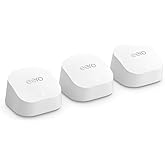
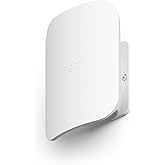
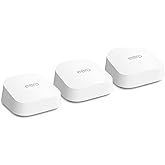
WHOLE-HOME COVERAGE - The eero mesh WiFi system brings up to 4,500 sq. ft. of fast, reliable WiFi to your home.
WORKS WITH ALEXA- With eero and an Alexa device (not included), you can easily manage wifi access for network profiles to take focus away from screens and back to what’s important.
WORKS WITH YOUR INTERENT SERVICE PROVIDER- eero replaces your wifi router and works with most major internet service providers.
SET UP IN MINUTES - The eero app guides you through setup and allows you to manage your network from anywhere.
DON'T LET WIFI SLOW YOU DOWN- Get the most from your WiFi by streaming, gaming, and working across your home.
GETS BETTER OVER TIME - Receive automatic updates to help keep your network safe and secure. Online security and additional network management features available via a separate subscription.
EXPERIENCE THE EERO TRUEMESH DIFFERENCE - eero’s patented TrueMesh technology intelligently routes traffic to reduce drop-offs and dead spots.
EASILY EXPAND YOUR SYSTEM - With cross-compatible hardware, you can add eero products as your needs change.
eero delivers world-class, whole-home connectivity for everybody. An eero 3-pack covers homes up to 4,500 sq. ft. in fast, reliable wifi from the basement to the backyard.
Say goodbye to dead spots and buffering
eero seamlessly connects your entire home with reliable wifi. Finally, you can stream, surf, and game from anywhere.
Support for Apple HomeKit-enabled routers
With Apple HomeKit, eero gives you even more protection of your HomeKit accessories and an easy way to manage what they are allowed to communicate with in your home and through the internet.
Set up in less than 10 minutes
Download
Get the eero app for iOS or Android.
Unplug
Disconnect your modem and anything connected to it.
Begin
With the modem unplugged, open the app and follow along.
Convenience and control
From the eero app, you can see what's happening on your network, check device usage, share your network with friends, or even pause the internet.
Premium services for a better internet experience.
An optional eero Plus subscription provides advanced digital security, network controls, and helpful insights for peace of mind. Learn more about eero Plus here.
Some features require linking your Amazon account, and downloading the Alexa application or using a compatible Alexa device. Internet connection speeds and availability depend on your internet service provider; if your internet service provider does not provide you with the maximum supported speed, you will not experience that maximum speed. Maximum wireless signal rates are derived from IEEE 802.11 standard. Specifications assume wired Ethernet connection; your experienced speed may vary when connected to an eero device that is configured as a wireless extender. Coverage estimates are based on normal use conditions. Actual range and performance can vary, and maximum supported speeds may not be available to all customers, due to factors such as local regulations (including power limits), network configuration, interference, connected devices, device usage, building materials, and obstructions. Specifications are based on use of a Wi-Fi 5 or later client device. For more information about eero performance, visit support.eero.com.
Subscription
30-day eero Plus trial is limit one per new eero customer account. Additional terms apply, see the eero Plus Terms of Service for more details. eero Internet Backup performance will vary and you are responsible for data charges with backup connection providers. Learn more about eero Internet Backup requirements, performance, and compatibility here.
Customers also bought these items from Amazon Devices
GreenCircle certified products are made of pre- or post-consumer material when it is manufactured. GreenCircle verifies the sources of recycled materials and analyses the recycled content used in the product to determine the percentage of pre-consumer or post-consumer content based on international standards and definitions. A product must contain recycled content to qualify.
GreenCircle certified products are made of pre- or post-consumer material when it is manufactured. GreenCircle verifies the sources of recycled materials and analyses the recycled content used in the product to determine the percentage of pre-consumer or post-consumer content based on international standards and definitions. A product must contain recycled content to qualify.
Customer Reviews, including Product Star Ratings help customers to learn more about the product and decide whether it is the right product for them.
To calculate the overall star rating and percentage breakdown by star, we don’t use a simple average. Instead, our system considers things like how recent a review is and if the reviewer bought the item on Amazon. It also analyzed reviews to verify trustworthiness.
Customers find the WiFi system extremely easy to set up and appreciate its excellent speed and signal strength throughout the house. The product quality receives positive feedback, with customers noting the well-designed mobile app, and they consider it worth the price. However, reliability and connectivity show mixed results - while some report great performance and immediate connection, others experience complete system failure and dropped connections.
AI Generated from the text of customer reviews Generated from the text of customer reviews
Select to learn more
1913 customers mention easy to set up, 1776 positive, 137 negative1,913 customers mention "Easy to set up"1,776 positive137 negative
Customers find the wifi system extremely easy to set up.
"...and is not worth the price. yes it was easy to install, but the range signal is only good in my bedroom and bathroom, the rest of the house is so bad..."Read more
"Cheap, fast and easy to set up. What more could you ask for? App lets you know if a device logs on. I like that. You can boot people if you want, too."Read more
"If you are looking for fast and easy setup with excellent speed and coverage - look no further. If you just want a system that works and works well?..."Read more
"Easy to setup when you follow directions. My internet speed went from @ 80 to 90 Mbs on a 200 Mbs Spectrum feed to over 230 Mbs using the same modem...."Read more
Customers report excellent WiFi coverage throughout their homes, with one customer noting there are no more dead zones.
"...With their service and the eero products we now have great signal not only in our house but our Barn and Kennel, this includes several security..."Read more
"Very happy with my Eero mesh system, I have strong signal throughout my two level house plus basement. I have not had any loss of signal issues...."Read more
"I bought this for our first home and we absolutely love it, the signal is great I’m into gaming and it works great for that as well, my wife streams..."Read more
"Security camera outside would go offline frequently due to weak signal and it would not connect to an extender. This solved my problem and more...."Read more
Customers praise the router's performance, describing it as the best they've used, with a well-designed mobile app.
"great product...i've sold more eero networks than any of their sales people...50-100 a month easy as I work for a major telecommunications company......"Read more
"Excellent product...way faster than my modem/router combo and extender. My house is about 4000 sq ft with basement. I bought this 3 pack and a 4th...."Read more
"...This is a great system. Occasionally in hard to reach spaces the system goes down, but this may be a device issue...."Read more
"So far so good...it’s a great router for when you have numerous devices the require a Wi-Fi signal working at the same time..though I did have some..."Read more
Customers report excellent speed with the wifi system, with one customer noting a positive difference in internet performance right away.
"Cheap, fast and easy to set up. What more could you ask for? App lets you know if a device logs on. I like that. You can boot people if you want, too."Read more
"...SPEED: I'm sure higher end systems are faster, but my internet speed more than doubled vs. my previous router, so I was quite happy...."Read more
"I never write reviews, but this is a great product! Very fast and easy to install. Strong signal throughout our house and no change to speed...."Read more
"...Another big shortcoming of this system is the bandwidth, it runs 5GHz, which is not compatible with most smart devices, which require 2.4GHz, does..."Read more
530 customers mention ease of use, 513 positive, 17 negative530 customers mention "Ease of use"513 positive17 negative
Customers find the wifi system easy to use, with a simple app interface and straightforward setup process.
"Great signal. Somewhat easy to set up with easy instruction. I live in the in law apartment at my son and his fiancée’s house on the farm...."Read more
"Finally what I’ve been looking for. Easy to use easy to set up like a Alexa device. I finally have coverage where I used to have dead spots. Love it!"Read more
"...Buying something else. Previous:Its pretty fast, simple, looks nice but I've had it less than 6 months and it goes down about every 10 days for..."Read more
"...And it really was a 10 minute setup, super easy. UPDATE: Four months in and we still love this system. Wifi throughout the house is much better...."Read more
496 customers mention value for money, 356 positive, 140 negative496 customers mention "Value for money"356 positive140 negative
Customers find the wifi system well worth the price, with one mentioning it saved monthly fees on their internet service.
"Worth every penny! We had a router and tried to add extenders to it. Spent several hours with no luck. Returned that system and bought this...."Read more
"...For me, it was 100% worth the money. If you're having issues with getting a decent signal across your home I'd suggest giving this a try."Read more
"What a waste of money. Has to be connected to gateway with Ethernet cable? So how can a single device boost a signal away from the router???..."Read more
"Did lots of research prior to purchase, great price, easy install, well balanced internet speed from Internet connection to furthest Mesh AP...."Read more
Customers have mixed experiences with the WiFi system's reliability, with some reporting it works well and performs great, while others mention it completely stops working and describe it as an unreliable product.
"Easy to set up - works great! I am using it to network 6 laptops in a medical clinic - no internet needed beyond setup which required an app."Read more
"...I have the 3 eero system to cover my 2700 sq ft house. It works well but occasionally (seems like once/week), it stops working to some degree, often..."Read more
"...the COVERAGE!! holy crud it is so spotty and unreliable. Even pre pandemic I worked from home so I need good coverage. This is so spotty...."Read more
"...I can say without question Eero is far and away the most stable and reliable, in my experience - and that is far more important to the average user..."Read more
Customers have mixed experiences with the WiFi system's connectivity, with some reporting immediate and strong connections, while others experience issues with the system losing or dropping connections.
"...Hooking up this kind of stuff is not new to me, but this would not connect no matter what I did. Unbelievable, do not waste your money...."Read more
"Solved my WiFi problem, especially having to work at home! I highly recommend and the price is much better priced than Best Buy!!"Read more
"...Cons: Connectivity Issues: Despite the easy setup and Alexa integration, I'm still in the process of determining whether the units and WiFi..."Read more
"...Since installing eero, I have had no connectivity issues. The set up for this system is one of the easiest I’ve ever seen...."Read more
Great little mesh router that is budget friendly and works with modem and Alexa
I have Sparklight Internet, which is very reliable and dependable, as I am a remote worker and they gave me their last Arris modem as company switched to Hitron modems and I had an incident where I briefly had a Hitron from them and I ended up losing two days of work and two points against me due the Hitron kept going offline repeatedly, as it was too sensitive to adverse weather conditions. I needed a workhorse to stay on continuous for my job. The Sparklight tech guy showed me where to find the list of approved DOCSIS 3.1 modems and said I could buy the Arris modem and avoid having the Hitron. I got the budget friendly Arris SB8200. The only problem was no built in Wi-Fi and those 2 in 1 models were out of my price range. I looked at traditional routers and they were also out of my price range. Then, I found I found my little superhero: The Amazon eero Mesh Router. The description said it can turn any regular modem in to a Wi-Fi modem. When I registered my Mac ID for the modem, I told her I also have my mesh router to go with it. She guided me through the steps to get modem and router up and running together and then have to download the eero app on phone. The app helps you finish the setup My Echo Dot immediately recognized it and connected. Then, I was able to connect my Android phone, Chromebook and Chromecast to the Wi-FI and did a speed test on all devices. My speed package is 300 down and 20 up yet, I got 326 down and 21 up-so it was even faster than my assigned internet plan. Now, the eero mesh router and the Arris modem are my Dynamic Duo to allow me to have stable internet for work, while allowing my other devices to connect to my internet as well. I am very happy with my little team, and so glad I found this little mesh router.
Brief content visible, double tap to read full content.
Full content visible, double tap to read brief content.
Best and easiest wireless mesh system I have used/setup. Used to extend a Starlink router from one building to another house and yard area. Setup is simple, and just works. Never had an issue with signal. Zero complaints.
Helpful
Sending feedback...
Thank you for your feedback.
Sorry, we failed to record your vote. Please try again
Brief content visible, double tap to read full content.
Full content visible, double tap to read brief content.
I did hours and hours of research over weeks to decide what mesh units to go with. I decided on the Eero 3-pack for my needs, because I've read of the headaches other mesh systems caused people and I didn't have a need for one with a speaker or anything like that. Going from a 10 year old router with a single 2.4Ghz band to these units is a big difference. My house is roughly 3100 sq ft and is 120 years old, with thicker walls of plaster over wood, and who knows what sort of older wires and such in the walls themselves. Despite the original router being in roughly the center of the house, I would have a very weak signal that frequently dropped off my desktop. The 3 Eero units have been up for barely a day and it's a marked improvement. I have noticed that they run a tad warm, but not any warmer than the box we use for cable (not the modem, but what's actually connected to the TV). We did sit them on coasters as a precaution considering the age of the furniture the devices sit on.
Set Up:
Relatively easy. My phone and the Eero units wouldn't connect via bluetooth for some reason, so I had to manually enter each serial number, but once I did the units were found in the app and recognized each other and main one. The actual set up from there was easy. I found good locations for the other 2 units and the app informed me I'd chosen great locations for them.
App:
I like the app. I prefer it over a computer-based website I would need to access, and I like that I can monitor what devices are connected from my phone. The app walked me through the setup and it didn't take me long to figure out how to make some changes to things and take advantage of some of the customization options. There is some discrepancies with the speeds the app tells me the various devices are getting and what the devices themselves tell me they are getting. I also like that I can see which devices are connected to which unit and the band that they're on. For some reason some devices jump between the bands rather than sticking to the same band, but that isn't an issue for me. I also don't mind that I can't select which devices use which band. With so few devices connected compared to other homes, interference isn't a concern.
Strength: Noticeably stronger. My phone has full signal in my room where before I had maybe 2 bars at the most. My desktop is at 70-80% strength, which isn't surprising given that it's still 20-30 feet from each of the 2 units and also likely due to the wireless network card I'm using, but it's stable and hasn't dropped at all once the units updated themselves through the app (dropped just once when the units were updating, but likely because it's more sensitive to signal strength and connection strength).
Speed: This hasn't been an issue. Some social media images are slightly slower to load on my phone, but I spend more time on my desktop and everything works perfectly. I was able to watch episodes and such without any buffering or other issues; before with the old router I would have to pause episodes to let more load so it wouldn't buffer on me and it would take twice as long to watch something. I'll have a console in November and will be better be able to judge stability and strength with it as well, but at this stage I'm not anticipating having trouble.
I didn't contact tech support at all, so I haven't rated it. I have my own security options in place on the various devices, so I did not do the eero Security trial or anything to do with that. Also, this is not a smarthome. We have no smart devices connected and will not ever have smart devices connected to these units, so I cannot comment on those. We will have, at most, 6 devices connected to the wifi at any one time, and usually just 5. There is one desktop with a wired connection to the unit connected to the modem, so that one doesn't affect the wifi. I did turn on band steering in the app to help my desktop and such in my room have a stronger signal. I am not planning on using the guest option at all. I'll update this review if necessary if I run into problems later on or if there are any changes with how the units work or how I use them.
53 people found this helpful
Helpful
Sending feedback...
Thank you for your feedback.
Sorry, we failed to record your vote. Please try again
Brief content visible, double tap to read full content.
Full content visible, double tap to read brief content.
Product works as described. Strong signal life. Installation was simple. Stable. We are able to utilize all features using the eero app. We are using it as an extender for our home and using Froniter Fios internet. Will buy again.
One person found this helpful
Helpful
Sending feedback...
Thank you for your feedback.
Sorry, we failed to record your vote. Please try again
Brief content visible, double tap to read full content.
Full content visible, double tap to read brief content.
Setup of the actual Eero units was fast and easy, but the Amazon WiFi simple setup didn't do jack for me. Yes, I had all of the requirements in place for it to supposedly work, but nothing at all connected automatically to the new network. I had to manually go through and add each and every item regardless of whether they were from a different manufacturer or whether they were Amazon products. So be ready for a long install if you have a lot of smart devices. It took me 3 hours to manually add everything to the new network. Echo devices, an Amazon microwave, Fire TV, Sonos, Ring, smart bulbs, smart plugs, TV, soundbar, etc. Not one of these things made the connection automatically.
All of that being said...now that it is set up and running, I do like the system. It makes our internet more usable in our basement and in the master bedroom, where the signal used to be painfully slow and unreliable. We do not have super high speed internet, so I can't speak to whether it would maintain that high speed throughout ones house. Ours is only 30mpbs (dismal, I know) and it's working okay with that speed. But I do lose speed as I get further from the access point. I get only 20mpbs if I'm further away, which is disappointing but I suppose understandable.
Based upon other reviews, I was worried that my NordVPN wouldn't work, but I don't have any troubles with it.
Helpful
Sending feedback...
Thank you for your feedback.
Sorry, we failed to record your vote. Please try again
Brief content visible, double tap to read full content.
Full content visible, double tap to read brief content.
It took me a long time to choose a mesh system that I would like to use in my household. There is one active gaming devices, 3 streaming devices, with 3+ outdoor cameras that are constantly running on my wifi network. I do not want to pay for an overkill but for one that will work well with my home, as well as my future expansion.
I will say with what I am experiencing so far, i am very happy with it.
Customer service: 5/5
Amazon always give me awesome customer service, well worth the price of the prime membership. And EERO is an amazon company, I will expect nothing less than the same quality of CS.
Outlook: 5/5
I like the look of the device. The size is pretty compact for it is. It is well-weighted and will sit sturdy on most of the flat surface. I have two of them sit on my desk in my office, one sit on my night stand, and one in my wife's office. It's look is sleek and fit well with most of the surrounding.
Wifi:
First of all, I am not looking for an overkill of device. I need a mesh wifi, that will is easy on budget, while getting the work done. I am looking to upgrade my outdoor camera system and getting a new set of home security. It will add some demand on my existing non-mesh wifi network. So far, I have upgrade my outdoor camera system using this eero, also add a couple smart home devices. Wifi signal is steady (don't drop), I notice significant improve in youtube loading time, and gaming time. I will say it will works well for most of the regular household. I mean, how often do you need gigabit to watch youtube?
Setup:
Setup was so easy. I downloaded the web, follow the app, and I am done in 10 mins. I was worry that I will have to do some massive configuration but hey, this is setup for many non-tech savvy person. So, if you are not tech-savvy, do not fear this! If you can read and follow instruction, you will be fine. You deserve a mesh wifi network!
Expandable:
This is one of the main reasons that I am choosing EERO over others for the ease of adding them into Alexa. I am going to smart home my house. That will include Blink XT2 (another Amazon company) and the Ring security system (another amazon company). I am planning to have all of them link to Alexa and make it easy for people in my household. Not to mention other smartplugs that I am going to use (waiting on Amazon to put them on sales).
I've already installed my Blink XT2 and linked to my Amazon home and Alexa (will write review later) and I am waiting on my home security system to arrive.
38 people found this helpful
Helpful
Sending feedback...
Thank you for your feedback.
Sorry, we failed to record your vote. Please try again
Brief content visible, double tap to read full content.
Full content visible, double tap to read brief content.
So I bought this to upgrade from my old Apple Airport Express. My modem supplied by Spectrum only has one ethernet connection as did the Airport Express. Due to COVID-19, I’ll be working out of my house and needed more Ethernet ports and increased bandwidth. Called Spectrum, upgraded my speed and bought the Eero router and one Beacon. I also bought an Ethernet switch to plug into the Eero - just Incase I need more ports.
The installation of this was easy but definitely took me longer than 30 minutes. I literally had to re-pair all of my devices manually (MacBook Pro, iPhone, 3 echo dots, one echo & firestick) to this router which was time consuming. It did not recognize everything as some reviews.
To get a clear picture of my setup: The modem is in my office which is in the front of my 1000 square foot condo built in 1982. I’ve always had horrible WIFI connectivity in the back half of my place.
When I bought this router, I decided to also buy the Beacon because even with an extender with my old set up, my WIFI connection in the back half of my condo either drops or is very weak. That’s where I have my firestick, one echo dot & the echo is in the middle of my condo.
I got the Eero first and once set up - experienced the same connectivity issues in the back of my condo. The firestick was constantly dropping or giving me a fair or marginal connection. Same with the echo dot in my master bedroom (which is in the back half of my condo near the firestick).
The Beacon came today and the setup was so ridiculously easy - I was full blown excited. However, although it paired seamlessly to the Eero, it didn’t automatically signal everything in the back half of my condo. The solution? I re-paired the firestick, echo and echo dot in the back half of my condo and now it shows on the app the Eero is signaling the front half of my condo and the Beacon is signaling the back half. For the first time ever - I have 5 bars everywhere.
I gave this an overall 5 star because the Eero WITH the Beacon is a beautiful combination. I gave the WIFI rating a 3 because the Eero is supposed to cover 1500 square feet and that was far from accurate in my 1000 square foot place.
I suggest whoever buys the Eero to spend the extra money and buy the Beacon. The Beacon was the game changer. Little overpriced but worth the 5 bars. Say goodbye to dead zones when the Eero is paired with the Beacon.
81 people found this helpful
Helpful
Sending feedback...
Thank you for your feedback.
Sorry, we failed to record your vote. Please try again
Brief content visible, double tap to read full content.
Full content visible, double tap to read brief content.
I always wait a while before writing a review so that I can provide a better perspective of a product's performance over time. I bought this Eero mesh wireless router a few months ago. I previously used a single wireless router that I rented from my internet service provider ($5 per month). For various reasons, my internet modem is placed on the 2nd floor of my 3 bedroom townhouse. Although my townhouse is not large, I suffered from a deadspot in the living room. No matter how I oriented my wireless router, the deadspot existed. As expected, this set of three mesh routers solved that problem completely. Additionally, I found the set up to be as easy as advertised. Moreover, I am quite pleased with the app interface that manages the network. I was easily able to give specific names to each router, monitor which devices connected to which router, and track when the devices automatically switched from one router to another or switched from 2.4GHZ to 5GHZ channel. Those conveniences of course are not necessary in order for the wireless network to operate, but having the ability to track device connections give me confidence in the network performance. After a period of several months, I can attest that I have never once lost coverage in any part of my house. My main desktop computer (a Mac) is hardwired to the first router, and wirelessly I have three smart tvs, another desktop, a laptop, two tablets, four smart phones, and an xbox all connected.
I originally contemplated buying the more expensive Google Nest that is carried at Costco, but I am completely satisfied with the performance, reliability, and ease of use of the Amazon Eero.
2/24/2022 - Update. Over a year and a half later, and I'm still extremely pleased with my Amazon Eero three-pack mesh cluster. The app on my smart phone is super useful to see the status of the network, track who is online, see which device is connected to which router, etc. Firmware updates are automatically pushed to the devices. I'm 100% confident that my Eero is the last source of any network lag or security breach I may experience.
One person found this helpful
Helpful
Sending feedback...
Thank you for your feedback.
Sorry, we failed to record your vote. Please try again
Brief content visible, double tap to read full content.
Full content visible, double tap to read brief content.
I had to drop my 3-star review to a 1-star review, details at the bottom.
When I installed the eero mesh Wi-Fi in the house I was very excited. I had done all the research (or at least - so I thought). I was imagining a whole house brimming with Wi-Fi signals at every corner without any dead spots. Just like the picture in the advertisement - all those virtual spheres of Wi-Fi coverage - covering the entire volume of the house. The funny part is - it is true. You do get exactly that kind of coverage.
What the advertisement does not tell you though, is the secret that I learnt only when I installed the system. You cannot freely roam within your network. I will provide some details below, but for the folks that want a quick summary - here is an example: Say you are on a Wi-Fi connected mobile device (phone/tablet/PC/etc.) and you happen to be connected to the eero access point in your home office. You have a great connection and your Wi-Fi connected device works really well. Now imagine you walk out of your home office (with the device) and go to a different area within your home; perhaps an area where you are right next to your second eero access point. You will find that your mobile device is still connected to the eero equipment in your original location (the home office), and your network connection may not be good. The eero access point nearest to you has wonderful coverage and is “brimming” with signal, but you can not connect to it. In other words - your mobile Wi-Fi connected device will not roam amongst the three eero access points that you have purchased (and placed in strategic locations in your home).
So, what is the point really?
The point simply is that all stationary Internet connected devices around your home will have great connections, because they will all be connected to the nearest eero access points. Exactly like it was back in the day when you had ethernet cabling connecting all your stationary devices. Anything that is mobile is really out of luck - same (or at least similar) dead spots around the house as before the eero!!
I dug a little deeper into this. Here is what eero’s support site has to say “…if you’re seeing weaker connections when there is a closer eero, you can toggle Wi-Fi off and back on for the device to connect to a closer eero.” Really, that’s your solution eero support??!! They even have an article on this subject on their support site.
Digging even deeper now (read: simple Internet search)- turns out that there are technology standards published back in 2008:
802.11v: allows the network’s control layer to influence client roaming behavior by providing it the load information of nearby access points.
802.11r: authenticates more quickly through Fast Basic Service Set Transition (FT).
More funny quotes on this from eero support: “…While we support 802.11r, we're still working on full support for 802.11r Fast Transition…”. “…Contact your phone's manufacturer... the phone determines what AP it connects to, not the AP…”
Wow! I have devices from a handful of manufacturers. In case I decide to keep eero, I will likely have to call Apple, Samsung, Google, Amazon (itself), Roku, Dell, HP, Sony, WeMo, Nest …. and influence all of them to work with eero!! … You get the picture.
Friends at eero, I want an appliance that works, not a super-high-maintenance project!!
Good luck everyone!
P.S. I had started out with a 3-star review, because the product does much of what it claims. However, Amazon did not publish my review saying that it contained an external url. They were right, I did include an external url to eero’s support site. However, while the url was “technically” external, eero is an Amazon company. Thus, I changed my 3-star review to a 1-star review.
130 people found this helpful
Helpful
Sending feedback...
Thank you for your feedback.
Sorry, we failed to record your vote. Please try again





 Report an issue with this product or seller