


 Report an issue with this product or seller
| Product Dimensions | 11.52 x 5.04 x 0.76 inches |
|---|---|
| Item Weight | 8.6 ounces |
| Manufacturer | Apple |
| Language | English |
| ASIN | B09BRG3GRR |
| Item model number | MK293LL/A |
| Batteries | 1 Lithium Ion batteries required. (included) |
| Date First Available | August 3, 2021 |
| CARVIEW |
Select Language
HTTP/2 301
server: nginx
date: Sat, 01 Aug 2026 11:54:30 GMT
content-type: text/html; charset=utf-8
content-length: 375
cache-control: private, max-age=90
content-security-policy: referrer always;
location: https://www.amazon.com/Apple-Magic-Keyboard-Computers-Silicon/dp/B09BRG3GRR?crid=1B16O5S7YGL3E&keywords=magic+keyboard+touch+id&qid=1649256806&sprefix=magic+keyboard+touch+id,aps,97&sr=8-3&linkCode=sl1&tag=9to5g-20&linkId=c137ba4479cd040e799e6e95261c4cb1&language=en_US&ref_=as_li_ss_tl
referrer-policy: unsafe-url
set-cookie: _bit=q71bSu-1729016571e0dc43aa-000; Domain=amzn.to; Expires=Thu, 28 Jan 2027 11:54:30 GMT
strict-transport-security: max-age=1209600
via: 1.1 google
alt-svc: h3=":443"; ma=2592000,h3-29=":443"; ma=2592000
HTTP/2 200
content-type: text/html;charset=UTF-8
server: Server
x-amz-rid: P9CR06P86DD27FACY3AY
accept-ch: ect,rtt,downlink,device-memory,sec-ch-device-memory,viewport-width,sec-ch-viewport-width,dpr,sec-ch-dpr,sec-ch-ua-full-version-list,viewport-height,sec-ch-viewport-height
p3p: policyref="https://www.amazon.com/w3c/p3p.xml",CP="CAO DSP LAW CUR ADM IVAo IVDo CONo OTPo OUR DELi PUBi OTRi BUS PHY ONL UNI PUR FIN COM NAV INT DEM CNT STA HEA PRE LOC GOV OTC "
cache-control: no-cache, no-transform
x-xss-protection: 1;
content-security-policy: upgrade-insecure-requests;report-uri https://metrics.media-amazon.com/
content-security-policy-report-only: default-src 'self' blob: https: data: mediastream: 'unsafe-eval' 'unsafe-inline';report-uri https://metrics.media-amazon.com/
content-encoding: gzip
x-content-type-options: nosniff
accept-ch-lifetime: 86400
vary: Accept-Encoding,User-Agent
strict-transport-security: max-age=47474747; includeSubDomains; preload
x-frame-options: SAMEORIGIN
date: Sat, 01 Aug 2026 11:54:31 GMT
set-cookie: session-id=134-0179662-5915032; Domain=.amazon.com; Expires=Sun, 01-Aug-2027 11:54:31 GMT; Path=/; Secure
set-cookie: session-id-time=2082787201l; Domain=.amazon.com; Expires=Sun, 01-Aug-2027 11:54:31 GMT; Path=/; Secure
set-cookie: i18n-prefs=INR; Domain=.amazon.com; Expires=Sun, 01-Aug-2027 11:54:31 GMT; Path=/
set-cookie: lc-main=en_US; Domain=.amazon.com; Expires=Sun, 01-Aug-2027 11:54:31 GMT; Path=/
set-cookie: sp-cdn="L5Z9:IN"; Version=1; Domain=.amazon.com; Max-Age=31536000; Expires=Sun, 01-Aug-2027 11:54:31 GMT; Path=/; Secure; HttpOnly
alt-svc: h3=":443"; ma=93600
akamai-request-bc: [a=23.11.215.213,b=2629222622,c=g,n=IN_KA_BANGALORE,o=20940],[a=126,c=o]
x-amzn-cdn-id: ak-0.d5d70b17.1785585270.9cb6c0de
x-cache: NotCacheable from child
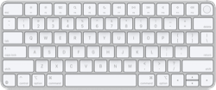
Amazon.com: Apple Magic Keyboard with Touch ID: Wireless, Bluetooth, Rechargeable. Works with Mac Computers with Apple Silicon; US English - White Keys : Electronics


This item cannot be shipped to your selected delivery location. Please choose a different delivery location.
USB-C to Lightning Cable
Customers find the keyboard excellent and perfect for Mac computers, with one customer specifically mentioning it works well for video editing.Customers appreciate the keyboard's Bluetooth connectivity, with one customer noting seamless integration with all Apple devices and another mentioning automatic connection to MacBook Air.Customers are satisfied with the keyboard's battery life, appreciating its rechargeable feature, with one customer noting it charges very quickly.Customers like the tactile feel of the keyboard.Customers have mixed experiences with the keyboard's Touch ID feature, with some finding it convenient and working well, while others report that it doesn't work at all or consider it a design failure.Customers report mixed experiences with the keyboard's reliability: while some say it works perfectly and the fingerprint reader performs flawlessly, others mention that it stops working properly and the function keys don't respond.Customers have mixed opinions about the keyboard's value for money, with some finding it worth the investment while others consider it pricey.Customers have mixed experiences with the keyboard: some find it amazing and easy to use, while others report it is miserable to type on.


No featured offers available
Learn more
Learn more
No featured offers available
We feature offers with an Add to Cart button when an offer meets our high standards for:
- Quality Price,
- Reliable delivery option, and
- Seller who offers good customer service
Apple Magic Keyboard with Touch ID: Wireless, Bluetooth, Rechargeable. Works with Mac Computers with Apple Silicon; US English - White Keys
Amazon's Choice highlights highly rated, well-priced products available to ship immediately.
Amazon's Choice
| Brand | Apple |
| Compatible Devices | Mac Studio (2023, 2022), MacBook Air (15-inch, M2, 2023), MacBok Air (13-inch, M2, 2022) MacBook Air (13-inch, M1, 2020), MacBook Air (Retina, 13-inch, 2020), MacBook Air (Retina, 13-inch, 2018 - 2019), MacBook Air (13-inch, Early 2015 - 2017), MacBook Air (11-inch, Early 2015), MacBook Pro (14-inch 2023), MacBook Pro (14-inch, 2021), MacBook Pro (16-inch 2023), MacBook Pro (16-inch, 2021), MacBook Pro (13-inch, M1, 2022), MacBook Pro (13-inch, M1, 2020), MacBook Pro (13-inch, 2020), MacBook Pro (16-inch, 2019), MacBook Pro (13-inch, 2016 - 2019), MacBook Pro (15-inch, 2016 - 2019), MacBook Pro (Retina, 13-inch, Late 2012 - 2015), MacBook Pro (Retina, 15-inch, Mid 2012 - 2015), MacBook (Retina, 12-inch, Early 2015 – 2017) See more |
| Connectivity Technology | Bluetooth, USB-C |
| Keyboard Description | Standalone |
| Recommended Uses For Product | Gaming, Office |
| Special Feature | Hotkeys and Media Keys, Lightweight, Rechargeable |
| Color | White |
| Keyboard backlighting color support | Single Color |
| Style | Lightning |
| Product Dimensions | 11.5"L x 6"W x 0.77"H |
About this item
- WIRELESS, RECHARGEABLE CONVENIENCE — Magic Keyboard with Touch ID connects wirelessly to your Mac via Bluetooth. And the rechargeable internal battery means no loose batteries to replace.
- WORKS WITH ANY MAC WITH APPLE SILICON — It pairs automatically with your Mac with Apple silicon so you can get to work right away. See the list of compatible devices above. Requires a Mac with Apple silicon using macOS 11.4 or later.
- ENHANCED TYPING EXPERIENCE — Magic Keyboard delivers a remarkably comfortable and precise typing experience.
- QUICK UNLOCK WITH TOUCH ID — Touch ID gives you a fast, easy, secure way to unlock your Mac and sign in to apps and sites.
- GO WEEKS WITHOUT CHARGING — The incredibly long-lasting internal battery will power your keyboard for about a month or more between charges. (Battery life varies by use.) Comes with a woven USB-C to Lightning Cable that lets you pair and charge by connecting to a USB-C port on your Mac.
Top Brand: Apple
Highly Rated
100K+ customers rate items from this brand highly
Trending
100K+ orders for this brand in past 3 months
Low Returns
Customers usually keep items from this brand
Compare Apple Magic Keyboards Products

|

|
|

|
|
|
DEVICE
|
||||
|---|---|---|---|---|
|
PRICE
|
-
|
-
|
-
|
-
|
|
RATINGS
|
|
|
|
|
|
TOUCH ID
|
|
|

|
|
|
BLUETOOTH
|
|
|
|
|
|
WIRELESS
|
|
|
|
|
|
PORT TYPE
|
USB-C
|
Lightning
|
USB-C
|
USB-C
|
Technical Details
Magic Keyboard with Touch ID for Macs with Apple silicon
|
Height |
0.16–0.43 inch (0.41–1.09 cm) |
|
Width |
10.98 inches (27.9 cm) |
|
Depth |
4.52 inches (11.49 cm) |
|
Weight |
0.54 pound (0.243 kg) |
|
System Requirements |
Bluetooth-enabled Mac with Apple silicon using macOS 11.4 or later |
|
What’s in the Box |
Magic Keyboard with Touch ID, USB-C to Lightning Cable |
Product information
Technical Details
Additional Information
What's in the box
Customer reviews
4.6 out of 5 stars
4.6 out of 5
1,341 global ratings
How customer reviews and ratings work
Customer Reviews, including Product Star Ratings help customers to learn more about the product and decide whether it is the right product for them.
To calculate the overall star rating and percentage breakdown by star, we don’t use a simple average. Instead, our system considers things like how recent a review is and if the reviewer bought the item on Amazon. It also analyzed reviews to verify trustworthiness.
Learn more how customers reviews work on AmazonCustomers say
Customers find the keyboard excellent for Mac use, with positive feedback about its Bluetooth connectivity, battery life, and tactile feel. The Touch ID feature receives mixed reviews - while some find it convenient, others report it doesn't work. Moreover, the reliability and typing experience show mixed results, with some saying it works perfectly while others report it stops working properly, and some find it easy to type on while others find it miserable. Additionally, opinions on value for money are divided, with some considering it worth the price while others find it pricey.
AI Generated from the text of customer reviews Generated from the text of customer reviews
Generated from the text of customer reviewsSelect to learn more
50 customers mention keyboard quality, 42 positive, 8 negative50 customers mention "Keyboard quality"42 positive8 negative
35 customers mention bluetooth connectivity, 26 positive, 9 negative35 customers mention "Bluetooth connectivity"26 positive9 negative
"...No more typing passwords every five seconds! Plus, the Bluetooth connectivity and rechargeable battery mean fewer cables and more convenience...." Read more
"...Love the feel & enjoy the easy connectivity & especially the battery life. Haven't charged my keyboard in 3 months...." Read more
"Taking three stars off because the bluetooth pairing process on Windows is abysmal when you use this keyboard for a hybrid workstation that has both..." Read more
"Connects great, fingerprint detection is nice. I find it hard to type because somehow the keyboard touch is pretty poor...." Read more
23 customers mention battery life, 19 positive, 4 negative23 customers mention "Battery life"19 positive4 negative
"...It feels nice, it looks nice, the battery life is great but I feel like $70-100 should be the price for this product...." Read more
"...you'll enjoy this elegant little keyboard with great battery life." Read more
"...The finger print sensor works like a charm. Battery life is amazing." Read more
"...are quite, Touch ID integration is fantastic and the battery life is incredible...." Read more
17 customers mention tactile feel, 14 positive, 3 negative17 customers mention "Tactile feel"14 positive3 negative
"...Love the feel & enjoy the easy connectivity & especially the battery life. Haven't charged my keyboard in 3 months...." Read more
"...The slim and minimalistic design is a pleasure to look at and feels great to type on...." Read more
"...Otherwise I like the feel of the keyboard." Read more
"Like the keyboard feel and finger print reader. Same experience as laptop when using my big screen monitor." Read more
59 customers mention touch id, 40 positive, 19 negative59 customers mention "Touch id"40 positive19 negative
"I generally hate this keyboard but Touch ID is a game changer for interaction with the Mac and security software like Okta...." Read more
"...I love the touch id and can leave with lightning connection, but not having a backlight is just a dumb decision on 2022 product" Read more
"...After I installed the latest Monterey OS. Touch ID does not work, switching the input language does not work. The mouse does not scroll...." Read more
"...The built-in Touch ID is a game-changer—it makes unlocking your Mac and authorizing purchases seamless and secure...." Read more
52 customers mention reliability, 33 positive, 19 negative52 customers mention "Reliability"33 positive19 negative
"Works great ! Does what is suppost to do. The Fingerprint ID works super fast" Read more
"...then the day after I could no longer return it, an entire row of keys stopped working...." Read more
"Bought this to work with apple MacBook Air. Works as expected. Should have spent more time in apple store feeling it out though...." Read more
"This keyboard works fine but the Touch ID can take like 10-15sec to recognize my fingerprint before it lefts me in which is very annoying...." Read more
17 customers mention value for money, 9 positive, 8 negative17 customers mention "Value for money"9 positive8 negative
"...At this price point, I expect a backlight, even if it means the keyboard is a bit thicker/heavier...." Read more
"...I have not had this issue. However the keyboard seems overpriced for what it is...." Read more
"...The touch is incredible. It might be pricey but it's worth every penny." Read more
"...Too expensive, it just is" Read more
16 customers mention typing experience, 9 positive, 7 negative16 customers mention "Typing experience"9 positive7 negative
"...while maintaining a precise machining and durability and great typing experience. This keyboard is no different...." Read more
"Connects great, fingerprint detection is nice. I find it hard to type because somehow the keyboard touch is pretty poor...." Read more
"...Other than the cost, it’s been great to use and easy to type on. Great for travel also!" Read more
"...11 and 15 months before the space bar becomes compromised and starts missing strokes...." Read more
Reviews with images
5 out of 5 stars
Finally Touch ID!
I have been a long time MacBook user and I have an off and on desktop set up, but I usually keep my MacBook lid closed because I just need a bigger screen. Having the lid closed, as a first world problem as it seems, I couldn't access the Touch ID feature on my M3 MacBook Air. I had a previous generation of the Magic Keyboard and I caved and bought the one with Touch ID. This has changed the game for me and made this set up so much easier not having to authenticate with my computer password every single time. I would absolutely not say the price is worth it, $50 more just for a Touch ID feature is asinine, but the way I have my setup I really thought it was necessary and has cut down on time navigating to different websites that have me re-sign in to websites all the time, it has changed everything.
Thank you for your feedback
Sorry, there was an error
Sorry we couldn't load the review
Filtering customer reviews
Loading customer reviews
There was a problem filtering reviews. Please reload the page.
Top reviews from the United States
- 5 out of 5 stars
Apple Magic Keyboard with Touch ID, Works Perfectly
Reviewed in the United States on May 8, 2023I recently purchased the Apple Magic Keyboard with Touch ID, and I must say it is a game-changer. This keyboard is the perfect blend of form and function, with a sleek and stylish design and a wide range of features that make it a pleasure to use.
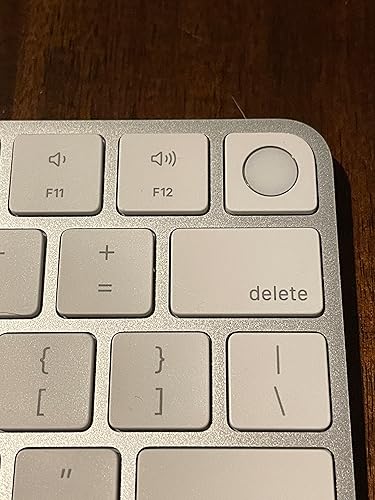
The standout feature of this keyboard is undoubtedly the Touch ID sensor. It allows me to log in to my MacBook Pro with just a touch of my finger, making the whole process quick and effortless. This added security feature gives me peace of mind knowing that my computer and sensitive data are protected from unauthorized access.
In addition to the Touch ID sensor, this keyboard has a host of other impressive features. The keys are well-spaced and have a satisfying amount of travel, making typing a breeze. The backlit keys are a nice touch, especially when working in dimly lit environments. The battery life is exceptional, lasting for weeks on a single charge.
The build quality of this keyboard is exceptional, as expected from Apple. The slim and minimalistic design is a pleasure to look at and feels great to type on. The keys have a satisfying amount of resistance, and the overall feel of the keyboard is premium.
Overall, I highly recommend the Apple Magic Keyboard with Touch ID to anyone looking for a top-of-the-line keyboard with added security features. It is a joy to use, and the attention to detail and quality craftsmanship make it well worth the investment.
26 people found this helpfulSending feedback...Sending feedback...HelpfulThank you for your feedback.Sorry, we failed to record your vote. Please try againThanks, we'll investigate in the next few days.Sorry, We failed to report this review. Please try again - 5 out of 5 stars
Thin, durable, precisely designed
Reviewed in the United States on August 9, 2023I never fail to be impressed by Apple's ability to innovate-- to make thinner, lighter, while maintaining a precise machining and durability and great typing experience. This keyboard is no different.
It has TouchID integrated-- and I had no idea how convenient that was going to be in reducing my 100 times per day logging back into the computer while I work. Being able to touch instead of enter a password really does help with the feeling of simplicity and speed when it comes to getting back to it.
I have never had to charge the keyboard since the initial charge. I'm shocked at the battery management.
There is nothing I would change about this keyboard. Fully satisfied.
Sending feedback...Sending feedback...HelpfulThank you for your feedback.Sorry, we failed to record your vote. Please try againThanks, we'll investigate in the next few days.Sorry, We failed to report this review. Please try again - 5 out of 5 stars
Awesome
Reviewed in the United States on November 3, 2025The perfect keyboard for a Mac - looks great and works perfectly especially the Touch ID
One person found this helpfulSending feedback...Sending feedback...HelpfulThank you for your feedback.Sorry, we failed to record your vote. Please try againThanks, we'll investigate in the next few days.Sorry, We failed to report this review. Please try again - 5 out of 5 stars
Finally Touch ID!
Reviewed in the United States on October 15, 2024I have been a long time MacBook user and I have an off and on desktop set up, but I usually keep my MacBook lid closed because I just need a bigger screen. Having the lid closed, as a first world problem as it seems, I couldn't access the Touch ID feature on my M3 MacBook Air. I had a previous generation of the Magic Keyboard and I caved and bought the one with Touch ID. This has changed the game for me and made this set up so much easier not having to authenticate with my computer password every single time. I would absolutely not say the price is worth it, $50 more just for a Touch ID feature is asinine, but the way I have my setup I really thought it was necessary and has cut down on time navigating to different websites that have me re-sign in to websites all the time, it has changed everything.

I have been a long time MacBook user and I have an off and on desktop set up, but I usually keep my MacBook lid closed because I just need a bigger screen. Having the lid closed, as a first world problem as it seems, I couldn't access the Touch ID feature on my M3 MacBook Air. I had a previous generation of the Magic Keyboard and I caved and bought the one with Touch ID. This has changed the game for me and made this set up so much easier not having to authenticate with my computer password every single time. I would absolutely not say the price is worth it, $50 more just for a Touch ID feature is asinine, but the way I have my setup I really thought it was necessary and has cut down on time navigating to different websites that have me re-sign in to websites all the time, it has changed everything.
8 people found this helpfulSending feedback...Sending feedback...HelpfulThank you for your feedback.Sorry, we failed to record your vote. Please try againThanks, we'll investigate in the next few days.Sorry, We failed to report this review. Please try again - 5 out of 5 stars
Comfort, Portability, and a Touch of Genius
Reviewed in the United States on January 11, 2025I’ve always been a fan of larger keyboards—they give you that satisfying, spacious feel. But the Apple Magic Keyboard with Touch ID? It’s a whole different story. This keyboard is all about comfort and portability, and it delivers on both fronts.
The compact size makes it perfect for slipping into a bag and taking anywhere, yet it doesn’t sacrifice the comfort of hand placement. Typing feels natural, with just the right amount of spacing and key travel to keep your wrists and fingers happy, even during long work sessions.
The built-in Touch ID is a game-changer—it makes unlocking your Mac and authorizing purchases seamless and secure. No more typing passwords every five seconds! Plus, the Bluetooth connectivity and rechargeable battery mean fewer cables and more convenience.
It’s lightweight yet sturdy, and the design is quintessential Apple—minimalist and elegant. If you’re someone who values portability but doesn’t want to compromise on typing comfort, this keyboard strikes the perfect balance.
For me, this keyboard has become the go-to for both work and travel. It’s a 10/10 in my book—comfortable, portable, and packed with features that make life easier!
7 people found this helpfulSending feedback...Sending feedback...HelpfulThank you for your feedback.Sorry, we failed to record your vote. Please try againThanks, we'll investigate in the next few days.Sorry, We failed to report this review. Please try again - 4 out of 5 stars
A Magic Keyboard with Touch ID, what’s that worth to you?
Reviewed in the United States on August 20, 2021For starters, this keyboard only works fully (Touch ID) on Macs with Apple Silicon, which is unfair to anyone who bought an Intel Mac in the last few years. I mean it has to be technically possible for this to work with T2 equipped Macs, but with Apple, we get what they give us. There’s also no backlight either, so yeah. So if you like the style of these newer Magic Keyboards and you own an Intel Mac, only get this if you plan on upgrading to Apple Silicon, otherwise, you should get the $100 model without Touch ID.
I think that this purchase only really makes sense for owners of the Mac mini or the 24” iMac who weren’t able to spend the extra money at the time (or just changed their mind). I don’t see why MacBook owners would ever buy this, but it will work with M1 MacBook Air/Pro and any future Apple Silicon Macs using what will likely be called the M1X and M2 chips being released later this year and next year, respectively. (I wrote this before they unveiled the M1 Pro/Max/Ultra naming conventions, definitely didn’t see them going in that direction but I guess it’s easier for people to differentiate which processors are more/most powerful).
This is pretty much just a regular old Magic Keyboard with Touch ID and a few other changes like the emoji button and the curved edges, which falls in line perfectly with Apple’s latest design language. The layout is a bit different too, but it’s not hard to switch to this. The typing experience is pretty similar to the previous generation. It feels really good for this type of keyboard without much key travel.
Pairing is simple, you just go into the keyboard settings and it will be detected as long as you turn on the keyboard. I never even plugged mine in until after pairing. You have to double tap the power button (on your Mac) to authenticate it the first time, similar to triggering Apple Pay on iPhone. Then you just register your fingerprint like on a MacBook, and good news- you can register multiple fingers. This is perfect for couples who share a desktop or even roommates or whatever. It’s really fast too, unlocking the Mac. About three times as fast as using my Apple Watch Series 3.
I think that you really gotta be drinking the kool-aid to buy this at the current price. Or you just really need Touch ID on the desktop for some reason. 3.5 stars, but I’m being kind and rounding up to 4.
Pros +
Excellent Build Quality
Includes braided USB C to Lightning cable (this is the first one they’ve ever made as far as I know, and now you don’t have to pay $1300 to get it with an iMac)
Touch ID works really well, and is super fast to be on a separate piece of hardware
Great typing experience (for a chiclet keyboard)
Emoji key
Cons-
Not backlit (Really Apple? You couldn’t give us this one thing?!)
Too expensive, it just is


 4 out of 5 stars
A Magic Keyboard with Touch ID, what’s that worth to you?
Reviewed in the United States on August 20, 2021For starters, this keyboard only works fully (Touch ID) on Macs with Apple Silicon, which is unfair to anyone who bought an Intel Mac in the last few years. I mean it has to be technically possible for this to work with T2 equipped Macs, but with Apple, we get what they give us. There’s also no backlight either, so yeah. So if you like the style of these newer Magic Keyboards and you own an Intel Mac, only get this if you plan on upgrading to Apple Silicon, otherwise, you should get the $100 model without Touch ID.
I think that this purchase only really makes sense for owners of the Mac mini or the 24” iMac who weren’t able to spend the extra money at the time (or just changed their mind). I don’t see why MacBook owners would ever buy this, but it will work with M1 MacBook Air/Pro and any future Apple Silicon Macs using what will likely be called the M1X and M2 chips being released later this year and next year, respectively. (I wrote this before they unveiled the M1 Pro/Max/Ultra naming conventions, definitely didn’t see them going in that direction but I guess it’s easier for people to differentiate which processors are more/most powerful).
This is pretty much just a regular old Magic Keyboard with Touch ID and a few other changes like the emoji button and the curved edges, which falls in line perfectly with Apple’s latest design language. The layout is a bit different too, but it’s not hard to switch to this. The typing experience is pretty similar to the previous generation. It feels really good for this type of keyboard without much key travel.
Pairing is simple, you just go into the keyboard settings and it will be detected as long as you turn on the keyboard. I never even plugged mine in until after pairing. You have to double tap the power button (on your Mac) to authenticate it the first time, similar to triggering Apple Pay on iPhone. Then you just register your fingerprint like on a MacBook, and good news- you can register multiple fingers. This is perfect for couples who share a desktop or even roommates or whatever. It’s really fast too, unlocking the Mac. About three times as fast as using my Apple Watch Series 3.
I think that you really gotta be drinking the kool-aid to buy this at the current price. Or you just really need Touch ID on the desktop for some reason. 3.5 stars, but I’m being kind and rounding up to 4.
Pros +
Excellent Build Quality
Includes braided USB C to Lightning cable (this is the first one they’ve ever made as far as I know, and now you don’t have to pay $1300 to get it with an iMac)
Touch ID works really well, and is super fast to be on a separate piece of hardware
Great typing experience (for a chiclet keyboard)
Emoji key
Cons-
Not backlit (Really Apple? You couldn’t give us this one thing?!)
Too expensive, it just is
98 people found this helpfulSending feedback...Sending feedback...HelpfulThank you for your feedback.Sorry, we failed to record your vote. Please try againThanks, we'll investigate in the next few days.Sorry, We failed to report this review. Please try again - 5 out of 5 stars
Love this keyboard!
Reviewed in the United States on December 22, 2023I bought this as a replacement for the last Apple keyboard I had and it works like a charm!
The older version used 2 x AA batteries, which always had to be changed, so when one key stopped working, I figured it was time to trade up, and I am sure glad I did!
This keyboard feels so smooth to the touch, has just enough of an incline to feel right ergonomically after working on it all day long / 7 days per week, and the charge seems to last forever.
Very happy with this purchase, so now just waiting for my magic trackpad to peter out so I can upgrade that.
Sending feedback...Sending feedback...HelpfulThank you for your feedback.Sorry, we failed to record your vote. Please try againThanks, we'll investigate in the next few days.Sorry, We failed to report this review. Please try again - 5 out of 5 stars
Works perfectly
Reviewed in the United States on December 22, 2023I bought this keyboard because the one built into my MacBook Air required that I keep the lid open which partially blocked the view of my 27 inch external monitor. The keyboard paired with my MBA automatically! When I turned the keyboard on the MBA recognized it immediately and that was the extent of the setup. I love that about Apple products: they integrate so well and without a lot of fuss. My only wish is for backlit keys but that would probably cause frequent recharging so I am okay with it.
I also bought a couple of stands (https://www.amazon.com/dp/B09LYWQQ3C?psc=1&ref=ppx_yo2ov_dt_b_product_details) to tilt the keyboard for a more comfortable typing experience.
Sending feedback...Sending feedback...HelpfulThank you for your feedback.Sorry, we failed to record your vote. Please try againThanks, we'll investigate in the next few days.Sorry, We failed to report this review. Please try again


Top reviews from other countries
 Nicole Hapgood5 out of 5 stars
Great keyboard for turning your back book into a full desktop replacement
Reviewed in Canada on July 9, 2024I wish I had this keyboard 2 years ago when I bought my latest MacBook, how the MacBook keyboard looks worn out. Keyboard worked as expected.
Sending feedback...Thanks, we'll investigate in the next few days.Sorry, We failed to report this review. Please try again- zhuangyishen5 out of 5 stars
The best keyboard.
Reviewed in Canada on May 4, 2023Own so many custome mechanical keyboards, low profile mechanical keyboard, ergo keyboard like kinesis advantage 2, moonlander. Magic keyboard still the best keyboard. After using it, I cannot use other keyboard now. Is worth to buy the none touch ID version if you don’t have any m1 chip mac machine. I use it on windows, linux, mac and ipad.
Sending feedback...Thanks, we'll investigate in the next few days.Sorry, We failed to report this review. Please try again - fruit juice5 out of 5 stars
Good keyboard
Reviewed in Canada on August 15, 2023It works exactly how I expected. It’s the only keyboard I can find with the same fn key layout as the MacBooks, so I don’t need to relearn touch typing the fn key. The Touch ID does not work for intel macs. Touch ID only works on m1 macs.
Sending feedback...Thanks, we'll investigate in the next few days.Sorry, We failed to report this review. Please try again - DigitalMann5 out of 5 stars
Far too expensive for a basic keyboard…Touch ID makes it worth it!
Reviewed in Canada on November 26, 2024If not for the Touch ID, this would be a total rip off. Having said that, the Touch ID is a godsend! This keyboard pays for itself every time you don’t have to manually put in your password! It uses the passwords in your iCloud password manager to sign in to the Mac itself as well as apps and websites.
Sending feedback...Thanks, we'll investigate in the next few days.Sorry, We failed to report this review. Please try again - Carson4 out of 5 stars
Great keyboard that works perfectly with Mac computers
Reviewed in Canada on June 28, 2022Its a joy to type on, it's compact and feels pretty well built. It does feel kind of light, and maybe a hint cheap, but when you're actually using it you almost don't regret paying the Apple tax.
Touch ID works as expected and overall I'm really happy with this purchase.
Oh and aesthetically, it's stunning.
Sending feedback...Thanks, we'll investigate in the next few days.Sorry, We failed to report this review. Please try again


 |
Your recently viewed items and featured recommendations
After viewing product detail pages, look here to find an easy way to navigate back to pages you are interested in.
Get to Know Us
Make Money with Us
Amazon Payment Products
Amazon Music
Stream millions
of songsAmazon Ads
Reach customers
wherever they
spend their time6pm
Score deals
on fashion brandsAbeBooks
Books, art
& collectiblesACX
Audiobook Publishing
Made EasySell on Amazon
Start a Selling AccountVeeqo
Shipping Software
Inventory Management
Amazon Business
Everything For
Your BusinessAmazonGlobal
Ship Orders
InternationallyAmazon Web Services
Scalable Cloud
Computing ServicesAudible
Listen to Books & Original
Audio PerformancesBox Office Mojo
Find Movie
Box Office DataGoodreads
Book reviews
& recommendationsIMDb
Movies, TV
& Celebrities
© 1996-2026, Amazon.com, Inc. or its affiliates
