


| CARVIEW |




Razer Core X Aluminum External GPU Enclosure (eGPU): Compatible with Windows & MacOS Thunderbolt 3 Laptops, NVIDIA/AMD PCIe Support, 650W PSU, Classic Black
We don't know when or if this item will be back in stock.


| Brand | Razer |
| Motherboard Compatability | ATX |
| Case Type | Desktop |
| Recommended Uses For Product | Gaming |
| Color | Classic Black |
| Material | Aluminum |
| Cooling Method | Air |
| Model Name | Core X |
| Item Weight | 14.3 pounds |
| Product Dimensions | 9.06"D x 14.74"W x 6.62"H |
About this item
- Desktop Grade Performance: Boosts Thunderbolt 3 laptop performance with support for up to 3 slot wide PCIe full sized desktop graphics cards
- Built-In Power Supply: Includes a 650W ATX PSU with 100W laptop charging via Thunderbolt 3
- Compatibility (Windows): Requires Thunderbolt 3 external graphics (eGPU) support with RS45 or later and compatible NVIDIA or AMD graphics cards
- Compatibility (macOS): Requires Thunderbolt 3 and High Sierra 10.13.4 or later and compatible AMD graphics cards only (NVIDIA cards not supported)
- *Graphics Card NOT included
 Report an issue with this product or seller
Featured items you may like
Product Videos

Product guides and documents
From the manufacturer
Razer Core X
Ultraboost Your Ultrabook
The Razer Core X Thunderbolt 3 external desktop graphics enclosure turns your compatible Windows 10 or Mac laptop into a desktop-class gaming machine by adding external NVIDIA GeForce, NVIDIA Quadro, or AMD Radeon graphics. The massive 650W power supply fuels the graphics card and provides 100W power delivery to compatible laptops via USB-C. Beauty meets beast with the ultimate external graphics solution.
Note: Graphics card sold separately.
PCIe Desktop Graphics Cards Support
For Desktop-Class Performance
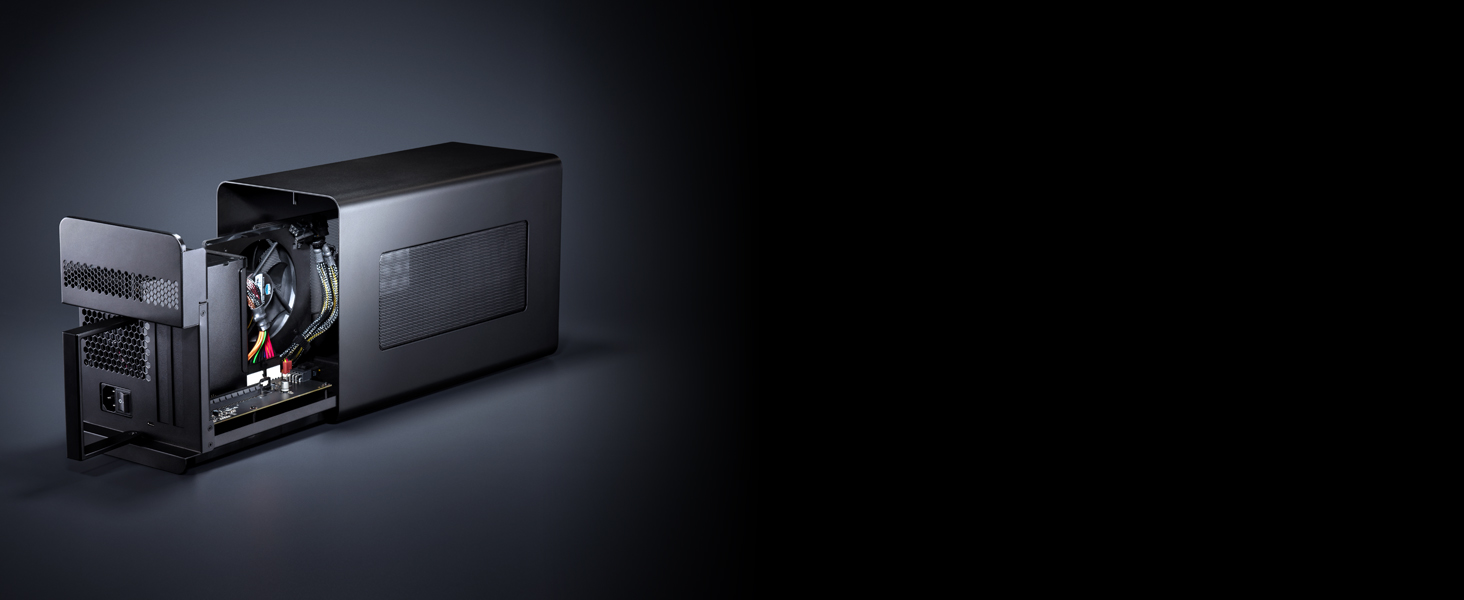
The Razer Core X features support for the latest PCIe desktop graphics cards including NVIDIA GeForce and AMD XConnect enabled Radeon cards. Highly mobile developers can now harness the power of compatible NVIDIA Quadro cards for professional graphics performance.
Thunderbolt 3 Connection
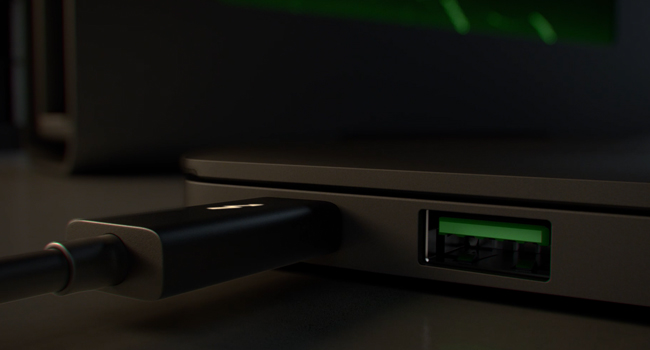
The Thunderbolt 3 (USB-C) connection between a laptop and Razer Core X yields incredibly fast speeds at up to 40Gbps, while offering a standard connection to various systems.
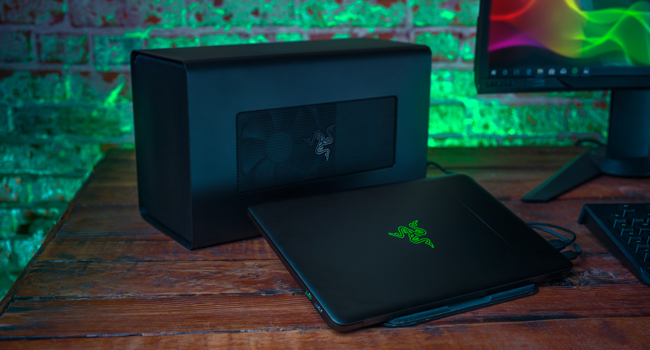
Plug and Play
Now there is no need to reboot your laptop every time you connect to external graphics. For quick connection to your game session, Razer Core X is plug and play when connected with compatible laptops.
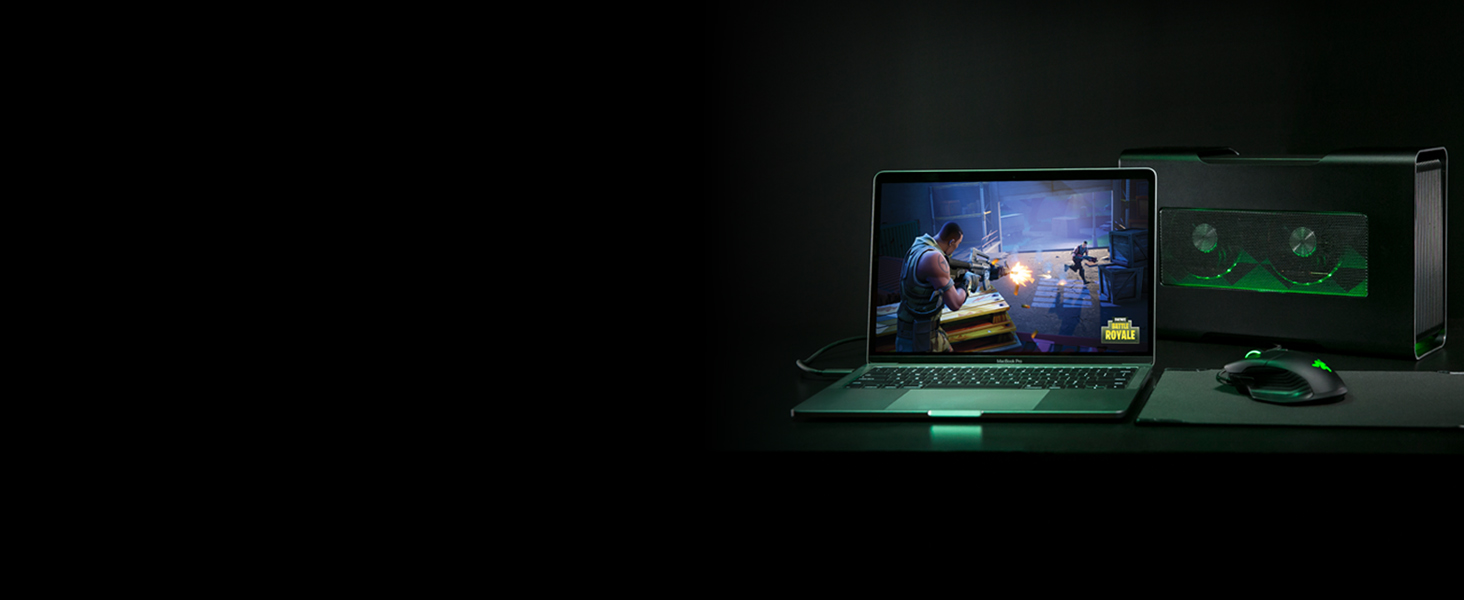
Versatile Compatibility
Windows 10 or Mac eGFX Systems
The Razer Core X is incredibly versatile and compatible with Thunderbolt 3 systems running Windows 10 RS1 or later and Macs running macOS High Sierra 10.13.4 or later. Laptops require a Thunderbolt 3 port with external graphics (eGFX) support.

Upgradeable Anytime
To Secure Future Proof Performance
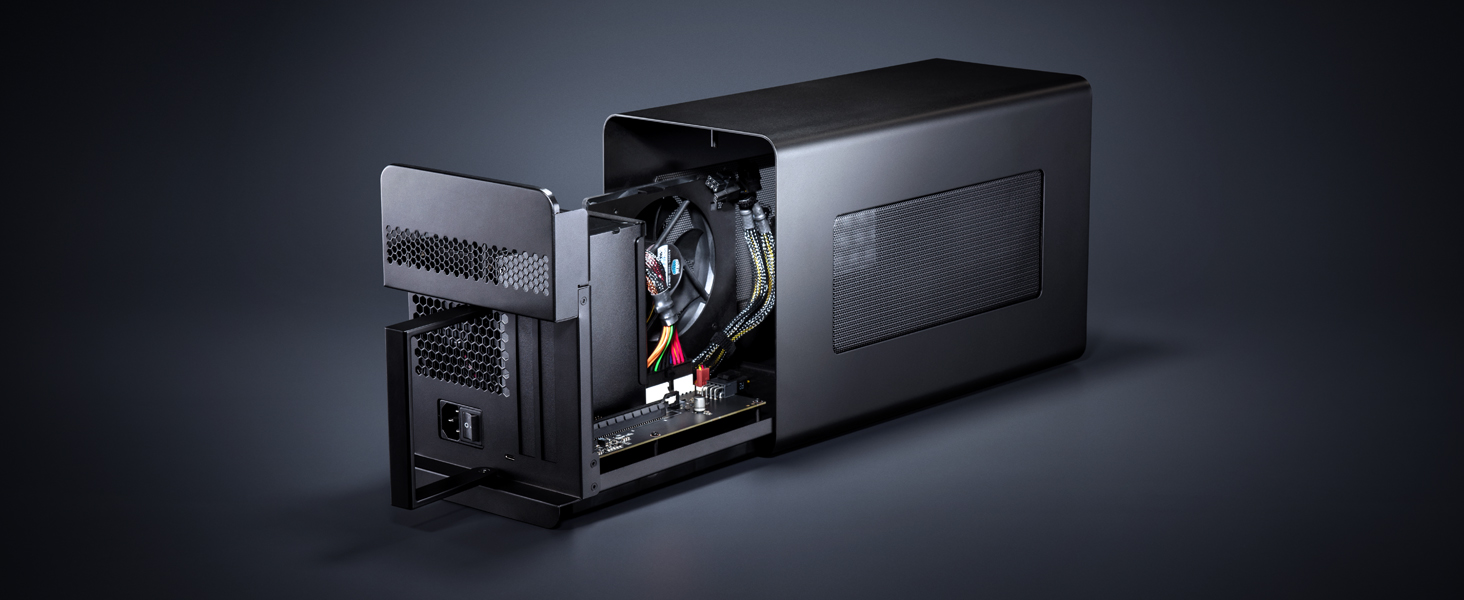
Stay at the top of your game by keeping your performance maxed. Razer Core X lets you easily upgrade your graphics card, so you can instantly give your laptop a boost and get access to the 650W ATX power supply anytime.
-
What systems are compatible with Razer Core X?
The Razer Core X is a simple plug and play solution, to harness the power of desktop graphics in a laptop. To connect to a Razer Core X, you will need a Thunderbolt 3 equipped laptop, the included Thunderbolt 3 cable and a compatible graphics card.
-
Will the Core X work with a Mac?
Yes, they are compatible with Thunderbolt 3 Macs running macOS High Sierra 10.13.4 or later and requires a compatible AMD graphics card. For more information on Mac compatibility please see the Razer Core X support page.
-
Is the Razer Core X compatible with AMD and NVIDIA graphics cards?
Razer Core X supports a wide variety of GPUs from both AMD and NVIDIA. We recommend reviewing the list of compatible plug and play graphics processors on the Razer Core X support page.
-
My Core X is not turning on, what should I do?
Download the latest software updates and graphics drivers. Connect your GPU, PCI slot and power connectors. Turn on the unit and connect the included cable to your Thunderbolt port. Select “Always Connect” in the Thunderbolt Control Panel.
-
Can I connect a Razer Core X to my laptop with USB Type C port?
Download the latest software updates and graphics drivers. Connect your GPU, PCI slot and power connectors. Turn on the unit and connect the included cable to your Thunderbolt port. Select “Always Connect” in the Thunderbolt Control Panel.
Product Description
The Razer Core x Thunderbolt 3 external desktop graphics enclosure enables full transformation of your compatible laptop into a desktop-class gaming or workstation setup. The Thunderbolt 3 design provides dedicated lanes for both graphics and I/O ensuring fluid gameplay. Connect to the future with the most advanced and versatile eGPU solution available.
Product information
| Supported Motherboard | ATX |
|---|---|
| Case Type | Desktop |
| Cooling Method | Air |
| Total USB 2.0 Ports | 1 |
| Total Usb Ports | 3 |
| Hard Disk Form Factor | 3.5 inches |
| Internal Bays Quantity | 3 |
| Compatible Devices | Compatibility (Windows): Requires Thunderbolt 3 external graphics (eGFX) support with RS45 or later and compatible NVIDIA or AMD graphics cards. Razer synapse 3 software not available on macOS ; Compatibility (macOS): Requires Thunderbolt 3 and High Sierra 10.13.4 or later and compatible AMD graphics cards only (NVIDIA cards not supported) |
| Color | Classic Black |
|---|---|
| Enclosure Material | Aluminum |
| Antenna Location | Gaming |
|---|
| Item Weight | 14.3 pounds |
|---|---|
| Item Dimensions D x W x H | 9.06"D x 14.74"W x 6.62"H |
Warranty & Support
Feedback

| Brand | Razer |
|---|---|
| Model Name | Core X |
| Unit Count | 1 Count |
| Manufacturer | Razer USA Ltd |
| UPC | 814855028016 |
| Global Trade Identification Number | 00814855028016 |
| Built-In Media | Razer Core X |
| Item Type Name | Razer Core X - External Graphics Enclosure |
| Model Number | RC21-01310100-R3U1 |
| Mfr Part Number | RC21-01310100-R3U1 |
| Warranty Description | 1 Year |
| Best Sellers Rank |
|
| ASIN | B07CQG2K5K |
| Customer Reviews |
4.3 out of 5 stars |
Safety and product resources
Safety documents
What's in the box
Top Brand: Razer


Customer reviews
Customer Reviews, including Product Star Ratings help customers to learn more about the product and decide whether it is the right product for them.
To calculate the overall star rating and percentage breakdown by star, we don’t use a simple average. Instead, our system considers things like how recent a review is and if the reviewer bought the item on Amazon. It also analyzed reviews to verify trustworthiness.
Learn more how customers reviews work on AmazonCustomers say
 Generated from the text of customer reviews
Select to learn more
Reviews with images

Works great, plug and play... but heavy
Top reviews from the United States
- 5 out of 5 stars
Premium Build Quality
Reviewed in the United States on February 25, 2019I don't know about you, but I shopped around and around and around for eGPU cases.
I looked at all of the premium vendors for Apple supported devices, and honestly this is the nicest and most practical case out of all of them. Unlike most cases there are vents on 4 sides of the case. It has a 72mm fan pulling in air opposite of the Graphics card and pulling in more are for the PSU... which most cases lack.
It comes with a 600w power supply unit. Most cases don't have that and cost much more... Why? I have no clue except they include extra Thunderbolt and USB ports. (Which in my case I don't need slowing down the graphics card's Pipeline Thunderbolt basically already took it to 80% regardless of speed)
I know some people love RBG but I hate RGB and I am so glad this case does not factor extra RGB into the cost of the product because it is a waste of electricity and money.
Its smooth and black and it hides very well on one of the shelves of my desk. (They don't have sides so air flow is not an issue)
Honestly it works really well and at first I was surprised that the 72mm fan was keeping my card so cold that it did not cycle at all until I was in a game for at least a few minutes.
Only down side is that the Thunderbolt cable included was a little short... I can make it work but it would have been nice to have a 3 foot cable if that was technically possible with Thunderbolt.
Very happy with this purchase and I think Razer really proved they can also make products for the active professionals, not just gamers.
48 people found this helpfulSending feedback...Sending feedback...HelpfulThank you for your feedback.Sorry, we failed to record your vote. Please try againThanks, we'll investigate in the next few days.Sorry, We failed to report this review. Please try again - 5 out of 5 stars
Works great, plug and play... but heavy
Reviewed in the United States on September 1, 2019As a part time gamer and full time Mac user, I wanted to play some games to my monitor when I am at home. Firstly, works great with Vega 64 and VII from AMD. These are, as of this review, the most recent GPU cards that both the box and the OS support. Moreover, to game you really need to go bootcamp... games just don't run well on OS X (despite the ports). Being able to reboot my machine into windows without unplugging something was key to my workflow. Plugging in the GPU and connecting this to the system is a breeze. I HIGHLY recommend a longer cord (Zikko makes a 6.6 foot TB3 that works perfectly).
The PROS: All of them. I have the non-chroma version because ... I'm not an RGB guy and I don't need all those ports as I already have a big TB3 hub (having multiple TB3s on the MBP makes this a simple set up).
The CONS: The thing is heavy... with the longer cord though, you can retire this unit to a safe location. If you are using the Chroma version, you will not be able to do this as the hub is built into the box... just a word of warning. Also, because of how the fans are set up, your GPU fans and the enclosure fan blow toward each other. Make sure the back of this unit is WIDE open as in don't put the back up to a wall. This is the only way the hot air can go to escape.
Overall, this is the best eGPU enclosure by far... the power is perfect... The fan issues are minor at best.

 5 out of 5 stars
Works great, plug and play... but heavy
Reviewed in the United States on September 1, 2019As a part time gamer and full time Mac user, I wanted to play some games to my monitor when I am at home. Firstly, works great with Vega 64 and VII from AMD. These are, as of this review, the most recent GPU cards that both the box and the OS support. Moreover, to game you really need to go bootcamp... games just don't run well on OS X (despite the ports). Being able to reboot my machine into windows without unplugging something was key to my workflow. Plugging in the GPU and connecting this to the system is a breeze. I HIGHLY recommend a longer cord (Zikko makes a 6.6 foot TB3 that works perfectly).
The PROS: All of them. I have the non-chroma version because ... I'm not an RGB guy and I don't need all those ports as I already have a big TB3 hub (having multiple TB3s on the MBP makes this a simple set up).
The CONS: The thing is heavy... with the longer cord though, you can retire this unit to a safe location. If you are using the Chroma version, you will not be able to do this as the hub is built into the box... just a word of warning. Also, because of how the fans are set up, your GPU fans and the enclosure fan blow toward each other. Make sure the back of this unit is WIDE open as in don't put the back up to a wall. This is the only way the hot air can go to escape.
Overall, this is the best eGPU enclosure by far... the power is perfect... The fan issues are minor at best.
4 people found this helpfulSending feedback...Sending feedback...HelpfulThank you for your feedback.Sorry, we failed to record your vote. Please try againThanks, we'll investigate in the next few days.Sorry, We failed to report this review. Please try again - 5 out of 5 stars
Awesome solution for Macbook Pro users with a minor caveat.
Reviewed in the United States on October 15, 2020Like every Razer item I've purchased, it's top notch quality products and the best bang for the buck. The Razer Core X eGPU seemed quite expensive at first but if you factor in power supply, control board, and quality; it's a great bargain. I've assembled every Win PC gaming rig that I've owned and use Macbook Pros for work. I recently upgraded to 2x BenQ 4K displays since the price was right and the WFH situation made it the right time... which is how I discovered the Razer Core X / eGPUs.
My Macbook Pro (15" mid 2015) is "kind of" capable of running 2 4K monitors but noticed performance issues when the 4K resolution is scaled to 1440p. macOS shows a warning for this under display settings when changing the resolution. It's either 1080p or 4K where it doesn't bog down. Well, we all know 4K on a 27" monitor is going to make everything very tiny and the 1080p resolution is going to be in yo face but the picture quality is amazing. I prefer the 1440p with the better image quality reason I went 4K rather than native 1440p. 5K is just still super expensive.
Some folks will probably be like why dual 4K?! I'm a software engineer so the extra real estate for the IDE / Text Editor on one screen and the rest on the other is what I've always preferred. The 1440p in high def makes the text look amazing. I know, I know... folks be like, you got a 4K for TEXT and 2 of them?! ... Yes, my eyes are not the same as they were over a decade ago when I started my software development career.
Anyway, back to how I got here. The MBP was sluggish due to the GPU. My specific model is described to work with 1 5K external monitor. Makes sense, it's a 5 year old laptop GPU powering dual 4K. I needed to upgrade my GPU and researched some solutions. I was disappointed finding out there's no native macOS support for Thunderbolt 2 and eGPUs but I found purge-wrangler.sh.
After following the basic instructions from the purge-wrangler github page, it was plug and play. I installed an AMD RX580... YES, an AMD... I have not purchased a desktop AMD card ever since the whole Bitcoin mining phase, people were forced to turn to NVIDIA cards. It all works great on my MBP. Also, I have this connected to a 4 port DisplayPort KVM for dual monitors. It works, make sure to buy the official Apple TB3 to TB2 since it's bidirectional and get a TB certified cable to plug into the adapter.
# Pros
- Quality packaging as always (stickers swag) 👏
- Quality product, paint, mesh, design, etc. 🙌
- Works with MBP (15" mid 2015, and a 13" MB Air 2012) TB2 (with install scripts) - Apple's limitation 🤦♂️
- macOS detected my monitors supported HDR and displayed an enable/disable checkbox in the display settings where as before it didn't 🤔
- Might have the highest wattage support compared to other competitors at the time of this review. Can support most high end GPUs but double check the dimensions and power requirements! 🥇
- The swivel / lock handle design - 👌
- It can play games with the RX580 but nowhere close to what my 1070Ti on the PC can do. I'm upgrading to a 5700XT since I got a Prime Day deal on it.
- Can play fortnite, cs:go, left4dead, etc. I suggest a better card since the Razer X is designed for some serious gaming GPUs. The RX580 is an insult for what this eGPU enclosure can support. However, if you don't care about gaming in high/ultra settings, software & web development, CAD, video editing etc. then a RX580 paired with this enclosure is a great upgrade.
# Cons
- Leaving idle state, the fans spin quickly causing some fan noise. It's only like a second or two. Not that big of a deal. Might be the GPU + Enclosure combo. Will find out with the 5700XT swap.
# Neutral
- Ventilation - can be used as a mini space heater for the winter by playing games at ultra settings. Not sure how much the office will warm up during the summer. It's fall.
- Some people complained theirs "didn't power on". You have to plug in a TB3 cable. Most people will assume they would see some kind of light or power when flipping the PSU switch. Wasn't the case and it left me scratching my head a bit. My situation with purge-wrangler had me connect the cable during script install. Razers instructions were to plug in the TB cable THEN flip the PSU switch.
- Wish it came with a longer TB3 cable but they sell longer TB cables separately. That's how they can keep the price low b/c a 6.6 FT TB2 cable cost me $45 so be glad it came with one.
25 people found this helpfulSending feedback...Sending feedback...HelpfulThank you for your feedback.Sorry, we failed to record your vote. Please try againThanks, we'll investigate in the next few days.Sorry, We failed to report this review. Please try again - 4 out of 5 stars
Enclosure works great, Thunderbolt is a nightmare
Reviewed in the United States on July 30, 2023This works great out of the box and if you have a Windows laptop or NUC or something similar. The nightmares begin on day 1 however. Thunderbolt is to blame here... I spent a while trying to find the "right version" of the Thunderbolt drivers to get this working stably on my HP Spectre laptop. It ended up only really being fully stable when I disabling the internal dGPU video card and turning off power management on random stuff like the ethernet card!
It really feels like incantations to get this to just not blue screen the laptop. Worse, it would "plague" it for the duration before it blue screens. I'd unplug the enclosure and then go to a coffee shop and find the laptop already blue screened and on the login screen hot in my backpack. If I didn't plug in for a while, no problems like that.
When this works, it's actually REALLY good. The video card, I've used an RTX 2080, and Intel Arc 770, only runs at PCI-e 4x but that's plenty for playing games on that are powered by a laptop. Diablo 4, Dead by Daylight, Overwatch, even Cyberpunk, run ok on this. There's some stutters and dips in FPS, but those really can be mostly attributed to the laptop. PCI-e 4x is just not slow enough for this to matter to gaming. Also, I was running an external display. Running the internal laptop display means you have to copy the framebuffer back to the internal card and it's not variable... the 4 PCI-e lanes are split so 2 go to the card and 2 come back... and that severely limits the framerate, makes things feel laggy, and causes a lot of stuttering and slowdown.
I ran CUDA workloads on this as well... and honestly didn't see too much difference with the same video card in a normal PC motherboard. There were times it "felt like" the models being uploaded to the card was running slower, but the actual processing times and numbers really didn't reflect measurable differences.
Thunderbolt in general is just super unreliable. My HP Spectre, a few Intel NUCs, a Dell XPS, and some other hardware all have random issues with Thunderbolt docks, VGA passthrough, and all the issues with stability. It's great if you're in a pinch, but terrible if it's your only setup.
I'd recommend this only if you want to sit at a desk with your laptop and game every now and then but otherwise have a primary gaming computer setup. I can also recommend using it with an Intel NUC where you're ok with the occasional crash/random reboot.
3 people found this helpfulSending feedback...Sending feedback...HelpfulThank you for your feedback.Sorry, we failed to record your vote. Please try againThanks, we'll investigate in the next few days.Sorry, We failed to report this review. Please try again - 5 out of 5 stars
Works Flawlessly on MacOS 10.14.x - Perfect AMD Vega 64 & Radeon VII
Reviewed in the United States on March 4, 2019When I first purchased the Razer Core X, the goal was to allow me to fully utilize 4x 4K displays with my (late 2018) Mac Mini (which is limited to Intel onboard graphics). After having read through numerous reviews, I paired it with an AMD Vega 64 (reference card) and it just worked out of the box. Now I've purchased a second to pair with a Radeon VII (keep reading for details) so I could power additional displays and benefit from passing video to virtual machines.
Now, there's one caveat to using an eGPU, and it's not specific to Razer or any other brand. If you're using disk encryption (APFS, Encrypted) on a Mac Mini, you will need to swap to the default HDMI port on the Mac Mini when booting and/or rebooting, and then back to the eGPU once the system is online.
# Workarounds
1). If you have a monitor with an extra DisplayPort or HDMI port, connect your primary to the graphics card within the eGPU and the secondary to the HDMI port on the back of the Mac Mini. When you boot, swap to the HDMI port on the Mac Mini using the display settings. Once the Mac Mini is booted, swap back to the port on the graphics card.
2). Backup your data, and reinstall MacOS (making sure you format the disk before reinstalling) and select APFS (not APFS Encrypted). The issue only impacts boot when disk encryption is used and by removing that from the boot sequence, the eGPU will be used by default.
If you don't absolutely *need* encryption enabled, I would go with #2 to minimize the hassle.
# Radeon VII Notes
For those wanting to use a Radeon VII, this eGPU enclosure *does* work, very well, though as of this review, you will need to make sure you are using the *beta* of MacOS (currently 10.14.5 Beta). The Radeon VII does not currently work with the default (non-beta) version of 10.14 as Apple doesn't include the drivers for the card in versions prior. Much like the issue with disk encryption, you will see a black screen if you're not using the beta release.
# Overall
The larger question here is, at nearly $300 (at the time of this review), is the Razer Core X worth it? What about when paired with a $400-$700 card? I'd say absolutely. If you have a MacBook Pro or Mac Mini with Thunderbolt 3 and you need something that you can quickly and easily upgrade with a new card in the future, this is an amazing enclosure.
I originally bought mine for a Vega 64, though recently swapped in a Radeon VII. I've bought a second one for the Vega 64 so it still gets used on the same Mac Mini (as the Mac Mini will support 2x eGPU's -- for best results, I'm adding them to the first and third TB3 ports).
123 people found this helpfulSending feedback...Sending feedback...HelpfulThank you for your feedback.Sorry, we failed to record your vote. Please try againThanks, we'll investigate in the next few days.Sorry, We failed to report this review. Please try again - 1 out of 5 stars
Junk... And their customer support is worse -
Reviewed in the United States on July 9, 2019Junk... And their customer support is worse - And this scathing review has YET to be addressed - manufacturer DOES... NOT.. CARE after the check clears
Equipment:
Lenovo P1 (has a P2000 GPU inside and nVidia software)
Core X
Asus GTX1060 8GB (was working - had to cool to install)
Update: Same results with Lenovo P71. Different results with OneMix 2S Platinum... but nothing good.
1) It was not detected on a Lenovo p1 ... my fault. I ran the ThuunderBolt app and it showed it and I connected it
2) Windows detected the display adapter. But, needed device driver update (wait, nVidia driver is up to date!)
3) Did driver update through Windows and got an error (yet it correctly saw the PCIe bus BAR0 data identifying the card)
4) Ran nVidia tools (it saw nothing)
5) Went to nVidia site and downloaded new tools/drivers - failed to do any good
6) Went to support site and found that (despite the instructions on the card) there is no firmware/software for the CoreX
7) Called tech support... this is long... but basically I summarize the conversation with these points:
a) If you do not use a Razer laptop... don't call tech Razer support for Core X - they have no support for any but them
b) The support person essentially was lame and offered me many untruths which implied that the lies on this and other sites (non Razer compatibility) were not untruths
c) But, basically he said that the Core X is only known to work with Razer laptops and do not recommend using others (cough look above and see many non Razer laptops)
d) He then tried to explain that it was not the fault or Razer (that they do not comply with industry standards is never the fault of the manufacturer... it is always somebody else's fault)
e) He explained that it would not work because I had to disable the insystem (P2000) GPU (yet... another external USB C GPU I use says "yay! more help - jump into the pool!)
f) He said that there is no firmware in the Core X (lol what!?). So, an update including actual industry standard compliance is not possible (get real... even a USB dongle has firmware - this MUST for PCIe as it at least has to include the BAR0 data and then there is the related UEFI/BIOS extensions to be enumerated and added to the ACPI (or equivalent device tree).
I may return it, or use the chassis/PSU and toss the other useless junk inside.
I am sad, I was expecting productivity improvement but, lost hours, money, and Razer lost another reputation point.
Likely last update: After my giving their tech support all they asked and getting the same questions a 3rd time I decided to cut my losses and make use of this in a positive way. It is a doorstop. Filled the thing with sand and it does all it was capable of doing except with more ballast. Now, it props open the door when I need to work on the sprinklers and I am glad for the sand in it since its mass increases when wet... Best use for this thing I can find.
17 people found this helpfulSending feedback...Sending feedback...HelpfulThank you for your feedback.Sorry, we failed to record your vote. Please try againThanks, we'll investigate in the next few days.Sorry, We failed to report this review. Please try again - 5 out of 5 stars
Great eGPU Box
Reviewed in the United States on March 15, 2020About the Razer Core X.
Recommend
Pros:
- Well thought out. Open the case, pop in your video card, close the case
- Quiet
- Modern Mac “plug and play”
- Not just another ugly black box, but it is a black box. (Just not ugly)
- Will not scratch your desk
- Repairable/upgradable components (like power supply)
- 650 watt power supply can feed most video cards AND power your laptop
Cons:
- Performance improvements from an eGPU are best for gaming.
- The thumb screw for anchoring your video card to the chassis needed a screw driver (thumb is too big)
- Metal to metal grounding (for static control) is limited by heavy ‘baked enamel’ finish
- Big, but that is also good because it allows full sized cards and better cooling
- Not a dock
- Power and signal cables on video cards can have one scratching their head if the connectors don’t match. Not Razer’s fault.
I was using a MacBook Pro 15-inch (Late 2016) and experienced no issues with the Razer. Add your video card and you are done. I wanted to write a balanced review but it was tough, as you can see by my weak list of “Cons.”
I wanted to see if adding an eGPU would improve my video export times. I did see some improvements with DaVinci Resolve but I seldom use that software. Unfortunately, sending tasks to the eGPU and back to the CPU is enough overhead that it wasn’t worth the complexity for me. However, gamers just want the video signal to go through the eGPU to a monitor; for that it is great. Since I don’t game I returned my unit but I was really impressed with everything about the Razer Core X. I seriously considered keeping it just in case I decide to game when I retire but decided technology would march on in 18-months.
Recommend - for gaming
2 people found this helpfulSending feedback...Sending feedback...HelpfulThank you for your feedback.Sorry, we failed to record your vote. Please try againThanks, we'll investigate in the next few days.Sorry, We failed to report this review. Please try again - 3 out of 5 stars
Looks and works great but has always on, noisy fans (fixable)
Reviewed in the United States on December 3, 2020This is for the Razer Core X (not Chroma): this external GPU enclosure looks and works great and is really easy to open up and access any components – which is good because the provided case fan and power supply fan are always running and not so quiet. It’s not terribly loud but the constant fan noise is pretty disappointing when you're accustomed to the silence of your laptop (like my 2019 16" MacBook Pro) during most everyday tasks. The Razer's PSU fan even runs when your connected computer is asleep!
However, it's not too difficult to replace both the case fan and the power supply unit (PSU) and make this thing silent, at least when you're not cranking up the graphics processing.
If you search online (egpu.io), you'll find that some folks have used a Noctua 120mm 3-pin fan for the case fan but these only come in some odd, brown and white colors that stand out and look odd in the black Razer Core X. (There's a more expensive, all black Noctua 120mm but it only comes in a 4-pin PWM variety.) I ended up using the Be Quiet! Silent Wings 3 120mm, BL064 for the case fan (around $20) which comes in black and blends right in. It works great, moves plenty of air and runs perfectly silently.
As for the power supply, most everybody recommends the Corsair SF600 SFX as it has a power plug orientation which fits in the Razer Core X appropriately. This alone will cost about half as much as the Razer Core X – so yeah, an expensive upgrade.. You'll find it's much smaller in size than the stock PSU but you need only use some adhesive velcro tape to secure it in place. It does have a slightly lower wattage at 600W but it won't affect your ability to run any high-powered graphics cards and charge your laptop via the Thunderbolt card.
Anyway, with the case fan replaced and the PSU replaced, the Razer Core X runs completely silent when you're not doing any demanding tasks. The question is, why doesn't Razer use these or similar components to begin with??
Also, I wish they'd provide a slightly longer Thunderbolt cable, like 24”.
For anyone who's interested, yes, I was also able to get the Razer Core X to work under Windows and Boot Camp on my 2019 16" MacBook Pro – and with an AMD Radeon RX 5700 XT. On the Mac side, just plug it in and it works. It looks like Parallels will even make use of it. However, getting an AMD card to work under Boot Camp is not straight forward at all. You'll have to go through some serious hassle to get the drivers installed and some rigamarole every time you boot into Windows. (See egpu.io and bootcampdrivers.com for help.) Apparently Nvidia cards will just work under Boot Camp, but then those aren't supported on the macOS side at all.
5 people found this helpfulSending feedback...Sending feedback...HelpfulThank you for your feedback.Sorry, we failed to record your vote. Please try againThanks, we'll investigate in the next few days.Sorry, We failed to report this review. Please try again


Top reviews from other countries
 Juan Rios5 out of 5 stars
Excelente compra para montar una gpu externa.
Reviewed in Mexico on July 30, 2022Es perfecta para mi, tengo una laptop con procesador core i5 11a gen. con gráficos integrados Iris Xe, pero no es buena con la mayoría de juegos actuales. Con este adaptador puse una RTX 3060 y los juegos van a máxima calidad en 1080p sin problema. Montarla es muy fácil y lo único que se requiere es conectarla y abrir el administrador Thunderbolt y listo. La computadora instala automáticamente los controladores de Nvidia y la mayoría de juegos reconocen en automático la gráfica, si ya tienes un juego con una configuración previa toca reconfigurar el juego o bajas la aplicación GeForce experience y esta te los configura, esta también sirve para que mandes tus juegos a streaming con el "moonlight" en el celular. Excelente compra, vale la pena al 100% el costo.
Sending feedback...Thanks, we'll investigate in the next few days.Sorry, We failed to report this review. Please try again- Juan5 out of 5 stars
Buena opción para gráfica externas en laptops
Reviewed in Mexico on May 21, 2021Creo que funciona bien, yo la compré por qué se me descompuso el de la lap, solo que se ha pasmado las dos pantallas un par de veces y nos hay ya no regresa, no estoy seguro si es por tema del producto, o es mi computadora la que tiene ya ese problema,


 5 out of 5 stars
Buena opción para gráfica externas en laptops
Reviewed in Mexico on May 21, 2021Creo que funciona bien, yo la compré por qué se me descompuso el de la lap, solo que se ha pasmado las dos pantallas un par de veces y nos hay ya no regresa, no estoy seguro si es por tema del producto, o es mi computadora la que tiene ya ese problema,
Sending feedback...Thanks, we'll investigate in the next few days.Sorry, We failed to report this review. Please try again - Dillan5 out of 5 stars
Works well with an Asus Zenbook Deluxe 8th Gen i7
Reviewed in Canada on October 4, 2018EDIT April 06/2019: I've upgraded my rating because the product really does deserve 5 stars.
I am having great success with this Razer Core X external GPU enclosure attached to an Asus Zenbook Deluxe 8th-gen i7 ultrabook. I am NOT gaming, I'm primarily running the Adobe Creative Cloud usual suspects: Photoshop, Premiere, Illustrator, Dreamweaver as well as Autocad and Revit. I installed a NVidia Quadro P620 card in the enclosure. Everything is far faster than before - very pleased with the upgraded performance. Installation in Windows was painless for the most part, but you should be aware that there was a very long delay while Windows detected the enclosure and set up the software for it, and there is absolutely no indication that anything is happening. If I didn't have patience I may have rebooted too early and screwed the whole thing up, but I checked Task Manager and could see the process taking about 20-30% cpu so I just let it go until it calmed down. Still no indication that it finished when it finished, I just waited a few minutes more then rebooted. Then I downloaded the latest card drivers from NVidia (ODE version not QNF) and installed them. Rebooted again. Then I plugged in the actual Display Port cables from four Asus 2560 × 1440 monitors and everything came up roses. The enclosure is practically silent - virtually impossible to tell it's even getting power. And huge. In fact it's bigger than most of the desktop computers in our offices. But that doesn't matter because it just sits behind the screens and does its job quietly out of sight.
I docked one star because I could not believe that I had to pull out the cordless drill and drill a hole to be able to secure the Quadro card in its slot. This won't be an issue for those with dual-width or wider video cards, but the Quadro P620 is a single-slot card and there's no hole to fasten the card's bracket to the enclosure case. Easy fix by drilling and tapping a hole in the case, but now I have to find a slot adapter cover plate to fill in the gaping hole beside my Quadro card, since the adapter cover that comes with the enclosure cannot be used as it's designed to be discarded once a card is installed. It's too wide to use. Kinda lame. If it weren't for this deficiency in design I would award this enclosure with 5 solid stars. I hope this helps.
UPDATE MARCH 2/2019 This enclosure is still working perfectly. I use it every work day. Great product.
Sending feedback...Thanks, we'll investigate in the next few days.Sorry, We failed to report this review. Please try again - B+5 out of 5 stars
Works great with NVIDIA RTX 2080 GPU and ASUS Zenbook Pro
Reviewed in Canada on April 2, 2021I wanted to add an additional GPU to ASUS Zenbook Pro UX550GE mainly for graphics and video processing. I got this enclosure together with a RTX 2080 GPU card, which is still quite hard to find, and they are perfect match. Just needed to install the driver for the GPU and the monitor was identified with no trouble at all. The overall system runs quite fast and almost noiseless. Also it works fine with NVIDIA Broadcast so I can use the system for videoconferencing, too. Just note that it only works with laptops with Thunderbolt 3 port and not USB-C. Definitely recommended.
Sending feedback...Thanks, we'll investigate in the next few days.Sorry, We failed to report this review. Please try again - Joydiaz15 out of 5 stars
Increible diseño
Reviewed in Mexico on November 23, 2018Lo mejor para poder portar una tarjeta de graficos
Sending feedback...Thanks, we'll investigate in the next few days.Sorry, We failed to report this review. Please try again

 |
Amazon Music
Stream millions
of songsAmazon Ads
Reach customers
wherever they
spend their time6pm
Score deals
on fashion brandsAbeBooks
Books, art
& collectiblesACX
Audiobook Publishing
Made EasySell on Amazon
Start a Selling AccountVeeqo
Shipping Software
Inventory Management
Amazon Business
Everything For
Your BusinessAmazonGlobal
Ship Orders
InternationallyAmazon Web Services
Scalable Cloud
Computing ServicesAudible
Listen to Books & Original
Audio PerformancesBox Office Mojo
Find Movie
Box Office DataGoodreads
Book reviews
& recommendationsIMDb
Movies, TV
& Celebrities
